Inspiration
Job Lens comes from Wrenly Home, a small home-cleaning company Landon King is starting in the Peoria, Illinois area. During a clean your hands are gloved, wet, or holding a spray bottle and a cloth. Checking a checklist or the time on a phone means stopping, peeling off a glove and touching a phone with dirty hands. Clients book a fixed time (say 2.5 hours) and expect every room done to a checklist, and things found on site (a stain, something broken, supplies running low) are easy to forget to report. Glasses can fix that: a glance and a pinch, and your eyes and hands stay on the work.
What it does
Job Lens is a Spectacles Lens that parks one checklist panel in the room, beside the thing you are cleaning, a little below eye level.
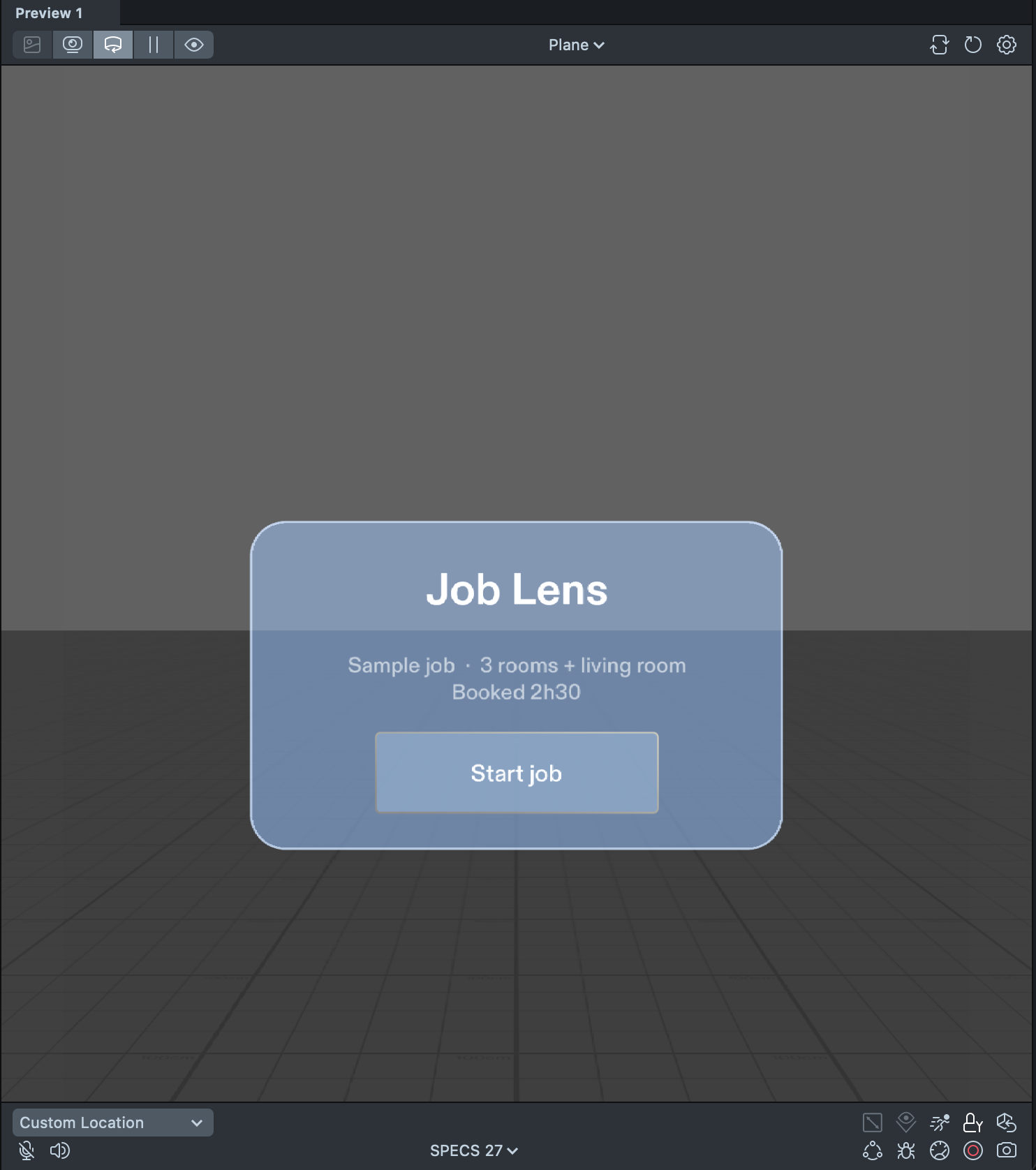
- Start card: a sample job ("3 rooms + living room, booked 2h30") and a Start job button.
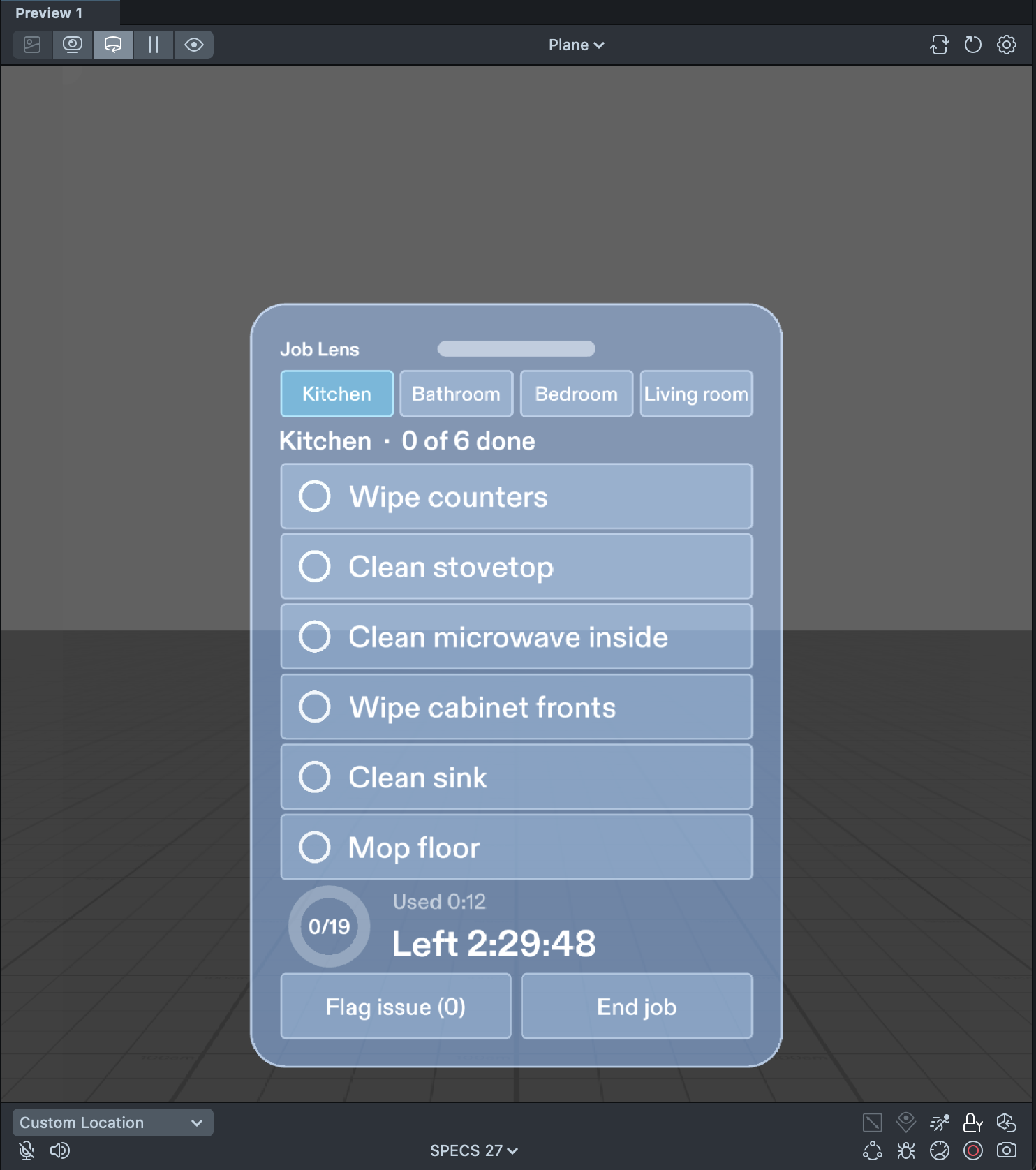
- Room-by-room checklist: tabs for Kitchen, Bathroom, Bedroom and Living room, 19 tasks in all. Pinch a task row to check it, pinch again to uncheck it. When the last task in a room is done, its tab gets a check mark, a short "Kitchen done" message fades in and out, and the panel moves on to the next unfinished room.
- Progress ring for the whole job, with the done count in the middle.
- Job timer: time used and time left against the booked 2:30. No alarms or pop-ups: time left turns a warmer colour under 15 minutes, and past zero it shows how far over the booking the job is.
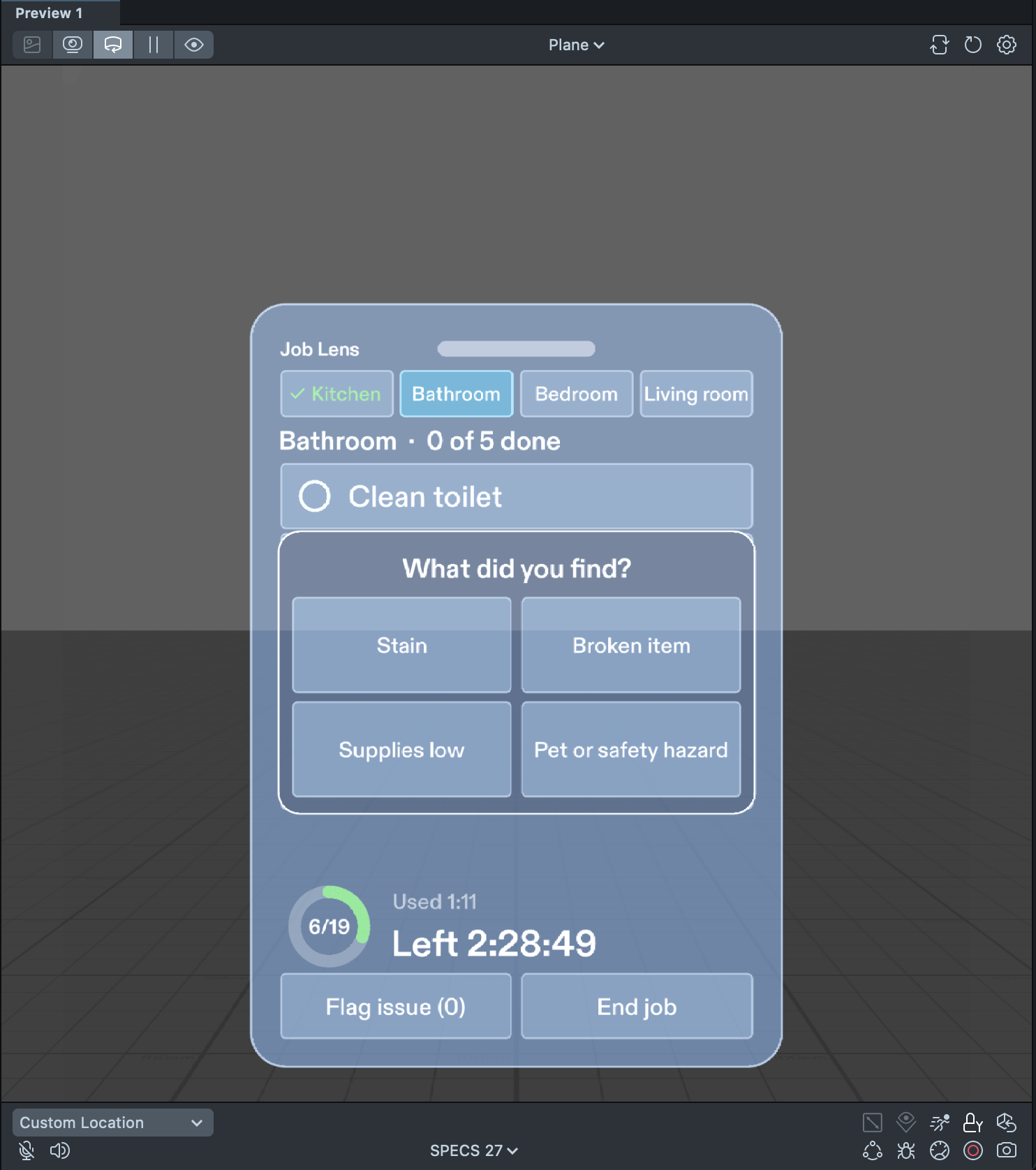
- Flag issue: two pinches, no typing, no voice. Pick Stain, Broken item, Supplies low, or Pet or safety hazard; it is logged with the room and the job time, a confirmation fades out, and the button shows the running count ("Flag issue (1)").
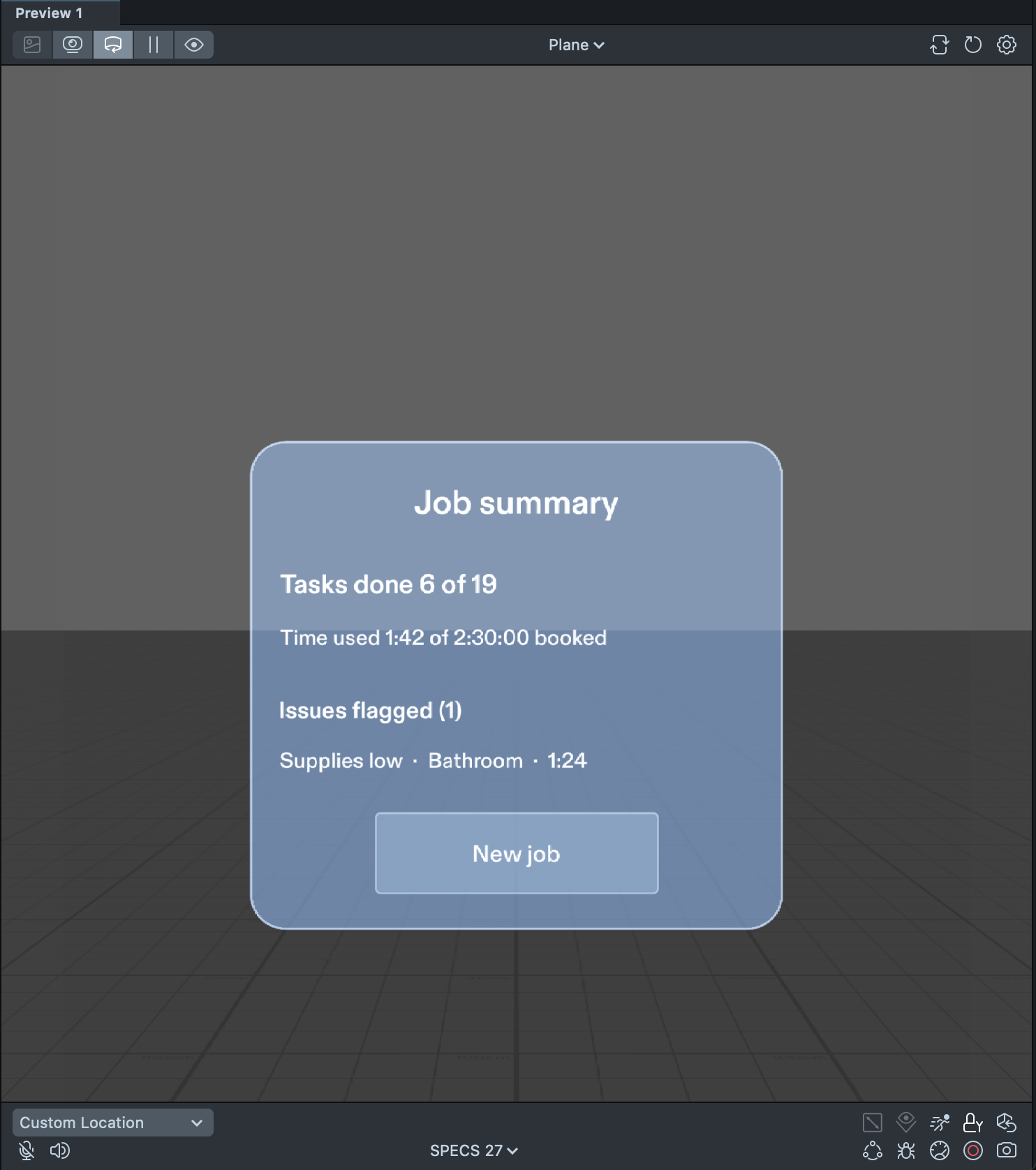
- End job summary card: tasks done out of total, time used against the booking, and every flagged issue with its room and time. New job resets everything.
- Drag handle to pinch and carry the panel next to whatever you are cleaning; it stays where you drop it.
- Off-screen arrow: when the panel is out of view, a small arrow at the edge of the view points back to where it is parked.
How we built it
- Planned with the Devpost Learn skill pack: the plan-lens interview in a coding agent turned the idea into an approved design brief (
devpost/design-brief.md). The interview pushed back on "a phone screen floating in your face", which is how the design ended up as one panel parked in the room, a hint arrow instead of a panel that follows you, and two-pinch issue flags. - Built by a coding agent through the CLAD plugin, working in Lens Studio 5.24.1 (SPECS target) through the Lens Studio MCP. Everything is TypeScript: the sample job data, a pure job-state module (checklist, room completion, issue log, real-time clock, overtime) kept separate from the UI so tests can read it directly, the panel, and the hint arrow. All interaction uses the Spectacles Interaction Kit and Spectacles UI Kit, so it works with the mouse in Interactive Preview.
- Tested with LEAF: 8 scenarios, all passing together in one LEAF "run all" from a fresh preview (each scenario resets the state it depends on, including the panel position): start job shows the Kitchen list and timer; check/uncheck a task; finishing a room moves on; flag Supplies low; end job summary then new job; timer warning and overtime; drag handle moves the panel; and a reach test that an avatar can physically reach Start job and a task row.
- Then design passes in plain design terms (bigger type, a solid mid-tone card, the whole card in view at start, a real progress ring), re-running all 8 tests after each round.
Challenges we ran into
- The preview cannot see a real kitchen. Lens Studio's preview has no real counter or room, so there is no object or room recognition. The room tabs are the stand-in for the glasses knowing which room you are in, and the panel is placed by hand with the drag handle.
- Black is see-through on Spectacles. The display is additive, so dark UI disappears. We used light text on mid-tone panels and brightened the palette, because on an additive display brightness is what reads as solid.
- Version pinning. The newest LEAF release did not compile against the Spectacles Interaction Kit version in this project, so LEAF was pinned to 2.0.2.
- Helper packages that broke the build. Two helper packages that were installed automatically were incompatible with the project and broke compilation; they were removed.
- Fitting it all on one panel. Six Kitchen rows, tabs, ring, timer and footer did not fit the planned 45 cm at readable text sizes, so rows and spacing were tightened (rows stay above the Interaction Kit's 4 cm minimum target) and the card was moved so the whole thing is in view at start.
- A crash on hover. Removing a UI Kit button inside its own pinch callback crashed when the hover ended ("Object is null"); replaced buttons are now hidden at once and removed a moment later.
- A countdown that looked wrong. The timer read 2:29:59 half a second after Start job; rounding the countdown up keeps 2:30:00 until a full second has passed.
Accomplishments that we're proud of
- The full loop works in the preview: start, check and uncheck, room done, switch rooms, flag an issue, summary, new job.
- All 8 LEAF scenarios pass together in one LEAF "run all" from a fresh preview, including the low-time and overtime timer states that a short demo cannot reach in real time.
- A design that respects gloved, busy hands: big targets, two-pinch flags, and a timer that never nags.
What we learned
- Glasses are at their best when information sits in the room beside the work and only asks for a glance, not when a phone screen floats in front of your face.
- Design for an additive display: light on mid-tone, never black.
- Write done criteria a tester can check in a minute; they became the LEAF tests.
- Separating the job logic from the UI made it testable and easy to restyle.
What's next for Job Lens
- Try it on real Spectacles. It has only been tested in the Lens Studio preview, not on a device, so comfort at a real counter, real hand tracking and whether the hint arrow is enough are still unproven.
- Custom checklists per job instead of one hard-coded sample job.
- Later: knowing which room you are in, and sending the end-of-job summary and flagged issues to the office.
Built by Landon King with King AI, an autonomous AI agent that can do anything a person can do on a computer. Submitted by KING HOLDINGS VENTURES LLC.
Built With
- clad
- devpost-learn-skill-pack
- leaf
- lens-studio
- lens-studio-mcp
- spectacles-interaction-kit
- spectacles-ui-kit
- typescript

Log in or sign up for Devpost to join the conversation.