-
-
Job Done: say what you did, get a PayPal invoice
-
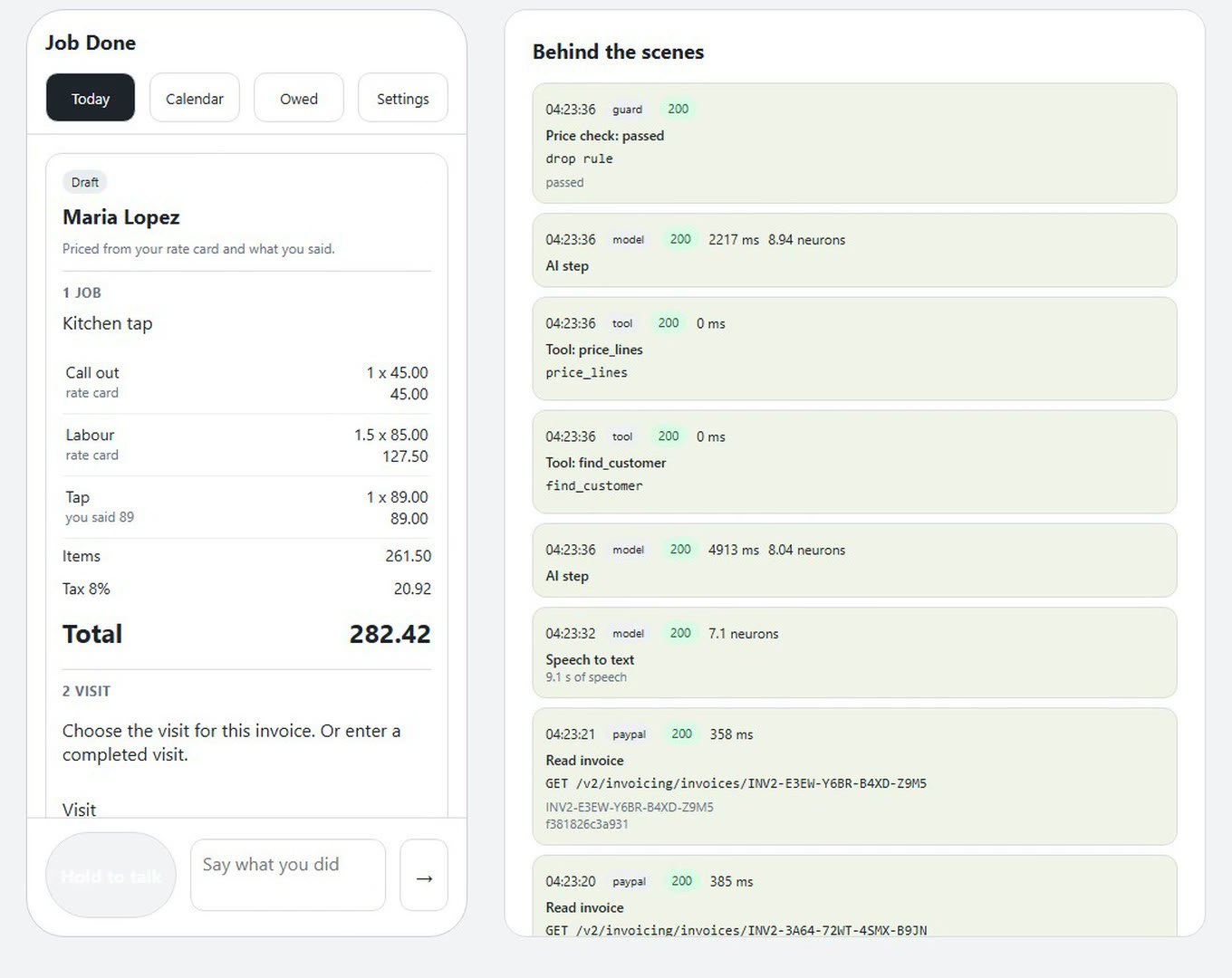
The invoice is priced from your own rate card
-
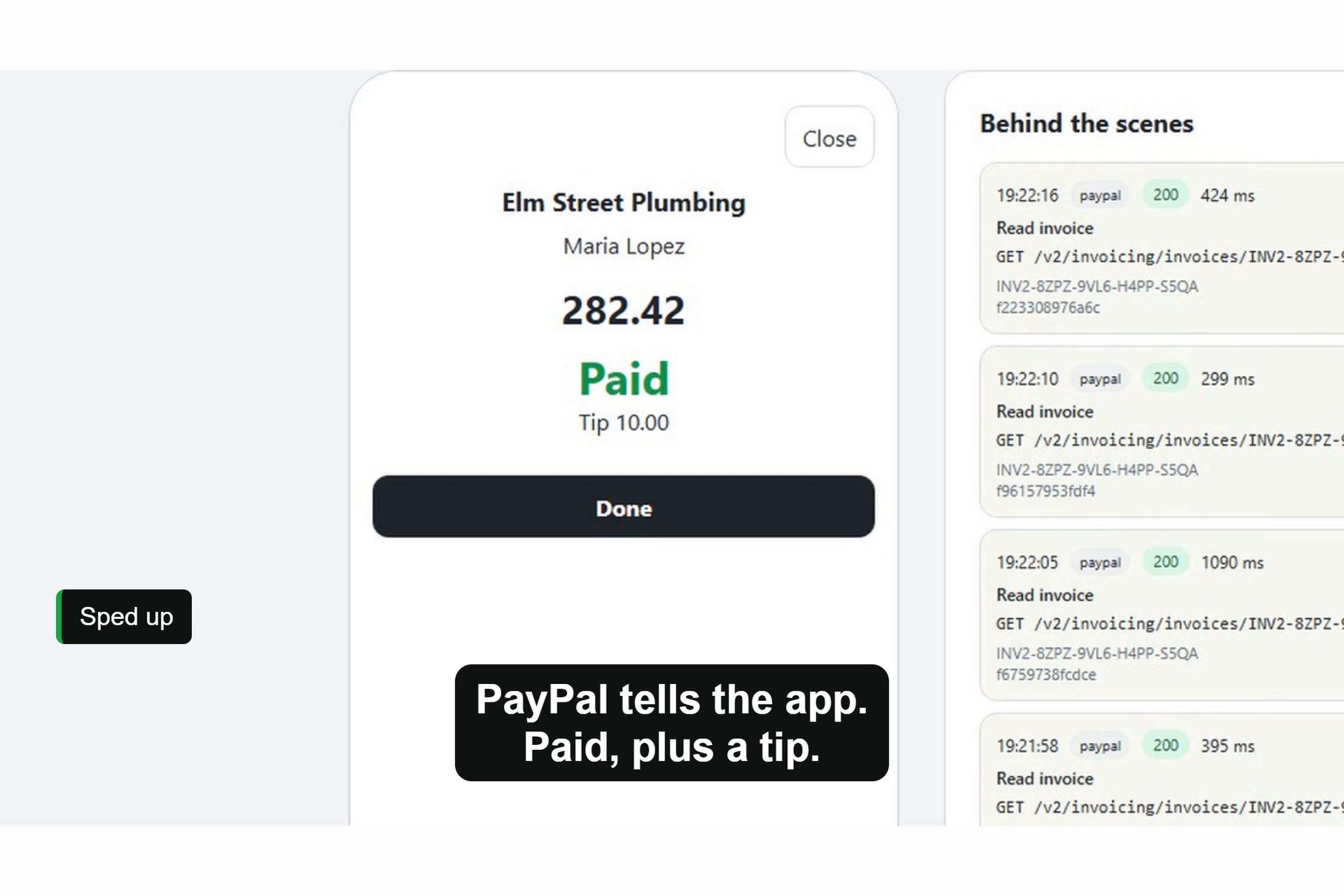
PayPal tells the app the invoice is paid, plus the tip
Judging criteria at a glance
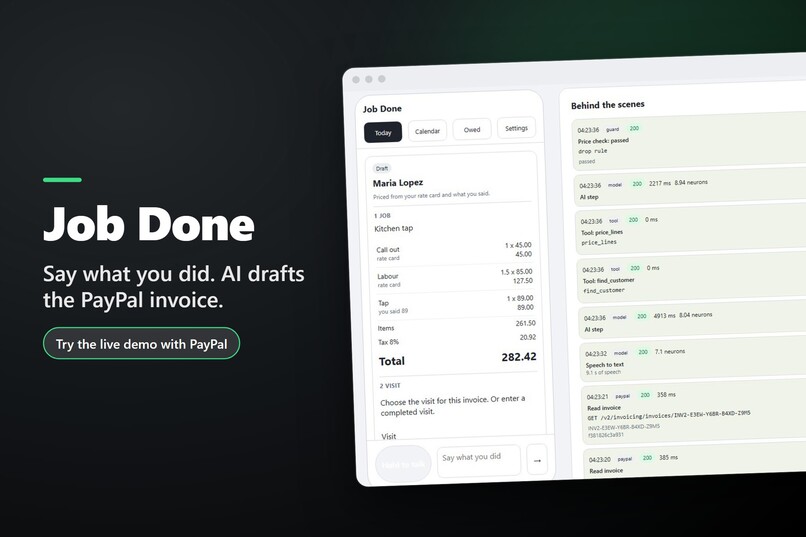
In short. Job Done is for tradespeople who work alone. Hold a button and say what you did. The app drafts the invoice from your own rate card, and one tap sends it through PayPal Invoicing with a QR code the customer can pay on the doorstep. Paid jobs turn green on a Bryntum Calendar. The next visit is held with a small deposit, and the deposit comes off the final bill.
Technological Implementation. PayPal Invoicing API: invoices, QR codes, cash payment records, reminders and cancellations, with verified webhooks and a fixed invoice number per draft, so two taps never make two invoices. AI: Whisper on Workers AI turns speech into text, and Granite 4.0 H Micro calls the app's read only tools. Code removes any amount that no tool returned and nobody said. Check it: src/paypal/invoices.js, src/paypal/webhooks.js, src/ai/whisper.js, src/agent/guard.js.
Design. The invoice card reads in three steps: Job, Visit, Payment. Bryntum Calendar shows each job's money state in words and colours. Nothing is sent until you tap Send.
Potential Impact. For tradespeople who work alone and write the invoice at night from memory. 55% of US small businesses that give customers 30 days to pay have overdue invoices; of those that ask for payment on the spot, 26% do (QuickBooks, 2026 Small Business Late Payments Report).
Innovation/Idea. One flow for the money of a whole job: bill the work, hold the next visit with a deposit, take the deposit off the final bill, and offer an unpaid slot to the next waiting job that fits, with the reason shown. Without it, the deposit, the booking and the final bill sit in separate places and are matched by hand. Check it: src/state/holds.js.
Presentation. The video runs 1 minute 55 seconds. Try it at https://job-done.midknight-labs.workers.dev: say what you did, send the invoice, and watch the job turn green when PayPal reports it paid. Video guide: 0:00 say the job, and AI drafts the invoice; 0:18 PayPal sends it with a QR code; 0:27 the customer adds a tip and pays; 0:43 a free slot is held with a deposit; 1:08 an unpaid deposit frees the slot for the next job; 1:43 every figure links to a real invoice.
Inspiration
A tradesperson who works alone finishes a job, drives to the next one and writes the invoice at night from memory. A booked visit can also sit empty when the customer never pays the deposit, and the hour is lost.
Late payment is common. 55% of US small businesses that give customers 30 days to pay have overdue invoices. Of those that ask for payment on the spot, 26% do (QuickBooks, 2026 Small Business Late Payments Report). That is a survey of all US small businesses, not proof that this app changes it.
We wanted one place that connects the money of a whole job: the bill for work just done, the deposit for the next visit, that deposit taken off the final bill, and a fair second use of a slot nobody paid for.
What it does
Job Done connects four steps with PayPal invoices:
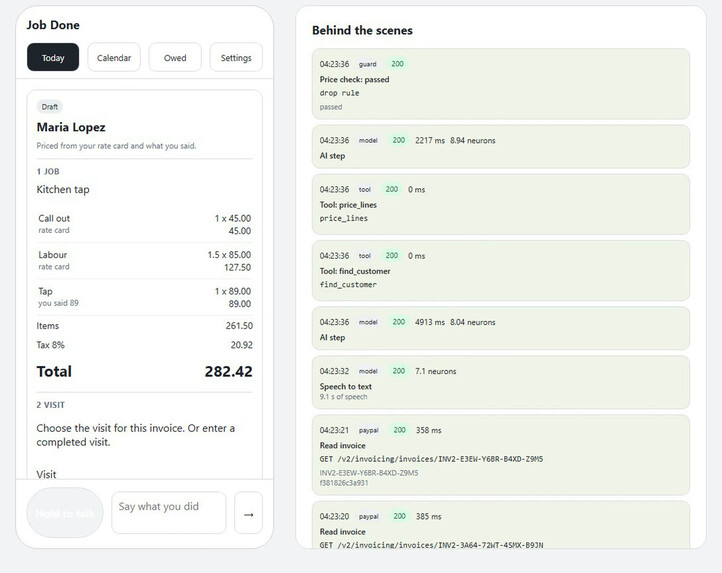
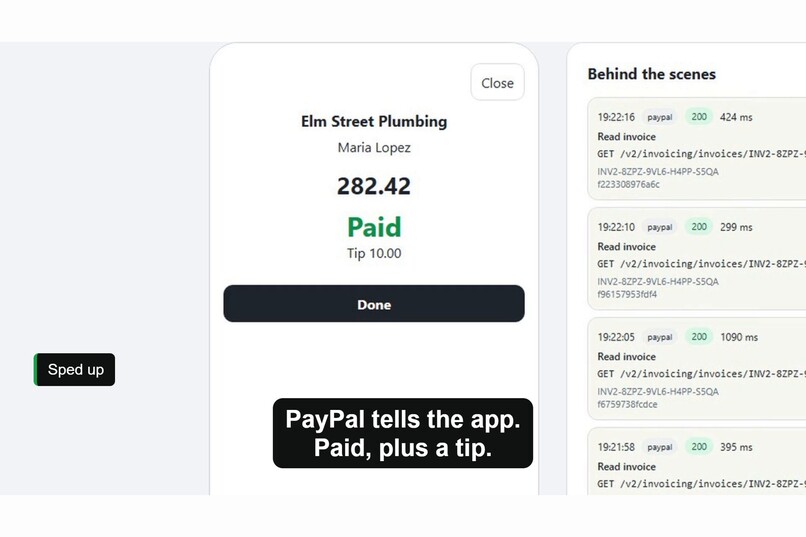
- Bill the finished job. Say or type what you did. The app drafts one invoice priced from your rate card, and each line says where its price came from. Confirm the visit it belongs to, then tap Send. PayPal creates and sends the invoice and the app shows its QR code. The job turns green when PayPal reports it paid.
- Hold the next visit with a deposit. Ask for a follow up visit. The app offers the earliest free slot in the period you asked for. That is only an offer. Sending the deposit invoice holds the slot, and paying the deposit confirms the booking.
- Take the deposit off the final bill. When that visit is billed, the paid deposit is credited. The card shows the job price, the paid deposit and the balance left. If the deposit covers the whole bill, you confirm the job is complete and get a receipt that shows any surplus to resolve.
- Reuse a slot nobody paid for. If a hold runs out unpaid, the app cancels the deposit invoice and frees the slot. It checks each job on the waiting list for length and for when that customer is free, offers the slot to the first one that fits, and shows why in a "Why this slot was offered" panel. The new deposit request waits for your tap. Server alarms run the expiry even when the page is closed. The panel tells apart "Slot offered", "Deposit requested" and "Booking confirmed", and never counts an offer as money.
Voice is the way in, not the whole idea. A misheard note is easy to fix: "Edit job note" puts the words back in the box, and nothing is sent until you tap Send. If a request fails, or the app asks back (for example "How long is the visit?"), what you said or typed stays in the box to fix and send again.
The invoice card reads in three steps: 1 Job (lines, sources, tax, total), 2 Visit (which visit, its start, end and length) and 3 Payment (tip, part payment, Send). Until the visit is confirmed the card says why Send is waiting.
Also in the app: tips and part payment (at least the deposit now, the rest later), cash payments, an Owed tab with late invoices first, and "What am I owed?" answered with links to the invoices behind each amount. Reminders come in two separate actions: "Copy message" copies your own words for a text or email, and "Send PayPal reminder" sends PayPal's standard reminder. The calendar shows PayPal's planned reminder days, and you can stop them for one invoice. Say "call out is 60 now" and the app offers a rate card change for your approval.
How we built it
A Cloudflare Worker serves the pages and API. Each demo workspace lives in a Durable Object. Workers KV keeps invoice links, expired workspace markers and daily counters.
Whisper on Workers AI turns speech into text. Granite 4.0 H Micro on Workers AI calls the app's read only tools to find customers, price work, find free slots and read invoices.
Code, not the model, decides what reaches the screen:
- Prices come from the rate card. A part cost must have been said, and labour hours must match the time said.
- Every customer, invoice and slot id must come from a tool result in the same turn.
- In every text the model writes (summaries, notes, reminder text, a new customer's name), a sentence with an amount that no tool returned and nobody said is removed. In a sentence about money ("owes", "paid", "deposit" and the like) a bare "5" or "five" counts as an amount too. A number followed by "days", "hours" or "invoices" is a count.
- An answer about money is written by code from the open invoices, not by the model. Each line names who owes you, the amount and how late it is, all from one invoice, and links that invoice. The model only picks which invoices the question is about.
- A booking always takes the earliest free slot that the slot tool found.
The PayPal Invoicing API handles invoices, QR codes, cash payment records, reminders and cancellations. Before sending, the app checks that PayPal's invoice total matches the draft, then reads back the payment state and gets the QR code. PayPal webhook signatures are verified before payment state changes. Repeated deliveries are ignored. Each draft has a fixed invoice number, so two taps never make two invoices.
Bryntum Calendar opens on the day view. Its mode buttons switch to the week. Jobs show their money state in words and colours. A plain calendar is available if Bryntum cannot load.
Before each model call, the app reserves a careful estimate of its cost against visitor, app and account budgets inside Cloudflare's free allowance, records the real use after, and stops further calls when a budget is reached. Recorded answers keep the demo lines working after the AI budget runs out, and they are labelled on screen. PayPal calls stay live sandbox calls.
Challenges we ran into
Payment, booking and calendar state have to stay right through retries and late updates. Fixed invoice numbers and stored progress let an interrupted send resume against the same invoice.
PayPal sandbox webhooks can take time. While the QR sheet is open, the app also polls the invoice, so a payment can show before its webhook arrives.
Deposits needed care. The final bill credits the paid deposit, and a fully covered bill needs your confirmation and a fresh PayPal check before the job is complete.
Freeing a slot needed more than taking the next name on a list. Each waiting job is checked for length and for when its customer is free, and the reason for every skip is kept.
Accomplishments that we're proud of
- A deposit follows the job from booking to final bill: hold, confirm, credit, balance, receipt.
- An unpaid slot is offered again with a readable record of every job considered and why.
- Spoken job notes become a checked draft and a live PayPal sandbox payment.
- The Behind the scenes panel shows each PayPal call, its response code and the invoice id.
- Unit and browser tests cover payments, booking holds, waiting lists, visit checks, the claims above and phone layouts.
What we learned
Money needs checks outside the model. Prices, visit times, deposit credits and payment state each need a clear source.
A booking needs clear stages. An offered slot, a requested deposit and a confirmed booking have different consequences, and the app should say which one it is.
What's next
Try the app with working tradespeople and measure time to a correct invoice. Then imports for real customer lists and rate cards, and live payments through a PayPal business account.
Built With
- bryntum-calendar
- cloudflare-d1
- cloudflare-workers
- css
- durable-objects
- granite-4.0-h-micro
- html
- javascript
- paypal
- paypal-webhooks
- whisper
- workers-ai
- workers-kv
