Inspiration
Today, many PM workflows are technically detached from the codebase. As early-career developers, we find ourselves joining new teams where a short JIRA title isn't enough to confidently act, and end up scheduling meetings just to learn how the repo is structured, where to make changes, and what "done" actually means. We wanted a single Generate button on JIRA that produces clear, testable action items grounded in the actual codebase—so teams move from idea to implementation faster.
What it does
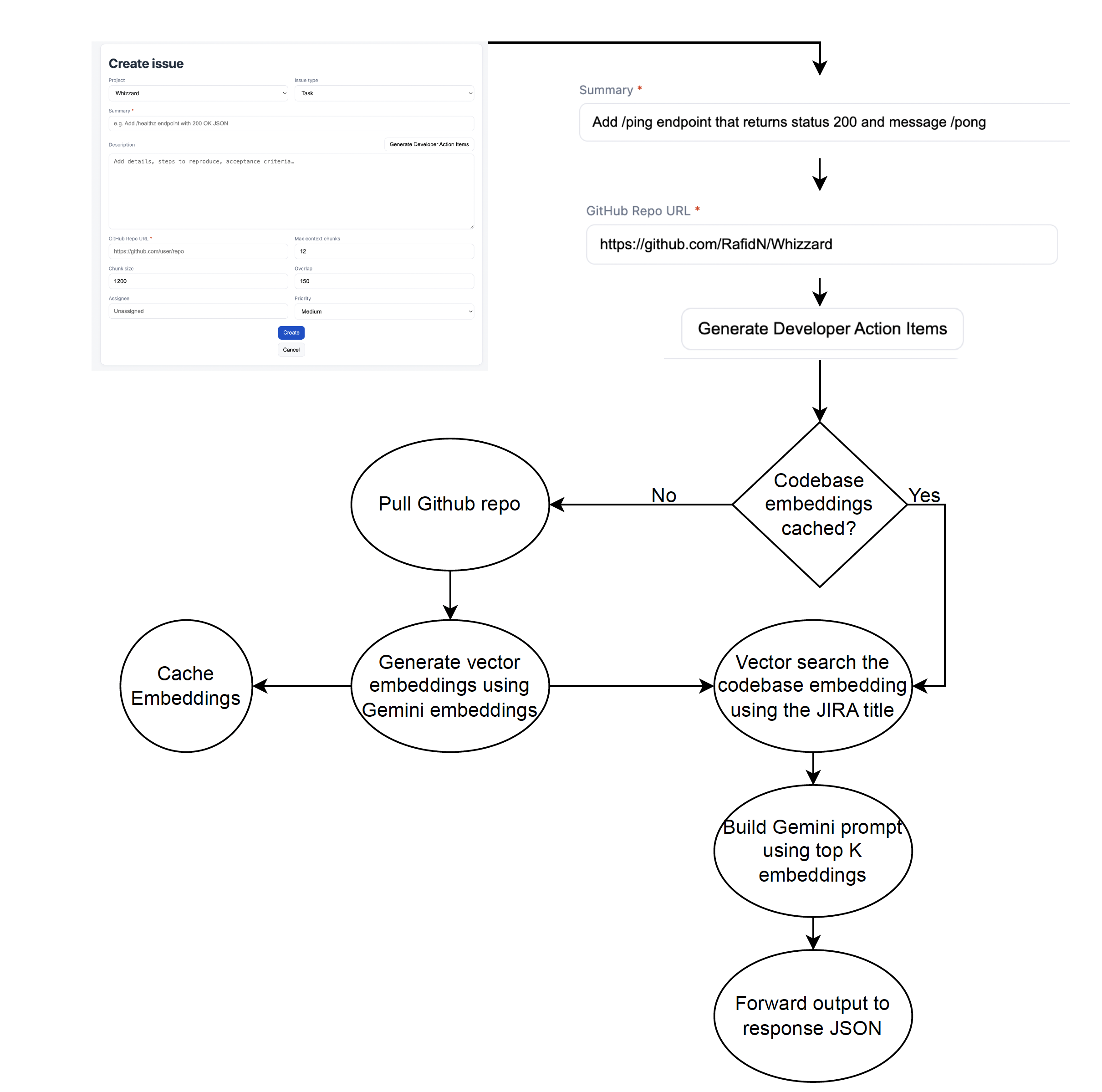
Since we can’t build directly on JIRA, we created a JIRA-like UI focused on the Create issue screen with a Generate Developer Action Items button.
Enter a ticket summary/title and GitHub repo URL, then we:
- Shallow-clone the repo
- Embed the codebase
- Retrieve the most relevant snippets (cosine similarity over embeddings)
- Generate a plan with Summary, Assumptions, Risks, Action Items, Acceptance Criteria, Test Plan, Files to Touch
- The Description field is auto-filled with Markdown; when you click Create, the ticket view renders the Markdown beautifully.
How we built it
- Backend: FastAPI orchestrates the pipeline (
/action-items). We shallow-clone repos, chunk and embed text/code (Google Gemini embeddings), index with FAISS (cosine similarity), pull Top-K context and build the prompt, then call Gemini to draft the plan. Robust logs, time measurements, and automatic temp cleanup. - Retrieval: Character-based chunks with overlap.
- LLM: Strict system prompt guarantees all seven sections of the description are generated.
- Frontend: Static HTML/CSS/JS that is meant to look like JIRA. The Generate button shows a loading state while the backend runs, drops the Markdown into Description, and the Create flow shows a rendered ticket.
Challenges we ran into
- Model availability drift: Requested models aren’t always enabled on every account. We added normalization + fallback so demos never break.
- Latency tuning: Balancing
chunk_size,overlap, and Top-K for fast demos without losing key context. - Edge cases in repos: Skipping noisy files and scoping to subdirectories to keep retrieval high-signal.
Accomplishments that we're proud of
- A UI that feels like the real JIRA with a single button that produces developer-ready, file-referenced plans.
- End-to-end reliability under hackathon constraints (clean error handling, model fallback, deterministic logging).
- Clear acceptance criteria and test plans generated automatically from repo context.
What we learned
- RAG from end-to-end, not just "use an LLM." We dug into Retrieval Augmented Generation as a full pipeline.
- Logging was incredibly important to our success, without it we as developers would never know if our program was stuck on an embedding step, or just taking a while. Learning to work with and write meaningful logs has been an extremely valuable experience.
- Caching is important in LLM projects. Testing our RAG was a very slow process as it takes 1-2 minutes to generate vector embeddings on a codebase, scaling with the codebase size. To fix this we cached vector embeddings of repositories we have already seen, so that we can skip the embedding step on repeated uses.
What's next for Dev Friendly
- Deeper integrations: Ideally this would be a feature available on JIRA, while we don't work at Atlassian and would love to have worked on that, we settled for a Web UI to showcase functionality. In the future, though we still would not be able to build on top of JIRA, we could try to integrate this into a chrome extension for better usability.
- Profiles & templates: Framework-aware plans (Flask/FastAPI/React/Next.js) and team-specific acceptance criteria based on previous PRs, and codebase rulesets.


Log in or sign up for Devpost to join the conversation.