Inspiration
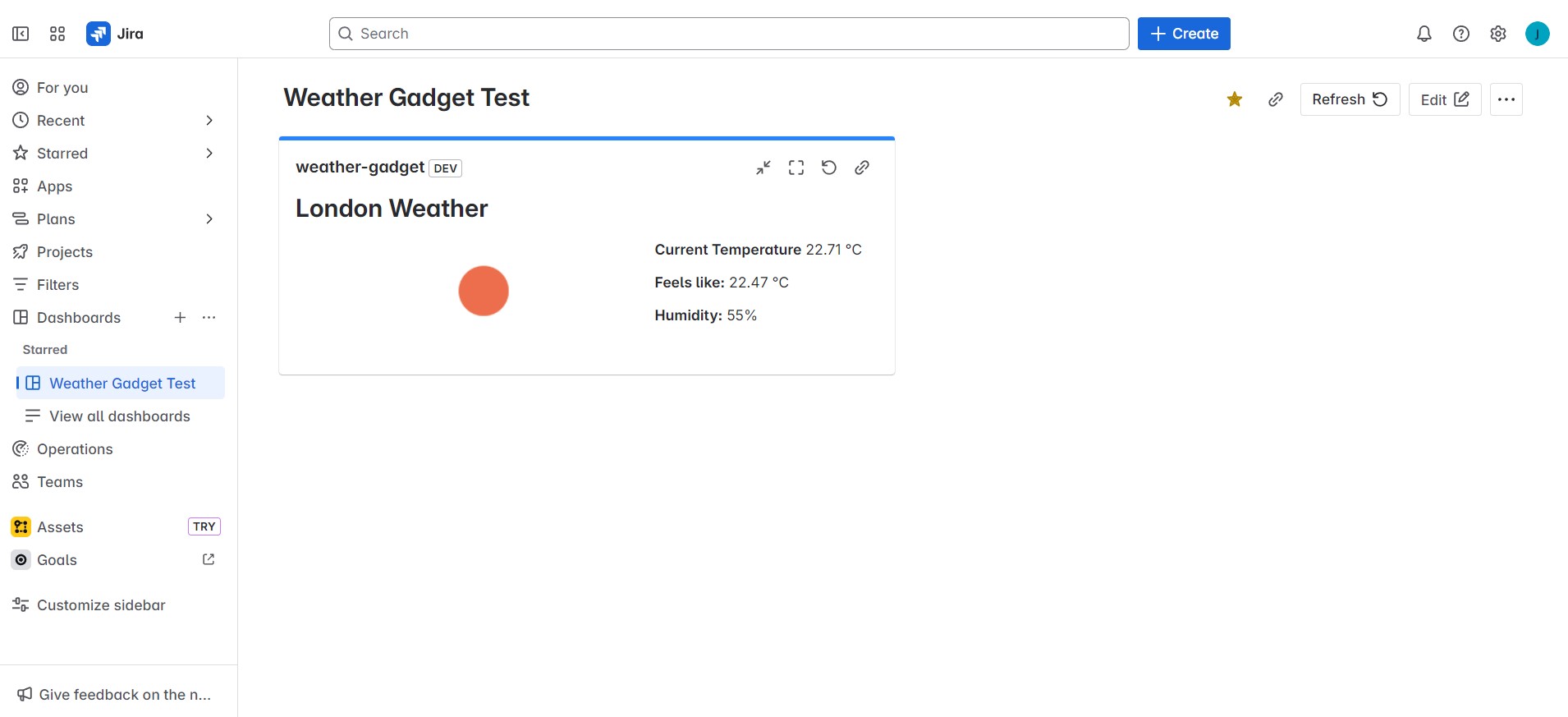
In today’s fast-paced environment, project teams often need quick access to contextual information. I wanted to create something useful right inside Jira, where many teams work daily. That's where the idea for the Weather Gadget came in—a real-time weather widget powered by the OpenWeather API that brings live conditions directly to Jira dashboards.
What I Learned
This project gave me hands-on experience working with Atlassian Forge, particularly the UI Kit for creating native dashboard gadgets. I learned how to:
- Use
@forge/apito make secure external API calls - Handle forms and user input with
useFormfrom@forge/react - Manage state and conditional rendering in React
- Integrate and format API responses in a user-friendly way
How I Built It
- Started with the Forge Jira Dashboard Gadget template
- Created a configuration view where users can enter a city and country
- Used OpenWeather's Geolocation API to fetch location options
- Displayed those options as radio buttons and allowed the user to select one
- Submitted the selected location and stored its lat/lon
- Used those coordinates to call OpenWeather’s Current Weather API
- Displayed weather info including temperature, feels-like, humidity, and weather icon using the UI Kit's layout components (
Box,Inline,Image,Heading, etc.)
Challenges
- Handling API errors gracefully, especially invalid location inputs
- Managing asynchronous fetch calls and updating UI state responsively
- Ensuring the gadget updated correctly in both edit and view modes
- Configuring proper permissions for external API calls and images from
openweathermap.org
Built With
- atlassian
- javascript
- jsx
- vscode

Log in or sign up for Devpost to join the conversation.