-
-
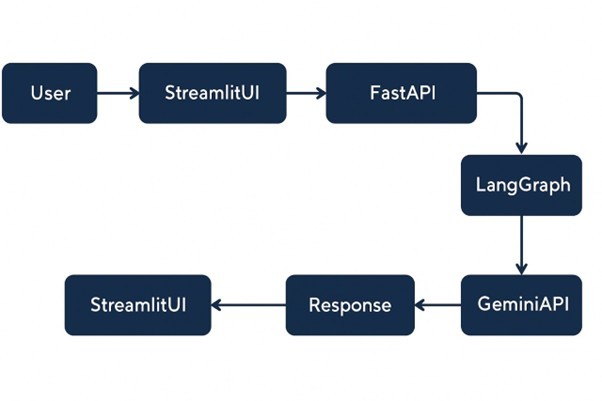
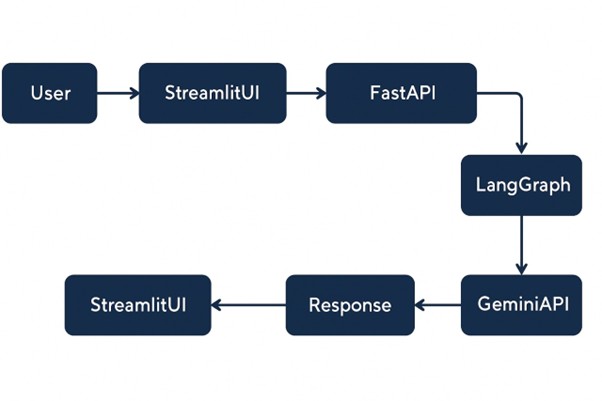
Architecture Diagram
-
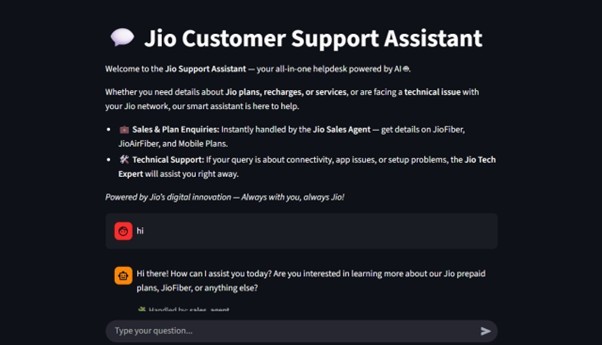
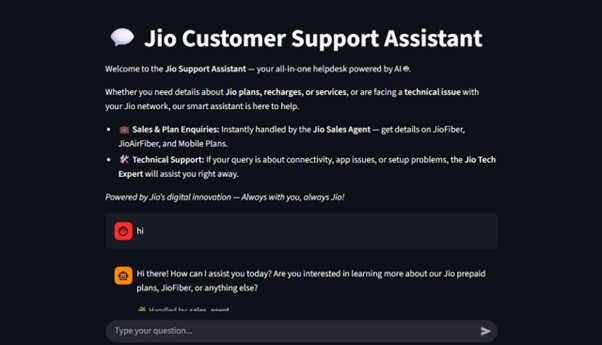
Working/Interface 1
-
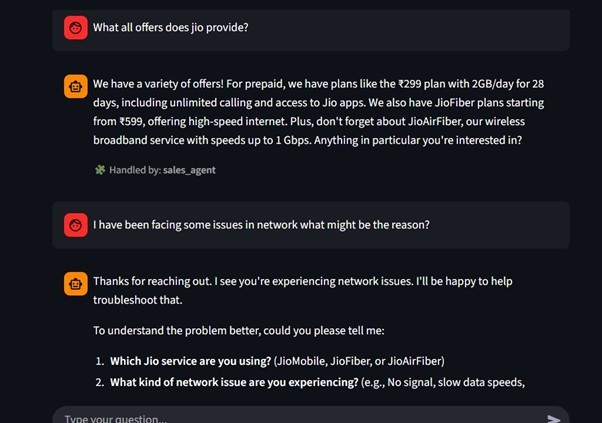
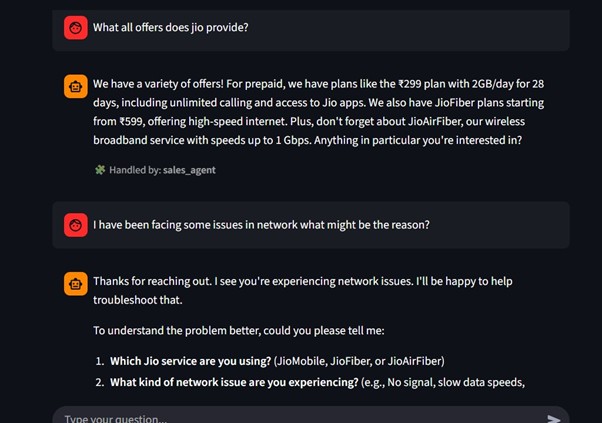
Working/Interface 2
-
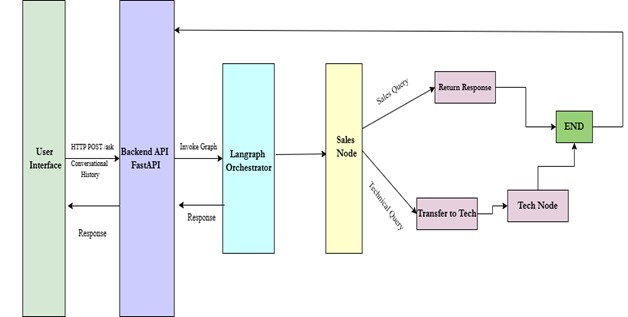
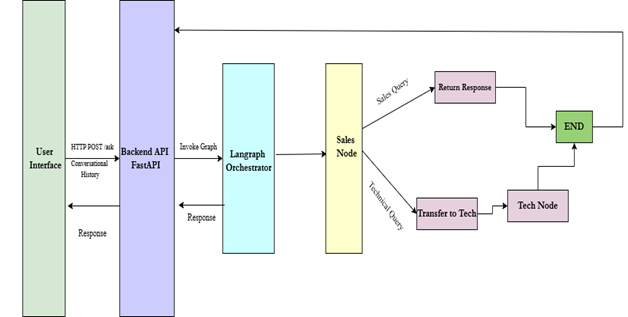
Data Flow Diagram
Our Project Story
Inspiration
Telecom support usually deals with long queues, inconsistent replies, and the constant back-and-forth between sales and technical teams. We wanted to explore whether a multi-agent conversational system could tackle these problems and how we could solve it. At the same time, we were excited to experiment with Google Cloud Run and Gemini models in a real customer-support scenario.
What it does
This system acts as an intelligent customer-support assistant that automatically understands what a user needs and routes the conversation to the right expert. Sales questions go to the Sales Agent. Technical issues go to the Tech Agent. If the Sales Agent realizes the user is actually facing a technical problem, it hands the conversation over smoothly. The assistant keeps track of the conversation, responds in natural language, and makes the entire experience feel more organized and less repetitive. Users get faster answers, fewer transfers, and clearer guidance all through a simple chat interface.
How we built it
We designed two specialized agents, one for sales queries and one for technical issues. Here’s how the system works:
- Gemini models power both agents, each with its own rules and domain knowledge.
- LangGraph manages the decision flow. If a query needs technical help, the Sales Agent returns an action tag and the system hands the conversation to the Tech Agent.
- The backend is implemented with FastAPI, packaged using Docker, and deployed on Cloud Run for scalability and quick responses.
- The Streamlit frontend displays a chat interface and shows which agent handled each message while communicating with the backend over HTTP.
Challenges and Solutions
- Handling Ambiguous Queries
- Challenge: User inputs were often unclear, leading to incorrect agent routing.
- Solution: Implemented a clarification mechanism where agents ask for more details if the user's intent confidence is low.
- Maintaining Context Across Agents
- Challenge: Conversation history was lost when switching between agents (e.g., Sales to Tech).
- Solution: Created a shared session memory in LangGraph, allowing all agents to access the same conversational context.
- Managing API Rate Limits
- Challenge: Exceeding Gemini API request limits, which caused
429errors. - Solution: Integrated real-time API usage monitoring with Cloud services to proactively track quotas and prevent throttling.
- Challenge: Exceeding Gemini API request limits, which caused
- Latency in Multi-Agent Orchestration
- Challenge: Sequential agent handoffs created slow response times.
- Solution: Optimized prompts by reducing token count and truncating context, which decreased average cross-agent latency from 4.8s to 2.6s.
- Cloud Run Deployment Constraints
- Challenge: Managing environment variables securely and mitigating cold-start latency on Cloud Run.
- Solution: Centralized environment variables in the Cloud Run service settings and configured a minimum of one active instance to ensure immediate availability. ## Accomplishments that we're proud of
- Building a working multi-agent system where two specialized AI agents communicate cleanly without stepping on each other’s responses.
- Getting Gemini models to behave consistently with strict routing rules and produce clean transfer signals when needed.
- Deploying a fully containerized backend on Google Cloud Run, and seeing it scale smoothly during testing.
- Designing a conversation flow that feels natural, even when switching from sales to technical support mid-chat.
- Creating a clean Streamlit interface that makes the whole system easy to test, demonstrate, and use.
- Solving tricky issues around context handling, prompt structure, and agent orchestration, the parts that often break in multi-agent setups.
What we learned
Working on this project helped us understand how different Google Cloud and AI components come together. Some of the key things we learned:
- Building domain-specific conversational agents using Gemini
- Deploying containerized applications on Google Cloud Run
- Designing multi-agent routing logic using LangGraph
- Developing fast, asynchronous APIs with FastAPI
- Managing conversation context across agents and turns
- Connecting a backend service to a Streamlit interface for real-time interaction
What's next for Jio Support Assistant
Future Enhancements
- Log Retrieval for Enhanced Tech Support
- Goal: Integrate real-time log retrieval from active servers.
- Benefit: Empowers the Tech Agent with accurate, live diagnostic data to provide faster and more precise technical support.
- Status: Implementation is pending secure access to a live server log stream.
- Expansion of Specialized Agents
- Goal: Introduce new, domain-specific agents to handle a wider range of user queries.
- New Agents Planned:
- Billing Agent: To manage invoices, payment status, and refund requests.
- Complaint Resolution Agent: To create, track, and manage user grievances and support tickets.
- Benefit: Improves first-contact resolution and routes users to the correct expert agent more efficiently.
- Voice-Enabled Interaction
- Goal: Implement speech-to-text functionality using Google Cloud's Speech-to-Text API.
- Benefit: Allows users to interact with the chatbot via voice commands, offering a convenient, hands-free, and more accessible user experience, especially on mobile devices.
- Persistent Conversational Memory
- Goal: Develop a long-term memory module using a vector database (e.g., Pinecone, ChromaDB).
- Benefit: Enables the chatbot to recall context and user history across multiple sessions, leading to more personalized, continuous, and human-like conversations.
- Multi-Language Support
- Goal: Add support for multiple Indian languages, including Hindi, Tamil, Telugu, and Malayalam.
- Technology: Leverage Google Translation API or the native multilingual capabilities of Gemini.
- Benefit: Increases accessibility and user adoption across India's diverse linguistic landscape.
- Performance and Analytics Dashboard
- Goal: Build a real-time dashboard (using Streamlit or Power BI) to monitor agent and system performance.
- Key Metrics to Track:
- Query volume per agent
- Average response times
- User satisfaction ratings
- Agent routing accuracy
- Benefit: Provides actionable insights for data-driven improvements, agent retraining, and system optimization.


Log in or sign up for Devpost to join the conversation.