-
-
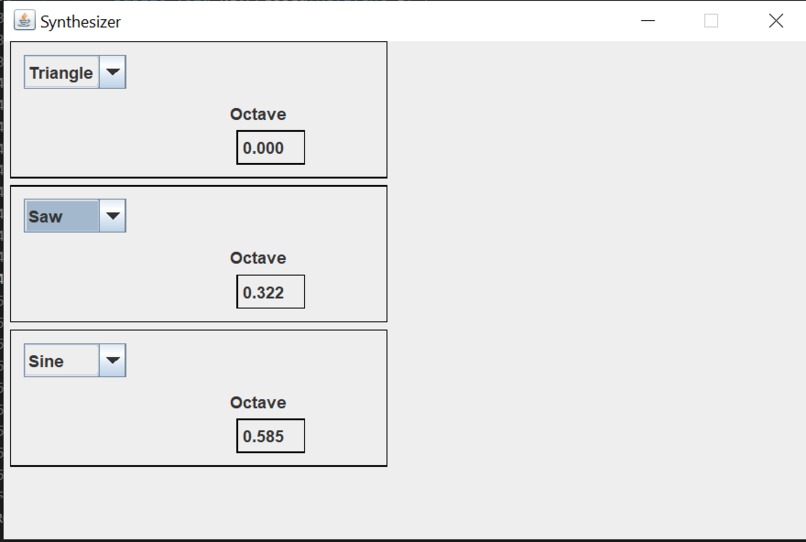
Synth screen
-
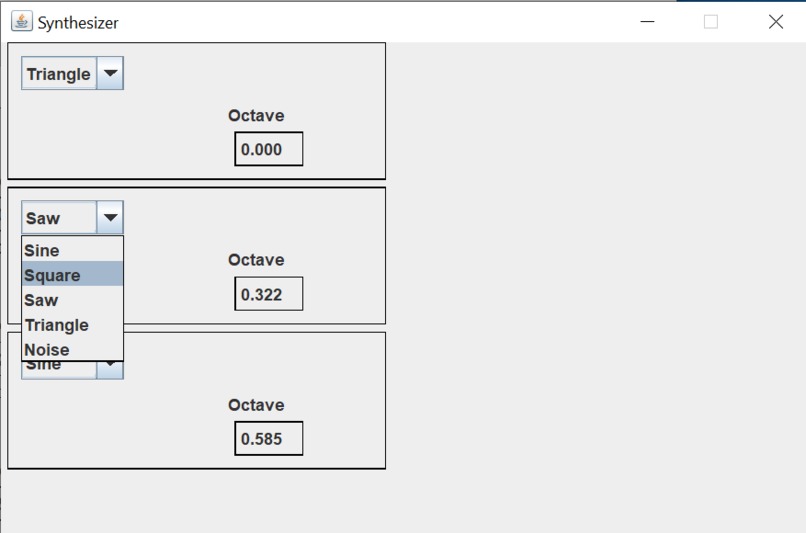
Waveform selector dropdown

Inspiration
Full disclosure: the majority of my work so far has basically just been following a Java OpenAL tutorial. For this reason, I would like to not be considered for any awards for this project. I anticipate that my chances to win an award with this were very small to begin with, but I wanted to be safe and make it clear that I withdraw from competing. My goal with this hackathon is basically just to have a defined time period where I focus a lot of effort into this project and maybe get some participation swag.
I've loved making music for as long as I can remember. However, since graduating from high school it's been harder to consistently find the times and places where I can play the instruments that I prefer (especially wind instruments). For this reason, I've recently gotten interested in digital audio and synthesizers -- if all I need to make music is a laptop and headphones, that means I can make a lot more music (plus while not bothering my roommates with any noise). I've played around with a few free digital synthesizers, but now I want to build something of my own and get pretty low-level access to the audio I'm creating. My eventual dream is to create my own vocoder from scratch, but if I'm hoping to ever achieve that, I need to start somewhere simple, which is this project: a keyboard-controlled multi-oscillator synth.
What it does
The synthesizer consists of three oscillators. The pitches of the oscillators are controlled with an ersatz piano keyboard where the following is the correspondence between keyboard keys and piano keys:
  | 2 | 3 |   | 5 | 6 | 7 |   | 9 | 0 |   | = |
  |C#4|D#4|   |F#4|G#4|A#4|   |C#5|D#5|   |F#5|
| Q | W | E | R | T | Y | U | I | O | P | [ | ] |
| C4| D4| E4| F4| G4| A4| B4| C5| D5| E5| F5| G5|

  | S | D |   | G | H | J |
  |C#3|D#3|   |F#3|G#3|A#3|
| Z | X | C | V | B | N | M |
| C3| D3| E3| F3| G3| A3| B3|
In addition to the key controls, each oscillator can be detuned with the "octave" setting, enabling the creation of chords. Finally, each oscillator's waveform may be selected from the five options: sine, square, saw, triangle, and noise.
How we built it
At a low level, the audio playback is handled by OpenAL (which we are interfacing with via the Lightweight Java Game Library OpenAL binding). All that we do is maintain and fill a queue of buffers and make sure that OpenAL is kept fed. Once the lowest-level stuff is handled, we have the power send any waveform we'd like out to the speakers. At the moment, the only waveforms I can generate are sines, squares, saws, triangles, and noise (and their sums), but this is perfectly adequete for now.
The user interface is via the Java Swing library. It's just a lot of components and event listeners that trigger e.g. playing a note or retuning an oscillator.
Challenges we ran into
One kind of frustrating few hours (granted it was late at night, so I probably could've solved this faster if I were more awake) was when I had finished all of the skeleton Swing and OpenAL stuff and was trying to get my first note out of the synthesizer. I had 3 silent mistakes buried in my code, and I just combed through it and eventually fixed them all. The most embarassing one was where I was generating the samples for a sine wave, and I typoed my parentheses to look something like samples[t] = sin((2 * Math.PI * freq)) * t / SAMPLE_RATE, so basically y = sin(k) * t instead of y = sin(kt).
I also had some difficulties learning to use Swing for the first time, like some of my components wouldn't display until I minimized and remaximized the window. I eventually figured out that this was because I had added these components after setting their parent visible, so no redraw was triggered until I did the minimize-remaximize. In the moment I was getting so confused and annoyed, but now I have a good mental model that means that the behavior makes sense. Yay!
Accomplishments that we're proud of
I guess that I'm excited that I created something that (while scuffed, ) actually works! I can play memey music on my laptop at my family now with code that I wrote starting from completely blank text files (with some guidance). Ultimately, though, this is a learning exercise, so I'm most proud of what I've learned so far from this project.
What we learned
I had zero useful experience with Swing before this project, and now I think I know enough to build stuff on my own with a moderate amount of documentation reference. This is super exciting, because I don't think I've ever before this built any applications that have real ui outside of a terminal! (Apart from a little bit of html, js stuff but I don't want to acknowledge that.)
I also got my first experience with creating a Java application with a real hierarchy of packages and stuff. What I'm accustomed to is writing single-class one-off programs, so it's really eye opening and exciting to work in this more extensible, large-scale-application-friendly format.
What's next for Java synthesizer
Here is a list of future goals I have for this synth (or its successors), sorted from near-term to far-term:
- Add toggles and volume sliders for the oscillators
- Tweak waveform generators so they don't crackle while oscillator is tuned (should be some fairly easy math and refactoring)
- Add envelopes to allow for adjustable note attack and fade
- Add MIDI input support (not yet sure if this is trivial or a headache)
- Allow for custom waveforms (including maybe some samples???)
- Get some Fast Fourier Transform up in here to allow for EQ and all sorts of other mischief
- (Distant future) I hope to turn this into a full sampler keyboard/vocoder.

Log in or sign up for Devpost to join the conversation.