-
-
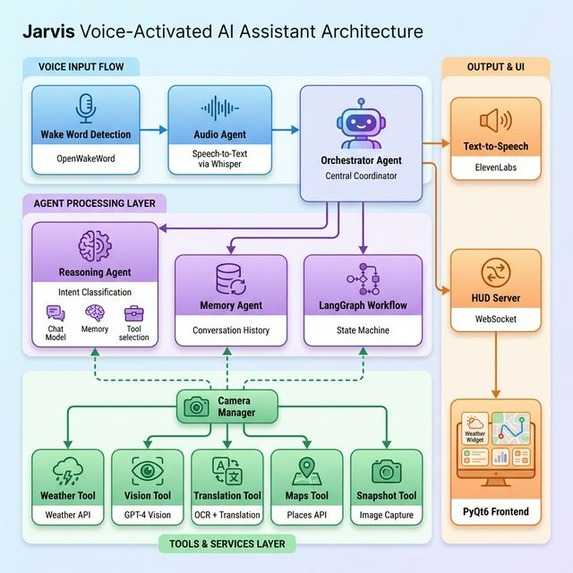
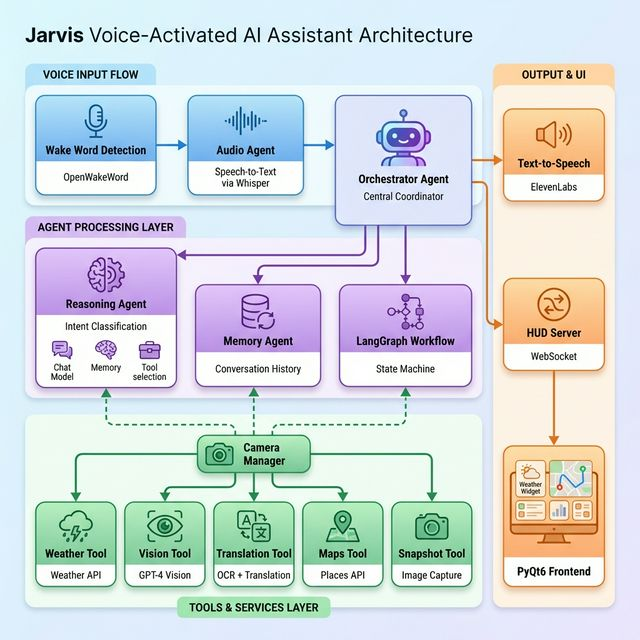
Structure Diagram
Inspiration
[Team]: Hey Jarvis, what did we all want when we first watched Iron Man.
[Jarviz]: You grew up wishing for JARVIS: today, you built him.
[Team]: We wanted a hands-free, heads-up interface that bridges the gap between digital intelligence and physical reality. By combining our interest in Computer Vision, UI design, and agentic workflows, we’ve built more than an assistant, we’ve built an ecosystem for accessibility, wellness, and productivity. It’s not just tech, it’s your surroundings, reimagined. This is our team's shared vision for the future of human-agent interaction, the first real Jarvis. Suit up.
What it does
Jarviz combines edge AI, real‑time speech & OCR, and a multiagent orchestration layer to empower users to manage wellbeing, schedules, and communication hands‑free. It’s an assistive HUD that listens for “Hey Jarvis”, understands intent, and takes action, from describing an individuals surroundings for a visually impaired individual, live translation on what you are seeing on vacation, to transcription to aid individuals in conversation, all with an accessible UX.
Even Stark Labs could only dream of this technology:
🌡️ Weather: Real-time weather information for any location
👁️ Vision Description: Multimodal LLM (Qwen VL) describes an individuals surroundings
📸 Snapshot Management: Save and retrieve camera snapshots with the HUD display, helping you when your hands are full
🌍 OCR Translation: Extract text from camera and translate to any language making navigating foreign cities seamless with real-time AR HUD translation of street signs, maps, and local surroundings
📍 Proximity Search: Find distance to nearest landmarks using Google Maps
🍽️ Intelligent Menu Analysis: Instant recognition of dietary triggers; just look at a menu to receive allergy alerts and ingredient breakdowns.
How we built it
Backend Stack
- Framework: Python asyncio
- Agent Orchestration: LangChain + LangGraph
- Reasoning LLM: GPT via OpenRouter
- Vision LLM: Qwen VL 32B via OpenRouter
- STT: OpenAI Whisper (local model)
- TTS: ElevenLabs WebSocket streaming
- Wake Word: OpenWakeWord (local, offline)
- VAD: WebRTC Voice Activity Detection
- OCR: EasyOCR
- Translation: Google Translate API
- Communication: WebSocket (websockets library)
Frontend Stack
- UI Framework: PyQt5
- Graphics: OpenCV for camera feed
- Rendering: QPainter for HUD overlay
- Animations: Custom animation system with easing
- Communication: WebSocket client (async)
Challenges we ran into
- Even after coming up with our idea of creating Jarviz, envisioning how the UI would look and how the user would interact with it continued to be a struggle.
- After Jarviz answered a question, it would hallucinate someone saying, “Hey Jarviz.”
- Everyone on our team fell asleep at the same time during our all-nighter.
- Creating the glass look on our UI was difficult, and we spent a lot of time trying to make it look how we imagined it.
- One of our Dev’s didn't wake up and almost missed the demo.
- We temporarily lost one of our devs for 6 hours after the Buffalo Bills lost their Game.
Accomplishments that we're proud of
- We created an Agent that solved our problems through only our voice. We brought the technology we grew up watching into reality in 24 hours!
- We orchestrated multiple agents to evaluate user queries with intent, reasoning, and context (chat history) over multi-turn interactions.
- Our Bills fan developer, who came back a fragment of his former self, single-handedly brought the voice of Jarviz to reality.
What we learned
- Explored how to build a Memory Agent that stores "snapshots" and user preferences, allowing the AI to remember things even when our hands are busy.
- Gained deep insight into Accessibility-first design, creating tools specifically for the visually and hearing impaired, such as live transcription and environment narration.
- Successfully integrated diverse services like Google Calendar, Weather, and Translate APIs into a single, cohesive agentic workflow.
What's next for Jarviz
- Device integration with AR glasses
- Add an text to ASL translation feature
- Add a mapping feature that displays directions on the HUD


Log in or sign up for Devpost to join the conversation.