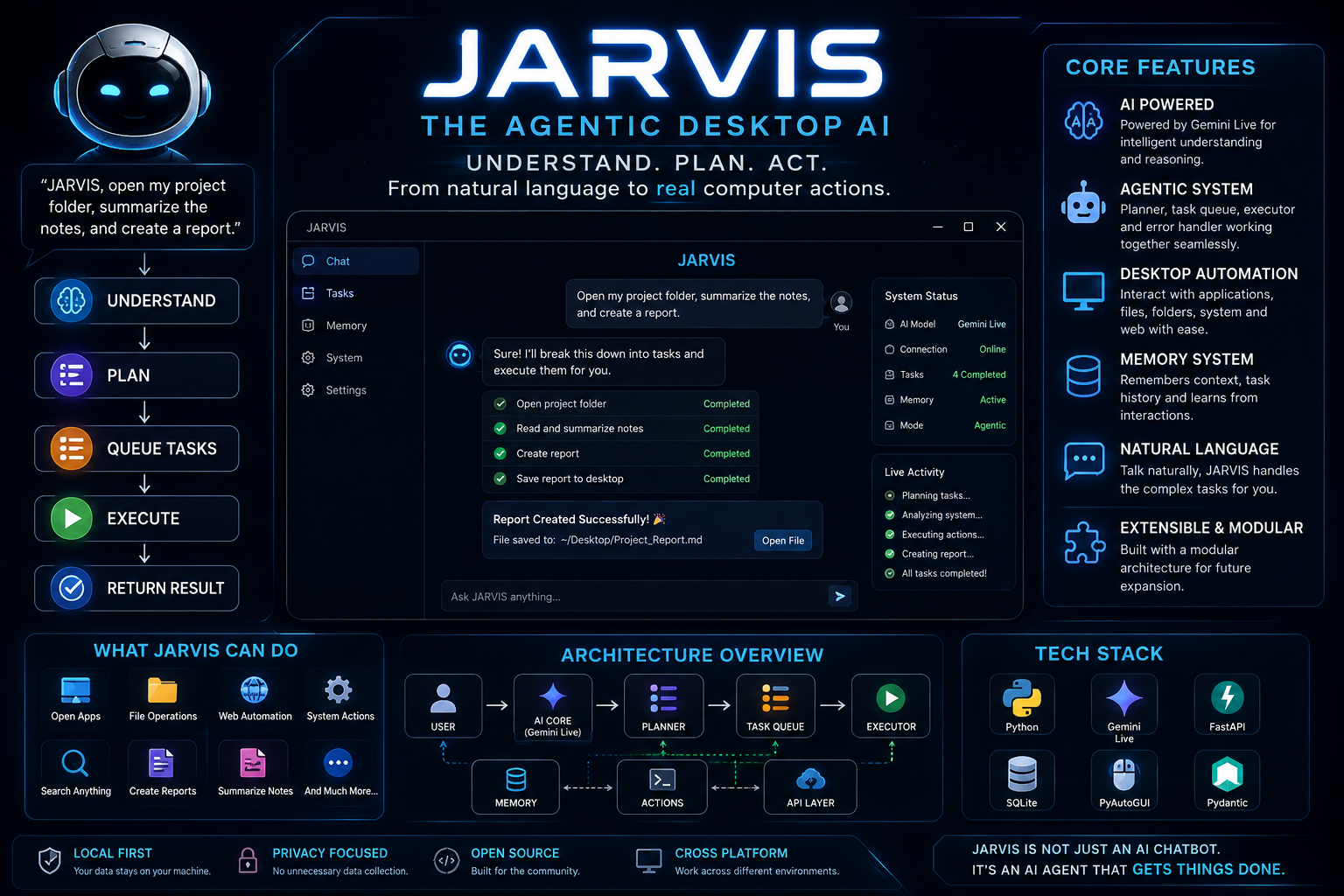
🤖 JARVIS
Understand. Plan. Act.
An AI-powered desktop assistant that turns natural-language intent into planned, executable computer actions.



🚀 What is JARVIS?
JARVIS is more than a chatbot.
It is an AI-powered desktop assistant designed to understand natural-language goals, plan tasks, interact with the computer, manage memory, and execute actions through a modular agent architecture.
Traditional AI:
User → Question → AI → Answer
JARVIS aims for:
User
  ↓
Natural-Language Goal
  ↓
Understand
  ↓
Plan
  ↓
Queue Tasks
  ↓
Execute
  ↓
Return Result
The goal is to move from AI that talks to AI that can act.
✨ Features
🧠 AI Intelligence
JARVIS uses an AI-powered core with Gemini integration to understand and process natural-language requests.
Current architecture includes:
- Gemini Live integration
- Natural-language interaction
- AI-powered reasoning
- Prompt-based assistant behavior
- API-key validation
- Secret management
- QA and auditing utilities
🤖 Agentic Task System
The agent/ layer handles task planning and execution.
agent/
├── planner.py
├── executor.py
├── task_queue.py
└── error_handler.py
Planner
Converts a high-level request into executable tasks.
Task Queue
Manages tasks waiting for execution.
Executor
Carries out available actions.
Error Handler
Handles failures during execution and provides a foundation for task recovery.
Agent Flow
User Goal
    ↓
 Planner
    ↓
Task Queue
    ↓
 Executor
    ↓
System Action
    ↓
 Result
🖥️ Desktop Interaction
JARVIS is designed to work with the computer itself rather than being limited to conversation.
The project targets:
- Application interaction
- File and folder operations
- System actions
- Desktop automation
- Web-related tasks
- Multi-step workflows
🚧 Desktop capabilities are actively evolving as new actions are added.
🧠 Memory System
JARVIS includes a dedicated memory layer.
memory/
├── answer_cache.py
├── config_manager.py
├── memory_manager.py
├── task_history.py
├── long_term.example.json
└── task_history.example.json
The memory architecture provides foundations for:
- Answer caching
- Long-term memory
- Task history
- Context management
- Configuration management
This allows JARVIS to evolve toward more contextual interactions.
👁️ System Awareness
JARVIS contains an awareness layer for interacting with and understanding its runtime environment.
The project also includes graphics-capability detection and related awareness components.
🌐 API Layer
JARVIS contains an API layer:
api/
├── server.py
└── status.py
This provides a foundation for exposing JARVIS functionality and system status to other interfaces or integrations.
🖥️ User Interface
JARVIS includes a dedicated user interface and CLI.
After installation, the CLI can be launched using:
jarvis
🏗️ Architecture
                         ┌────────────────────┐
                         │        USER        │
                         └─────────┬──────────┘
                                   │
                                   ▼
                         ┌────────────────────┐
                         │     UI / CLI       │
                         └─────────┬──────────┘
                                   │
                                   ▼
                         ┌────────────────────┐
                         │    JARVIS CORE     │
                         │   AI / Live Model  │
                         └─────────┬──────────┘
                                   │
                                   ▼
                         ┌────────────────────┐
                         │       AGENT        │
                         │                    │
                         │      Planner       │
                         │         ↓          │
                         │    Task Queue      │
                         │         ↓          │
                         │      Executor      │
                         └─────────┬──────────┘
                                   │
              ┌────────────────────┼────────────────────┐
              ▼                    ▼                    ▼
       ┌──────────────┐     ┌──────────────┐     ┌──────────────┐
       │    ACTIONS   │     │    MEMORY    │     │     API      │
       │    SYSTEM    │     │ & TASK DATA  │     │   SERVICES   │
       └──────────────┘     └──────────────┘     └──────────────┘
              │                    │                    │
              └────────────────────┼────────────────────┘
                                   ▼
                         ┌────────────────────┐
                         │       RESULT       │
                         └────────────────────┘
📁 Project Structure
JARVIS/
│
├── agent/
│   ├── error_handler.py
│   ├── executor.py
│   ├── planner.py
│   └── task_queue.py
│
├── api/
│   ├── server.py
│   └── status.py
│
├── actions/
├── awarness/
├── config/
│
├── core/
│   ├── api_key_validator.py
│   ├── graphics_capability.py
│   ├── live_model.py
│   ├── prompt.txt
│   ├── qa_audit.py
│   ├── qa_mode.py
│   ├── qa_report.py
│   └── secret_store.py
│
├── docs/
│
├── memory/
│   ├── answer_cache.py
│   ├── config_manager.py
│   ├── memory_manager.py
│   ├── task_history.py
│   ├── long_term.example.json
│   └── task_history.example.json
│
├── scripts/
├── tests/
├── assets/
│
├── main.py
├── ui.py
├── pyproject.toml
├── requirements.txt
├── .env.example
├── DESIGN.md
├── PRODUCT.md
├── CONTRIBUTING.md
└── LICENSE
⚡ Quick Start
🚀 One-Command Setup
For Linux/macOS:
git clone https://github.com/utkarxzz/JARVIS.git && cd JARVIS && python3 -m venv .venv && source .venv/bin/activate && pip install . && python3 scripts/setup_jarvis.py && jarvis
Important: On first launch, JARVIS may ask for your Gemini API key.
🔑 Gemini API Key Setup
JARVIS requires a Gemini API key for its AI functionality.
1. Get your Gemini API key
Open the official Google AI Studio API-key page:
Get Gemini API Key — Google AI Studio
Sign in with your Google account and create an API key.
2. Launch JARVIS
After installation:
jarvis
When the JARVIS UI asks for the Gemini API key, paste the key you generated from Google AI Studio.
3. Keep your API key private
Never share your Gemini API key publicly.
Do not put it inside:
- GitHub commits
- README files
- Screenshots
- Source code
- Public videos
- Issues or discussions
If using an environment configuration, keep it in .env and make sure .env is ignored by Git.
Example:
.env
Your repository already provides:
.env.example
as the template for local configuration.
🛠️ Manual Installation
Requirements
- Python 3.11+
- Git
- Internet connection
- Gemini API key
- Supported desktop environment
Step 1 — Clone
git clone https://github.com/utkarxzz/JARVIS.git
cd JARVIS
Step 2 — Create virtual environment
python3 -m venv .venv
Step 3 — Activate
Linux/macOS:
source .venv/bin/activate
Windows:
.venv\Scripts\activate
Step 4 — Install JARVIS
pip install .
Step 5 — Run setup
python3 scripts/setup_jarvis.py
Step 6 — Start
jarvis
💬 Example Workflow
A simple request can follow this flow:
User:
Open my project folder.

        ↓

JARVIS understands the request

        ↓

Planner creates the task

        ↓

Task enters queue

        ↓

Executor performs the action

        ↓

JARVIS returns the result
For multi-step tasks:
User Goal
    ↓
Understand
    ↓
Plan
    ↓
Task 1
    ↓
Task 2
    ↓
Task 3
    ↓
Execute
    ↓
Result
🎯 Hackathon Concept
From Chatbots to Computer Agents
A chatbot can generate an answer.
An agent can work toward a goal.
JARVIS explores the second approach.
The core concept is:
                  ┌──────────────┐
                  │     GOAL     │
                  └──────┬───────┘
                         ↓
                  ┌──────────────┐
                  │  UNDERSTAND  │
                  └──────┬───────┘
                         ↓
                  ┌──────────────┐
                  │     PLAN     │
                  └──────┬───────┘
                         ↓
                  ┌──────────────┐
                  │     ACT      │
                  └──────┬───────┘
                         ↓
                  ┌──────────────┐
                  │   OBSERVE    │
                  └──────┬───────┘
                         ↓
                  ┌──────────────┐
                  │   RECOVER    │
                  └──────┬───────┘
                         ↓
                  ┌──────────────┐
                  │   COMPLETE   │
                  └──────────────┘
💡 Why JARVIS?
🗣️ Natural Interaction
Users can express goals naturally instead of learning a complicated command system.
🧩 Modular Architecture
Planning, execution, memory, API services, awareness, and actions are separated into dedicated components.
🔄 Multi-Step Execution
The agent architecture provides a foundation for turning complex goals into multiple executable tasks.
🧠 Memory
Task history, memory management, and answer caching provide persistent context capabilities.
🖥️ Computer-Centric AI
The project focuses on AI interacting with the computer itself rather than remaining purely conversational.
🧪 Testing & QA
JARVIS includes testing and QA infrastructure.
tests/
Core QA components include:
core/
├── qa_audit.py
├── qa_mode.py
└── qa_report.py
These provide a foundation for validating and improving assistant behavior.
🔐 Security
Because JARVIS can interact with the operating system, security is an important consideration.
The project includes:
- API-key validation
- Secret management
- Error handling
- Configuration management
- QA auditing
Security Rules
Never commit:
.env
API keys
Access tokens
Private credentials
Secrets
If an API key is accidentally exposed, revoke it and create a new one.
🧰 Tech Stack
| Technology | Purpose |
|---|---|
| 🐍 Python 3.11+ | Core application |
| 🤖 Gemini Live | AI interaction |
| 🧠 Agent Architecture | Planning & execution |
| 💾 Memory System | Context & task history |
| 🌐 API Layer | Services & system status |
| 🖥️ Desktop UI | User interaction |
| ⚙️ Python Packaging | Installation & CLI |
| 🔧 Git | Version control |
🗺️ Roadmap
✅ Foundation
- [x] Modular architecture
- [x] AI core
- [x] Gemini integration
- [x] Agent planner
- [x] Task executor
- [x] Task queue
- [x] Error handling
- [x] Memory system
- [x] Task history
- [x] API layer
- [x] Desktop UI
- [x] CLI entry point
- [x] QA/audit foundation
🚧 In Development
- [ ] More reliable desktop application control
- [ ] Expanded system actions
- [ ] Improved multi-step execution
- [ ] Better task recovery
- [ ] Improved context handling
- [ ] More advanced computer awareness
- [ ] More autonomous workflows
🔮 Future Vision
AI
 ↓
Understand
 ↓
Plan
 ↓
Act
 ↓
Observe
 ↓
Learn From Context
 ↓
Complete Real-World Tasks
🤝 Contributing
Contributions are welcome.
See:
CONTRIBUTING.md
Basic workflow:
git checkout -b feature/my-feature
Make your changes and test them:
git add .
git commit -m "Add my feature"
git push origin feature/my-feature
Then open a Pull Request.
🐛 Bug Reports
When reporting an issue, include:
- Operating system
- Python version
- JARVIS version
- Command used
- Error message
- Relevant logs
- Steps to reproduce
📚 Documentation
Additional documentation is available in:
docs/
DESIGN.md
PRODUCT.md
CONTRIBUTING.md
👨💻 Creator
Utkarsh Tiwari
JARVIS is an independent project exploring:
AI Agents × Desktop Automation × Human-Computer Interaction
📄 License
JARVIS is released under the MIT License.
See LICENSE for details.
⭐ Support JARVIS
If you like the project:
⭐ Star the repository 🐛 Report bugs 💡 Suggest features 🤝 Contribute 📢 Share it
# 🤖 JARVIS ### **Understand. Plan. Act.** **From AI that talks → to AI that acts.**