-
-
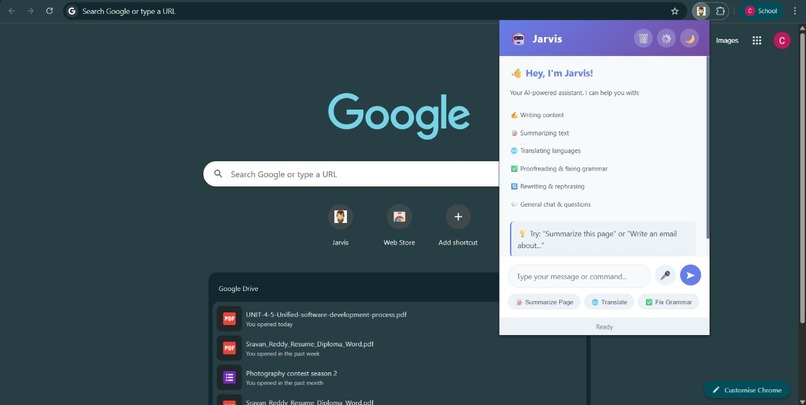
Frontend Design for Jarvis
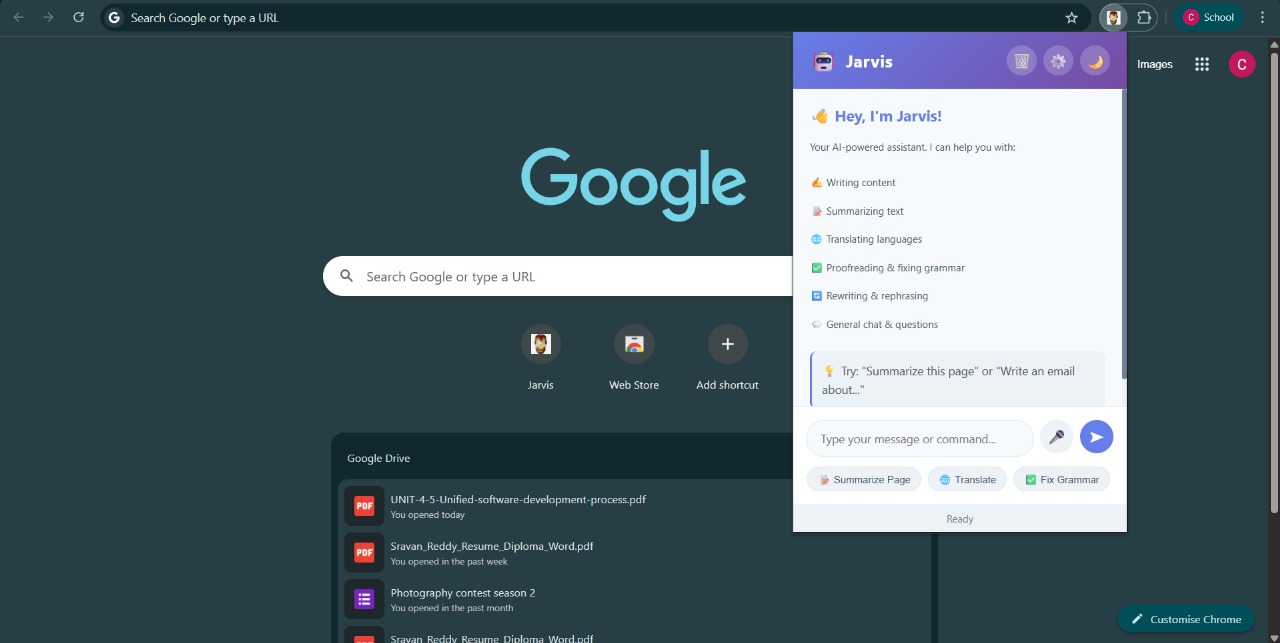
Here is a set of answers you can use as a starting point for your hackathon submission. I've based this on our conversations about your "Jarvis" project.
Feel free to edit and personalize these to perfectly match your experience!
Inspiration The inspiration for "Jarvis" came from the constant feeling of information overload we experience every day. The modern web is an ocean of data, but navigating it efficiently is a major challenge. We found ourselves drowning in long articles, complex documentation, and cluttered pages, wasting valuable time trying to find the signal in the noise.
We were inspired by the concept of an omnipresent AI assistant—like the "Jarvis" from Iron Man—that could act as an intelligent co-pilot for browsing. With the recent advancements in on-device AI, particularly Google's Gemini Nano, we saw an opportunity to build a tool that was not only smart but also private and fast, as it could run directly in the user's browser without sending sensitive data to a server.
What it does Jarvis is a Chrome extension that acts as your personal on-page AI assistant. Once activated, it can:
Summarize any webpage: Instantly generates a concise summary of long articles or documents, allowing you to grasp the key points in seconds.
Provide Contextual Insights: (You can add more features here, e.g., "Answer questions about the page content," "Explain complex terms," or "Identify key entities.")
Run On-Device: By leveraging the built-in Gemini Nano model, all analysis happens locally. This ensures user privacy is 100% protected and makes the assistant incredibly responsive.
How we built it We built Jarvis using a modern web technology stack, focusing on performance and a seamless user experience.
Frontend & UI: We used standard HTML, CSS, and JavaScript to create the extension's popup and on-page interface. This allowed us to build a lightweight and responsive UI that integrates smoothly with the browser.
Chrome Extension APIs: We utilized core Chrome APIs, including chrome.tabs to get information about the active tab and chrome.scripting to inject our content scripts into the webpage to analyze its content.
Core Logic: The "brain" of our operation is Gemini Nano, accessed via the new window.ai API. We capture the text content (DOM) of the current page and pass it to the on-device model to generate the summaries and insights.
Manifest V3: The entire extension is built on the Manifest V3 platform, ensuring it meets modern standards for security, performance, and privacy.
Challenges we ran into A hackathon is always a race against time, and we faced several key challenges:
Integrating Gemini Nano: Being a very new technology, documentation was emerging. Our biggest hurdle was figuring out the correct way to instantiate the model and stream responses from it efficiently within the constraints of a Chrome extension.
Content Scraping: Reliably extracting the main readable content from diverse webpage layouts is notoriously difficult. We had to write a robust DOM parser that could strip away ads, navbars, and footers to feed clean text to the AI.
Extension Permissions: Navigating the Manifest V3 security model was a learning curve. Ensuring we had the right permissions (like activeTab and scripting) without overreaching and alarming the user took careful balancing and testing.
Time: As with any hackathon, our ambitions were huge. We had to ruthlessly prioritize our core feature—summarization—and table other cool ideas (like chat history) for the future.
Accomplishments that we're proud of Despite the challenges, we're incredibly proud of what we built in such a short time:
A Working On-Device AI Product: We successfully integrated Gemini Nano into a Chrome extension. Seeing our code generate its first accurate summary using only local resources was a huge "wow" moment.
Privacy-First Design: We achieved our primary goal of creating a useful AI tool that does not compromise user privacy by sending browsing data to an external server.
A Functional Prototype: We didn't just have a slide deck; we have a working extension that people can install and use.
Teamwork and Rapid Learning: We learned an entirely new API (the AI API) and shipped a product, which speaks volumes about our ability to collaborate and learn under pressure.
What we learned This hackathon was an intense learning experience. Our key takeaways were:
The Power of On-Device AI: We learned that powerful AI is no longer limited to the cloud. On-device models are viable, fast, and open up a new world of privacy-centric applications.
Chrome Extension Development is Tricky: The asynchronous nature of Chrome APIs and the strict separation of contexts (background scripts, content scripts, popups) require a specific way of thinking about application architecture.
Prioritization is Everything: A hackathon isn't about building everything; it's about building the right thing well. Focusing on our Minimum Viable Product (MVP) was the key to our success.
What's next for Jarvis This hackathon was just the beginning. We have a clear roadmap for Jarvis:
More AI Features: We plan to expand beyond summarization to include on-page Q&A (e.g., "What is the main argument of this article?"), term definitions, and language translation.
Contextual Awareness: We want to make Jarvis "smarter" by allowing it to understand the type of page (e.g., e-commerce, documentation, news) and offer specialized tools for each.
UI/UX Polish: We want to refine the user interface to make it more intuitive and seamlessly integrated into the browsing experience.
Chrome Web Store: Our ultimate goal is to polish Jarvis and publish it on the Chrome Web Store so everyone can have a private AI co-pilot for their browser.

Log in or sign up for Devpost to join the conversation.