-
-

OUR LOGO
-
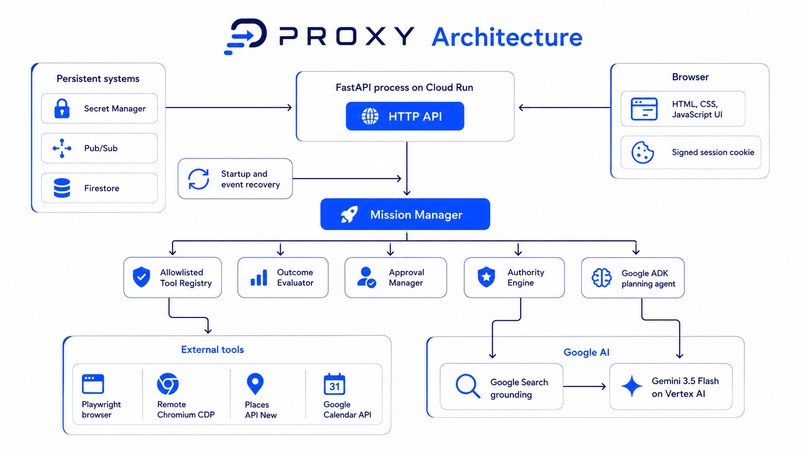
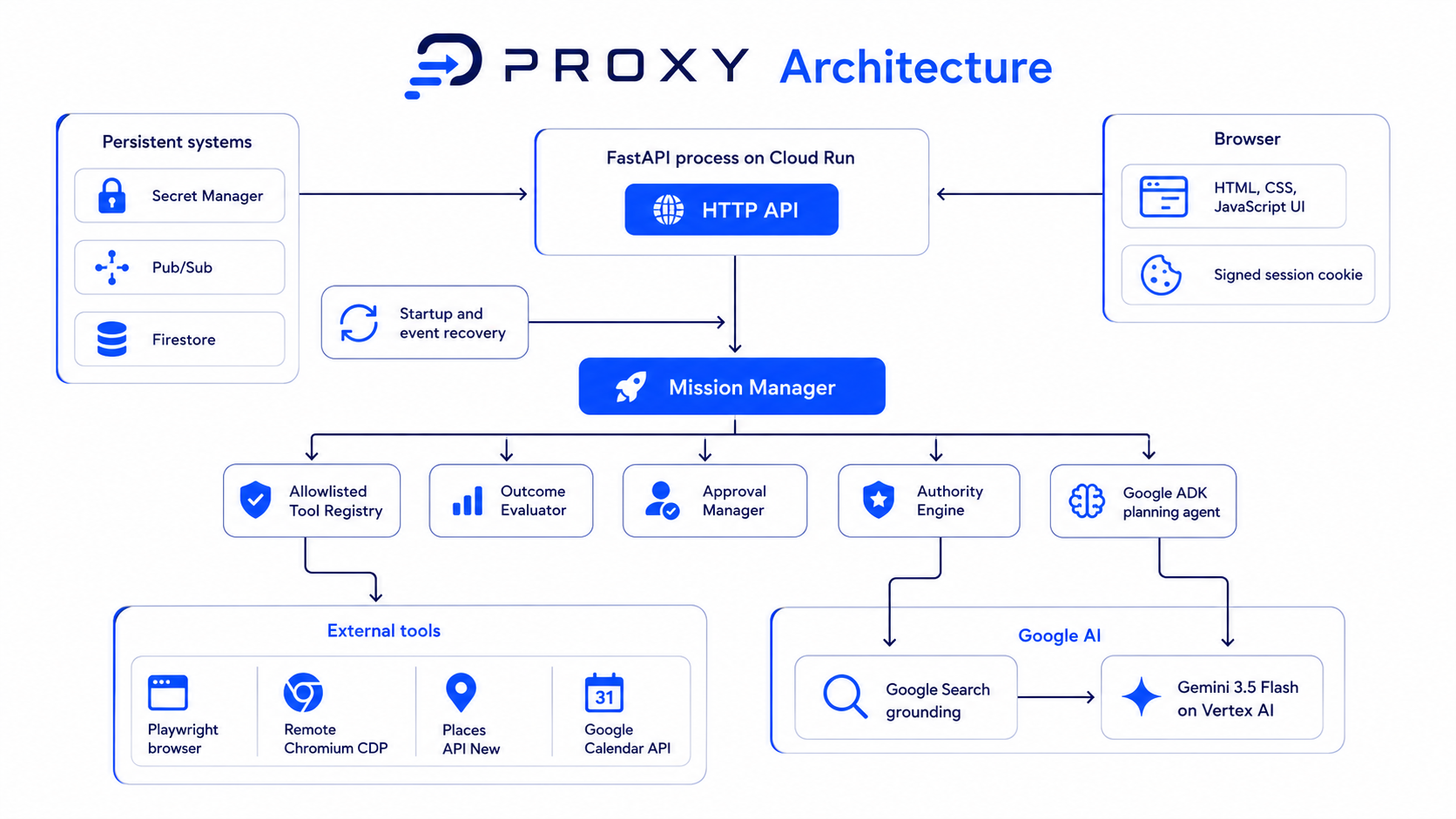
Architecture

Inspiration
PROXY came from a problem I kept running into in my own life. For example, I was considering a tutoring job in Dubai while studying in Ras Al Khaimah, which meant balancing classes, travel time, meetings, costs, and sudden schedule changes. An AI could help me plan it once, but if one thing changed, I would have to start the whole process again.
That made me want to build something different: an agent that could hold onto the actual outcome, not just respond to one prompt. PROXY keeps a mission alive, reacts when circumstances change, and knows when it can continue on its own versus when it needs my approval.
What it does
PROXY turns a normal-language request into a persistent mission. It extracts the goal, constraints, and limits, creates a plan, and then uses tools such as Google Calendar, web/place search, and browser actions to make progress.
The main idea is that the mission does not disappear after one response. PROXY stores what it has already done, what it is waiting for, and what decisions were made. If it reaches something sensitive or outside its permission, it pauses and asks for approval. If circumstances change after a mission was completed, it can reactivate the mission and continue working toward the original outcome.
How we built it
PROXY is mainly built in Python, with Gemini handling natural-language understanding, structured extraction, planning, and decision-making. Firestore stores missions, constraints, approvals, decision records, and activity history so the agent can continue where it left off.
Pub/Sub is used for event-driven updates, while Cloud Run hosts the backend. I also integrated Google Calendar read/write, web and place search, browser execution, approval and resume flows, mission replay, and recovery logic. I wanted the architecture to be simple enough to understand from the repository instead of hiding everything behind one large AI call.
Challenges we ran into
The hardest part was making PROXY reliable after the first AI response. Creating a plan was relatively easy. Making sure the system remembered what it had already done, recovered from failures, waited for approval, and did not repeat actions was much harder.
I was also new to Google Cloud, so learning Cloud Run, Firestore, Pub/Sub, permissions, and Google APIs while building the project was a challenge on its own. Designing the Authority Envelope was another big part of the project because I wanted PROXY to be useful without giving an AI unlimited control.
Accomplishments that we're proud of
I am most proud that PROXY treats tasks as actual missions with a state and history instead of just chat messages. Every mission can have constraints, events, approvals, decisions, and a timeline showing what happened.
One of my favorite parts is the SATISFIED → REACTIVATED flow. PROXY can finish a mission, keep it stored, and later reactivate it if something changes. I am also proud of the approval system, because PROXY can act independently where it has permission while still stopping before actions that should remain under human control.
What we learned
The biggest thing I learned is that building an AI agent is much more about the system around the model than I expected. Memory, state, retries, events, permissions, and recovery are just as important as the quality of the LLM response.
I also learned a lot about Google Cloud by actually building with it. Before this project I had very little experience with Cloud Run, Firestore, or Pub/Sub, so getting them to work together in one project was one of the most useful parts of the hackathon for me.
What's next for PROXY
Next, I want to connect more real-world events to missions. Gmail integration would let an email reply automatically affect an active mission, and phone calling would help PROXY handle situations that cannot be completed through a website.
I also want to improve preference memory, retries, browser recovery, and support more types of missions. The long-term goal is for PROXY to become something you can give a responsibility to rather than something you have to keep prompting every few minutes.
Built With
- agent
- ai
- ai-assistant
- api-integration
- autonomous-agents
- browser-automation
- gemini
- generative
- google-cloud
- llm
- natural-language-processing
- python
- speech-to-text
- text-to-speech
- web-search

Log in or sign up for Devpost to join the conversation.