-
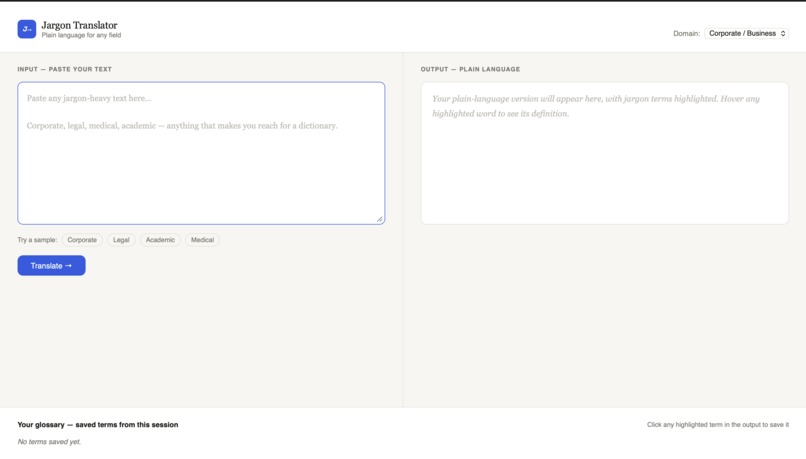
Main view
Inspiration
Every workplace, courtroom, hospital, and university has its own private language — and if you don't already speak it, you're locked out. We've all nodded along to a sentence we didn't understand, signed something we couldn't parse, or left a meeting more confused than when we walked in. Jargon isn't just annoying; it creates real barriers to understanding. We wanted to build something that tears those barriers down, instantly.
What it does
Jargon Translator takes any jargon-heavy text — corporate, legal, academic, or medical — and rewrites it in plain English anyone can understand. It highlights every replaced term directly in the output, so you can hover to see both the original phrase and its definition. Terms you want to remember can be saved to a personal glossary that persists across sessions, building your own plain-language dictionary over time.
How I built it
The frontend is vanilla JavaScript, HTML, and CSS — no frameworks. The core translation is powered by the Claude API (claude-sonnet-4-6), which returns a structured JSON response containing the rewritten text and a list of every jargon term it replaced, along with definitions. The output is rendered with inline highlighted spans and hover tooltips built entirely through DOM manipulation. The personal glossary is stored in localStorage.
Challenges I ran into
The trickiest part was reliably mapping replaced terms back to their positions in the rewritten text. Since the AI rephrases things, the jargon term rarely appears verbatim in the output — so we highlight the replacement while preserving the original term and definition in the tooltip. Getting that mapping consistent without breaking when terms overlapped or appeared multiple times required careful ordering and regex handling.
Accomplishments that I'm proud of
The hover tooltip system feels genuinely polished — you get the original jargon term, its plain replacement, and a definition, all without leaving the page. The glossary also quietly builds itself as you use the tool, which gives it a sense of growing with the user rather than resetting every session.
What I learned
How to prompt an LLM to return structured, parseable JSON reliably — and how to build a UI that degrades gracefully when the response isn't what you expected. Also how much work goes into making something feel simple.
What's next for Jargon Translator
Browser extension so it works on any page without copy-pasting. Shareable glossaries so teams can build a shared plain-language dictionary together. And a readability score that tracks how dense a document is before and after translation.

Log in or sign up for Devpost to join the conversation.