-
-
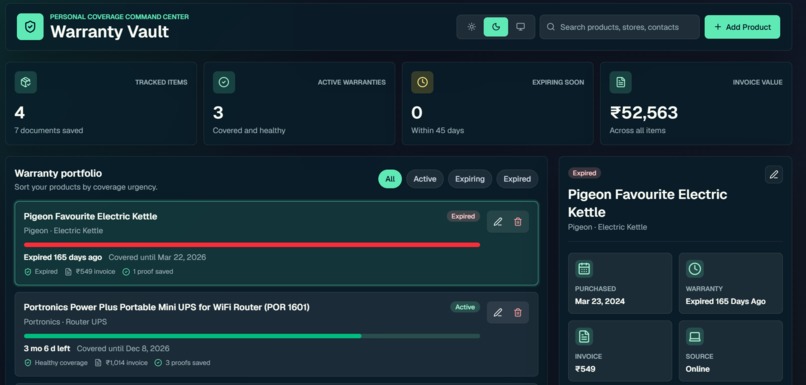
Home Page for Warranty Vault after user login
-
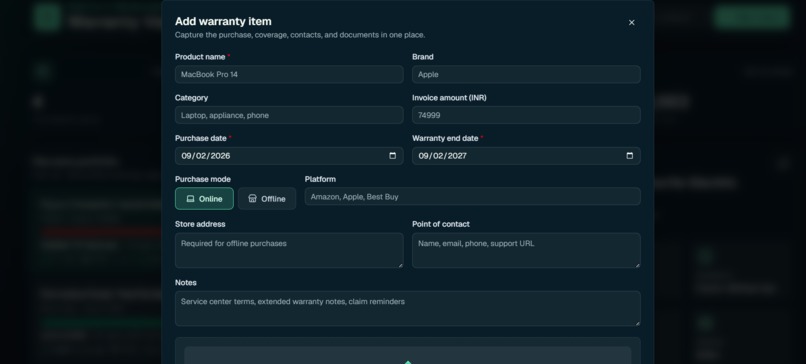
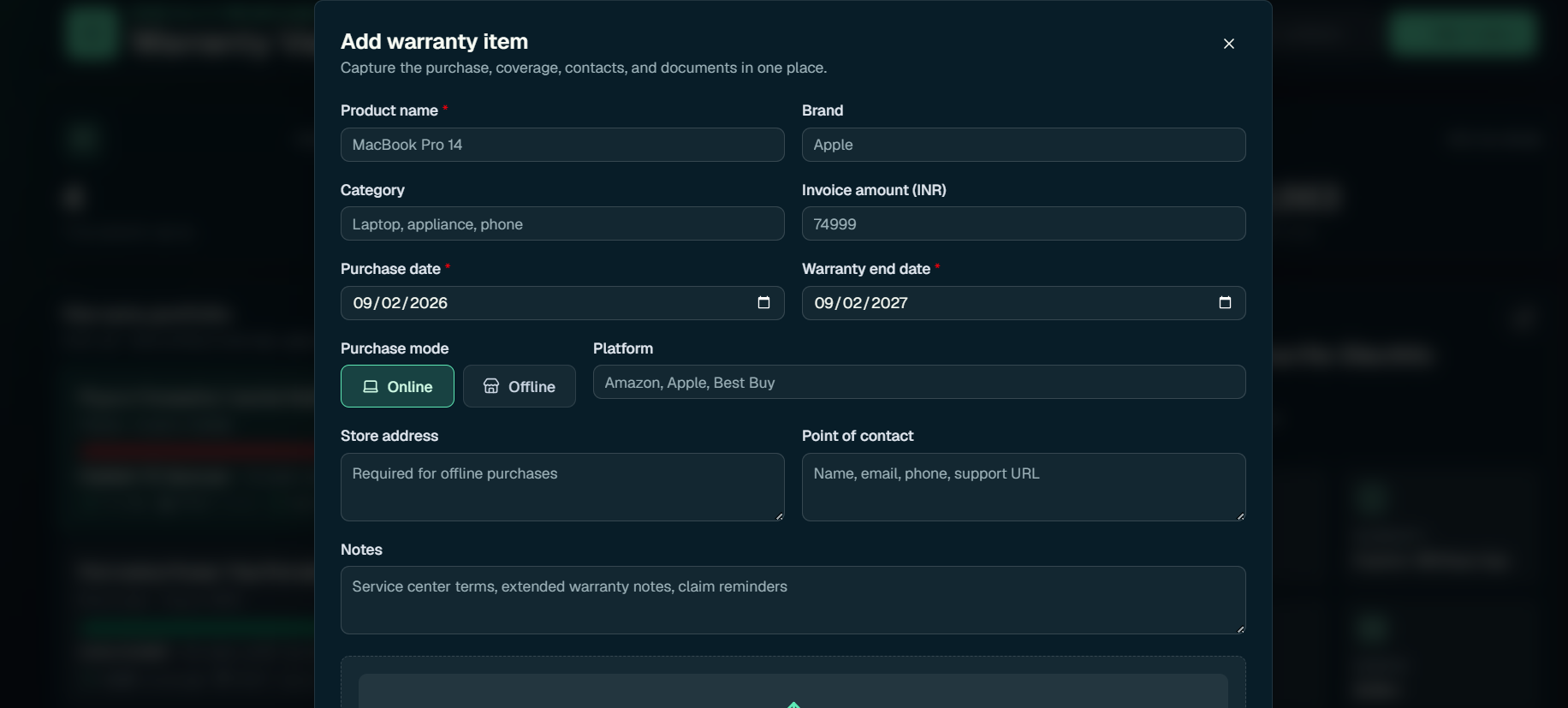
Add warranty page
-
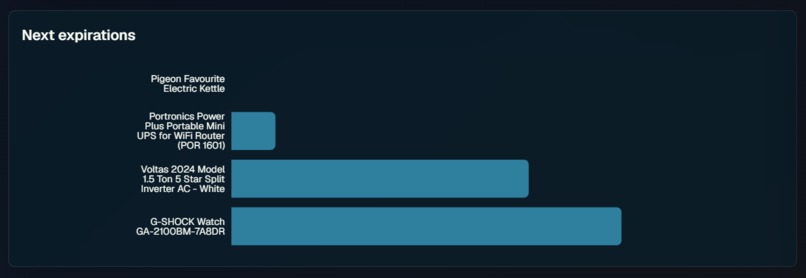
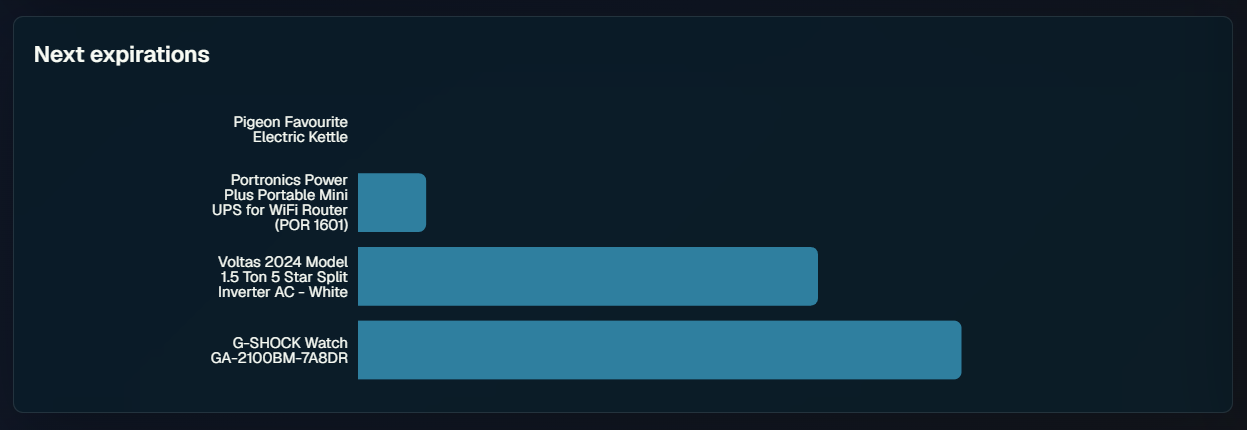
Chart of remaining warranty per product
-
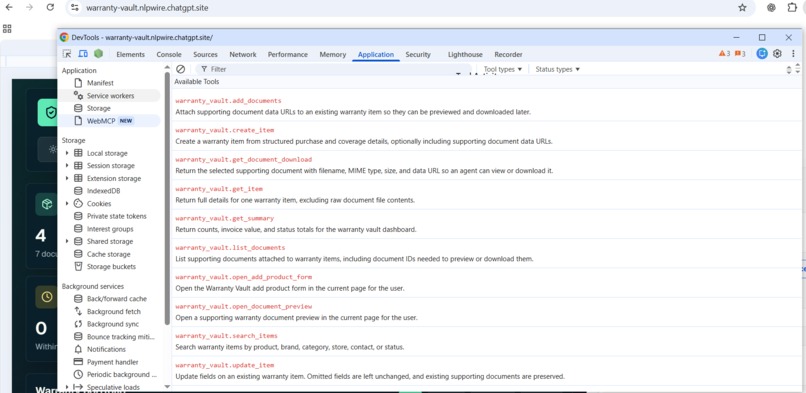
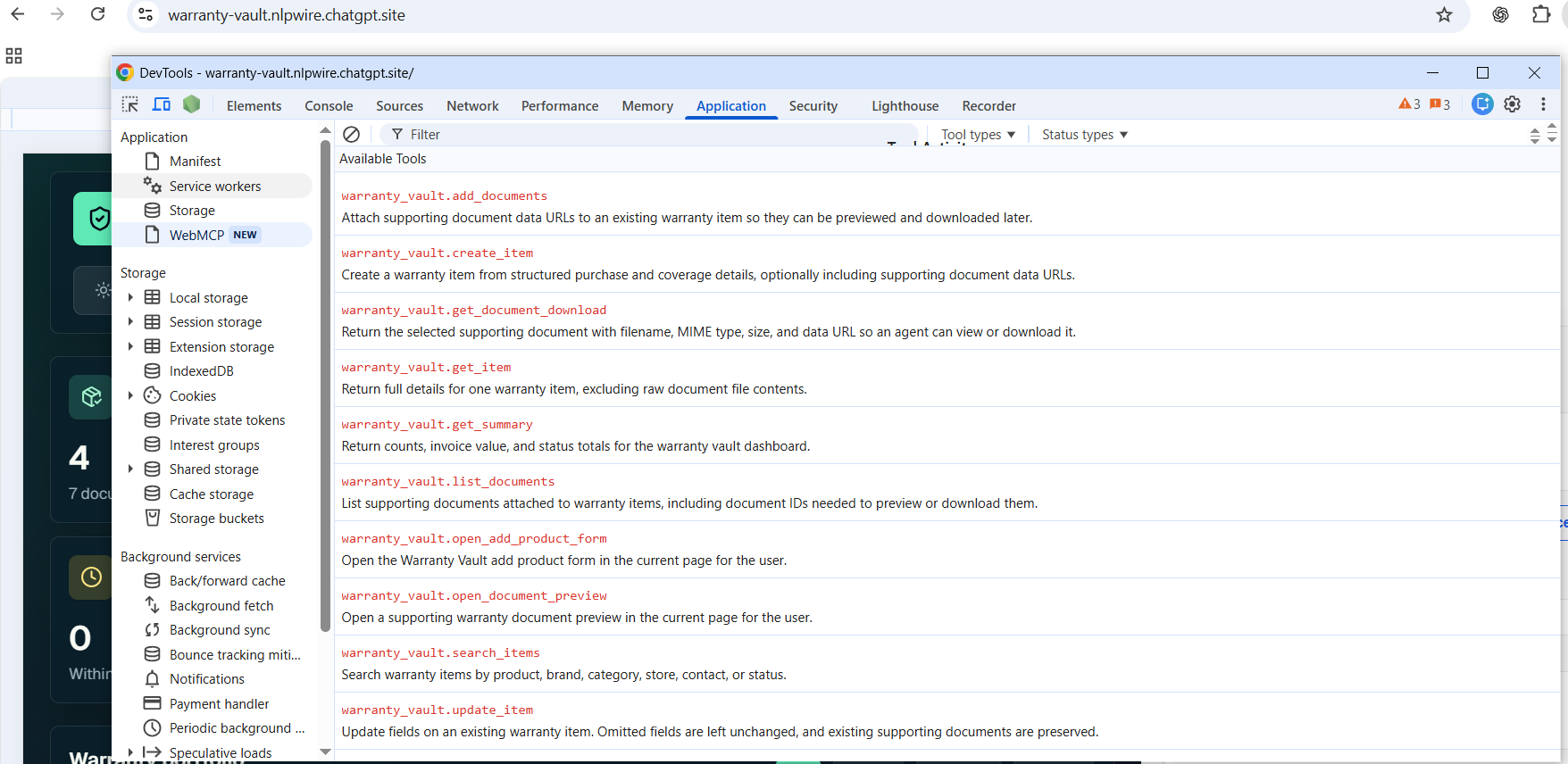
List of WebMCP tools, from Chrome
-
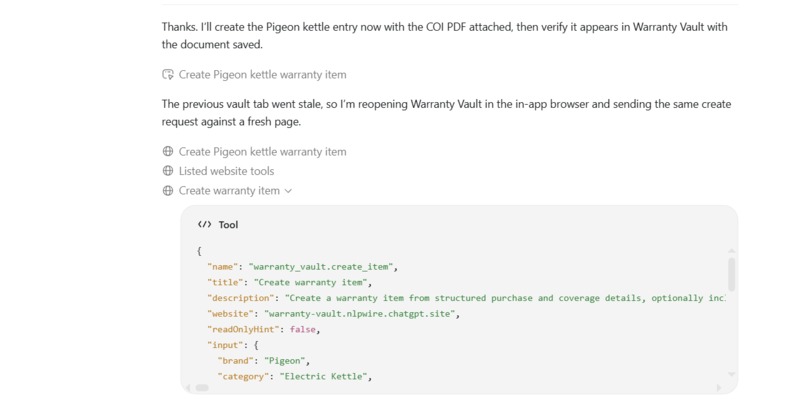
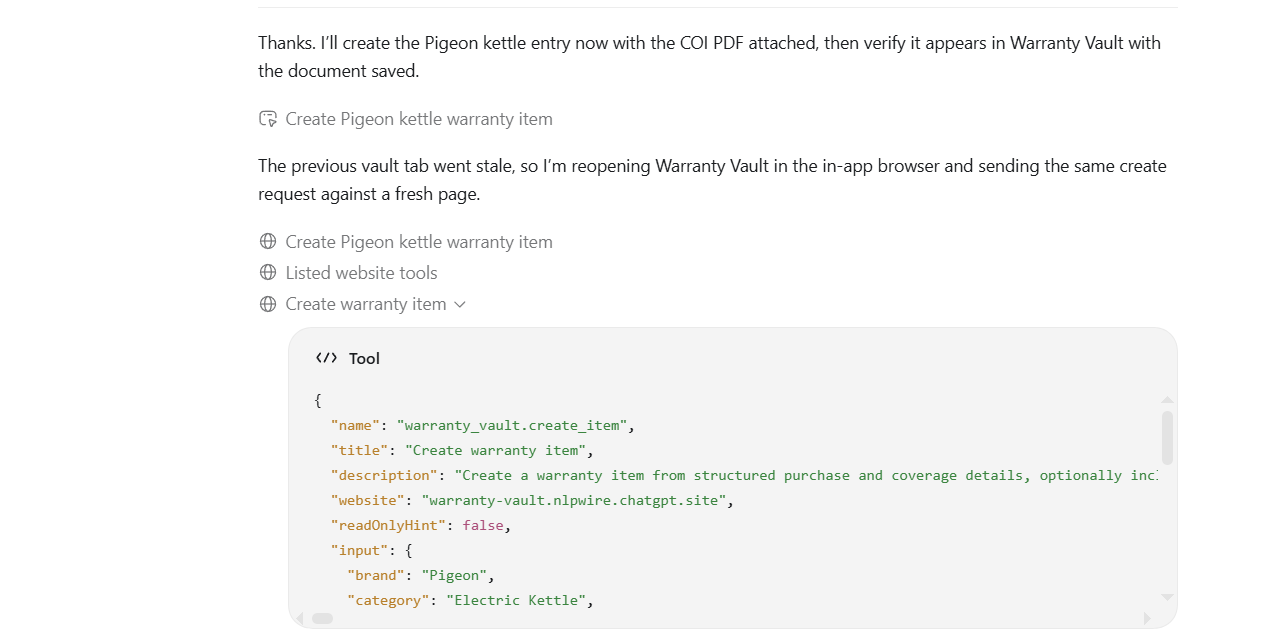
Agent using tool to create a new warranty item
-
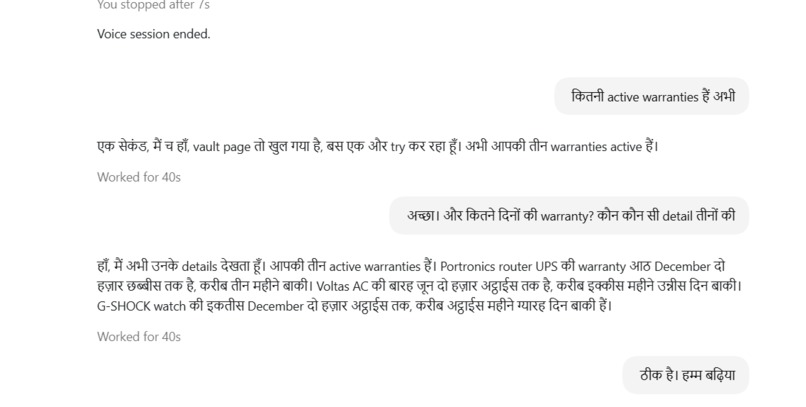
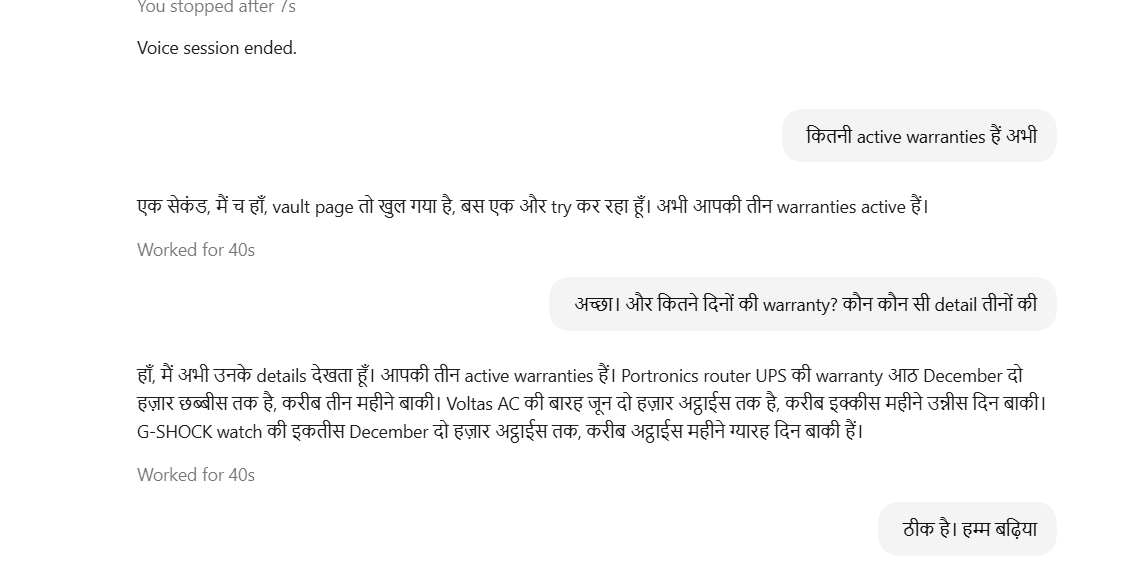
Agent conversing in Hindi+English to user for fethcing details of warranty
-
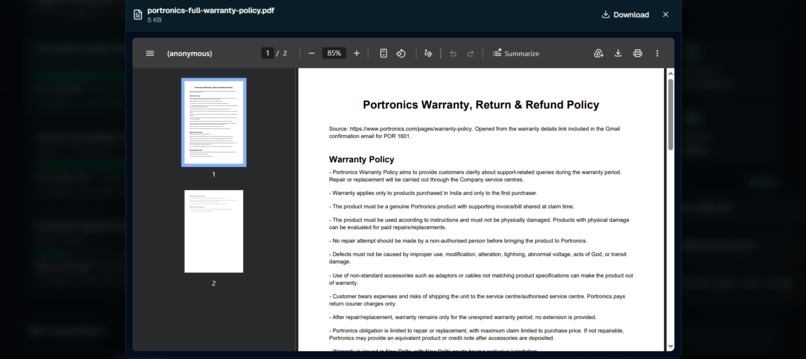
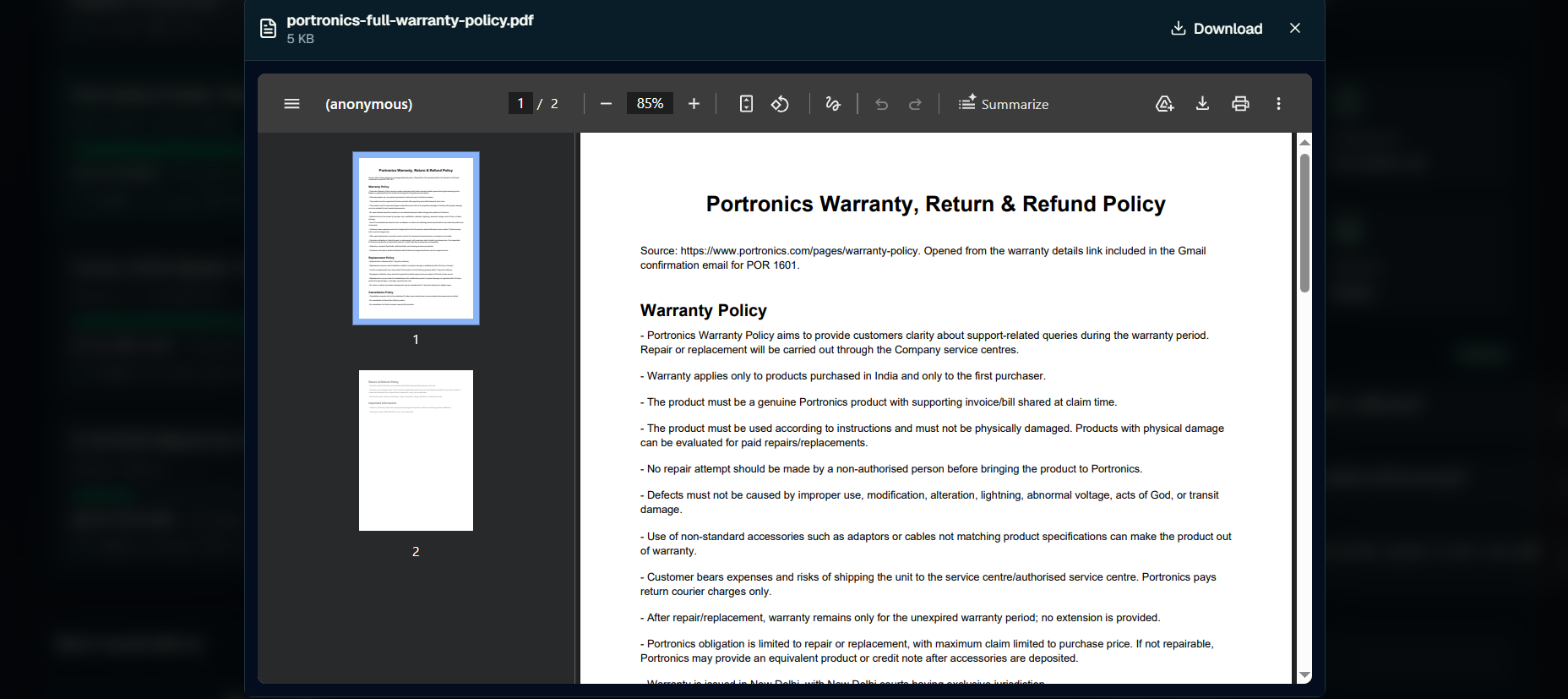
Preview of uploaded warranty doc through Codex Agent
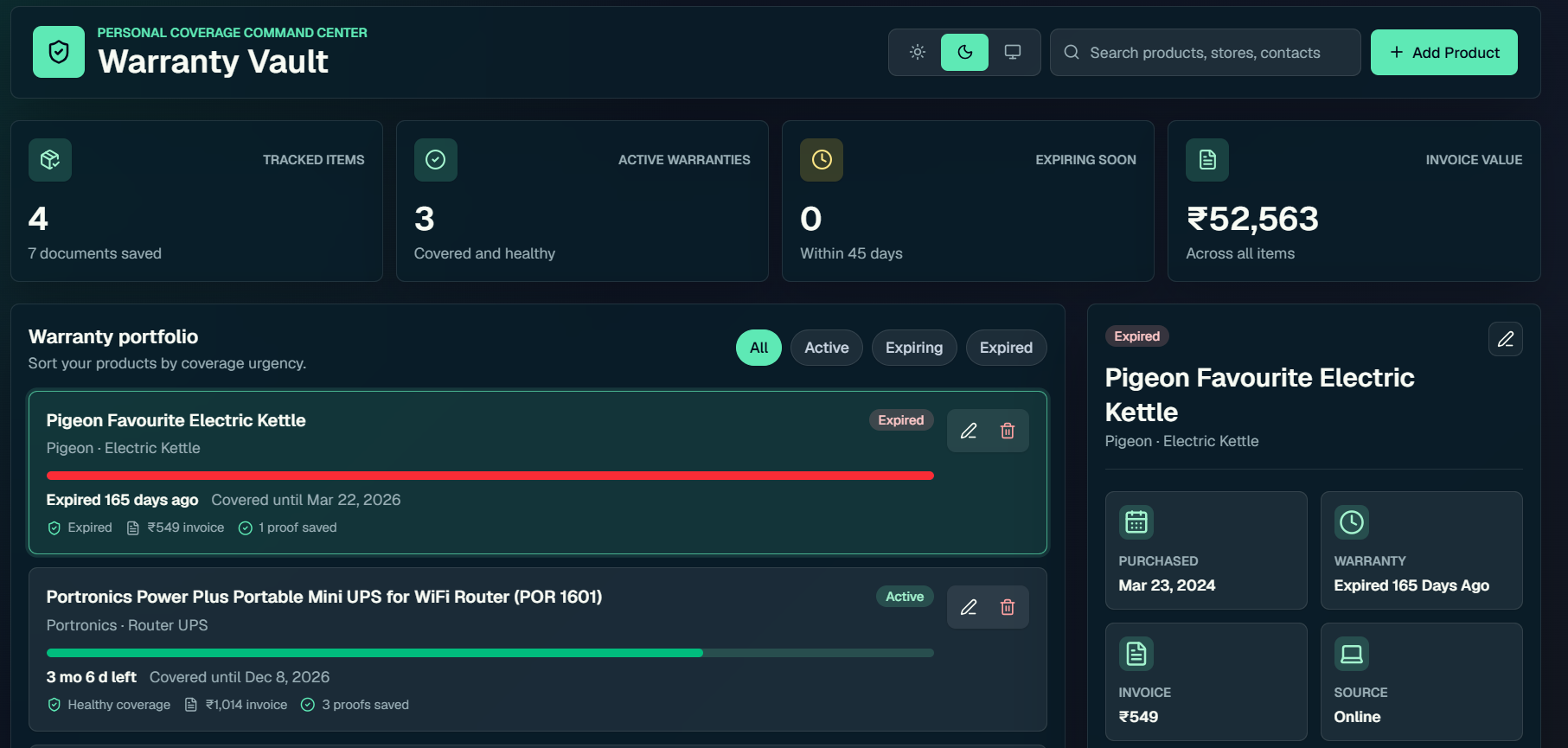
Warranty Vault
Inspiration
Whenever we buy a product—an AC, TV, laptop, mobile phone, or home appliance—we receive product and warranty information in different ways.
Sometimes we have to register the warranty manually on a website. Sometimes the information is available in a Gmail purchase email, invoice, PDF, receipt, or warranty document.
The information already exists digitally, but we still have to manually organize it.
To keep track of a warranty, users often have to search their emails, find the invoice or warranty document, read it, and manually copy details such as the product name, brand, model number, serial number, purchase date, price, warranty period, and expiry date into another application.
Months or years later, when the warranty is about to expire—or when the product develops an issue—we have to search through the same old emails, PDFs, and invoices again.
This made us ask a simple question:
Why should users manually enter and search for information that already exists digitally?
That question inspired us to build Warranty Vault.
Warranty Vault brings the complete warranty lifecycle into one place—from capturing warranty information from Gmail to tracking expiry and helping users extend or claim their warranty when they need it.
With WebMCP, Warranty Vault becomes agent-ready, allowing AI agents to understand the application's capabilities and perform structured actions on behalf of the user.
What it does
Warranty Vault is a smart warranty management application designed to eliminate repetitive manual warranty entry and simplify warranty management throughout the product lifecycle.
Instead of manually finding an email, reading an invoice, and entering every field into Warranty Vault, a user can simply ask:
"Find my AC warranty email in Gmail and add it to Warranty Vault."
The AI can find the relevant purchase or warranty email in Gmail, understand the information, extract the required product and warranty details, and use Warranty Vault's WebMCP capabilities to create the warranty record.
Warranty Vault can maintain information such as:
- Product name
- Brand
- Product category
- Model number
- Serial number
- Purchase date
- Purchase price
- Retailer or seller
- Warranty duration
- Warranty start date
- Warranty expiry date
- Invoice and supporting information
But Warranty Vault doesn't stop after saving the warranty.
It continues to help users throughout the complete warranty lifecycle.
Warranty Expiry Tracking
Warranty Vault keeps track of warranty expiry dates so users don't have to remember them manually.
When a product is approaching its warranty expiry date, Warranty Vault can surface that information to the user so they can take action before it is too late.
Claim Warranty
If a product develops an issue while it is still under warranty, the user can initiate a warranty claim directly from the product record.
Instead of searching again for the invoice, purchase date, model number, or warranty information, Warranty Vault already has the required product context available.
Our complete experience is:
Gmail / Invoice / PDF → AI extracts details → WebMCP → Warranty Vault → Track Expiry
How we built it
We started by building Warranty Vault as a structured product and warranty management web application.
Users can manually add and manage warranties, but we didn't want to build another application where users simply move information from one form to another.
The biggest opportunity was eliminating that repetitive manual entry.
That's where WebMCP became an important part of the solution.
We used WebMCP to make Warranty Vault agent-ready by exposing meaningful, structured capabilities that an AI agent can understand and use.
Instead of requiring an AI agent to visually navigate the website, locate every input field, enter information, and click buttons, WebMCP allows Warranty Vault to expose the actions available to an agent and the information required to perform them.
For our Gmail use case, the journey works like this:
- The user gives a natural-language instruction:
"Find my AC warranty email in Gmail and add it to Warranty Vault."
The AI searches Gmail for the relevant purchase or warranty email.
It reads the relevant email and identifies the product and warranty information.
It extracts available information such as product name, brand, model number, purchase date, purchase price, and warranty period.
The extracted information is converted into the structured fields required by Warranty Vault.
The AI discovers the relevant capability exposed by Warranty Vault through WebMCP.
The agent provides the structured warranty information to Warranty Vault.
Warranty Vault validates the information and creates the warranty record.
This transforms the traditional experience from:
Search Gmail → Open Email → Open Invoice → Read → Copy Details → Open Warranty App → Fill Form → Save
into:
Ask → AI understands → WebMCP acts → Warranty saved
We also designed the experience around higher-level user actions rather than individual UI interactions.
For example:
Add Warranty
Extend Warranty
Claim Warranty
This allows WebMCP to support the warranty lifecycle rather than simply automate form filling.
Challenges we ran into
One of the biggest challenges was that warranty information is not standardized.
Different manufacturers and retailers provide product and warranty information differently.
One Gmail message might contain all the required information directly in the email.
Another might contain only basic purchase information with an attached invoice or PDF.
Some documents clearly specify the warranty duration, while others may not mention it at all.
This created an important challenge:
How do we allow AI to understand unstructured information while keeping the data stored in Warranty Vault structured and reliable?
We also had to think carefully about missing information.
For example, if a purchase email doesn't contain a serial number or clearly specify the warranty duration, the AI should not invent information simply to complete the record.
Another challenge was deciding what capabilities should be exposed through WebMCP.
Instead of thinking about low-level interactions such as:
"Click this button."
or
"Fill this field."
we focused on meaningful user goals:
"Add this warranty."
"Extend this warranty."
"Claim this warranty."
This helped us design Warranty Vault not only as a website for humans, but as an application that AI agents can understand and interact with through structured capabilities.
Building Warranty Vault with WebMCP helped us discover some interesting challenges around how agents interact with dynamic web applications.
Dynamic WebMCP Tool Availability
One of the first challenges we encountered was that Warranty Vault could be loaded successfully, but its WebMCP tool list could refresh during the agent's first interaction.
This created situations where a tool discovered by the agent was temporarily unavailable or changed while the agent was attempting to use it.
It highlighted an important consideration for agent-ready applications: tool discovery and tool execution need to remain reliable even while the underlying page and application state are changing.
Page Loading vs. Agent Execution
Another challenge occurred when the web page was not fully loaded and the WebMCP tools were not yet available.
Agents are naturally eager to complete the user's task. If the expected WebMCP tools are not immediately available, the agent may attempt to continue by interacting with or scraping the UI instead of waiting for the structured WebMCP capabilities to become ready.
For Warranty Vault, we wanted the agent to use WebMCP as the primary interaction mechanism rather than falling back to UI-based interaction too quickly.
This taught us that agent-ready websites need clear readiness signals and reliable tool availability so agents know when to wait, retry tool discovery, or proceed.
File Download and Upload
Our warranty workflow also involves invoices, PDFs, receipts, and warranty documents, which introduced another challenge.
While structured data such as product name, purchase date, and warranty period works naturally with WebMCP tools, file transfer is more complex.
For example, an agent may need to:
Read a Gmail message → download the attached invoice → extract warranty information → create the Warranty Vault record → upload or attach the original invoice.
Passing files between the agent, external sources, and WebMCP-enabled applications is currently more challenging than passing structured text or JSON data.
For our use case, this is particularly important because invoices and warranty documents are valuable supporting evidence for future warranty claims.
These challenges helped us understand that building an agent-ready application isn't only about exposing tools. Tool lifecycle, page readiness, agent fallback behavior, and file handling are equally important parts of creating a reliable end-to-end agent experience.
Accomplishments that we're proud of
Our biggest accomplishment is demonstrating a practical WebMCP use case around a real everyday problem.
Warranty Vault doesn't use WebMCP simply to demonstrate that an AI agent can interact with a website.
WebMCP directly addresses our core user pain point: repetitive manual warranty management.
These are strong accomplishments because they show accessibility, multimodal input, multiple information sources, and reduced manual effort.
Below are detailed points:
1. Making Warranty Management Accessible Through Conversation
One of our biggest accomplishments is making Warranty Vault usable without requiring users to understand complicated forms or workflows.
Users can communicate naturally with an agent in Hindi or English. They can type their request or simply have a conversation with Codex.
For example:
"Mere AC ki warranty Gmail se find karke Warranty Vault mein add kar do."
or
"Find my AC warranty details and add them to Warranty Vault."
The agent can understand the intent and use Warranty Vault's WebMCP tools to complete the task.
This makes warranty management much more accessible, regardless of the user's preferred language or familiarity with the application.
2. Turning Information From Multiple Sources Into a Warranty Record
Warranty information doesn't always come from one clean document.
A user might have:
- A photo of a purchase bill
- A PDF invoice
- A Gmail purchase confirmation
- A manufacturer's warranty webpage
- A photo of the product or label
- Product guidelines or manuals
- Technical documentation or schematics
Instead of asking the user to read all these sources and manually combine the information, they can provide them to the agent through different channels.
The agent can understand and extract relevant information from these sources, combine the useful details, and use WebMCP to add the structured information to Warranty Vault.
What previously required searching, reading, copying, and filling out forms can now be handled through a simple conversation with the agent.
3. Helping Existing Users Understand Their Warranty Documents
Warranty Vault isn't useful only when adding a new product.
Existing users may already have multiple invoices, manuals, warranty documents, terms and conditions, and other supporting documents stored for their products.
Reading every document just to understand what is covered can be time-consuming and confusing.
An agent can read these supporting documents on behalf of the user, identify useful information, and create notes against the product in Warranty Vault.
For example, it could capture important information such as warranty conditions, maintenance requirements, exclusions, or other useful instructions found across the supporting documents.
Instead of users repeatedly going through their entire document repository, the important information can be brought directly into their Warranty Vault record.
These accomplishments helped us move Warranty Vault beyond being just a place to store warranty records.
We built an experience where users can bring information from conversations, Gmail, images, invoices, PDFs, websites, manuals, and existing documents, let an agent understand it, and use WebMCP to turn that information into useful actions.
Our biggest accomplishment is reducing the work expected from the user:
Don't search every document. Don't copy every field. Don't understand every form. Just tell the agent what you need.
What we learned
One of our biggest learnings was that making an application agent-ready is different from simply automating a website.
Traditional websites are primarily designed for humans.
Humans understand pages, forms, buttons, labels, menus, and navigation.
An AI agent needs a structured way to understand:
What can I do here?
What information does this action require?
How should I perform the action?
WebMCP gives Warranty Vault a way to expose those capabilities to AI agents.
We also learned that each part of our solution has a clear responsibility.
Gmail is one of the sources where purchase and warranty information already exists.
AI understands the user's natural-language request and extracts relevant information from unstructured sources such as emails and invoices.
WebMCP provides the structured bridge that allows the AI agent to interact with Warranty Vault.
Warranty Vault owns the product and warranty records, validations, expiry tracking, and actions such as extending or claiming a warranty.
Together, these components create a much simpler experience for the user.
What's next for Warranty Vault
1. Build Warranty Vault for Indian Families
Our next goal is to build Warranty Vault as an India-focused warranty management platform, designed around how Indian consumers and families purchase and manage products.
Users should be able to manage warranties not only for their own home, but also for their parents' home and their entire family from a single place.
The vision is:
One family. Multiple homes. Hundreds of products. One Warranty Vault.
2. Integrate With Quick-Commerce and E-Commerce Purchases
We want to integrate Warranty Vault with the growing quick-commerce and e-commerce ecosystem.
Instead of manually registering every new purchase, users could bring purchase information from supported platforms, emails, invoices, and receipts into Warranty Vault with the help of agents.
Our goal is to make the journey increasingly seamless:
Purchase → Automatically Organize → Track Warranty → Take Action
3. Enable One-Click Warranty Claims Through Agents
Finding the warranty is only half the problem. The next challenge begins when a consumer actually wants to claim it.
We want Warranty Vault to enable users to initiate warranty claims through agents using different channels, including voice, email, manufacturer/service portals, and grievance portals.
A user could simply say:
"My AC is not cooling. Check my warranty and help me raise a claim."
The agent could use the product information, invoice, warranty terms, and supporting documents already available in Warranty Vault to help initiate the appropriate claim journey.
Our goal is to move from:
Find documents → Understand coverage → Find where to complain → Fill forms → Follow up
to:
Explain the problem → Agent understands → Claim initiated
4. Help Consumers Understand What Their Warranty Actually Covers
Warranty documents and service contracts can be long and difficult for consumers to understand.
We want Warranty Vault to go beyond storing these documents and help users understand the services and benefits already available to them.
Agents could analyze the warranty contract and supporting documents to:
- Explain available services in simple language
- Highlight relevant warranty clauses
- Identify coverage, exclusions, and conditions
- Surface maintenance requirements
- Show the appropriate claim or service journey based on the contract
- Help users understand which clause may be relevant to their issue
For example, instead of reading an entire warranty document, a user could ask:
"My AC needs servicing. What services are included in my warranty?"
Warranty Vault could surface the relevant terms and guide the user through the appropriate next steps.
This can make claim redressal easier and more transparent, while helping consumers better understand the benefits they already paid for.
Ultimately, we want Warranty Vault to evolve from a warranty storage application into an intelligent warranty companion for Indian families.
The future journey we envision is:
Buy → Capture → Organize → Understand → Track → Get Reminded → Extend → Claim → Resolve
Our goal is simple:
Don't make consumers search through emails, invoices, contracts, portals, and paperwork to understand their warranty. Let them tell an agent what they need, and let Warranty Vault help them find the right information and take the right action.
Built With
- chatgpt
- codex
- react
- recharts
- tailwind
- vinext

Log in or sign up for Devpost to join the conversation.