-
-
Magic Cilum Policy Lab
-
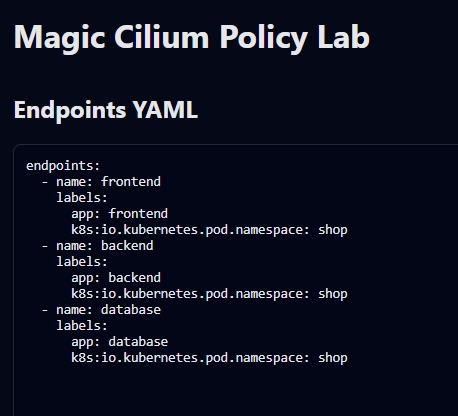
Testing - Step -1
-
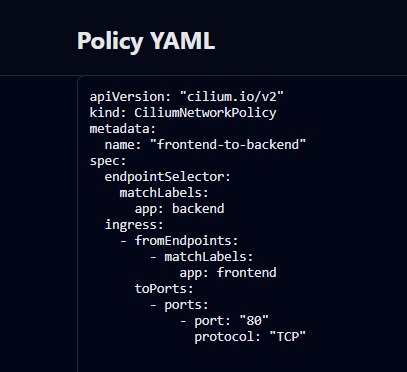
Testing - Step -2
-
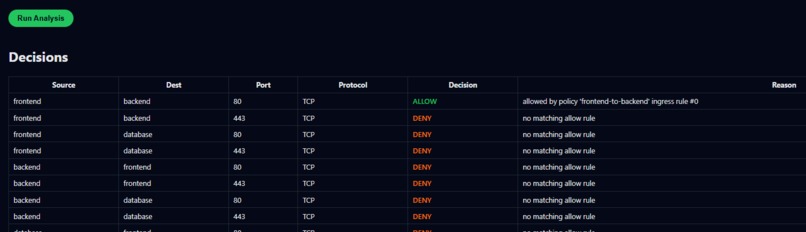
Click-Analysis-this-report-seen
-
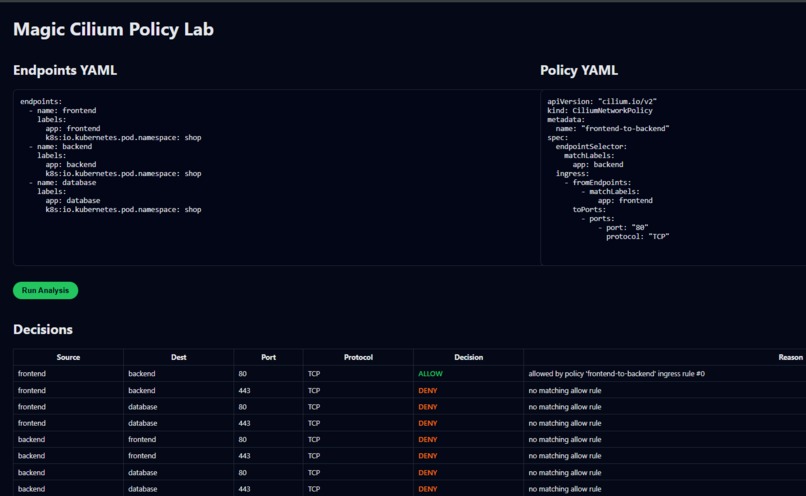
OverAll UI
Inspiration
CiliumNetworkPolicy is powerful but often hard for developers to understand. Teams struggle to predict “who can talk to whom,” especially with identity-based rules, L3–L7 filters, and complex YAML. I wanted a tool that makes these policies visual, simple, and intuitive.
What it does
Cilium Policy Lab parses CiliumNetworkPolicy files, simulates allowed and denied traffic between endpoints, and generates an interactive graph. It explains each decision in plain language, helping users clearly understand connectivity without needing deep networking knowledge.
How we built it
I built a Python-based CLI that loads policy YAML, models endpoints with labels, evaluates ingress/egress rules, and computes connectivity decisions. The output is transformed into JSON and rendered in a lightweight web viewer using a clean graph layout.
Challenges we ran into
Interpreting Cilium’s policy structure—selectors, ports, directions, and L7 rules—was more complex than expected. Ensuring accurate rule matching and producing explanations that users could understand were major challenges. Designing a simple, intuitive UI from this data also required careful iteration.
Accomplishments that we're proud of
I created a functional offline Cilium policy simulator that works without a Kubernetes cluster. The tool gives clear results, visualizes traffic flow, and provides explainable decisions. It bridges the gap between networking experts and developers.
What we learned
I learned how Cilium interprets identity-based policies, how label selectors map to datapath rules, and how traffic decisions emerge from layered ingress and egress logic. I also gained experience structuring CLI tools and building simple graph visualizations.
What's next for Visual Simulator & Explainer for CiliumNetworkPolicy
Future plans include integrating live clusters, pulling real endpoints via kubectl, incorporating Hubble flow validation, supporting L7 HTTP rules more deeply, exporting reports, and adding a playground where users test policies interactively.
🚀 Magic Cilium Policy Lab
Visual Simulator & Explainer for CiliumNetworkPolicy Live Demo → https://cilium.admnwizard.com/web/ Built for eBPF Summit Hackathon 2025 Magic Cilium Policy Lab is a lightweight visual analyzer that simulates who can talk to whom under CiliumNetworkPolicy rules. It transforms complex YAML into a simple, interactive graph and human-readable decisions.
🌟 Features
• 🧩 Simulates Cilium Network Policies • 🔍 Label-based traffic evaluation (Cilium-style) • 📊 Clear allow/deny decision table • 🕸️ Network graph visualization • 📦 No cluster required — fully offline • ⚡ FastAPI backend + simple HTML/JS UI • 🔐 HTTPS-ready (your deployment uses SSL via NGINX)
🧰 Architecture
Magic Cilium follows a lightweight, clear architecture: ┌──────────────────────────┐ │ Web UI │ │ YAML input fields │ │ Run Analysis button │ │ Graph + Decisions view │ └─────────────┬────────────┘ │ POST /api/analyze ▼ ┌──────────────────────────┐ │ FastAPI Backend │ │ Parses YAML (PyYAML) | │ Matches labels/ports │ │ Simulates Cilium rules │ └─────────────┬────────────┘ │ JSON graph/decisions ▼ ┌──────────────────────────┐ │ Browser Graph Renderer │ │ Draws nodes/edges │ │ Shows ALLOW/DENY tab │ └──────────────────────────┘ Components • Frontend: o Static HTML, CSS, JS o Sends YAML to API o Renders graph + decisions • Backend: o Python + FastAPI o YAML parsing o Label + ingress rule matching o Port-based evaluation • Deployment: o Uvicorn on port 4089 o NGINX SSL reverse-proxy o Public URL: https://cilium.admnwizard.com/web/
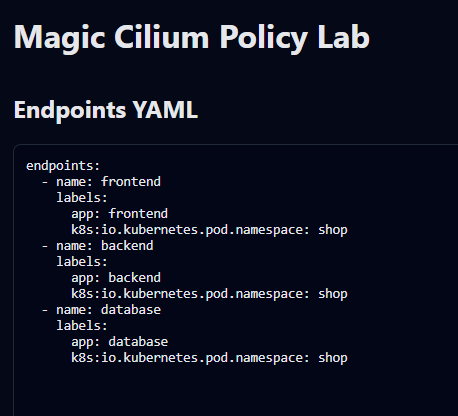
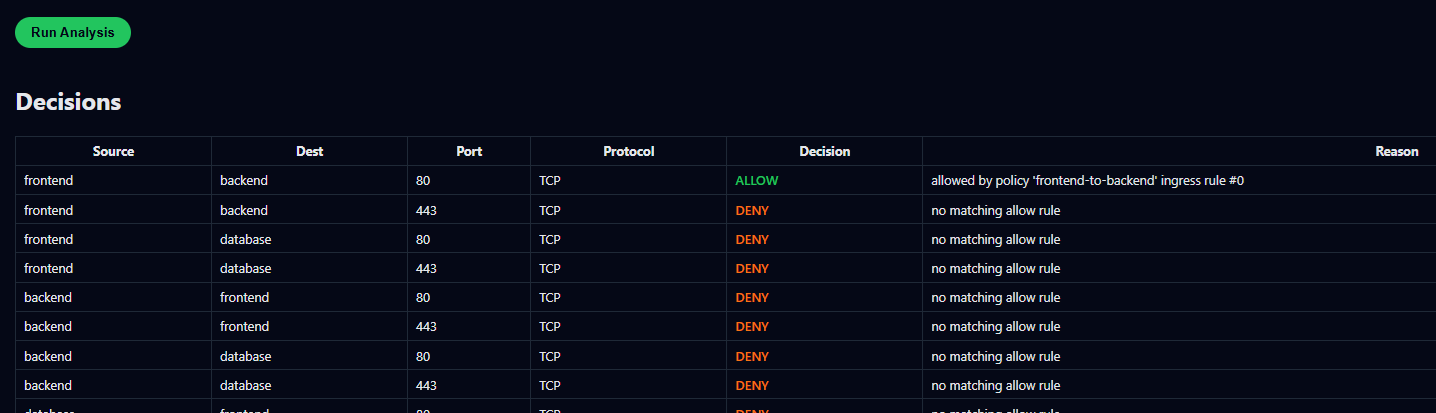
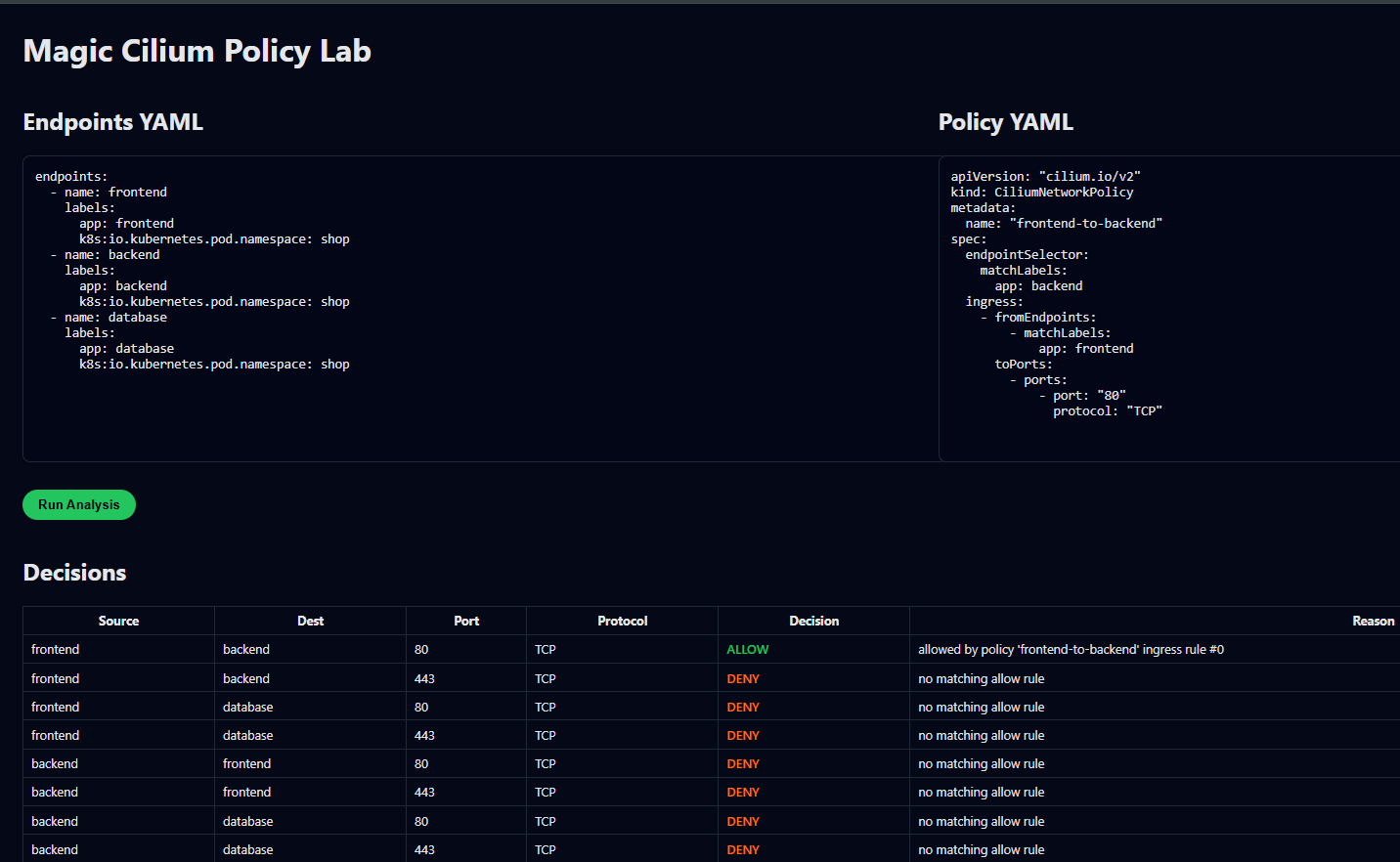
🧪 How to Test the UI Visit → https://cilium.admnwizard.com/web/ This is the simplest way to test Magic Cilium. You will see: • Endpoints YAML • Policy YAML • Run Analysis button • A Decisions Table • A Graph Visualization 1️⃣ Paste this into Endpoints YAML endpoints:
- name: frontend labels: app: frontend k8s:io.kubernetes.pod.namespace: shop
- name: backend labels: app: backend k8s:io.kubernetes.pod.namespace: shop
- name: database
labels:
app: database
k8s:io.kubernetes.pod.namespace: shop
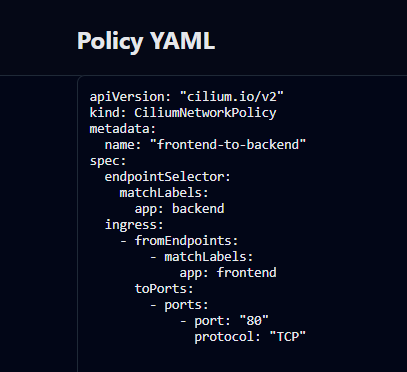
2️⃣ Paste this into Policy YAML
apiVersion: "cilium.io/v2"
kind: CiliumNetworkPolicy
metadata:
name: "frontend-to-backend"
spec:
endpointSelector:
matchLabels:
app: backend
ingress:
- fromEndpoints:
- matchLabels: app: frontend toPorts:
- ports:
- port: "80" protocol: "TCP" 3️⃣ Click Run Analysis 4️⃣ Check the Decisions Table You will see: Source Dest Port Decision Reason frontend backend 80 ALLOW allowed by policy frontend backend 443 DENY no matching allow rule all other combinations DENY no matching allow rule 5️⃣ Check the Graph • 🟢 Green edges = ALLOW • 🔴 Red edges = DENY Example: • ALLOW frontend → backend (80/TCP) • DENY frontend → backend (443/TCP) This gives a clear picture of “who can talk to whom”. ________________________________________ 🧪 Example Scenarios Add a second policy: --- apiVersion: "cilium.io/v2" kind: CiliumNetworkPolicy metadata: name: "deny-to-database" spec: endpointSelector: matchLabels: app: database ingress:
- fromEndpoints:
- matchLabels: k8s:io.kubernetes.pod.namespace: shop toPorts:
- ports:
- port: "80" protocol: "TCP" Rerun → Graph updates automatically. ________________________________________ 🔧 Local Installation git clone https://github.com/yourname/cilium cd magic-cilium
- fromEndpoints:
python3 -m venv venv source venv/bin/activate pip install -r requirements.txt
uvicorn app.main:app --host 0.0.0.0 --port 4089 Open: http://localhost:4089/web/
🖥️ Production Deployment (Your Server) Location: /home/sureshwizard/projects/liveprojects/selium Running via systemd ExecStart=/home/sureshwizard/projects/liveprojects/selium/venv/bin/uvicorn app.main:app --host 0.0.0.0 --port 4089 SSL URL https://cilium.admnwizard.com/web/ NGINX handles: • SSL termination • Proxy to port 4089 • Redirect HTTP → HTTPS
📚 What the Engine Supports • endpointSelector.matchLabels • ingress.fromEndpoints.matchLabels • ingress.toPorts[].ports[] • protocol: TCP • Implicit deny (when no rules match) Perfect for: • Kubernetes • Cilium beginners • Policy debugging • Learning how label-based identity works
📈 Roadmap • Egress support • L7 HTTP rules • Multi-policy evaluation • Import from kubectl • Advanced graph visualization • Export to PDF/Markdown
🏷️ License Open Source — Apache 2.0
👤 Author AI & Code with Suresh

Log in or sign up for Devpost to join the conversation.