Inspiration 🐳
Hey I'm Cinja,
Thank you for checking out my very first hackathon project! I am a software developer, and I've been a dedicated Jira user for years. I used the opportunity presented by "codegeist unleashed" to automate a task that I (and probably many others) perform daily: creating Jira issues as soon as something happens on the internet!
We're all familiar with this routine: After our first coffee, we check our email inbox to catch up on what we might have missed.
Does this sound familiar to you?
- Your finance department contacts you about a missing receipt for your last credit card transaction.
- ➡️ Let's create an issue on our personal Jira board for that.
- Someone adds you as a reviewer for a pull request on Bitbucket (or GitHub or GitLab).
- ➡️ Let's turn this into an issue on a Jira software development board.
- You receive an automated email from Atlassian (Apple or Google) because one of your apps needs an update due to an approaching deprecation period.
- ➡️ Make this a ticket on the short-term roadmap in Jira.
That's what I mean: Something happens on the internet or someone contacts you via email. If it's important, you can create a Jira Cloud issue for it.
After likely spending years migrating content from my email inbox, I invite every Jira Cloud user to now use Issue Inbox.
What it does 🌎
Issue Inbox uses the power of modern AI to automate the creation of issues based on incoming mails.
This app does not pipe all your sensible data from e-mails to a foreign AI server!
You might probably think: Well, another app that leaks my private company data to remote server. 🥱
Being in the Atlassian ecosystem for over one year now I am a big fan of Atlassian Forge. It was quite a challenge to combine the strengths of Forge around data privacy with the power of online AI services. As hard as this was as much I am proud of the fact that Issue Inbox combines both!
In a nutshell 🥜
Issue Inbox empowers Jira users (not just global admins) to create their custom inboxes, like [email protected].
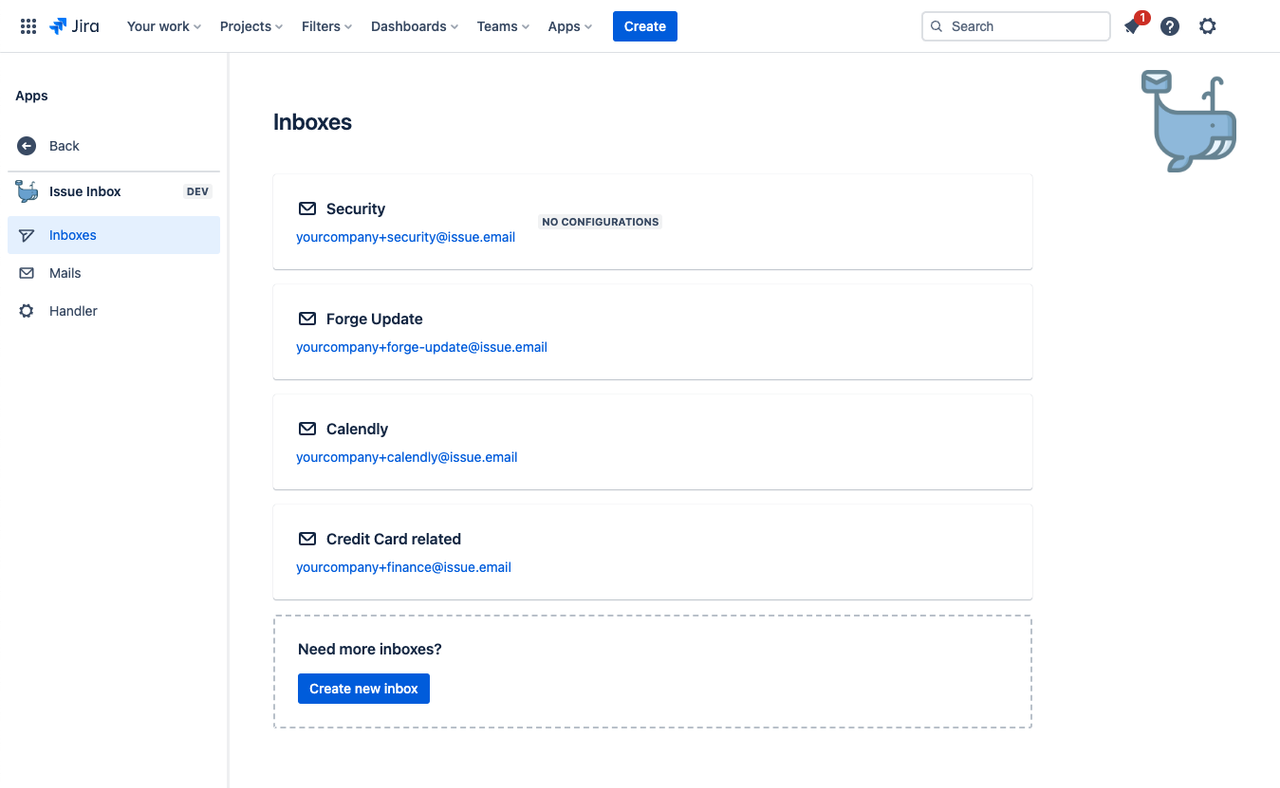
Each inbox has a regular email address. You can either:
- Manually forward relevant emails to it.
- Set up an automated forwarding rule in your mail client.
- Configure the originating service (e.g., Bitbucket, GitHub, or others) to send emails directly to the @issue.email inbox.
Each inbox comes with its configuration:
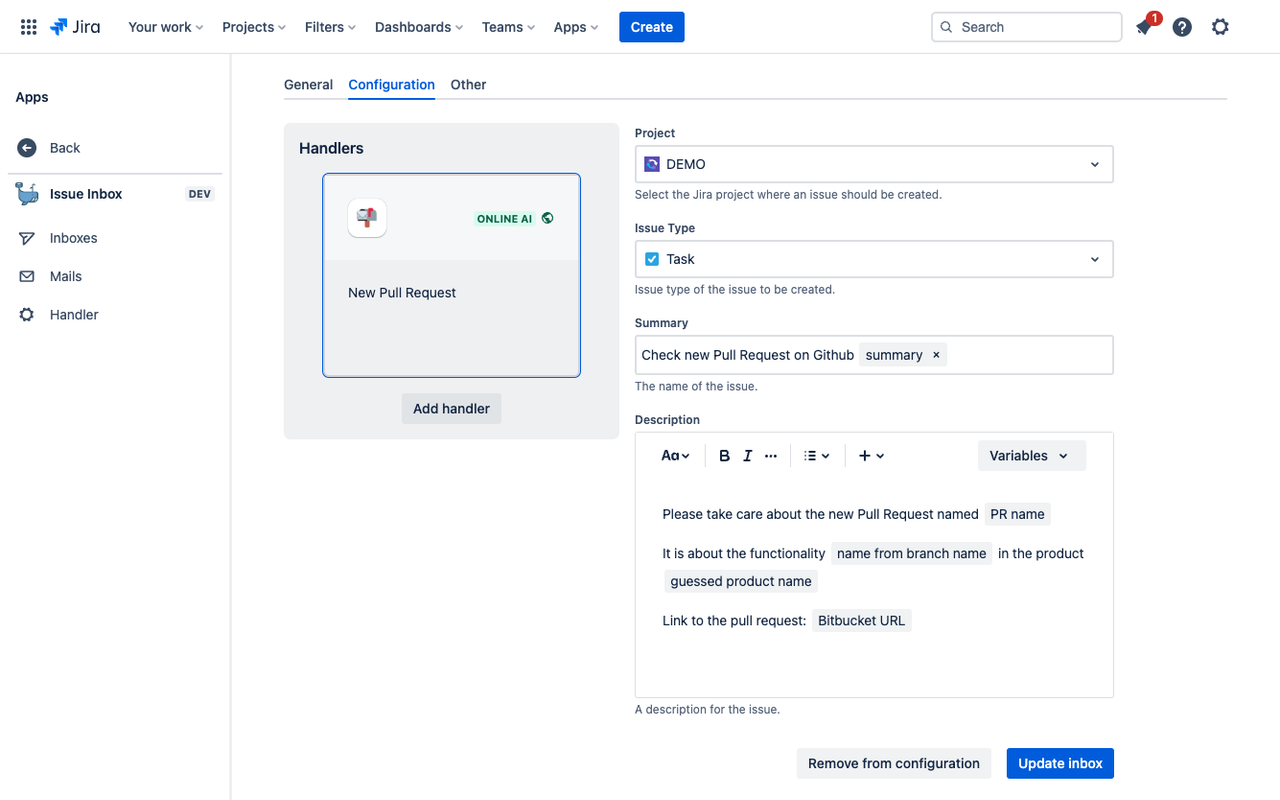
This configuration dictates what should happen when an email arrives. You can use variables in the summary and description to enrich the issue with valuable information from the email.
The result looks like this:
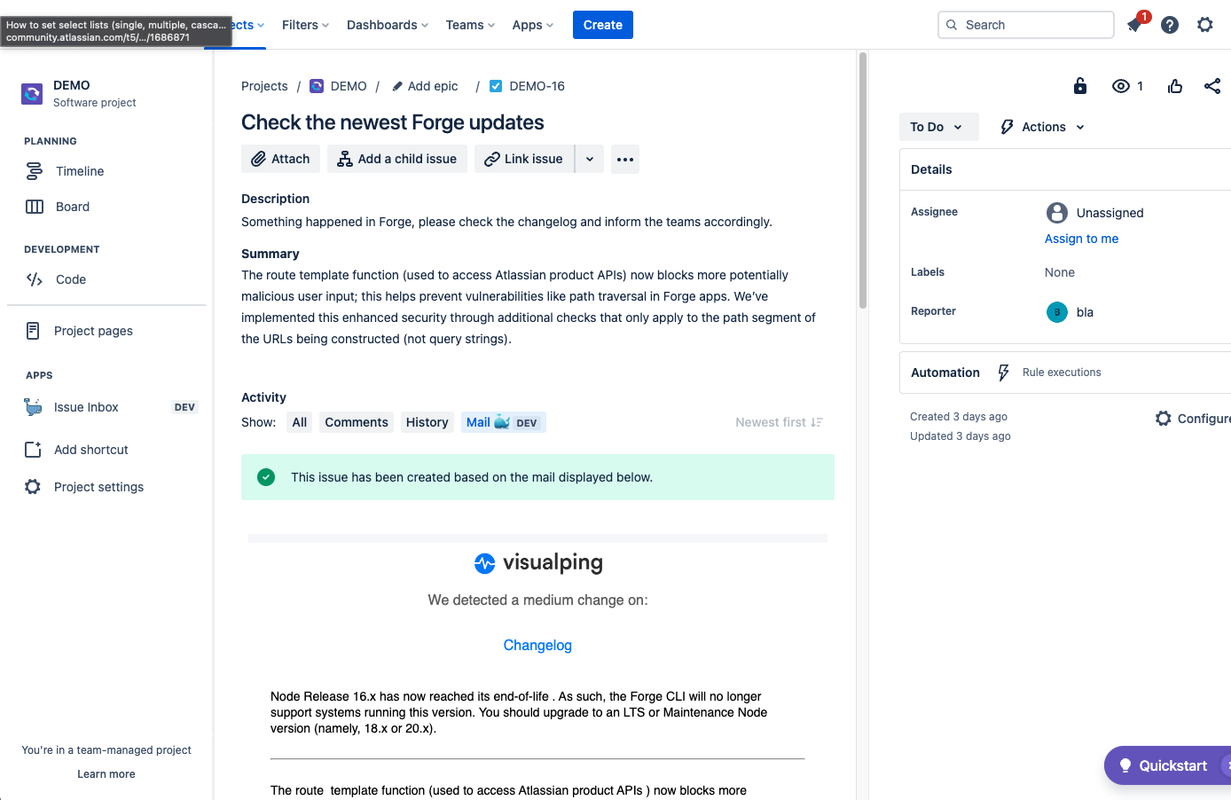
The screenshot above also demonstrates the power of Issue Inbox: We're employing a third-party service, Visualping, to monitor the official Atlassian Forge changelog. Whenever a new Forge update is published, we receive an email, and a summarized version of this update is automatically added as a new Jira issue! 🚀
How does this work? 🤔
The way Issue Inbox processes incoming emails is defined by handlers. They specify which emails to use and what information to extract. Fortunately, the app comes with default handlers, allowing you to start right away:
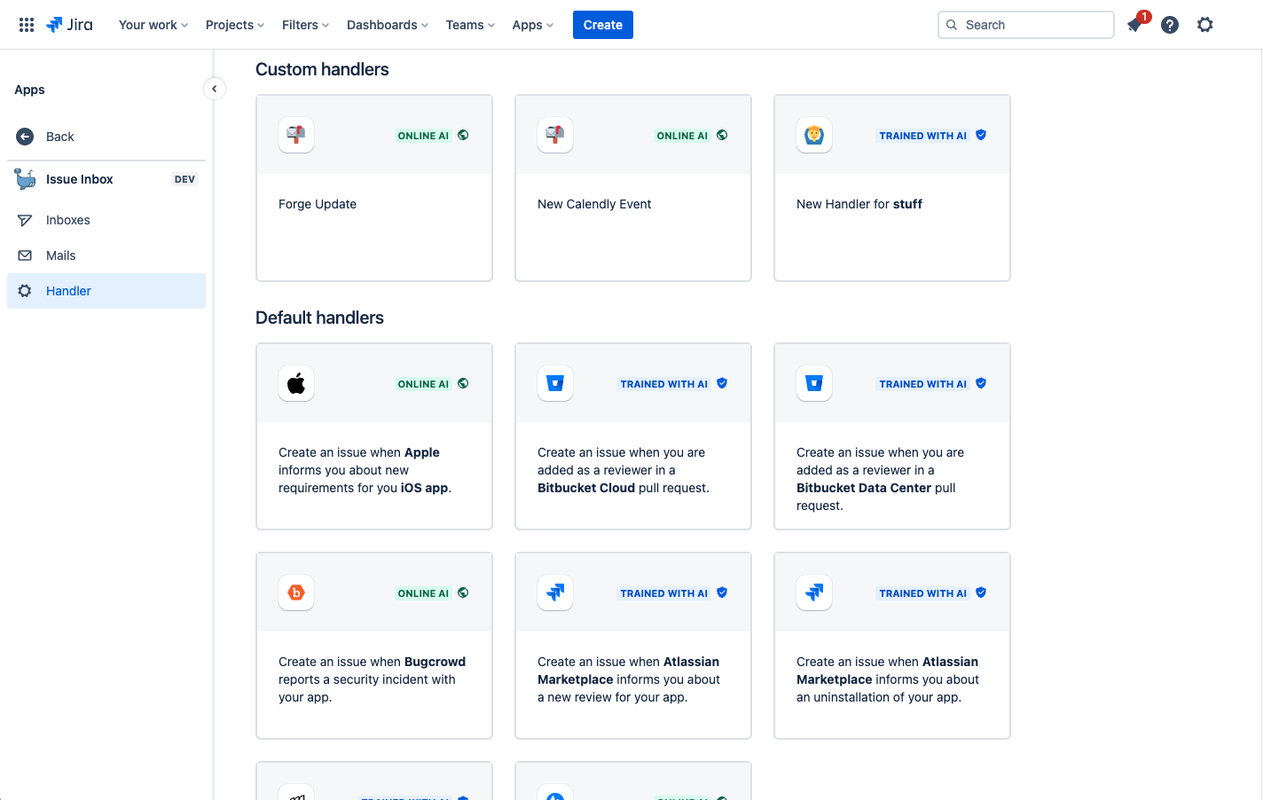
Take a closer look at the screenshot above: There are two types of handlers:
- ONLINE AI handlers securely send your emails to the remote service Open AI to extract valuable information. They are easy to set up and ideal for non-confidential emails and when there are no legal restrictions on involving third-party services in email processing.
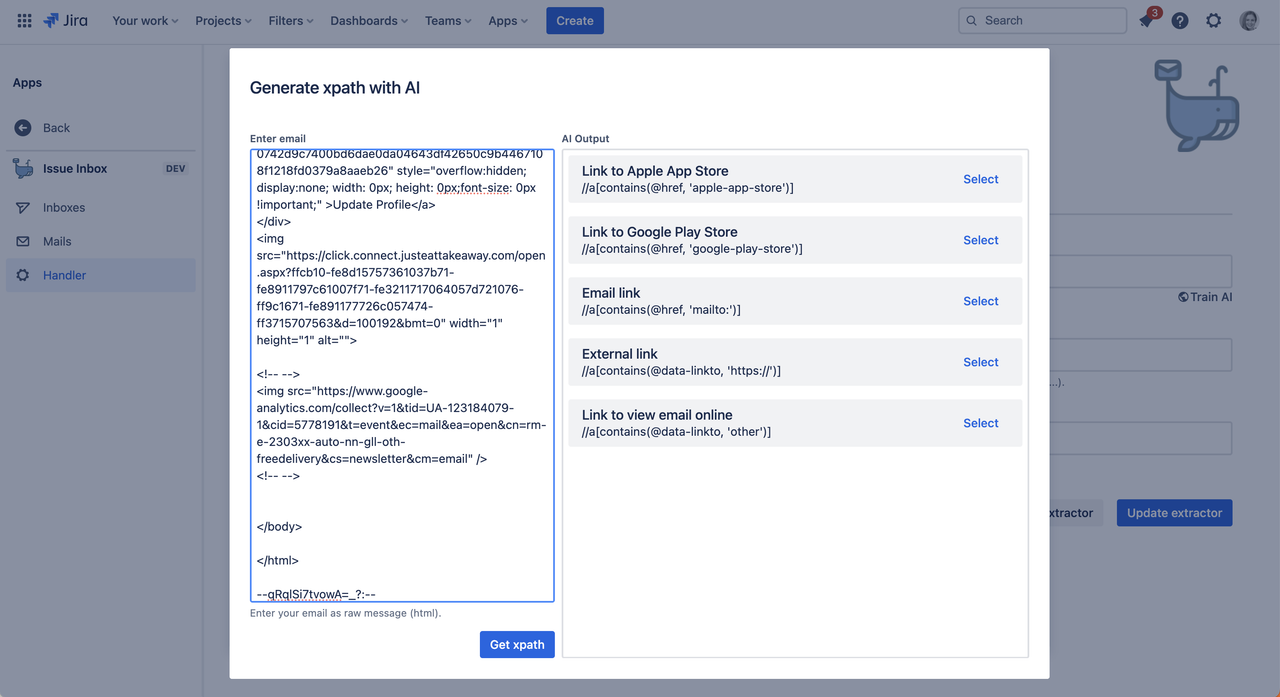
- TRAINED WITH AI handlers go a step further: They use AI for training to understand how to extract content from emails from specific senders. You can specify the relevant parts of an email using a single email as a reference, and thereafter, actual emails can be processed without relying on remote AI. See the screenshot below:
What third-party services are supported? 🔌
This is a beauty of Issue Inbox: Every service that sends emails (and they all do) can be connected. You can use the pre-defined handlers as a start to build you own configurations. Sure, for some services there are already integration apps in the marketplace. But they are often not well maintained.
Issue Inbox is the all-in-one solution. You can even connect your own companies legacy services as long as they send notifications via email. Alternatively you can use it for emails from customers.
You can learn more on how to define custom handlers in the "extraction & detection" section below.
Wait! Where is my data stored? 💽
Great news: All data at rest is exclusively stored within the Atlassian Cloud. As mentioned earlier, you can either fully automate the detection and extraction process with Open AI or simply use individual emails to extract pertinent information for upcoming emails. Data persistence is entirely managed via Forge, with no other databases involved.
Sold. But how can I trust you on this?
I've devoted as much time to building the issue creation as I have to ensure maximum transparency in every core functionality. Every email ingested into the application is displayed in the Mail Client. This not only offers visibility but is also super helpful for debugging. 🐛
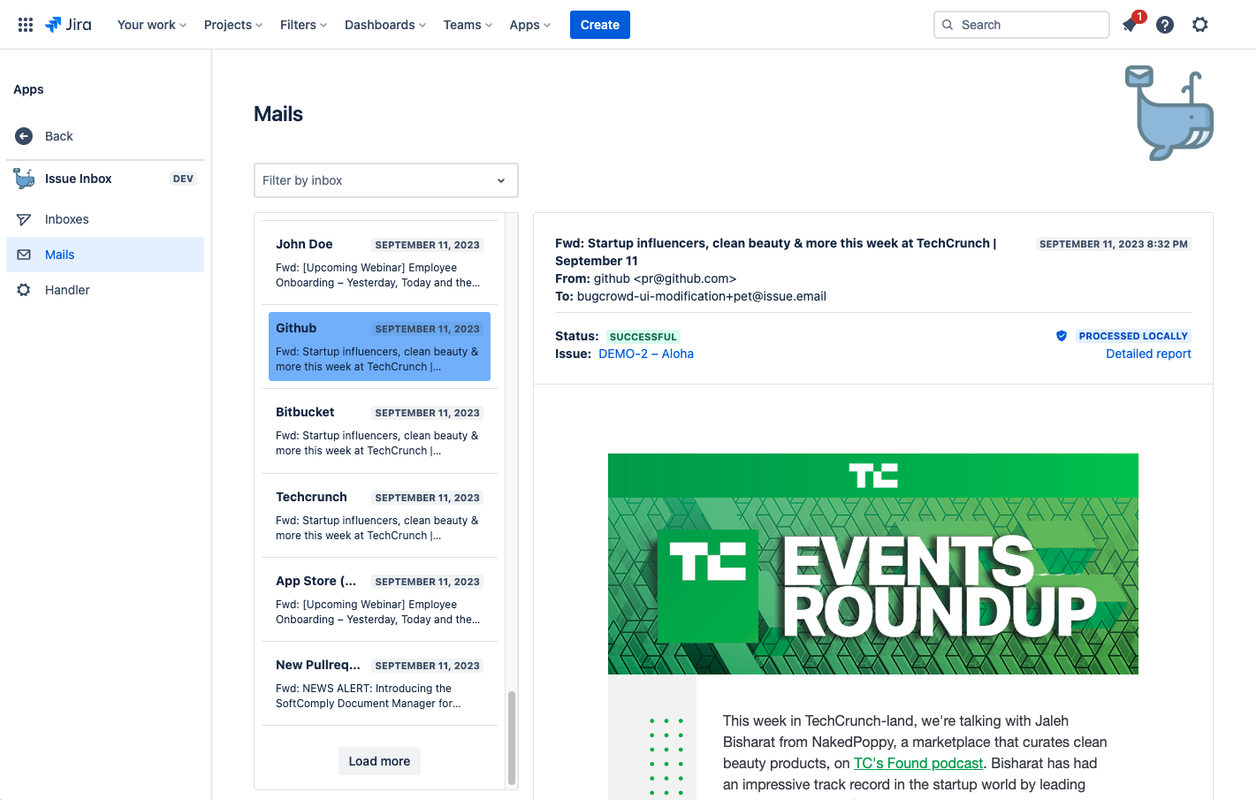
See that "processed locally" label above? This means that the email never left the Atlassian ecosystem.
Doesn't Jira Cloud have a mail integration? ☝🏻
You are right! Jira has a limited functionality to integrate mails with projects. But this features has not been improved for quite a time.
- Unlike Jira Cloud's email integration Issue Inbox doesn't restrict functionality to global admins, making it accessible to all users. 🔑
- Obviously, it doesn't rely on AI for processing. 📠
- While Jira typically copies plain text to the summary, Issue Inbox offers control over extracted values, providing flexibility in issue creation based on email content. 🧠
How we built it
The Domain 🌍
Like every new side project, development began with the purchase of a new domain. 😅 – I'm now the proud owner of the TLD issue.email. Pretty cool, right? That's why the inboxes have addresses like [email protected].
One of the next steps will be figuring out how to allow customers to connect their own mail servers.
I still think it was worth the $20. 😇
Detectors and Extractor ⚙️
This was the more challenging part. For every incoming email, we need to determine whether it is mean for further processing, and if so, which data to extract. Detectors and extractors consist of one or multiple modules, each falling into different categories:
- Pure AI components: These modules send your email to an AI server. You can configure them with prompts that ask questions like "Does this look like a bug report from a customer?" or "Extract the invoice amount."
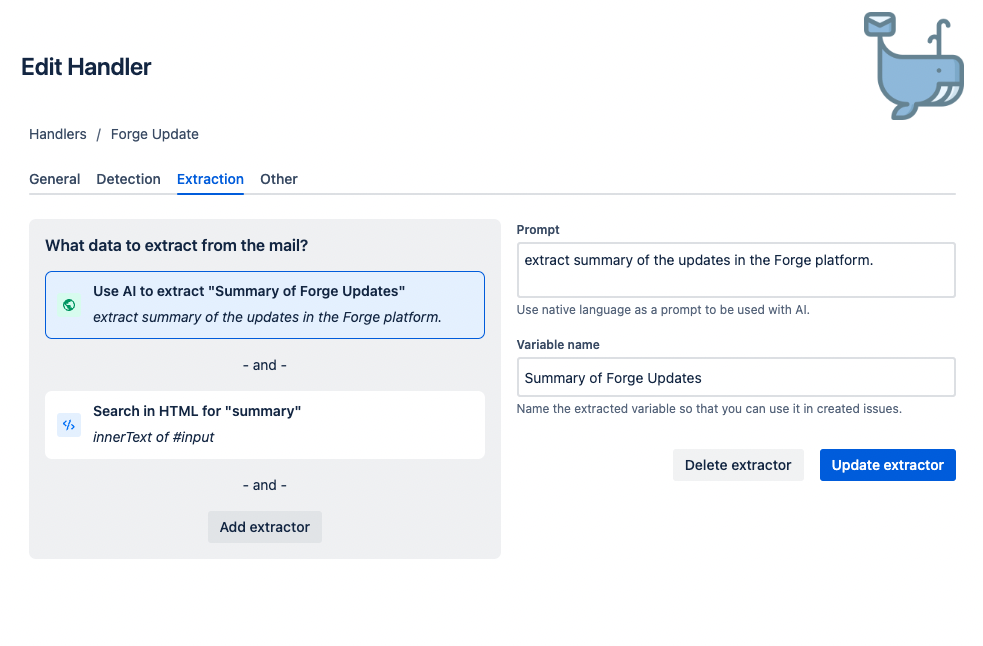
Hybrid AI components: These modules can utilize AI to learn how to process emails locally. You can paste an email into the training pop-up, as shown in the screenshot above, to extract the necessary XPath selectors. These selectors are then exclusively used within Forge for all subsequent emails.
Simple components: These components work well as basic filters. You can perform actions such as checking whether the subject contains specific strings.
Transparency Report 🕵🏻♀️
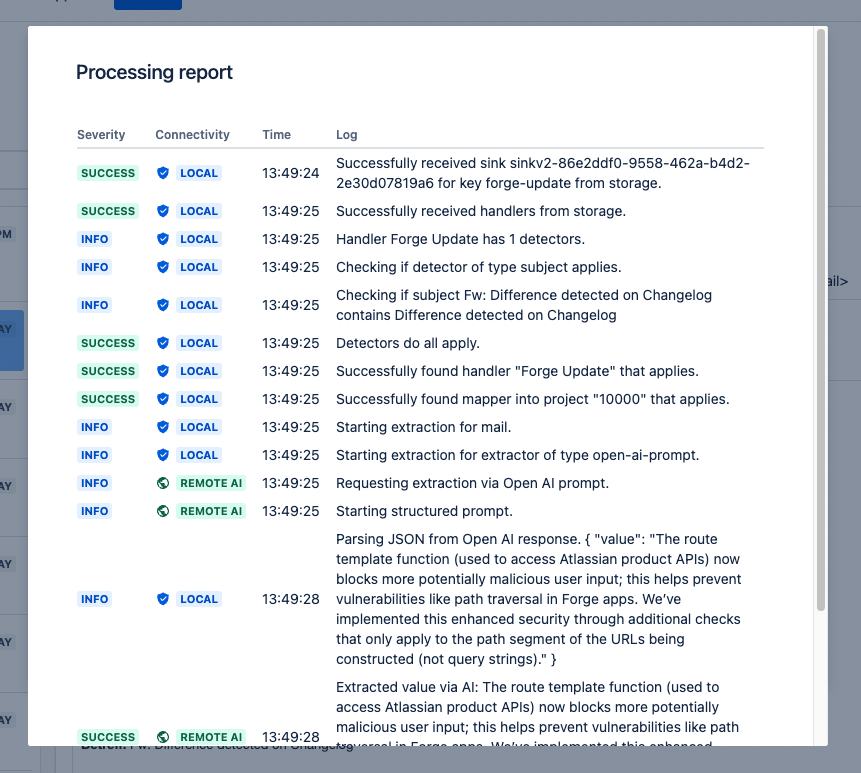
To handle the responsible usage of AI at every stage, Issue Inbox logs and persists every action taken. You can access a report for each email to review the operations performed and see whether they were executed remotely on AI servers or locally within Forge.
For sensitive emails, such as those related to finance, you can ensure that only pre-trained modules have been utilized.
Challenges We Ran Into
Storage API / Complex Queries 💾
The project came to life thanks to the support for Complex Queries in the Storage API. 🚀 I've built the application around entities, serving as its persistence layer. I used entities for Mails, Inboxes, Handlers, and Logs (Transparency Report), ensuring a that data is securely stored on Atlassian servers while allowing users to query specific information. Nevertheless, setting this up has been a challenge, especially the configuration of the related indexes was tricky. 👩💻
Mail Rendering in Custom UI 💌
While Issue Inbox benefits from the flexibility of mails, it feels like no too much happened in terms of their technical nature. It was hard to render mails correctly in the Forge iFrames. I am happy to have found the right combination of great open source libraries to make this possible. 🙌🏻
Accomplishments I'm Proud Of
We all know that Atlassian Forge is centered around customer privacy and the assurance that customers can trust the location of their data. It's a platform built on customer trust. Integrating Artificial Intelligence services with Forge wasn't easy.
I have spent quite some time think about how to use the power of AI without sacrificing the advantages of Forge. I'm happy to say that I've found an approach that combines the best of both worlds. 👩💻
Upcoming features
- Marketplace Release
- Support for custom mail servers
- Granular permission control
- Project scoped inboxes
- More techniques to learn extraction strategies from AI
Thank you for reading this! Bye, Cinja 👋
Built With
- forge
- openai
- react
- typescript


Log in or sign up for Devpost to join the conversation.