-
-
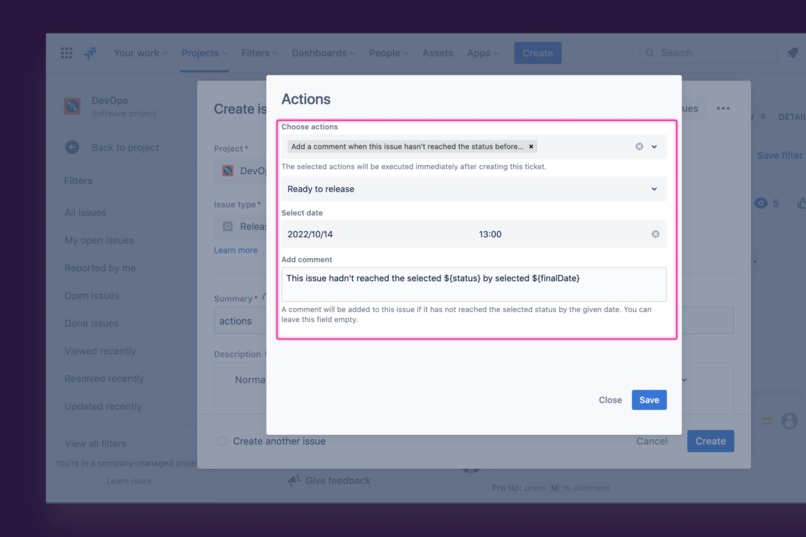
Set up the rule where the comment will appear when the task doesn't reach the status to the date
-
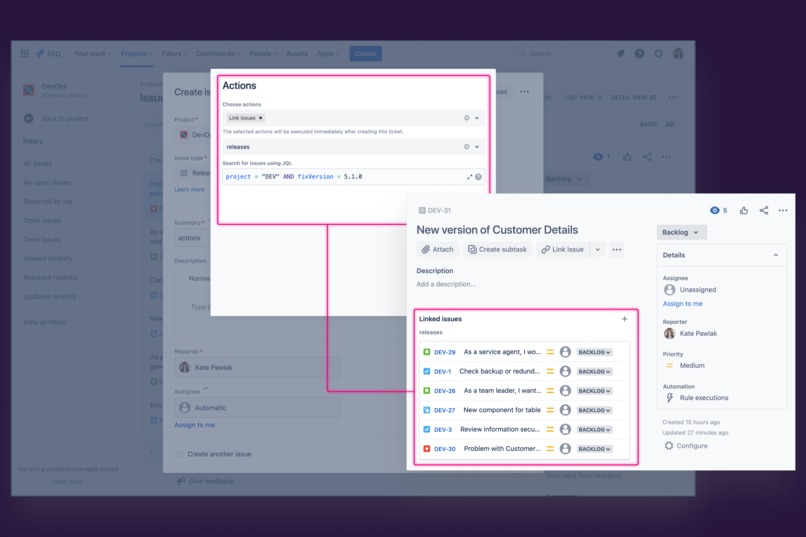
Use bulk issue linking with JQL and save your time
-
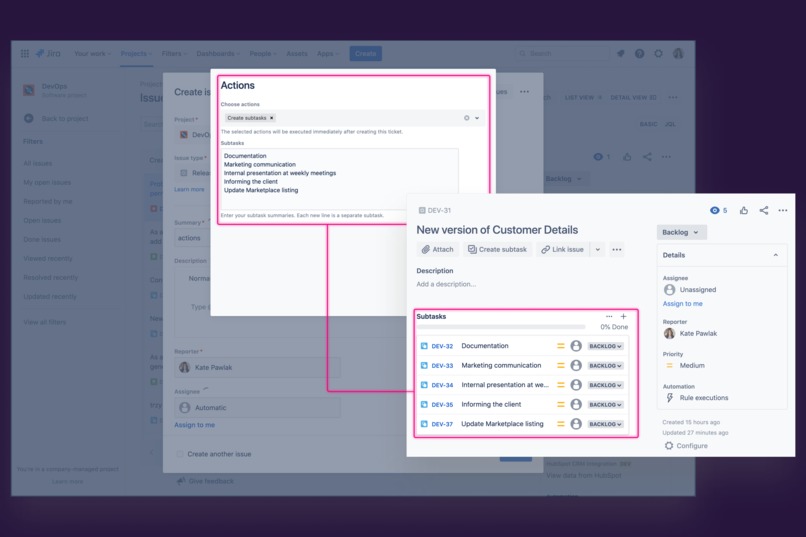
Create many subtasks at once when issue creating


Inspiration
Many projects undoubtedly are based on Jira automation. However, both its great potential and its restrictions are present. For example, only the administrator may establish rules; even the manual trigger on the problem view screen is tucked away. That is why we decided to create Issue Actions for Jira. With the help of this solution, you may plan subsequent actions when an issue is created. As a result, your time will be saved, and you won't have to make a million clicks to manually link tickets or create subtasks.
What it does
Issue Actions allows users to perform actions related to an issue after it has been created without additional clicking. In the first version, the following actions are available:
Bulk issue linking - the ability to link issues we type in JQL, f.e.: project = IMC AND fixVersion = 5.0 – thanks to that, there's no longer a need to create issues after issues manually when the request is made.
Add a comment if the issue doesn't achieve XYZ status by {date} – this feature allows users to type the comment with the following rules. It can be a simple reminder that if this issue won't be in progress due to the date, it's necessary to change the priority or ask the product owner to react.
Add a comment when this issue is added to the active sprint – the comment shows when the issue is moved to the active sprint.
Add a comment when the status is not reached until a given date – the user sets up the comment, which will appear on the exact date when the task doesn’t change the status.
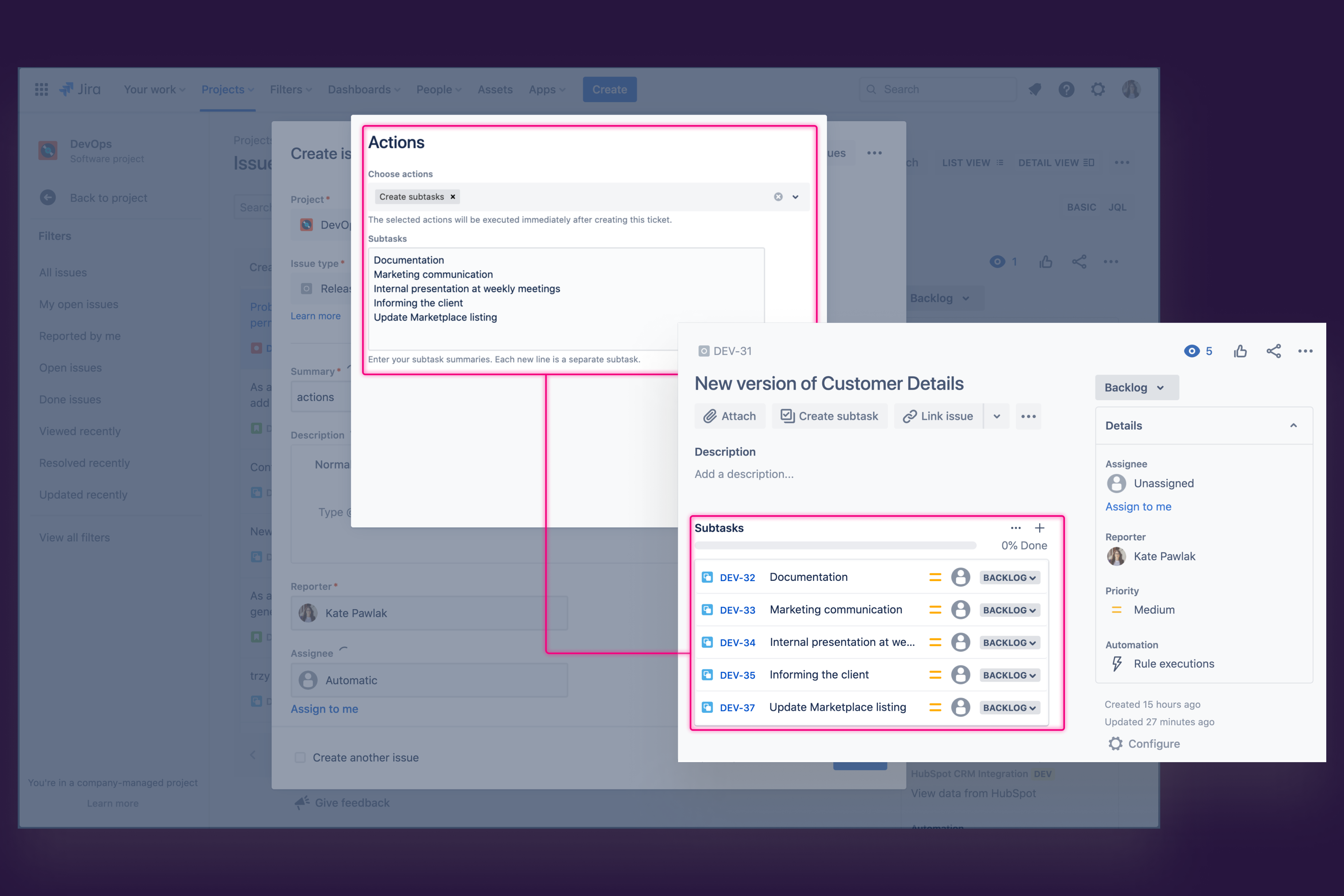
Bulk subtask creating – users can create a dozen subtasks simultaneously in one go. All that needs to be done is type their summary in the following lines. It’s convenient when there are a dozen of them to do.
How we built it
🛠 This app is built with Forge. The starting point was the UI modifications (UIM). We used Forge Custom UI, Forge Storage, and Admin page. We use web and scheduled triggers. The frontend is built with AtlasKit's components. We managed the entire project using Jira Cloud and Confluence. The Interface graphic designs are prepared in Figma.
Challenges we ran into
Callback onClose is a never-ending story! Due to the lack of it, we had to figure out a temporary solution. We developed the identification generator, which is included in the Summary – it automatically disappears when the actions are done. Thanks to this, users know on which issue the actions should be executed. We managed to use UI modification slightly differently, as it’s said. Its creators didn’t foresee using it to open modals that allow you to perform some action.
Accomplishments that we're proud of
We have discovered and patented the other UIMs usage that makes our dialogue work. Broadened horizons are always welcome.
What we learned
This was a great opportunity to get to know the Forge modules that were new to us. Web trigger, scheduled trigger – welcome on board! What’s more, we also deepen the knowledge of UI modification and using prebuilt and reusable components based on other AtlasKit components.
What's next for Issue Actions for Jira
We’re looking forward to receiving users’ feedback. We’ve created our idea checklist and are still extending it. We can’t wait for Atlassian's addition of Forge support in service projects, as this will expand the scope of use cases that we will be able to realize with actions in our addon.
Built With
- atlaskit
- figma
- react
- storybook
- typescript


Log in or sign up for Devpost to join the conversation.