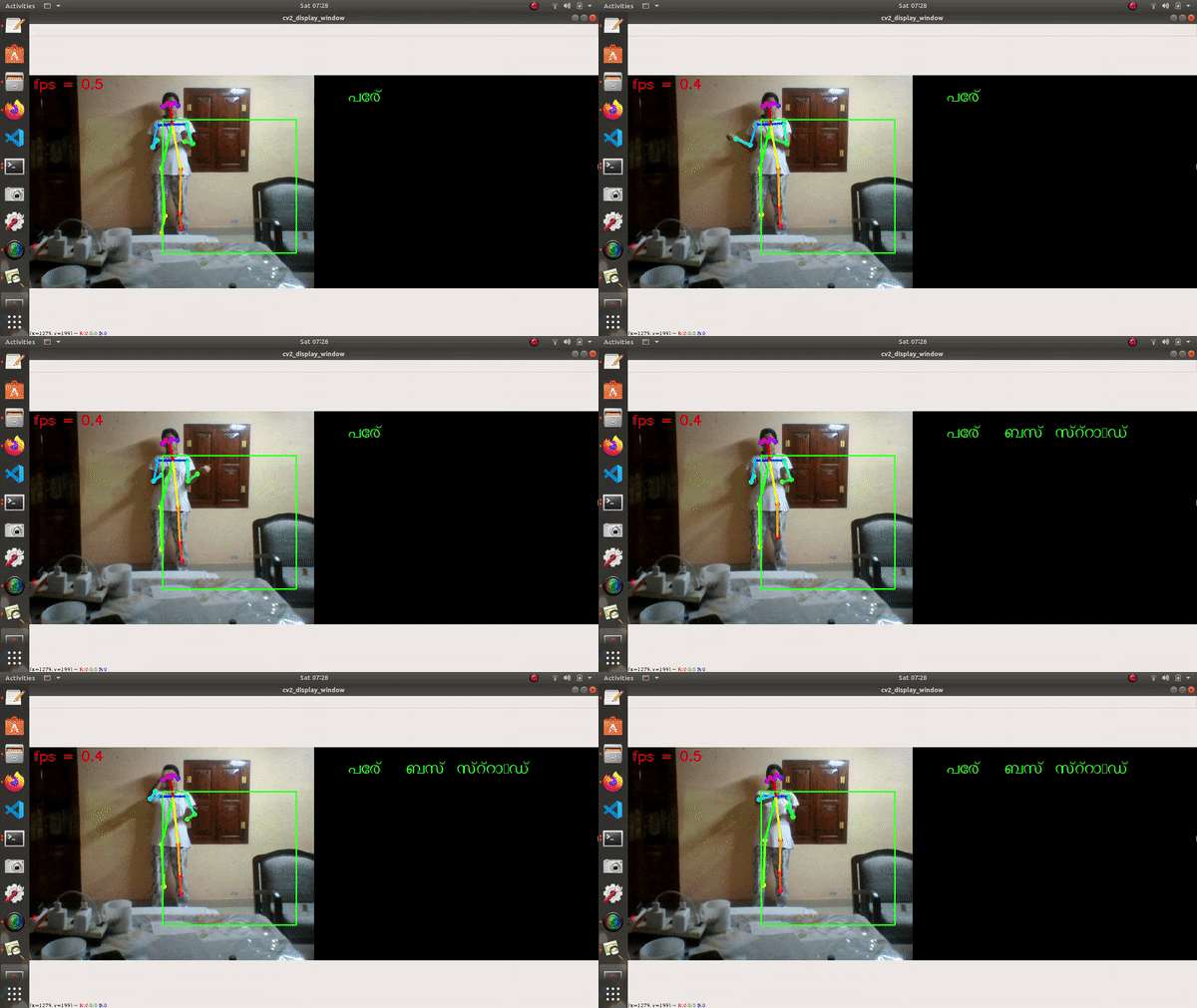
ISL to Malayalam using OpenPose


My System : Ubuntu 18.04.4 LTS | Intel® Core™ i3-3110M CPU @ 2.40GHz × 4
Contents :
- Story
- Install OpenPose
- System Design
- Model
- Results
- Front-end Design
- Future Works
Story :
When I thought of this project first, I didn't knew where to get the dataset. Went to a special school and they said there is no official signs for each words in Malayalam and there is no signs for letters (That was a surprise). I found out that each signs had movements and I needed video dataset (traped !). What now ? I searched many projects and found out that, for me with a laptop of limited processing power and memory, the best way is to split the video frames into a few frames and that's what I did.
As American Sign Language Translators mostly uses images as dataset, I turned my attention to action recognition projects and that's where I found out about OpenPose. I created my own dataset by capturing video for 8 Malayalam words [പേര്, ബന്ദ്, ബസ് സ്റ്റാൻഡ്, ബാങ്ക്, ഭക്ഷണം, വിജയം, വീട്, വെള്ളം] and splitted them into 7 to 9 image frames. I used ISL Dictionary Malayalam to know more about each signs. One of the projects that helped me a lot is Realtime Action Recognition by Feiyu Chen. The program is splitted into 5.
- First detect the skeletons using Openpose and are saved as txt files.
- Second program combine all the txt file to one single txt file.
- Third program extracts the features.
- Fourth program trains the model and saves it as a pickle file.
- Fifth program uses the trained model to convert the signs from webcam.
Install OpenPose :
Note : Python >= 3.6.
I used OpenPose from this Github Repository : tf-pose-estimation.
Create a folder githubs in the "src" folder.
cd src/githubs
git clone https://github.com/ildoonet/tf-pose-estimation
The tutorial to download the "cmu" model is given here.. "mobilenet_thin" model is already in the folder.
System Design :
8 libraries were written to support the main programs in which 5 are used for main implementation. The main program is divided into 5 section : Skeleton extraction, Skeleton text files to a single text file, Data pre-processing/feature extraction, model training and testing/final program.

1.Skeleton Extraction :
Skeleton extraction is done at the first part of the main program. Here Openpose library is used to extract the skeleton from the given image. 18 joints are detected and it is drawn on the image and saves it as a new image file. An image information text file is also created using Skeleton library during this phase where each value is a list with 5 values. The list is of the form [action count, clip count, image count,image label, filepath]. The list for each image is saved in the image information text file. As this project is using Malayalam label, the labels were encoded before saving into the text file.

Openpose also creates a text files consisting the information of each skeleton. It is also a list with the image information list mentioned above and the values of 18 points. As the values for both x and y coordinates are needed and hence there is 36 values in the list

2.Skeleton text files to single file :
In this phase the skeleton information text files are the input files and these are combined into a single text file using the Skeleton library. This will reduce the time to process the features of each skeleton.

3.Feature Extraction :
In this phase the skeleton information text file is taken as the input and data is processed and features are saved into CSV file. Time-serials features are extracted. Raw features of individual images are converted to time-serial features calculated from multiple raw features of multiple adjacent images, including speed and normalized position. The output is saved as two CSV files, one consisting of features and other it’s corresponding labels.
4.Training Data :
The model is trained using the CSV file where the features are extracted. X and Y features are splitted into 70% training and 30% testing data. PCA is used to reduce the dimensionality of datasets, increasing interpretability but at the same time minimizing information loss. Classifier library is used here to train the model. In this phase any models from Nearest Neighbors, LinearSVM, Gaussian Process, Decision Tree, Random Forest, MLP, AdaBoost, Naive Bayes etc canbe selected. from the experiments the best result is given by MLP and hence it is chosen. Model is evaluated using both splitted feature files. 679 training samples and 291 testing samples. The trained model is saved into a pickle file for further use.
5.Use trained model :
Use trained model to convert Malayalam Sign Language into text using webcam.
Model :
Signs are read using webcam. The model saved in the pickle file is used here. 5 adjacent images are read and displays the label with the highest score. A blackboard is displayed along with the webcam image to write the translated text. MLP Online Learning method is used in this system.
Results :
The experimental results of the proposed system.
- Confusion Matrix :

- Accuracy : 95.8%

Front-end Design :

Sign to text option opens the mobile camera to read and then displays the text in the text box. Text to sign option plays the video for the selected word. The video is constructed using 2D avatar.
I got the 2D avatar idea from the github repo.
Future Works :
In this project I have developed a design for a mobile application. This application can be implemented using Flutter as front-end and Python as back-end. This application has two options, either to convert the sign to text or text to sign. The text to sign conversion is in progress. In this feature, when the user selects a word, the video for the word is played. The video is created using a 2D vector illustration and animates its containing curves in real-time based on the recognition resulting from PoseNet and FaceMesh. It borrows the idea of skeleton-based animation from computer graphics and applies it to vector characters. This avatar is used to record video for each words. The sign to text feature is implemented using this project system where, clicking on the option opens the mobile camera and the model detects the skeleton of the person in front of the camera and predicts the gesture.

Log in or sign up for Devpost to join the conversation.