Inspiration
Six weeks into a new serum, you look in the mirror and honestly can't tell whether it's doing anything. So you either quit something that needed another month, or you keep rebuying something that never worked.
Most of us have the evidence in a bathroom cabinet. In a survey of 2,000 UK adults for The Body Shop, people said they spend an average of £17.51 per skincare product and have two abandoned products at home, about £35 each and over £1bn across the UK. 27% gave up on a product because the formula wasn't right for their skin, and 18% because it worked at first and then stopped (Professional Beauty, 2022). In a 2026 Face the Future report on acne in the UK, 53% said they had spent money on products that didn't work (TheIndustry.beauty).
Retailers rarely see this as a return. Opened cosmetics usually can't be sent back, so "this didn't work for me" turns into silent churn: the customer keeps the product and never reorders. When they do switch to a complexion product, shade is the risk; industry estimates put foundation and concealer returns at about 23% where returns are allowed, mostly from shade mismatch (Eightx 2026 benchmarks, an aggregated industry synthesis rather than a single study).
YouCam's brief named the moment exactly: standing in front of a mirror deciding whether a product is working. We built for that moment, and for the purchase that comes straight after it.
What it does
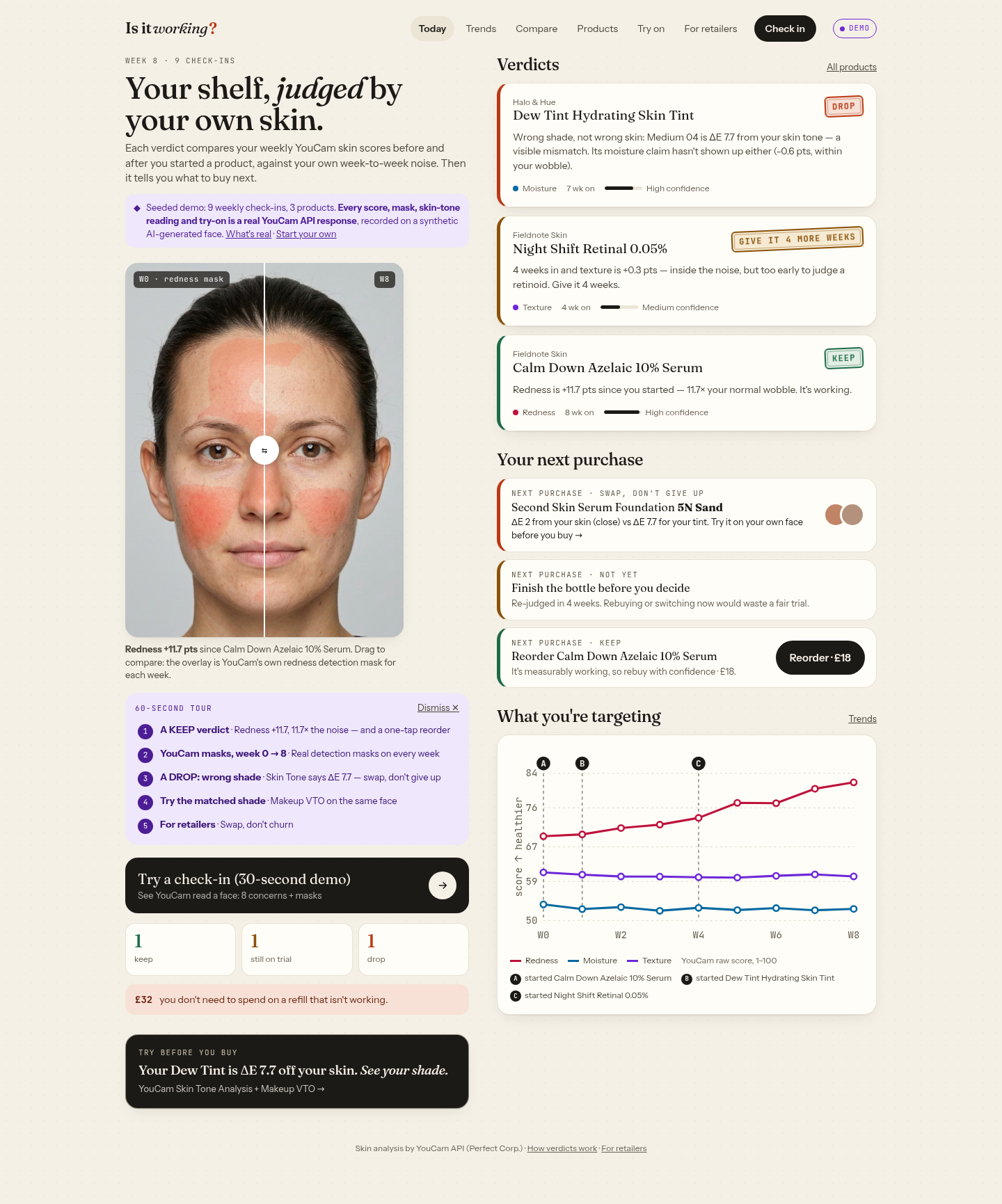
Most skin tools stop at a score, or at "it isn't working". Is It Working? turns every verdict into the right next purchase.
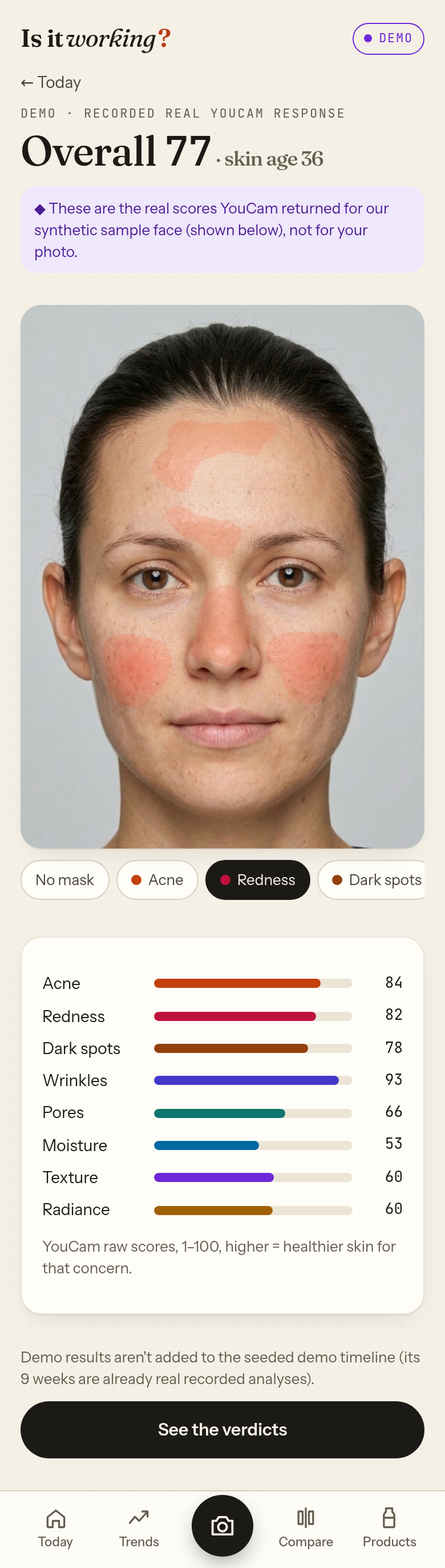
- A 30-second weekly check-in. The phone camera frames your face in an oval and checks the lighting on the device first, so each week's photo is comparable and a bad photo never costs an API unit. YouCam AI Skin Analysis (v2.1) scores 8 concerns (acne, redness, age spots, wrinkles, pores, moisture, texture, radiance) and returns a detection mask for each.
- Every product gets a fair trial. Scores build into per-concern trends with a lettered marker on the day you started each product. Drag-to-compare lines up week 0 and today with YouCam's own masks on both sides. Photos and masks are saved in the browser (IndexedDB), so the comparison still works after YouCam's result links expire.
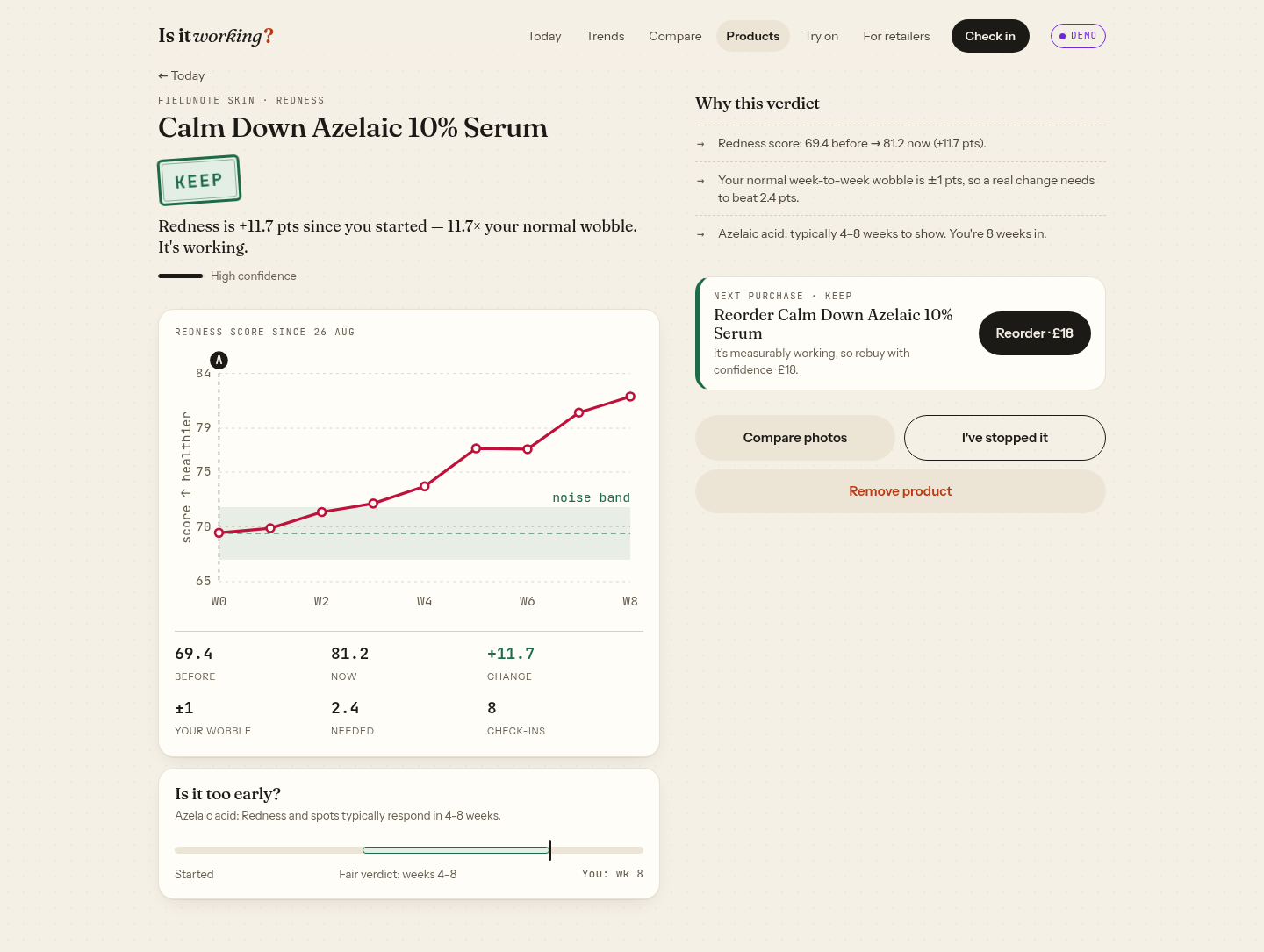
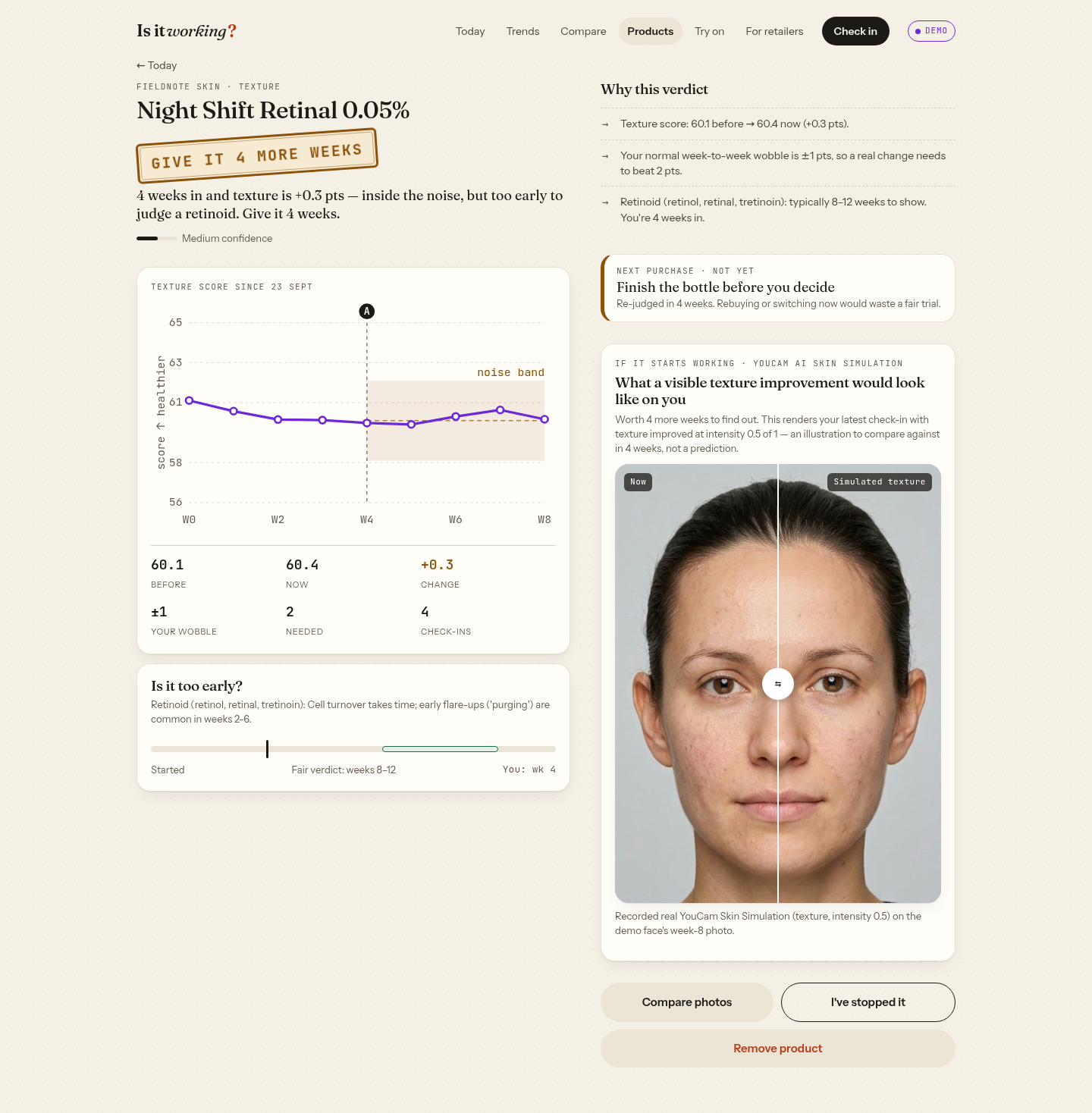
- A verdict, with the numbers. For each product's target concern, a deterministic, unit-tested engine compares before vs now against your own week-to-week wobble and the realistic time that type of product takes (retinoids 8–12 weeks). It returns KEEP, GIVE IT N MORE WEEKS or DROP, with every reason in plain English.
- The next purchase, done right.
- KEEP → reorder with confidence. In the demo, Calm Down Azelaic 10% Serum improved redness by +11.7 points, so the app offers a one-tap reorder (£18).
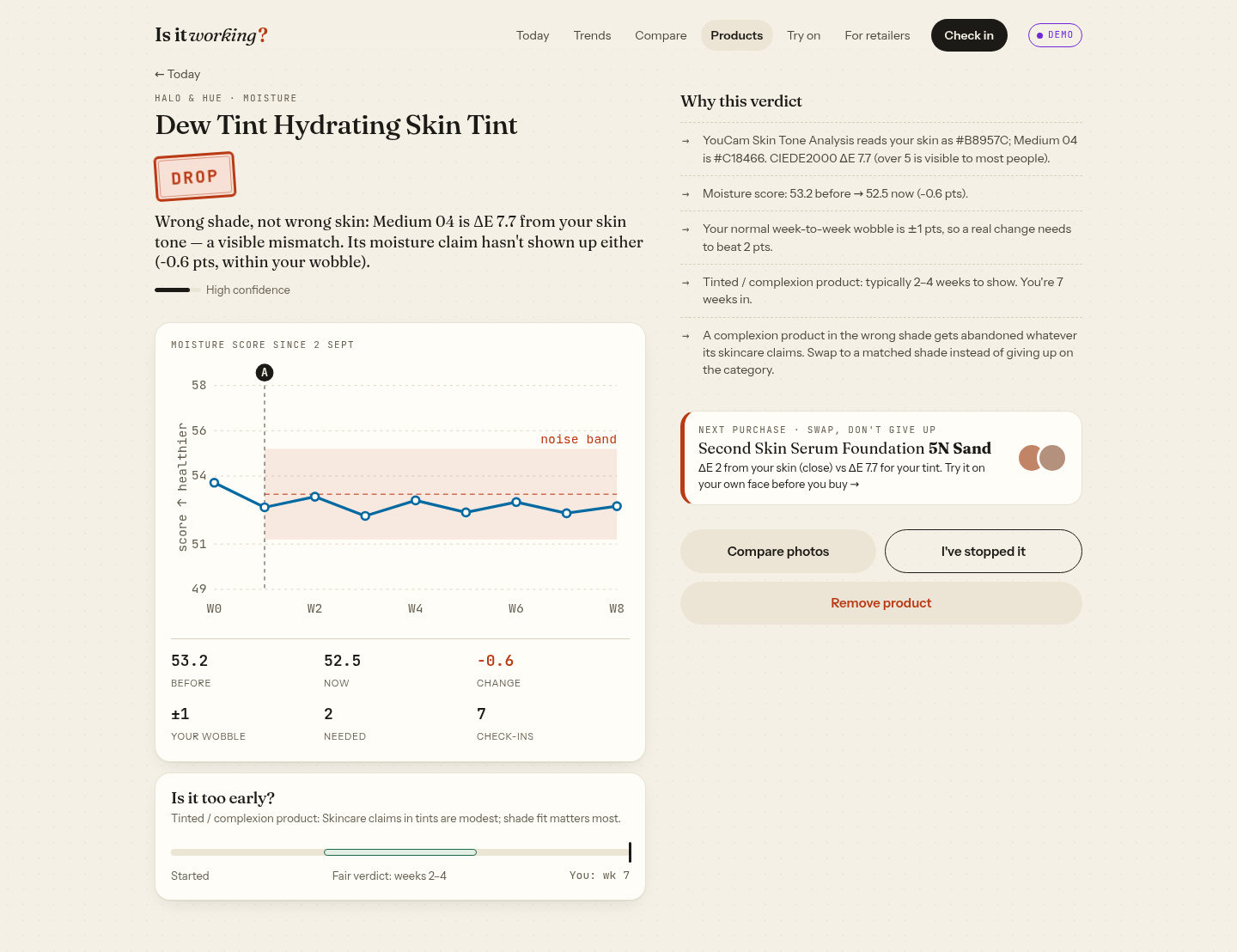
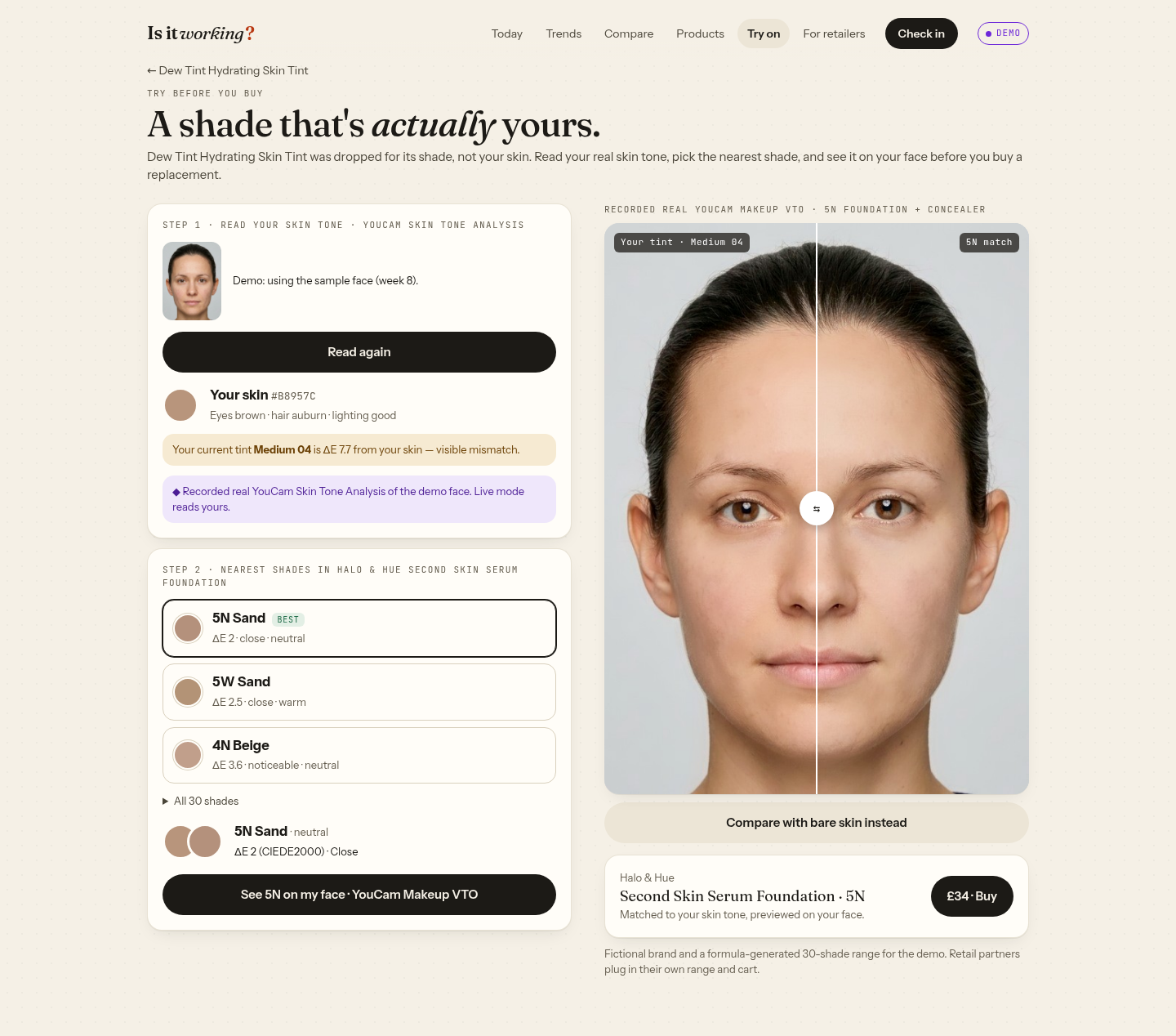
- DROP → swap, don't give up. The demo's Dew Tint wasn't failing your skin, it was the wrong shade. YouCam Skin Tone Analysis reads the skin colour (#B8957C); the tint's Medium 04 is ΔE 7.7 away, a visible mismatch. The app ranks a 30-shade range by CIEDE2000 and finds 5N Sand at ΔE 2.0.
- Try it on before you buy. YouCam Makeup VTO renders both the old tint shade and 5N (foundation + concealer) on the same face, side by side.
- GIVE IT TIME → finish the bottle. The retinal is only 4 weeks in (texture +0.3, inside the wobble), so the app says don't rebuy or switch yet. YouCam AI Skin Simulation shows what a visible texture improvement would look like on that face, labelled as an illustration, not a prediction.
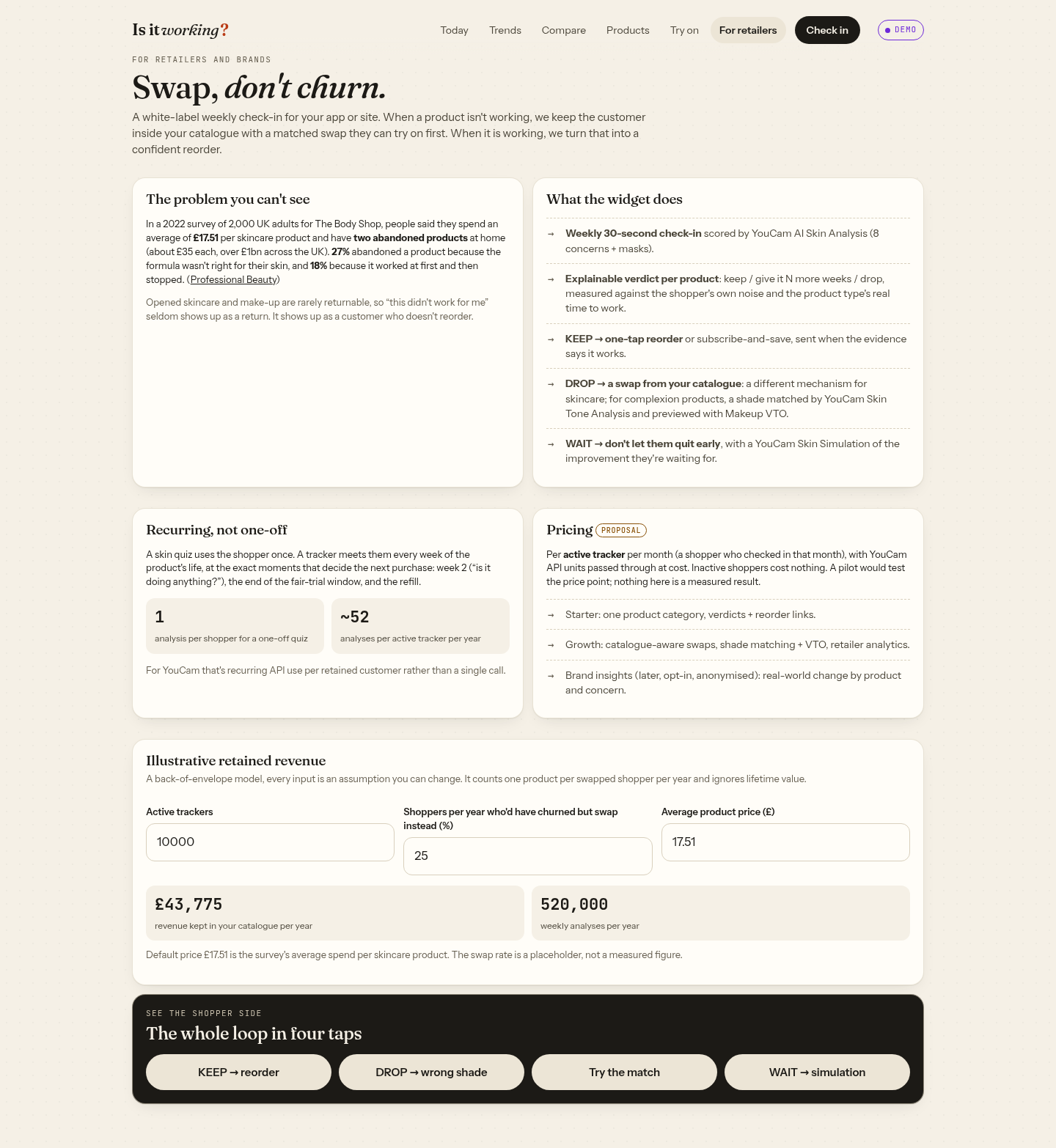
- For retailers: "swap, don't churn". A
/retailerspage sets out the white-label version: KEEP becomes a reorder or subscription, DROP becomes a matched swap inside the retailer's own catalogue, WAIT keeps the shopper from quitting early. It includes an illustrative retained-revenue calculator (every input is a labelled assumption) and a per-active-tracker pricing proposal. What's real in the demo: the face is AI-generated and the 9 weekly photos are a synthetic series (week 0 is the original image; weeks 1–8 are colour-shifted towards an AI-generated "calmer skin" version, with small exposure and white-balance changes). There are no real users. Every score, mask, skin-tone reading, try-on image and simulation in the demo is a real YouCam API response to those photos: 9 Skin Analyses (72 masks), 1 Skin Tone Analysis, 2 Makeup VTO renders and 1 Skin Simulation, committed infixtures/, with tests checking that the app's numbers match the recordings. The redness improvement is built into the synthetic photos; YouCam measured it. The flat texture and moisture are also YouCam's measurements. Brands, products and shades are fictional. ## How we built it
- Next.js 15 (App Router) + TypeScript on Vercel. Mobile-first web app with a two-column desktop layout above 1024 px. No install and no account; check-ins live on the device (localStorage + IndexedDB).
- Four YouCam APIs, one pattern, all server-side. The API key never reaches the browser. Each feature: File API upload (
POST /s2s/v2.0/file+ PUT) →POST /s2s/v2.x/task/{skin-analysis | skin-tone-analysis | makeup-vto | skin-simulation}→ poll until success. | YouCam API | Used for | Units per call | |---|---|---| | AI Skin Analysis v2.1 (SD, 8 concerns + masks) | Weekly check-in, trends, compare, verdicts | 12 | | Skin Tone Analysis | Real skin colour for shade matching | 20 | | Makeup VTO (foundation + concealer) | Try the matched shade, and the old one, on your face | 1 | | AI Skin Simulation (texture, 0.5) | "If it starts working" preview on WAIT verdicts | 4 | - Built for a public demo. Live calls need an access code, are rate-limited, check the free credit balance first, and fall back to recorded real responses on low credit, timeouts or API errors. Photo-quality errors are mapped by code family to specific advice ("bring your chin down slightly") with Upload another photo or Show the recorded result, never a silent swap. Feature-specific minimum photo sizes are checked before a unit is spent. Result images come through an
/api/imgroute that only accepts YouCam's own storage hosts. - Verdict engine (
lib/verdict.ts): pure TypeScript. Baseline vs latest means, residual wobble around the trend, type-specific time windows, purge handling, confidence scoring, and a shade rule (a complexion product more than ΔE 5 from the latest skin-tone reading is a DROP). - Shade matching: CIELAB + CIEDE2000, tested against a published reference pair.
Quality: 18 unit tests, GitHub Actions CI (test + typecheck + build), axe-core WCAG 2 A/AA with 0 violations on 9 pages, reduced-motion support.
Challenges we ran into
Weekly photos are noisy. Light, angle and focus can move a score more than most serums move skin in a month. We guide the capture, check lighting on the device, and judge each change against the user's own wobble and the product's realistic timeline, so a KEEP means something.
Honest demo data on a unit budget. Our first version mixed one real analysis with simulated weeks. We rebuilt it so every number on screen is a real YouCam response to a reproducible synthetic photo series, for 160 units in total, and wrote tests that fail if the app's numbers drift from the recordings.
YouCam result links expire. Masks and try-on images are short-lived S3 links, so we copy them into IndexedDB on save; otherwise Compare would break after a couple of hours.
A forced example. Our first DROP judged a tinted moisturiser on hydration and then suggested a foundation, which didn't add up. Running real Skin Tone Analysis showed the real story: the tint was ΔE 7.7 off the skin. "Wrong shade, not wrong skin" became the clearest example of what the app is for.
Accomplishments that we're proud of
A complete loop: capture → measurement → attribution → verdict → the right next purchase, using four YouCam APIs in one journey.
Every number in the demo is a real API response, with provenance in the repo and tests to prove it.
A KEEP, a WAIT and a DROP that each end in a concrete, sensible purchase decision.
Accessible (0 axe violations), fast, and it works without an account.
What we learned
A skin score is most useful as a time series tied to a decision. The question people actually have isn't "what's my score?" but "do I buy this again, wait, or switch?" For retail, that makes skin analysis a recurring touchpoint: a one-off skin quiz is one API call, while a weekly tracker is about 52 analyses per active shopper per year, at exactly the moments that decide the next purchase.
What's next for Is It Working?
- A retailer pilot: catalogue-aware swaps, one-tap reorder and subscribe-and-save, and purchase dates pulled in automatically. Test the per-active-tracker pricing and measure reorder and swap rates, which we haven't measured yet.
- Real people, with consent: an opt-in study of real weekly check-ins to set evidence-based noise floors per concern.
- Ingredient-list reading to set each product's target concerns and timeline automatically.
- YouCam HD Skin Analysis (more concerns) and real-time capture guidance with the YouCam camera kit.
- Zone-level mask analysis to tell purging from new breakouts. Optional cloud sync with consent. ## Testing instructions
Open https://is-it-working.vercel.app on a phone or desktop browser. No sign-up is needed. It opens on a seeded demo profile: 9 weekly check-ins of a synthetic, AI-generated face, three fictional products and their verdicts. Every score, mask, skin-tone reading, try-on and simulation in it is a recorded real YouCam API response. A short, dismissible tour points out the key screens. To make live YouCam API calls, open https://is-it-working.vercel.app/?access=yc-7dbc7edd once (the code is remembered). Then use Check in (Skin Analysis), Try on (Skin Tone Analysis + Makeup VTO) and the Night Shift Retinal product page (Skin Simulation). Live calls fall back to recorded results if credits run low or the API errors. Please use AI-generated or consenting faces only. Brands and shades are fictional; the app gives cosmetic observations, not medical advice.
Built With
- nextjs
- node.js
- react
- typescript
- vercel
- youcam-api
