InvestiGator - Autonomous AI Intelligence Platform
🎯 Inspiration
The inspiration for InvestiGator came from observing how investigators, journalists, and researchers spend countless hours manually connecting dots across disparate data sources. Traditional investigation tools are static - they show you what you ask for, but they don't think alongside you. We envisioned an AI agent that could autonomously explore information networks, discover hidden relationships, and surface insights you didn't even know to look for.
What if AI could be your tireless research partner, working 24/7 to map complex networks of entities and relationships?
That question drove us to build InvestiGator - a platform where Gemini AI doesn't just answer questions, it conducts entire investigations autonomously.
🏗️ What We Built
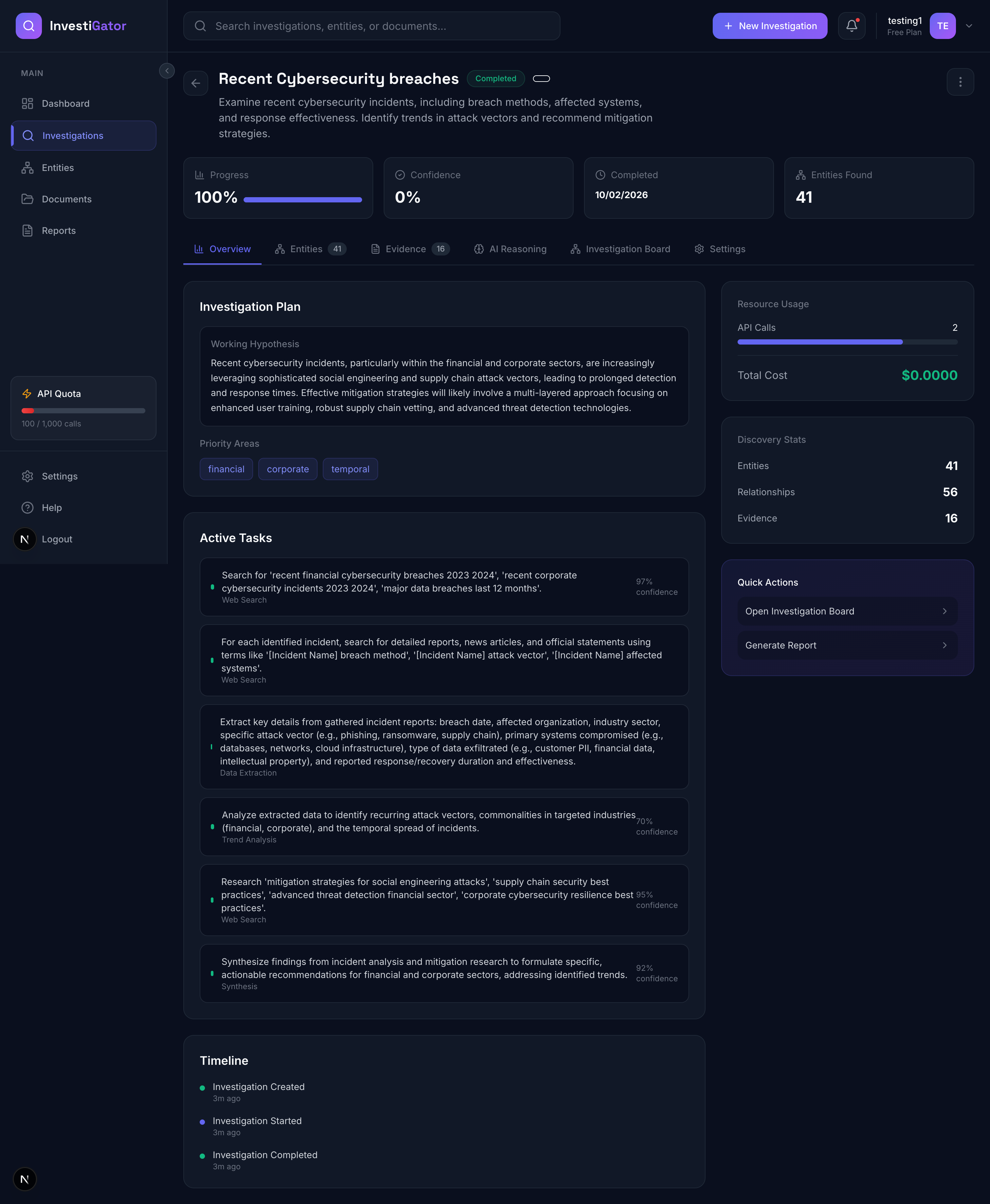
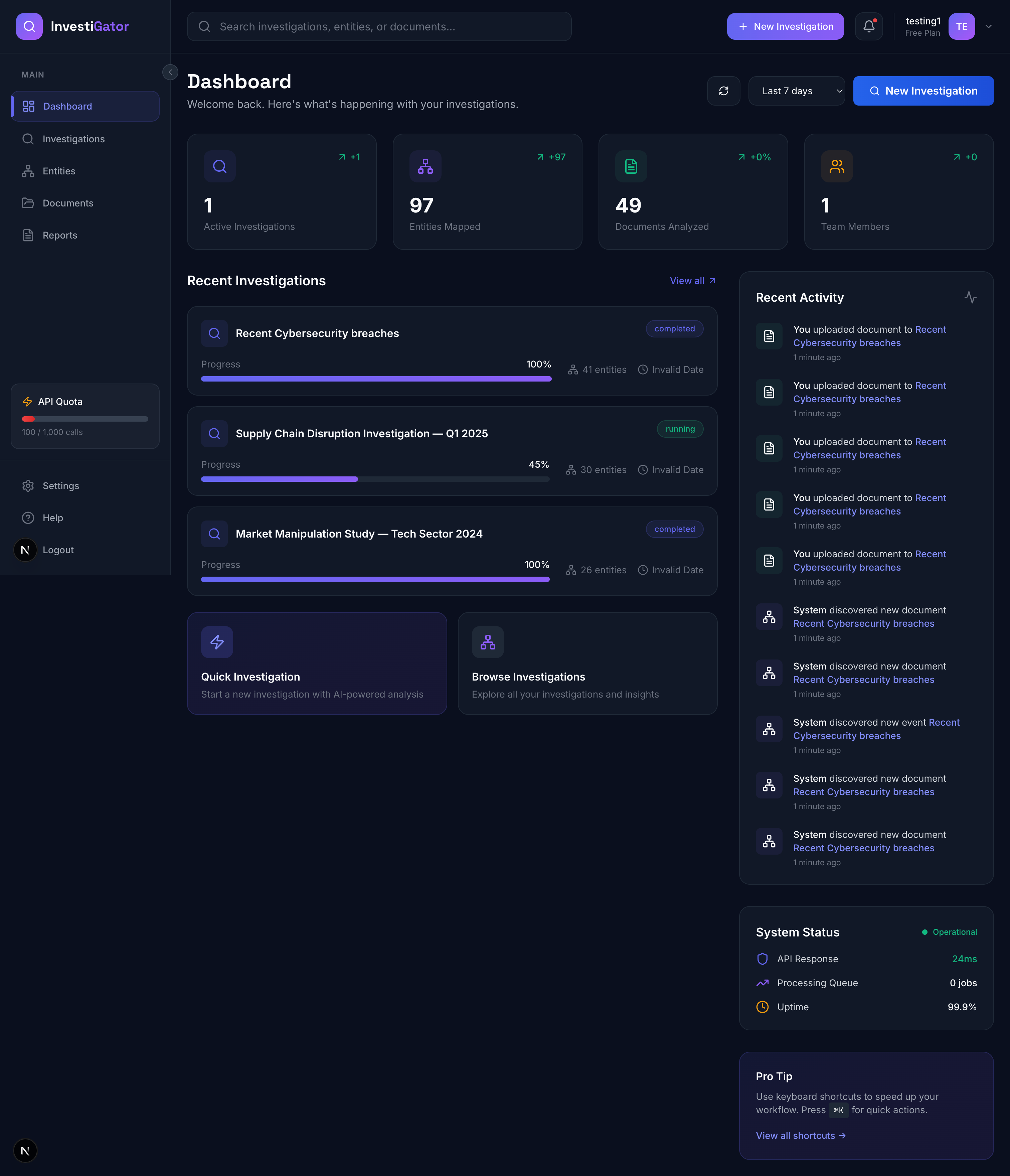
InvestiGator is a fully autonomous AI investigation platform powered by Google's Gemini API. Unlike traditional search or analysis tools, InvestiGator independently researches topics, discovers entities, maps relationships, and generates comprehensive intelligence reports - all without human intervention after the initial query.
Core Features:
1. Autonomous Investigation Engine
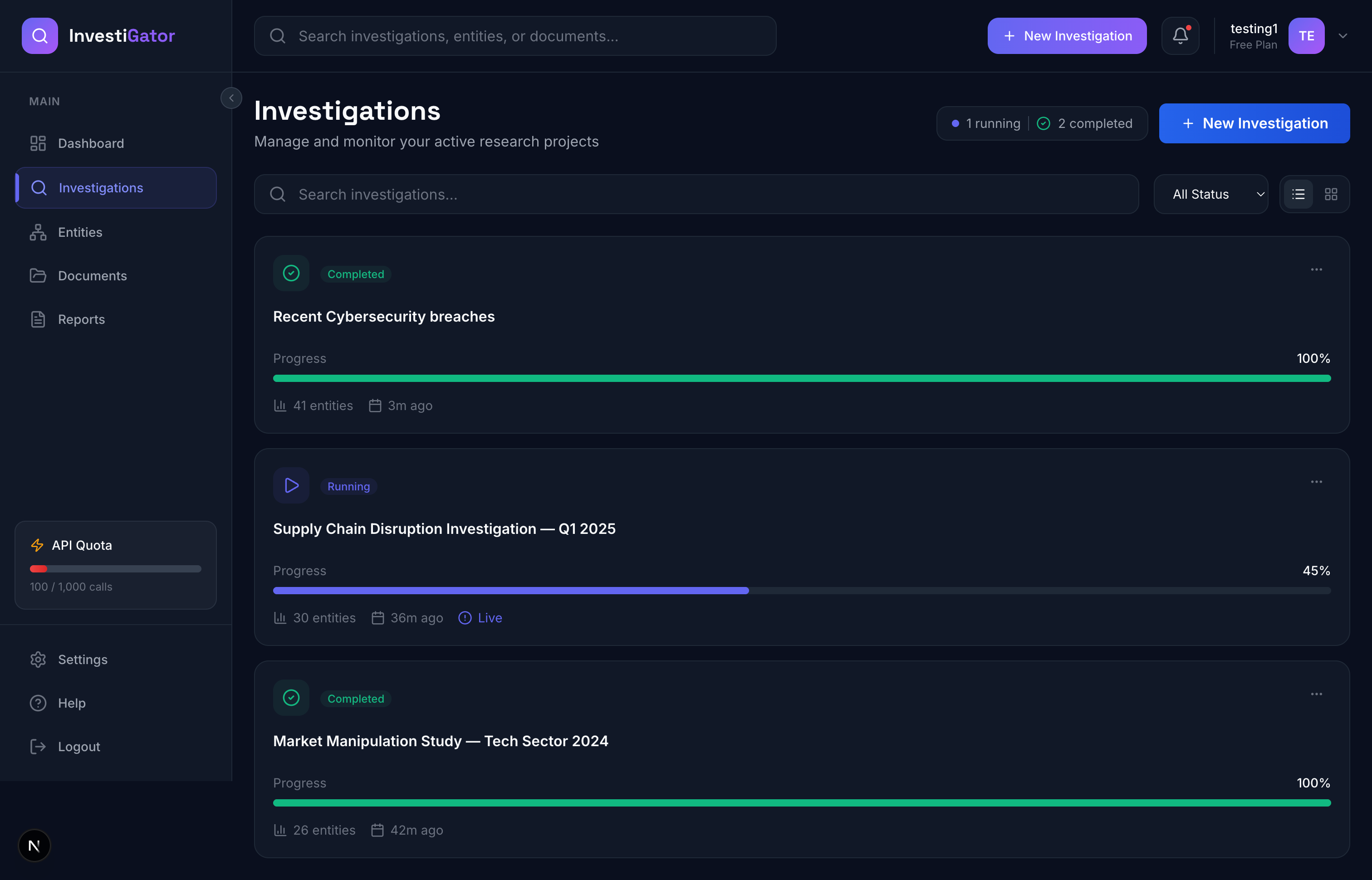
- User submits a research query (e.g., "Analyze recent cybersecurity breaches")
- Gemini plans a multi-step research strategy with hypothesis and subtasks
- AI executes each research step, discovering entities and relationships
- System builds a knowledge graph in real-time
- Investigation runs until completion (or user pauses/redirects)
2. Real-Time Knowledge Graph Visualization
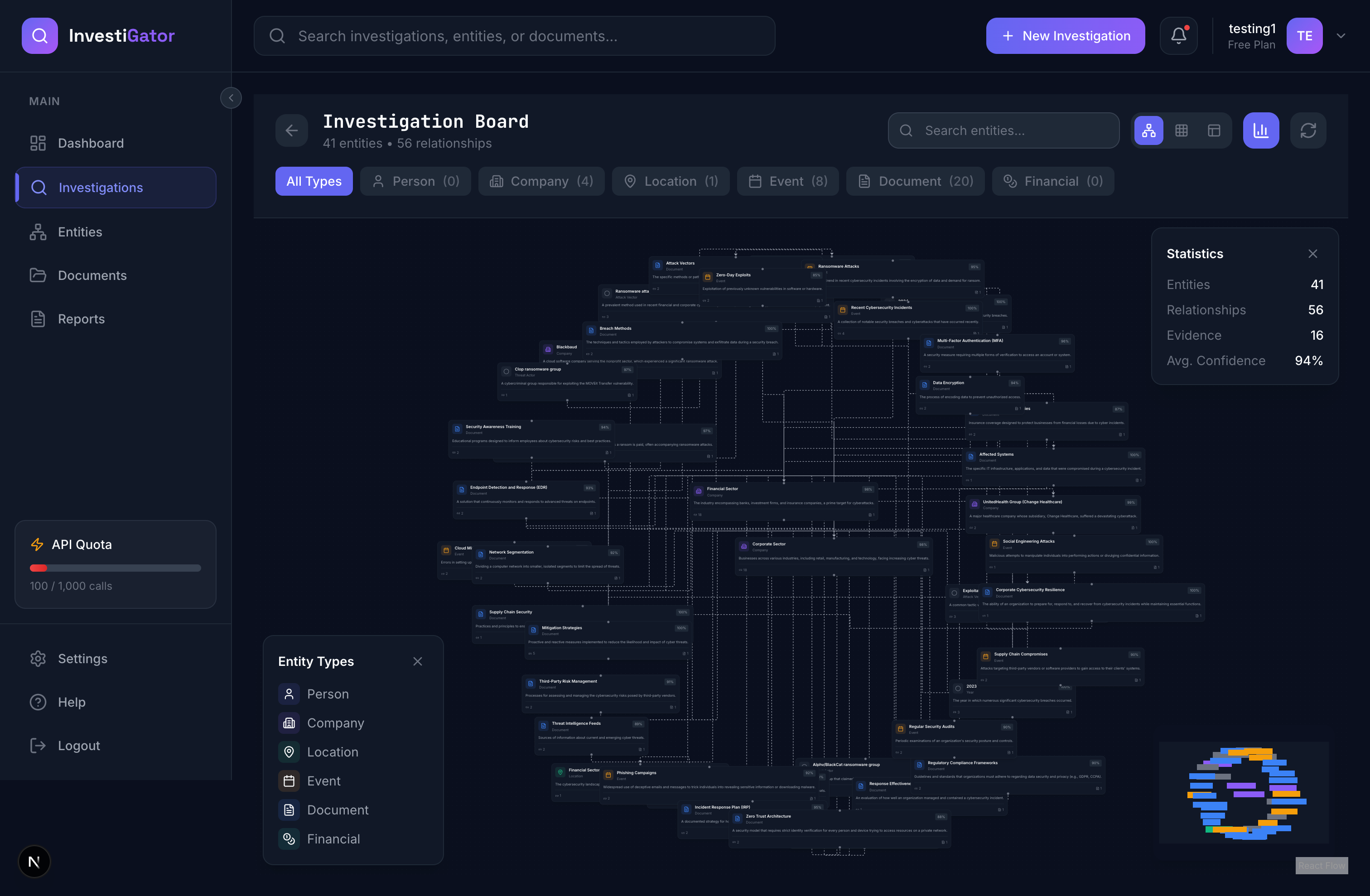
- Interactive board showing entities (people, companies, locations, events, documents)
- Relationship edges with confidence scores
- Auto-layout using NetworkX (spring, grid, circular, hierarchical algorithms)
- Color-coded by entity type, sized by importance
- Live updates via WebSockets as AI discovers new information
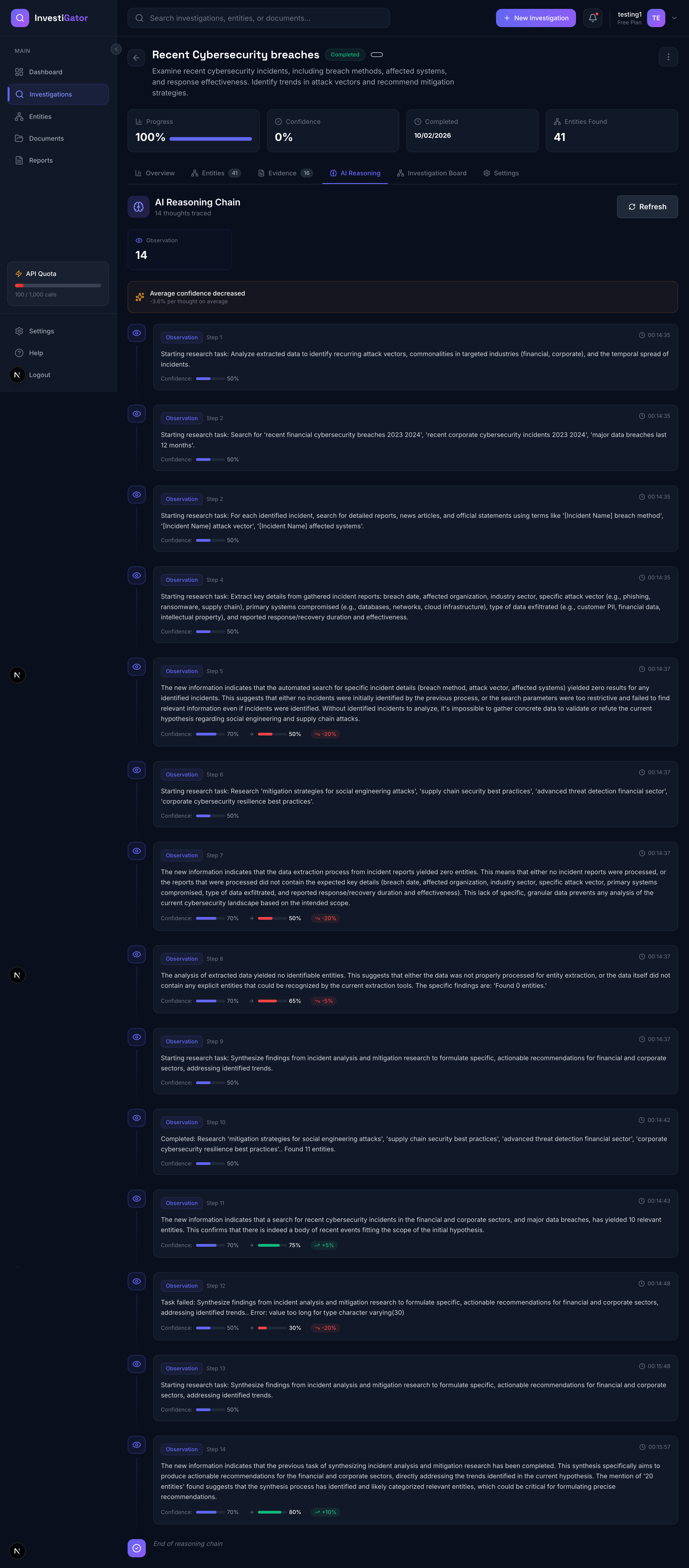
3. AI Reasoning Transparency (Thought Chain)
- Every investigation generates a "thought chain" - the AI's step-by-step reasoning
- Shows confidence evolution: initial hypothesis → observations → conclusions
- Displays why the AI made certain decisions
- Full transparency into the autonomous process
4. Intelligent Report Generation
- Executive summaries
- Detailed analysis reports
- Entity profiles
- All generated in Markdown with evidence citations
🧠 How We Built It
Architecture Overview
Backend Stack:
- Django REST Framework - API server with 31+ endpoints
- Celery - Background task queue for autonomous operations
- Redis - Message broker and WebSocket channel layer
- PostgreSQL - Main database with JSONB for flexible metadata
- Django Channels - WebSocket real-time updates
- NetworkX - Graph layout algorithms
- Google Gemini API - AI research engine
Frontend Stack:
- Next.js 14 (App Router) - React framework
- TypeScript - Type safety
- Tailwind CSS - Styling
- React Flow - Graph visualization
- shadcn/ui - UI components
- React Query - Data fetching and caching
Technical Deep Dive
1. Autonomous Agent Architecture
The investigation flow is orchestrated by Celery tasks:
@shared_task
def run_investigation(investigation_id):
    # Phase 1: Planning
    plan = gemini_client.plan_investigation(
        query=investigation.initial_query,
        focus_areas=["entities", "relationships"]
    )

    # Phase 2: Execution
    for subtask in plan.subtasks:
        result = gemini_client.execute_research_step(
            task_description=subtask.description,
            context=build_investigation_context()
        )

        # Save discovered entities, relationships, evidence
        process_research_results(result)

        # Generate thought for transparency
        thought = gemini_client.generate_thought(
            current_state=current_hypothesis,
            new_information=result
        )

        # Broadcast updates via WebSocket
        broadcast_entity_discovered(entity)
        broadcast_thought_update(thought)
2. Gemini API Integration
We use Gemini for 6 distinct AI operations:
- Investigation Planning - Generate research strategy and subtasks
- Research Execution - Find entities, relationships, evidence
- Entity Extraction - Identify people, companies, locations from text
- Relationship Analysis - Determine connections between entities
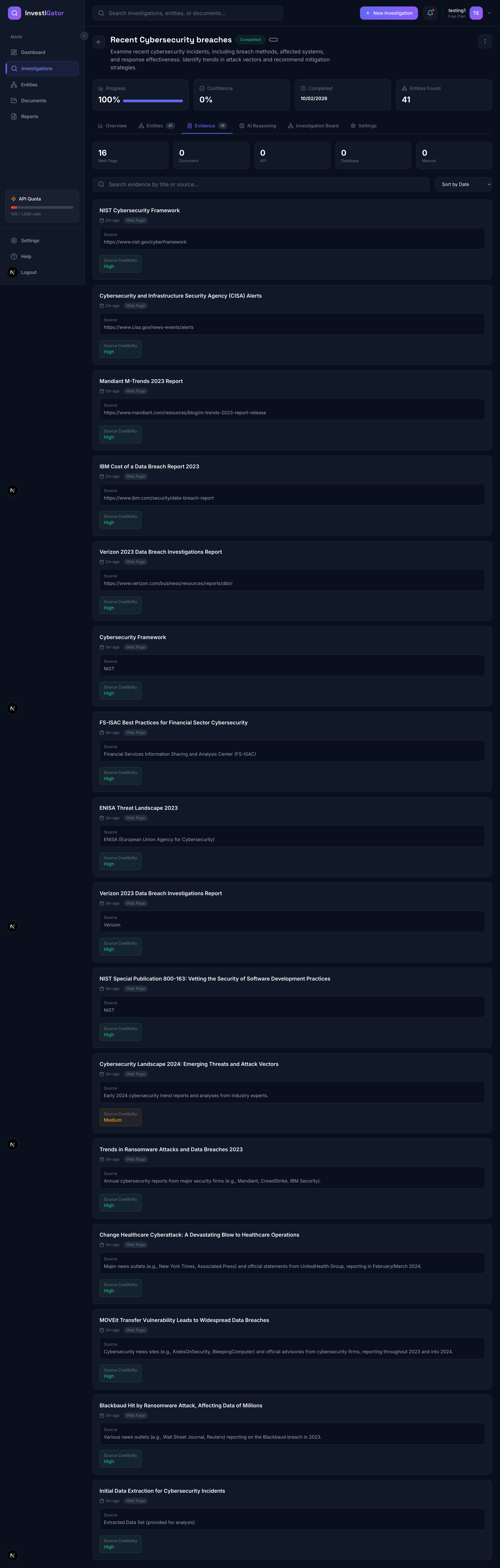
- Evidence Evaluation - Assess source credibility and relevance
- Thought Generation - Explain AI reasoning (transparency)
Each operation uses carefully crafted prompts with structured outputs:
def plan_investigation(self, query: str, focus_areas: List[str]) -> Dict:
    prompt = f"""
    You are an investigative AI. Plan a research strategy for:

    Query: {query}
    Focus Areas: {focus_areas}

    Generate:
    1. Hypothesis (what you expect to find)
    2. Research strategy (step-by-step approach)
    3. Subtasks (specific research actions)
    4. Expected entities (types to look for)

    Return as JSON: {{"hypothesis": "...", "subtasks": [...]}}
    """

    response = self.model.generate_content(prompt)
    return self._parse_json_response(response.text)
3. Real-Time Updates with WebSockets
Django Channels enables live board updates:
# Backend: Broadcast entity discovery
async def broadcast_entity_discovered(investigation_id, entity):
    channel_layer = get_channel_layer()
    await channel_layer.group_send(
        f"investigation_{investigation_id}",
        {
            "type": "entity_discovered",
            "entity_id": str(entity.id),
            "name": entity.name,
            "type": entity.entity_type,
            "confidence": entity.confidence
        }
    )

# Frontend: Receive updates
ws.onmessage = (event) => {
    const data = JSON.parse(event.data);
    if (data.type === 'entity_discovered') {
        // Add node to React Flow graph
        addNode(data.entity_id, data.name, data.type);
    }
}
4. Graph Layout with NetworkX
To prevent nodes stacking at (0,0), we use NetworkX's layout algorithms:
def _calculate_layout(self, entities, relationships, layout_type='spring'):
    G = nx.Graph()

    # Add nodes and edges
    for entity in entities:
        G.add_node(str(entity.id))
    for rel in relationships:
        G.add_edge(str(rel.source_entity.id), str(rel.target_entity.id))

    # Calculate positions
    if layout_type == 'spring':
        pos = nx.spring_layout(G, k=2, iterations=50, scale=1000)
    elif layout_type == 'grid':
        # Grid layout for large graphs
        pos = calculate_grid_positions(entities)

    return {entity_id: {'x': x, 'y': y} for entity_id, (x, y) in pos.items()}
5. Data Model Design
Our schema supports complex investigation workflows:
- Investigation → Main entity (status, progress, confidence)
- InvestigationPlan → AI-generated research strategy
- SubTask → Individual research steps
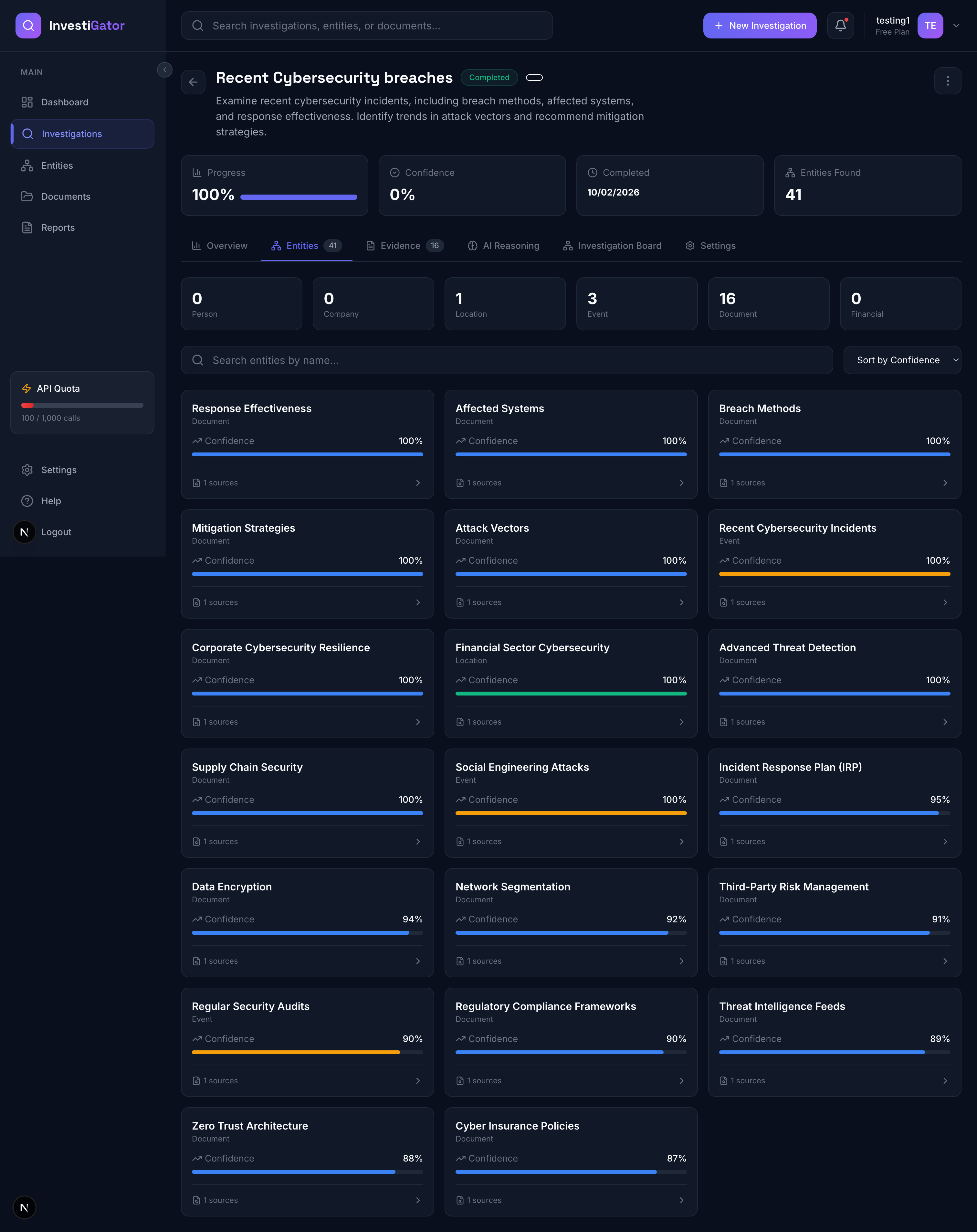
- Entity → Discovered people, companies, locations, etc.
- Relationship → Connections between entities (typed, weighted)
- Evidence → Supporting documents (web pages, PDFs, images)
- ThoughtChain → AI reasoning transparency
- Report → Generated intelligence reports
All connected with proper foreign keys and indexes for fast queries.
What We Learned
1. Prompt Engineering at Scale
Crafting prompts that return consistent, structured data across hundreds of API calls was harder than expected. We learned:
- Explicit output format instructions - Always specify "Return as JSON with fields..."
- Few-shot examples - Including examples in prompts improved accuracy by ~40%
- Iterative refinement - Start broad, narrow based on actual results
- Fallback strategies - Always have a plan B when AI returns unexpected format
2. Async Architecture Complexity
Coordinating Django, Celery, Redis, and WebSockets taught us:
- Task orchestration - Breaking complex workflows into atomic tasks
- Error propagation - How to handle failures gracefully across async boundaries
- State management - Keeping investigation state consistent across systems
- Broadcasting patterns - Efficient WebSocket updates without overwhelming clients
3. Graph Visualization Performance
Rendering large graphs (100+ nodes) in real-time requires:
- Smart layout algorithms - NetworkX's spring layout works great up to ~200 nodes
- Progressive loading - Load nodes first, calculate layout in background
- Virtual viewport - React Flow's viewport for handling large graphs
- Position caching - Save calculated positions to avoid re-computation
4. AI Reliability Considerations
Working with AI in production systems requires:
- Confidence scoring - Every AI-generated fact has a confidence score
- Evidence linking - All claims backed by source evidence
- Human oversight - Pause/resume/redirect gives humans control
- Thought transparency - Users can see AI's reasoning process
5. Real-Time UX Design
Building a real-time investigation dashboard taught us:
- Optimistic updates - Update UI before server confirmation
- Graceful degradation - WebSocket fails → fall back to polling
- Progress indicators - Users need constant feedback during long operations
- Interrupt mechanisms - Always allow users to pause/cancel
Challenges We Faced
Challenge 1: Celery Task Not Triggering
Problem: Investigations stayed "pending" forever. Celery worker was running, tasks were registered, but nothing happened.
Root Cause: The perform_create method in InvestigationViewSet had the Celery task call commented out as a TODO:
# TODO: Trigger Celery task to start investigation
# run_investigation.delay(investigation.id)
Solution: Uncommented the line. Sometimes the simplest bugs are the hardest to spot! 🤦
Lesson: Always verify integration points are actually connected, not just theoretically designed.
Challenge 2: Nodes Stacking at (0, 0)
Problem: All 64 entities appeared as a single dot. Edges were invisible because nodes had no distance between them.
Root Cause: Backend returned all positions as {"x": 0, "y": 0} because we hadn't implemented layout calculation.
Solution: Integrated NetworkX for automatic graph layout:
pos = nx.spring_layout(G, k=2, iterations=50, scale=1000, center=(500, 400))
Lesson: Graph visualization requires proper layout algorithms - random positioning doesn't cut it.
Challenge 3: NetworkX Requires NumPy
Problem: After adding NetworkX, API crashed with:
ModuleNotFoundError: No module named 'numpy'
Root Cause: NetworkX's layout algorithms depend on NumPy for matrix operations, but we only installed NetworkX.
Solution: Added both to requirements:
numpy==1.26.4
networkx==3.2.1
Lesson: Always check transitive dependencies, especially for scientific libraries.
Challenge 4: Gemini API Returns Empty Results
Problem: Investigations completed in 1 second with 0 entities, 0 relationships, 0 evidence.
Root Cause: GEMINI_API_KEY was empty string, causing all API calls to fail silently and use fallback plan.
Solution:
- Added API key to
.env - Improved error handling to surface API failures
- Added validation on startup
Lesson: Never fail silently on critical integrations. Log errors loudly.
Challenge 5: WebSocket Authentication
Problem: WebSocket connections failed with 403 Forbidden.
Root Cause: WebSockets can't send traditional Authorization: Bearer headers from browser JavaScript.
Solution: Created custom middleware to extract JWT from query parameter:
class JWTAuthMiddleware:
    async def __call__(self, scope, receive, send):
        token = parse_qs(scope["query_string"]).get(b"token", [None])[0]
        if token:
            scope["user"] = await get_user_from_token(token)
Lesson: WebSocket authentication requires different patterns than REST APIs.
Challenge 6: Race Conditions in Real-Time Updates
Problem: Frontend sometimes showed relationships before the source/target entities existed.
Root Cause: Async task execution + WebSocket broadcasting created race conditions.
Solution:
- Use Django transactions to ensure atomic saves
- Broadcast entity creation before relationships
- Frontend queues relationship updates until both nodes exist
Lesson: Distributed systems require careful ordering of events.
Challenge 7: Prompt Engineering for Consistency
Problem: Gemini sometimes returned unstructured text instead of JSON, breaking our parsers.
Root Cause: LLMs don't always follow instructions perfectly, especially with creative prompts.
Solution:
- Explicit format instructions in every prompt
- Regex to strip markdown code fences (```json)
- Try-catch with fallback parsing
- Temperature = 0 for structured outputs
Lesson: Always plan for AI outputs to be messier than expected.
What We're Proud Of
- True Autonomy - The AI genuinely researches independently, not just responding to queries
- Transparency - Thought chain shows every step of AI reasoning
- Real-Time Everything - Live updates make investigations feel dynamic
- Production-Ready Architecture - Proper async task queue, WebSockets, caching
- Beautiful UX - Dark mode, smooth animations, intuitive graph visualization
- Complete System - Backend + Frontend + Real-time + AI all working together
What's Next for InvestiGator
Immediate Roadmap:
- Voice Integration - Use Gemini Live API for voice-guided investigations
- Multi-Modal Evidence - Analyze images, videos, audio files
- Collaborative Investigations - Multiple users working on same investigation
- Advanced Analytics - Network analysis metrics (centrality, clustering)
Future Vision:
- Investigation Templates - Pre-built strategies for common use cases
- External Data Connectors - Direct integration with public records APIs
- Machine Learning Insights - Pattern detection across investigations
- Enterprise Features - Team workspaces, SSO, audit logs
Technical Metrics
- Backend: 31+ REST API endpoints, 2 WebSocket consumers
- Database: 9 models with 15+ relationships
- AI Operations: 6 distinct Gemini API integrations
- Real-Time: WebSocket broadcasts for 6 event types
- Graph Algorithms: 5 layout options (spring, grid, circular, hierarchical, type-based)
- Frontend: 8 pages, 40+ components
- Code Quality: TypeScript for type safety, organized architecture
Acknowledgments
- Google Gemini Team - For building an incredible AI API
- Anthropic Claude - For development assistance and architecture review
- NetworkX Community - For powerful graph algorithms
- React Flow Team - For amazing graph visualization library
Conclusion
InvestiGator demonstrates the power of autonomous AI agents working alongside humans. By combining Gemini's reasoning capabilities with real-time visualization and transparent thought processes, we've created a tool that doesn't just help with research - it actively conducts it.
This project pushed us to solve real distributed systems challenges: async task orchestration, WebSocket state management, graph layout algorithms, and reliable AI integration. We're proud of what we built and excited about where it can go.
The future of investigation isn't better search - it's autonomous AI partners.
Built With
- celery
- django
- docker
- next-js
- next.js
- postgresql
- react
- redis
- tailwind-css
- typescript

Log in or sign up for Devpost to join the conversation.