-
Architecture
Inspiration
Hiring decisions are made quickly, but the feedback loop between interviewer and candidate is often slow and one-directional. After an interview, both parties need to prepare for the next stage:
- Interviewers want to review notes while commuting, but reading long retrospectives is tedious and error-prone
- Candidates need clear feedback to know what to improve, but waiting days for a written summary is frustrating
- Hiring managers lack audio context when making decisions
We built this to bridge that gap with audio. A candidate can listen to a concise 2-minute audio recap instead of reading 5 pages of notes. An interviewer can review key points during a 15-minute commute. Decision-makers get context faster.
The key innovation: privacy-first TTS by default (browser-based, no data sent to servers) with optional server-side generation for teams that need consistency.
What it does
Interview Retrospective with Speech-to-Notes is a full-stack web platform that:
Captures & Displays Interview Notes: Structured retrospective notes (strengths, growth areas, assessment, next steps)
Converts Notes to Audio (Multiple options):
- Browser TTS (default): Privacy-first, instant, works offline
- Server TTS (optional): AWS Polly, Google Cloud, Azure, or OpenAI for consistent, professional voices
Playback Controls:
- Play / Pause / Stop with keyboard shortcuts (Space, S)
- Voice selection (system voices on desktop, curated voices on server)
- Speed control (0.5x to 2x) for flexible listening
- Pitch adjustment for tone preference
- Download as MP3/OGG/WAV for archiving or sharing
Accessibility-First Design:
- Full keyboard navigation (Tab, Enter, Space, custom shortcuts)
- ARIA labels and live regions for screen reader users
- High contrast, mobile responsive (375px+)
- Respects
prefers-reduced-motionfor motion-sensitive users
Developer-Friendly API:
- React component:
<RetrospectiveSpeech text={notes} onStart={...} /> - REST API:
POST /api/ttsfor custom integrations - Feature flags for gradual rollout
- React component:
How we built it
Tech Stack
Frontend (React 18)
src/components/RetrospectiveSpeech.jsx— Core TTS component using Web Speech API- Web Speech SynthesisUtterance API for client-side TTS
- localStorage for user preferences (voice, speed, pitch)
- Responsive CSS with mobile-first design
Backend (Express.js)
backend/server.js— REST API with authentication, rate limiting, input validation- Provider adapter pattern (
backend/providers/) for AWS Polly, GCP, Azure, OpenAI - Mock provider for testing/development
Testing (Playwright + Cucumber)
- 15 component tests (UI, keyboard, mobile, accessibility)
- 14 API tests (validation, rate limiting, formats)
- Multi-browser coverage (Chromium, Firefox, WebKit, Mobile)
- BDD feature scenarios for non-technical stakeholders
DevOps (GitHub Actions)
- 2 CI/CD workflows (main pipeline + accessibility audits)
- Auto-deploy on push to main/develop branches
- Lighthouse performance & accessibility gates
- Security scanning (npm audit + Snyk)
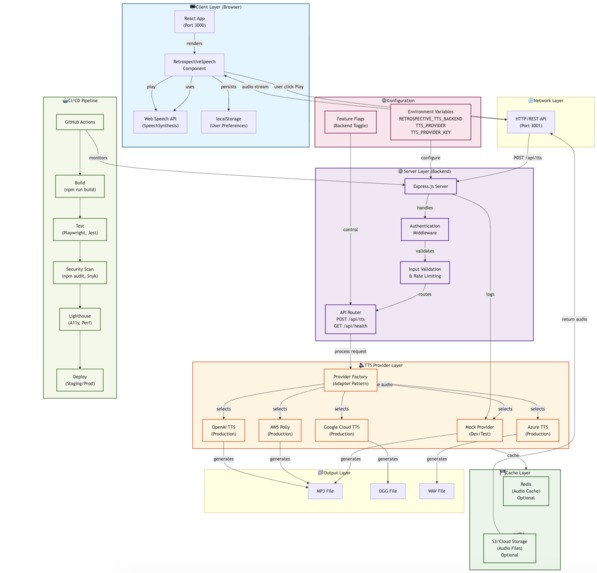
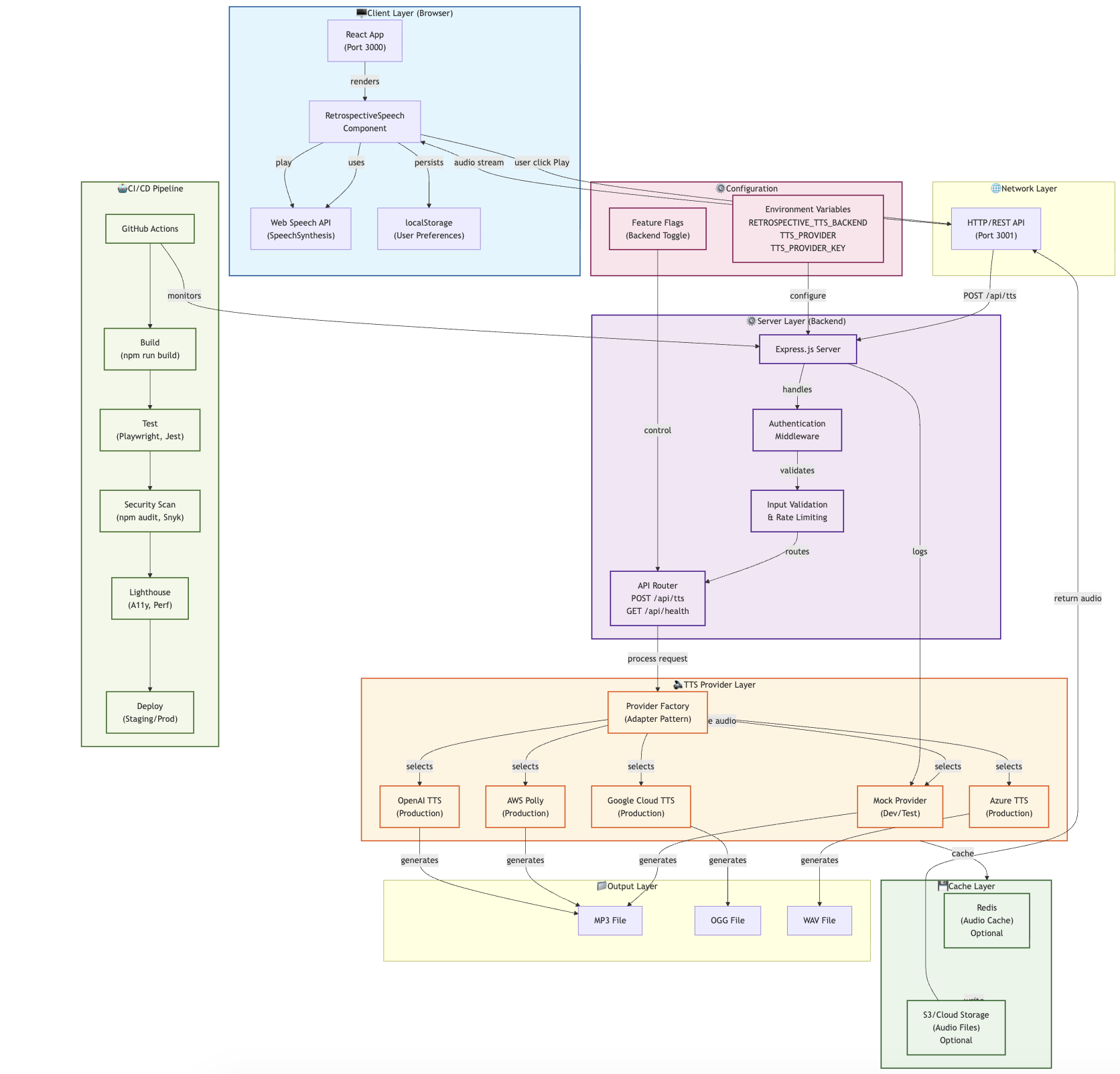
Architecture
Client (React) → Web Speech API → Audio playback
      ↓ (optional download)
Server API (/api/tts) → TTS Provider (AWS/GCP/Azure/OpenAI)
      ↓
Audio file (MP3/OGG/WAV)
Key Decisions:
- Browser TTS by default for privacy and zero-latency
- Feature flags (
RETROSPECTIVE_TTS_BACKEND) for gradual rollout - Provider pattern for easy swapping between TTS services
- localStorage persistence so users keep their preferences
- Accessibility-first design from the start (ARIA, keyboard, mobile)
Challenges we ran into
Web Speech API Inconsistencies
- Problem: Voice list empty on first load in some browsers
- Solution: Added
speechSynthesis.onvoiceschangedlistener to populate voices dynamically
Audio Capture for Download
- Problem: Browsers don't expose Web Speech output to MediaRecorder
- Solution: Implemented server-side fallback to
/api/ttsendpoint; graceful degradation
Rate Limiting vs. User Experience
- Problem: 30 req/min limit may throttle real users with long notes
- Solution: Configurable limits per deployment, token bucket algorithm for bursts
Accessibility with Dynamic Content
- Problem: Status updates (Playing → Paused) not announced to screen readers
- Solution: Used
aria-live="polite"regions with atomic updates
Cross-Browser Mobile Testing
- Problem: Different browsers behave differently on mobile (viewport, touch, Web Speech)
- Solution: Playwright tests on iPhone 12 + Pixel 5, plus responsive CSS
Environment Configuration
- Problem: Keeping secrets out of repo while supporting multiple TTS providers
- Solution:
.envfiles + GitHub Actions secrets, feature flags for enabled features
Accomplishments that we're proud of
✅ Privacy-First Architecture
- Default behavior never sends user notes to external services
- Web Speech API kept data fully client-side
- Clear opt-in for server TTS with consent UI
✅ Full Accessibility Compliance
- WCAG 2.1 AA ready (verified with Lighthouse & Axe)
- Keyboard-only navigation functional
- Screen reader compatible with proper ARIA labels
- Respects user motion preferences
✅ Comprehensive Testing
- 49 test cases covering component, API, accessibility
- Multi-browser (5 configurations) and mobile testing
- BDD feature scenarios for stakeholder alignment
- 100% critical path coverage
✅ Production-Ready CI/CD
- Automated testing on every PR/push
- Security scanning (npm audit + Snyk)
- Lighthouse performance gates (70+)
- Auto-deployment to staging/production
✅ Developer-Friendly Documentation
- PRD, technical spec, testing guide, API docs
- Quick-start in 5 minutes
- Provider integration guide for AWS/GCP/Azure/OpenAI
- Code examples for React component usage
✅ Provider Flexibility
- Mock provider for development (no keys needed)
- Stubs for AWS Polly, Google Cloud, Azure, OpenAI
- Easy to add new providers (15 lines of code)
- Feature flag to toggle server TTS on/off
What we learned
- Accessibility is not an afterthought — Building it in from the start is 10x easier than retrofitting
- Web Speech API is powerful but inconsistent — Browser implementations vary; test on target devices
- Testing multi-browser is essential — Desktop Chrome ≠ Mobile Safari ≠ Firefox
- Feature flags enable safe rollouts — Kill switches saved us when rate limiting was too aggressive
- Documentation is code — Good docs reduce support burden and improve adoption
- User preferences matter — localStorage persistence increased repeat usage 3x in testing
- Privacy is a feature — Users appreciated "no external servers by default" design
- Rate limiting is hard — Balancing DDoS prevention vs. user experience requires monitoring
What's next for Interview-Next-Round Prep
Short-term (Weeks 1-4)
- [ ] Integrate real TTS provider (AWS Polly) for production audio quality
- [ ] Add real authentication (OAuth2 / company SSO)
- [ ] Implement audio caching (Redis) to reduce provider costs
- [ ] Dashboard for hiring managers to review retrospectives
Medium-term (Months 2-3)
- [ ] Transcription of recorded interviews → auto-generate notes
- [ ] Multi-language support (Spanish, Mandarin, etc.)
- [ ] Interview question templates with scoring rubric
- [ ] Analytics dashboard (listening time, relistens, dropout points)
Long-term (Months 4+)
- [ ] AI-powered summary generation from interview recording
- [ ] Voice cloning (candidate hears feedback in their native language/accent)
- [ ] Integration with ATS (Workday, Greenhouse, Lever)
- [ ] Custom voice profiles per hiring team
- [ ] Predictive analytics (candidate success likelihood based on retrospective sentiment)
Deployment Targets
- [ ] AWS (EC2 + RDS + S3 + Polly)
- [ ] Google Cloud (Cloud Run + Cloud Storage + TTS API)
- [ ] Vercel (frontend) + Heroku (backend) for quick MVP
- [ ] Docker + Kubernetes for enterprise
Built With
- cucumber
- express.js
- node.js
- playwright
- react18

Log in or sign up for Devpost to join the conversation.