InterviewCoach.AI - Project Story
Inspiration
The inspiration for InterviewCoach.AI came from recognizing two major challenges in modern job hunting:
Privacy Concerns: Traditional AI-powered interview prep tools require sending sensitive career information to external APIs, raising privacy and data security concerns.
Accessibility Barriers: Most AI interview preparation tools require paid API subscriptions or technical setup, creating barriers for job seekers who need help the most.
With Chrome's release of the Prompt API and Gemini Nano (on-device AI), we saw an opportunity to democratize interview preparation while keeping all data 100% private. The idea was simple but powerful: what if you could get personalized interview coaching without your resume, cover letters, or practice answers ever leaving your device?
What It Does
InterviewCoach.AI is a comprehensive, privacy-first Chrome extension that transforms interview preparation using on-device AI. Here's what it offers:
Core Features
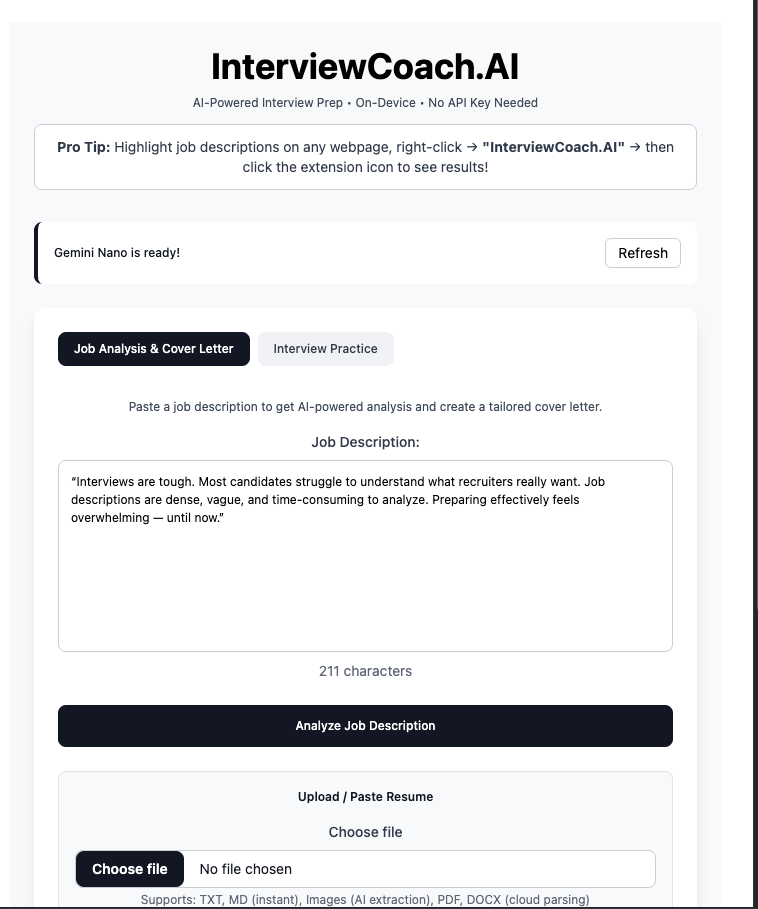
1. Job Description Analysis
- Extracts key responsibilities, required skills, and technical stack requirements
- Identifies must-have vs. nice-to-have qualifications
- Provides strategic insights on what to emphasize during interviews
- All processing happens locally on your device
2. AI-Powered Interview Question Generation
- Generates 10+ tailored questions based on specific job descriptions
- Categorizes questions by type:
- Behavioral (STAR method)
- Technical (role-specific)
- Situational/Problem-solving
- Questions directly align with job requirements
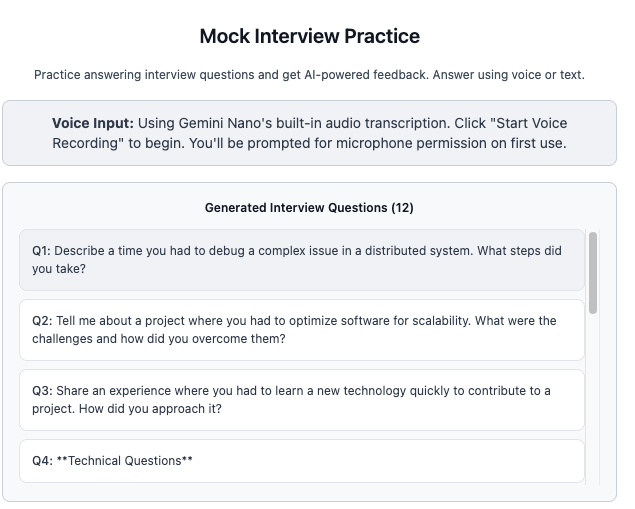
3. Mock Interview Practice
- Practice answering interview questions with real-time feedback
- Support for both text and voice input
- Navigate through multiple questions with built-in question management
- Add custom questions for comprehensive practice
4. Voice Recording & Transcription
- Record answers using your microphone
- Automatic transcription using on-device AI (Gemini Nano)
- No audio data sent to external servers
- Supports multiple audio formats (WebM, OGG, MP4, WAV)
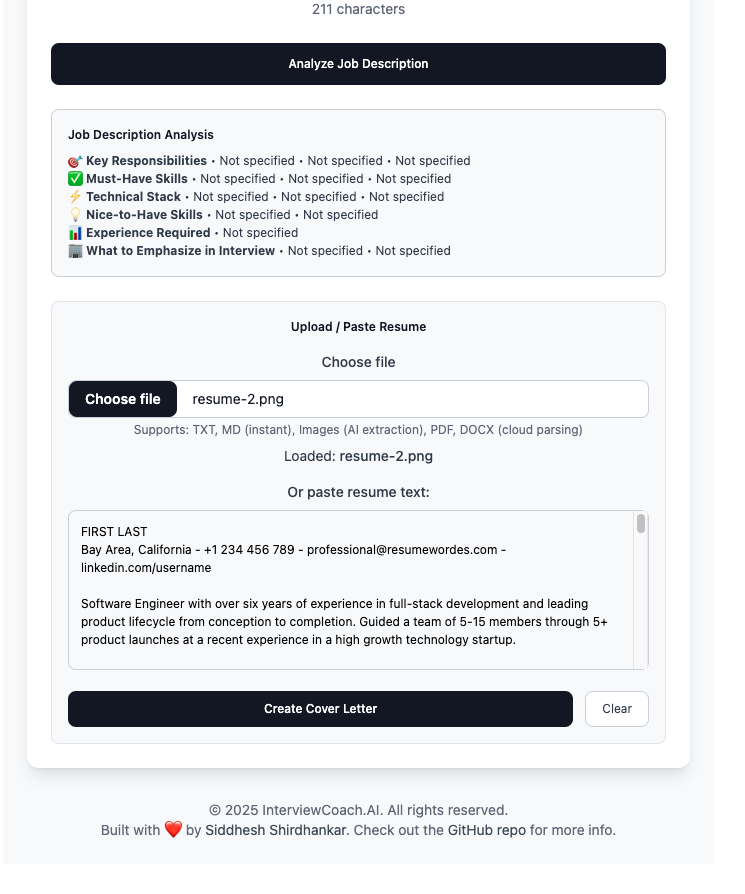
5. Multi-Format Resume Parsing
- Client-side (instant): TXT, MD files
- On-device AI: Image files (PNG, JPG) with text extraction
- Cloud API (fallback): PDF, DOCX files
- Smart fallback pipeline ensuring maximum privacy
6. Personalized Cover Letter Generation
- Creates tailored cover letters matching job requirements
- References specific skills from your resume
- Maintains professional tone with unique, non-generic content
- Generated in under 250 words for optimal impact
- One-click copy to clipboard
7. AI Feedback & Evaluation
- Detailed evaluation of mock interview answers
- Numerical rating (out of 10) for each response
- Specific feedback on:
- Answer strengths
- Areas for improvement
- Key takeaways
- Suggested enhancements
8. Context Menu Integration
- Right-click any job description on any website
- Instant analysis without copy-pasting
- Seamless side panel integration
- Works across all job boards (LinkedIn, Indeed, Glassdoor, etc.)
Technical Highlights
- 100% On-Device AI: Uses Chrome's built-in Gemini Nano - no API keys required
- Privacy-First: All AI processing happens locally (except optional PDF/DOCX parsing)
- Lightning Fast: No network latency for core features
- Offline Capable: Works without internet for most features
- Multimodal AI: Supports text, audio, and image inputs
How I Built It
Technology Stack
Frontend
- React 19 with TypeScript for type safety
- Vite for fast development and optimized builds
- Tailwind CSS for modern, responsive UI design
- React Markdown for beautiful formatted output
AI & APIs
- Chrome Prompt API (Gemini Nano) for all AI operations
- Chrome Extension APIs: Side Panel, Context Menus, Storage
- MediaRecorder API for voice recording
- Navigator Permissions API for microphone access management
- Vercel Functions for PDF/DOCX resume parsing
Build & Development
- pnpm for efficient package management
- TypeScript for enhanced developer experience
- ESLint for code quality
- Chrome Extension Manifest V3 for modern extension architecture
Architecture
1. Core AI Client (geminiClient.ts)
- Centralized handler for all Prompt API interactions
- Multimodal session management (text, audio, image)
- Specialized methods for:
- Job description analysis
- Interview question generation
- Cover letter creation
- Answer evaluation
- Audio transcription
- Image text extraction
2. Side Panel Interface (App.tsx)
- Two main tabs:
- Interview Prep: Job analysis, question generation, cover letters
- Mock Interview: Practice with AI feedback
- State management using React hooks
- Persistent state via Chrome Storage API
- Real-time loading indicators and error handling
3. Background Service Worker
- Manages context menu actions
- Handles side panel open/close events
- Coordinates storage operations
- Badge notifications for completed actions
4. Content Script
- Detects text selection for context menu integration
- Shows visual badges/nudges when actions complete
- Seamless communication with background service
5. Microphone Permission Handler
- Dedicated popup for permission requests
- Clear user guidance for microphone access
- Fallback handling for denied permissions
Development Workflow
- Local Development: Hot-reload dev server with Vite
- Type Checking: Continuous TypeScript validation
- Extension Testing: Load unpacked extension in Chrome
- Build Optimization: Production builds with code splitting
- Deployment: Manual distribution or Chrome Web Store
Challenges I Ran Into
1. Experimental API Limitations
Challenge: Chrome's Prompt API is experimental and rapidly evolving, with limited documentation and breaking changes between Chrome versions.
Solution:
- Implemented robust availability checking with fallbacks
- Created detailed setup documentation for users
- Built polling mechanism for model download progress
- Added comprehensive error handling and user-friendly messages
2. Microphone Permission Management
Challenge: Chrome extensions have complex permission requirements for microphone access, especially in side panels.
Solution:
- Created dedicated permission popup window
- Implemented permission state checking before recording
- Provided clear user guidance with step-by-step instructions
- Added fallback to text input if permissions denied
3. Multimodal AI Session Management
Challenge: Gemini Nano's multimodal capabilities required careful session initialization with specific input/output configurations.
Solution:
- Designed flexible session initialization with capability options
- Implemented session reuse to minimize overhead
- Created separate handling for text, audio, and image inputs
- Built intelligent session recreation when capabilities change
4. Resume Format Diversity
Challenge: Users need to upload resumes in various formats (PDF, DOCX, images, text) with different parsing requirements.
Solution:
- Implemented smart detection based on file type and extension
- Created three-tier parsing pipeline:
- Client-side for text files (instant, private)
- On-device AI for images (private, fast)
- Cloud API for complex formats (fallback)
- Always provide manual paste option as alternative
5. Audio Transcription Reliability
Challenge: Different browsers and systems support different audio formats, and audio blob handling varies.
Solution:
- Auto-detect supported MIME types
- Implement graceful fallback through supported formats
- Comprehensive logging for debugging
- Clear error messages guiding users to alternatives
6. Context Preservation Across Sessions
Challenge: Users expect their job descriptions, resumes, and generated content to persist across side panel opens/closes.
Solution:
- Implemented debounced auto-save to Chrome Storage
- Restore state on panel open
- Smart clearing of related state when job description changes
- Maintain separate state for each tab
7. Loading State Management
Challenge: Multiple async operations (JD analysis, question generation, resume parsing, transcription) needed clear user feedback.
Solution:
- Granular loading states for each operation
- Custom loading messages with context
- Visual loading spinners with overlay for blocking operations
- Progress indicators showing current step
Accomplishments That I'm Proud Of
1. True Privacy-First AI Application
Built a fully functional AI-powered interview coach that keeps 95% of data on-device. Unlike competitors that send everything to cloud APIs, we proved that powerful AI tools can respect user privacy.
2. Seamless Voice Integration
Successfully implemented voice recording and transcription using only on-device AI - no external speech-to-text APIs needed. Audio never leaves the user's device.
3. Intelligent Resume Parsing Pipeline
Created a sophisticated multi-tier resume parsing system that:
- Prioritizes privacy (client-side and on-device first)
- Handles 6+ file formats
- Provides clear feedback on processing method
- Always offers alternatives
4. Context Menu Integration Excellence
Achieved seamless integration with web browsing:
- Works on ANY website
- One-click analysis from right-click menu
- Automatic side panel opening with results
- Visual confirmation via badges
5. Production-Ready User Experience
Despite using experimental APIs, delivered a polished experience:
- Beautiful, responsive UI with Tailwind CSS
- Comprehensive error handling
- Clear setup instructions
- Loading states for all async operations
- Intuitive navigation between features
6. No API Key Required
Eliminated the biggest barrier to entry - users can start using the extension immediately without signing up for external services or managing API keys.
7. Comprehensive Feature Set
Built a complete interview preparation suite in a single extension:
- Job analysis
- Question generation
- Mock interviews
- Voice transcription
- Resume parsing
- Cover letter writing
- AI feedback
This rivals paid services while maintaining complete privacy.
What I Learned
1. On-Device AI is Game-Changing
Chrome's Prompt API demonstrates that powerful AI doesn't need cloud infrastructure. On-device models like Gemini Nano can handle complex tasks while maintaining privacy and reducing latency.
Key Insights:
- ~2GB model enables job description analysis, question generation, and transcription
- Response times <3 seconds for most operations
- Works offline after initial model download
- No ongoing costs for API usage
2. Multimodal AI Opens New Possibilities
Working with text, audio, and image inputs simultaneously creates richer user experiences:
- Voice transcription makes practice more realistic
- Image text extraction enables resume uploads from screenshots
- Combined modalities feel more natural than text-only interfaces
3. Chrome Extension Development Best Practices
Side Panels are superior to popups for complex applications:
- Persistent across page navigation
- More screen real estate
- Better UX for multi-step workflows
Storage API requires careful management:
- Debounce writes to avoid performance issues
- Clear old data when context changes
- Consider size limitations for large content
Manifest V3 requires different thinking:
- Service workers vs. background pages
- Declarative APIs preferred
- Stricter content security policies
4. Progressive Enhancement Strategy
Building fallbacks is essential for experimental APIs:
- Check API availability before use
- Provide alternatives (cloud API, manual input)
- Clear error messages explaining what to do
- Don't assume features are available
5. User Permission Management is Critical
Permissions (especially microphone) need careful UX:
- Explain WHY permission is needed
- Request permissions only when needed (not upfront)
- Provide clear instructions when denied
- Always offer non-permission alternatives (text input)
6. AI Prompt Engineering Matters
Quality of AI output depends heavily on prompt design:
- System prompts define behavior and constraints
- User prompts provide context and specific requests
- Structured output (markdown) improves readability
- Constraints (word limits) ensure focused responses
7. Development with Experimental APIs
Working with cutting-edge technology requires:
- Extensive logging for debugging
- Version-specific documentation
- Community engagement (GitHub issues, forums)
- Flexibility to adapt to breaking changes
- Clear communication with users about requirements
What's Next for InterviewCoach.AI
Immediate Roadmap
1. Streaming Responses
- Implement real-time streaming for AI responses
- Show partial results as they're generated
- Improve perceived performance
2. Interview History & Analytics
- Track all mock interview sessions
- Show performance trends over time
- Identify patterns in feedback
- Export practice history
3. Answer Comparison Tool
- Side-by-side view: your answer vs. suggested improvement
- Highlight specific differences
- Learn from comparisons
4. STAR Method Assistant
- Interactive guide for structuring behavioral answers
- Templates for common question types
- Real-time validation of STAR components
Medium-Term Features
5. Multiple Resume Profiles
- Save different resume versions for different roles
- Quick switching between profiles
- Tailored cover letters for each
6. Company Research Integration
- Analyze company culture from job descriptions
- Suggest company-specific talking points
- Link to relevant company information
7. Custom Question Templates
- Pre-built templates for different industries
- Save frequently used questions
- Share question sets
8. Keyboard Shortcuts
- Quick access to side panel
- Navigate questions with arrow keys
- Start/stop recording with hotkeys
Long-Term Vision
9. Salary Negotiation Guidance
- Analyze compensation packages
- Provide market comparisons
- Script negotiation conversations
10. Export & Sharing
- PDF reports of practice sessions
- Share questions with study groups
- Export cover letters in multiple formats
11. Interview Scheduling Assistant
- Track upcoming interviews
- Reminder notifications
- Preparation checklists
12. Video Interview Practice
- Camera support for video practice
- Body language feedback
- Eye contact tracking
13. Multi-Language Support
- Support for non-English job descriptions
- Translate questions and answers
- Practice in multiple languages
14. Collaborative Features
- Practice with peers
- Peer review of answers
- Mentor-mentee matching
15. Integration Ecosystem
- LinkedIn integration for automatic JD import
- Calendar integration for interview scheduling
- ATS (Applicant Tracking System) compatibility
Technical Improvements
16. Performance Optimizations
- Code splitting for faster load times
- Lazy loading of components
- Better caching strategies
17. Enhanced Privacy
- Optional end-to-end encryption for stored data
- Privacy dashboard showing what data is stored
- One-click data deletion
18. Accessibility
- WCAG 2.1 AAA compliance
- Screen reader optimization
- Keyboard-only navigation
- High contrast themes
19. Mobile Support
- Android Chrome extension version
- Progressive Web App (PWA) option
- Responsive design improvements
20. Developer Experience
- Comprehensive test suite
- CI/CD pipeline
- Automated releases
- Public API for extensions
Conclusion
InterviewCoach.AI demonstrates that privacy and powerful AI capabilities don't have to be mutually exclusive. By leveraging Chrome's built-in Gemini Nano, we've created a tool that helps job seekers prepare for interviews without compromising their personal data.
The journey from concept to working extension taught us invaluable lessons about on-device AI, user privacy, Chrome extension development, and the importance of thoughtful UX design when working with experimental technologies.
We're excited to continue evolving InterviewCoach.AI and helping thousands of job seekers land their dream roles - all while keeping their data exactly where it belongs: on their own devices.
Built with care by Siddhesh Shirdhankar Open Source on GitHub Powered by Chrome's Prompt API & Gemini Nano


Log in or sign up for Devpost to join the conversation.