-
-
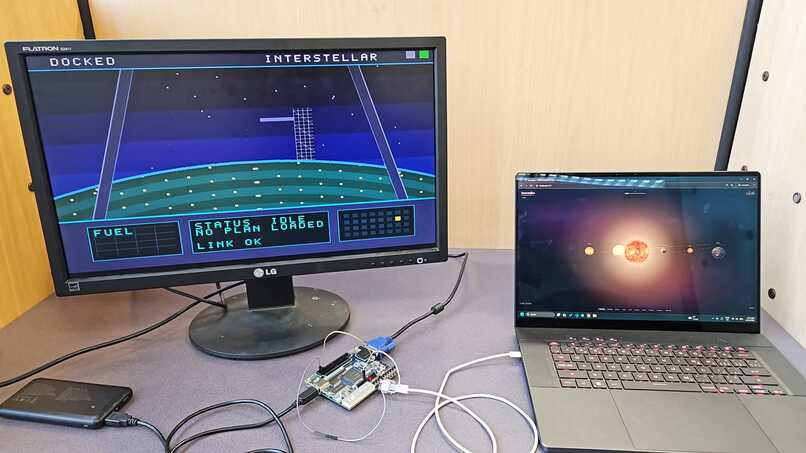
Initial Setup and look of UI
-
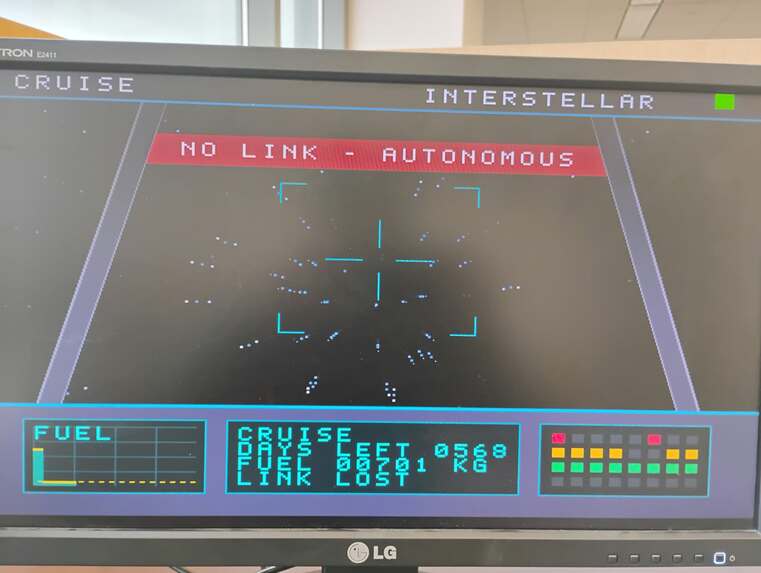
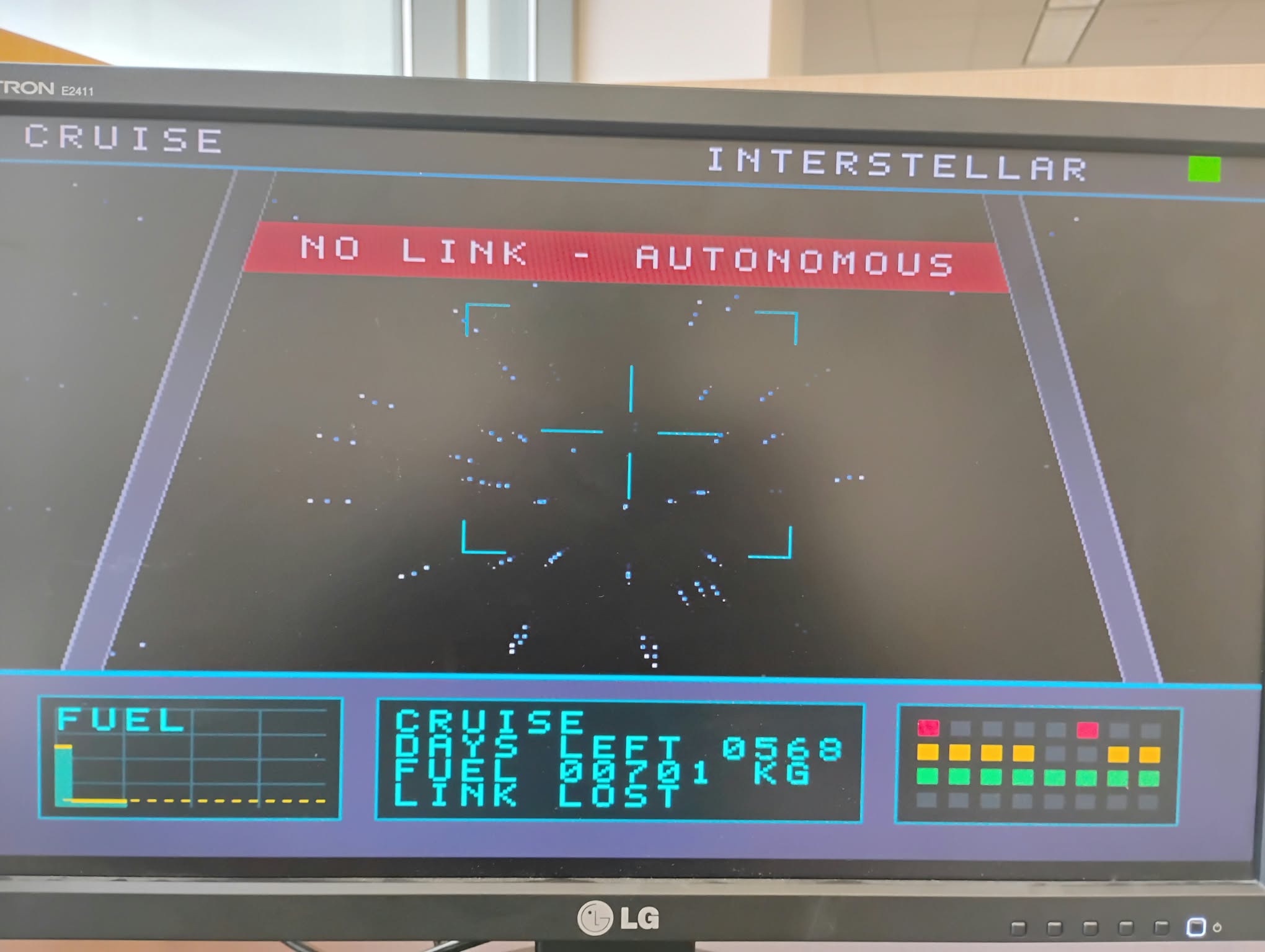
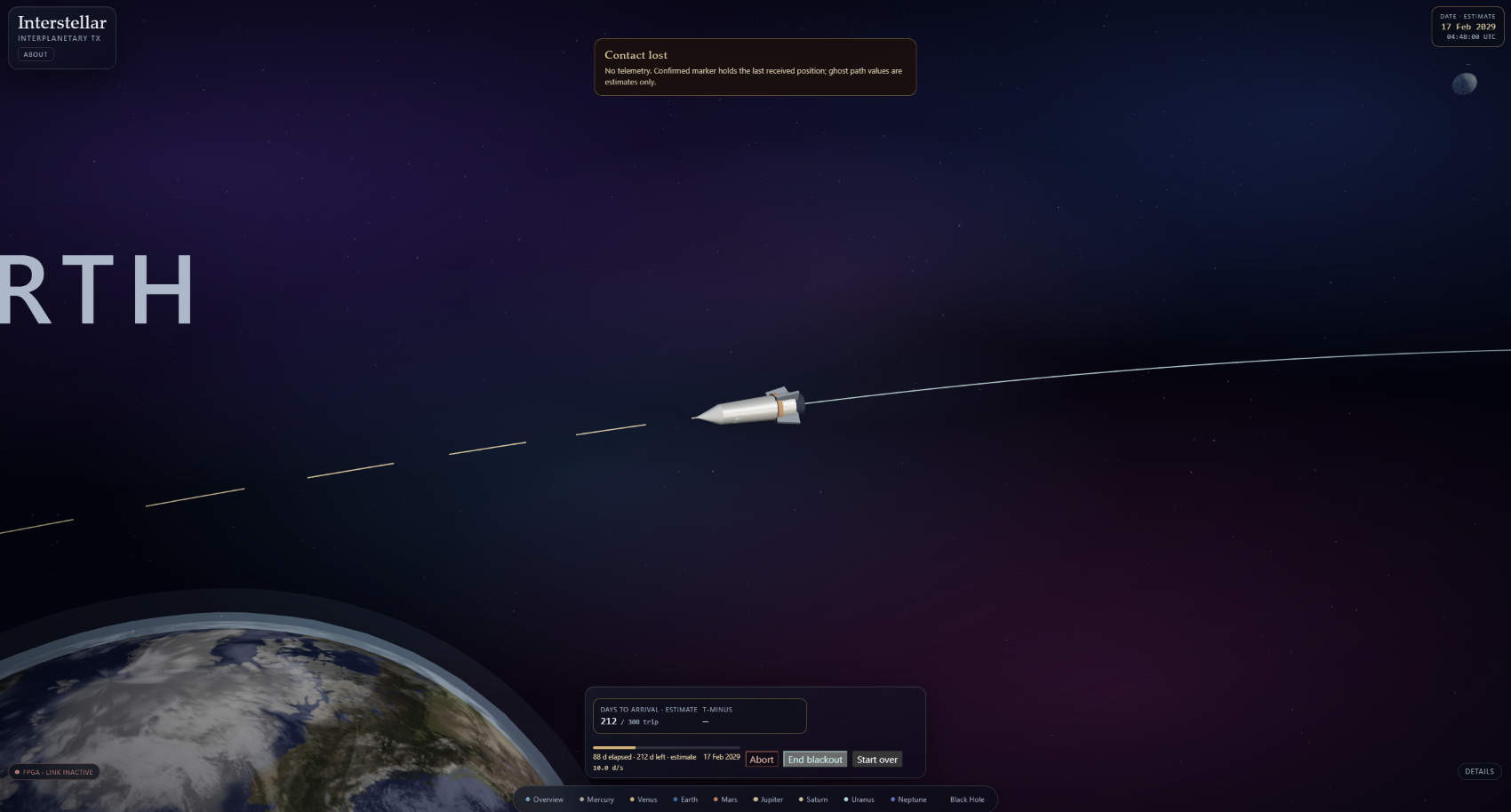
Connection lost in space
-
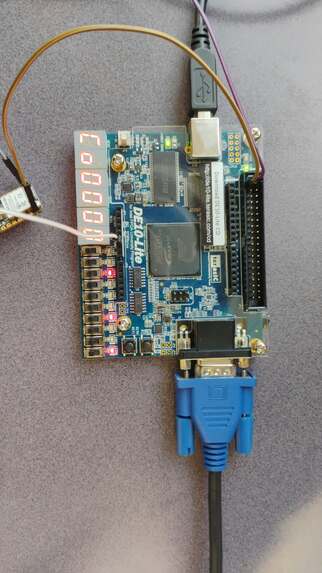
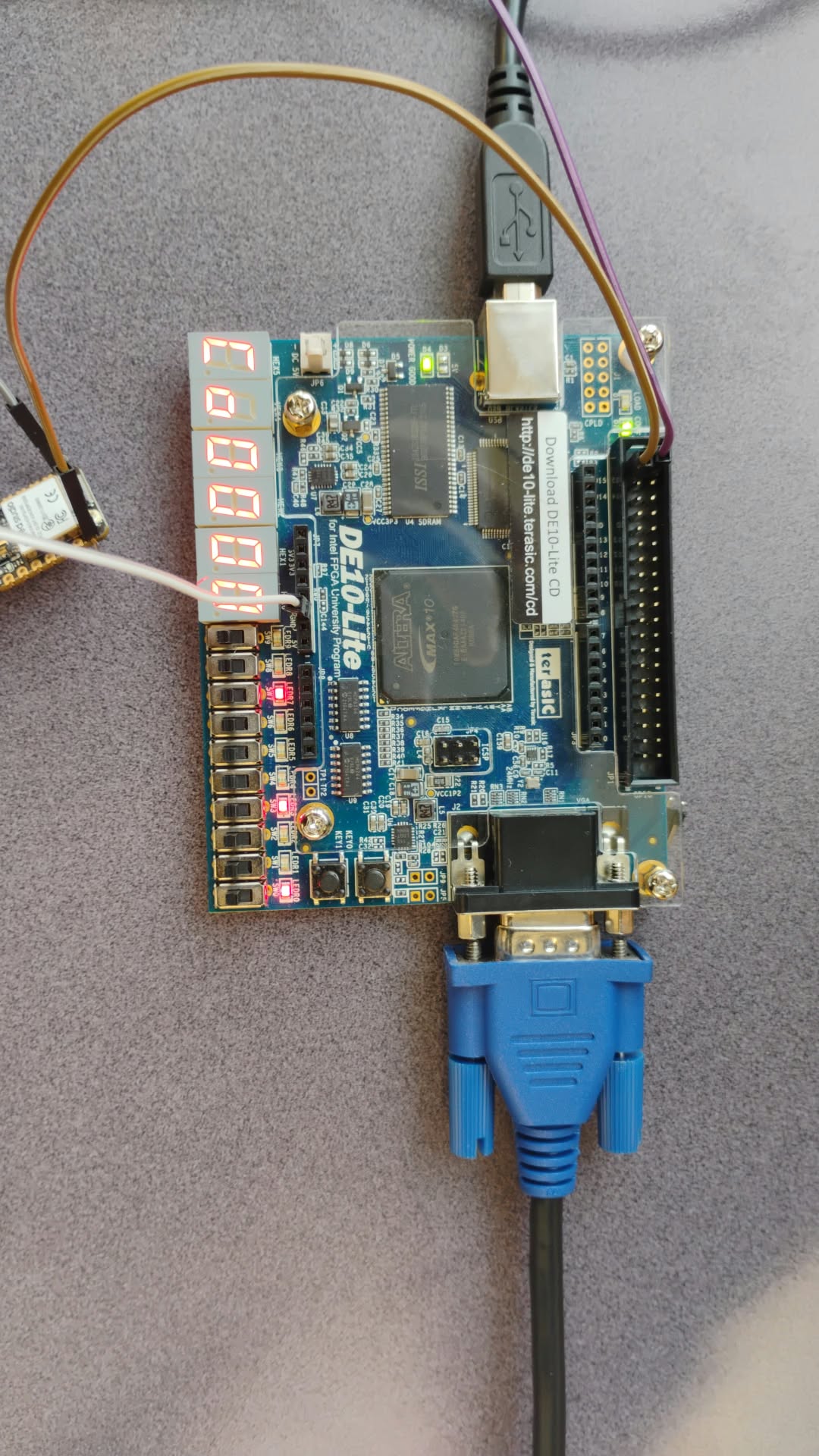
Flight computer hardware
-
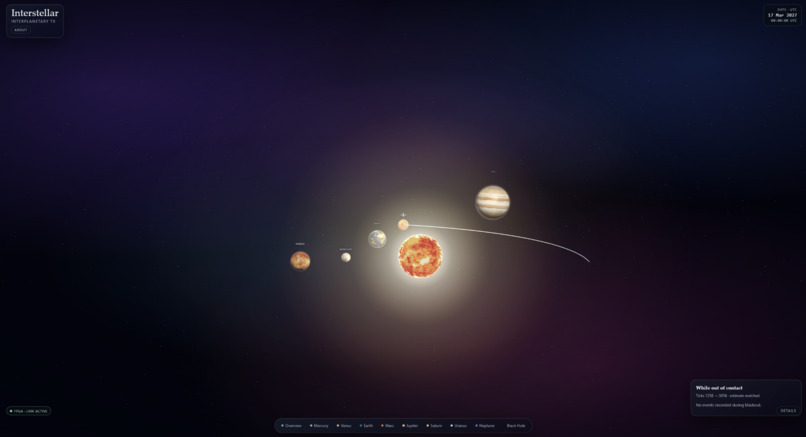
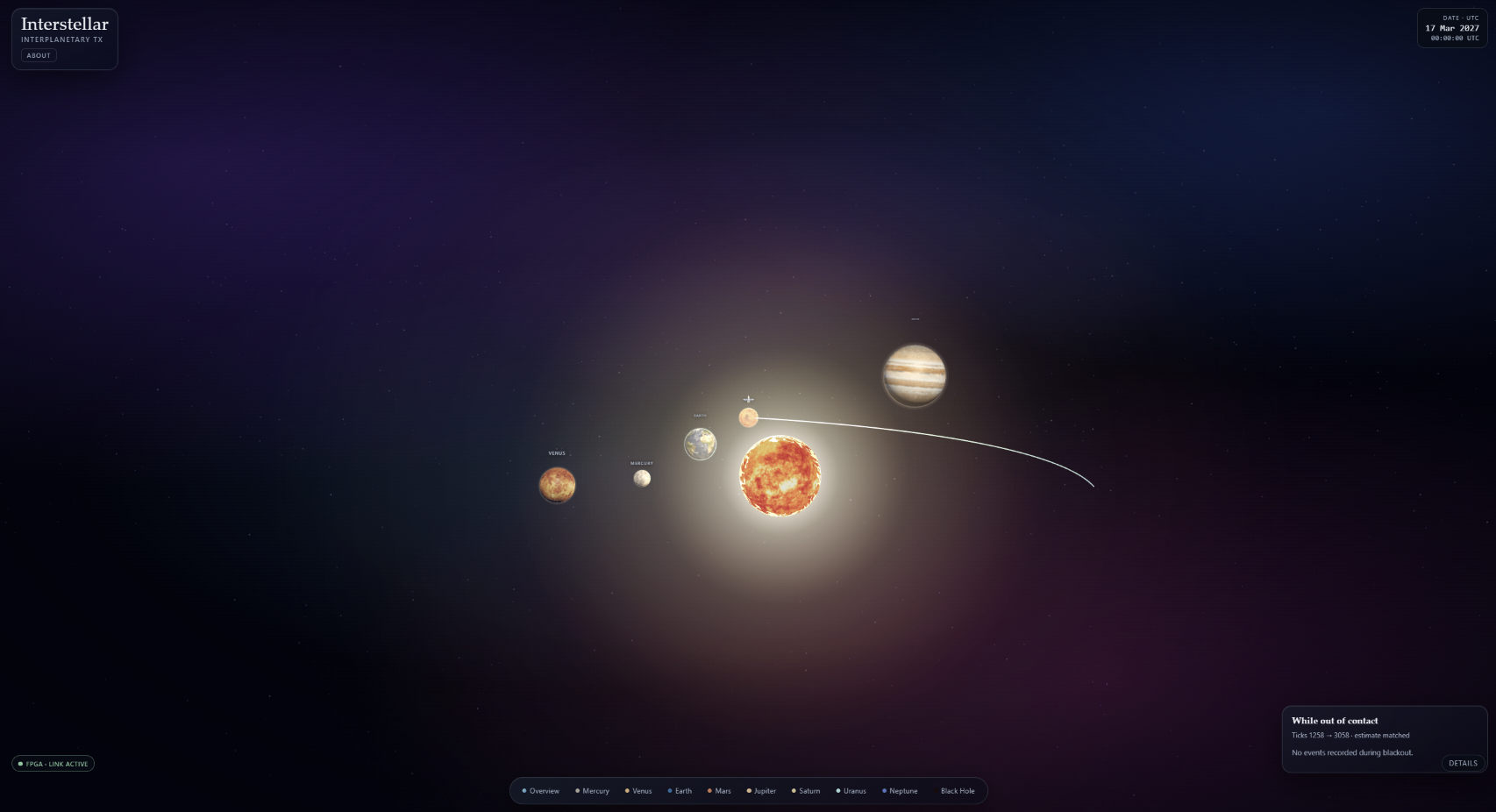
Initial look of the UI
-
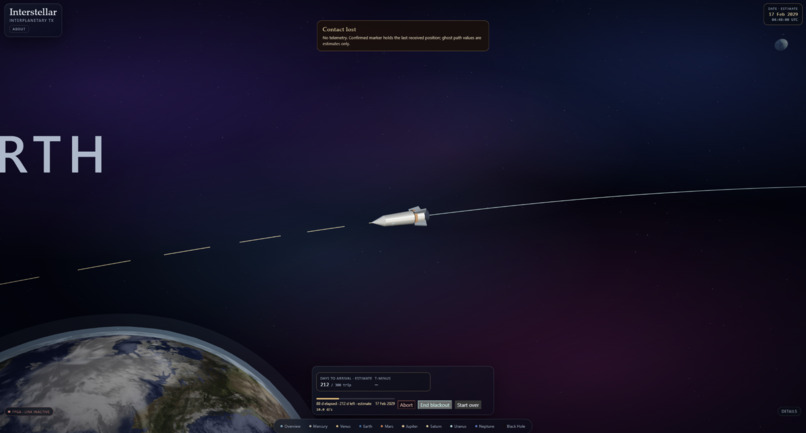
Flight path to another planet
-
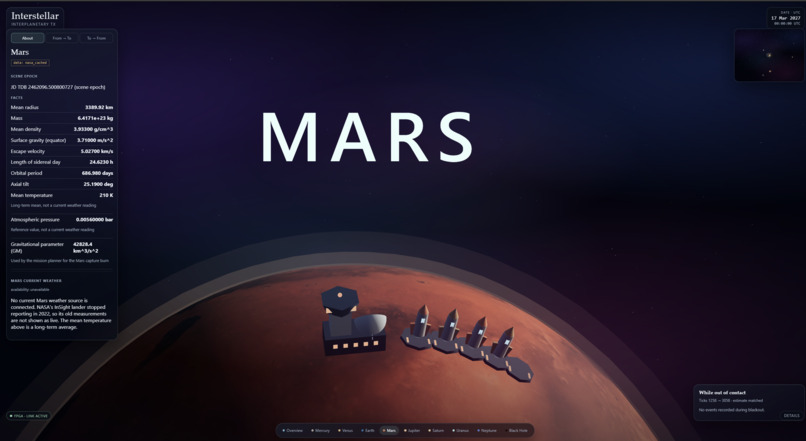
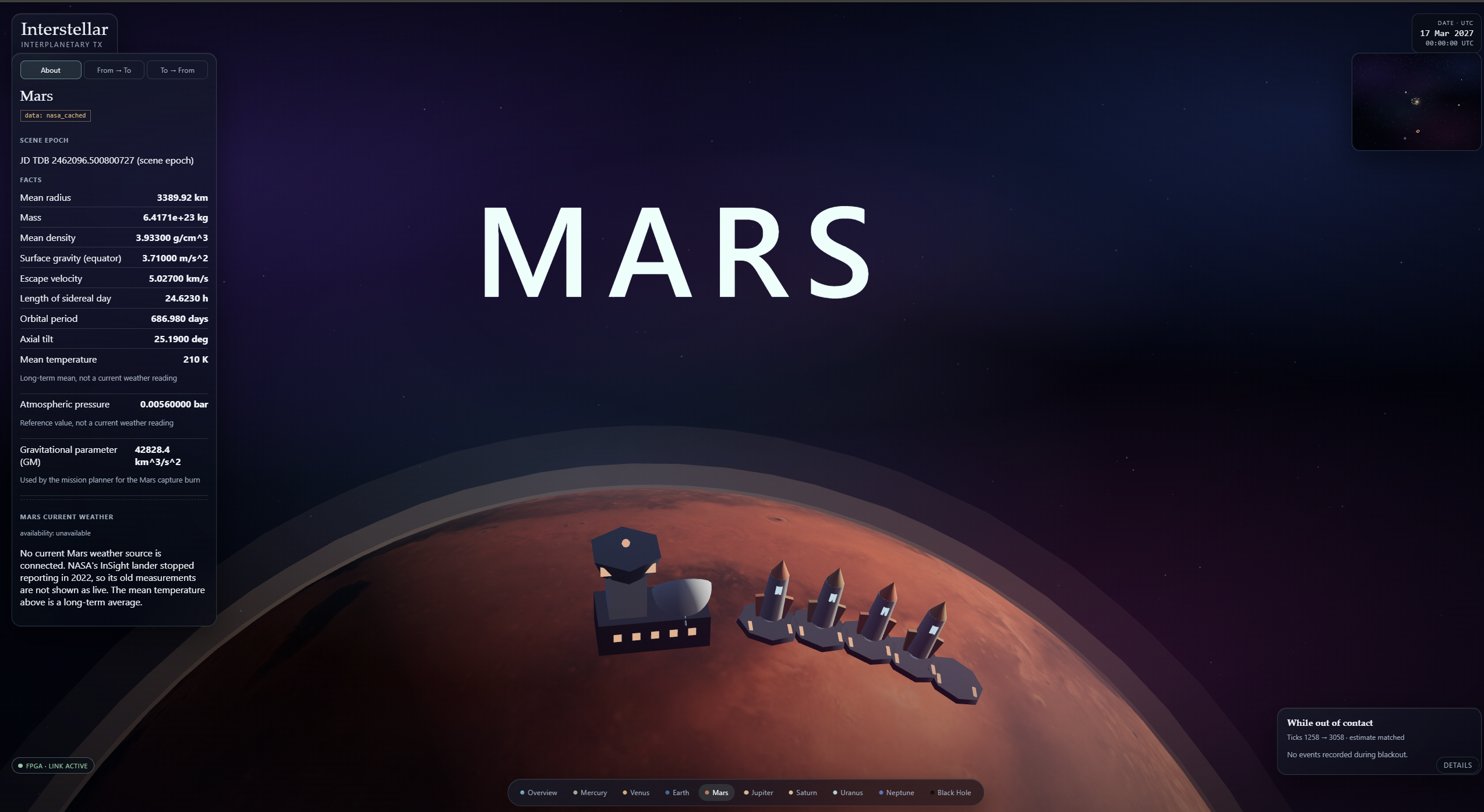
When on the planet
Interstellar
Mission control on your laptop. A real spacecraft computer on your desk. Real NASA orbits in between.
Hack the Nest 2026 · Interstellar Highway
What is this, in one minute
Imagine people living on several planets. Cargo shuttles fly between them. Two questions matter:
- Which route do we fly? Planets never stop moving, so the cheapest trip and the fastest trip change every day.
- Who flies the shuttle when Earth cannot talk to it? Radio contact with a spacecraft drops out. When it does, nobody on the ground can press a button for it.
Interstellar answers both, with real parts:
- The laptop is mission control. It takes real planet positions from NASA, works out the routes, and shows a 3D solar system you can fly around in.
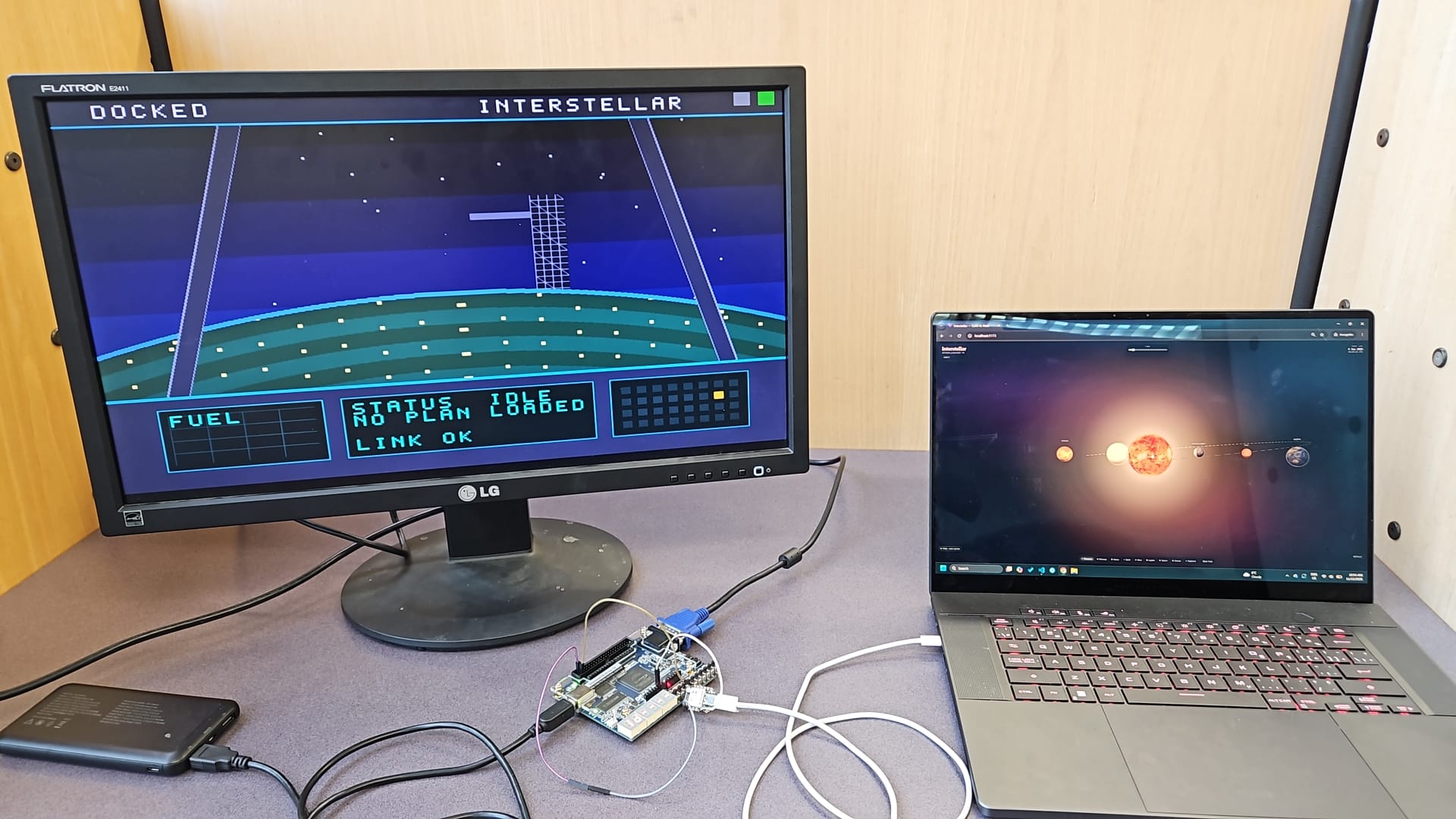
- A small circuit board (an FPGA) is the shuttle's on-board computer. Once a mission is uploaded, the board runs the flight by itself: it counts the time, fires the engine burns, tracks the fuel, and protects itself from memory errors.
- In the middle of every flight we cut the link. Mission control goes blind and can only estimate where the shuttle is. The board keeps flying. When contact returns, the laptop finds out what really happened.
If the board does not fire the burn, the shuttle on the screen does not arrive. The picture never cheats.
Why we built it
Real deep-space missions cannot be flown with a joystick:
- Signals are slow and sometimes absent. A radio signal to Mars takes between about 3 and 22 minutes each way, and contact is lost entirely when the Sun is in the way. A spacecraft has to carry out its critical burns on its own schedule.
- Space corrupts memory. Radiation can flip a bit inside a computer. Flight computers keep several copies of important values and take a vote.
- Fuel decides everything. Leaving a few weeks earlier or later can multiply the fuel a trip needs.
Most "space simulators" skip all three: one program draws the planets and also decides that the ship arrives. We wanted to show the real division of labour, small enough to sit on a desk:
| Mission control (laptop) | The link (USB bridge) | The shuttle (FPGA board) |
|---|---|---|
| Knows the solar system and plans the route | Carries messages, nothing else | Knows nothing about planets; it executes the plan, exactly and on time |
| Can only watch once the flight starts | Can be cut | Keeps going when the link is cut |
The point for a viewer: you can pull the wires out mid-flight and the mission still completes, because the thing flying it was never the laptop.
How it works
   NASA/JPL Horizons data            Laptop: mission control               FPGA: shuttle computer
  (where every planet is,     -->   1. search launch dates and      -->   3. runs the mission clock
   on every date)                      trip lengths                         4. fires departure burn
                                    2. upload the chosen plan               5. fires capture burn
                                       (timing + fuel, 28 bytes)            6. reports status 10x a second
                                    7. draws only what the board   <--
                                       reports
- Pick a planet and a destination. The laptop shows two options: Saves the most fuel (wait until the planets line up) and Gets there fastest (leave sooner, burn more).
- Launch. The plan is uploaded to the board. A 5-second countdown runs in real time on the screen and on the board.
- Fly. A trip of months or years is compressed into 30 seconds. The date in the corner races forward and the planets move with it.
- Blackout. A quarter of the way in, the laptop loses contact on purpose. It shows a dashed "best guess" for the shuttle. The board shows that the link is lost and keeps counting down the days.
- Sync. Contact returns shortly before arrival. The laptop replaces its guess with the board's real record and lists anything that happened while it was blind.
- Arrive, or not. If the board fired its capture burn on time, the shuttle lands and is now docked at the new planet. If a fault sent the board into safe mode, the shuttle sails past, and the screen shows that instead.
What to watch in the demo
| Moment | On the laptop | On the board |
|---|---|---|
| Launch | 5-second countdown, shuttle lifts off | Countdown, then the departure burn |
| Blackout | "Contact lost", dashed estimate | Link-lost indicator, days keep counting down |
| Flip switch SW0 | (out of contact, sees nothing) | One of three memory copies is corrupted and outvoted; the flight continues |
| Flip switch SW1 on a second run | Its estimate still says "on course" | All three copies disagree: safe mode, no capture burn |
| Sync | "While out of contact" summary; the estimate is replaced by the truth | Unchanged: it was right all along |
What is real, and what is a model
| Part | Status at submission |
|---|---|
| Planet positions | Real NASA/JPL Horizons data, stored in the repo so the demo runs offline |
| Routes | 13 routes between Mercury, Venus, Earth, Mars and Jupiter, 38 flight options. Each one is re-flown by an independent numerical check before it is accepted |
| Shuttles | Two model ships, "Standard" and "Long-range". They are not real spacecraft |
| FPGA mission computer | Runs on a real DE10-Lite, booting from its own flash. On the real board through the bridge: full 30-second missions to capture with the automatic blackout, recorded by our FPGA owner in the board log (app/hardware/fpga/README.md) |
| Fault protection (three copies and a vote) | On the real board, per the same log: switch SW0 corrupted one copy, it was outvoted and the mission still completed; switch SW1 made all three disagree and the board went to safe mode with no capture burn |
| Simulated controller | A software stand-in for the board so the app runs with no hardware. The screen says "Simulator" when it is used |
| Brain input (optional extra) | A two-choice selector that opens a planet's information card. Synthetic signals only; no live EEG result is claimed |
How we built it
- Backend: Python, FastAPI, WebSockets. One worker thread owns the serial port, so there is exactly one voice talking to the board.
- Orbit maths: NumPy, SciPy, Astropy, and a Lambert solver, on NASA/JPL Horizons state vectors.
- Frontend: TypeScript, React, Three.js. It renders only what the backend reports.
- Shuttle computer: Verilog on a Terasic DE10-Lite (Intel MAX 10), built in Quartus. Seven-segment and VGA cockpit displays.
- Bridge: a Seeed XIAO ESP32S3 passing bytes between USB and the board's 3.3 V serial pins.
- Tests: over 400 automated backend tests, golden byte-for-byte protocol frames shared by the Python and Verilog sides, and an independent re-flight of every stored route.
Four people built it in one weekend, working with AI coding agents (Claude Code, OpenAI Codex, Cursor) under written contracts: one shared protocol file, one owner per folder, every change reviewed and tested before it was merged.
Technical details
Route mathematics
All positions and velocities are heliocentric, ecliptic, in kilometres and seconds, from NASA/JPL Horizons.
1. Transfer orbit (Lambert's problem). For a launch date t1 and a trip length T, take the origin planet's position r1 at t1 and the destination's position r2 at t1 + T. Solve for the one orbit around the Sun that connects them in exactly T:
find v1, v2 such that an orbit with mu_sun leaving r1 with v1 reaches r2 after time T with velocity v2
2. Burns (patched conics). The shuttle starts and ends in a circular parking orbit of radius r_p around each planet. The speed it must have relative to the planet, far away, is
v_inf_depart  = | v1 - v_planet1 |
v_inf_arrive  = | v2 - v_planet2 |
and each burn is the difference between the escape trajectory's speed at the parking orbit and the circular speed there:
dv = sqrt( v_inf^2 + 2*mu_planet / r_p ) - sqrt( mu_planet / r_p )
3. Fuel (rocket equation). With exhaust velocity ve = Isp * g0, working backwards from the mass that must arrive:
m_before_burn = m_after_burn * exp( dv / ve )
applied first to the capture burn, then to the departure burn. A route is feasible only if the total fits in the shuttle's tank.
4. Search. For each route and shuttle class, launch dates every 5 days and trip lengths every 5 days are tried across the stored date range. Two winners are kept: the least fuel, and the earliest arrival the tank can pay for.
5. Independent check. Every winner is integrated numerically from r1, v1 under the Sun's gravity (SciPy DOP853) and must arrive within 10 km of the planet, with energy and angular momentum conserved. A second integrator (implicit Radau) and a from-scratch recomputation of both burns and the fuel are run by the reviewer before a route is merged.
Model limits. Only the Sun's gravity during the coast; instant burns; no gravity assists; no launch from the surface; "best" means best within the searched grid. A missed capture is shown as an uncaptured coast, not a precise flyby.
Time scaling
The board always counts 100 ticks per second. Every plan uses the same three numbers, whatever the trip length:
| Phase | Ticks | Real time | Simulated time |
|---|---|---|---|
| Countdown | 500 | 5 s | real time |
| Flight | 3000 | 30 s | the whole trip: trip_days / 30 days per second |
| Tail | 300 | 3 s | room to show a missed capture |
The laptop shows a calendar date. The board shows only days to arrival, counted with integers so both sides agree exactly:
days_to_arrival = trip_days - floor( (tick - departure_tick) * trip_days / (arrival_tick - departure_tick) )
The wire protocol
One frame format in both directions, at 115200 baud:
A5 5A | version | type | sequence (u16) | session (u32) | length (u16) | payload | CRC-16/CCITT-FALSE
- The plan is 28 bytes: mission id, departure / arrival / end ticks, and three fuel amounts in grams. The board never sees a planet, a date or a floating-point number.
- Commands are stop-and-wait: one at a time, each answered by a 16-byte ACK. A repeated command with the same sequence number is answered again but never applied twice.
- The board sends a 40-byte STATUS ten times a second: state, tick, which burns have fired and when, fuel left, fault counters.
- The same golden frames, byte for byte, are checked by the Python tests and the Verilog testbenches.
Full definition: app/contracts/ (protocol, JSON schemas, API).
The shuttle computer (FPGA)
- Mission sequencer: states IDLE, LOADED, ARMED, RUNNING, SAFE, COMPLETE, ABORTED. Each burn fires at most once, at
tick >= scheduled tick, and deducts fuel from an integer ledger. - Fault tolerance: the control values (state, burn record, fuel, burn ticks) are stored three times and read through a majority voter. One corrupted copy is outvoted and counted. If no two copies agree, the board latches SAFE and refuses to fire further burns, while its clock keeps running.
- Autonomy: nothing in the flight depends on receiving a message. A link watchdog only drives the displays.
- Displays: six seven-segment digits (state, countdown, days to arrival) and a VGA cockpit.
Source and board log: app/hardware/fpga/.
Blackout, estimate and sync
- While in contact, the backend sends a keep-alive twice a second. The board calls the link lost after 2 s of silence.
- From 25 % to 85 % of every flight the backend goes silent, discards anything it receives, and refuses to send commands.
- During that time the screen keeps the last confirmed values frozen and shows a separate, labelled estimate, extrapolated from the last telemetry at 100 ticks per second.
- When contact returns, the first valid STATUS replaces the estimate. The backend reports which events happened out of contact and every difference between estimate and truth. An estimate is never turned into a result.
- A link light shows Active, Inactive or Reconnecting. It becomes Active only on a valid STATUS from the board, never on a timer.
Fleet
Shuttles are tracked, not assumed. A route can be launched only from a planet where a shuttle of the right class is docked. A shuttle moves only on confirmed board events: departure burn (in flight), capture (docked at the destination), safe mode or abort after departure (lost).
Run it
Needs Python 3.10+ and Node.js. Two Git Bash windows in the repo folder:
app/scripts/start-backend.sh simulator          # window 1: backend on http://127.0.0.1:8000
cd app/frontend && npm ci && npm run dev         # window 2: the 3D interface
Open http://localhost:5173. No hardware is needed in simulator mode.
.venv/Scripts/python -m pytest app/tests # all backend tests, offline
With the real board: program the DE10-Lite (app/hardware/fpga/README.md), wire the XIAO to header JP1 (app/hardware/xiao/README.md, 3.3 V only), check the link with python -m app.hardware.xiao.probe --port COM10 --seconds 5, then set TRANSPORT_MODE=fpga and SERIAL_PORT=COM10 in .env (copy .env.example) and start as above.
Repository map
| Path | What |
|---|---|
app/backend/ |
API, mission runtime, orbit maths, NASA data access, fleet, time scaling, serial transport |
app/frontend/ |
The 3D interface |
app/hardware/fpga/ |
Verilog for the shuttle computer, Quartus project, board log |
app/hardware/xiao/ |
Bridge firmware and link probe |
app/contracts/ |
The protocol, golden frames, JSON schemas and API description everyone builds against |
app/data/ |
Stored NASA data and validated routes |
app/brain/ |
Optional brain-input extension |
docs/plan/ |
The design specification |
Team
Abderrahmene Naceri · Sadat Tanzim · Affan Syed · Zain Usmani
Credits
Planet positions and constants: NASA/JPL Horizons. This project is not endorsed by NASA. Planet textures: Solar System Scope (CC BY 4.0). Third-party licences: THIRD_PARTY_NOTICES.md.
AI tools used: Claude Code, OpenAI Codex, Cursor.