-
-
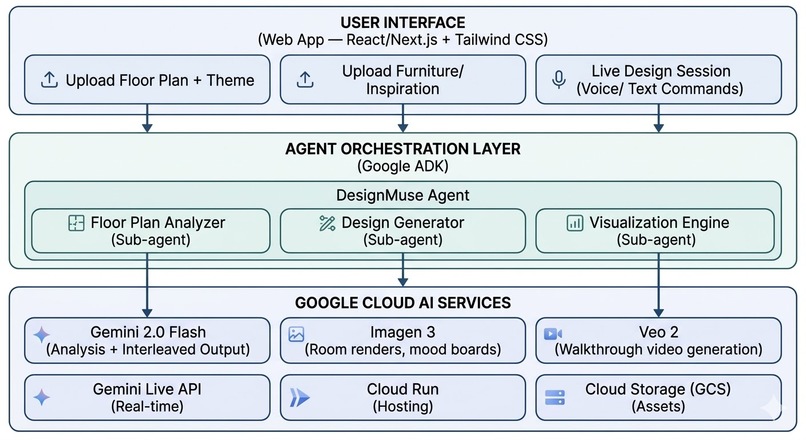
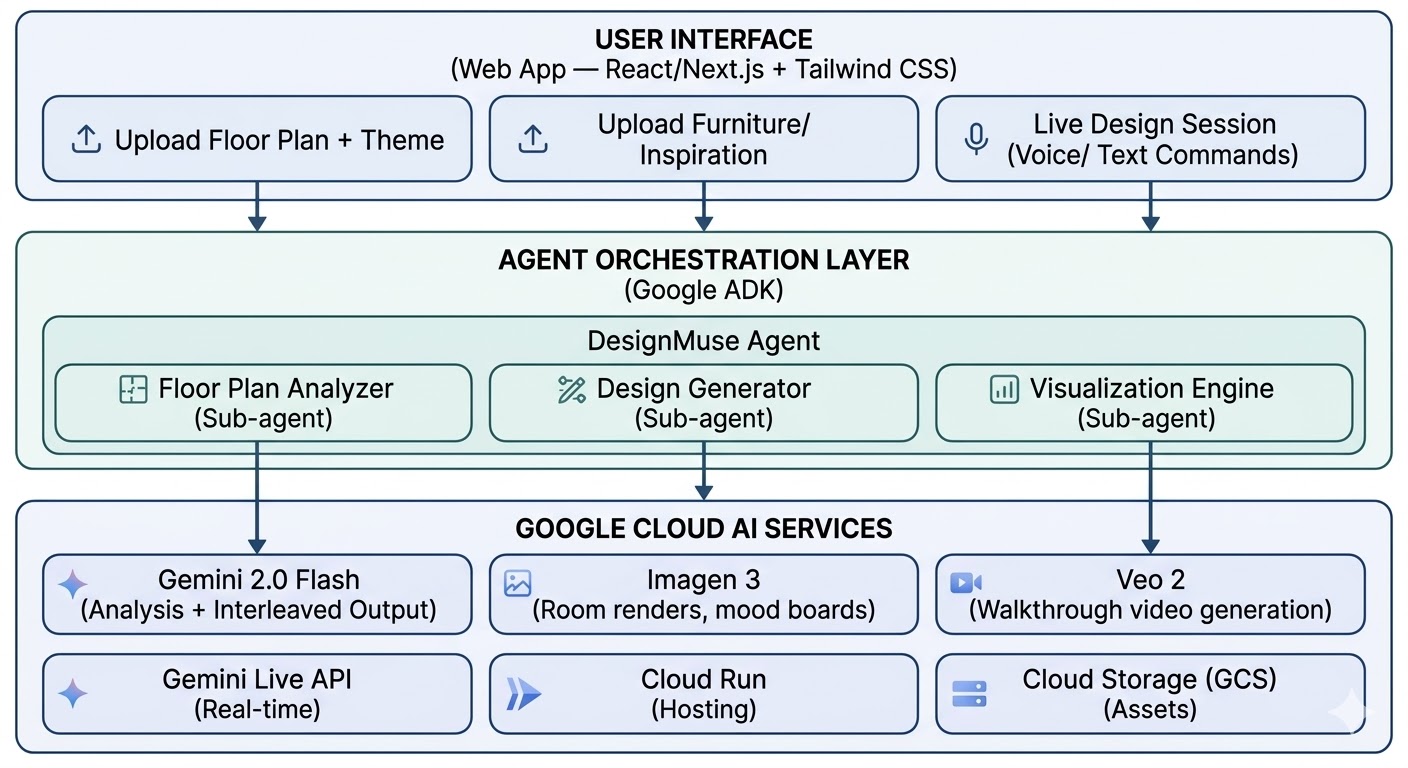
System Architecture
-
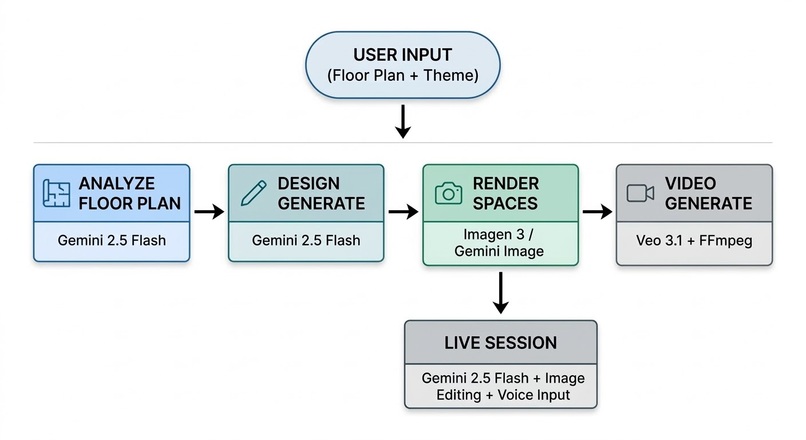
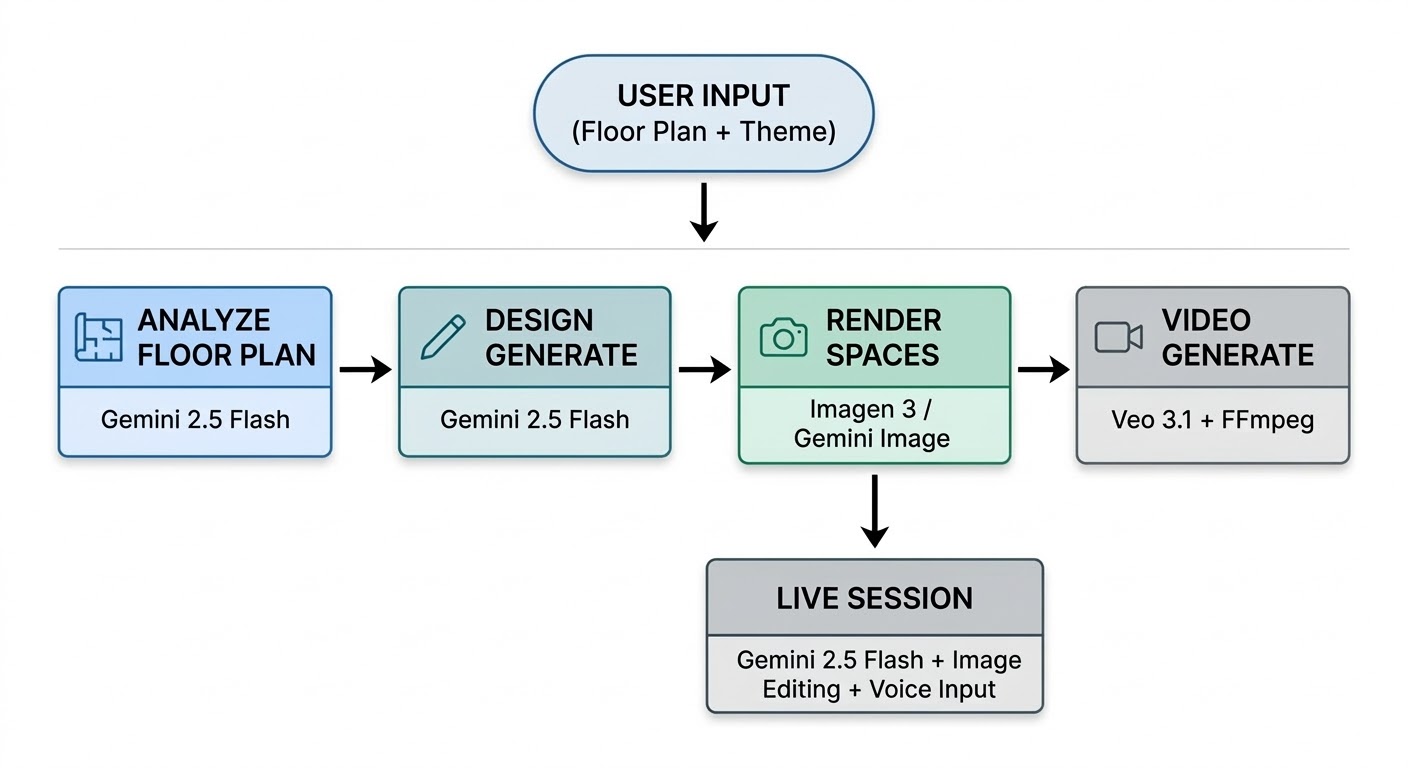
Agent Workflow
-

App Logo

Inspiration
Interior design is one of the most visually-driven yet inaccessible professional services. The tools that exist today are fragmented: Pinterest for inspiration, SketchUp for layout planning, separate rendering software for visualizations. None of them connect the full pipeline from floor plan to final walkthrough.
More importantly, the imagination gap is real. 2D mood boards and fabric swatches don’t help most people understand what a space will feel like. DesignMuse bridges that gap by generating photorealistic images and videos of our actual floor plan with our chosen aesthetic — before a single piece of furniture is purchased.
The target users go beyond individual homeowners. Real estate agents spend $1,500–$6,000 on virtual staging per property. Property developers need to present design options to buyers. Airbnb hosts want to stage rental properties attractively. Interior design students need rapid prototyping tools. DesignMuse addresses all of these use cases with a single pipeline.
What it does
DesignMuse has three core capabilities, each building on the last.
1. Theme-Based Design Generation Upload a floor plan — it can be a rough sketch, an architectural blueprint, or even a photo of one drawn on a napkin. Pick a theme like “Greek Mediterranean,” “Japanese Zen,” or “Industrial Loft.” The system analyzes the spatial layout, identifies individual rooms, and generates a complete design for each space: color palettes with hex codes, furniture suggestions, material recommendations, decoration ideas, and a photorealistic render showing what the room would look like.
The results stream in progressively. The text design appears first, then each room’s render arrives one by one as they finish generating. No waiting for everything to complete before seeing results.
2. Live Interactive Design Session Once users have a design, they can open a live session and start making changes conversationally. Type “swap the living room sofa to dark leather” or use their browser’s voice input to say it out loud. The system figures out which rooms are affected, generates updated renders with the changes applied, and lets us preview before confirming.
They can also upload a reference photo — say, a photo of a specific chair from a furniture website — and ask the system to place it into a room. It extracts the item from their photo and edits it into the existing room render, preserving the original composition and lighting.
How we built it
The interesting part of DesignMuse isn’t any single model call, it’s how different AI models are orchestrated together into a coherent pipeline.
All generative AI models are accessed through Google Cloud Vertex AI, which provides a unified API surface. An important implementation detail: the backend maintains two separate GenAI client instances. Models like Gemini text/JSON, Imagen, and Veo are region-specific, while Gemini's image generation models require the global endpoint. Having two clients with different location configurations avoids routing errors.
The Multi-Agent Pipeline Rather than one monolithic function that does everything, DesignMuse uses a multi-agent architecture with three specialized agents, each responsible for a distinct stage of the pipeline.
FloorPlanAgent takes the raw floor plan image and uses Gemini 2.5 Flash’s multimodal vision capability to extract structured data: room names, approximate dimensions, spatial relationships, architectural features like windows and doors. The output is clean JSON that downstream agents consume.
DesignerAgent receives the structured room data along with the selected theme and generates a complete design plan. It produces room-by-room color palettes, furniture suggestions, material recommendations, and decoration ideas, all as structured JSON. Then it hands off to
Imagen 3to generate a photorealistic render for each room. During live sessions, this same agent handles modification requests: it figures out which rooms are affected by a change, preserves existing image URLs for unaffected rooms, and returns a targeted update.VisualizerAgent handles two responsibilities. For image editing, it uses a three-tier fallback strategy: first, it tries to edit the existing room image using
Gemini 2.5 Flash Image(which preserves the original composition). If that fails, it falls back to regenerating the image from scratch using Imagen 3 with the full room description plus changes. As a last resort, it keeps the original image. For video, it sends each room image toVeo 3.1for clip generation, then usesFFmpegto concatenate all clips into a single walkthrough.An Orchestrator ties the agents together, managing the data flow between stages and handling the SSE (Server-Sent Events) streaming that lets the frontend display results progressively.
Streaming Architecture
One of the key UX decisions was to make everything stream. When we generate a design, the text plan appears within seconds. But room image generation takes 10–30 seconds per room. Rather than making the user stare at a spinner for two minutes, the backend uses Server-Sent Events to push each room’s render to the frontend as soon as it’s ready.
The same pattern applies to video generation. Each room’s video clip takes time to generate, so the frontend shows a progress bar that updates with each completed clip, followed by a “stitching” event when FFmpeg is concatenating, and finally the complete video URL.
This is implemented with FastAPI’s StreamingResponse wrapping an async generator. Each agent yields events as they complete work, and the orchestrator forwards them to the HTTP response stream.
Google Cloud Infrastructure
Vertex AI All model access goes through Vertex AI rather than direct API keys. This was a deliberate choice: Vertex AI provides higher rate limits, better quota management, and the service account–based authentication that Cloud Run needs. The google-genai Python SDK handles the client management, and the backend simply configures two clients (regional and global) at startup.
Cloud Run The application runs as two separate Cloud Run services: one for the FastAPI backend and one for the Next.js frontend. Cloud Run was the right fit because the workload is bursty — design generation requests are CPU/memory-intensive but infrequent. Serverless auto-scaling means no idle costs between requests, while the 2 vCPU / 2 GB memory allocation handles the concurrent model calls comfortably.
The deployment is automated with a single shell script that builds Docker images, pushes them to Artifact Registry, deploys the backend first (to get its URL), then builds the frontend with the backend URL baked in, and finally updates the backend’s CORS configuration to allow the frontend’s origin. The entire process runs with one command.
Cloud Storage Generated images and videos are stored in a Google Cloud Storage bucket with public URLs. This is important because the frontend needs to display images directly, and the video walkthrough files can be large. GCS provides the durability and CDN-backed delivery that makes this seamless.
Challenges we ran into
The Live Session Design
The live interactive session posed an interesting architectural challenge. The system needs to maintain context across multiple turns: the original floor plan, the current design state, all previous modifications. But it also needs to be efficient — re-rendering every room on each message would be wasteful and slow.
The solution: when a live session starts, the server loads the existing design and floor plan into a Gemini conversation context. When the user sends a modification request, the DesignerAgent determines which rooms are affected and returns only the changes. The VisualizerAgent then re-renders only the affected rooms, using the existing images as a starting point for editing rather than generating from scratch. This keeps response times reasonable even for large floor plans with many rooms.
Reference image handling adds another layer. When a user uploads a photo of, say, a specific armchair, the system includes it as a multimodal input to the Gemini conversation. The model identifies the item, and the VisualizerAgent edits it into the existing room render using Gemini’s native image editing capability.
Accomplishments that we're proud of
The entire MVP is something to be proud of. Especially, I worked in a constraint environment where I did not have any access to GPU to run the model. Also, this project was done in less than a week's time. I had to learn how the Google tech stack worked. In the process, I burned almost all my free google cloud credits! But I am happy of the end outcome as now I can really use this for my own apartment designing!
What we learned
Model selection matters more than prompt engineering. The three-tier fallback for image editing (Gemini Image → Imagen regeneration → keep original) wasn’t planned from the start. I discovered through testing that Gemini’s image editing sometimes fails on certain compositions, and Imagen’s text-to-image sometimes produces inconsistent results when given very specific descriptions. The fallback chain handles both gracefully.
Streaming transforms the user experience. The difference between “wait 90 seconds, see everything” and “see text in 3 seconds, then images appearing one by one over 90 seconds” is enormous. The total wait time is the same, but the perceived experience is completely different. SSE was worth the implementation complexity.
Two GenAI clients, not one. This tripped me up initially. Gemini’s image generation models (gemini--image) require the global endpoint, while Imagen, Veo, and Gemini text models require a regional endpoint like us-central1. Using a single client with one location causes cryptic routing errors. The fix is simple — two client instances with different location configs — but the error messages don't make the cause obvious.
Cloud Run cold starts matter for long operations. Gemini, Imagen, and Veo calls can each take 10–30 seconds. The Cloud Run request timeout needs to be set generously (600 seconds in our case) to accommodate multi-room design generation where the total wall-clock time can reach several minutes.
What's next for DesignMuse AI — An AI Interior Design Agent
The most important thing will be to connect with a marketplace like Amazon and google search. So, that based on a design suggestion, I can look up for the necessary producets and buy them directly. The platform would evolve in a way that it is not only just a designer and a visualizer, it will be a recommendation engine from where I can actually get recommendation and links to purchase the furnitures and the items required to complete the real interior designing and home setup process.
Built With
- docker-compose
- fastapi
- gemini-flash-2.5
- google-cloud
- google-cloud-vertex-ai
- imagen-3
- next.js
- python
- tailwind
- veo-3.1
- vertex-ai
- web-speech-api


Log in or sign up for Devpost to join the conversation.