Inspiration
We've all scrolled endlessly through furniture websites looking for something that fits our awkward corner or matches our specific style. What if you could design furniture perfectly tailored to your exact space, before it even exists?
With Android XR and Gemini, we saw the opportunity. Interior Design XR (IDXR) was born from the idea that if you can dream it and measure it, you should be able to see it in your living room—instantly.
What it does
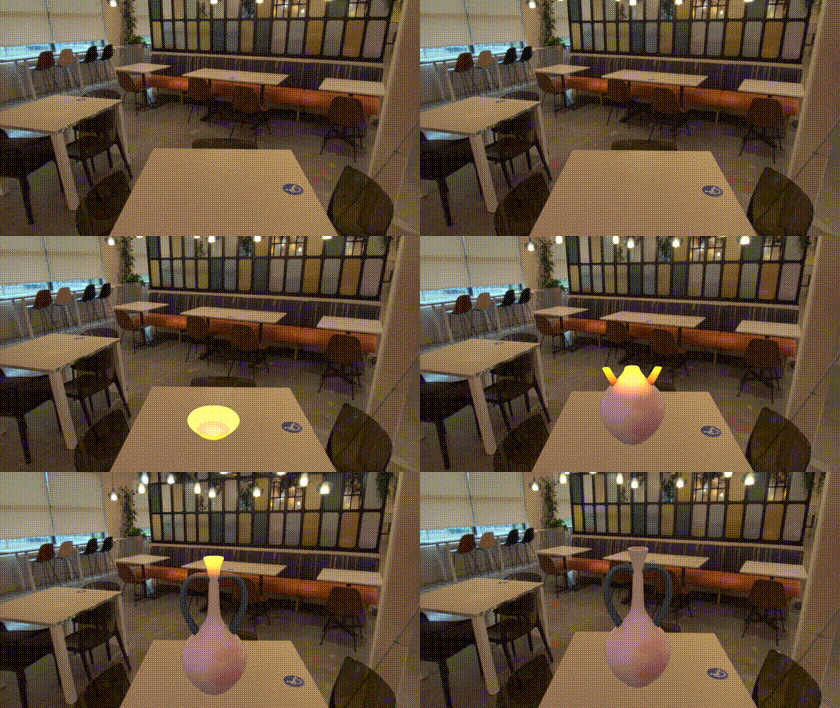
Interior Design XR turns your physical environment into a canvas for generative AI, creating bespoke 3D furniture using only voice and gestures.
The workflow:
- Define the Space: Physically draw a bounding box in your room using hand tracking
- Conversational Design: Talk to Gemini Live: "Generate a mid-century modern velvet armchair"
- Visual Preview: See a 2D concept in seconds
- Iterative Refinement: Enable painting mode, sketch modifications directly on the image, then say "Regenerate based on my sketches"
- 3D Materialization: Say "Convert to 3D" and watch it generate in 2-3 minutes
- Physical Integration: The mesh automatically reshapes and repositions to match your bounding box dimensions, with proper depth occlusion behind real furniture
What makes us different: Unlike one-shot "draw and generate" approaches, we're human-in-the-loop. You iterate quickly with 2D previews (10 seconds), refine until perfect, then commit to expensive 3D generation. This saves time and gives you control at every step.
How we built it
Stack: Vanilla JavaScript with no build steps, XR Blocks for WebXR, Gemini Live 2.5 Flash with Function Calling, Gemini 2.5 Flash Image, Meshy AI for image-to-3D, Three.js for rendering.
Architecture: We used Gemini's Function Calling to create a tool-based system. Each feature (generate, draw, regenerate, convert to 3D) is a callable tool, letting Gemini orchestrate the entire workflow through natural conversation.
Pipeline:
- Extract bounding box dimensions → Generate image with exact size constraints
- Users sketch modifications → Screenshot + regenerate with "clean output only" prompt
- 2D image → Meshy 3D conversion → Automatic rescaling/repositioning to fit the original bounding box
Speed hack: XR Blocks Simulator let us develop in Chrome, 10x'ing iteration speed vs. constantly wearing the headset.
Challenges we ran into
"Sketch vs Clean Output": Teaching Gemini to understand sketches but NOT include drawing strokes in final images. Solved with careful prompting: "Generate ONLY the furniture—no tools or UI."
Async Chaos: Three AI services (Gemini Live, Gemini Image, Meshy) racing. Built a state machine with task locking to prevent users from spamming "convert to 3D" during generation.
Scale Matching: Ensuring generated 3D models matched the physical bounding box dimensions required automatic rescaling logic and careful dimension passing through the entire pipeline.
Depth Occlusion: Tuning WebXR Depth API so furniture correctly hides behind real objects.
Accomplishments that we're proud of
End-to-end voice+gesture workflow: Empty space → photorealistic 3D furniture using zero keyboards/menus
Human-in-the-loop design: Unlike one-shot generation, our iterative 2D preview system lets users refine quickly before committing to expensive 3D
Automatic spatial fitting: Generated meshes automatically reshape/reposition to match your exact bounding box—no manual adjustment needed
Sub-10-second iteration: From prompt to 2D preview in ~10 seconds means rapid design exploration
Gemini as orchestrator: Function calling turns the LLM into a natural-language operating system for the app
What we learned
Voice over menus in XR. Spatial gestures + conversation = most natural UI.
Constrained AI is useful AI: Giving Gemini physical dimensions makes output actionable, not just cool.
Iteration speed beats features: Testing in 5 seconds vs. 5 minutes = 10x more experiments.
Human-in-the-loop beats one-shot: Fast 2D iteration before slow 3D commit gives users control and saves compute.
Prompting is engineering: Small prompt changes ("CRITICAL:" vs "Please") dramatically affect output quality.
What's next for Interior Design XR
Persistence: AR anchors to save furniture across sessions
Lighting: WebXR lighting estimation for realistic shadows
Cloud Sharing: Share designs via link, like Google Drive
Shopping: Visual search to find real furniture matching your design
Multi-user: Collaborative room design in real-time
Multi-room: Design entire apartments in one session
Built With
- gemini
- javascript
- meshy
- three.js
- webxr
- xrblocks

Log in or sign up for Devpost to join the conversation.