-
-
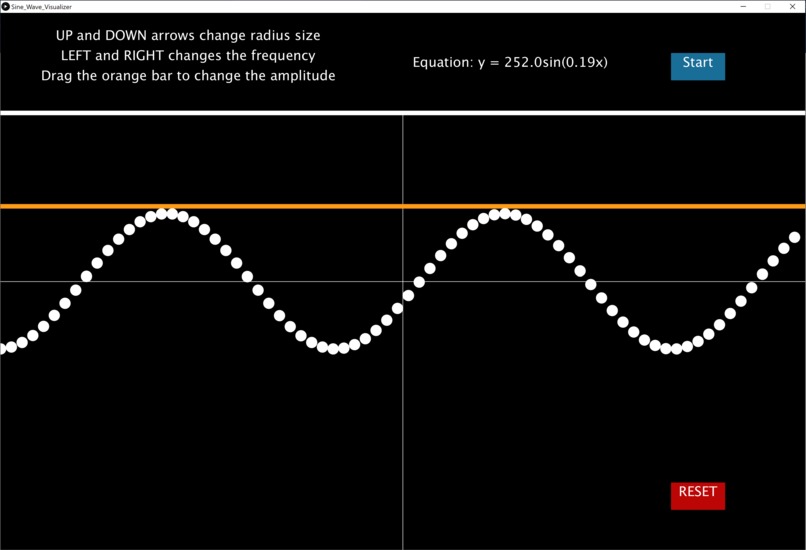
Screenshot of program running

Inspiration
These last 4 years of high school, I have dedicated a lot of my free time to one of my favorite activities: math tutoring. Working 100+ hours and volunteering 500+ hours as a tutor has taught me many things, among them is learning to adapt to each student's individual learning style. Furthermore, I picked up on key concepts that most students had difficulty understanding and made sure to reinforce those areas of teaching in later sessions.
One of these topics that many students had trouble with was understanding the "mysterious" and "abstract" sine graph. More specifically, many students had a hard time wrapping their heads around the foundational, general equation of a sine wave: y = Asin(B(x+C))+D. After learning what exactly was confusing students, I found that the problem was that students often mixed up how the variables A, B, C, and D change the graph. For example, some students would believe that the "A" in the equation would cause a vertical displacement or that changing "C" would change the period of the equation.
In order to correct this faulted way of thinking about the graph, I created this Sine Wave Visualizer Program by setting C and D equal to zero and allowing students to physically see the changes in the sine wave based on their alterations to A and B. By displaying the equation of the graph above the plane, students can see how changing the amplitude of the bar increases/decreases the "A" term and how increasing/decreasing the period is associated with the "B" term in the equation.
I have used this program on my current students and have found that not only does the program make it easier to grasp these sine wave manipulation concepts by dissecting it into manageable chunks, but the students often find entertainment when playing around with the program.
What it does
Features:
- Start/Stop animation button
- Amplitude Bar Manipulation
- Period of Wave Manipulation
- "Zoom in" feature for better visualization
Using the Program:
- Clicking the start/stop button will enable the "dots" that make up the sine wave to move in normal oscillatory motion
- User can click and drag on the orange bar on the top of the screen to change the amplitude of the sine wave
- Using the LEFT and RIGHT arrow keys allow the user to increase/decrease the period of the sine wave
- Using the UP and DOWN arrow keys scale the radius of the dots that make up the sine wave for more/less clutter on the screen
How I built it
I used Processing and some of its basic, built-in functions such as mousePressed and mouseClicked to bring the program's features to life. Additionally, I made separate classes for buttons and the amplitude bar - giving me the flexibility to add new features in later versions.
Challenges I ran into
Some of the challenges I ran into included having to learn a different "style" of Java. Processing simplifies many user interactions, so part of getting started involved having to learn how to go from "standard" Java syntax to the type that Processing uses. An example of this is using keyCode == UP instead of KeyEvent.VK_UP when referencing the key event that occurs when the user hits the "up" arrow key.
Additionally, I ran into problems with translating the Processing grid to different coordinates. This proved problematic when I wanted to create a function for each button that could tell if the user was over the button object. I solved this problem by realizing I could just check if the user was hovering over the button's color value, however, I had to make sure that no two buttons had the same hex color.
Finally, the third biggest challenge was finding a way to organize my code better. I originally had most of the project written on one single file, however, I quickly realized that this was a very inefficient way to approach this program. Therefore, I opted to spend the time to make separate classes for the objects I was putting in the program.
Accomplishments that I'm proud of
I have never made a "full" project in Processing before and I was happy to get the chance to see this one through. More than anything, however, I am beyond proud that this program was actually able to serve its original purpose: to educate. I am proud that my students were able to use this program to understand sine graph manipulations better and have fun while doing it!
What I learned
I learned that I need to spend a little more time planning out my project before starting. I like to start coding the moment I think of an idea, but I have really learned that I need to plan out as much as I can before starting and maybe writing some pseudocode along the way. This will help me avoid having to make drastic changes and keep my ideas sorted and organized.
What's next for Interactive Sine Wave Learning Aid
The current goal is to continue making interactive programs for my students to use and focus on other areas that many learners need help with. With simple to use and manageable "applet-like" programs that focus only on certain aspects of a topic, these kid-friendly programs could potentially be used in learning centers and classrooms.

Log in or sign up for Devpost to join the conversation.