-
-
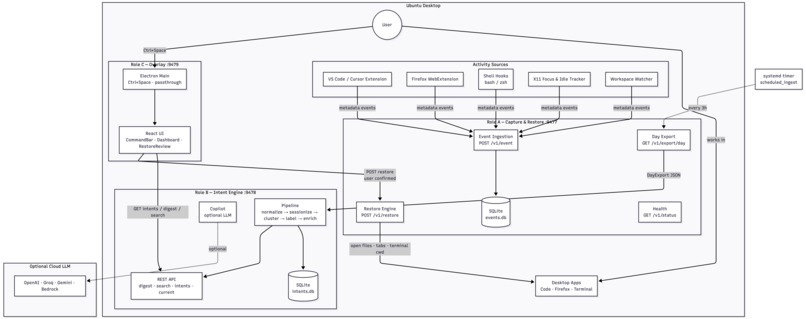
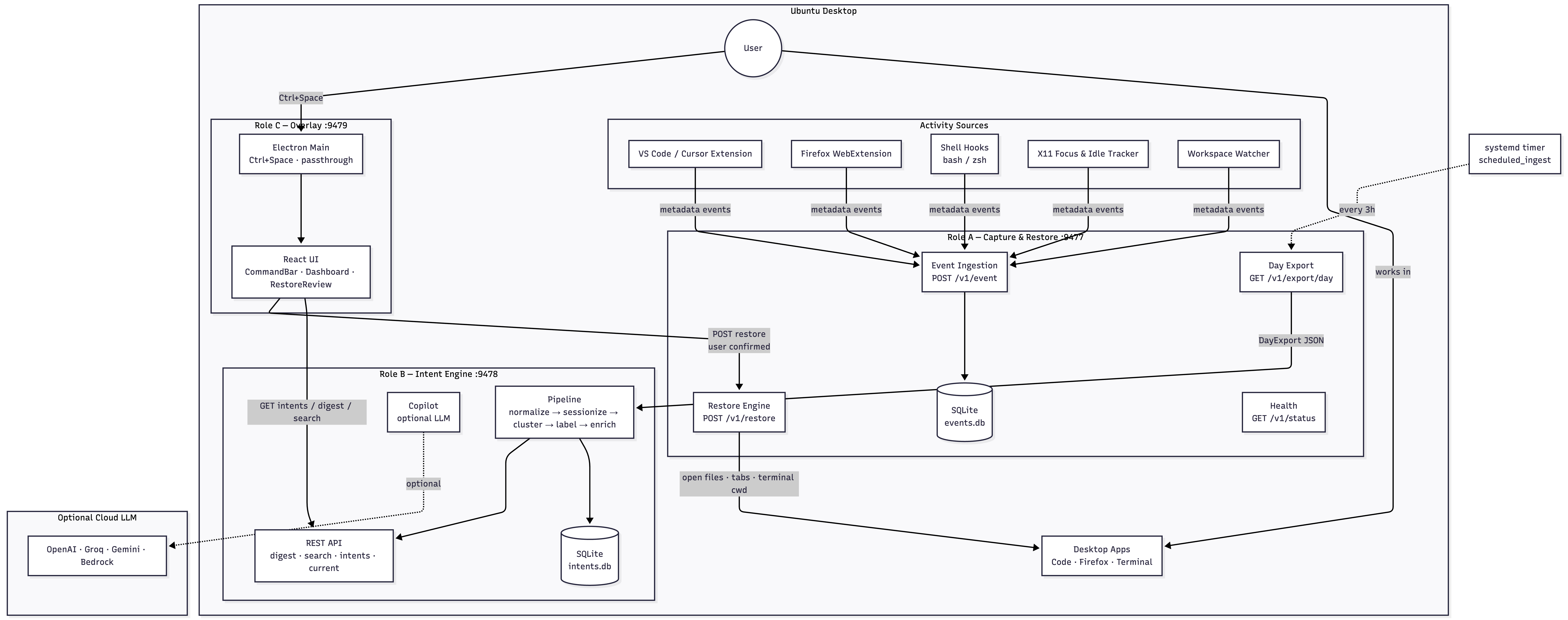
architecture-diagram
Intent
Inspiration
We kept losing ourselves. Every evening we'd close a laptop mid-thought — a dozen tabs, three terminals, an editor with unsaved context — and every morning we'd spend the first 20 minutes trying to remember what we were even trying to do. Existing tools either recorded your screen (creepy, huge, unsearchable) or tracked time (useless for context). Nothing actually remembered your intent. So we built the thing we wished existed: a local layer that quietly turns a day of activity into the handful of things you were actually trying to accomplish, and brings them back with one keystroke.
What it does
Intent is a local desktop memory layer with three parts working together:
- Captures lightweight signals on your machine — app focus, file opens, editor saves, browser tab changes, shell commands, idle windows. No screenshots, no keystrokes, no document contents.
- Reconstructs your day as intents — a deterministic pipeline groups those signals into sessions like "Building the login feature," "Fixing the checkout bug," "Reviewing PR #142," each with the files, URLs, and terminal context that belong to it.
- Brings it all back — a translucent overlay summoned with
Ctrl+Spaceshows yesterday's intents. Search by what you were trying to do, not by filename. Hit Resume and your editor, browser tabs, and terminal all reopen exactly where you left them.
Everything runs on your laptop. Your data never leaves the device.
How we built it
Three services, three responsibilities, one hotkey:
- Role A — Capture (Python, FastAPI, SQLite). Local event server on
127.0.0.1:9477. Pulls signals from a VS Code / Cursor extension, a Firefox WebExtension, shell hooks (bash/zsh), and an X11 focus/idle tracker on Linux. Also owns Restore — the only thing that opens applications on the user's behalf, and only after explicit confirmation. - Role B — Intent engine (Python, FastAPI). Local service on
127.0.0.1:9478. Normalizes events, sessionizes them by focus + idle, clusters them by project and semantic proximity, and labels each cluster deterministically (with optional swappable LLMs: OpenAI, Groq, Gemini, Bedrock). Emits daily digests, search, and structured resume payloads. - Role C — Overlay (Electron + React + Vite + TypeScript). A transparent always-on-top glass surface with a command bar and expandable session dashboard. Global
Ctrl+Spaceshortcut, mouse pass-through when idle, designed to feel native on Ubuntu.
Deterministic-first was our north star: the pipeline works with zero API keys, zero cloud calls, and zero data leaving the device. LLMs are opt-in polish, never load-bearing.
Challenges we ran into
- Signals without surveillance. We had to be able to reconstruct meaningful intent from only metadata — no screen capture, no doc contents, no keystrokes. That forced us to invent a much richer signal grammar (focus + workspace + file kind + command family + domain) instead of just brute-forcing an LLM over screenshots.
- Making determinism actually good. The temptation to just "ask GPT what this cluster is about" is huge. We resisted it. Building template-based labeling that produces "Building Login Feature" from cluster hints — reliably, offline, in milliseconds — took several iterations.
- The overlay UX on Linux. True transparent, always-on-top, click-through-when-idle Electron windows on X11 and Wayland behave differently. Getting the global hotkey, mouse pass-through, and glass rendering to feel like macOS Spotlight on Ubuntu was harder than the entire backend.
- Restore without foot-guns. Reopening files, URLs, and terminals from stored payloads means we could easily execute the wrong thing on the wrong day. We designed a hard boundary: Role B stores restore payloads, Role C displays and confirms, only Role A executes — and stored shell commands are never re-executed, only their working directory is restored.
- Keeping the three roles decoupled. Role B is not allowed to read Role A's SQLite. Role C is not allowed to invent restore data. Enforcing that discipline in code (not just docs) meant a lot of API surface work early on.
Accomplishments that we're proud of
- It runs entirely on your machine. No cloud dependency, no account, no telemetry. The AI parts are optional and swappable.
- A day of real activity becomes 3–5 meaningful cards. Not a timeline. Not a heatmap. Actual intents you'd recognize.
- One-key restore that actually works. Editor + tabs + terminal all reopen in the correct place, from stored deterministic payloads.
- A pipeline that's testable and boring in the best way. Golden fixtures, replayable via a single HTTP call, produce identical intents every time.
What we learned
- Privacy isn't a constraint — it's the feature. The moment we committed to "no screenshots, no doc contents, local-only," the product got sharper, not weaker.
- Metadata is enough. You can reconstruct astonishing amounts of context from focus events, filenames, and command families alone.
- Deterministic first, LLM later. Every LLM call we removed made the system more reliable, faster, and easier to demo.
- Boundaries make products. Splitting into Role A / B / C — capture / memory / surface — forced clean interfaces and made the whole thing debuggable.
- The best restore is the one that respects the user. Never auto-executing shell commands, always confirming before opening apps. Trust is earned in the boring cases.
What's next for Intent
- macOS and Windows capture. The engine and overlay are cross-platform; we need parity in the collectors.
- Wayland support. Full-fidelity focus + idle tracking beyond X11.
- Cross-day intents. Detect when today's "Debug login" is really day-3 of the same story, and thread them.
- Team mode (opt-in). Answer "what was Priya working on Tuesday?" without ever leaving the device — sharing summaries peer-to-peer, not to a cloud.
- Ambient recall. Surface a card the moment you switch to a file you were editing last week, without being asked.
- Better restore. IDE workspaces, editor cursor position, browser scroll depth, terminal history — everything a human would want back.
- Packaged installers. One-line install for Ubuntu today,
.dmgand.msisoon.
The pitch we keep coming back to: your desktop should remember for you. We're just getting started.
Built With
- bedrock
- codex
- fastapi
- firefox
- gemini
- groq
- python
- typescript
- vite
- vsix

Log in or sign up for Devpost to join the conversation.