-
-
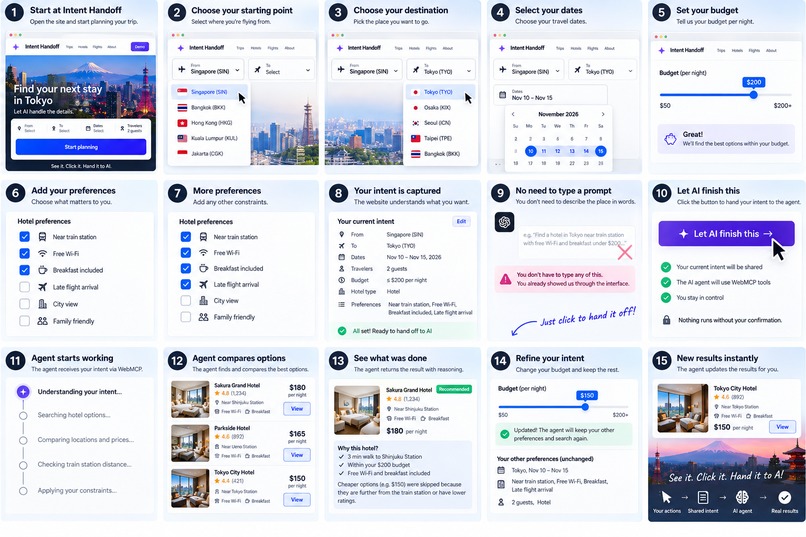
step by step to use intent handoff
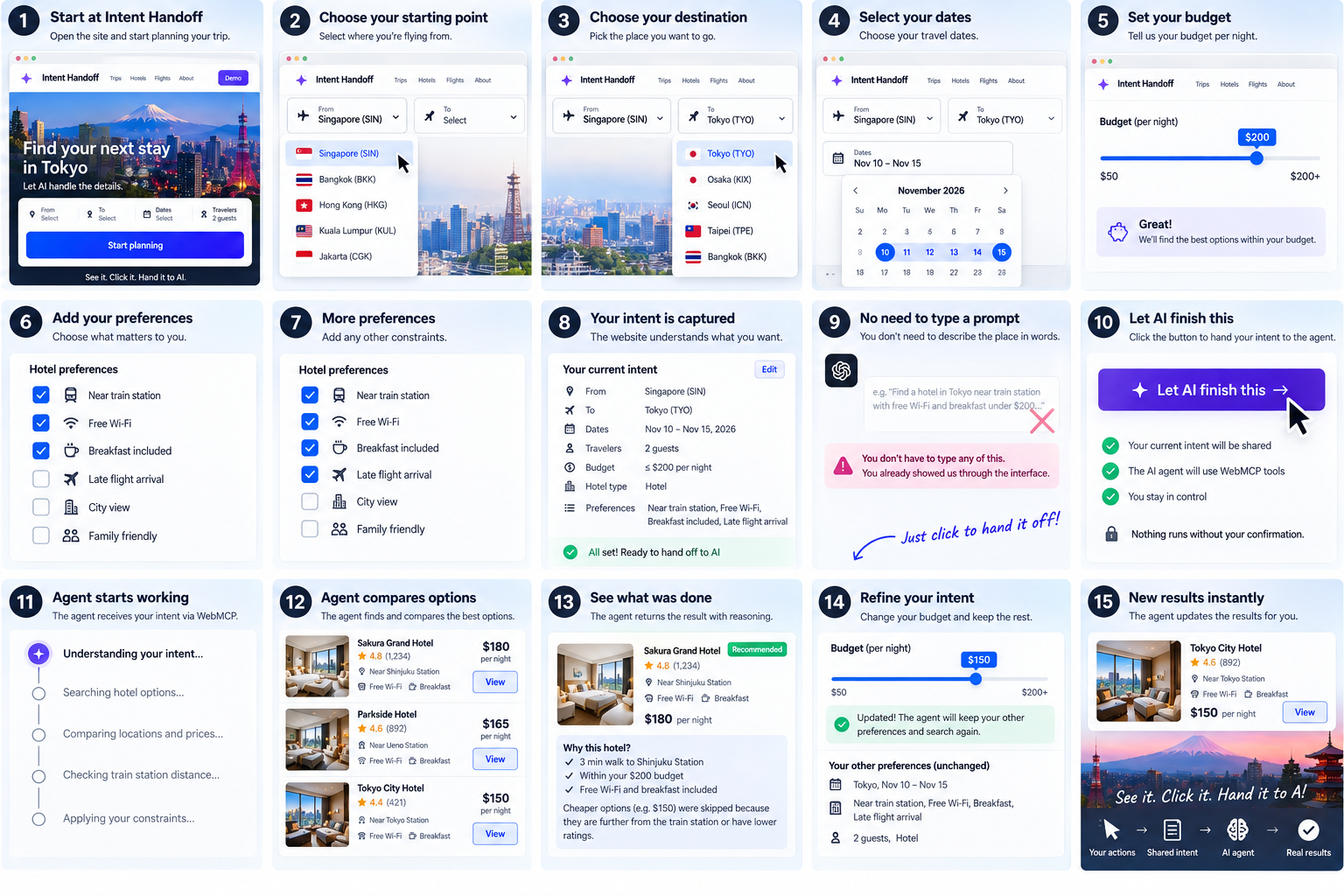
Inspiration
I noticed something strange about how we use AI with websites.
The user can already see exactly what they mean on the screen. They can point to it by clicking it.
But when they want an AI to help, suddenly they have to describe that thing in words:
“The second hotel on the left.”
“The one near the station.”
“The cheaper one I was looking at just now.”
Then the AI has to guess which place or object the user means.
Why?
The website already knows exactly what the user clicked.
I wanted to remove that translation step.
That became Intent Handoff: instead of describing a place, product or object in words and asking AI to guess, the user can interact with it directly and hand that exact context to the agent.
What it does
Intent Handoff connects normal website interactions directly to an AI agent through WebMCP.
A user browses normally. They click a hotel, choose a budget, select preferences or interact with something they are interested in.
Those interactions create structured intent.
When the user hands the task to AI, the agent doesn't have to guess what “that hotel” or “the place I just clicked” means.
It receives the actual object, its context, the user's existing selections and the task that needs to be completed.
The user can simply point through the interface instead of describing through a prompt.
The AI can then continue the task, use WebMCP tools, report progress and return the result to the website.
How we built it
I built Intent Handoff using WebMCP as the bridge between the website and the agent.
The website exposes structured tools for the agent to read the user's current intent, selected constraints, task context and task status. The agent can then search options, report progress, apply changes and submit the completed result.
The important part is that UI interactions are converted into structured context.
Instead of:
user click → user describes click → AI interprets description
we can do:
user click → structured intent → AI
I also added explicit user-controlled handoff. The agent cannot simply take over because something was clicked. The user chooses when they want AI to continue the task.
Challenges we ran into
The difficult part was deciding how to translate UI interaction into useful agent context.
A webpage contains a huge amount of information. The agent does not need all of it.
It needs to know what the user actually means.
So I had to separate the visual interface from the intent behind the interaction: which object was selected, which constraints matter, what has already happened and what the agent should do next.
The other challenge was making the transition feel natural.
The goal was not to create another AI chat box beside a website. The AI should feel like it can continue directly from what the user was already doing.
Accomplishments that we're proud of
We built the complete handoff loop on a live website.
The user can interact with the interface, select exactly what they mean, hand the task to an AI through WebMCP, let the agent complete the work, refine the constraints and receive the result back in the website.
The user never needs to explain which hotel they mean.
They already clicked it.
That sounds simple, but I think it changes an important part of human-agent interaction: the interface itself can become a way of communicating with AI.
What we learned
We learned that prompting does not always need to mean typing.
Humans are already communicating intent when they use an interface.
A click can say:
“This one.”
A filter can say:
“Only show me things under this price.”
A selection can say:
“This matters to me.”
Instead of throwing those signals away and asking the user to reconstruct everything as a prompt, WebMCP lets us expose them directly to the agent.
AI doesn't always need to guess what the user means from words when the user has already shown us what they mean through their actions.
What's next for Intent Handoff
Next, I want to take Intent Handoff beyond the travel demo.
Imagine browsing a shopping website and clicking a product, then handing that exact product to your agent.
Or selecting a document, property, flight, restaurant or workflow item and asking AI to continue without explaining which one you mean.
Eventually, individual objects and actions on a website could become handoff points between humans and agents.
The idea is very simple:
See it. Click it. Hand it to AI.
No describing where it is.
No copying information.
No asking AI to guess which thing you meant.
The website already knows.
Just hand over the intent.
Built With
- codex
- cursor


Log in or sign up for Devpost to join the conversation.