IntelliPen - Your Intelligent Writing Companion
Inspiration
We've all been there—struggling to find the right words in an email, scrambling to take notes during a meeting, or needing a quick translation but hesitant to paste sensitive text into an online tool. The problem? Most AI writing assistants send your data to external servers, raising privacy concerns and requiring constant internet connectivity.
IntelliPen was born from a simple question: What if AI-powered writing assistance could be completely private, running entirely on your device? With Chrome's new built-in AI APIs, we saw an opportunity to create a writing companion that respects your privacy while delivering professional-grade features.
What it does
IntelliPen is a Chrome extension that brings three powerful tools directly to your browser.
- Website: https://intellipen.nrl.ai/
- Source code: https://github.com/vietanhdev/IntelliPen
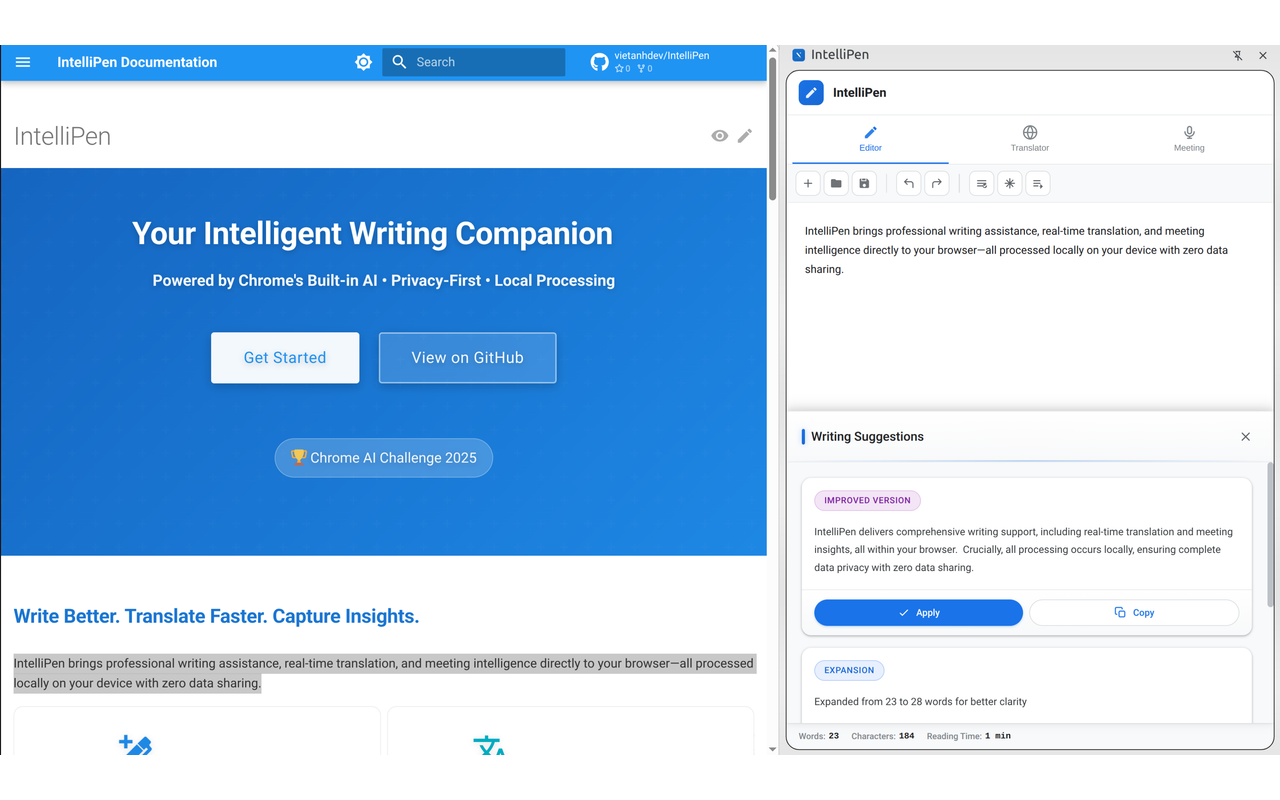
✍️ IntelliPen Editor
A rich-text editor with comprehensive AI-powered writing assistance:
- Grammar Checking: Real-time grammar, spelling, and punctuation correction using Chrome's Proofreader API
- Writing Improvement: AI-powered content enhancement for clarity and readability using Writer API
- Tone Adjustment: Transform text tone between formal, casual, professional, and friendly styles using Rewriter API
- Document Management: New, open, save documents with auto-save functionality
- Real-time Stats: Word count, character count, and reading time tracking
- Export Options: Save your work as .txt files
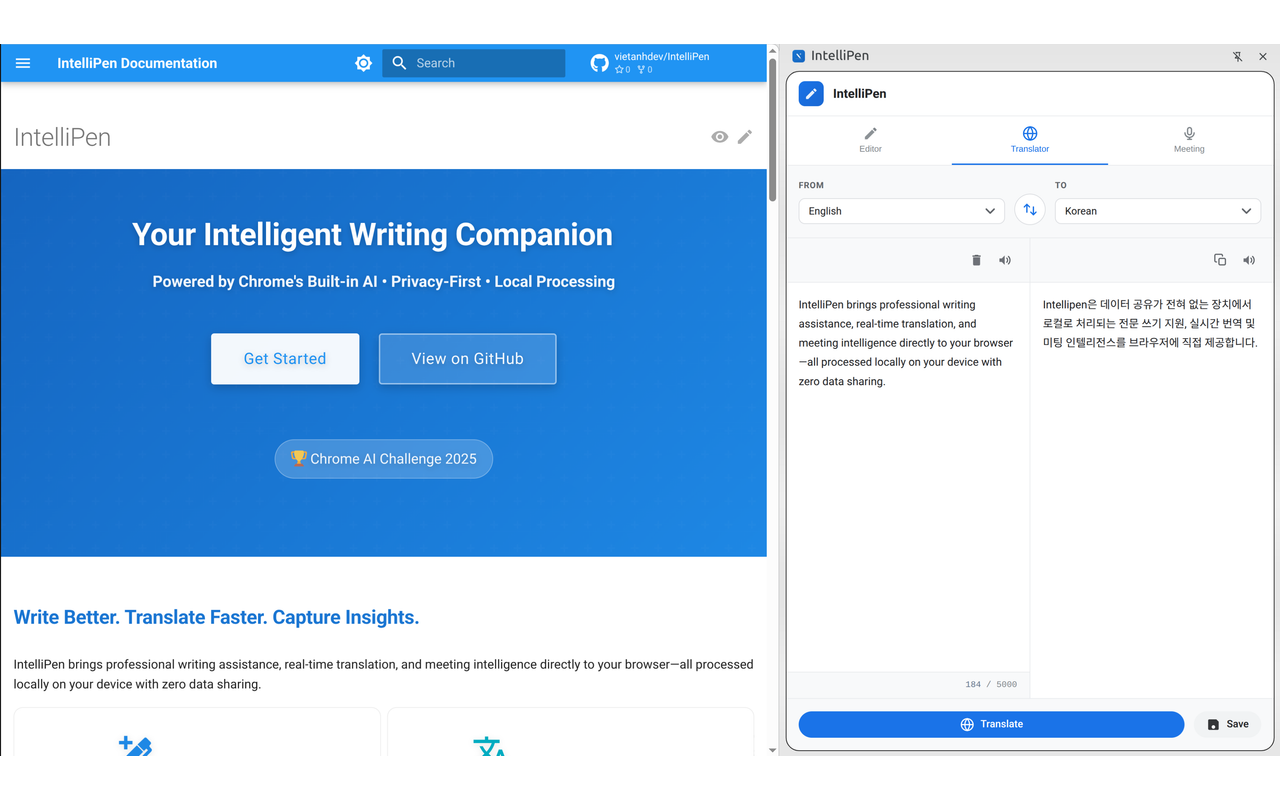
🌐 Translator
Dedicated translation interface with complete privacy:
- 25+ Languages: Translate between multiple languages, all processed locally using Translator API
- Auto-detection: Automatic source language identification using Language Detector API
- Real-time Translation: Instant translation as you type—no data sent to external servers
- Private Translation: Unlike cloud-based translators, your sensitive content never leaves your device
- Text-to-Speech: Listen to source and translated text
- Character Counter: Track text length with visual warnings (up to 5000 characters)
- Language Swap: Quick swap between source and target languages
- Context Menu Integration: Right-click to translate selected text on any webpage
- Export Options: Save translations for later use
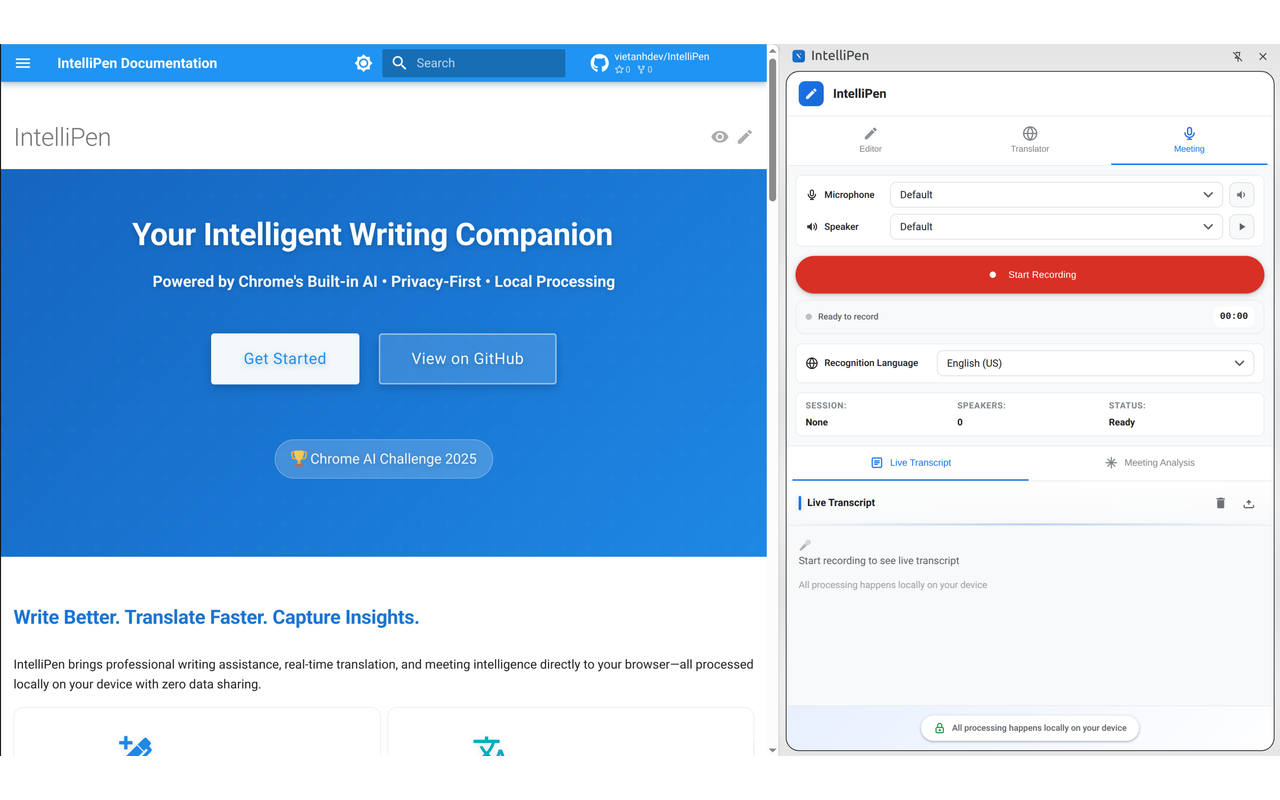
🎙️ Meeting Dashboard
Comprehensive meeting recording and AI-powered analysis:
- Audio Recording: Professional recording with microphone permission management
- Device Selection: Choose microphone and speaker with test functionality
- Language Selection: Support for 15+ recognition languages (English, Spanish, French, German, Italian, Portuguese, Japanese, Korean, Chinese, and more)
- Live Transcription: Real-time transcript display using Web Speech API
- Speaker Identification: Automatic speaker detection and labeling using Prompt API
- Executive Summaries: AI-generated meeting overviews using Summarizer API
- Action Item Extraction: Automatic task identification with owner assignment using Prompt API
- Key Decisions: Identification of important decisions made using Prompt API
- Follow-up Email Generation: Professional email drafts with meeting summary using Writer API
- Export Options: Save transcripts and analysis as text files
All of this happens 100% locally on your device—no data ever leaves your browser.
How we built it
IntelliPen leverages Chrome's cutting-edge built-in AI APIs (Gemini Nano) to deliver a privacy-first experience:
Technical Architecture
- Chrome Extensions Manifest V3: Modern service worker architecture with background.js handling extension lifecycle, API coordination, and context menu integration
- 7 Chrome AI APIs: Successfully integrated all available Chrome built-in AI APIs
- Prompt API (LanguageModel): General AI interactions, action items, key decisions
- Proofreader API: Grammar, spelling, and punctuation correction
- Writer API: Content generation and writing improvement
- Rewriter API: Tone adjustment and style transformation
- Summarizer API: Meeting summaries and text summarization
- Translator API: Multi-language translation
- Language Detector API: Automatic language detection
- Web Speech API: Real-time audio transcription for meeting recording
- Rollup 4.9.6: Build system with plugins for module resolution, CommonJS conversion, and minification
- Modular Design: Clean separation of concerns with reusable components
Key Components
AIAPIManager (src/ai-apis/AIAPIManager.js)
- Centralized management for all Chrome AI APIs
- Automatic availability checking for each API
- Session management and cleanup
- Streaming support for progressive responses
- Graceful error handling and fallback mechanisms
EditorAIFeatures (src/editor/EditorAIFeatures.js)
- Grammar checking with Proofreader API
- Writing improvement with Writer API
- Tone adjustment with Rewriter API (formal, casual, professional, friendly)
- Fallback suggestions when APIs are unavailable
MeetingAIFeatures (src/meeting/MeetingAIFeatures.js)
- Executive summary generation with Summarizer API
- Action item extraction with Prompt API (JSON-formatted output)
- Key decision identification with Prompt API
- Follow-up email generation with Writer API
- Speaker identification and transcript analysis
UI Component Library (src/components/ui-components.js)
- 20+ custom SVG icons with gradient support (#667ba2 to #764ba2)
- Reusable buttons, badges, cards, toggles, toasts, and context menus
- Consistent styling with CSS variables
- Smooth animations and transitions
Sidepanel Interface (sidepanel/)
- Dual-screen interface with seamless tab switching
- Editor screen with toolbar and suggestions panel
- Translator screen with language selection and text-to-speech
- Meeting screen with device management and live transcription
- Real-time stats and status indicators
Development Stack
- JavaScript ES6+: Modern async/await patterns, classes, and module system
- HTML5/CSS3: Responsive design with CSS Grid, Flexbox, and CSS Variables
- DOMPurify 3.0.8: HTML sanitization for security
- Sharp 0.33.5: Automated icon generation from SVG source
- Node.js 16+: Development environment
- npm: Package manager and script runner
Testing Infrastructure
- Puppeteer Core: Browser automation for end-to-end testing
- Jest 29.7.0: Test framework with 60-second timeout support
- Chrome for Testing 138+: Dedicated Chrome build for automated testing
- 7 Test Suites: Comprehensive coverage of all features
- Basic Tests: Browser launch, page creation, navigation
- AI APIs Tests: API availability detection and AIAPIManager initialization
- Editor Tests: Text editing, grammar checking, tone adjustment
- Translator Tests: Language selection, translation controls, text I/O
- Meeting Tests: Recording controls, device selection, transcript display
- Popup Tests: Extension branding, API status indicators, quick actions
- Service Worker Tests: Extension loading, Chrome APIs availability
- Headless Mode: Fast execution for CI/CD pipelines
- Headed Mode: Visual debugging for test development
- Serial Execution: Prevents browser conflicts with
maxWorkers: 1
Challenges we ran into
Automated Testing with Chrome AI APIs
Testing a Chrome extension that relies on cutting-edge AI APIs presented unique challenges:
- Chrome Version Requirements: Tests require Chrome 138+ with specific hardware (4GB+ VRAM, 22GB storage)
- Extension Loading: Puppeteer needed custom configuration to load unpacked extensions with trial tokens
- Async API Detection: AI APIs load asynchronously, requiring careful timing in tests
- Headless Limitations: Some AI features behave differently in headless mode
- Serial Execution: Browser conflicts required running tests serially with
maxWorkers: 1
We built a comprehensive test infrastructure with:
- Automatic Chrome for Testing installation (
npm run test:install-chrome) - Global setup/teardown for browser lifecycle management
- Helper functions for extension page navigation
- Both headed (visual debugging) and headless (CI/CD) modes
- 7 test suites covering all major features
API Availability Detection
Chrome's built-in AI APIs are still in early access (Chrome 138+), requiring specific Chrome versions, hardware (4GB+ VRAM), and 22GB+ storage for the Gemini Nano model. We built a comprehensive availability checking system in AIAPIManager that:
- Checks each API individually on initialization
- Provides clear status indicators in the popup menu
- Implements graceful fallback mechanisms when APIs are unavailable
- Logs detailed availability information for debugging
Streaming Response Handling
Implementing progressive rendering for long AI responses required careful async iterator management. We had to:
- Handle async generators from streaming APIs (writeStreaming, rewriteStreaming, summarizeStreaming)
- Update UI incrementally without flickering
- Manage state synchronization between streaming chunks
- Implement proper cleanup when users cancel operations
Meeting Transcription Accuracy
The Web Speech API's accuracy varies significantly by accent, audio quality, and background noise. We addressed this by:
- Implementing confidence scoring for transcript entries
- Adding speaker identification using Prompt API
- Supporting 15+ recognition languages
- Providing device selection and testing functionality
- Handling recognition errors and restarts gracefully
Memory Management
Running multiple AI sessions simultaneously (editor + translator + meeting) required careful resource management:
- Proper session cleanup when switching screens
- Destroying AI API instances when no longer needed
- Managing media streams and audio contexts
- Preventing memory leaks from event listeners
- Implementing auto-save to prevent data loss
Cross-Component Communication
Coordinating between background service worker, content scripts, popup, and sidepanel required a robust message passing architecture:
- Implementing bidirectional communication with chrome.runtime.sendMessage
- Handling async responses with proper error handling
- Managing context menu clicks and forwarding to sidepanel
- Synchronizing state across multiple extension contexts
- Dealing with message channel timeouts and failures
JSON Response Parsing
Chrome's Prompt API sometimes returns JSON wrapped in markdown code blocks (json ...), which broke our parsing. We implemented a cleanJSONResponse helper to strip markdown formatting before parsing.
Trial Token Management
Chrome AI APIs require trial tokens in manifest.json for early access. We had to:
- Generate and configure trial tokens for all 7 APIs
- Handle token expiration gracefully
- Provide clear error messages when tokens are invalid
- Test across different Chrome versions and platforms
Accomplishments that we're proud of
🧪 Comprehensive Test Coverage: Built a complete end-to-end testing infrastructure with:
- 7 test suites covering all major features (AI APIs, Editor, Translator, Meeting, Popup, Service Worker)
- Puppeteer-based browser automation with Chrome for Testing 138+
- Both headed (visual debugging) and headless (CI/CD) modes
- Automatic Chrome installation and extension loading
- Serial execution to prevent browser conflicts
- 60-second timeout support for AI operations
✨ Complete Privacy: Built a fully-featured AI writing assistant that never sends data to external servers—all processing happens locally using Chrome's built-in Gemini Nano model
🎯 7 AI APIs Integration: Successfully integrated all 7 available Chrome built-in AI APIs into a cohesive user experience with proper availability checking and fallback mechanisms
🚀 Production Ready: Created a polished extension with:
- Professional UI with gradient branding (#667ba2 to #764ba2)
- Comprehensive error handling and user feedback
- Graceful degradation when APIs are unavailable
- Auto-save functionality to prevent data loss
- Export options for all content types
📦 Modular Architecture: Designed a clean, maintainable codebase with:
- AIAPIManager for centralized API management
- Separate feature modules (EditorAIFeatures, MeetingAIFeatures)
- Reusable UI component library
- Clear separation between background, content scripts, and UI
🎨 Modern UI: Built a comprehensive design system with:
- 20+ custom SVG icons with consistent styling
- Reusable components (buttons, badges, cards, toggles, toasts)
- Smooth animations and transitions
- Responsive dual-screen interface
- Real-time status indicators
🔊 Meeting Intelligence: Delivered a complete meeting solution with:
- Real-time transcription using Web Speech API
- AI-powered analysis (summaries, action items, decisions)
- Professional follow-up email generation
- Device management with testing functionality
- Support for 15+ recognition languages
🌐 Private Translation: Created a translator that rivals cloud services but keeps all data local:
- 25+ language support
- Auto-detection with Language Detector API
- Text-to-speech for both source and target
- Context menu integration for quick translation
- Character counter with visual feedback
📝 Smart Editor: Built a writing assistant with:
- Real-time grammar checking
- AI-powered writing improvement
- Tone adjustment (formal, casual, professional, friendly)
- Document management with auto-save
- Real-time stats (word count, character count, reading time)
What we learned
Testing Chrome Extensions Requires Special Tooling
Building automated tests for a Chrome extension with AI APIs taught us valuable lessons:
- Puppeteer Configuration: Loading unpacked extensions requires specific launch arguments and permissions
- Async Timing: AI API availability checks need proper waiting strategies
- Test Isolation: Each test needs clean browser state to avoid interference
- Headless vs Headed: Some features behave differently in headless mode
- CI/CD Integration: Headless mode enables fast automated testing in GitHub Actions
We learned to build a robust test infrastructure that supports both development (headed mode for debugging) and production (headless mode for CI/CD).
Chrome AI APIs are Powerful but Early
The built-in AI APIs offer impressive capabilities, but they're still in early access with specific requirements:
- Chrome 138+ on desktop only (Windows 10+, macOS 13+, Linux, ChromeOS)
- 22GB+ storage for Gemini Nano model download
- 4GB+ VRAM for AI processing
- Trial tokens required in manifest.json
We learned to build robust availability checking, provide clear user feedback, and implement fallback mechanisms for when APIs are unavailable.
Privacy-First Design Requires Different Thinking
Building for local processing meant rethinking traditional cloud-based patterns:
- No server-side state management—everything happens in the browser
- Memory management is critical when running multiple AI sessions
- Session cleanup is essential to prevent memory leaks
- Local storage encryption for sensitive data
- Clear privacy indicators to build user trust
We learned to optimize for on-device performance while maintaining a smooth user experience.
User Experience is Critical for AI Tools
AI features are only valuable if users can access them easily:
- Real-time API status indicators in popup menu
- Clear error messages when APIs are unavailable
- Progressive disclosure—show advanced features when needed
- Contextual help and placeholder text
- Smooth transitions between screens
- Auto-save to prevent data loss
We learned that transparency about what's happening (local processing, API availability) builds user confidence.
Streaming APIs Improve Perceived Performance
Even though processing happens locally, streaming responses make the experience feel faster:
- Async iterators for progressive rendering
- Incremental UI updates without flickering
- Cancel operations mid-stream
- Show progress indicators during long operations
We learned to embrace async/await patterns and handle streaming gracefully.
JSON Parsing Needs Defensive Programming
Chrome's Prompt API sometimes returns JSON wrapped in markdown code blocks, which broke our initial parsing. We learned to:
- Clean responses before parsing
- Validate JSON structure
- Provide fallback values when parsing fails
- Log detailed error information for debugging
Extension Architecture Requires Careful Planning
Chrome Extension Manifest V3 has specific constraints:
- Service workers replace background pages
- Content scripts run in isolated contexts
- Message passing is asynchronous
- Context menus require careful state management
We learned to design a robust message passing architecture and handle cross-context communication properly.
What's next for IntelliPen
Short-term Enhancements
- Custom Prompts: Allow users to create and save custom AI prompts for repeated tasks
- Writing Templates: Pre-built templates for common documents (emails, reports, blog posts)
- Translation History: Save and manage frequently used translations with favorites
- Meeting Templates: Customizable analysis templates for different meeting types (standup, retrospective, planning)
- Keyboard Shortcuts: Add keyboard shortcuts for common actions (Ctrl+G for grammar check, Ctrl+T for translate)
- Dark Mode: Implement dark theme for better accessibility
- Advanced Export: Export to more formats (PDF, DOCX, Markdown)
Long-term Vision
- Universal Text Field Detection: Detect text fields on any webpage and offer inline writing assistance
- Real-time Grammar Overlay: Show grammar suggestions directly on web pages as you type
- Platform-specific Adapters: Optimized integrations for Gmail, LinkedIn, Notion, Google Docs
- Collaborative Features: Share documents and translations with team members (still locally processed)
- Browser Sync: Sync preferences and documents across devices using Chrome's sync API
- Plugin System: Allow developers to extend IntelliPen with custom AI features
- Mobile Support: Bring IntelliPen to Chrome on Android when built-in AI APIs become available
Research Directions
- Context-Aware Suggestions: Learn from user writing patterns to provide personalized suggestions
- Multi-document Analysis: Analyze relationships between multiple documents
- Advanced Meeting Features:
- Improved speaker diarization with voice recognition
- Sentiment analysis for meeting tone
- Meeting effectiveness scoring
- Automatic meeting minutes generation
- Writing Style Learning: Adapt to user's writing style over time
- Advanced Privacy Features:
- Optional end-to-end encryption for shared content
- Privacy dashboard showing all data processing
- Granular privacy controls per feature
Try it out
IntelliPen is ready to transform your writing workflow while keeping your data private.
System Requirements
- Chrome Version: 138+ (stable) on desktop
- Operating System: Windows 10+, macOS 13+, Linux, or ChromeOS (Chromebook Plus)
- Storage: At least 22GB free space for Gemini Nano model download
- GPU: 4+ GB VRAM for AI processing
- Network: Unmetered connection for initial model download (one-time)
Installation
Development Installation
Clone the repository:
git clone https://github.com/vietanhdev/IntelliPen.git
cd IntelliPen
Install dependencies:
npm installBuild the extension:
npm run buildLoad in Chrome:
- Open
chrome://extensions/ - Enable "Developer mode" (top right)
- Click "Load unpacked"
- Select the
distdirectory
- Open
Start using IntelliPen:
- Click the extension icon to open the sidepanel
- Grant microphone permission for meeting recording
- Start writing, translating, or recording meetings!
Usage Tips
Editor:
- Type or paste text to get started
- Click toolbar buttons for AI features
- Use Ctrl+S to save (auto-save is enabled)
- Monitor real-time stats at the bottom
Translator:
- Select source and target languages
- Type or paste text (up to 5000 characters)
- Translation happens automatically
- Right-click selected text on any webpage for quick translation
Meeting Dashboard:
- Grant microphone permission when prompted
- Select your devices and test them
- Choose recognition language
- Click "Start Recording" to begin
- View live transcript in real-time
- Stop recording to generate AI analysis
Built With
Core Technologies
- Chrome Built-in AI APIs (Gemini Nano)
- Prompt API (LanguageModel)
- Proofreader API
- Writer API
- Rewriter API
- Summarizer API
- Translator API
- Language Detector API
- Chrome Extensions Manifest V3
- Web Speech API
- JavaScript ES6+
- HTML5/CSS3
Build Tools & Dependencies
- Rollup 4.9.6 - Module bundler
- @rollup/plugin-node-resolve 15.2.3 - Module resolution
- @rollup/plugin-commonjs 25.0.7 - CommonJS conversion
- @rollup/plugin-terser 0.4.4 - Minification
- rollup-plugin-copy 3.5.0 - Asset copying
- DOMPurify 3.0.8 - HTML sanitization
- Sharp 0.33.5 - Image processing
Development & Testing Tools
- Node.js 16+
- npm - Package manager
- ESLint 8.56.0 - Code linting
- Jest 29.7.0 - Testing framework
- Puppeteer Core - Browser automation for E2E tests
- @puppeteer/browsers - Chrome for Testing installer
- Chrome for Testing 138+ - Dedicated Chrome build for automated testing
Links
- GitHub Repository: https://github.com/vietanhdev/IntelliPen
- Documentation: https://vietanhdev.github.io/IntelliPen/
- Demo Video: https://youtu.be/gS6hGjVwELk
- Issues: GitHub Issues
IntelliPen - Write better, translate faster, capture meeting insights. All locally. All private. All yours.
Participating in Google Chrome Built-in AI Challenge 2025
Built With
- google-ai
- google-extension
- llm

Log in or sign up for Devpost to join the conversation.