-
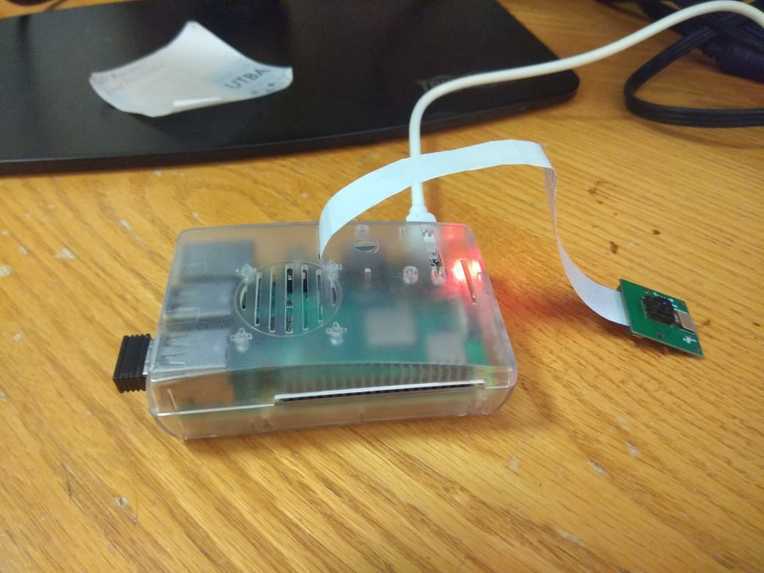
Hardware
-
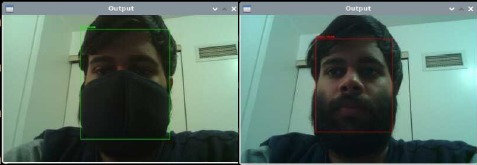
Detection
-
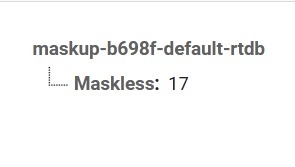
Realtime Database
Inspiration
The inspiration behind Intelligent Masky was creating a difference on both the high levels and the grassroots level. At the grassroots level, we could make sure that people are wearing masks before entering a business or schools. This is especially relevant now as the fear COVID is going down. Whether or not it seems scary, it is a deadly disease that has killed far more people than necessary.
At a higher level, we could inform governments on how many people are not wearing masks in an area. This would help them know where to properly enforce mask regulations and educate people on why masks are required.
What it does
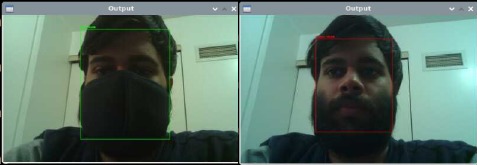
Intelligent Masky is a small device which consists of a raspberry pi which is connected to a camera and a speaker. This raspberry pi is running a tensorflow model which can differentiate between people who are wearing a mask and people who are not. Many of these small and cost-effective devices can be placed outside multiple businesses and schools in an area.
When the device senses that a person is not wearing a mask, a message is played through the speaker requesting that person to wear a mask and come back. Simultaneously, the raspberry pi sends a request to a Linode cloud computer running a server using Node and Express, which in turns updates a variable in the Google Firebase realtime database.
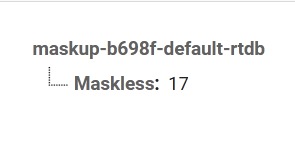
This variable in the database keeps track of how many people were found to be maskless while visiting various businesses or schools in an area. The cloud computer also has a cron job that resets this variable each night to 0.
Hence, we can get a daily report of how many people in an area are not wearing masks from our cloud computer. This is done by visiting the following link: http://172.105.110.164/show
How we built it
Intelligent Masky Hardware Intelligent Masky hardware consists of a raspberry pi with a camera and a speaker attached to it. This raspberry Pi is running a Tensorflow model which is trained to detect whether or not a person is wearing a mask. If the person is not wearing a mask, the raspberry pi plays a pre-recorded message which asks the person to come back after wearing a mask. Additionally, the raspberry pi also sends a get request using CURL to the address link, which tells the Linode cloud computer to increment the firebase variable.
Intelligent Masky Cloud Software There is a Linode Nanode cloud machine that has been provisioned to act as the heart of all Intelligent Masky devices created. This cloud computer is running Node.js and has 3 routes created with Express.js which are listed below:
Update link Sending a get request to this link will invoke a python script on the cloud computer that will increment the "Maskless" variable in firebase
Reset link Sending a get request to this link will invoke a python script on the cloud computer that will reset the "Maskless" variable in firebase to 0, restarting the count for the day.
Show link Sending a get request to this link will invoke a python script on the cloud computer that will generate a basic webpage showing the number of people who were found to be maskless by all Intelligent Masky devices running in a specific area.
Challenges we ran into
I did not have much experience using Linode. Hence, it took some fiddling and experimentation to get the right tools installed on the Linode machine.
The image recognition running on the raspberry pi was quite slow, and it really tested me to get it running smoothly enough for it to be effective.
I needed a way to make requests using python, but did not want to use the requests library. Hence I used curl to send a request using the system() method in the python os module.
Accomplishments that we're proud of
The Linode computer that I provisioned and the raspberry pi have only 1 GB of RAM each, and it is quite exciting to see both of them work so smoothly with such low-spec hardware.
Executing python scripts from JavaScript using child processes was something I had never done before, and I am proud that I got it working, and was even able to pass data to create a dynamic webpage.
This is my first time creating a project using Node, and I am very happy that it worked as I intended.
What we learned
Child processes in javascript. Provisioning and setting up Node and npm on a cloud computer. Opening other python scripts from a main script using read(), open(), and exec()
What's next for Intelligent Maskup
Creating a better looking webpage for the daily report. Having long term data logging to see the effect of mask rule enforcing. Maybe we could have the Linode machine record the daily data and display it in the form of a graph for easy interpretation.

Log in or sign up for Devpost to join the conversation.