Inspiration
We've both experienced burnout that crept up without warning. You don't notice it while it's happening. You just notice, eventually, that the code you wrote at hour four was slower, buggier, and harder to debug than the code from hour one. We wanted a tool that could see what we couldn't: the moment cognitive load tips from productive into counterproductive.
Most productivity tools tell you what you did. We wanted something that tells you what's happening right now.
What it does
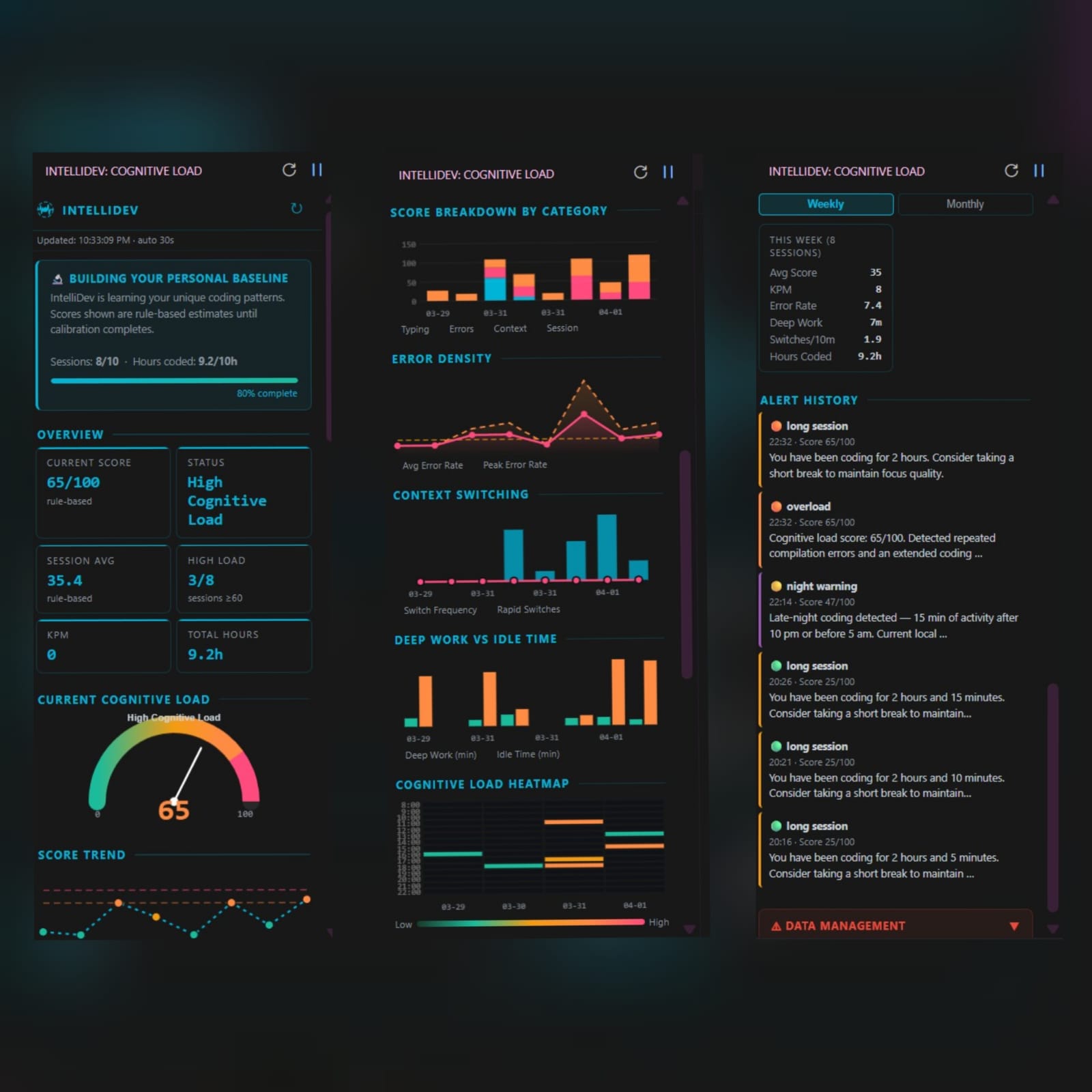
IntelliDev is a VS Code extension that scores your cognitive load in real time on a scale of 0 to 100. It silently monitors four behavioral signals:
- Typing rhythm — cadence, variability, backspace rate, pause patterns
- Error frequency — compilation errors, burst detection, debug session count
- Context switching — file switch rate, rapid switches, unique files touched
- Session length — total time coded, deep work blocks, idle ratio, night-time activity
These feed a 20-rule scoring engine that estimates mental load continuously. When the score climbs too high, IntelliDev fires a notification with a clear rest recommendation.
The score sits on a simple spectrum:
| 0–30 | 30–60 | 60–80 | 80–100 |
|---|---|---|---|
| Stable Focus | Mild Strain | High Load | Burnout Risk |
After 10 sessions, IntelliDev locks a personal baseline calibrated using Pearson z-scores, so scores are relative to your patterns, not a population average. Fast typers are not penalized for high KPM. Night owls are not flagged every evening.
Everything is visualized in a sidebar dashboard: live gauge, session trends, a time-of-day heatmap, deep work vs. idle breakdowns, and a full alert history.
Nothing leaves your machine.
How we built it
The extension is built entirely in TypeScript using the VS Code Extension API. The core tracker hooks into onDidChangeTextDocument and related workspace events, which provide typing metadata without ever exposing source code content.
The scoring engine evaluates 20 rules across four signal categories and produces a composite score. Baseline calibration computes Pearson z-scores from historical session data:
$$ z = \frac{x - \mu}{\sigma} $$
where \( x \) is the current session metric, \( \mu \) is the user's personal mean, and \( \sigma \) is their standard deviation across past sessions.
The dashboard is rendered as a VS Code Webview panel using vanilla HTML, CSS, and JavaScript. Session data is persisted locally as JSON files with automatic cleanup after 90 days.
Challenges we ran into
Timezone handling was unexpectedly painful. The VS Code extension host on Windows defaults to UTC, which caused alert timestamps to be consistently wrong for non-UTC users. We resolved it by explicitly passing local timezone offsets from the Webview layer back into the extension host.
Baseline fairness took several iterations. Early versions flagged high-KPM typists as overloaded and penalized anyone coding after 10 pm. Switching to z-score normalization against personal history fixed both problems. Getting the calibration window right (10 sessions to lock, recalibrate every 30) required careful tuning.
Alert fatigue was a genuine risk. An extension that notifies too often trains users to dismiss it. We settled on a 5-minute cooldown for standard alerts and a 30-minute cooldown for night alerts after observing how quickly the ignore reflex kicks in.
Accomplishments that we're proud of
The privacy architecture is something we're genuinely proud of. It would have been easier to send data to a server and run a richer model. We chose not to. The VS Code API we rely on is technically incapable of reading source code. That constraint is baked into the design, not added afterward.
The personal baseline system is the other. Generic thresholds are blunt instruments. The z-score approach means IntelliDev adapts to you rather than asking you to adapt to it.
What we learned
Behavioral signals are noisier than they look. Typing rhythm alone varies enormously depending on what someone is doing: thinking, writing comments, and writing logic all produce very different keystroke patterns. Building a scoring engine that is signal-rich without being brittle required more iteration than we expected.
We also learned that privacy and utility are not opposites. Every meaningful insight in IntelliDev is derived from metadata, not content. You do not need to read someone's code to understand how they are doing.
What's next for IntelliDev
- Smarter recalibration — moving from a fixed 30-session window to a rolling weighted average that responds faster to genuine shifts in work patterns
- Team mode — aggregate, anonymized load trends for engineering leads who want to spot team-wide burnout risk without surveilling individuals
- Break suggestions — pairing each alert with a contextual recommendation based on what the score pattern looks like, not just the number
- JetBrains port — the scoring logic is editor-agnostic; the platform layer is not yet
Built With
- css
- html
- javascript
- typescript
- vscode-extension-api



Log in or sign up for Devpost to join the conversation.