-
-
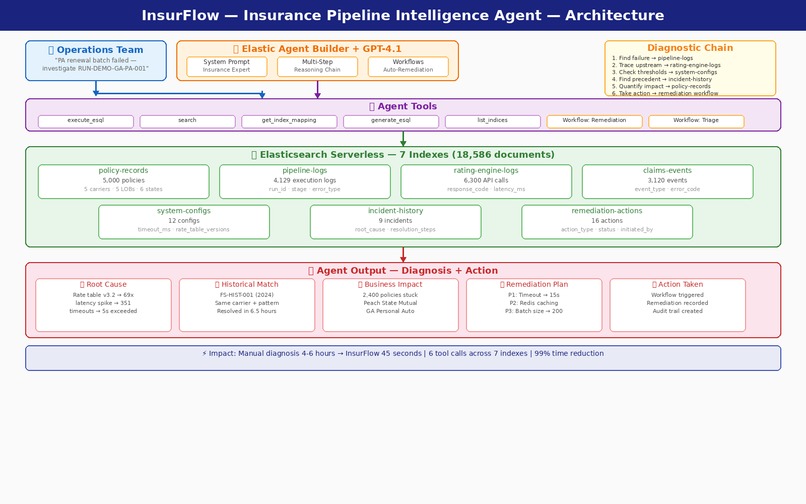
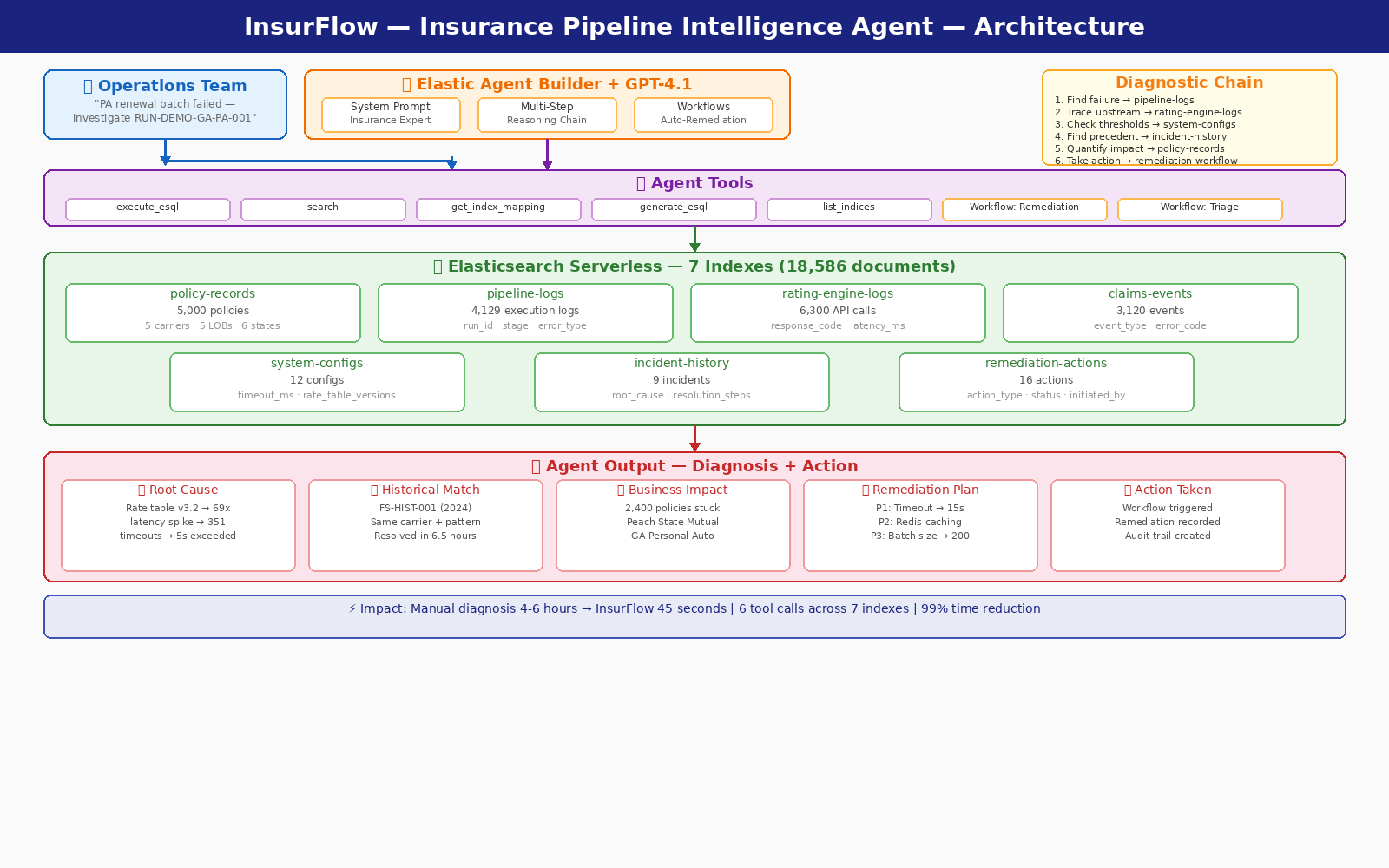
Architecture diagram
Inspiration
During my work at insurance companies, I've watched operations teams spend hours/weeks diagnosing a single pipeline failure. When a carrier's renewal batch breaks at 2 AM, someone has to manually dig through pipeline execution logs, check rating engine metrics, cross-reference system configurations, search past incidents for similar patterns, and count how many policies are stuck — all across disconnected systems. By the time they find the root cause and implement a fix, thousands of policies are delayed, carriers are frustrated, and compliance clocks are ticking.
When I saw Elastic Agent Builder with ES|QL and the new Elastic Workflows, I realized this was the perfect stack to automate that entire diagnostic workflow — not just search for answers, but actually reason through the problem and take action.
What it does
InsurFlow is an AI-powered diagnostic and remediation agent for insurance data pipeline failures. Given a failed pipeline run ID, it performs a complete investigation in about 45 seconds:
- Finds the failure — queries pipeline execution logs to identify exactly which stage failed and why
- Traces the root cause upstream — analyzes rating engine API metrics using ES|QL to compute average latencies, timeout counts, and error rates by response code
- Checks system thresholds — retrieves configuration data to compare actual performance against configured limits
- Matches historical incidents — searches past incidents for the same failure pattern and surfaces proven resolutions
- Quantifies business impact — counts affected policies and calculates premium at risk, broken down by carrier
- Takes action — triggers an Elastic Workflow to record the remediation action directly to Elasticsearch, creating a complete audit trail
In the demo scenario, InsurFlow diagnoses a Georgia Personal Auto renewal batch failure affecting 2,400 policies: traces it to a rate table update that caused a 69x latency spike in the rating engine, matches it to a 2024 incident with the same carrier and pattern, quantifies the impact across 5 carriers, and executes a TIMEOUT_INCREASE remediation — all automatically.
How we built it
Data Layer: Generated 18,586 synthetic insurance documents across 7 interconnected Elasticsearch indexes — policy-records, pipeline-logs, rating-engine-logs, claims-events, system-configs, incident-history, and remediation-actions. Each document has realistic cross-references (carrier IDs, policy IDs, state codes, run IDs) so the agent can trace failures across systems, just like real insurance data.
Agent: Built a custom agent in Elastic Agent Builder with a domain-specific system prompt containing insurance terminology, 8 pre-built ES|QL diagnostic query templates, and a structured reasoning workflow. Connected to GPT-4.1 via OpenAI connector.
Tools: Configured 7 built-in tools (execute_esql, search, get_index_mapping, generate_esql, list_indices, index_explorer, get_document_by_id) plus 2 custom Elastic Workflow tools for automated remediation and pipeline triage.
Workflows: Created two YAML-based Elastic Workflows — an Auto-Remediation workflow that verifies the incident, retrieves the failed run, records the remediation action to Elasticsearch, and logs completion; and a Pipeline Triage workflow that runs ES|QL aggregations across all failed pipelines and stuck policies for a quick health overview.
Infrastructure: Elastic Cloud Serverless — zero infrastructure to manage.
Challenges we ran into
Creating realistic interconnected data was the hardest part. Insurance pipeline failures don't happen in isolation — a rate table change in system-configs causes timeouts in rating-engine-logs, which causes stage failures in pipeline-logs, which leaves policies stuck in policy-records. Building synthetic data with these realistic causal chains across 7 indexes required careful design of failure scenarios where every document tells a consistent story.
Getting ES|QL queries right in the system prompt took iteration. The agent needed query templates specific enough to be useful but flexible enough to adapt to different failure types. Finding the right balance between prescriptive templates and letting the LLM generate its own queries was key.
Elastic Workflows validation caught us initially — workflows require a triggers section and have specific syntax rules for variable interpolation. The YAML editor's real-time validation was helpful once we understood the schema.
Accomplishments that we're proud of
The agent actually takes action. Most diagnostic agents just generate reports. InsurFlow triggers Elastic Workflows to record remediation actions directly to Elasticsearch, creating a real audit trail with execution IDs and timestamps.
Historical pattern matching works. The agent found a July 2024 incident with the same carrier, same failure pattern, and surfaced the exact resolution steps that worked before — without being explicitly told to look for it.
ES|QL as a diagnostic powerhouse. The agent computes average latencies, counts timeouts by rate table version, aggregates premium at risk by carrier — real analytics, not keyword search. ES|QL transforms the agent from a chatbot into an analyst.
99% time reduction. What takes an operations team 4-6 hours of manual correlation across 5 systems, InsurFlow completes in approximately 45 seconds with 6 automated tool calls.
What we learned
ES|QL is the secret weapon for domain-specific agents. Most RAG-based agents retrieve text and summarize it. ES|QL lets the agent actually compute — aggregations, statistical comparisons, filtered counts — which is exactly what diagnostic workflows need. The difference between "searching for incidents" and "calculating the average latency increase across 351 timeout events grouped by rate table version" is the difference between a chatbot and a real tool.
Elastic Workflows complete the agent story. An agent that only advises is half an agent. Adding workflows that let the agent write back to Elasticsearch — recording actions, updating statuses — transforms it from a passive advisor into an active participant in the operations workflow.
Domain-specific system prompts matter more than model choice. The insurance terminology, pipeline stage names, carrier codes, and pre-built query templates in the system prompt are what make InsurFlow useful. A generic agent with the same data would struggle to connect rate table versions to pipeline timeouts without that domain context.
What's next for InsurFlow: Insurance Pipeline Intelligence Agent
- Real-time alerting integration: Connect InsurFlow to Elastic alerting rules so it automatically investigates pipeline failures the moment they occur — no human trigger needed
- Multi-agent architecture: Add a "Reviewer" agent that validates the diagnostic agent's findings before executing remediation, implementing a check-and-balance system for production safety
- Expanded coverage: Extend beyond pipeline failures to claims adjudication errors, underwriting workflow bottlenecks, and commission calculation discrepancies
- MCP endpoint: Expose InsurFlow via MCP so it can be embedded in Slack, PagerDuty, or internal dashboards where operations teams already work
- Production deployment: Partner with insurance carriers to test InsurFlow against real pipeline data and validate the time savings in production environments
Built With
- anthropic
- elasticsearch
- github
- openai

Log in or sign up for Devpost to join the conversation.