-
-

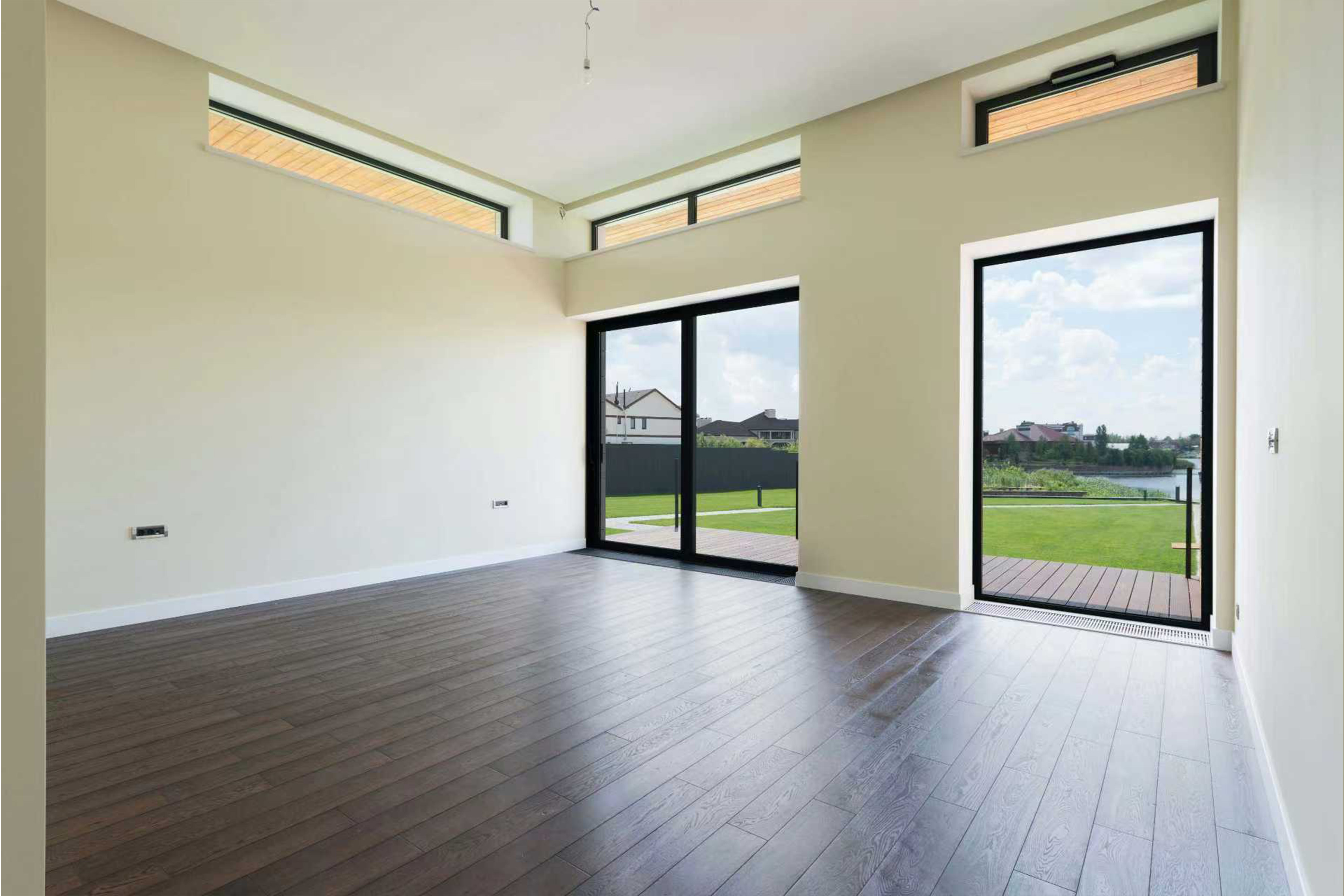
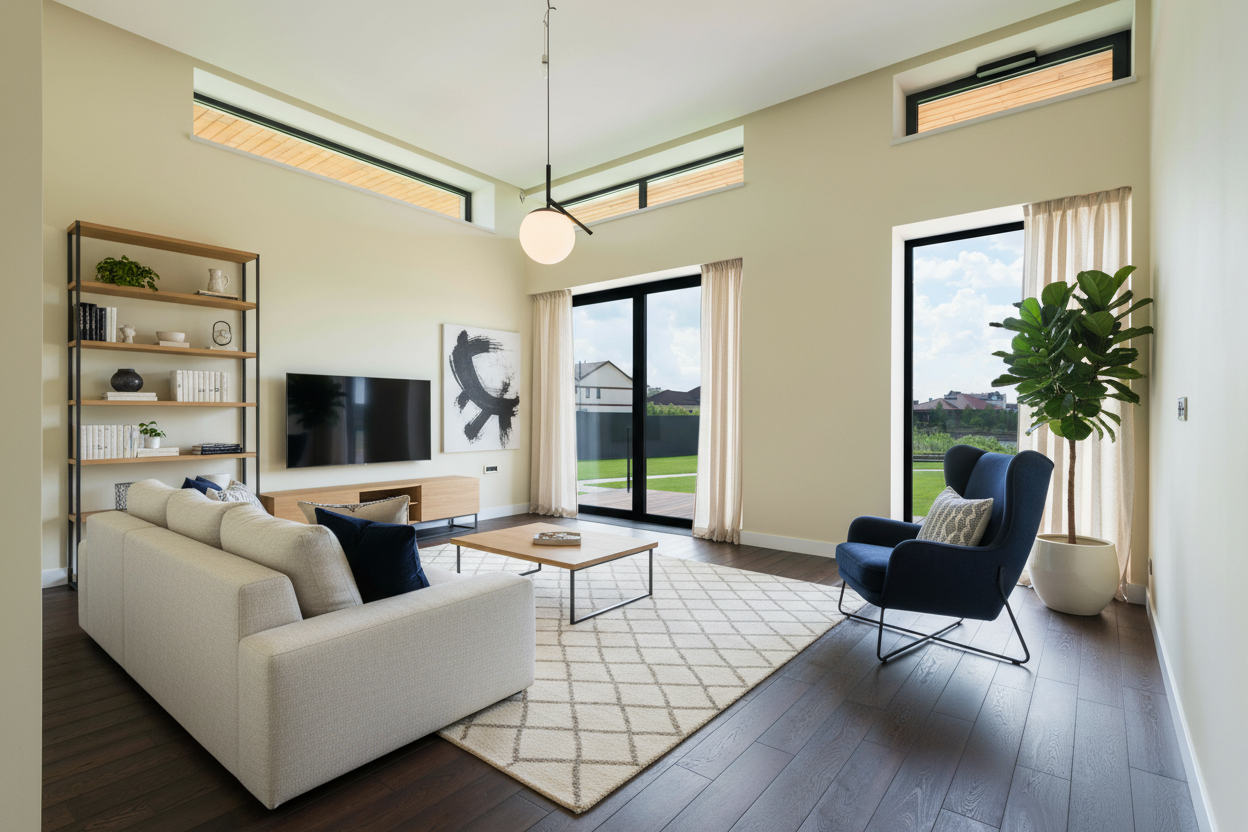
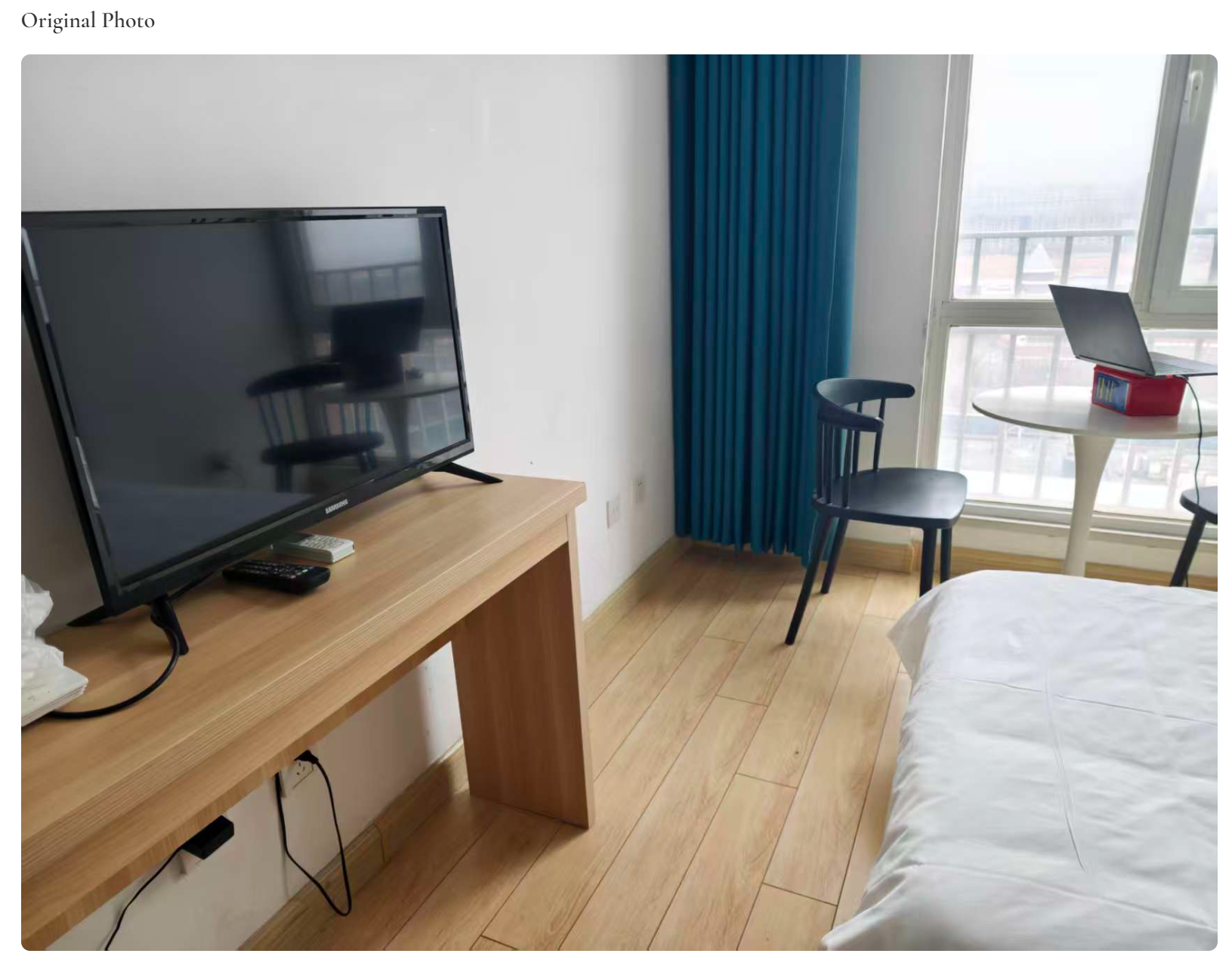
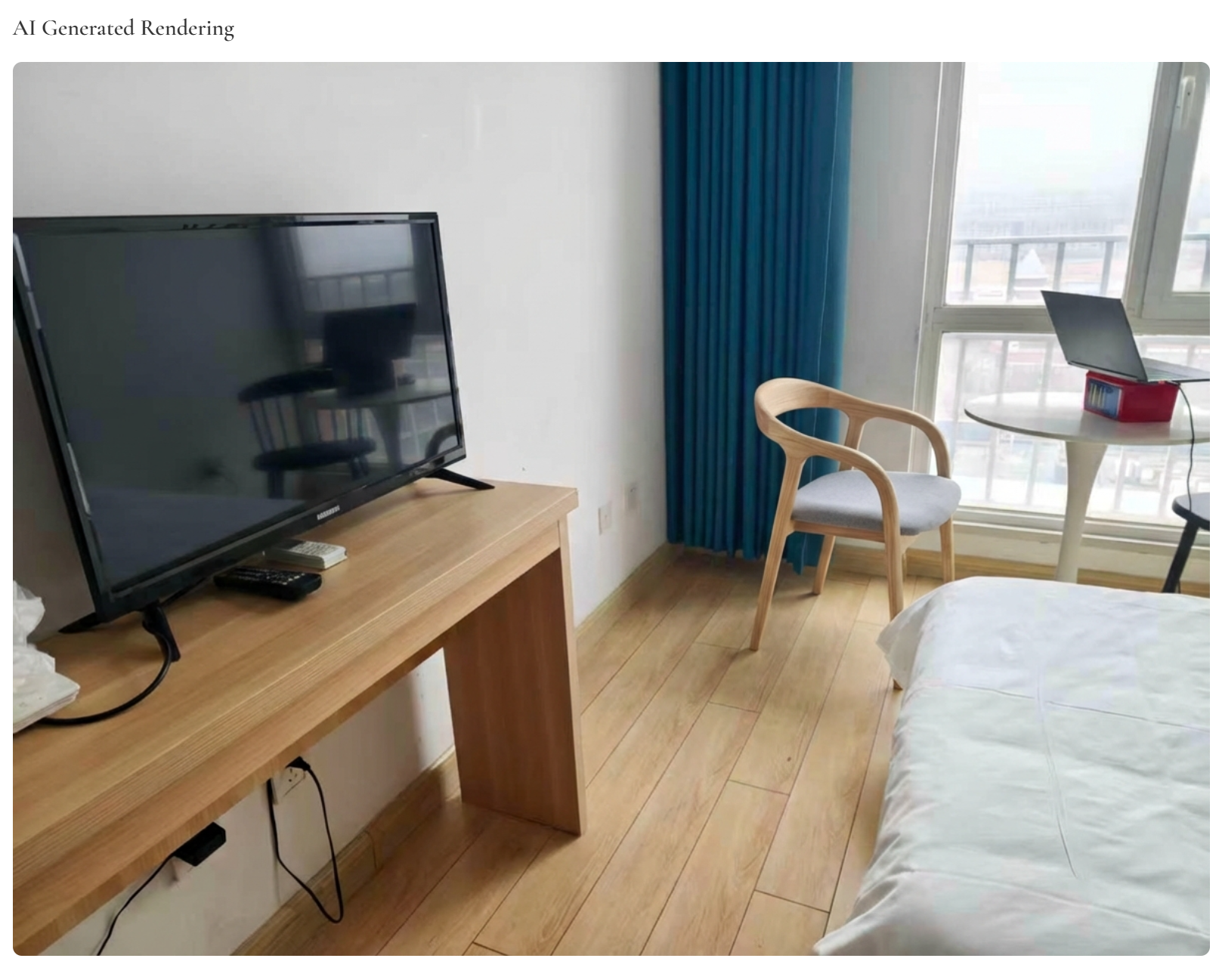
InstaRoom-before & after
-
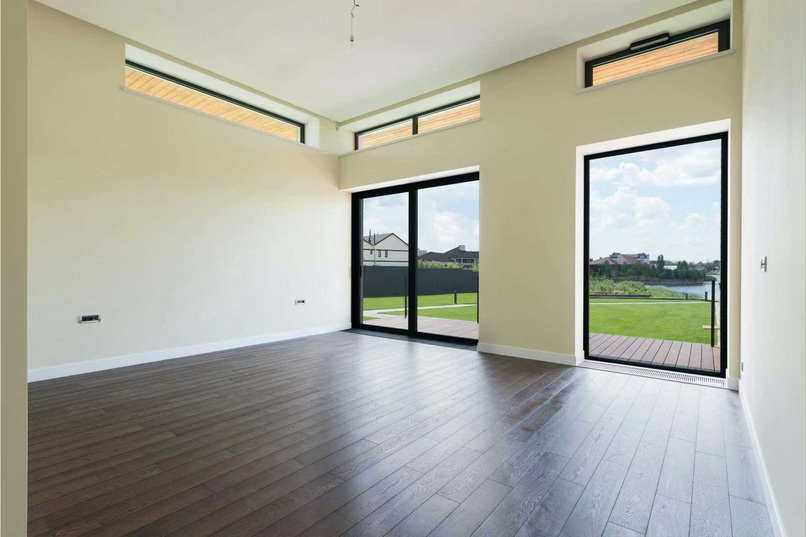
home before
-
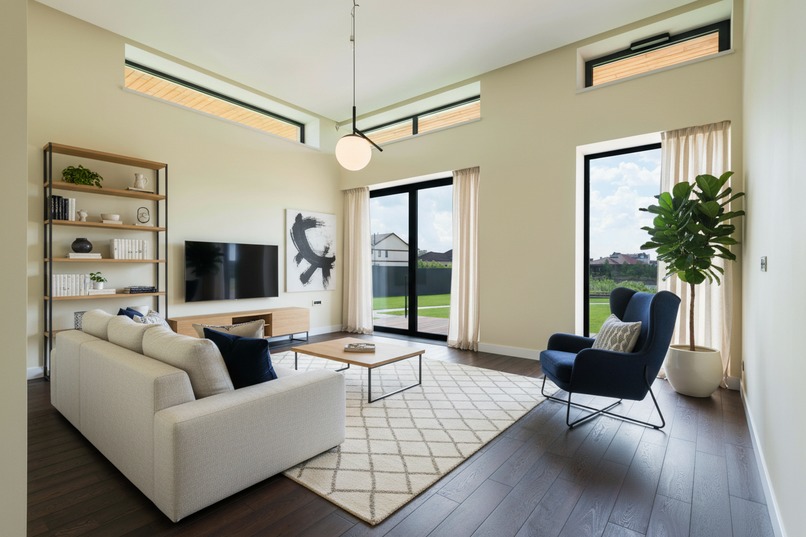
home after - whole home custimization
-
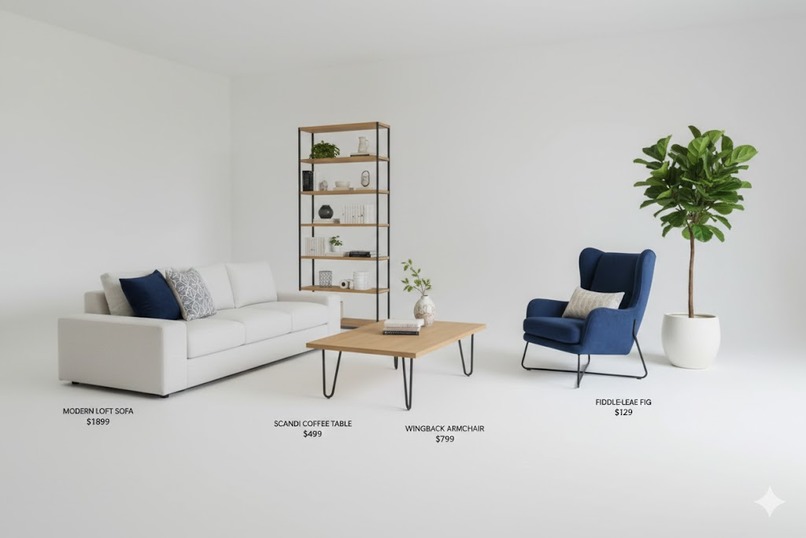
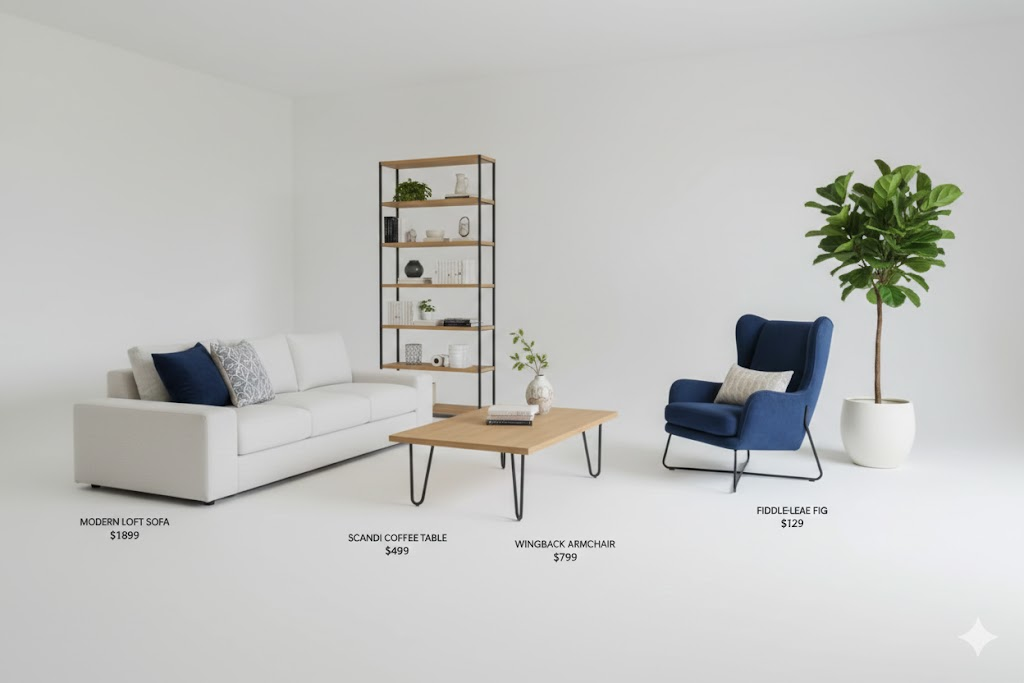
real shopping list
-
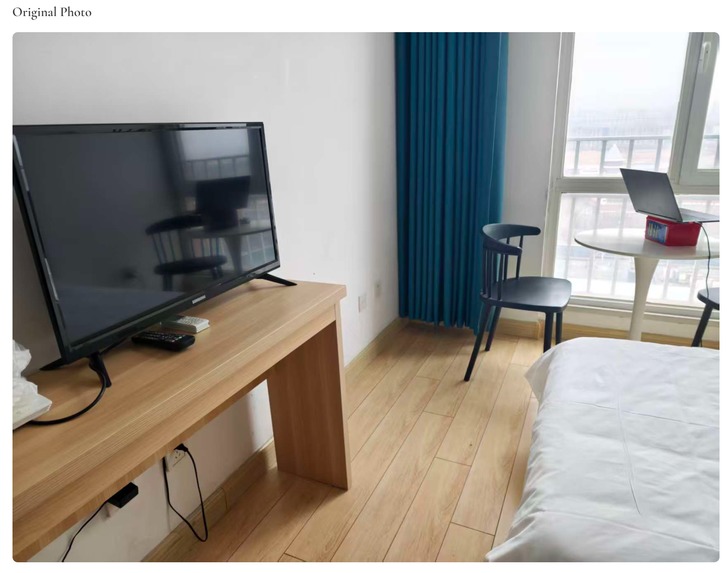
home before
-
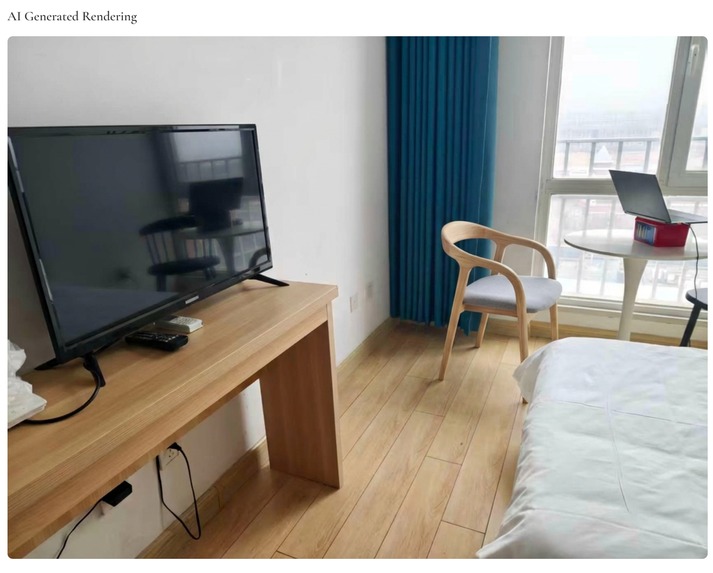
home after- furniture swap

🏠 InstaRoom - AI-Powered Home Design Assistant
Google Gemini API Hackathon 2026 Submission
A one-stop intelligent home design platform powered by Gemini 3 multimodal capabilities
🌟 Project Overview
InstaRoom is a interesting AI home design application that empowers everyone to become their own interior designer. Simply upload a room photo, and AI will help you:
- 🎯 Smart Scoring - Evaluate your living space from multiple professional dimensions
- 🛋️ Furniture Swap - Replace old furniture with one click and preview the new look
- ✨ Dream Home - Generate ideal home renderings based on your existing space
- 🎨 Style Customization - Input your design requirements, AI creates tailored solutions
🚀 Core Features
1. 🎯 AI Room Scoring
Upload a room photo, and AI evaluates it from five professional dimensions: Space Layout, Color Harmony, Lighting Utilization, Style Coordination, and Functionality. It also generates a unique "Space Narrative" - a poetic description of your living space.
Technical Highlights:
- Gemini 3 multimodal image analysis
- Structured JSON output ensures scoring consistency
- Bilingual scoring reports (English/Chinese)
2. 🛋️ AI Furniture Swap
Select the furniture to replace, and AI will:
- Automatically measure furniture dimensions (using reference objects)
- Analyze room environment and style
- Generate 2 different style replacement options
- Use Gemini image editing to directly replace furniture in the original photo
- Recommend matching products
Technical Highlights:
- Dual-perspective dimension measurement algorithm
- Gemini 3 Image for image editing
- Vector similarity-based product matching
- Semantic Tag Smart Translation: Automatically converts abstract requirements (e.g., "child-friendly", "easy to clean") into precise material and structural tags (e.g., "rounded corners", "waterproof fabric", "removable and washable"), enabling intelligent mapping from user intent to e-commerce searchable tags
3. ✨ One-Click Dream Home Generation
Based on improvement suggestions from the scoring results, AI automatically generates:
- Ideal home effect rendering
- Detailed shopping list (with specific product recommendations)
- Renovation instructions and design concepts
Technical Highlights:
- Multi-turn AI dialogue for complete solution generation
- End-to-end flow from scoring to rendering
- Few-Shot Learning improves output quality
4. 🎨 Room Style Customization
Input your design requirements (e.g., "I want a pink bedroom suitable for females"), and AI will:
- Analyze existing room conditions
- Generate detailed design plans
- Render effect images
- Provide complete shopping lists
Technical Highlights:
- Natural language requirement understanding
- Automatic constraint extraction
- Multi-option comparison generation
🛠️ Technical Architecture
┌─────────────────────────────────────────────────────────────┐
│                        InstaRoom                             │
├─────────────────────────────────────────────────────────────┤
│  Frontend (React + Vite)                                     │
│  ├── i18n Internationalization (EN/ZH)                       │
│  ├── Responsive Design                                       │
│  └── Beautiful UI Animations                                 │
├─────────────────────────────────────────────────────────────┤
│  Backend (Node.js + Koa)                                     │
│  ├── RESTful API                                             │
│  ├── Prompt Engineering System (XML Templates + Builder)     │
│  └── Multi-language Prompt Support                           │
├─────────────────────────────────────────────────────────────┤
│  AI Engine (Google Gemini API)                               │
│  ├── Gemini 3 - Text Generation & Image Analysis     │
│  ├── Gemini 3 Image - Image Editing & Generation     │
│  └── Structured JSON Output                                  │
└─────────────────────────────────────────────────────────────┘
📦 Tech Stack
| Layer | Technology |
|---|---|
| Frontend | React 18, Vite, TailwindCSS, react-i18next, React Router |
| Backend | Node.js, Koa, @google/genai SDK |
| AI | Gemini 3 Flash, Gemini 3 Flash Image |
| Database | MySQL (local product data) |
🎯 Gemini API Usage
This project deeply integrates multiple Google Gemini API capabilities:
Multimodal Image Analysis (
gemini-3-flash)- Room photo analysis
- Furniture recognition and dimension estimation
- Style identification
Image Editing & Generation (
gemini-3-flash-image)- Furniture swap renderings
- Dream home visualizations
- Style customization effects
Structured Output (
responseMimeType: "application/json")- Ensures AI output matches expected format
- Easy for frontend parsing and display
Few-Shot Learning
- Examples improve output quality
- XML templates + JSON examples system
🏗️ The Story of InstaRoom
Inspiration
The journey of furnishing a home is often a nightmare of "Three Too-Manys":
- Endless Tabs: Users drown in hundreds of browser tabs, struggling to cross-reference fragmented products across disconnected sites.
- Mismatched Budgets: AI often generates "Pinterest-style" dreams that are either physically impossible or financially ruinous.
- Spatial Confusions: Items that look great on screen often fail in reality due to wrong scaling—leading to costly "buyer’s remorse."
As a former architect, I know that great design isn't just about a pretty render; it’s about spatial logic, structural integrity, and budgetary discipline. We built InstaRoom to bridge the "Action Gap" between visual inspiration and physical reality. We are an AI-driven, end-to-end home design and full-chain fulfillment platform that delivers architect-grade solutions in a single tap.
Challenges we ran into
The biggest hurdle was Spatial Depth Perception. Estimating real-world dimensions from a 2D photo is a classic architectural challenge. We solved this by developing a Dual-Perspective algorithm . This system cross-references identified objects and known reference objects (like a beer can ) with Gemini’s spatial reasoning.
Mathematically, we calculate the scale factor s using reference objects R and pixel dimensions p: $$s = \frac{Actual_Size(R)}{Pixel_Size(p)}$$
Accomplishments that we're proud of
- From Pixels to Parcels: We created a workflow that goes from a raw photo to a populated shopping cart in under 15 seconds.
- Architectural Logic: Integrating professional design rules into AI prompts so the results are actually livable.
- Semantic Search: Building a bridge between human "feeling" (e.g., "cozy") and real-world inventory.
What we learned
Gemini 3 as an Architect: We discovered that Gemini 3 is remarkably capable of "thinking like an architect." When provided with clear structural constraints, its multimodal reasoning understands spatial relationships, moving beyond simple image generation.
Defining the Boundary (Structure vs. AI): As the Product Lead, my biggest takeaway was the necessity of defining clear boundaries. To prevent AI "hallucinations," we had to decide exactly what to structure and what to leave to AI:
- The Structured (Rules): Spatial dimensions, budget limits, and structural logic. These are hard-coded as fixed constraints.
- The AI (Flexibility): Aesthetic synthesis and the semantic interpretation of user needs (e.g., translating "cozy" into visual harmony).
Execution over Design: We learned that users don't just want a "design"—they want clarity and execution. A beautiful render is just a dream; the real product value lies in the end-to-end fulfillment. The goal is to build the bridge from a visual concept to a fully-furnished reality.
What's next for InstaRoom
- AR Real-Time Walkthrough: Allowing users to "walk" through their InstaRoom design in their house using AR.
- B2B for Real Estate: Empowering agents to provide "Instant Virtual Staging" for empty listings.
- Direct Checkout Integration: Partnering with retailers for a true "One-Tap" purchase experience.
🚀 Quick Start
Prerequisites
- Node.js >= 18.0
- npm >= 9.0
- Google Gemini API Key
Installation Steps
Clone the repository
git clone https://github.com/your-username/instaroom.git
cd instaroom
Install dependencies
# Install backend dependencies
cd server
npm install
# Install frontend dependencies
cd ../client
npm install
Configure environment variables
# Create .env file in server directory
cd ../server
echo "GEMINI_API_KEY=your_api_key_here" > .env
Start the services
# Start backend (port 3000)
cd server
npm start
# New terminal, start frontend (port 5173)
cd client
npm run dev
Access the application Open your browser and visit
http://localhost:5173
📂 Project Structure
InstaRoom/
├── client/                    # Frontend React Application
│   ├── src/
│   │   ├── components/        # Reusable Components
│   │   ├── pages/             # Page Components
│   │   ├── i18n/              # Internationalization Config
│   │   └── App.jsx            # Main Application
│   └── package.json
│
├── server/                    # Backend Koa Service
│   ├── controllers/           # Controller Layer
│   ├── services/              # Business Logic Layer
│   ├── prompts/               # Prompt Template System
│   │   ├── templates/         # XML Templates
│   │   └── builders/          # Builder Classes
│   ├── models/                # Data Models
│   ├── routes/                # API Routes
│   ├── config/                # Configuration Files
│   └── server.js              # Entry Point
│
└── README.md
🌍 Internationalization
The application supports English and Chinese:
- Fully internationalized frontend UI
- Backend AI prompts support language switching
- Scoring reports, shopping lists, etc. all support bilingual output
🔒 Third-Party Dependencies Declaration
This project uses the following third-party services and libraries:
| Dependency | Purpose | License |
|---|---|---|
| Google Gemini API | Core AI capabilities | Google API Terms |
| React | Frontend framework | MIT |
| Koa | Backend framework | MIT |
| TailwindCSS | CSS framework | MIT |
| react-i18next | Internationalization | MIT |
🎬 Demo Video
🧪 Testing Instructions
- Visit
http://localhost:5173after starting the application - Switch language using the toggle in the top-right corner
- Try each feature:
- Room Scoring: Upload a room photo and get AI evaluation
- Furniture Swap: Upload 2+ photos, annotate furniture, generate swap options
- Dream Home: From scoring results, click "Generate Dream Home"
- Room Customization: Describe your design needs in natural language
👥 Team Information
Team Name: InstaRoom Team
| Role | Member |
|---|---|
| Project Lead | [Jiayu Shao] |
| Developer | [Qikang Zhu] |
📝 License
MIT License
🙏 Acknowledgments
Thanks to Google for providing the powerful Gemini API, enabling us to integrate AI capabilities into the home design field and help everyone create better living spaces.
Example
Made with ❤️ for Google Gemini API Hackathon 2026
Built With
- css3
- gemini3
- html5
- javascript
- koa
- mysql
- react18
- tailwindcss
- vercel
- vite


Log in or sign up for Devpost to join the conversation.