-
-
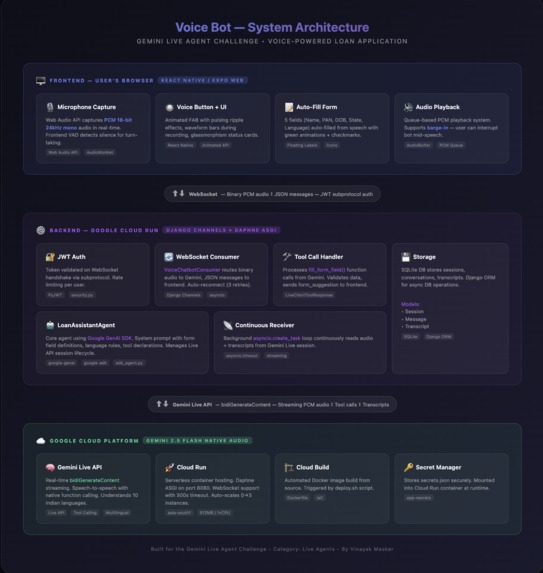
ARCHITECTURE DIAGRAM
-
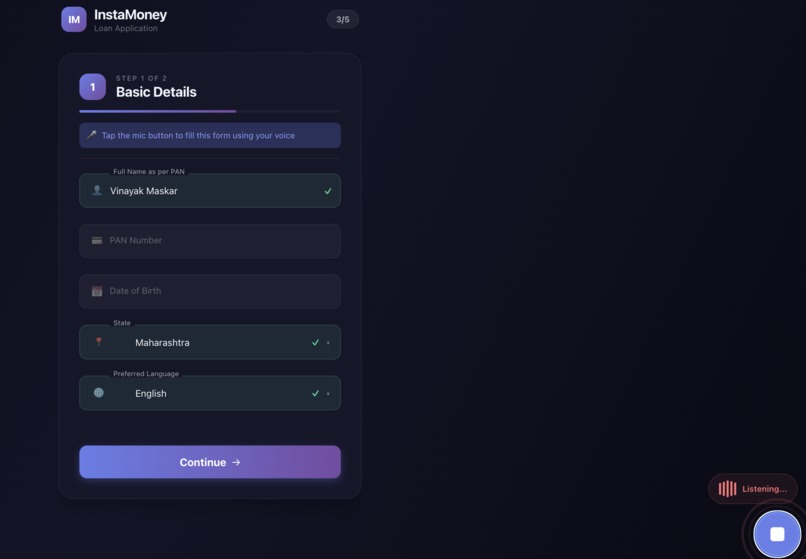
REAL TIME VOICE CHAT
Inspiration
Millions of Indians face barriers when applying for loans online — complex forms, language limitations, and low digital literacy. Rural users often abandon applications because they can't navigate English-only interfaces or struggle with typing on small screens. Visually impaired and motor-disabled users are completely excluded from traditional form-based applications.
We asked: what if users could just talk, in their own language, and have AI handle the rest? No screen to read, no fields to tap, no language barrier — just a natural conversation.
The Gemini Live API's streaming bi-directional audio with native tool calling made this possible — a truly conversational agent that listens, understands, and acts in real-time.
What it does
Lets users complete a loan application form by simply speaking. The voice agent:
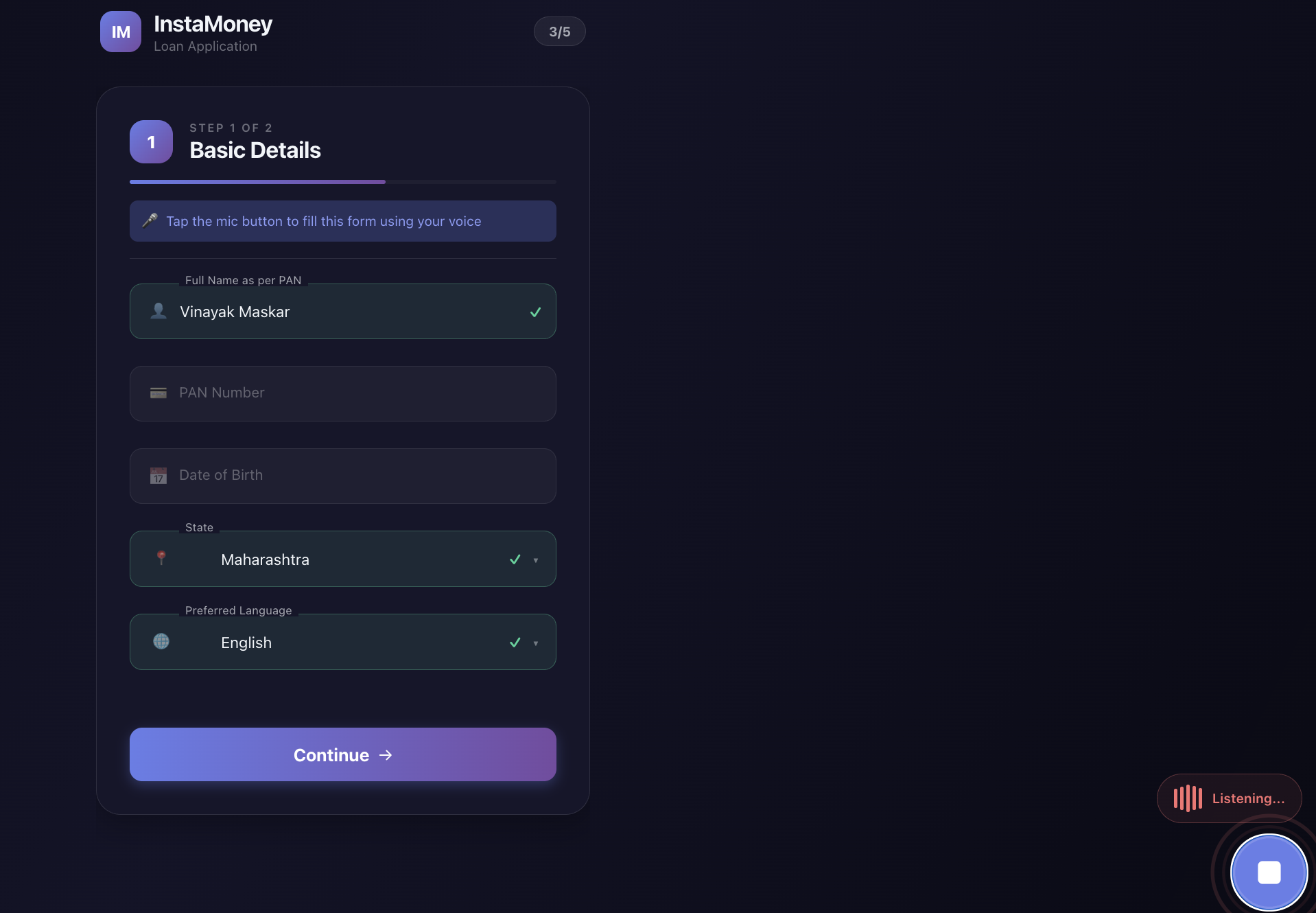
- Greets the user and guides them through 5 form fields (Full Name, PAN Number, Date of Birth, State, Preferred Language)
- Auto-fills fields in real-time as the user speaks — no typing, no buttons
- Supports 10 Indian languages — Hindi, Marathi, Tamil, Telugu, Bengali, Gujarati, Kannada, Malayalam, Punjabi, and English
- Switches languages instantly mid-conversation — say your name in English, give your PAN in Hindi, no problem
- Handles interruptions naturally (barge-in) — users can cut the bot off and it adapts
- Works for everyone — voice-first design means visually impaired users, elderly users, and people with motor disabilities can complete the application without ever touching the screen
How we built it
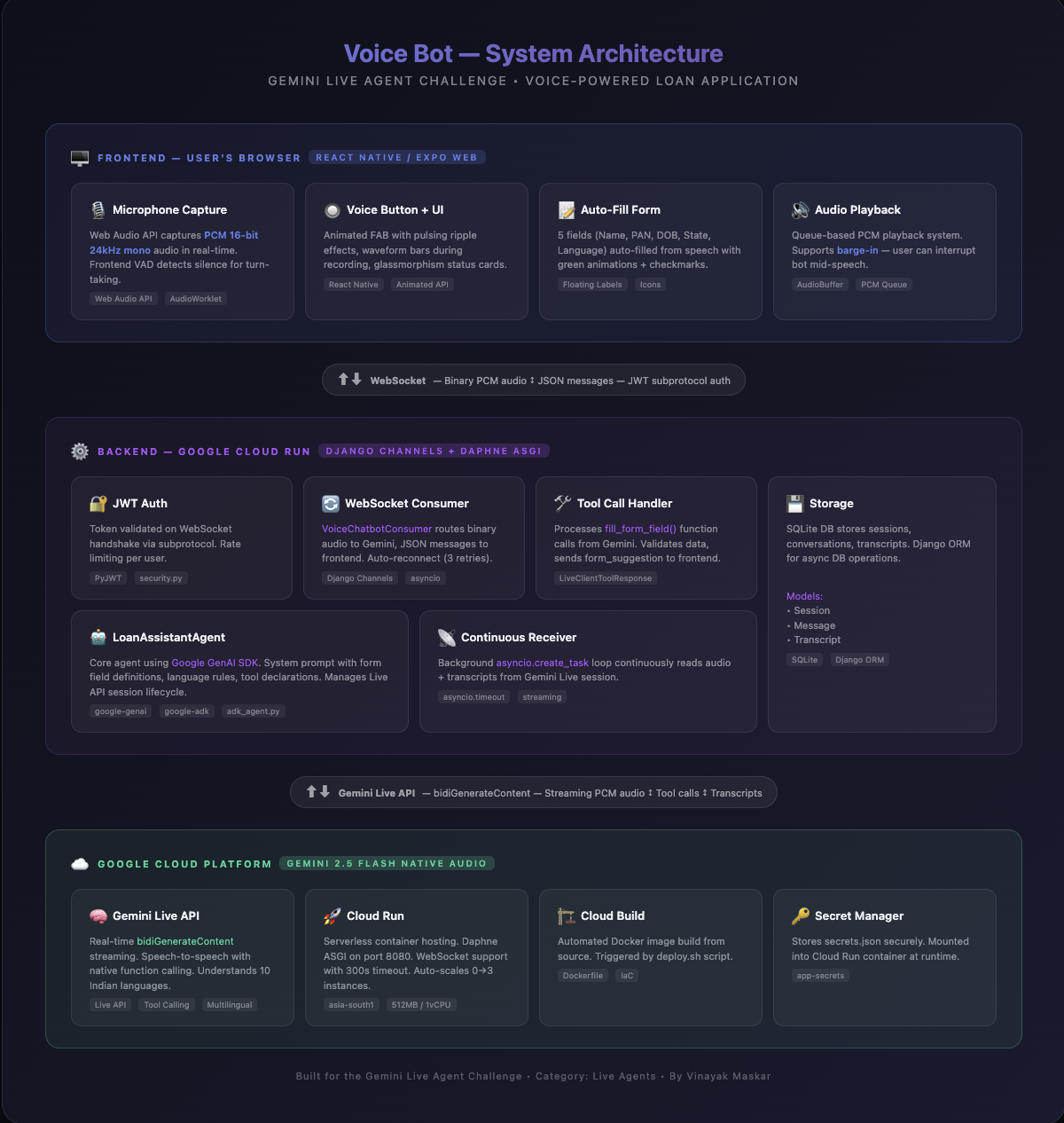
AI Layer: Gemini 2.5 Flash Native Audio model via the Google GenAI SDK, using the Live API (bidiGenerateContent) for streaming bi-directional audio with native function calling (fill_form_field).
Backend: Django Channels + Daphne ASGI server handling WebSocket connections. A continuous background receiver (asyncio.create_task) reads from the Gemini Live session in real-time. JWT authentication is passed via WebSocket subprotocol.
Frontend: React Native (Expo Web) with the Web Audio API for real-time PCM 16-bit 24kHz mono audio capture. Time-scheduled gapless playback ensures smooth voice output even over network connections. Voice Activity Detection (VAD) on the client side enables responsive turn-taking.
Audio Pipeline: Raw PCM binary frames flow directly over WebSocket — no base64 encoding, no intermediate formats. This zero-overhead approach minimizes latency from microphone → Gemini → speaker.
Deployment: Fully automated on Google Cloud Run via deploy.sh — Cloud Build compiles the Docker image, Secret Manager stores API keys, and the frontend is served from the same Cloud Run instance. Single command deployment.
Challenges we faced
1. Gapless audio over network: Audio chunks arrive with variable latency over Cloud Run. Queue-based playback (play one chunk, wait for onended, play next) created audible gaps. We solved this with time-scheduled playback — pre-scheduling each chunk at precise positions on the Web Audio API's AudioContext timeline, eliminating gaps entirely.
2. Duplicate bot responses: Gemini's native audio model speaks a confirmation before calling the tool, then speaks the same confirmation again after receiving the tool response. We built server-side suppression logic that detects tool_call events and mutes the duplicate post-tool audio.
3. Model deprecation mid-development: Our original model (gemini-2.0-flash-exp) was permanently deprecated. We migrated to gemini-2.5-flash-native-audio and discovered that temperature: 0.1 with candidate_count: 1 is critical for consistent tool calling — higher temperatures caused the model to skip function calls or respond twice.
4. WebSocket auth on Cloud Run: Browser WebSocket connections don't support custom HTTP headers. We implemented JWT token passing via WebSocket subprotocol, validated server-side before accepting the connection.
What we learned
send_client_contentvssend_realtime_inputin Gemini's Live API produce fundamentally different model behaviors — the former gives clean single responses, the latter can cause duplicates- Temperature is not just about creativity — at 0.1, Gemini reliably calls tools; at 0.4+, it becomes inconsistent
- Audio playback over a network requires completely different strategies than local playback
- Native audio models process function calls differently than text models — they generate audio both before and after tool execution
- A well-structured system prompt with explicit examples and forbidden phrases dramatically improves voice agent reliability
What's next
Accessibility for Disabled Users
- Visually impaired users — Full screen reader compatibility with ARIA labels, and a complete audio-only mode that eliminates the need to see the screen entirely. Users can complete the entire loan application through voice alone, with spoken confirmations for every field filled.
- Motor disabilities — Hands-free operation with voice-activated controls. No tapping, no swiping — just speak to navigate, fill, and submit.
- Hearing impaired users — Real-time speech-to-text transcription displayed on screen, with visual indicators for bot responses and form fill confirmations.
- Cognitive accessibility — Simplified conversational flow with patient, step-by-step guidance. The bot repeats and explains as many times as needed without frustration.
- Elderly users — Large text mode, slower speech rate option, and support for regional dialects beyond standard languages.
Our vision is that no one should be denied a loan because they can't fill out a form. Voice AI removes the digital divide — whether you're visually impaired, have limited mobility, are elderly, or simply can't read English.
Technical Roadmap
- Full loan application flow with income verification and document upload via Gemini Vision
- Persistent storage with Cloud SQL for production-grade data management
- Native mobile apps (iOS/Android) using React Native
- Speaker verification for security
- Real-time validation against government databases using Gemini grounding
- Multi-step loan workflow with approval status tracking and notifications
Built With
- css
- daphne
- django
- django-channels
- docker
- expo.io
- gemini-live-api
- google-cloud-build
- google-cloud-run
- google-container-registry
- google-genai-sdk
- google-secret-manager
- html
- javascript
- jwt
- python
- react-native
- sqlite
- web-audio-api
- websocket

Log in or sign up for Devpost to join the conversation.