-
-
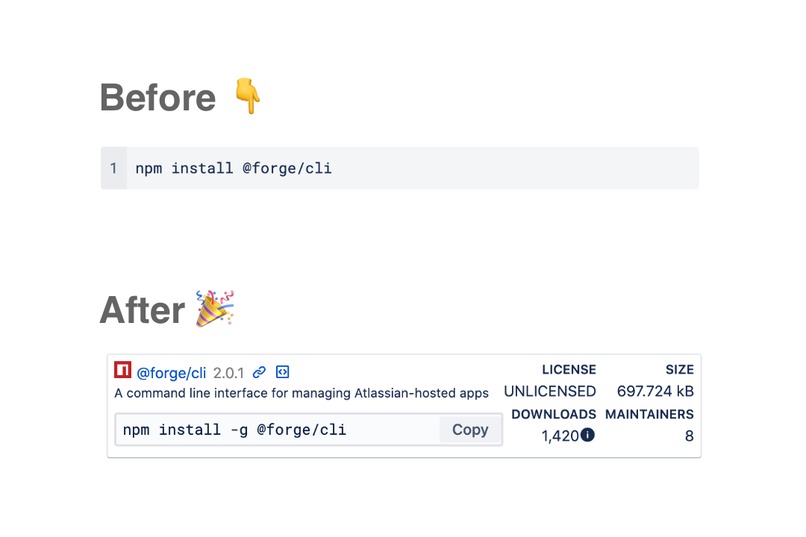
"Before and after" showing how Inline Package Info enhances your Confluence documents
-
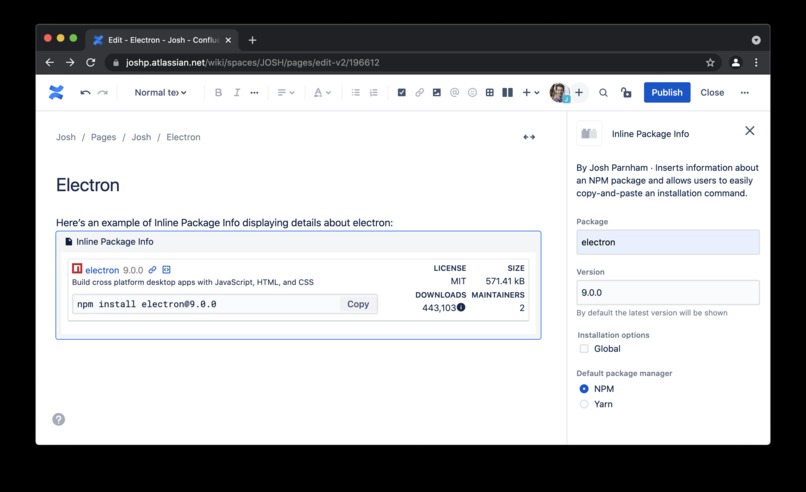
Screenshot showing what options are available for customisation


Inspiration
Inline Package Info was inspired by Atlassian's Smart Links, as well as my experience with Confluence pages that instruct users on installing various dependencies - for example, wiki pages for getting started with a particular service or getting a local development environment setup.
What it does
Inline Package Info allows you to embed rich information about NPM packages into your Confluence pages. It provides a copy button which allows users to easily copy-and-paste the installation code into their terminal, whilst also vastly increasing security and accountability by showing information about the packages that the user is about to install right within the Confluence page. By prominently featuring information like the licence and download count, users can make sure that they're complying with any relevant licensing requirements and also know that they're downloading a legitimate package, not a knockoff or an package with a typo in its name.
How we built it
I used Atlassian Forge's Custom UI functionality to build this macro.
Challenges we ran into
Since this was my very first Forge app, there was a substantial learning curve. However, apart from learning the ins-and-outs of the Forge platform there wasn't too many challenges overall.
Accomplishments that we're proud of
I was proud that I was able to learn the Forge platform and build a functional product within the time limits of the hackathon.
What we learned
I learned a tonne about the Forge platform, as well as a lot about the APIs of different package repositories.
What's next for Inline Package Details for Confluence
There are a bunch of features which I want to build, including:
- the ability to use other package repositories, eg Nuget, Pypi, etc
- the ability to view more information about packages (such as viewing the sub-dependencies inline in a modal)
- showing more content when a user makes the macro wider


Log in or sign up for Devpost to join the conversation.