-
-
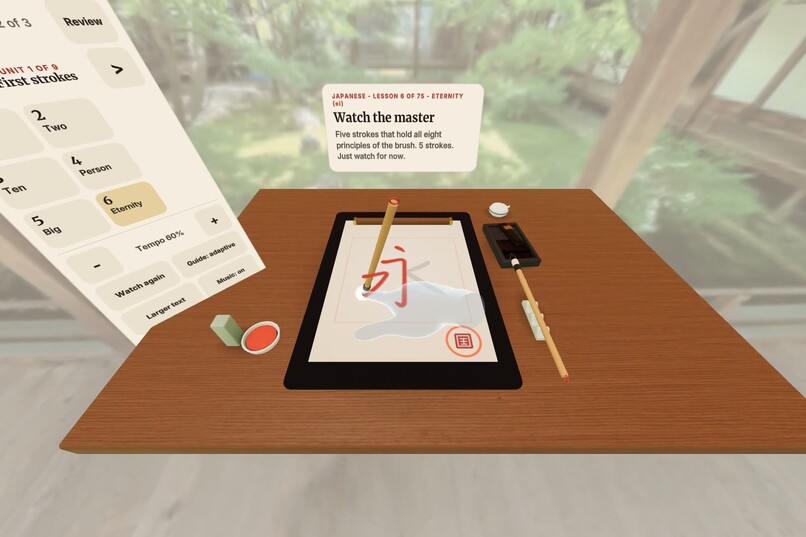
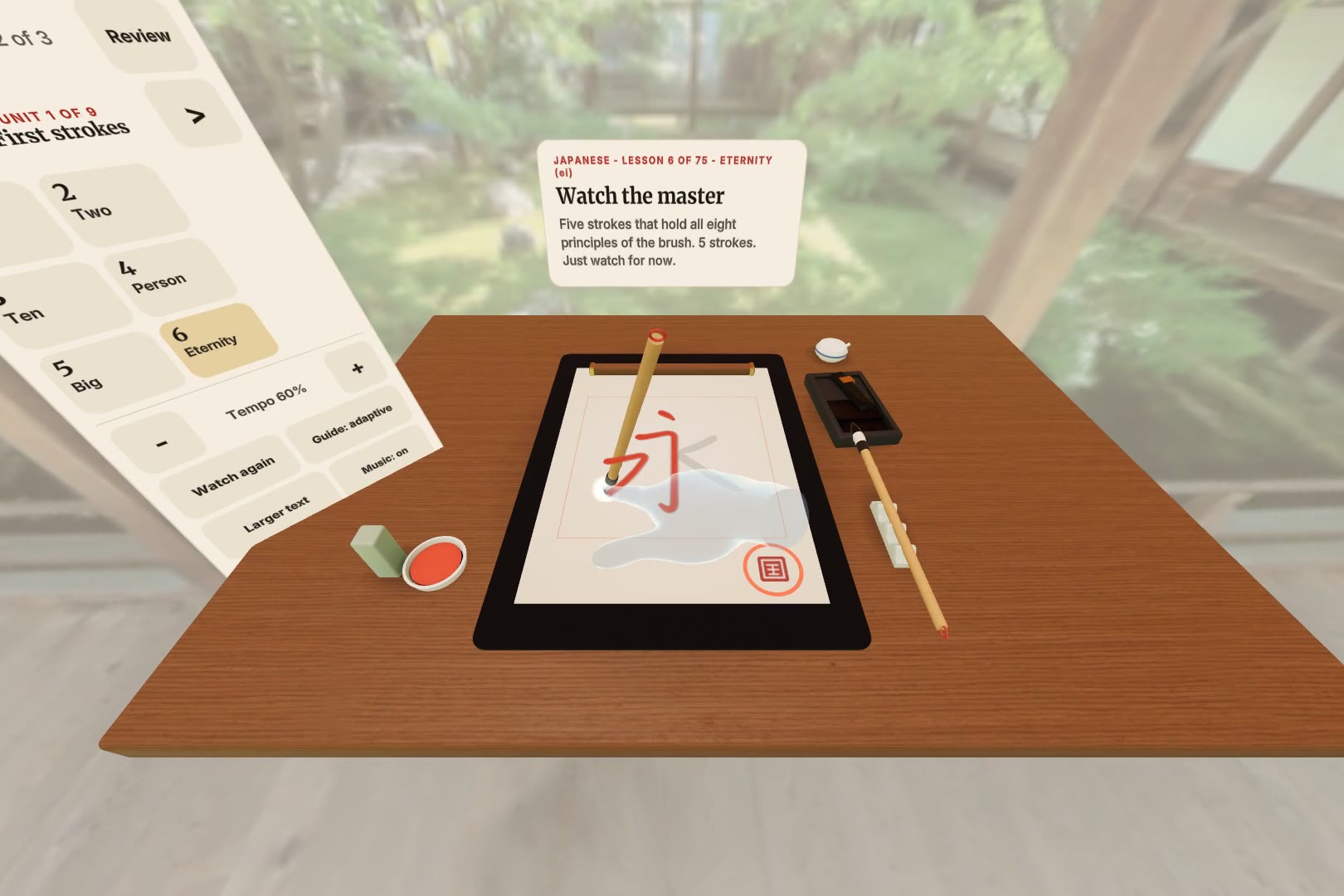
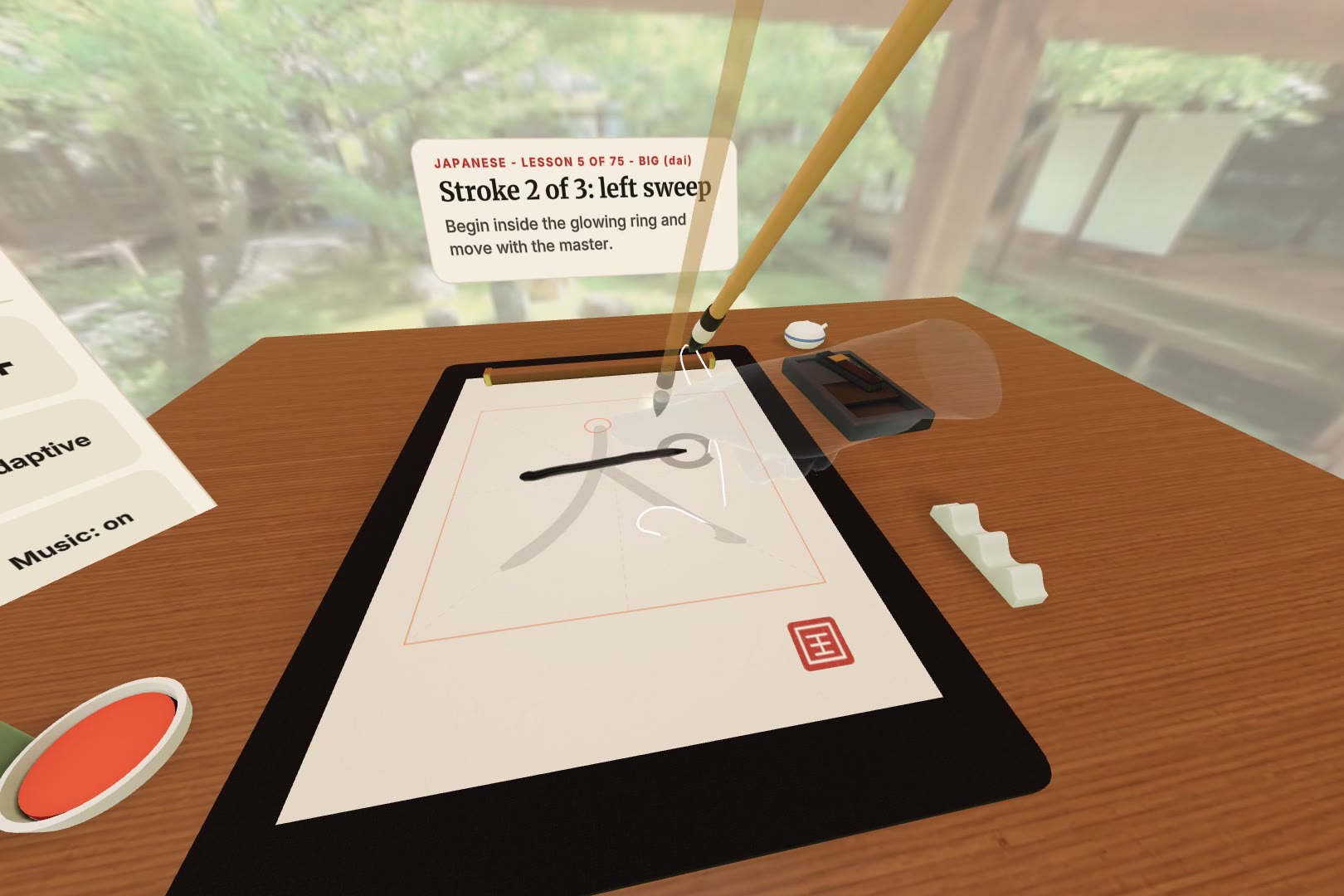
The master writes 永 (eternity) beside your hand, on your real desk, at a Kyoto temple.
-
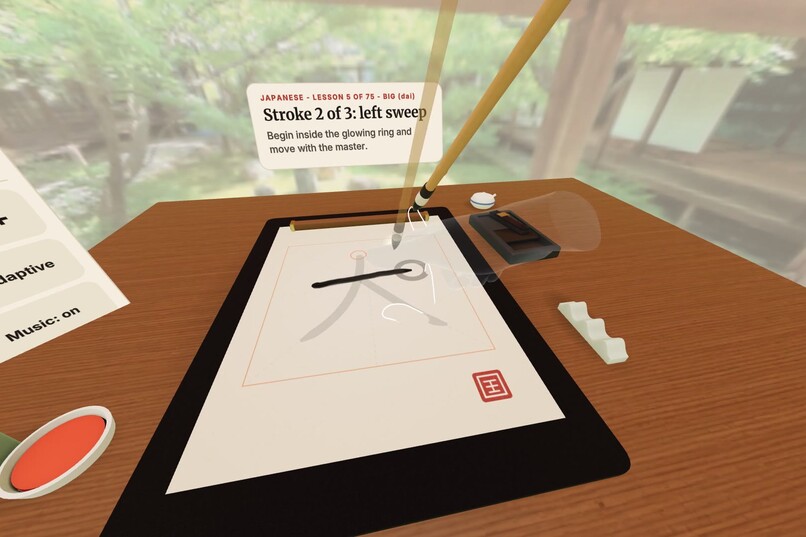
Write with the master. Stay in step and your hands lock together and the ink turns gold.
-
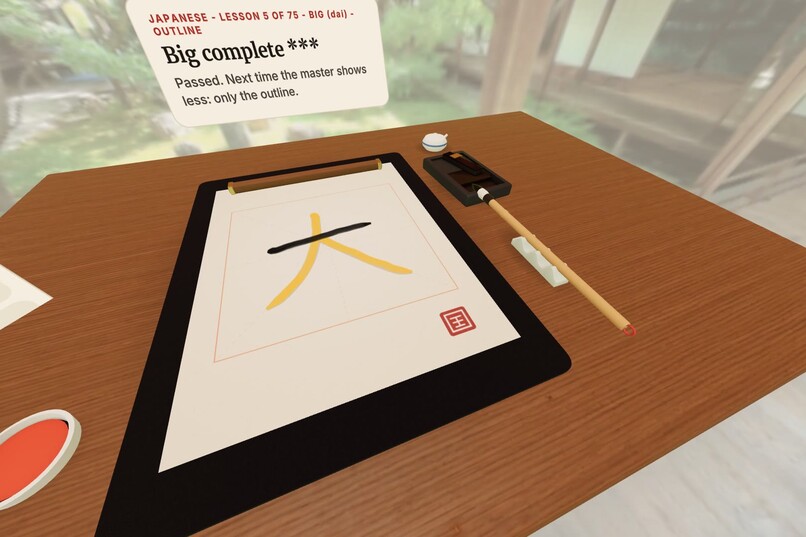
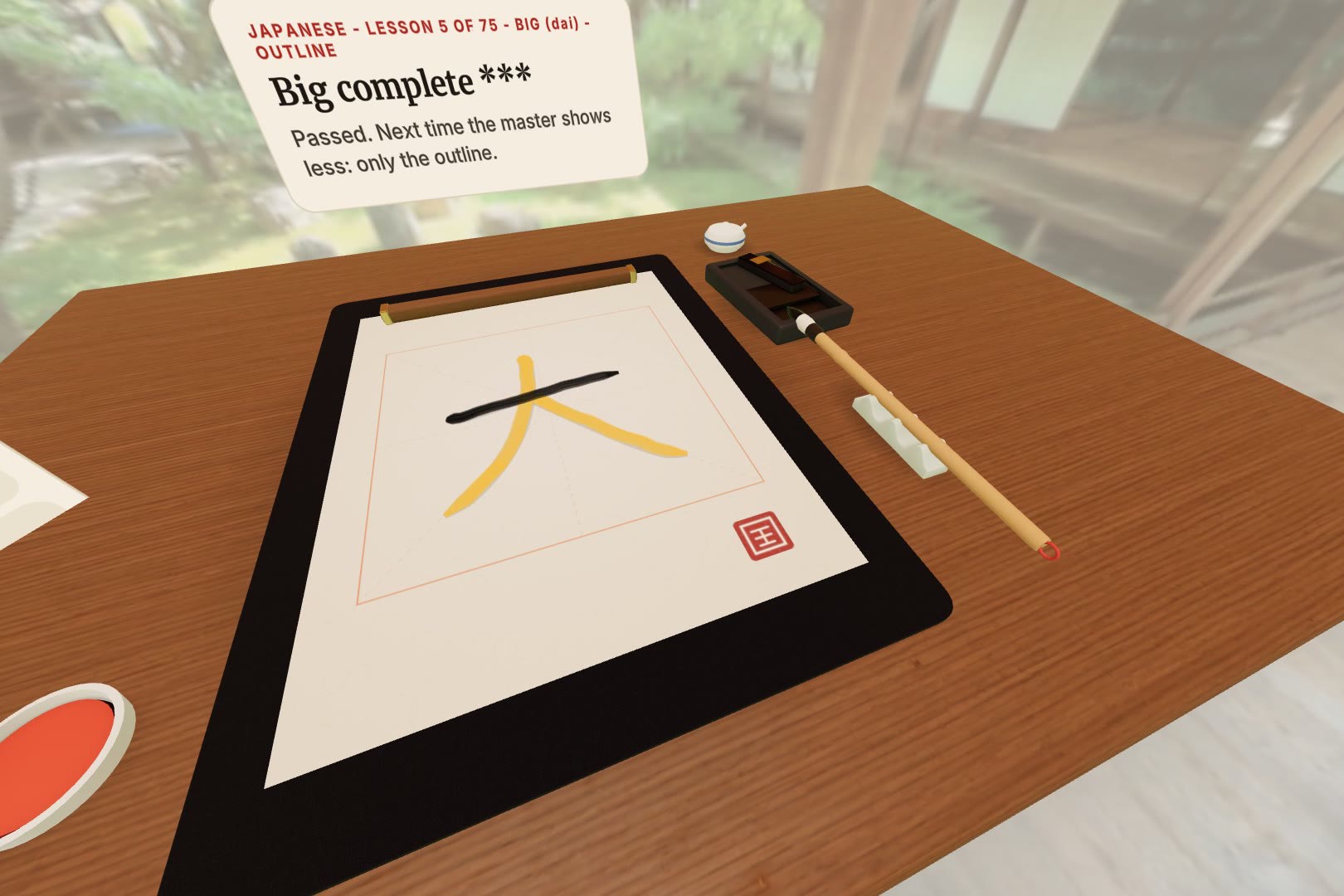
A character complete, with a score and the master's seal. Next time the master helps less.
-
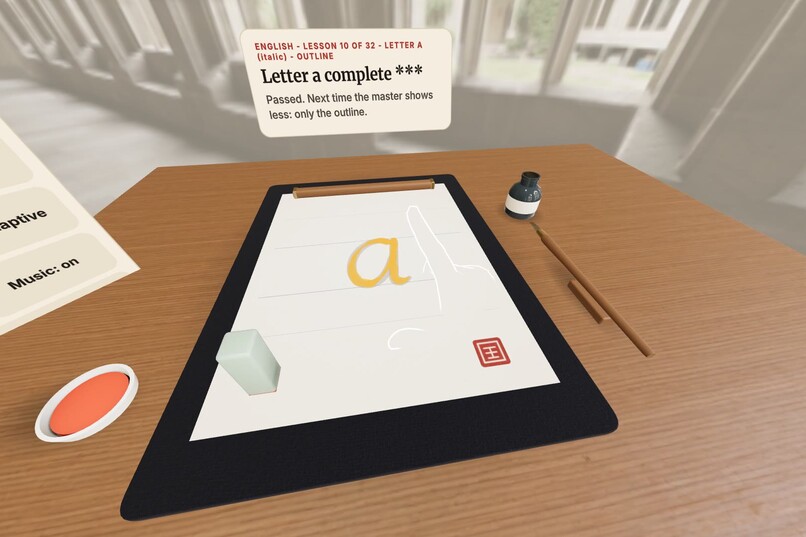
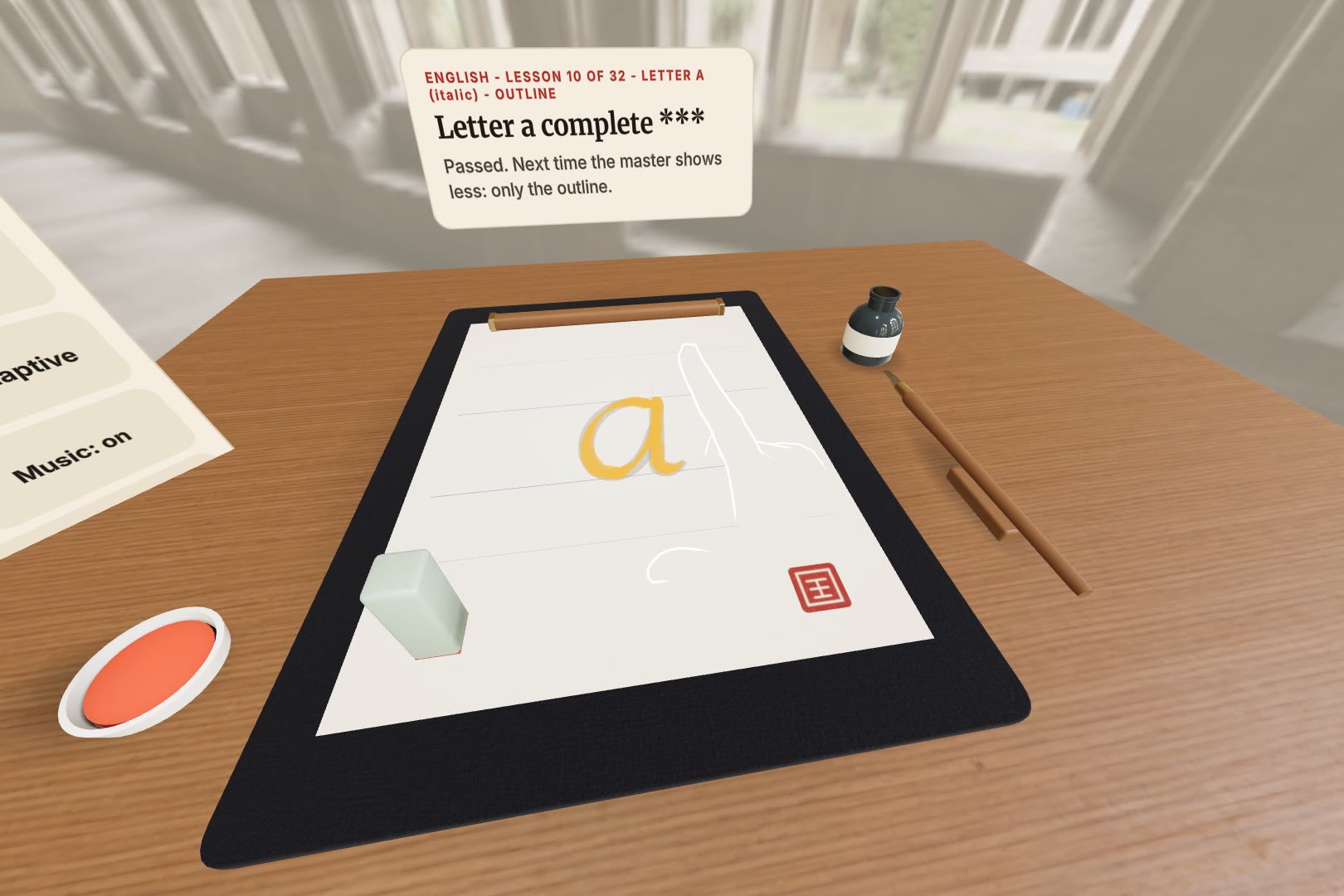
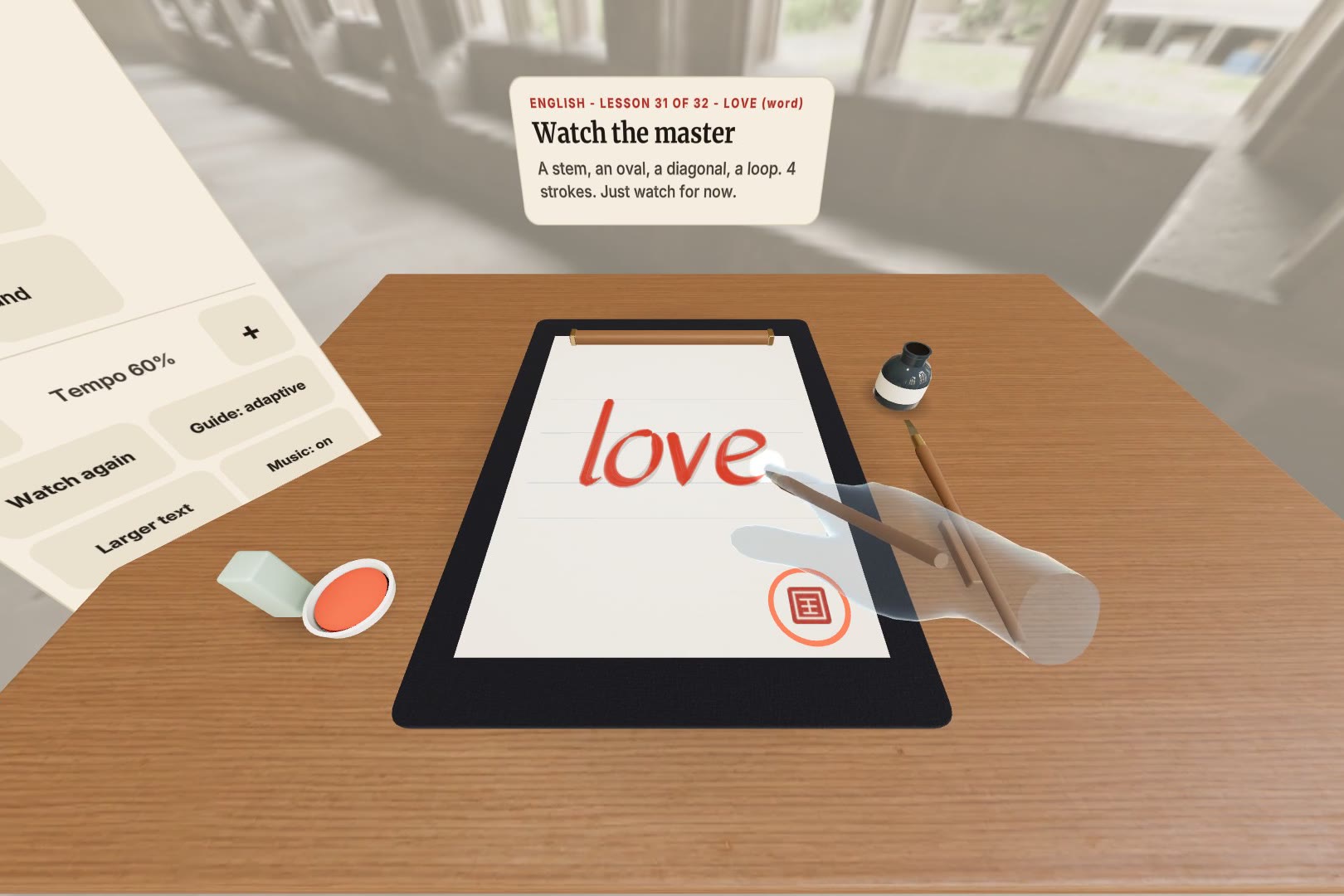
English italic with a broad-edge dip pen, on ruled lettering paper, in a medieval cloister.
-
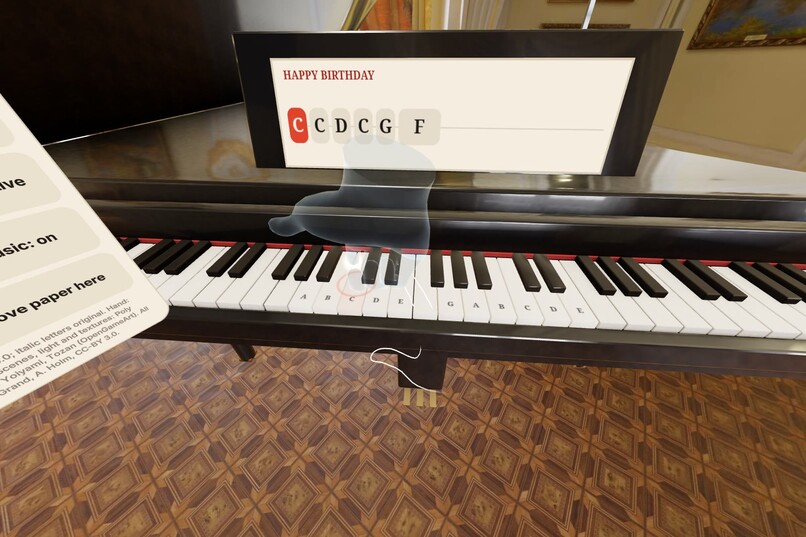
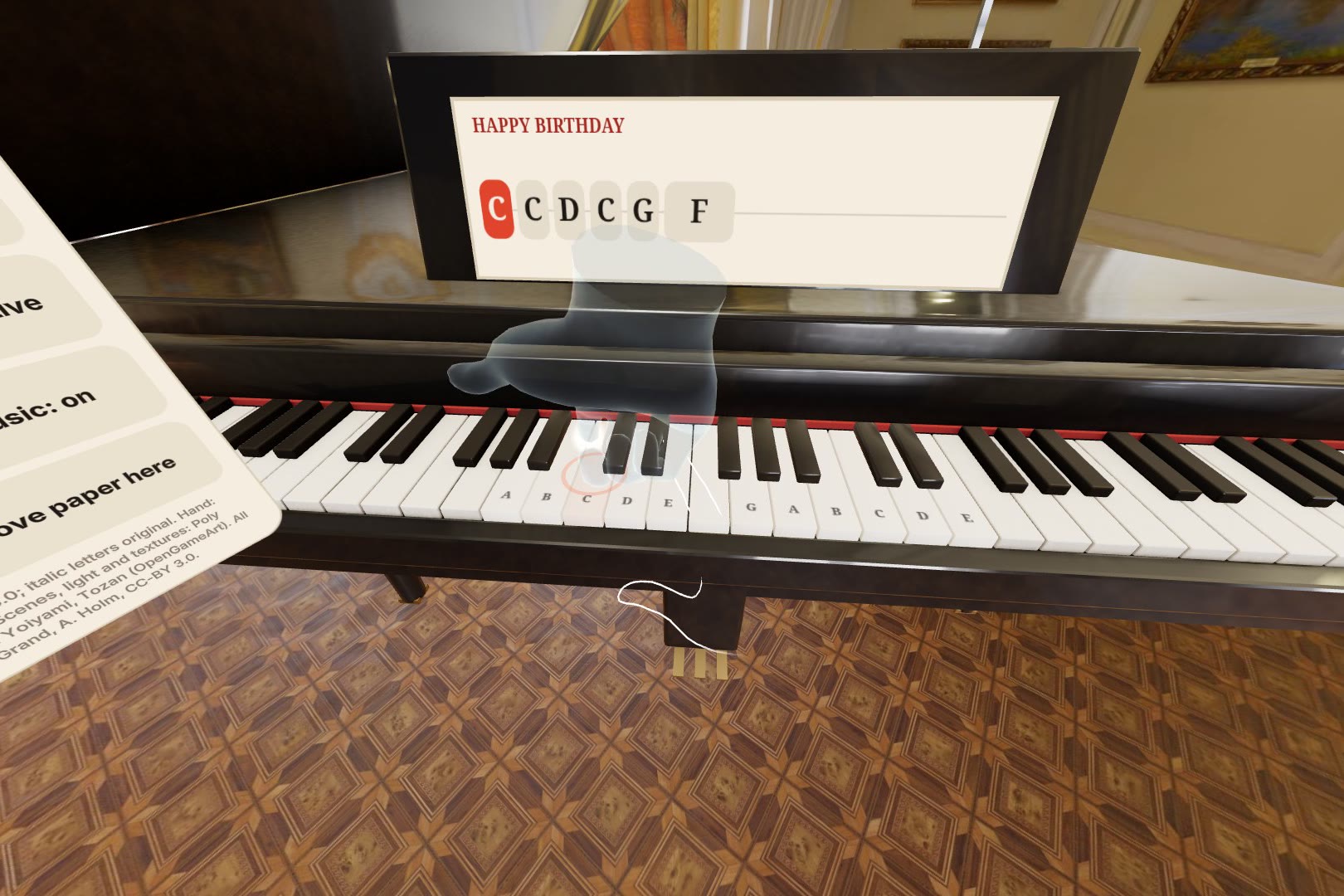
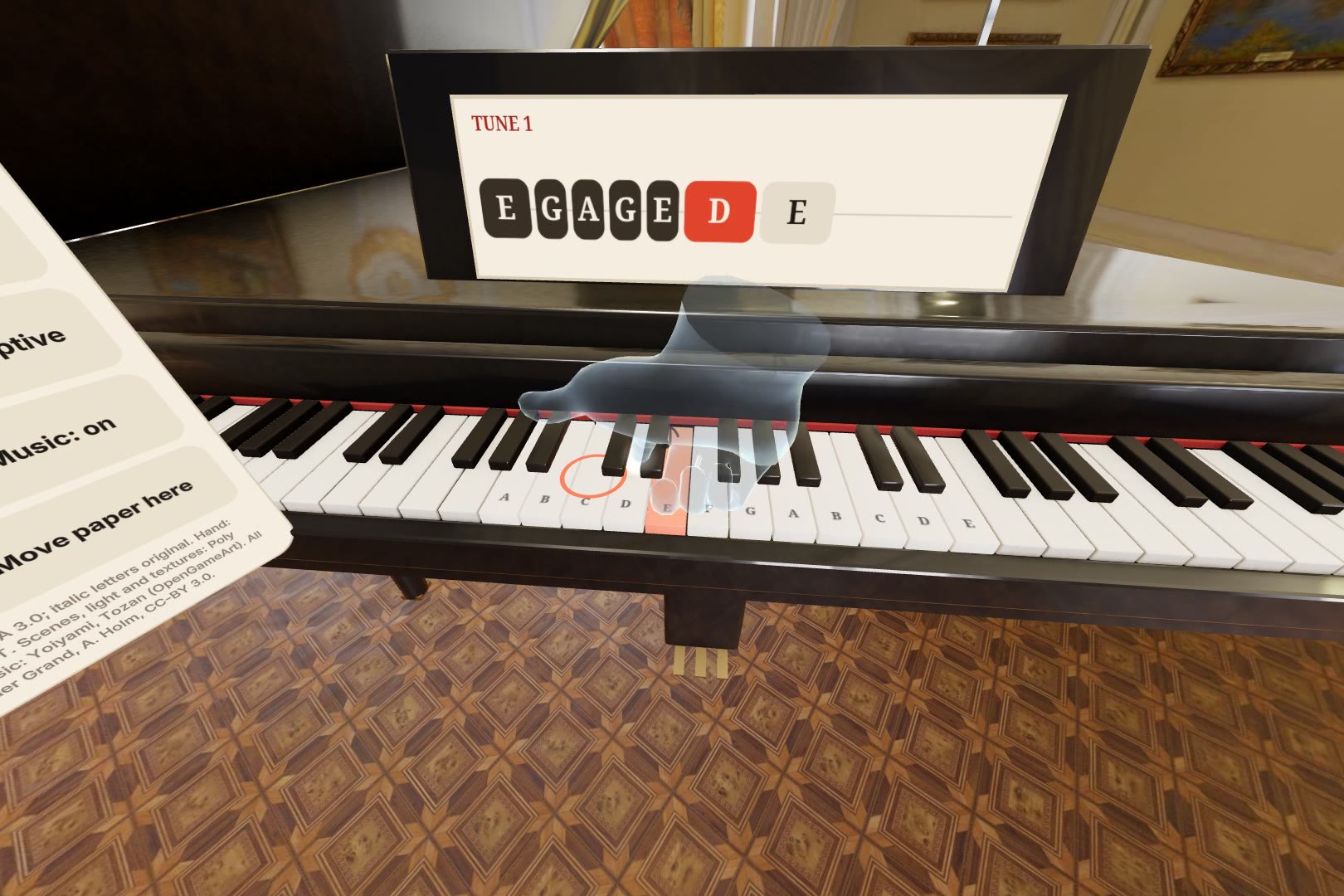
Piano: the master plays a phrase, you echo it. Notes on the beat turn gold on the music sheet.
-
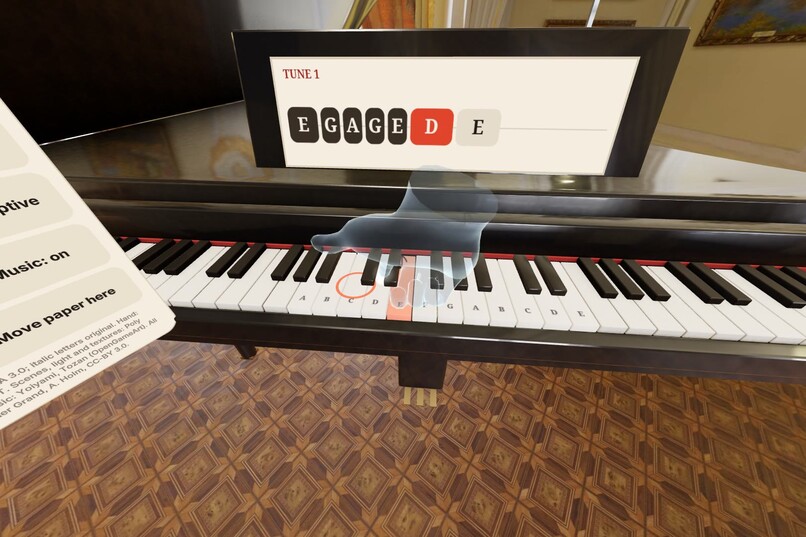
Play your own tune and the master learns it, then plays it back and teaches it to you.
-
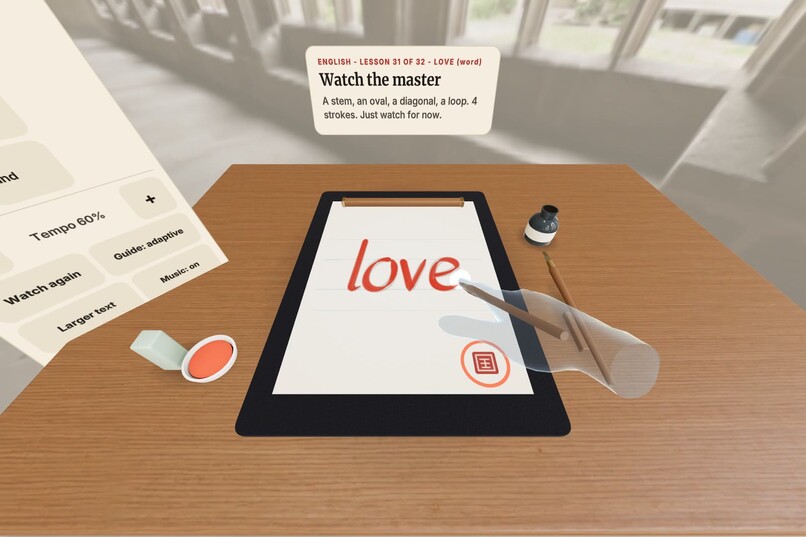
Letters, then words: the master writes "love" with the pen.
Inspiration
Calligraphy and piano are learned the same way: you watch a teacher's hand, then copy it many times. Videos and books show that hand from the wrong side, and a beginner usually has no teacher sitting next to them.
Mixed reality can put the teacher's hand right next to yours, on your own desk, seen from your own eyes. We wanted to find out whether that is enough to actually teach a craft with your hands, not only show it.
What it does
You put on a Quest, sit at a table and press "Begin at my desk". A writing set lands on your real table, in your own room. If you like, the Scene button fades your room into a place where the craft is practised (a Japanese garden veranda, a Chinese garden, or a medieval cloister for English lettering), or into a photo of your own. In beta, you can also describe a place in words and an AI model paints it as a 360 background.
Calligraphy
- A translucent master's hand writes the character first, holding a brush (or a broad-edge pen for English).
- Then you write it stroke by stroke with your fingertip on the real desk, while the master's hand leads at your tempo. Stay close to it and the two hands lock together, and your ink turns gold.
- Each stroke is scored on path, direction, order, speed and staying in step, with a specific hint when it misses ("Other direction", "Slower").
- There are about 160 short lessons in units, like a language app: Japanese (kanji and hiragana), Chinese, and English italic letters and words.
- Each character, letter or word is spoken as the master writes it (Mandarin, Japanese or English, and again with "Hear it"), in our teammate Yosun Chang's voice.
- English is written with a virtual broad-edge nib, so downstrokes come out thick and hairlines thin, the way a real dip pen behaves.
Piano
- A keyboard and a grand piano appear at your table, in a music room.
- The master plays a short phrase, you echo it, and then you play the whole song. A four-beat count-in and a key that pulses exactly when it is due make the rhythm visible.
- Several fingers and chords work.
- There are 26 songs and exercises, from Happy Birthday through the black-key layout, sharps and flats, scales, and well-known public-domain melodies. A new short phrase to echo is generated every day.
- You can play your own tune and the master learns it and teaches it back. You can also import a MIDI file, or share a tune as a link that someone else opens on their Quest.
Comfort
- "Paper: my real pad" (beta) hides the virtual sheet so you see your own paper pad, with an outline to lay it in; the master's strokes and your ink draw on top.
- "Recenter in front of me" on the menu, or holding the Meta button, brings the whole set right in front of you at your table's height.
The master lets go
- Each time you pass a lesson, the master helps less: full guide, then only the outline, then from memory.
- Within an attempt, the ghost hand also fades while you keep up and comes back when you slip.
- A daily goal, a streak and a Review button bring back the lesson you are weakest at.
Why mixed reality matters here
Two things only work because the lesson happens in your real room.
First, touch. Quest hand tracking has no haptics, so writing in mid-air feels like nothing. We put the paper and keys on your actual desk, so every stroke and every note ends with your finger touching a real surface. One touch on a seal (or on middle C at the piano) tells the app exactly where that surface is.
Second, viewpoint. The master's hand sits where a teacher's hand would be, and you see it from your own eyes. You copy a motion, not a picture of one.
It runs in the browser (WebXR), so a judge or a student opens a link and starts. There is nothing to install.
How we built it
- Immersive Web SDK (IWSDK) and three.js, written in TypeScript, running in Meta Quest Browser.
- Hands:
- the 25 tracked joints of each hand, smoothed;
- touch detection against the calibrated desk height;
- a poke test for menu buttons with hover and press feedback;
- a thumbs-up gesture for "Next lesson".
- Placement: the app finds a table among the detected planes, ignores couches, beds and tilted surfaces, and anchors the set so it can return to the same spot next session.
- Lesson data: stroke order and shapes come from KanjiVG (Chinese and Japanese, including hiragana). The English italic letters are our own drawings, written in the order a scribe would write them.
- Models: every object, from the brush to the grand piano, is built by one Blender Python script, with baked shadows where parts meet.
- Assets: 360-degree places from Poly Haven (CC0) and a garden 360 shot by our team, sampled grand piano notes, and public-domain melodies with our own arrangements.
- Sound: spatial, so each note comes from its key and the brush sounds where it touches.
- Testing: we didn't have a headset for most of the build. We wrote automated tests that drive the IWSDK emulator's hands through the experience:
- every lesson, plus wrong strokes that must get the right hint;
- phrases, chords and learning your own tune;
- lost hand tracking;
- six simulated rooms;
- a table higher or lower than the room scan;
- restarting a session.
- We built it with Claude Code as a coding partner, including those tests.
Challenges
Fading the help without making it random. If the ghost hand is always there, you follow it instead of learning. A CHI 2026 study on skill-adaptive ghost hands for VR piano found better retention when the ghost's transparency follows the learner's performance. We built that into both crafts: the ghost fades in real time while you are in step, comes back when you slip, and steps down further each time you pass.
Telling a stroke from a hand passing by. People rest their hands, reach across the paper and lose tracking mid-stroke. A stroke only starts after the finger has been seen lifting. Very short or plunging touches are ignored, and a stroke interrupted by lost tracking is cancelled instead of scored.
Real tables are not always where the room scan says. A tester on a Quest 3S found the keys sitting below the top of their standing desk, out of reach. Now the calibration touch measures where your finger actually rests. If that is a few centimetres away from the detected table, everything moves onto the real surface once you lift your finger. We tested tables 10 cm higher and 8 cm lower than the scan.
What we are proud of
- The core loop works end to end: watch, write with your fingertip on a real surface, lock in, get specific feedback, and see the master's help shrink as you improve.
- It is a course you can come back to for weeks, with three scripts and two crafts, not one demo lesson.
- English italic with a broad nib. A small change to how ink width is computed makes it feel like lettering instead of brush writing.
- The tests. Hands, lessons, rooms and restarts are checked automatically, which let us change a lot in the last days without breaking the main journey.
What we learned
- A real surface matters more than any visual. Writing on the actual desk turned out to be the difference between tracing in the air and writing.
- The emulator cannot replace a person in a real room. Our tests covered six simulated rooms, but the standing-desk problem only showed up when someone tried it at their own desk.
- Guidance needs to disappear on purpose. Following a ghost hand feels like learning while it is there. Building the fading in from the start shaped how every lesson works.
What's next
What works today: everything above, in the browser on Quest 3 and 3S, tested in the emulator and by one headset tester.
What we want to do next:
- Work with teachers. We are not calligraphers or piano teachers. Next we want to work with calligraphy and piano teachers to check the lesson order, the scoring and the hints, and to learn how they correct students.
- More real-world testing: more rooms and more people, with performance captured on the headset.
- Feedback teachers use: the master's correction marks in vermilion ink on your page, finger numbers for the piano, and playing a duet with the master.
- Writing with a real pen or brush: this is in beta. A fingertip touch finds your table, then you rest the pen's tip on the seal and the app learns where the tip is from your hand, and remembers it. Our headset tester found it first learned the fingertip instead of the pen; that is fixed, and it needs more headset testing before it can become the default.
- More of our tester's ideas: writing surfaces you choose from objects on the desk (calligraphy grid paper, parchment, a zen sand garden, water, snow), lining the set up to the real table with a tracked controller, quick controls in the top cap of the 360 place, and tracking the real paper pad itself so the outline follows it.
Credits
- Stroke order and shapes: KanjiVG, CC BY-SA 3.0, (c) Ulrich Apel and contributors (Japanese and Chinese characters and hiragana). The English italic letters are our own.
- Piano samples: Salamander Grand Piano by Alexander Holm, CC-BY 3.0.
- 360-degree places: Japanese garden veranda by Yosun Chang (Ink and Ivory team); Chinese Garden, Ballroom and Historic Cloister Passage (by Elvis Posa) HDRIs from Poly Haven (CC0). Studio lighting: Brown Photostudio 02 by Sergej Majboroda, Poly Haven (CC0).
- Music: "Yoiyami Core Theme", "Oriental Somber", and "Asianoriental1" and "Asianoriental2" by Tozan, CC0 via OpenGameArt.
- Text to 360 (beta): DiT360 by Insta360 Research (MIT), called as a public Hugging Face Space.
- Textures: Poly Haven and ambientCG (CC0).
- Hands: WebXR Input Profiles generic hand (MIT); base hand pose from IWER (MIT, Meta Platforms).
- Pronunciation (Mandarin, Japanese, English): Yosun Chang's voice (Ink and Ivory team), generated with ElevenLabs.
- Melodies: traditional or by composers who died long ago (public domain); Happy Birthday's melody is public domain. Our own note sequences and exercises.
Code: https://github.com/shiwani42/ink-and-ivory
LONG DISTANCE COLLABORATION WITH FRIENDS WHO MET DIRECTLY ON LINKEDIN MADE POSSIBLE WITH CLAUDE CODE AND SLACK!
