Inspiration
After working on the AutoDrive competition for a while, and being able to make a car aware of its surroundings and move on its own, I ended up asking myself the most natural question: why the hell can't I do this on my good old 2014 Chevy Malibu? The answer to this very deep yet simple question is: there's no hardware for that; no actuated steering wheel and no way to control the brakes externally.
That shifted my perspective from trying to run the autonomy in real life to running it in simulation, but with real data. My experience from the AutoDrive challenge made it easier, since I know exactly what I need.
The bigger picture
Beyond all my ideas about autonomy in cars, I have had for a long time the desire to just publish my work somewhere. I have many ideas that either exist in my numerous notes, note-taking apps, markdown files; little stains of my brain exist almost everywhere. So, taking this idea of "publishing" my work, I decided to come up with a "lab". Not a physical one, but one that would function as they typically do: projects here and there, lab notes, code that is available for re-use etc. I named it Initiative Labs. And its first official project being...
Initiative Vision 1
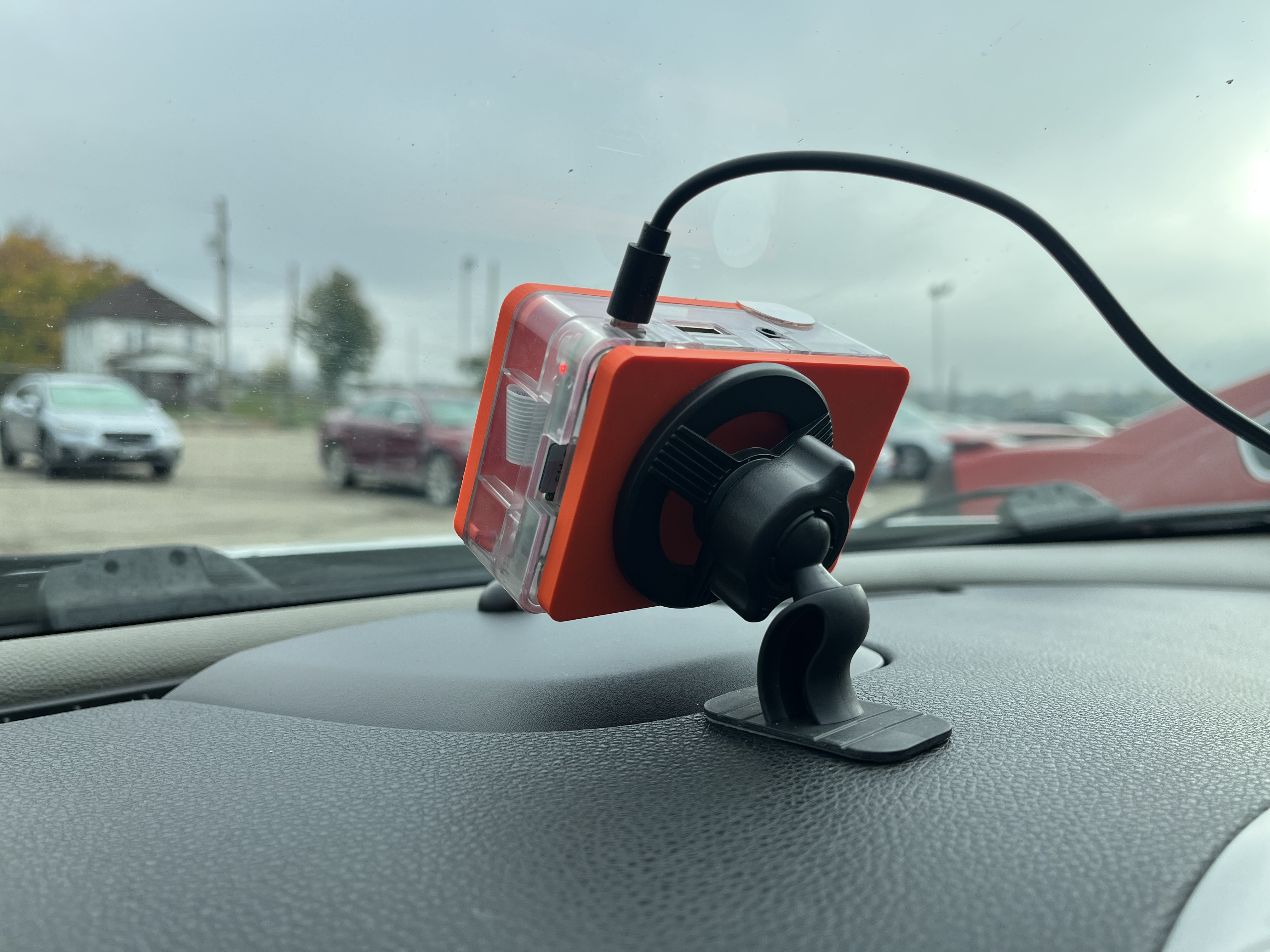
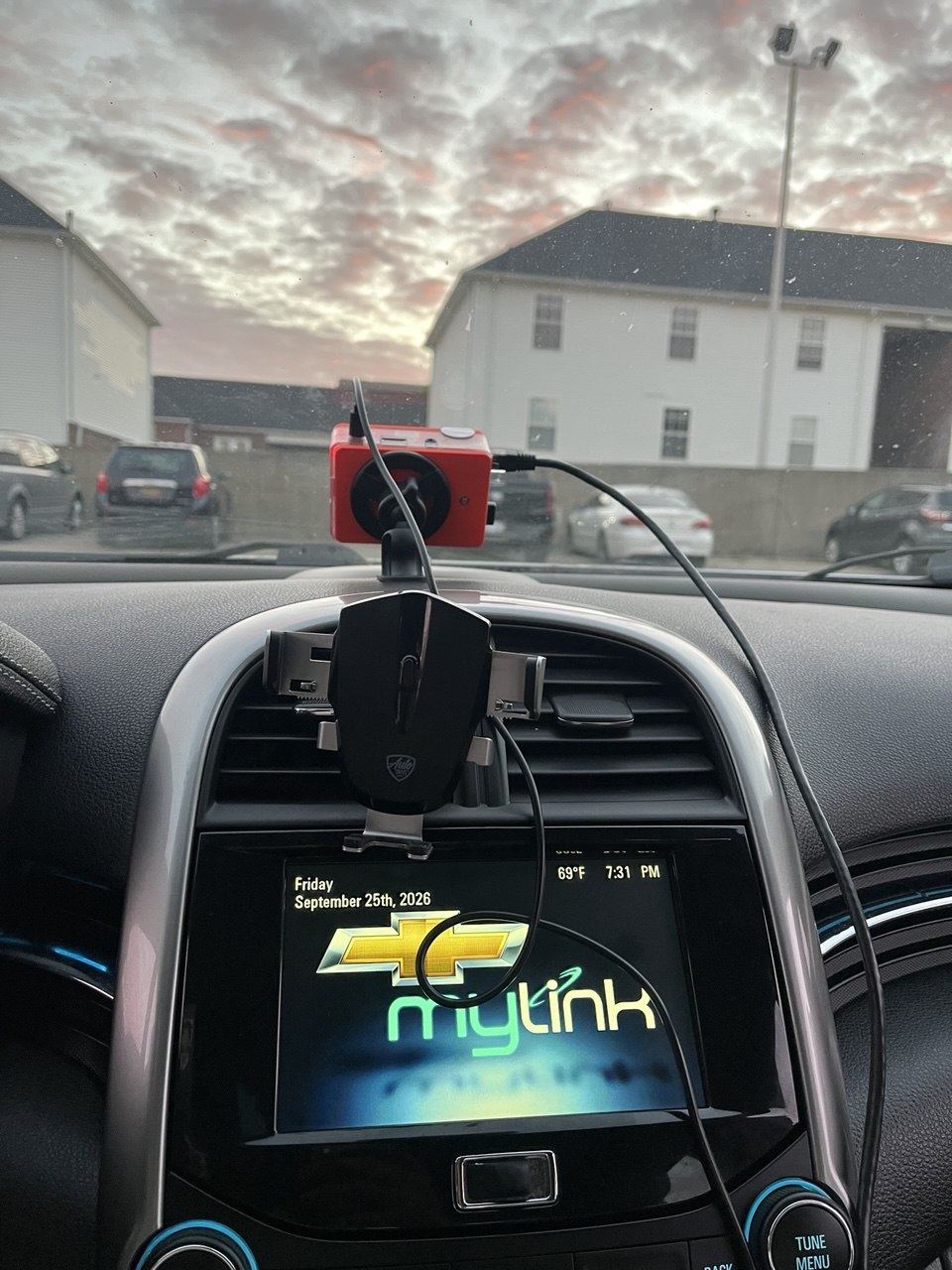
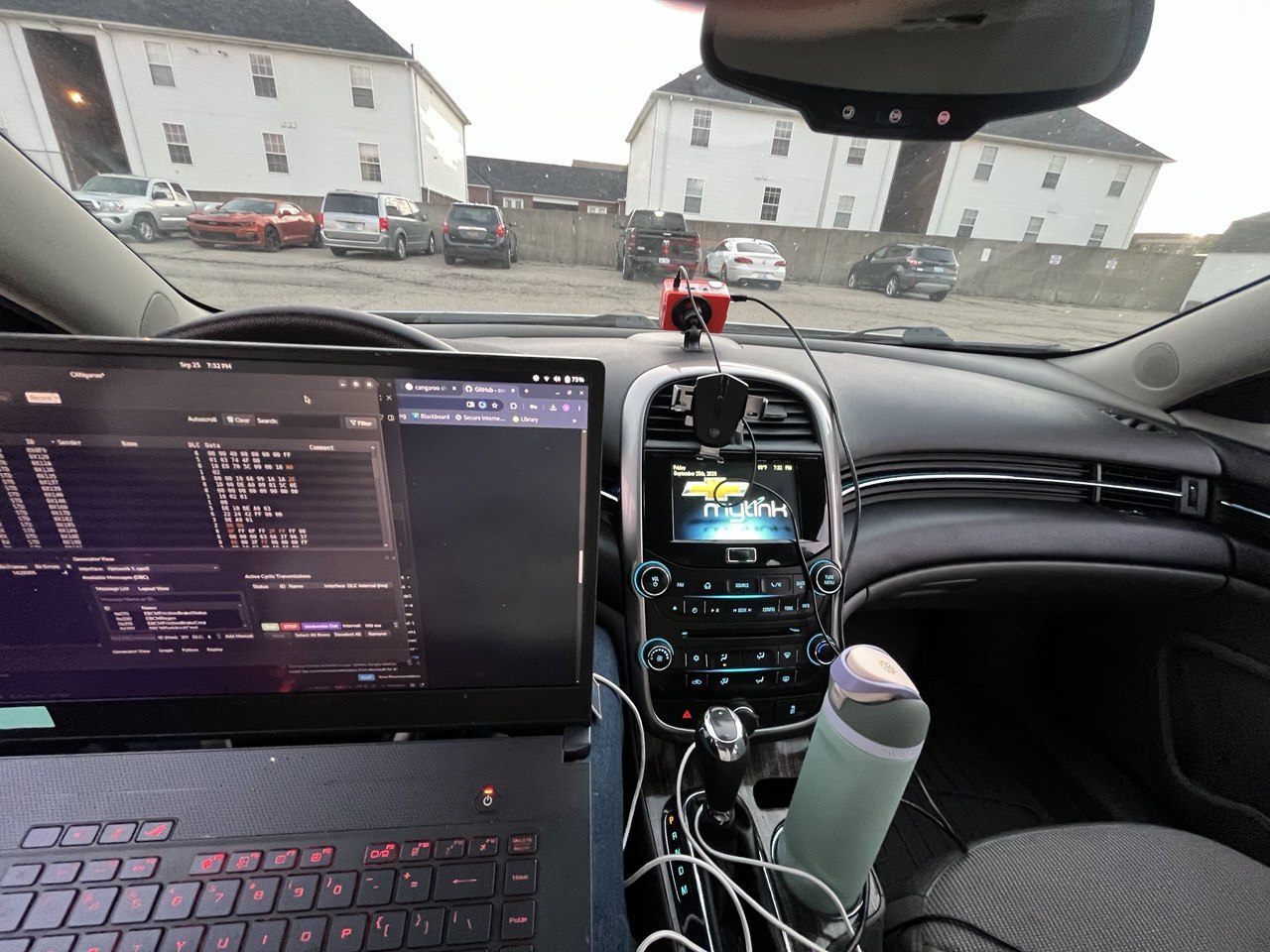
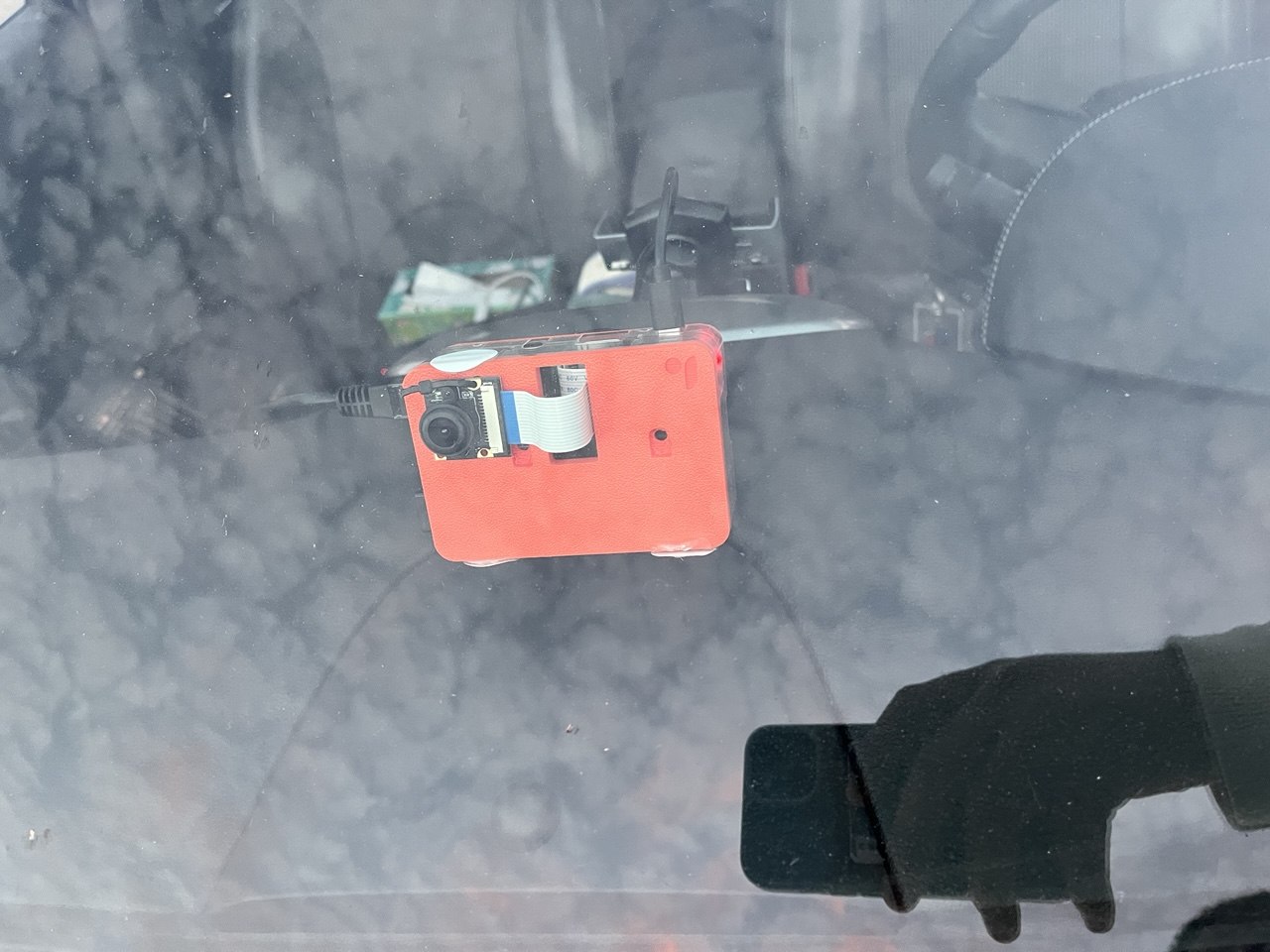
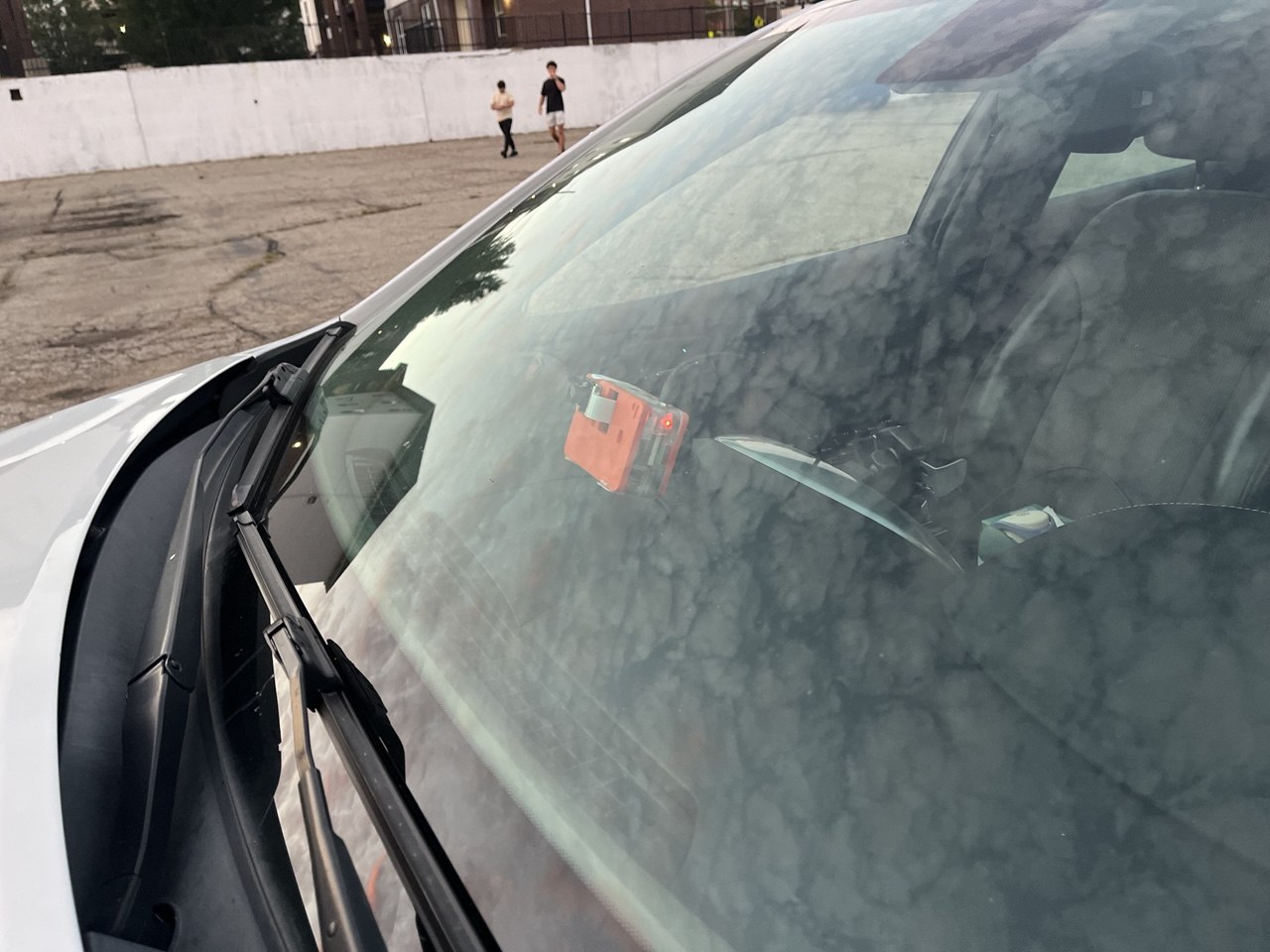
The Vision 1 is an edge computing device that collects data: footage of the road ahead, CAN data from the car, GPS location and IMU data. It was born as a data-collection tool for my simulation work (more on that in Future iterations), but this competition turned it into something more immediate: a device that looks at the road with you, sends what it sees to the cloud, and gets back where the lane is, whether you're drifting out of it, which vehicles are around, and which stop and speed-limit signs you just passed. For safety reasons, no real autonomy can be deployed (yet) and the system never controls the car, but the idea of an edge-computing ADAS companion is not far-fetched. But then, how do you turn a few pictures into such a device?
From pixels to autonomy
The amount of processing required to extract useful insights from the Vision 1's raw data goes beyond the compute capabilities of a simple edge-computing device. This project is purposely built on a Raspberry Pi 3 with only 1GB of RAM. The reason? Constraints harness creativity. This means the Pi 3 is only allowed to do as little as possible - collecting and storing data - and needs to do it efficiently. This opens a wide set of options for post-processing, and reconnects us back to this competition: collect the data locally, process it in the cloud, dispatch the data where it needs to be - either in the sim environment, or back on the Pi just to display useful alerts to the driver.
How OpenCV + AWS fits perfectly
To be entirely transparent, every idea I had before involved post-processing locally on my actual computer. The Vision 1 was only meant to be a convenient, if not an overpowered dashcam. The idea sparked when I came across this competition, did some research and almost hit my own forehead when I realized that I could have thought about this earlier. OpenCV was already the library of choice when it came to the computer vision aspect (and was extensively used by my team and myself on the AutoDrive competition). Processing in the cloud was a useful addition, and a frankly viable one; I can now turn this into a much simpler, automated system that only requires me to plug-and-drive. I originally pictured the results being ready by the time I walk from the parking lot to my desk. It ended up better than that: each frame comes back processed a little over a second after the camera captured it, while I'm still driving.
How it's built, ran and tested
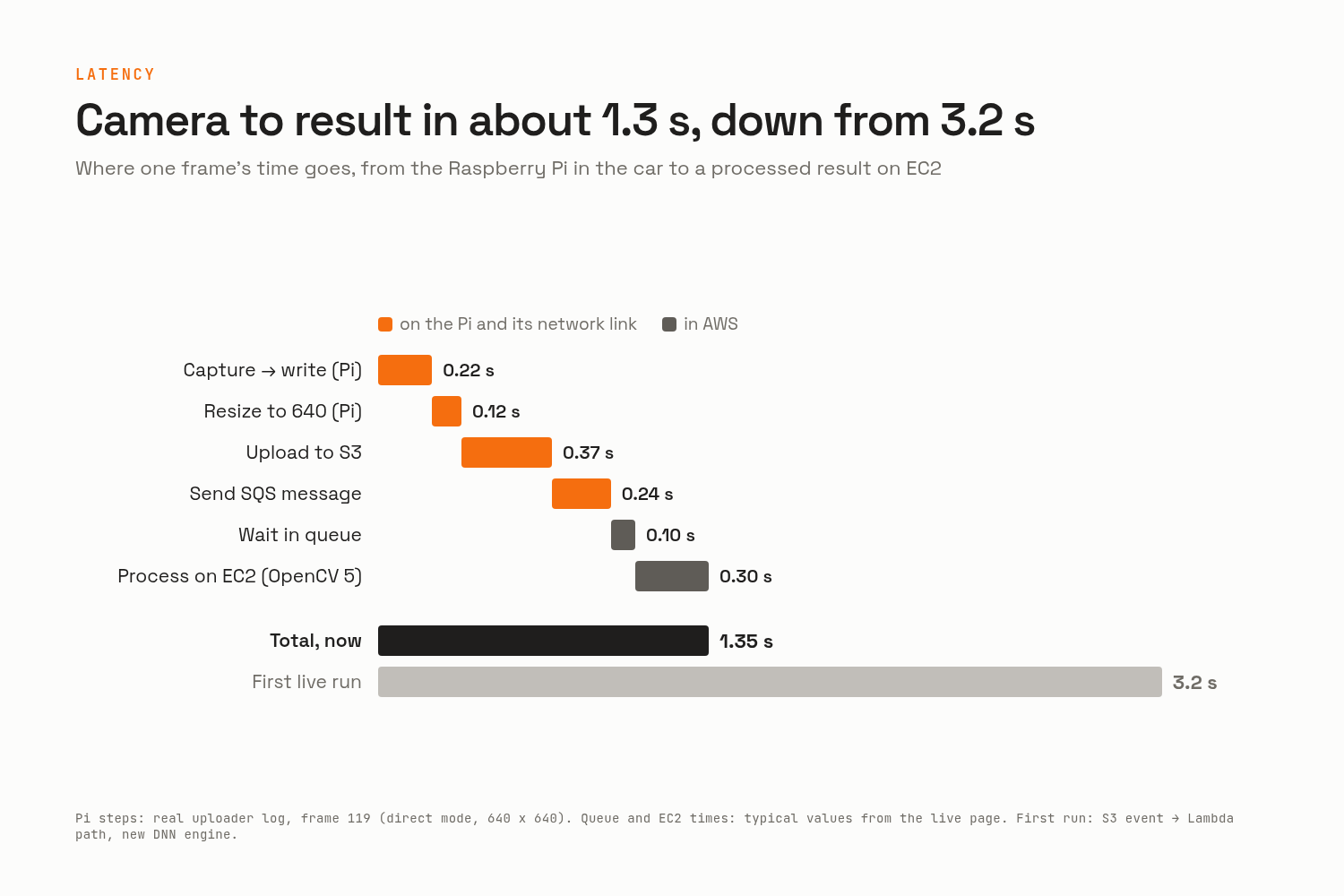
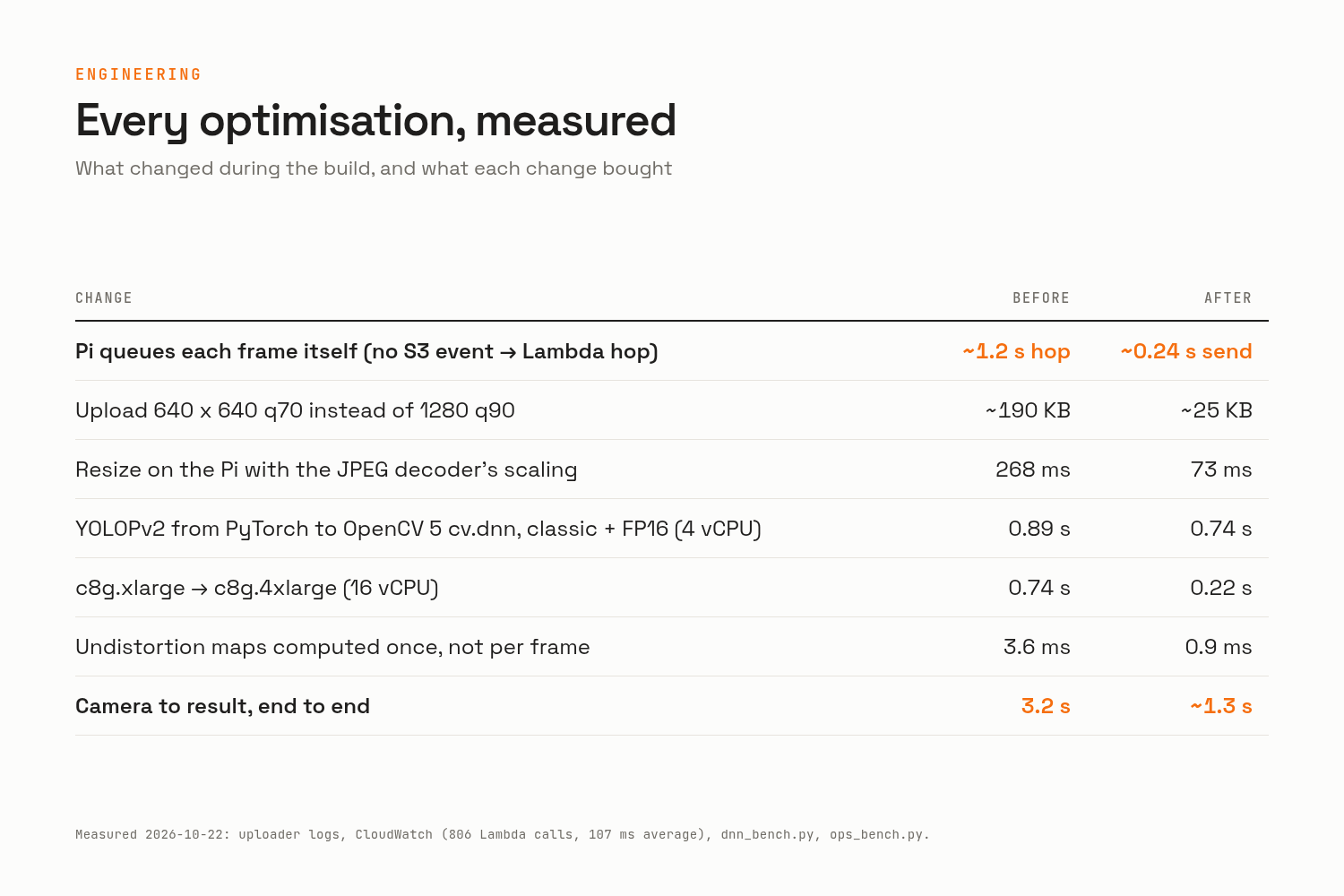
In the car. The Pi 3B records the camera at 1280 x 1280 and 30 fps, and logs the CAN bus in listen-only mode, both to its SD card. About once a second, it takes the latest frame, shrinks it to 640 x 640 (about 25 KB instead of 190 KB, using the JPEG decoder's own scaling so the Pi barely notices), uploads it to S3 and puts a message on an SQS queue. Each frame carries the exact moment the sensor captured it, so every latency number starts at the camera, not at the upload.
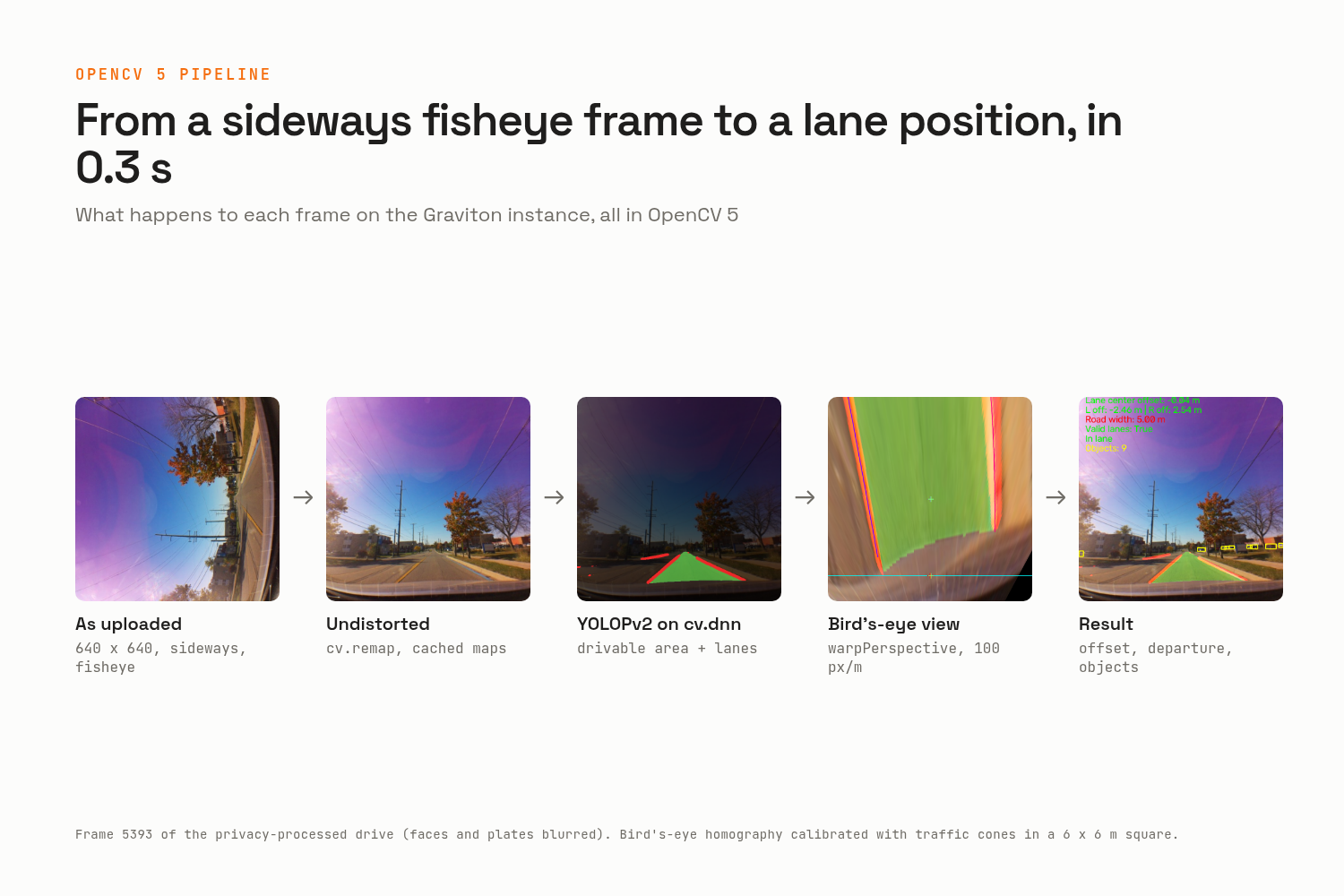
In AWS. An EC2 Graviton4 instance (c8g) running COOL, the Cloud Optimized OpenCV AMI (COOL 3.1, OpenCV 5.1), pulls frames from the queue and runs everything in OpenCV 5:
- Undistortion with the camera calibration (the matrix scales to whatever resolution arrives, the maps are computed once and reused).
- YOLOPv2 exported to ONNX and run on
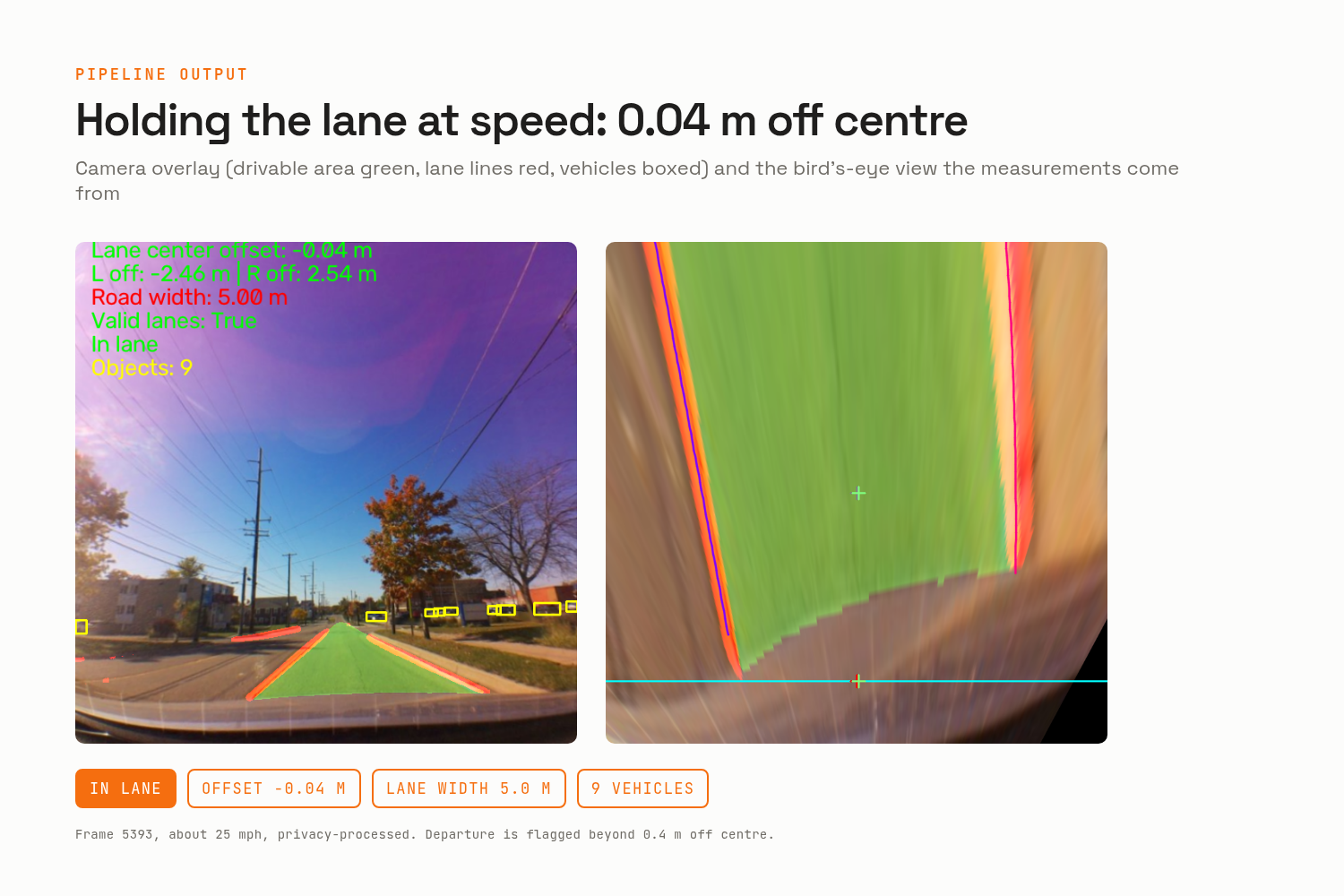
cv.dnn: drivable area, lane lines and vehicles in one pass. The export needed some ONNX graph surgery, becausecv.dnncan't read the detection outputs the way PyTorch packs them. - A bird's-eye view from a homography I calibrated with traffic cones laid out in a 6 x 6 m square in a parking lot. From it come the car's offset in the lane, each line's distance, the road width and a departure warning.
- Vehicle boxes, decoded from YOLOPv2's raw detection head and cleaned up with
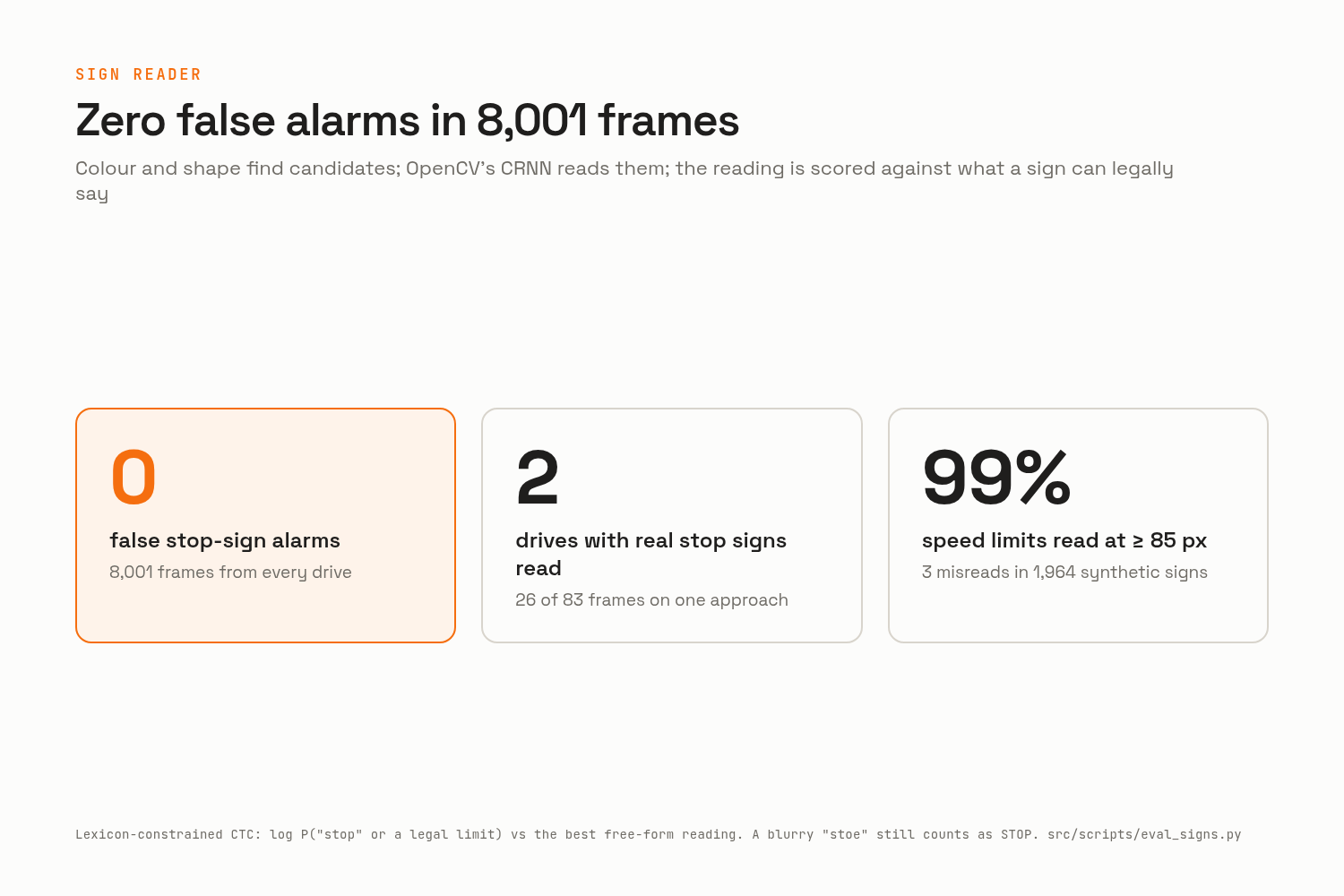
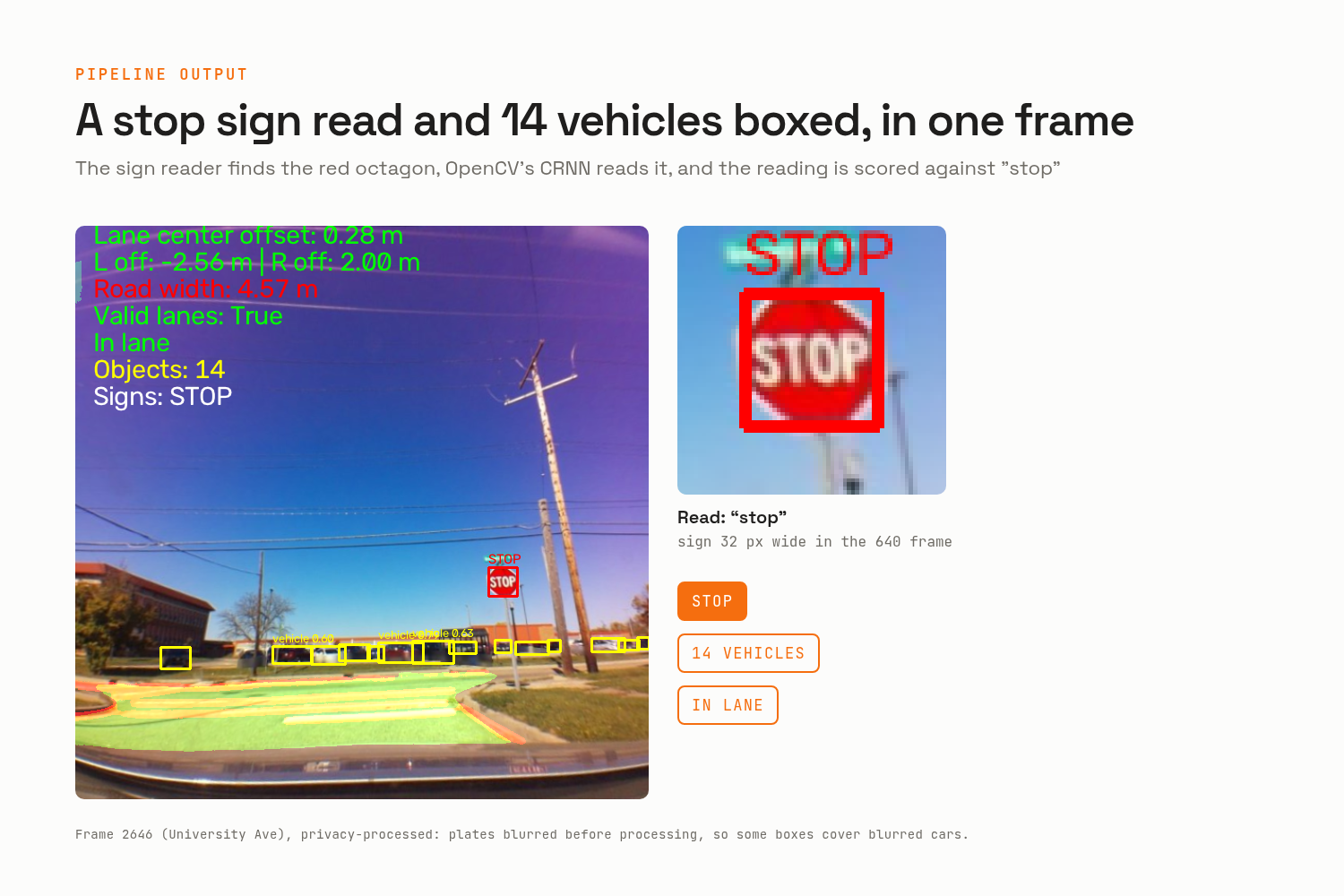
cv.dnn.NMSBoxes. - A stop-sign and speed-limit reader built from scratch: colour and edges find candidates, shape checks keep octagons and upright rectangles, and OpenCV's CRNN text recognizer reads them. Instead of trusting the raw OCR, it scores how likely the text is to say exactly "stop" or a legal speed limit, so a blurry "stoe" still counts as STOP while random shapes don't.
Results stream to a live web page, and when a drive ends, the H.264 videos and a per-frame metrics file land in S3. Per-frame latency, inference time and lane stats go to CloudWatch, with a dashboard. Every component has its own least-privilege IAM permissions; the website even gets its AWS access through Vercel's OIDC federation, with no stored keys.
For the judges, who don't have my car. The virtual Pi replays a recorded drive on your own computer, at real speed, and uploads frames exactly like the car does, through the real AWS pipeline. Next to the camera it shows the car's state from the CAN bus at that moment: speed, RPM, gear, a steering wheel that turns with the real angle, the pedals and the blinkers. The demo page on initiativelabs.cc starts the cloud instance on demand, shows the live results, and hands the virtual Pi temporary one-hour upload credentials, so you don't need an AWS account. The instance switches itself off after 20 idle minutes. The shared drive went through a privacy pass first: faces and number plates blurred, GPS removed, and the raw CAN (which contains the car's VIN) left out.
Testing. About 100 unit tests, plus evaluations that can be re-run from the repo:
- Model port:
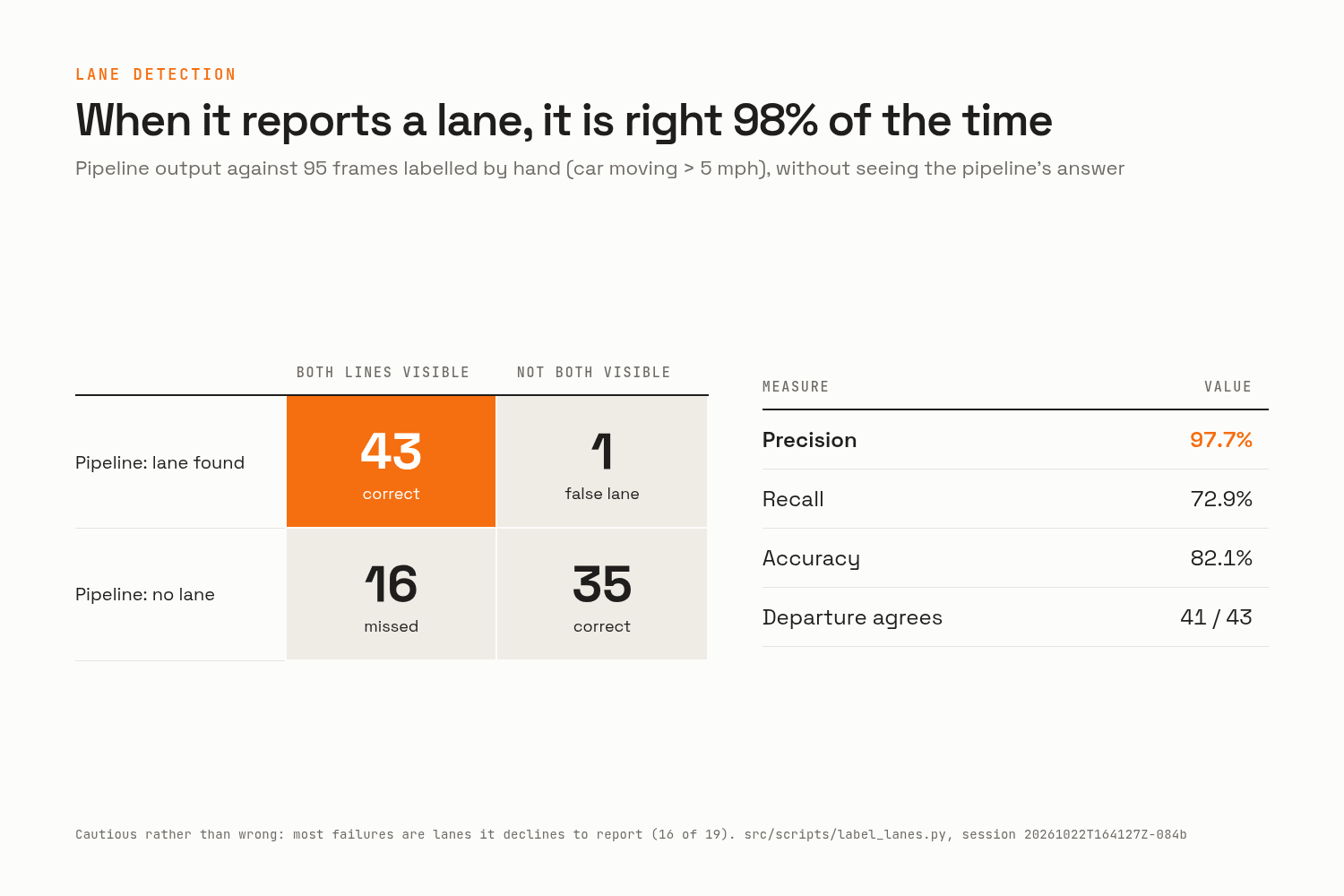
cv.dnngives exactly the same lanes, drivable area and boxes as the original PyTorch model (mask IoU 1.000 on 40 real frames). - Lanes, against 95 frames I labelled by hand: when the pipeline says it found both lane lines, it's right 97.7% of the time; it finds 73% of the lanes a person can see. It's cautious rather than wrong.
- Stop signs: zero false alarms in 8,001 frames across every drive I have, and real stop signs found in two different drives.
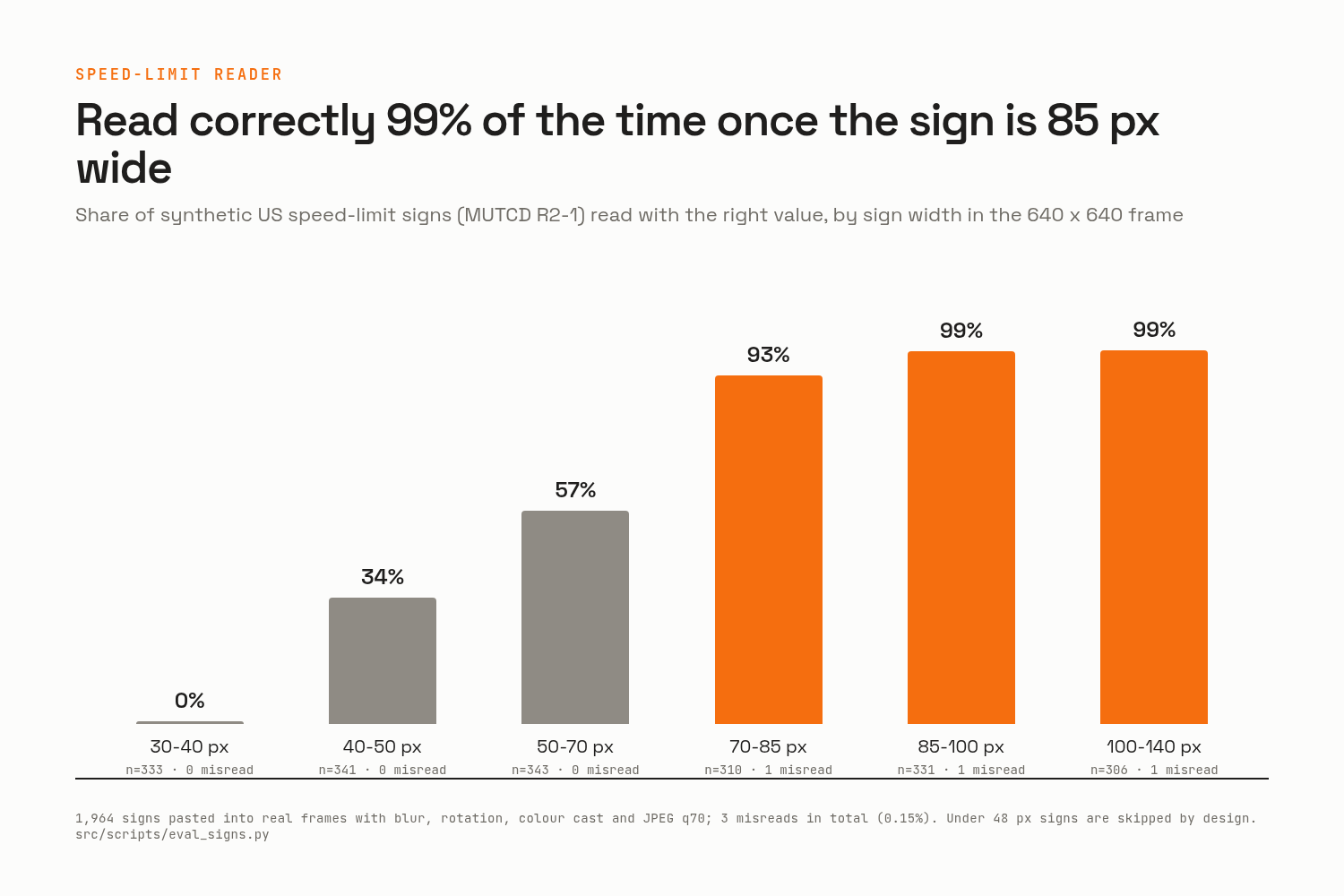
- Speed limits: my local roads didn't give me a single speed-limit sign on camera, so I pasted the official sign design into real frames (blurred, tinted, compressed): 99% read correctly once the sign is 85 px wide or more, 3 wrong readings out of 1,964.
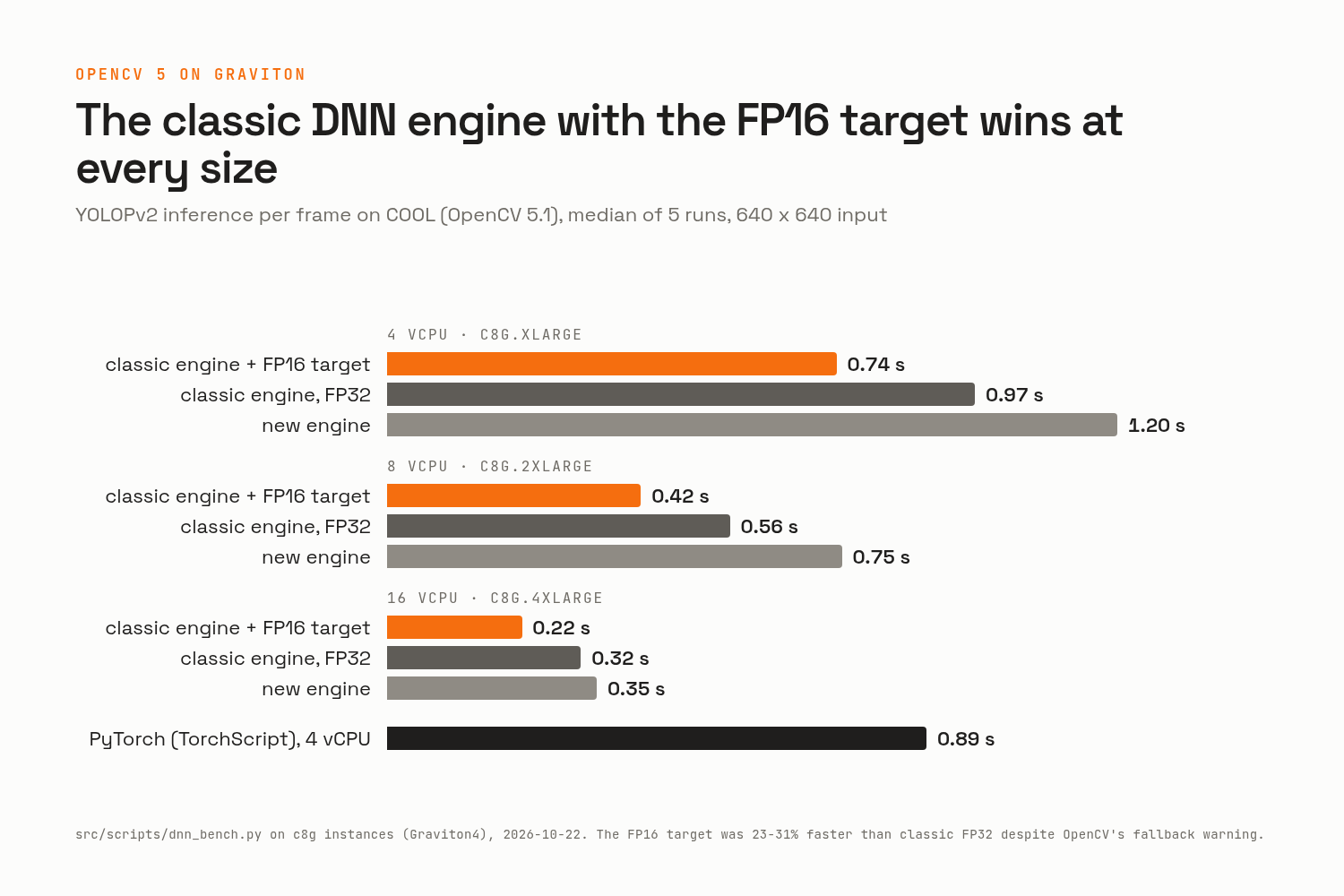
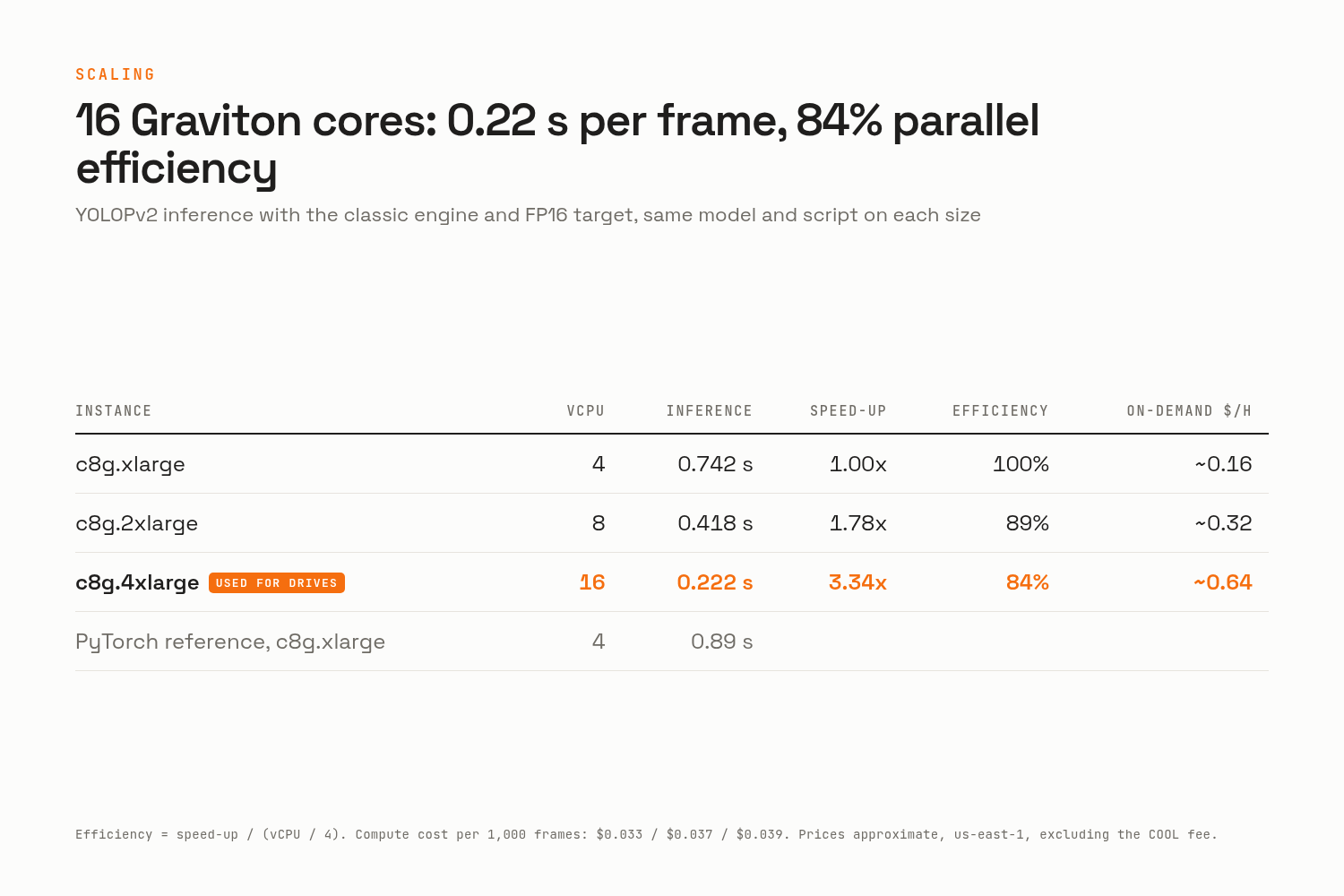
- Speed: YOLOPv2 inference takes 0.74 s, 0.42 s and 0.22 s per frame on 4, 8 and 16 Graviton cores, against 0.89 s for the original PyTorch model on 4.
Learnings, findings, discoveries
- The slow part wasn't the computer vision, it was the plumbing. The first live pipeline took about 3.2 s from camera to result. Over a second of it was S3 notifying Lambda that a frame had arrived; the Lambda itself ran in about 0.1 s. Having the Pi send the queue message itself, uploading 640 frames, and running inference on a bigger Graviton got it to about 1.2 to 1.4 s, now measured from the sensor.
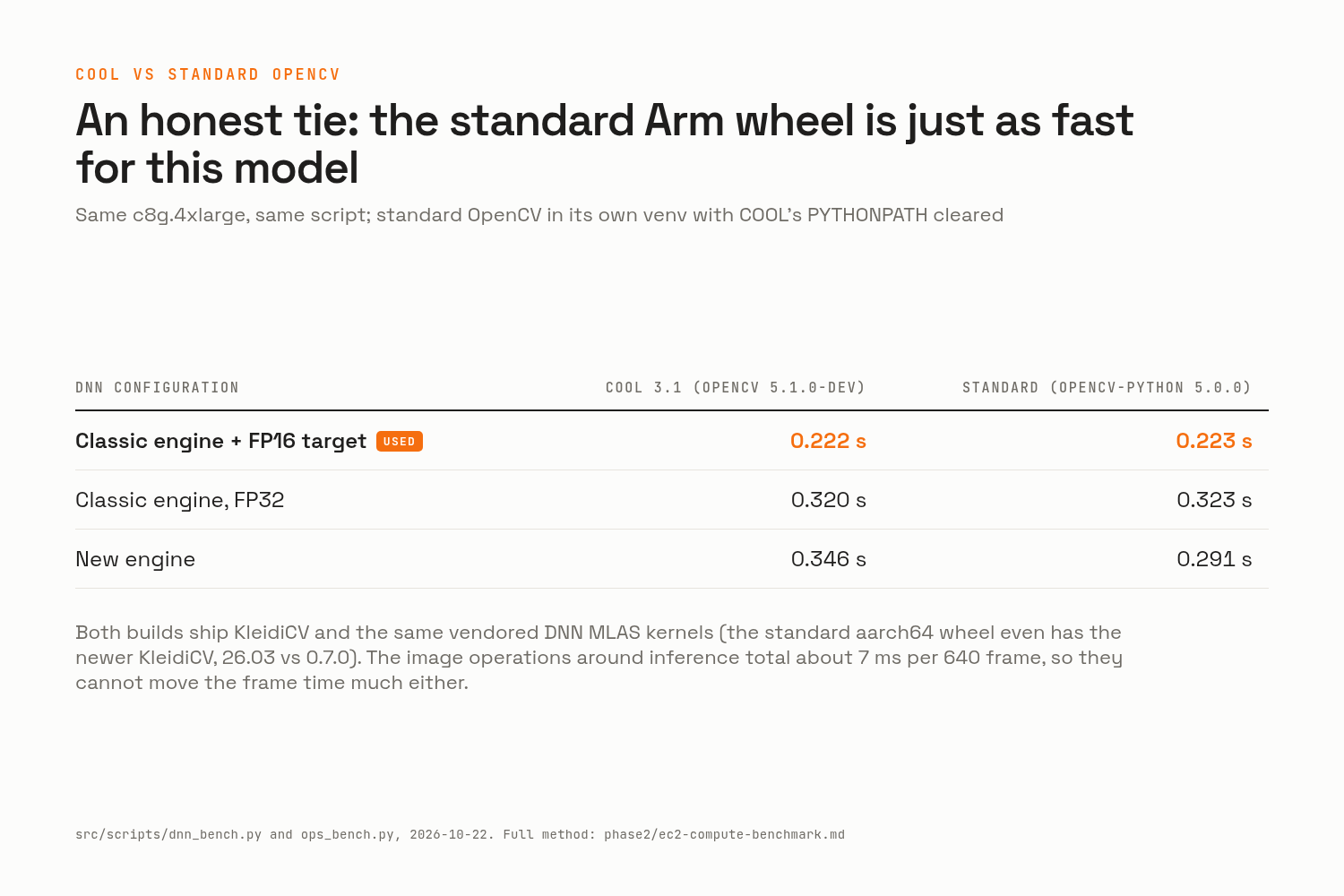
- On Graviton, the "old" DNN engine wins. OpenCV 5's classic
cv.dnnengine with the FP16 target was 23 to 31% faster than the alternatives at every instance size, even though OpenCV prints a warning saying it falls back to FP32. On my x86 laptop it's the opposite: the new engine is faster. - COOL vs standard OpenCV: a tie, honestly. For this model, the standard
pip installof OpenCV on Graviton was just as fast as COOL (0.223 s vs 0.222 s), because the standard Arm wheel already bundles KleidiCV and the same matrix kernels. Also worth knowing: COOL's venv setsPYTHONPATHon activation, which quietly makes any other OpenCV load COOL's instead, and a systemd service needs it set explicitly. - A generic OCR becomes reliable when you tell it what it's allowed to read. Scoring the CRNN's output against the handful of things a sign can say (lexicon-constrained CTC) turned a model that reads "st0p" and "stoe" into a reader with zero false alarms.
- CAN data needed verifying too. I checked the sign of the steering angle against the camera's own image motion (positive = left), and which turn-signal code means which side against the steering that followed.
- Privacy has hidden corners. The raw CAN log contains the car's VIN and the OnStar GPS position, and OpenCV's zoo plate detector, trained on Chinese plates, found none of the US plates in my footage. I ended up blurring the lower half of every nearby vehicle box instead, which still leaves 93% of vehicles detectable for the demo.
Challenges, and why it changed shape a gazillion times
- Offline, then live. The plan was to process full recordings after each drive. It became live-only: frames are processed as I drive, and what's left afterwards is the archive and the results.
- From PyTorch to OpenCV. Inference started in PyTorch; moving it to
cv.dnnmeant exporting a TorchScript model to ONNX and reshaping its outputs until OpenCV could read them, then proving the results were identical. - Too small an instance. The first EC2 instance (1 vCPU) took 4 s per frame and fell 160 s behind the car. Benchmarking at 4, 8 and 16 cores is how the scaling numbers above came to be.
- The detector only sees vehicles. YOLOPv2 was trained with every traffic object merged into one class, so it never boxes a sign. That's why the sign reader exists.
- No speed-limit signs on my roads, hence the synthetic evaluation, and a highway drive still to come.
- The Pi 3B runs hot (86°C at 1280 x 1280 with 3 encoder threads), so every extra job on it had to be measured: resizing went from 268 ms to 73 ms by letting the JPEG decoder do it.
- The judges can't drive my car. That's where the virtual Pi, the privacy-safe drive, the on-demand demo page and the temporary credentials came from.
Future iterations
- The research goals the Vision 1 was born for. Use the recorded CAN and GPS as ground truth to tune the plant model and controllers of a simulated vehicle in MATLAB, so the simulation behaves like the real car; and extract specific scenarios from the drives (lane changes, stops, curves) to validate a controller quickly and streamline test cases.
- Alerts back in the car: a small OLED screen on the Pi showing lane position, departures, and the last stop and speed-limit sign, fed by a results queue. It's designed, just not built.
- Below a second end to end: carry the small 640 frame inside the SQS message itself (one network call instead of two), and write the preview straight from the camera's pixels. Together that should bring it to about 0.6 to 0.9 s.
- More of the road: a second detector for pedestrians, cyclists and traffic lights; distance to the car ahead from the bird's-eye view; and using the live CAN to flag a lane departure without a turn signal.
- More evaluation: highway driving with lane changes, real speed-limit signs, night and rain.
Built With
- adas
- amazon-web-services
- can
- graviton
- matlab
- opencv
- python
- raspberry-pi
- yolo
- yolopv2

Log in or sign up for Devpost to join the conversation.