-
-
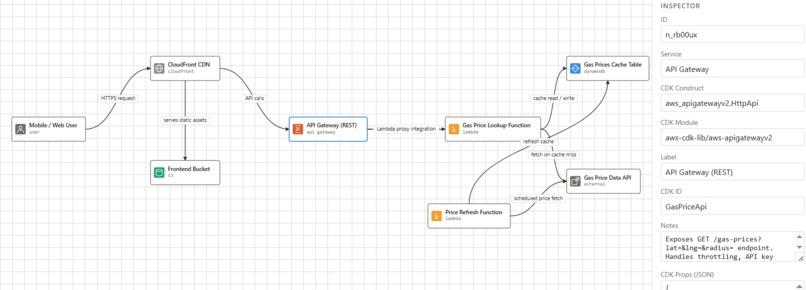
Cheapest Gas Station Near User Diagram
-
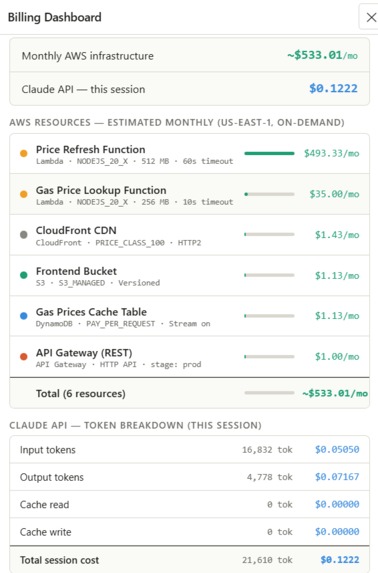
Billing
Inspiration
Engineers waste hours on infrastructure setup, provisioning DynamoDB tables, configuring IAM roles, wiring VPCs, before writing a single line of application code. We've all felt the friction of translating a whiteboard architecture into actual deployed cloud resources. We wanted to collapse that gap entirely: describe your architecture in plain English, get a live interactive diagram to show your manager, and get that diagram deployed without touching the AWS console or a line of IaC (Infra-as-Code). The rise of agentic AI made this the right moment to build it.
What We Learned
Agentic tool design is everything. The quality of CDK output is almost entirely determined by how well the diagram JSON is structured. When mapping cloud infrastructure, the edges between nodes matter as much as the services themselves: IAM actions, CDK wiring methods, and integration types all live between services and off the billing record. In building our own diagram language schema, we mirrored the language of AWS itself, with a UI that humans edit visually, agents read programmatically, and the entire pipeline speaks in common.
Keeping the agent context pays off. We initially discarded the CDK generation agent after it wrote the files. When we added deployment auto-repair, we realized the agent already had the full context of every decision it made: which files it wrote, what tradeoffs it chose. Reusing that same conversation to diagnose failures was dramatically better than starting a fresh agent with just the error log.
MCP tools are the antidote to hallucination. Infrastructure-as-code is one of the worst domains for non-deterministic generation. A hallucinated property compiles fine, passes cdk synth, and only fails at deploy time with a CloudFormation error. The traditional answer is RAG or fine-tuning, but neither gives you the true deterministic specificity that industry deployments need. With aws_kb_retrieve connected to the live AWS documentation catalog, the CDK generation agent looks up the exact L2 construct API before writing each resource, which is the same source of truth a human engineer would consult.
How We Built It
InfraAgent is built as a Node.js CLI with three commands: infra-agent, diagram, and infra-decommission, each backed by a shared pipeline of ES modules.
Phase 1: Architecture Design
When you run infra-agent, it first reads your repository using a priority-ranked file walker that surfaces package.json, entrypoints, IaC configs, and source files up to a 60KB budget. That context, combined with your plain-English prompt, is handed to a Claude agent running in an agentic tool-use loop.
- Tool Use: The agent calls structured tools:
add_node,add_edge,set_metadata, to build a typed graph. - Graph Structure: Every node carries a full CDK props object and every edge carries its IAM actions, relationship type, and exact CDK L2 wiring method.
- Machine-Ready: The agent never outputs prose; it only calls tools, which means the resulting graph is machine-ready with no parsing step.
Phase 2: The Diagram Editor & Approval
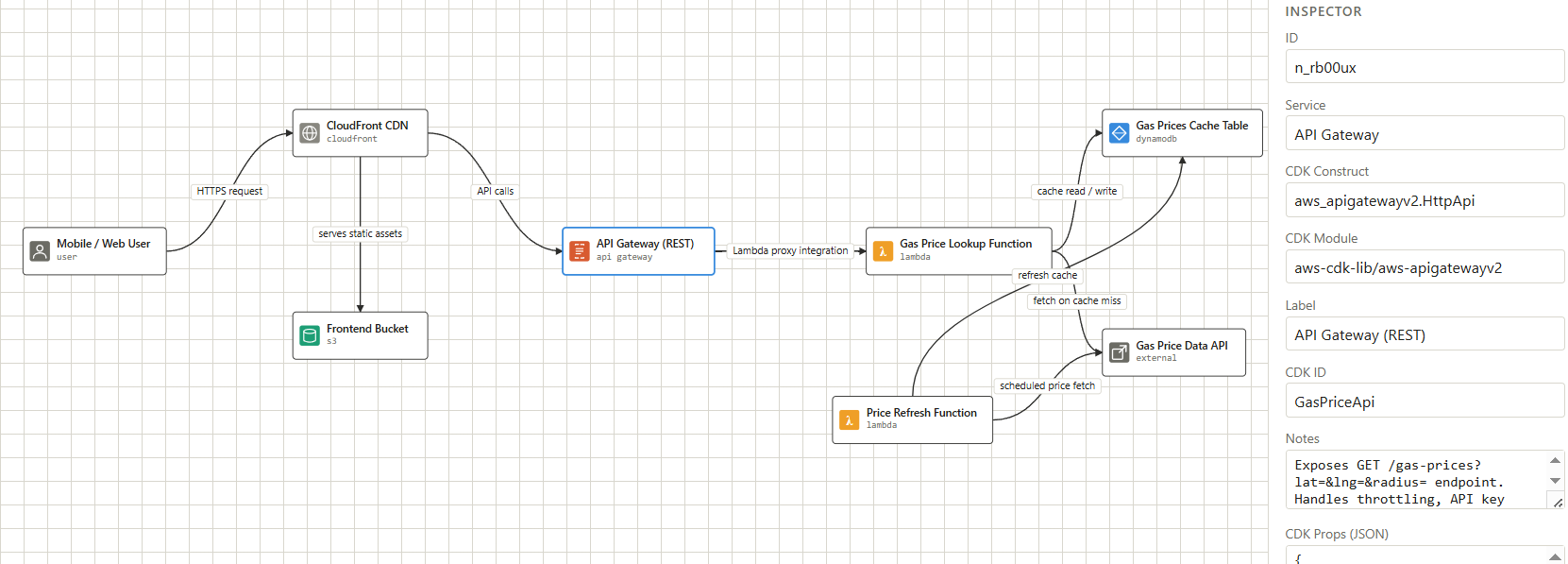
Once the graph is generated, a local Node HTTP server starts on a random port and opens the browser. The editor is a self-contained SVG canvas built from scratch (using no diagramming library) featuring a draggable node palette, an inspector panel for editing props, and a live JSON preview.
- Conversational Refinement: An embedded Claude chat panel lets you refine the architecture conversationally using the same tool-use API to mutate the diagram live.
- Codebase Integration: If you enable the "Include codebase" toggle, the editor fetches your repo files from the CLI server's
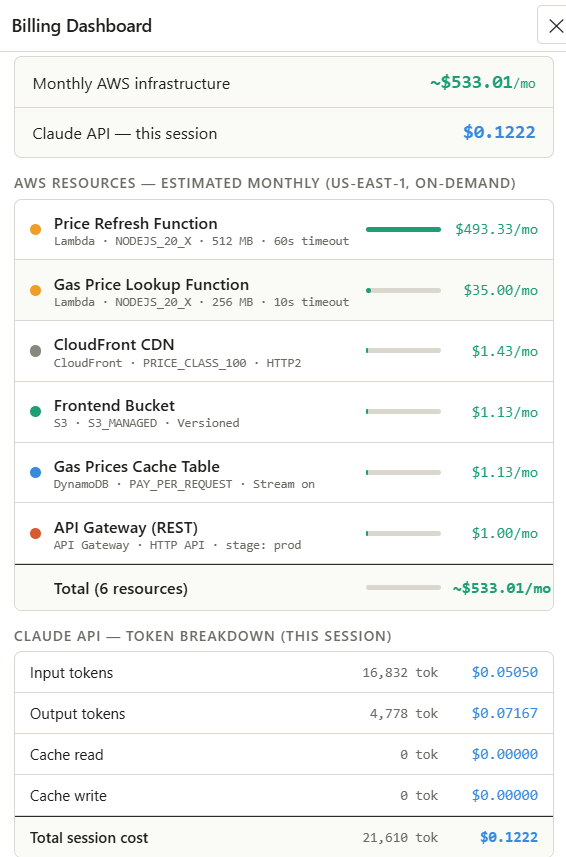
/contextendpoint and injects them into the agent's system prompt. - Cost Estimation & Auto-Save: A billing dashboard reads the node props and estimates monthly AWS costs in real time. Every change auto-saves to a state JSON file via
POST /state. - Review & Confirmation: When you press Enter in the terminal, the server closes and the saved state JSON is read back. The CLI prints a structured review, including resources grouped by type, key props, IAM actions per connection, and the CDK method for each edge, before asking for confirmation. Nothing is generated until you say yes.
Phase 3: CDK Code Generation
A second Claude agent takes the approved graph and generates a complete TypeScript CDK project.
- Knowledge Retrieval: Before writing each resource, it queries the AWS documentation knowledge base via
aws_kb_retrieveto verify the correct L2 construct API. This is the primary mechanism for eliminating hallucinated prop names and incorrect defaults. - File Output: The agent writes
lib/-stack.ts,bin/.ts,package.json,tsconfig.json,cdk.json, and aREADME.md. - Persistent Agent: Critically, this agent is kept alive after generation rather than discarded.
Phase 4: Deployment
The CLI streams output to the terminal and writes a full transcript to disk while running the following sequence:
npm install → npm run build → cdk synth → cdk bootstrap (optional) → cdk diff → cdk deploy
Phase 5: Auto-Repair
If deployment fails, the same CDK generation agent from Phase 3 is handed the failure context (the last 4KB of stdout/stderr plus CloudFormation failed events fetched from the AWS API) and asked to diagnose, patch, and redeploy.
- Success Rate: In testing, the auto-repair feature was able to fix 5/10 CDK generation errors.
Safety Mechanisms: A loop detector compares failure signatures across attempts to avoid spinning. The agent retries up to three times before handing control back to the user with a transcript for manual debugging.
Challenges We Faced
Designing a diagram language that two audiences can read. The graph schema had to be legible to a human editing it visually and precise enough for the CDK agent to consume as a specification. Too loose and the downstream agent guesses; too rigid and the architect agent can't express nuanced relationships. Getting the edge schema right was the key decision that made agent-to-agent handoff reliable.
Scope creep from the model itself. Without explicit cost mode guidance, Claude's architect agent defaulted to over-engineered architectures: multi-AZ RDS, NAT gateways, and WAF for applications that didn't need any of it. We introduced generation modes (minimal / simple / standard / enterprise) as a forcing function, embedding the cost constraints directly into the system prompt so the model's defaults matched the user's actual intent rather than best-practice maximalism.
Making CDK generation deterministic. Early versions of the CDK agent would invent IAM policies and resource names. The fix was encoding the exact CDK L2 method call on every edge (
table.grantReadWriteData(fn),fn.addEventSource(new SqsEventSource(queue, {batchSize: 10}))), so the agent translates rather than designs.Browser-native Claude tool use. Calling the Anthropic API directly from a browser with
anthropic-dangerous-direct-browser-accessrequired careful handling of the agentic loop, tool results need to be round-tripped back as user messages, and a mid-turn API failure shouldn't corrupt the conversation history. We built a clean loop that only commits completed turns to shared history.Cost estimation accuracy. Lambda pricing depends on memory × duration × invocations, all variable. We settled on documented baseline assumptions (1M invocations, full timeout duration) and made those assumptions explicit in the UI so users know what they're looking at.
Built With
- amazon-web-services
- api
- cdk
- claude
- html5
- python

Log in or sign up for Devpost to join the conversation.