-
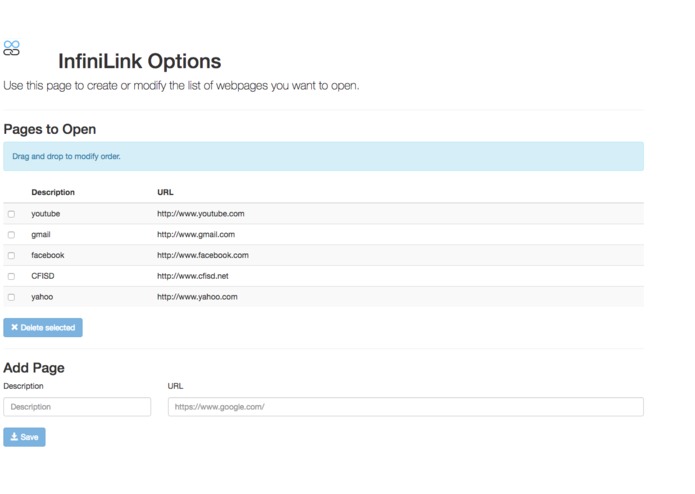
Options Page
-
Icon on the Browser Options Tab


Inspiration
Everyday, I open the same tabs when I come home from school. For example, I use Gmail, Home Access Center (School Grades), Facebook, Youtube, and possibly a few more websites. We all know how much of a pain it is to type every single link out in the address bar one at a time. So, this way all of the links I use on a daily basis will open at the press of a button.
What it does
When the extension is first downloaded, you should go to the options to set it up based on your personal websites. You may add an infinite amount of websites, hence the name. Once all of the web sites of your desire are added, you must click save before continuing. You should see the logo for InfiniLink in the top right corner next to the three dots, once you click this button, every single website that you had entered in the options menu will open as a new tab.
How I built it
I used JavaScript API's as well as html in order to code this project the way it is. JavaScript and html are used towards the construction of the framework of this extension. Google does store the data of the extension for free once the one-time $5 developer fee is paid, but for projects that are not being uploaded, the storage is free regardless you have paid the developer fee or not.
Challenges I ran into
I did not really have any severe challenges except for two throughout the construction of this project. The issue was that every time I uploaded my project to Google Chrome Extensions Database to test it, it would give me errors that for no reason which would not let me test the file. I was forced to restart a couple of times (I had found some of the data) before successfully uploading it to my personal extension list. This project is currently NOT in the Google Chrome Store. The other problem that I had was that I had an issue while trying to format the logo icon to the correct size while retaining the quality of the image. After playing around with a few photo editors, I finally got the dimensions of the logo to fit and to be clear.
Accomplishments that I'm proud of
I have used JavaScript and html before but not this heavily. I have never developed for the Google Chrome Store and having done all of this in less than 24 hours is really something to be proud of.
What I learned
I learned a couple of programming languages in such short time. Knowing extra things will not hurt, they will probably benefit me. When I do go to my next hackathon, I will most definitely be more prepared than I was for this hackathon due to the tremendous amount of useful things I have learned. Also, time management played a big part in completing this project on time. At first, I would work for a bit and take breaks whenever I'd like, but later on when I realized I was not getting much work done, I made a schedule for my self. Time-management is the key to success. I will be making a schedule as soon as I decide what my next project will be.
What's next for InfiniLink
I do plan on uploading it to the Google Chrome Store within the next couple of weeks. Also, I do have in mind a few upgrades for this project. For example, I would implement a way to reduce the speed of each tab opening, for if all tabs are opening at once, the computer is more than likely to freeze varying on your internet service and plan. Not every user would be required to use this option, only those who would like to slow down the process of opening all of the tabs.


Log in or sign up for Devpost to join the conversation.