
Smart AAC Board
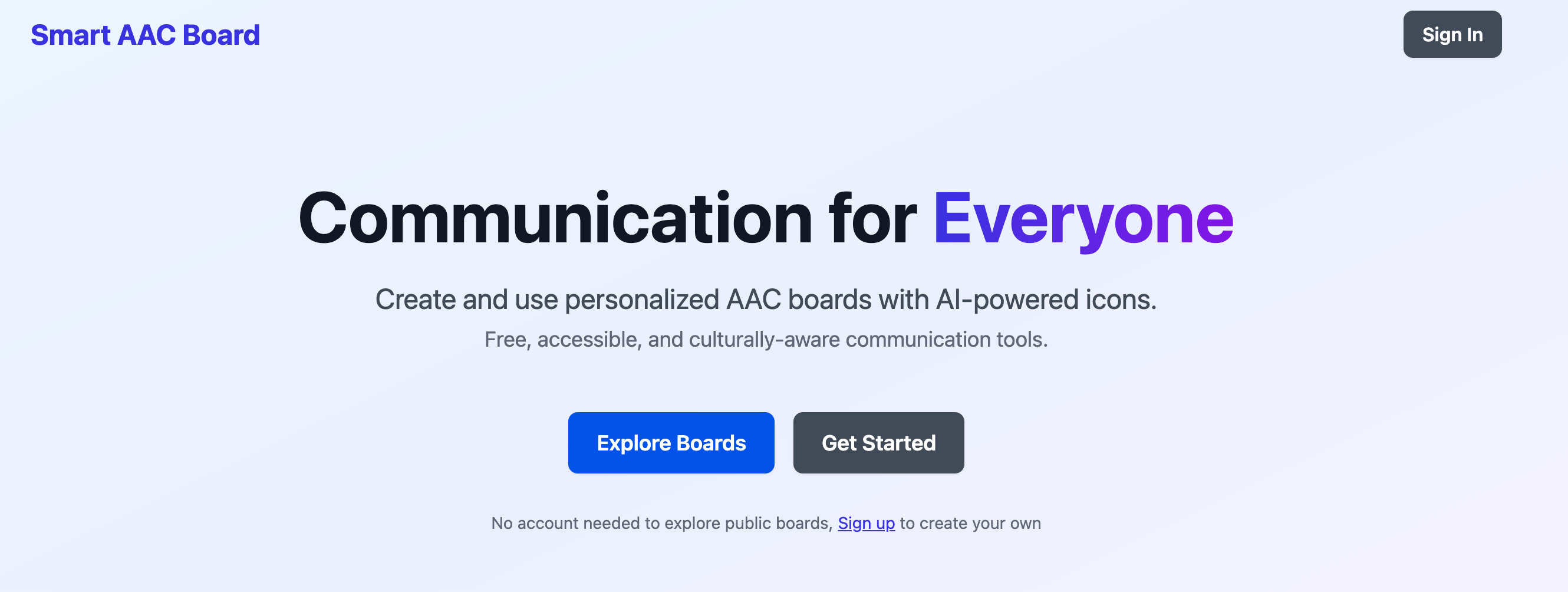
An AI-powered, culturally adaptive communication board for inclusive expression
Inspiration
The inspiration behind the Smart AAC Board came from our shared desire to apply design and technology to improve accessibility and inclusion. During our coursework in Disability, Design and Innovation, we explored how communication barriers affect independence and participation for people with speech and language disabilities.
We found that while AAC tools exist, most are generic and fail to reflect users’ cultural, linguistic, and visual contexts. We wanted to bridge this gap by creating an AI-powered AAC system that feels personal, familiar, and empowering — celebrating cultural diversity rather than enforcing one-size-fits-all design.
This project became not only a technical challenge but a social mission: to design a culturally aware AAC solution that adapts to every user’s world and amplifies their voice through inclusive technology.
Why We Did This
Problems with Existing AAC Systems (The Background)
Despite their importance, current AAC platforms (like Cboard or Global Symbols) have serious limitations:
1. Lack of Cultural and Demographic Representation
Most AAC libraries rely on Western-centric icons that fail to represent diverse cultures.
- Food icons often depict pizza, burgers, and milk — irrelevant to many non-Western users.
- Visuals of clothing, gender expression, and family life are often inaccurate or exclusionary.
- Icons are childlike or gender-neutral, leaving adults, women, and non-binary users unseen.
According to ASHA (2019), effective communication requires understanding and responding to the unique combination of cultural variables, including age, disability, ethnicity, gender identity, and language. Yu (2018) further stresses that AAC professionals must deliver culturally and linguistically responsive communication support.
2. Inaccessible Interfaces
Many AAC apps fail WCAG accessibility standards, using poor color contrast or cluttered icon layouts that increase cognitive load. This is especially challenging for users with dyslexia, autism, or visual impairments. Most systems are rigid — restricting icon arrangement, sizing, and text placement.
3. Technical Limitations and Lack of Personalization
Many AAC tools are difficult to configure, requiring long setup processes or technical expertise. Fully customizable AAC platforms are often expensive, making them inaccessible to the people who need them most.
These issues lead to limited personalization, high cost, and ultimately, reduced usability and cultural relevance.
The Concept
What it does
AAC (Augmentative and Alternative Communication) refers to a set of tools, strategies, and technologies that help individuals with communication difficulties express themselves. These can range from low-tech boards to high-tech AI-based systems.
- Augmentative: Supplements natural speech.
- Alternative: Replaces speech when it is not possible.
- Communication: The ability to exchange thoughts, ideas, and emotions.
AAC tools — using symbols, pictures, gestures, or voice-output devices — support individuals with cerebral palsy, autism, Down syndrome, aphasia, or motor speech disorders. Their purpose is to improve independence, participation, and quality of life.
The Smart AAC Board builds on these principles with AI-driven personalization and cultural adaptation:
- Image Generation: Creates icons and emojis tailored to users’ culture, disability, and visual preferences.
- Accessibility Compliance: Ensures all visuals meet contrast, simplicity, and cultural appropriateness guidelines.
- API Integration: Allows use as a standalone web app or as a service integrated into schools, hospitals, or accessibility platforms.
How We Built It
We started by analyzing existing AAC boards to identify gaps in accessibility, representation, and usability. Our team then split responsibilities between frontend and backend development:
- Frontend Team: Focused on UI design and prompt-based generation through Google AI Studio.
- Backend Team: Built API endpoints, AI integrations, and data storage logic using Node.js.
We used Google AI Studio to experiment with structured prompting — first asking the AI to generate a roadmap (roadmap.md) before any code. This ensured clarity, version control, and iterative improvement.
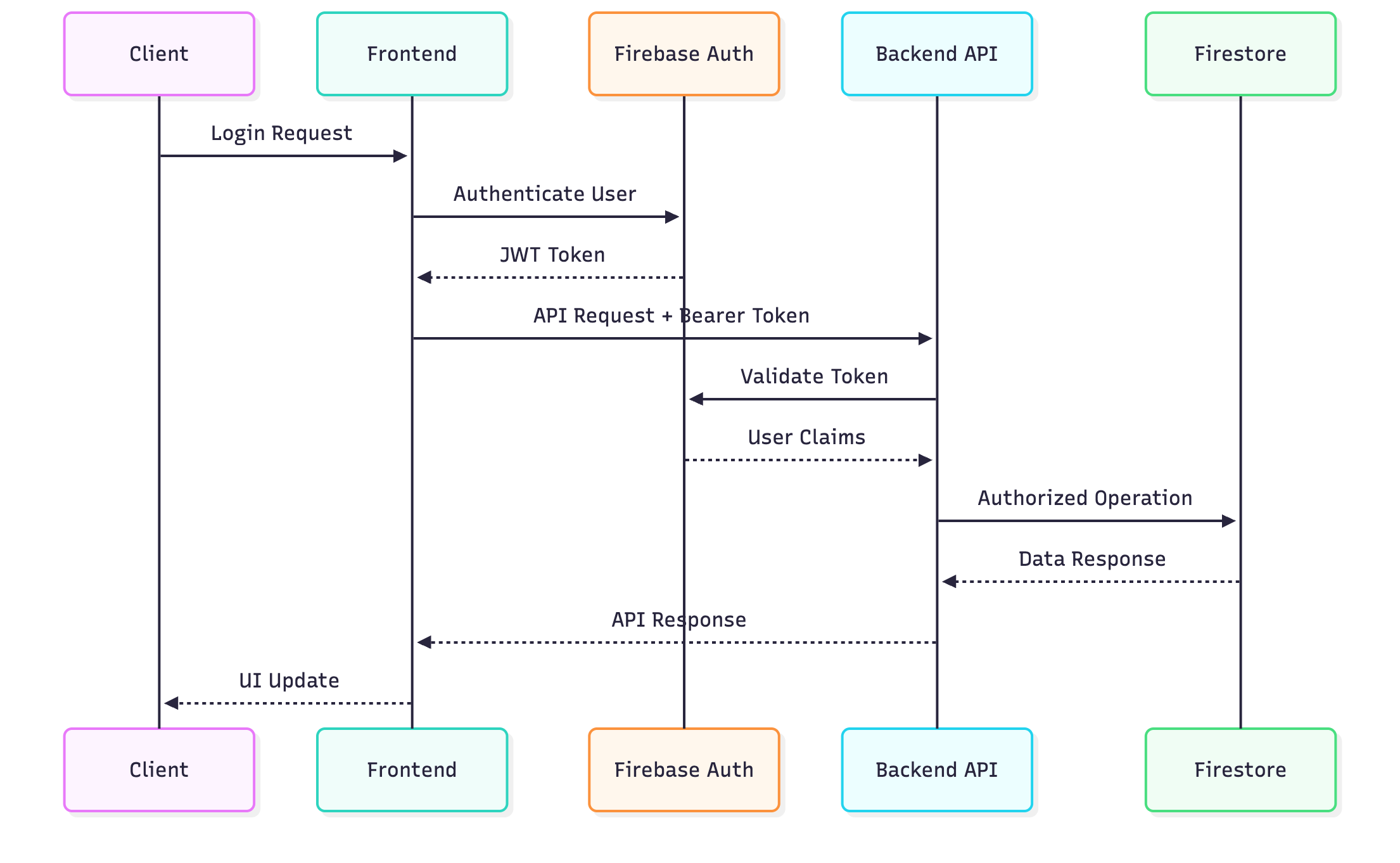
After refining the AI-generated base code, we enhanced the UI locally, integrated backend APIs, and deployed both services on Google Cloud Run. The backend handled AI processing, Firebase authentication, and storage.
Architecture
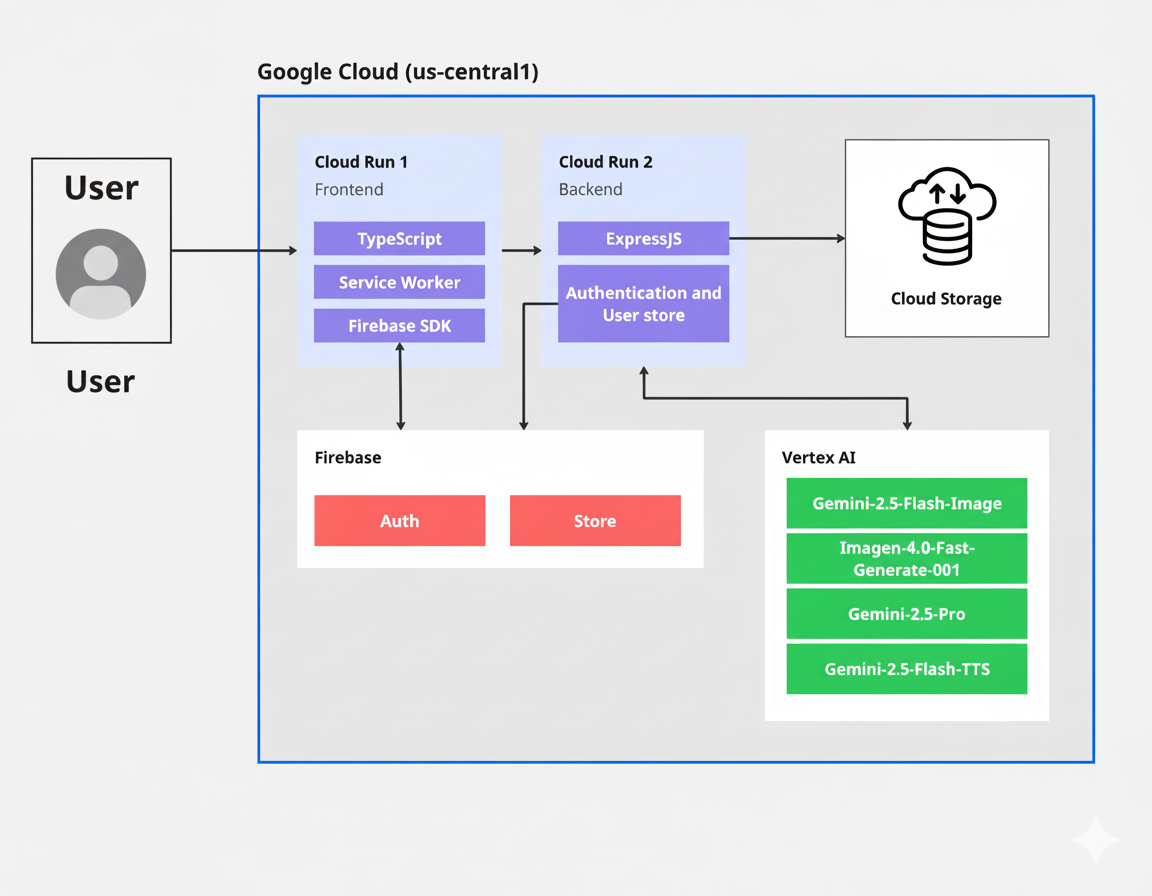
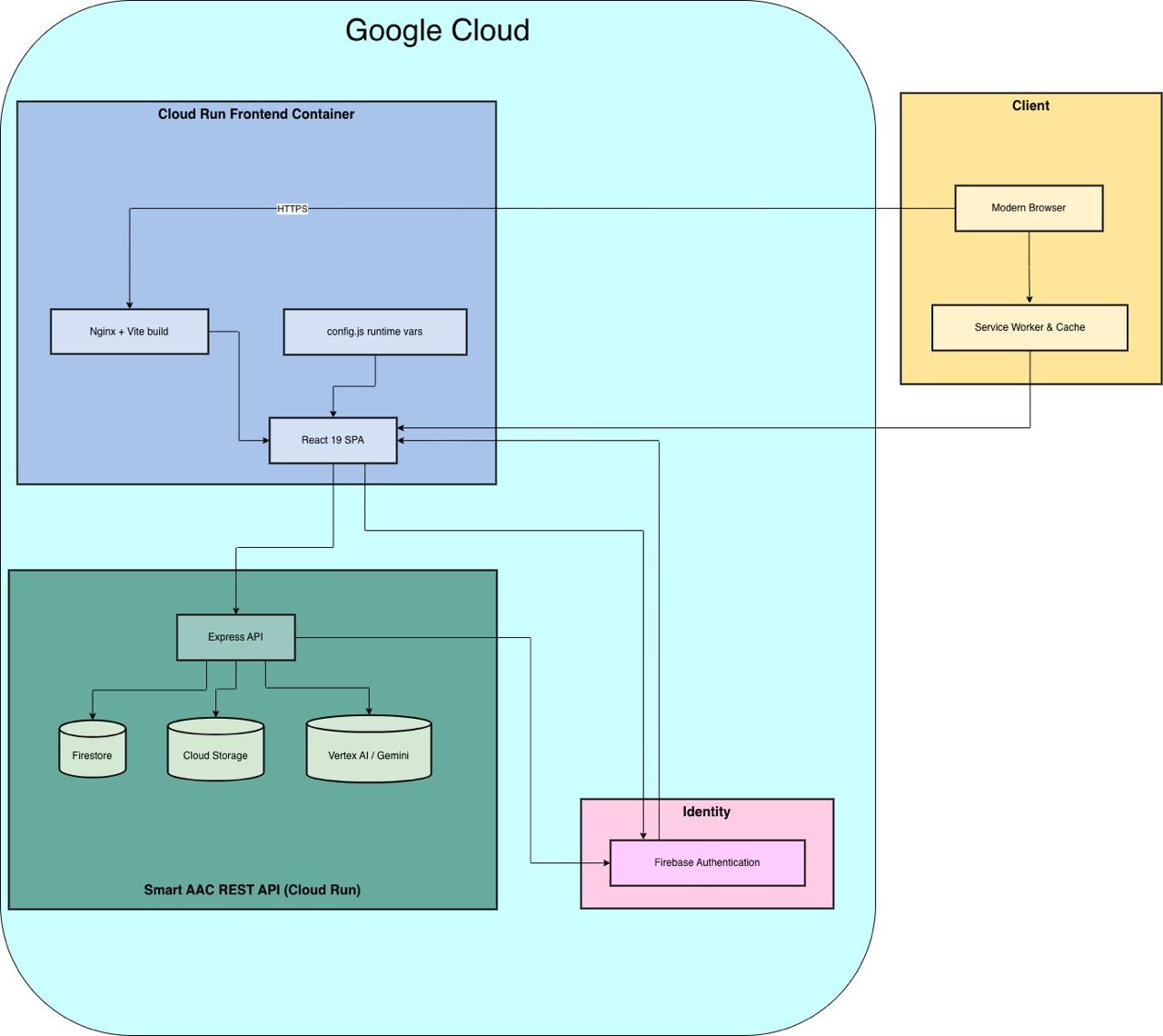
We implemented a modular, cloud-native architecture designed for scalability and integration with Google Cloud’s AI ecosystem.
System Overview
Frontend
- Built with React 18, TypeScript, and Material-UI (MUI).
- Handles AAC board rendering, interaction, and accessibility controls.
- Deployed on Google Cloud Run.
Backend
- Built with Node.js 18 + Express.js.
- Manages AI processing, data handling, and Firebase authentication.
- Deployed separately on Google Cloud Run.
Database & Storage
- Firestore (NoSQL) for user and board data.
- Cloud Storage for storing generated icons and audio files.
AI Engine (Vertex AI)
- 🟩 gemini-2.5-flash-image: Converts photos to simplified icons.
- 🟩 imagen-4.0-fast-generate-001: Text-to-icon generation.
- 🟩 gemini-2.5-pro: Context reasoning and translation.
- 🟩 gemini-2.5-flash-tts: Text-to-speech conversion.
Deployment
Both services are containerized and deployed via Cloud Run in us-central1, using CI/CD and IAM-based permissions.
Prompt Engineering while using Google AI Studio's build
We used Google AI Studio's build feature as an intelligent co-creator. Instead of generating code immediately, the AI was guided to:
- Understand requirements.
- Build a roadmap (
roadmap.md). - Execute tasks in iterative phases.
This structured prompting resulted in clear, version-controlled outputs and faster prototyping. Each prompt refined the design, logic, and architecture systematically, using models like Gemini 2.5 Pro for reasoning and Flash models for image and speech tasks.
Our process demonstrated that AI can act as a design collaborator, not just a coding assistant — making development both faster and more inclusive.
Unique Selling Point (USP)
The Smart AAC Board stands apart from traditional AAC platforms through its adaptive, inclusive, and AI-powered approach.
| Feature | Existing Platforms (Global Symbols / Cboard) | Smart AAC Board (AI-AAC Concept) |
|---|---|---|
| Cultural Relevance | Static, Western-centric icons | Context-adaptive icons reflecting local foods, attire, and customs |
| Accessibility Compliance | Inconsistent visual contrast or simplicity | AI auto-applies WCAG-compliant visual parameters |
| Personalization | Manual customization | Automatic generation from user prompts and cultural profiles |
| Contextual Awareness | Static symbol sets | Icons adapt to context (school, home, hospital, travel) |
| Scalability | Requires human illustrators | AI generates infinite new, culturally appropriate symbols instantly |
| Representation | Generic gender/age figures | Inclusive representations across age, gender, and culture |
This combination of AI personalization, accessibility compliance, and cultural intelligence enables Smart AAC Board to deliver a more empowering communication experience for diverse users worldwide.
Features and Use Cases
Features
Our system focuses on two main features that promote accessibility and creativity:
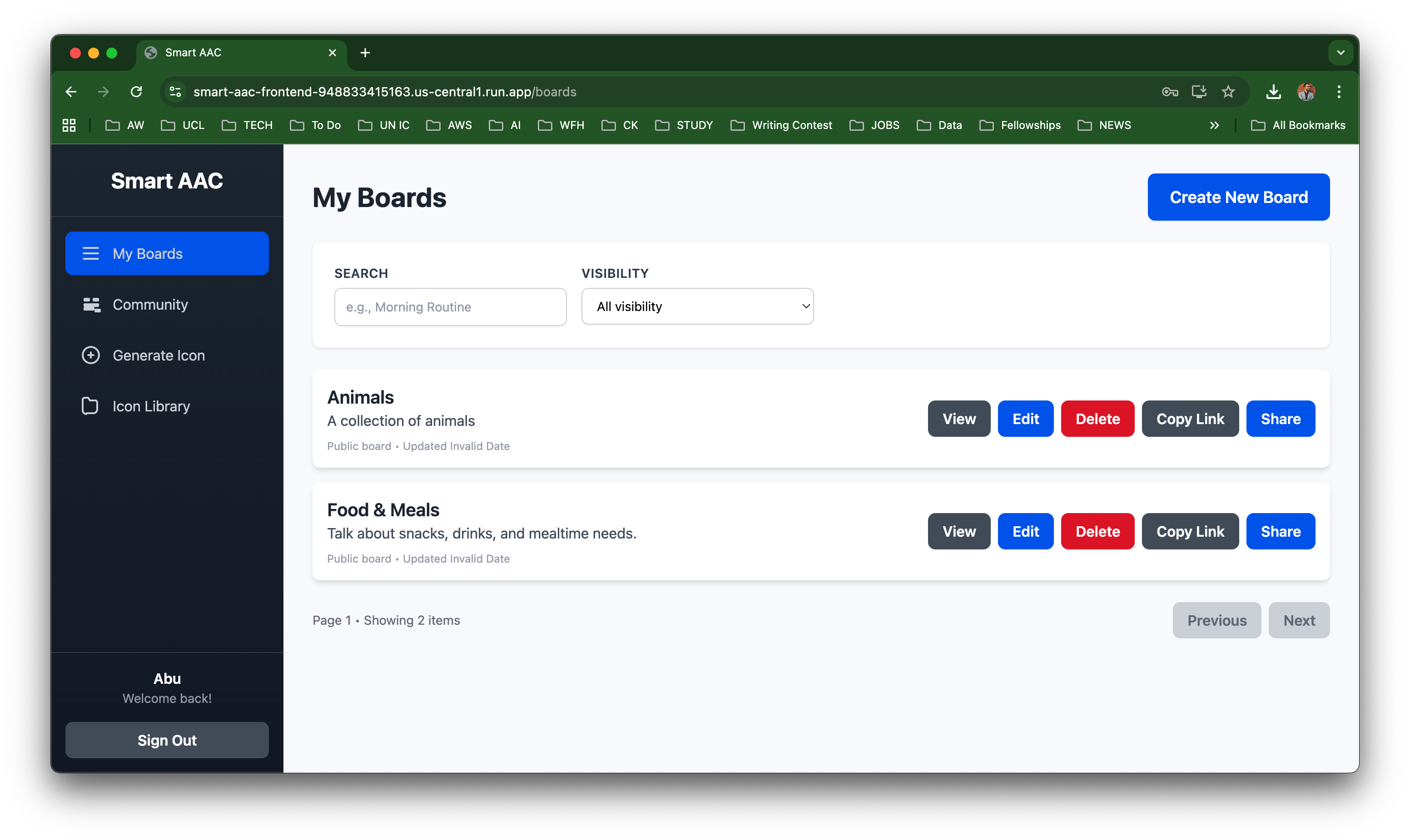
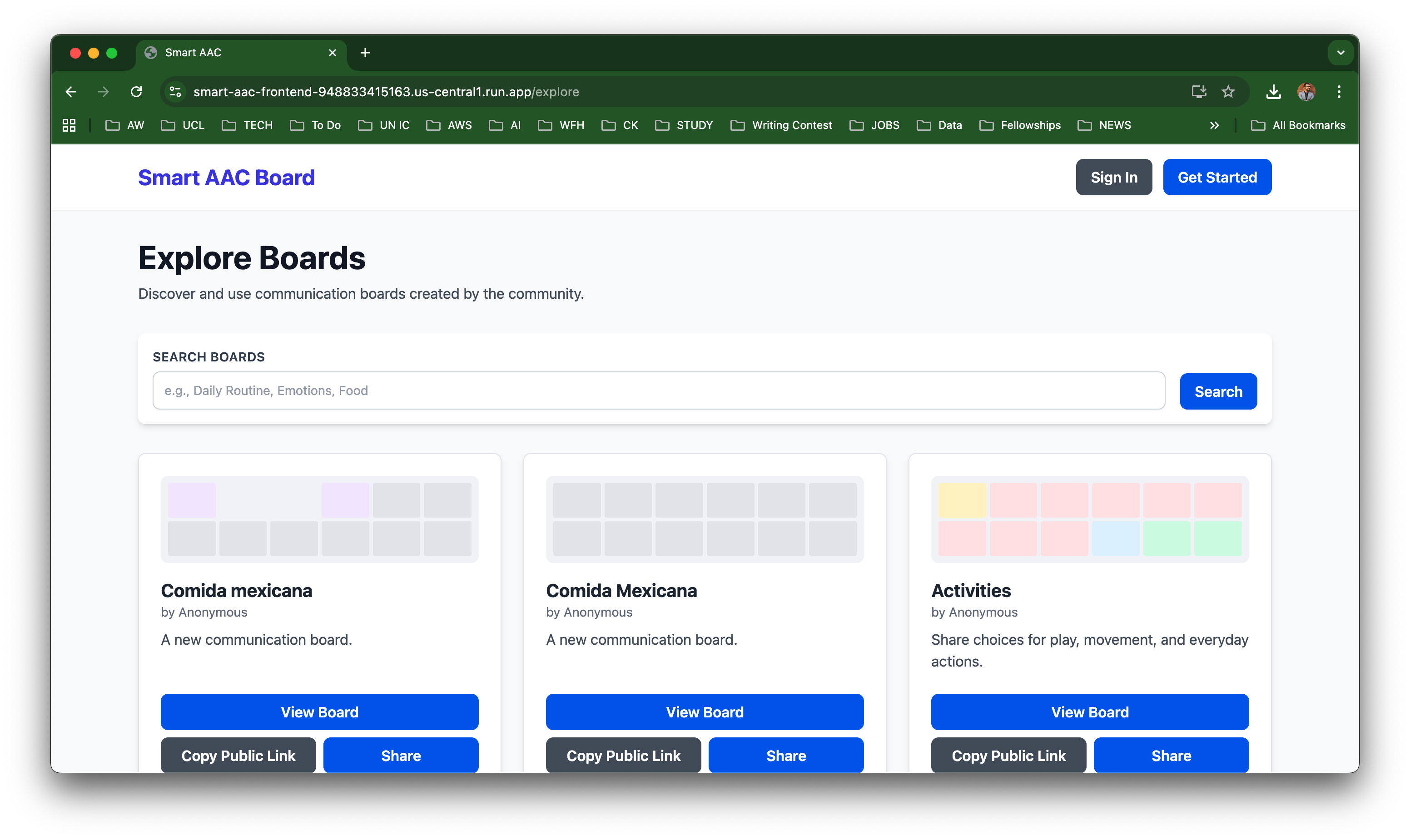
- Explore Boards:
- Access public, open-access AAC boards shared by users.
- Browse, copy, and adapt boards for different languages or contexts.
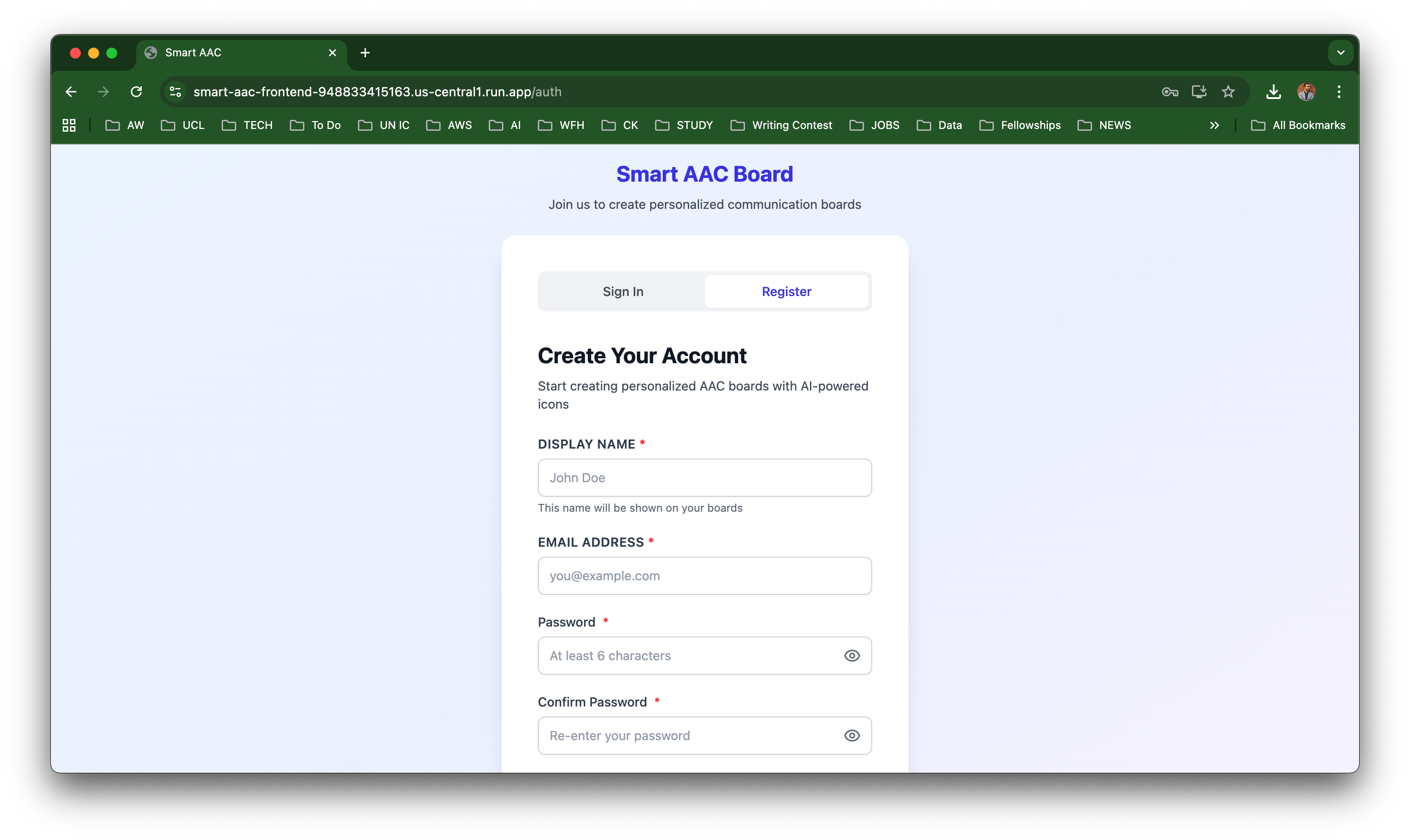
- Account Creation and Personalization:
- Register and onboard by providing personal and cultural context data.
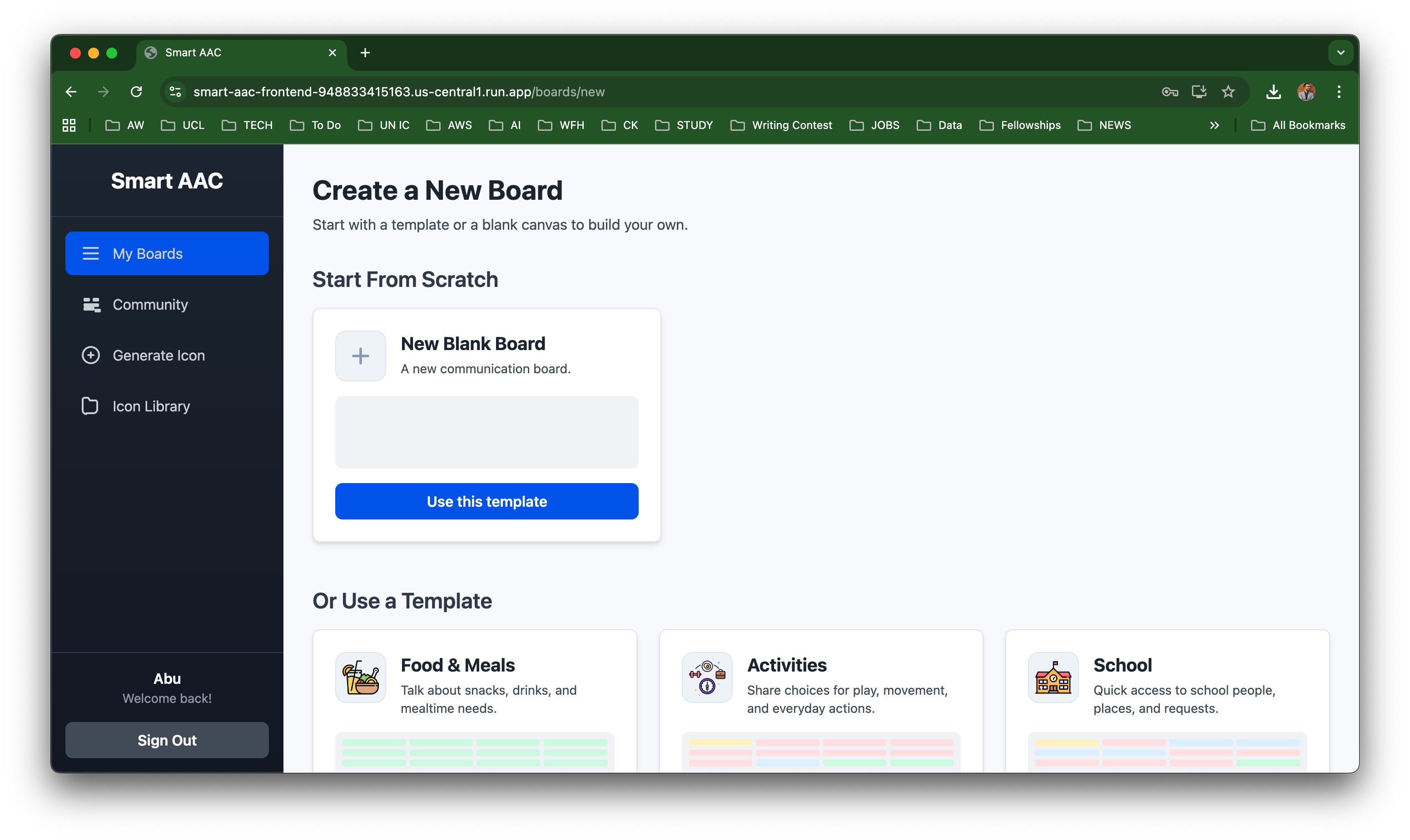
- Use pre-designed templates or build custom boards from scratch.
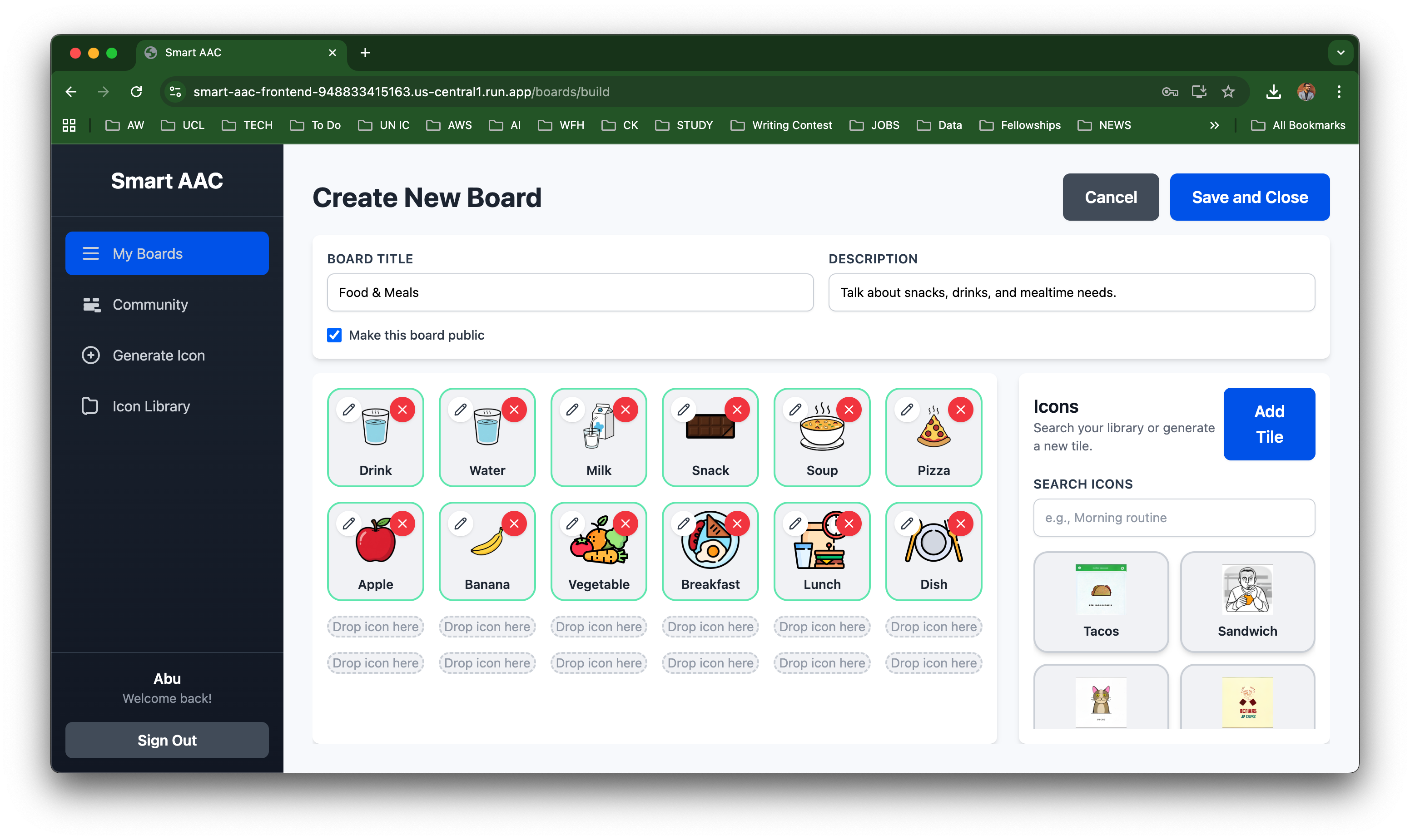
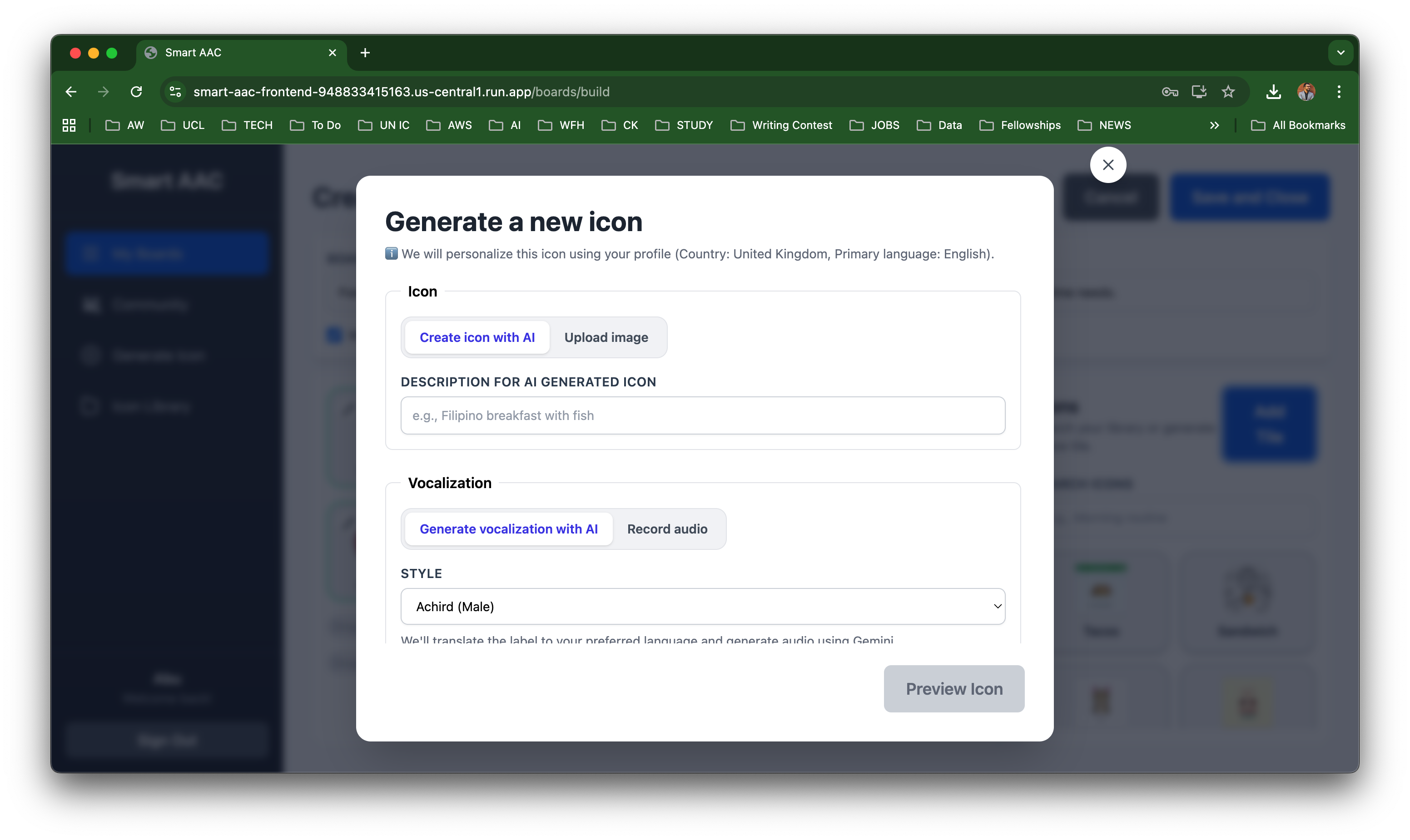
Create and edit tiles:
- Assign labels and categories.
- Choose colors.
- Generate icons with AI or upload your own.
- Add vocalization — either AI-generated or self-recorded.
This flexible system empowers caregivers, therapists, and individuals to co-create accessible, meaningful communication experiences.
Use Cases
1. Communication Disabilities
Supports individuals with:
- Autism Spectrum Disorder (ASD): Express emotions and needs through relatable icons.
- Aphasia or Neurologic Disorders: Construct sentences via touch or gaze interaction.
- Temporary Speech Loss: Communicate visually after surgery or trauma.
Example: A person with cerebral palsy in Mexico can generate local food icons like tacos or pozole instead of generic Western foods.
2. Travel & Multilingual Communication
- Enables tourists, migrants, or refugees to communicate essential needs using visuals (“vegetarian food,” “toilet,” “help”).
- The AI adapts icons based on local culture and context, avoiding misinterpretations.
Challenges We Faced
1. Learning to Prompt Effectively
One of our biggest early challenges was understanding how to communicate with Google AI Studio effectively. Writing precise, structured prompts that produced consistent results took time. We learned that feeding the AI with detailed context — such as architecture notes, wireframes, and project goals — greatly improved its output. However, as our codebase grew, the interface became slow, and large prompt histories caused occasional crashes.
2. Managing AI Model Behavior
We faced unexpected inconsistencies with the AI models. For instance, while generating icons, the AI sometimes produced realistic photographs instead of the intended 2D sketches. Even when asked for transparent backgrounds, the outputs sometimes included solid colors or large file sizes (over 1MB). We had to iteratively refine prompts and test multiple models in Vertex AI to achieve our target style and performance.
3. Deployment and Permissions
Deploying both the frontend and backend on Google Cloud Run was more complex than anticipated. Our automated Docker-based deployment scripts encountered repeated build errors due to permission settings and service account misconfigurations. It took several iterations, along with the use of Gemini 2.5 Pro for troubleshooting, to resolve these and achieve stable deployments.
4. Handling System Integration
Integrating the backend (Node.js + Express) with Firebase, Firestore, and Vertex AI presented multiple API configuration challenges. We had to manage data flow securely across different environments and ensure consistency between authentication, storage, and AI responses. Debugging asynchronous requests, latency issues, and rate limits required careful design adjustments.
5. Balancing Accessibility and AI Design
Creating a system that was both accessible and AI-driven was a balancing act. AI models often prioritize visual detail, while accessibility requires simplicity and contrast. Ensuring that generated icons remained WCAG-compliant without losing cultural context required additional backend post-processing and prompt optimization.
6. Time and Iteration Constraints
As a hackathon project, time was our biggest constraint. We had to make quick decisions on model selection, API handling, and UI refinement while maintaining collaboration across team members. Frequent back-and-forth between AI-generated and human-edited code slowed us down but helped ensure quality and clarity in the final product.
7. Limited Language and Dialect Support
Our text-to-speech and translation models offered limited coverage for regional languages and dialects. While the core AI supported multiple major languages, the absence of dialect-specific nuance reduced cultural accuracy and emotional expression. Expanding linguistic inclusivity remains a key goal for future iterations.
8. Processing Time and Multi-Model Complexity
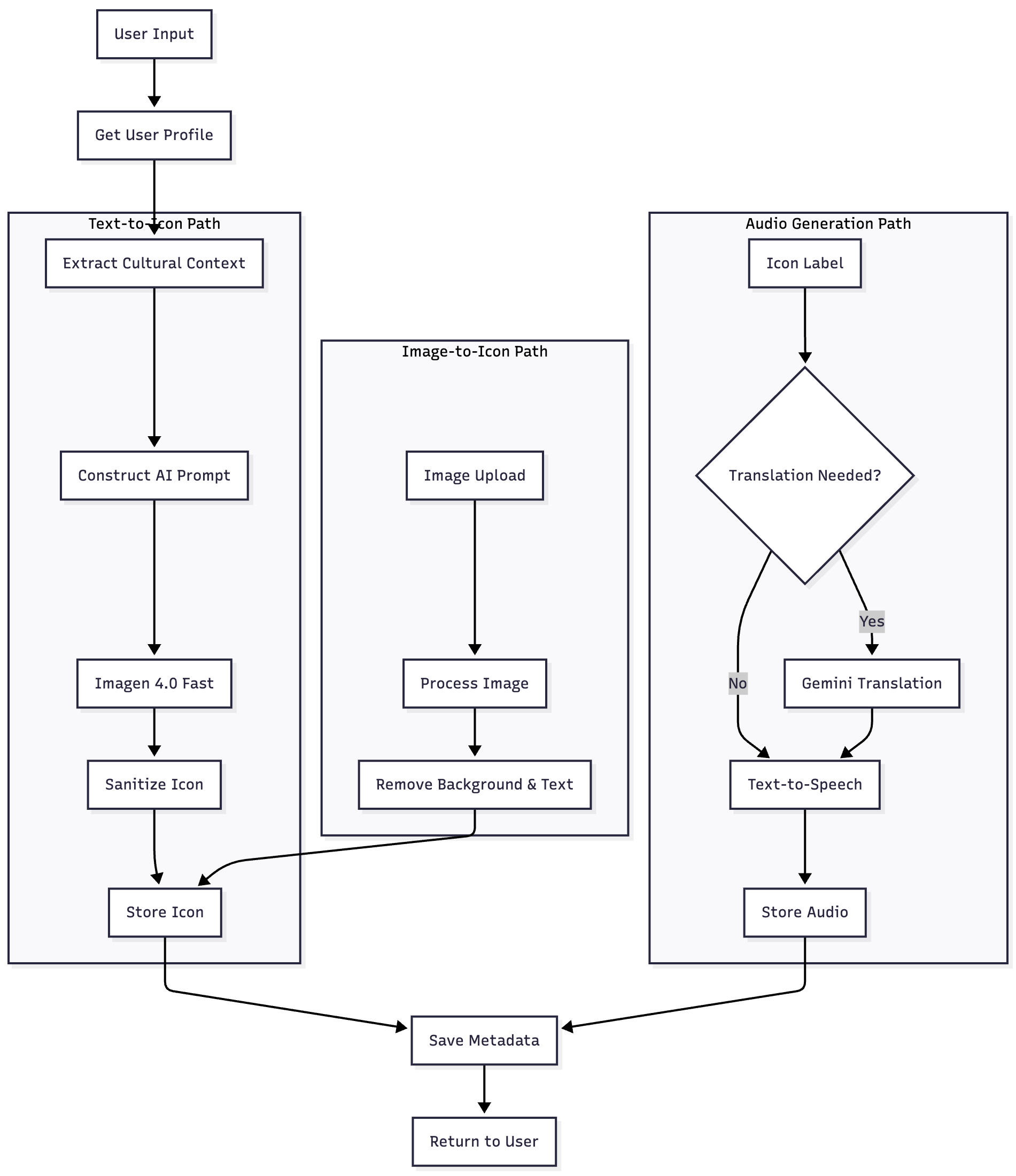
Generating content that requires multiple steps — such as text analysis, icon generation, and audio synthesis — led to noticeable delays. Each model invocation added processing time, especially when run sequentially. We plan to optimize this workflow using asynchronous pipelines and caching for faster responses.
9. Model Training for Specific Use Cases
We discovered that pre-trained AI models lacked sufficient sensitivity to AAC-specific contexts. The models performed well on generic data but struggled to adapt to disability-centered communication needs without fine-tuning. Training domain-specific models is an essential future step.
10. Full Stack Development Using Google AI Studio
Building both the frontend and backend logic with Google AI Studio was ambitious but challenging. The tool performed well for modular code generation, but maintaining full-stack consistency across multiple iterations required careful roadmap planning and human intervention.
11. Platform Performance Limitations
Google AI Studio’s web-based interface, though powerful, often became slow with complex prompts or large files. A dedicated desktop IDE version could significantly improve performance, iteration speed, and local debugging capability.
Accomplishments That We’re Proud Of
- Built a fully functional AI-powered AAC system integrating multiple Gemini models.
- Designed a modular, serverless architecture on Google Cloud Run.
- Created culturally aware communication icons that reflect real users’ lives.
- Implemented an AI-assisted development process using roadmap-driven prompting.
- Overcame deployment challenges with Docker, Cloud Build, and service permissions.
- Blended design thinking, accessibility, and AI into a cohesive, inclusive product.
What We Learned
- Prompt engineering is iterative: Structure, clarity, and sequencing lead to better AI outputs using Google AI Studio.
- AI accelerates development but needs human empathy: Technology enhances, but human insight ensures inclusivity.
- Inclusive design requires cultural context: Visual familiarity increases trust and usability.
- Serverless architecture simplifies scaling: Cloud Run enabled easy iteration and maintenance.
- Team collaboration drives creativity: Merging design and tech expertise built a truly inclusive product.
What’s Next
1. AI Refinement & Model Consistency
Enhance prompts for consistent 2D, transparent, high-contrast icons and automatic validation for accessibility standards.
2. Backend Post-Processing & Automation
Implement automated optimization — compressing files, removing backgrounds, and standardizing formats.
3. Accessibility & User Testing
Conduct usability studies with AAC users, caregivers, and therapists to validate inclusivity and functionality.
4. Multilingual & Cultural Expansion
Extend support for more languages and regions by training on diverse cultural datasets.
5. Partnerships & Integrations
Collaborate with accessibility organizations, schools, and clinics to pilot real-world adoption.
6. Open-Source Collaboration
Release core modules for community-driven improvements, encouraging inclusive innovation worldwide.
7. Vision Ahead
Evolve the platform into a global accessibility ecosystem connecting AI, culture, and disability inclusion.
Important Links
Backend Code Repo: https://github.com/codersbeyondborders/aac-backend
Frontend Code Repo: https://github.com/codersbeyondborders/aac-frontend
Working Demo: https://smart-aac-frontend-948833415163.us-central1.run.app/
Built With
- cloudrun
- gemini
- google-ai-studio
- node.js
- typescript

Log in or sign up for Devpost to join the conversation.