-
-
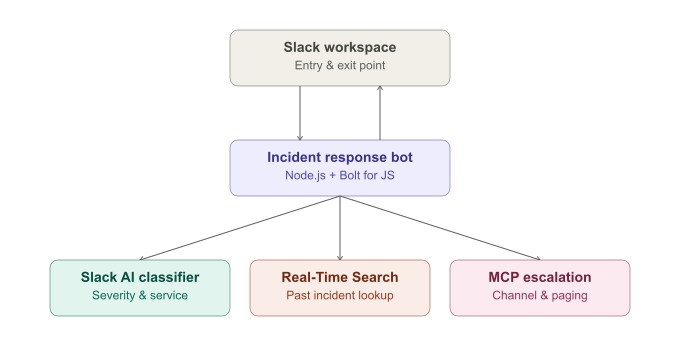
architecture overview
-
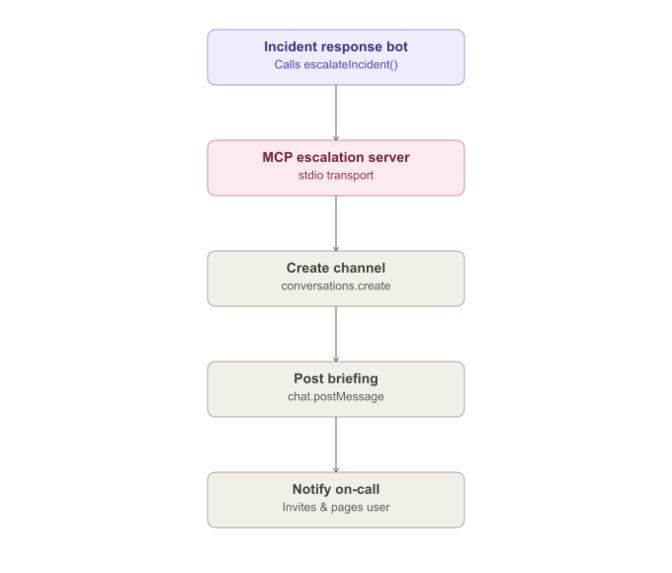
architecture mcp detail
Incident Response Agent
Inspiration
When something breaks in production, the first few minutes are usually spent on manual triage: figuring out severity, checking whether this has happened before, and pulling the right people in. I wanted to see how far I could get automating that entire triage process inside Slack, the tool engineering teams are already living in when an incident hits.
What it does
The Incident Response Agent watches a Slack channel for raw alert messages, the kind you'd normally get piped in from a monitoring tool, and turns each one into a fully triaged incident in a few seconds. It assigns a severity level and confidence score, identifies the affected service, surfaces similar past incidents along with how they were resolved, and, for high-severity incidents, automatically creates a dedicated channel, briefs it with full context, and pages the on-call engineer. Lower-severity incidents can be escalated the same way with a single button click.
How I built it
The agent is a Slack app built with Bolt for JavaScript and TypeScript, running as a single Node.js process. It listens for messages, classifies them, looks up history, and renders interactive Block Kit cards with Resolve and Escalate actions. Three pieces work together end to end:
Slack AI — alert classification. A pattern-matching engine maps incoming text to a severity level (CRITICAL, HIGH, MEDIUM, or LOW), a confidence score, and an affected service, all rendered straight into the Slack message.
Real-Time Search — historical incident lookup. Each classified incident is matched against a structured incident history, surfacing similar past cases and the resolution that worked, so the responder isn't starting from zero.
MCP — automated escalation. The bot acts as an MCP client and talks over stdio to a dedicated MCP server exposing three tools: create_escalation_channel, post_incident_briefing, and notify_oncall_engineer. When an incident is CRITICAL, or when someone clicks Escalate, the bot orchestrates all three in sequence: a new incident channel is created, briefed with the full context, and the on-call engineer is invited and paged, all through real Slack Web API calls, not simulated.
Challenges I ran into
Getting the MCP server and the Bolt app talking to each other reliably took a few iterations. TypeScript's CommonJS compilation doesn't allow top-level await, so the MCP server's stdio transport had to be wrapped in an async IIFE before it would run. I also hit a case where Slack's own "user joined channel" system messages were being picked up and misclassified as a new low-severity incident, which I fixed by filtering out message subtypes and bot messages before classification.
Accomplishments that I'm proud of
All three technologies work together in a single live demo, not as three disconnected features. A raw alert turns into a classified incident, a relevant historical match, and a real escalation, complete with channel, briefing, and paging, within seconds, with no manual intervention required for critical incidents.
What I learned
This was my first hands-on experience with MCP, and building it end to end made the appeal of the protocol click: a stdio client and server let the bot call real, well-defined tools instead of hardcoding Slack API calls everywhere escalation logic was needed. I also got a much clearer picture of the Slack platform itself, in particular that Events and Interactivity each need their own Request URL configured separately, something that wasn't obvious until the Escalate button silently failed to do anything. On the debugging side, tracing a generic MCP "Connection closed" error back to a single incompatible top-level await in the server process taught me to follow transport-level errors all the way to their root cause instead of assuming the protocol library itself was at fault.
Built With
- api
- block
- bolt
- context
- for
- javascript
- kit
- mcp
- model
- node.js
- protocol
- sdk
- slack
- typescript
- web
- zod

Log in or sign up for Devpost to join the conversation.