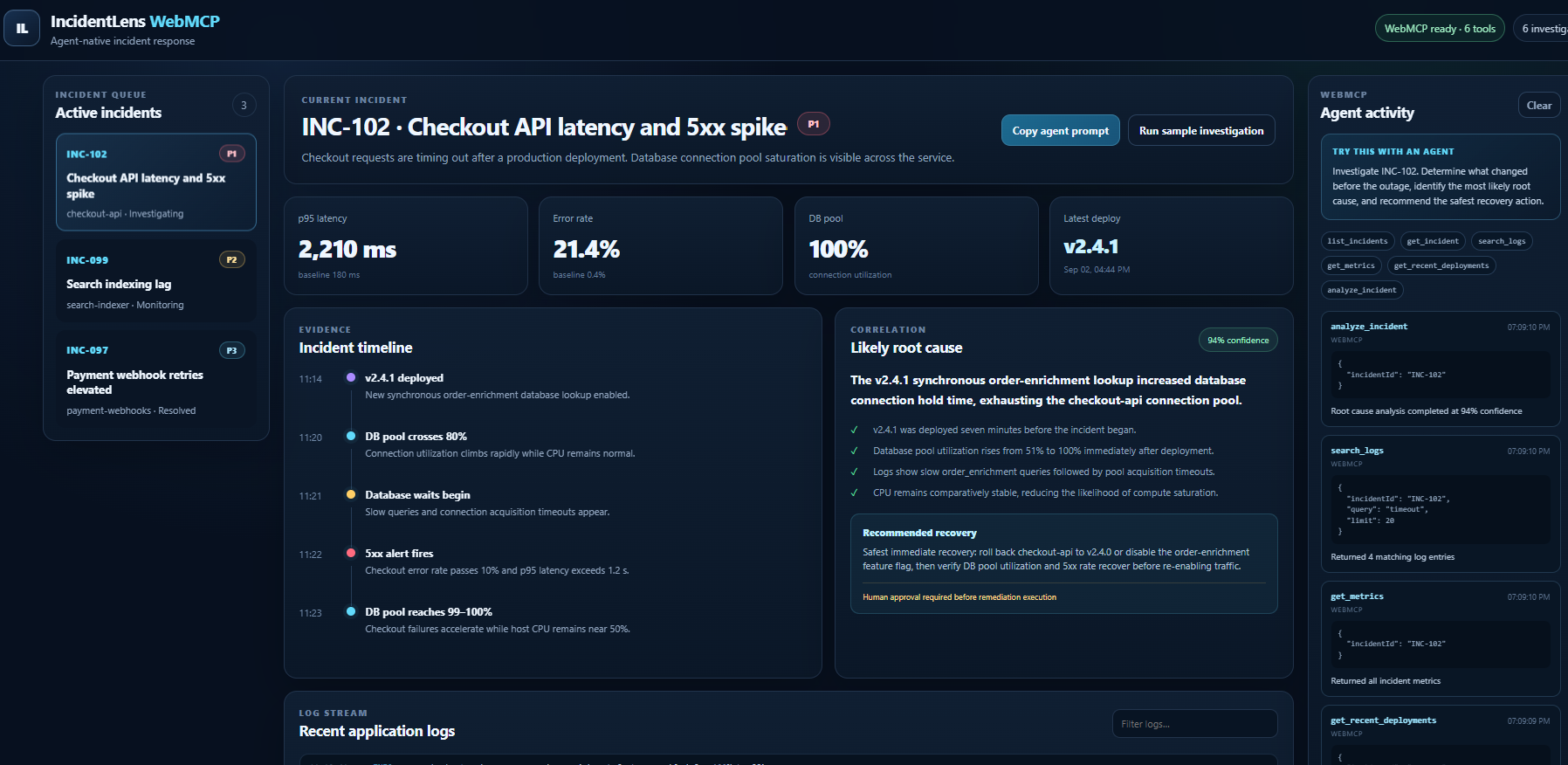
IncidentLens WebMCP
Inspiration
Production incidents rarely fail because engineers have no data. They fail because the useful evidence is scattered across alerts, logs, metrics, deployment history, and runbooks.
During an outage, an engineer may need to jump between several screens just to answer basic questions:
- What changed?
- When did the degradation begin?
- Which service is responsible?
- Was there a deployment immediately before the incident?
- What is the safest remediation?
AI agents can help with this investigation, but traditional websites are primarily designed for humans. An agent often has to interpret visual interfaces, navigate pages, and extract information indirectly.
IncidentLens WebMCP explores a different approach: make the incident-response application itself agent-native.
Using WebMCP, IncidentLens exposes structured incident investigation capabilities directly to compatible AI agents while preserving the same dashboard for human operators.
What it does
IncidentLens is an incident-response console that combines:
- alerts
- application logs
- infrastructure metrics
- deployment history
- incident timelines
- root-cause hypotheses
- remediation recommendations
The dashboard can be used normally by an engineer, but it also exposes these capabilities as structured WebMCP tools.
An AI agent can investigate an incident through a workflow such as:
list_incidents
      ↓
get_incident
      ↓
get_alerts
      ↓
search_logs
      ↓
get_metrics
      ↓
get_recent_deployments
      ↓
build_timeline
      ↓
analyze_root_cause
      ↓
suggest_remediation
For example, a user can ask:
Investigate INC-102. Determine what changed before the outage, identify the most likely root cause, and recommend the safest recovery action.
Instead of trying to visually navigate the application, the agent can call the relevant WebMCP tools and receive structured results.
Why WebMCP matters
Without WebMCP, an AI agent interacting with an operational dashboard may need to:
- understand the page layout,
- locate the correct controls,
- navigate multiple views,
- interpret visual information,
- extract relevant values,
- repeat the process for every investigation step.
IncidentLens exposes the underlying capabilities directly.
For example:
search_logs({
  incidentId: "INC-102",
  query: "connection timeout"
})
can return structured evidence that an agent can reason over immediately.
This makes the interaction more deterministic, composable, and transparent.
The human interface and the agent interface coexist: engineers can continue using the dashboard normally while agents gain a structured way to assist them.
Human-in-the-loop safety
Incident response can involve high-impact actions.
For that reason, IncidentLens separates investigation from execution.
Agents can autonomously:
- inspect evidence,
- correlate telemetry,
- construct timelines,
- generate hypotheses,
- and recommend remediation.
Potentially destructive actions such as rollbacks or service restarts remain subject to explicit human approval.
The goal is not to replace the incident commander. It is to give them a much faster investigation partner.
Example incident
One demonstration incident begins shortly after deployment v2.4.1.
IncidentLens correlates several pieces of evidence:
Deployment v2.4.1
        ↓
Database connection usage rises
        ↓
Connection pool becomes saturated
        ↓
Request latency increases
        ↓
HTTP 5xx errors spike
Rather than showing only an AI-generated answer, IncidentLens exposes the evidence used to reach the conclusion so the operator can independently verify it.
How we built it
IncidentLens is implemented as a web application with WebMCP-enabled tools exposed from the browser.
The application contains a simulated production environment with realistic:
- incidents
- alerts
- logs
- time-series metrics
- deployment events
- service metadata
Each investigation capability has a structured input and output contract so an AI agent can invoke it directly.
The architecture is intentionally simple:
Human / AI Agent
        │
        ▼
IncidentLens Web UI
        │
        ├── Human-facing dashboard
        │
        └── WebMCP tools
                │
                ▼
        Incident data layer
                │
        ┌───────┼─────────┐
        ▼       ▼         ▼
      Logs    Metrics   Deployments
This allowed us to focus on demonstrating how WebMCP changes the interaction model rather than hiding the core idea behind unnecessary infrastructure.
Challenges
One of the biggest design challenges was deciding what should become a tool.
Simply exposing every button on a web page would not create a useful agent interface.
Instead, we designed tools around meaningful operational capabilities such as:
search_logs
get_metrics
get_recent_deployments
build_timeline
analyze_root_cause
Another challenge was maintaining human oversight. Incident response is an area where an incorrect automated action can make an outage worse, so the system intentionally keeps remediation execution separate from investigation and recommendation.
We also focused on returning structured, inspectable evidence rather than asking users to trust an unexplained AI conclusion.
What we learned
The most important lesson was that agent-enabled websites should not simply reproduce the existing UI as tools.
The strongest WebMCP tools represent intent and capabilities, not mouse clicks.
For example:
"Search incident logs for database errors"
is considerably more useful to an agent than:
"Click the Logs tab"
WebMCP makes it possible for a website to support both interaction models simultaneously:
a visual interface for people and a structured capability interface for agents.
What's next
IncidentLens could be extended with integrations for real observability and operations systems such as:
- OpenTelemetry
- Prometheus
- Grafana
- Kubernetes
- cloud monitoring platforms
- deployment systems
- ticketing and incident-management platforms
A future version could also introduce approval-gated remediation tools, persistent incident memory, multi-agent investigations, and automatic post-incident reports.
Our longer-term vision is an operations console where humans remain in control while AI agents can reliably understand and operate the underlying application through explicit, structured capabilities.
Built With
- agents
- ai
- css3
- devops
- html5
- incident
- javascript
- next.js
- node.js
- observability
- openai
- react
- sre
- typescript
- webmcp

Log in or sign up for Devpost to join the conversation.