-
-
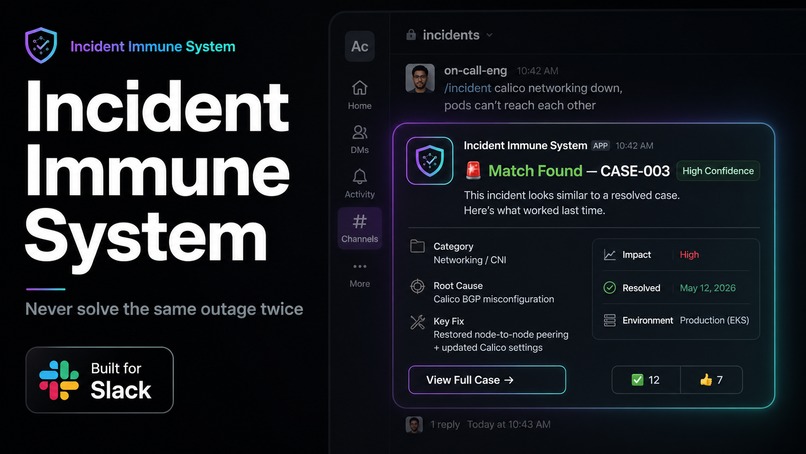
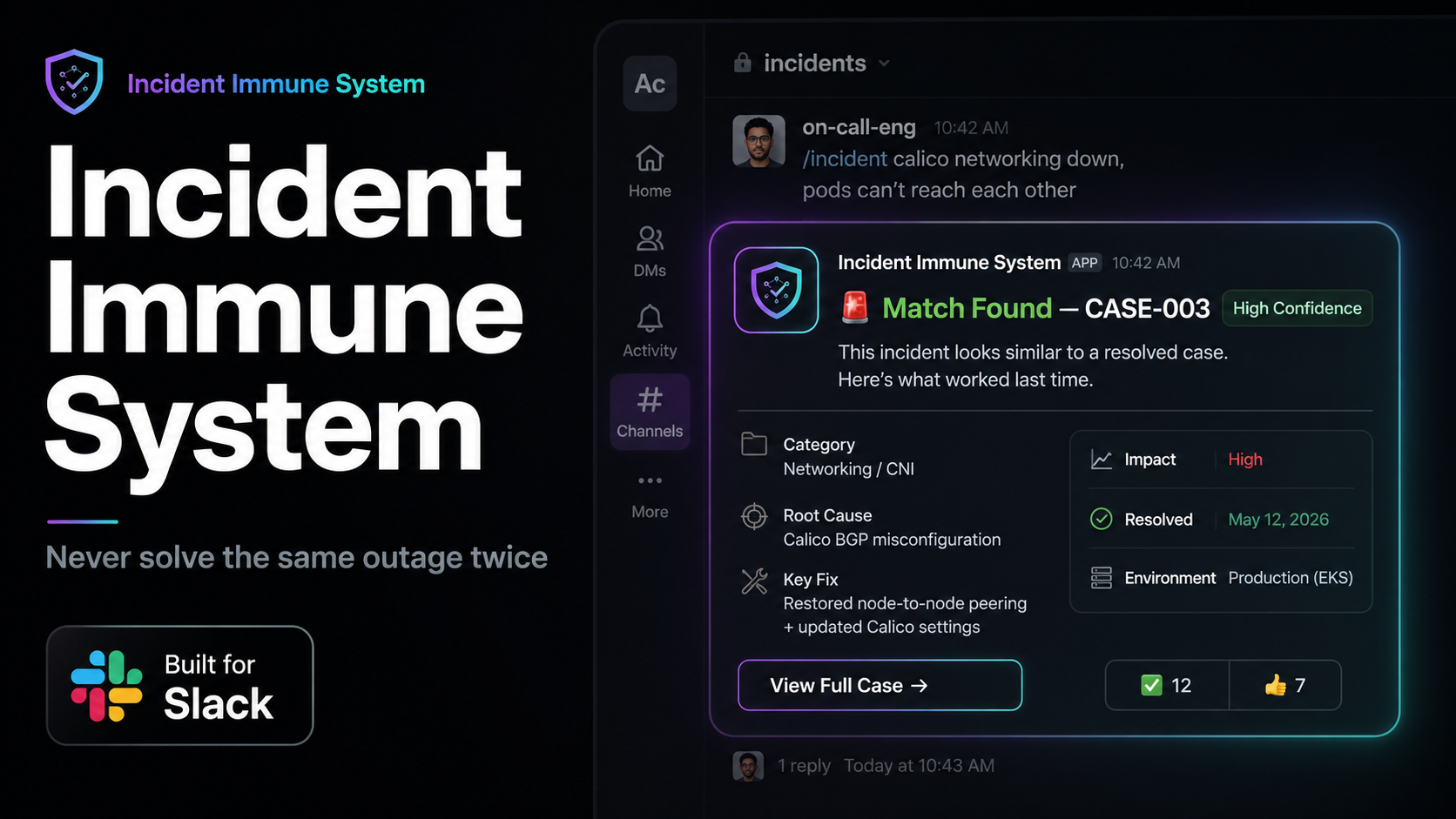
Incident Immune System
-
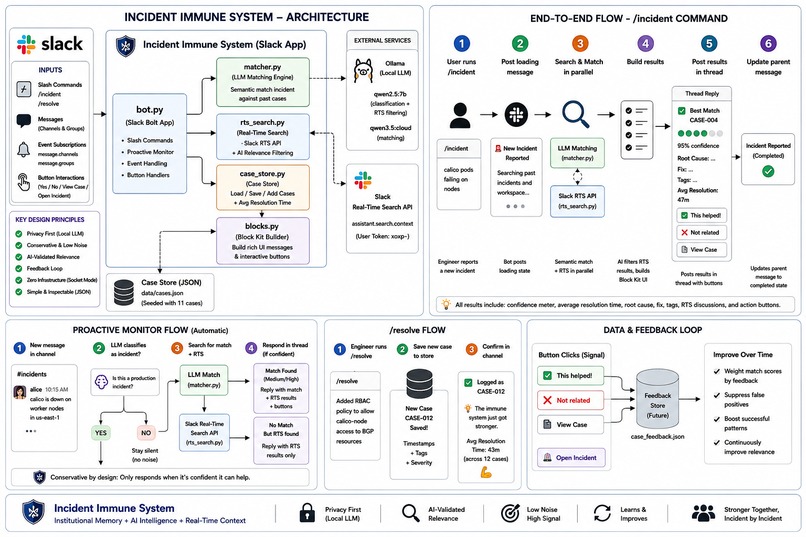
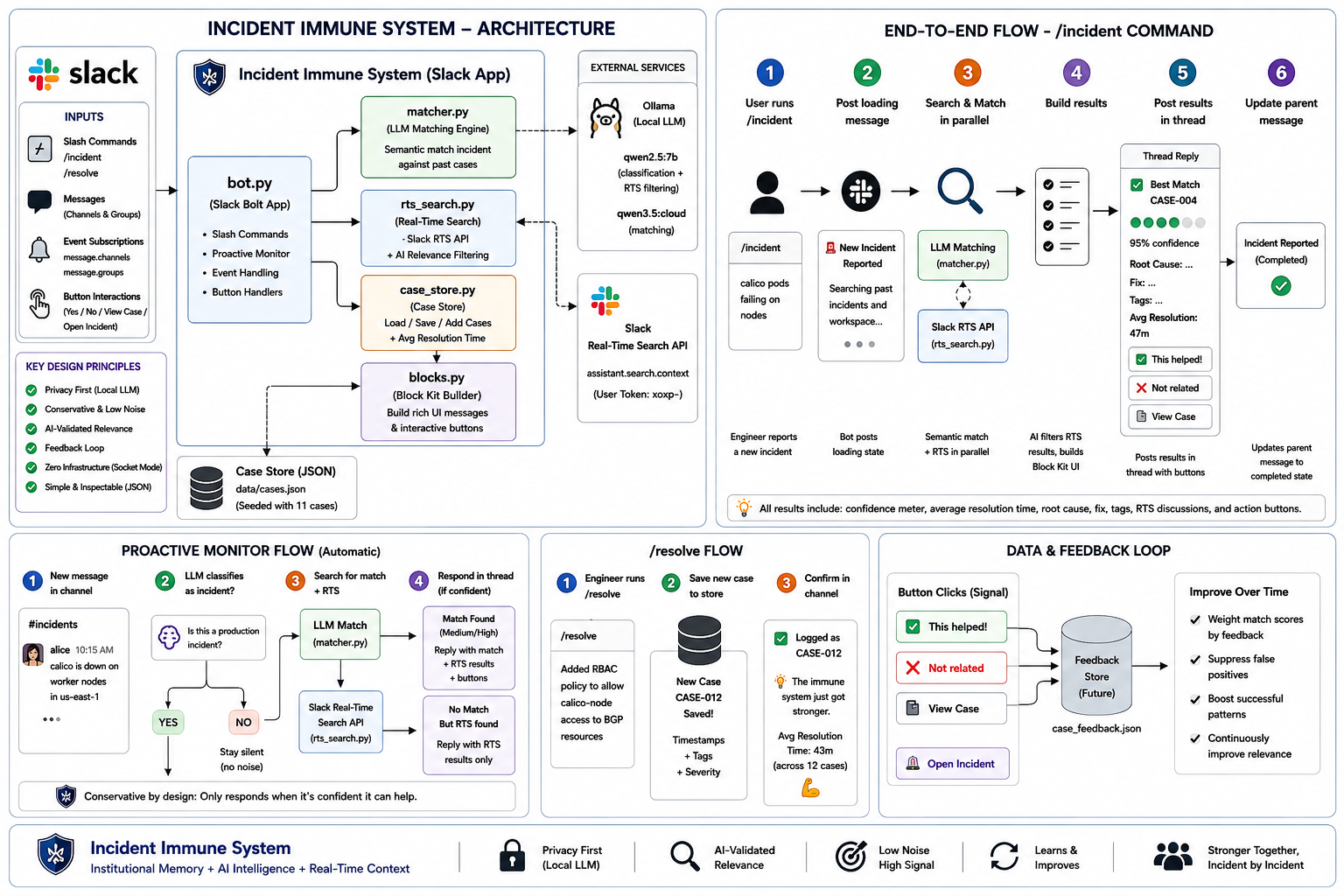
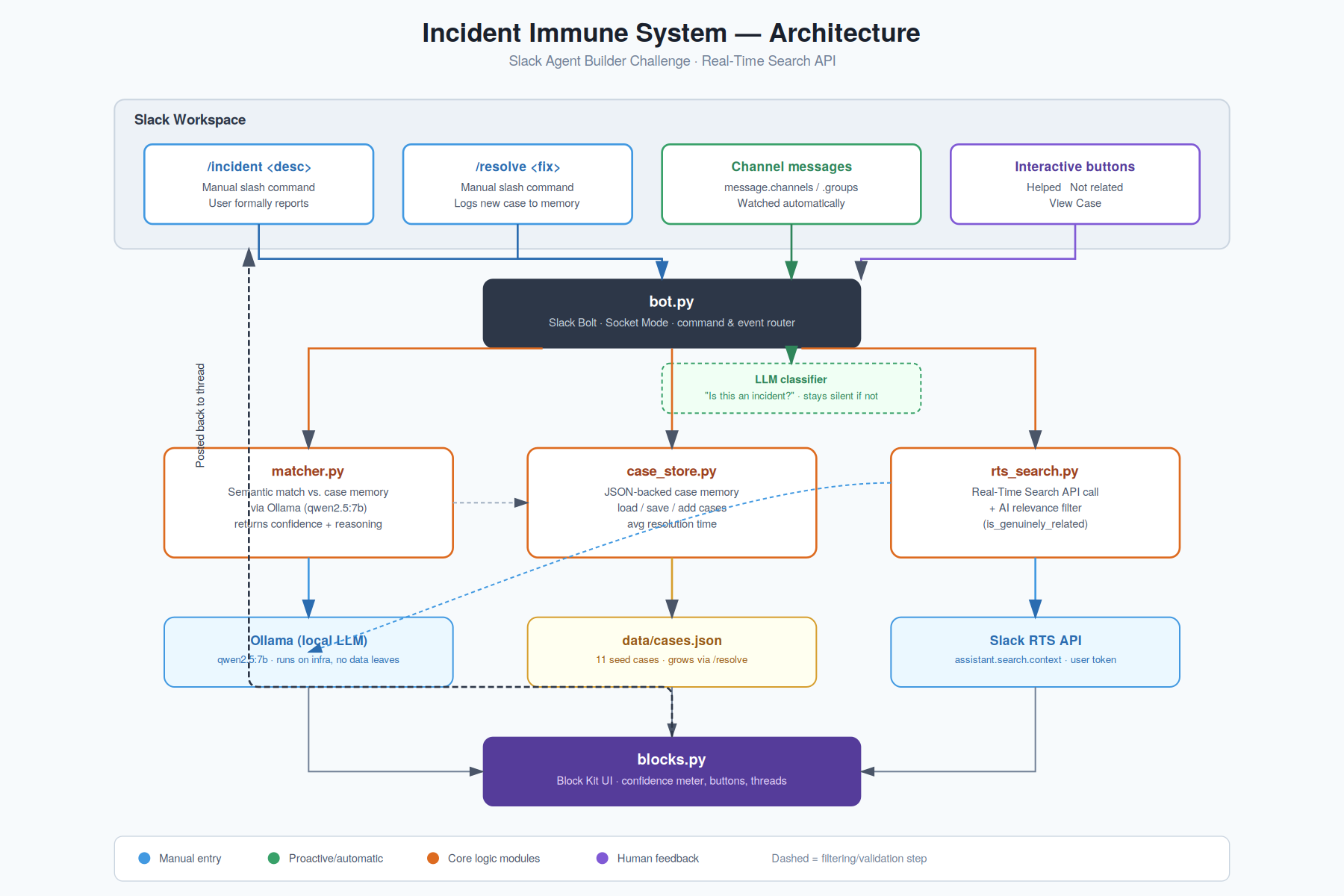
Flow + Architecture
-
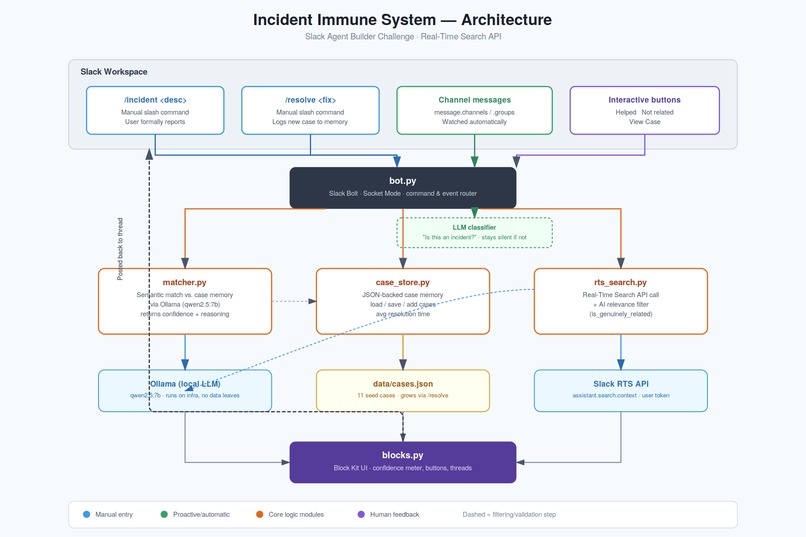
Block Diagram
-
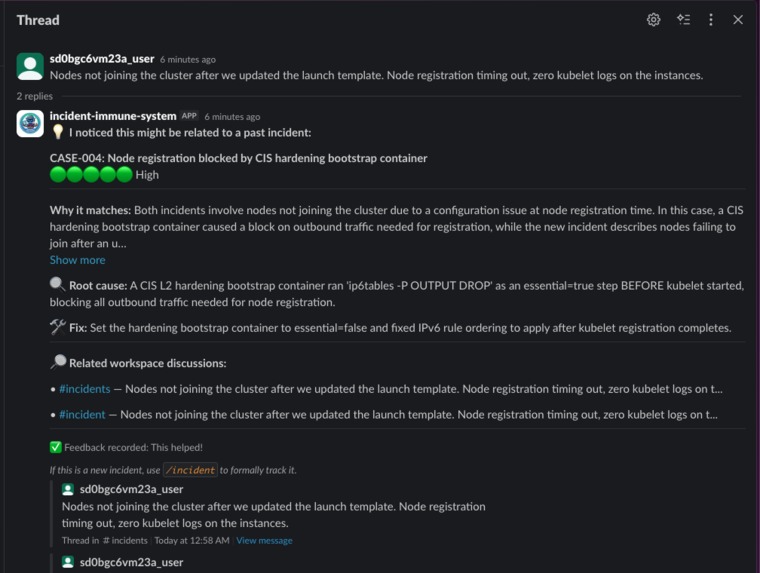
Proactive Monitoring For all Messages
-
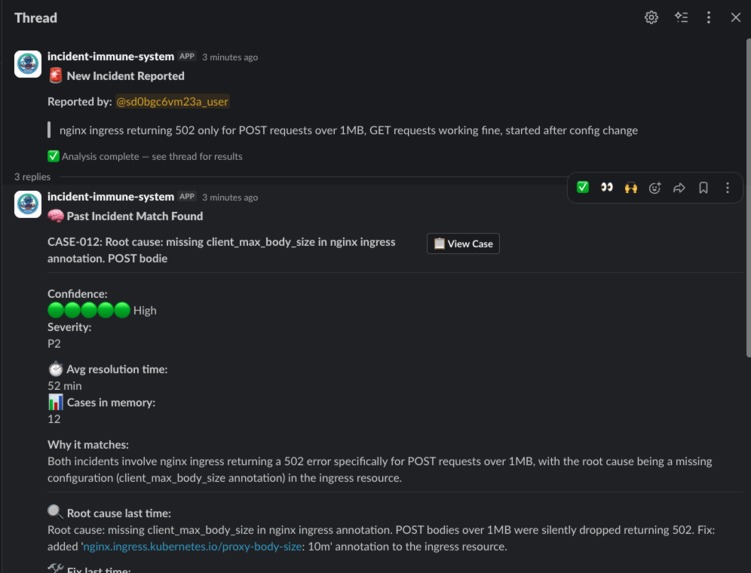
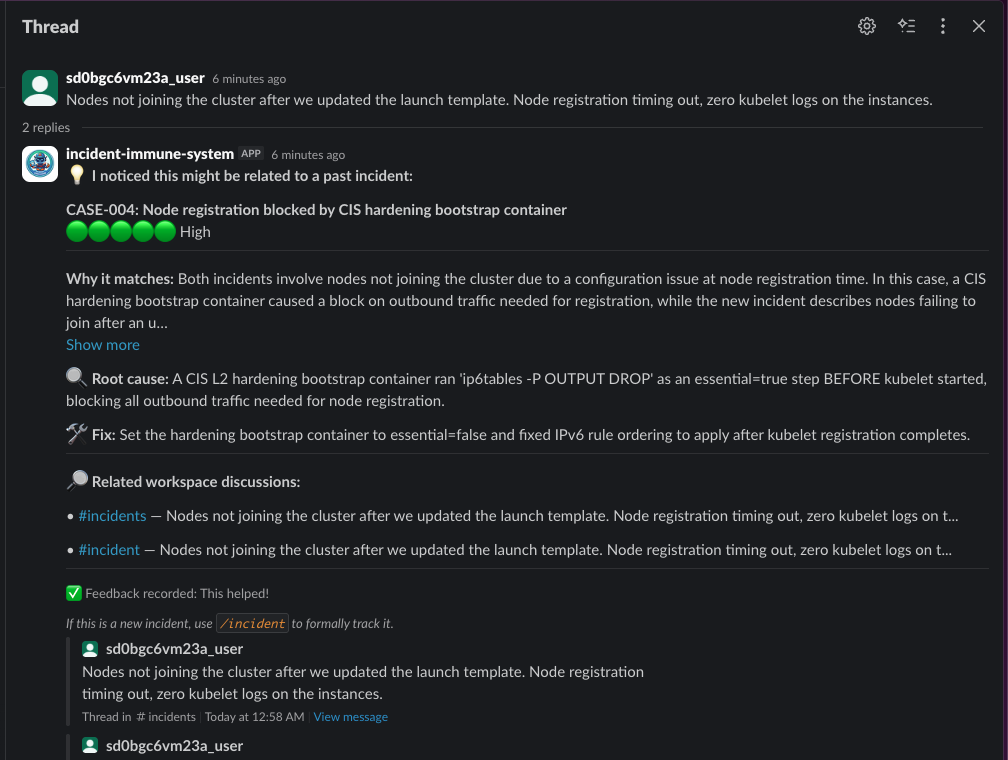
Incident Logged and correlated with old issue
Inspiration
Every engineering team has tribal knowledge - the senior engineer who remembers that "this exact Calico issue happened eight months ago and the fix was a one-line RBAC patch." But that person is on vacation. Or it's 3am. Or they left the company.
We've lived this managing AWS EKS and Azure AKS clusters across production. P1 incidents get solved slower not because the fix doesn't exist - it exists in a resolved Jira ticket, a Slack thread from six months ago, a runbook nobody updated. The knowledge is there. It's just invisible at the moment you need it most.
Incident Immune System exists to make that knowledge visible, automatically, in the channel where the incident is already happening.
What it does
Incident Immune System is a Slack agent that turns every resolved production incident into searchable institutional memory.
Proactive detection - The agent monitors channels it's invited to. When someone posts a message that looks like an incident ("calico down?", "blank white page after deploy"), it automatically searches past case memory and surfaces the most relevant root cause and fix - no command needed.
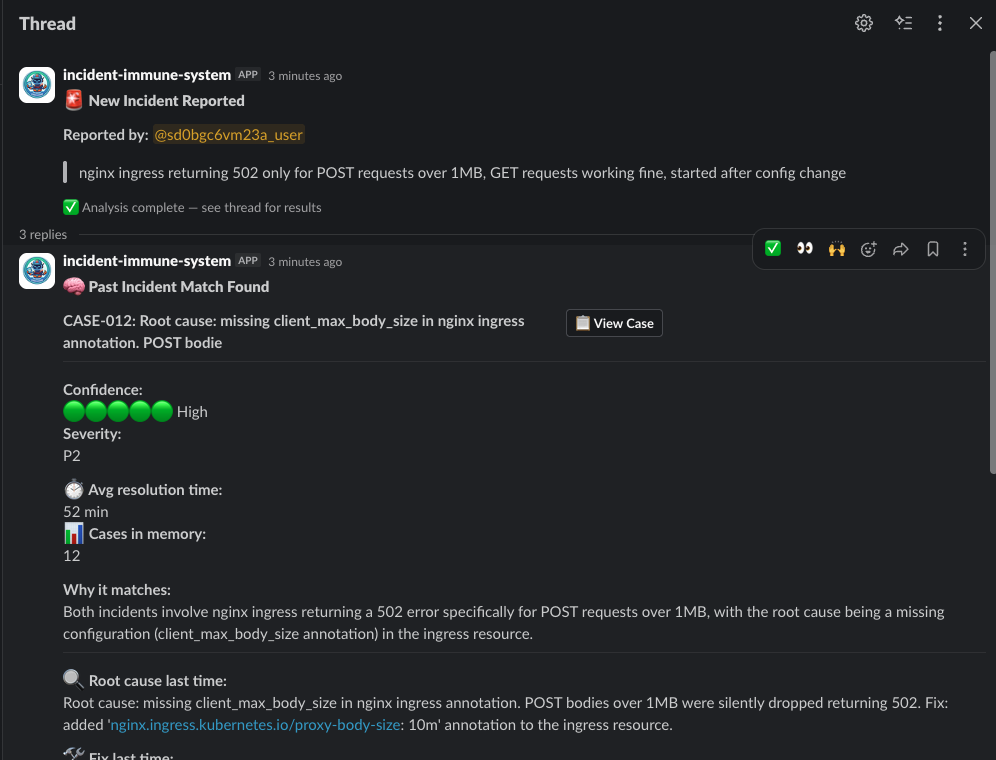
/incident <description> - For formally tracked incidents, engineers run this slash command. The agent searches two sources in parallel: a local case store of past resolved incidents (matched semantically by a local LLM, not just keywords) and the live Slack workspace via the Real-Time Search API, finding related discussions across channels that engineers might not know to look for.
/resolve <fix summary> - Once an incident is resolved, this command logs it as a new case. The memory grows with every incident the team closes.
AI-filtered RTS results - Raw Slack search surfaces text-similar results, not semantically related ones. Every RTS candidate is validated by the LLM before display - so "crashing" in an Android app doesn't surface alongside a Kubernetes pod crash.
Rich Block Kit UI - Every result is delivered as a structured, interactive message, not a wall of text. A confidence meter, average resolution time across all past cases, root cause, fix, and tags render as clean Block Kit sections. Three buttons - This helped, Not related, View Case - turn every match into a feedback loop that improves the system over time.
How we built it
- Python + Slack Bolt in Socket Mode - zero infrastructure, no public URL needed
- Slack Real-Time Search API (
assistant.search.context) with a user token (xoxp-) to surface live workspace discussions relevant to the current incident - Ollama (qwen2.5:7b) running locally for incident classification, semantic case matching, and RTS relevance filtering - no data leaves your infrastructure
- JSON-backed case store seeded with 11 real-world incident patterns (6 Kubernetes/infra, 5 React frontend P1s) that grows organically as teams resolve incidents
The RTS integration required using a user token rather than a bot token to avoid needing a live action_token from an app_mention event - a non-obvious implementation detail that took real debugging to work out.
Challenges we ran into
RTS relevance is text-based, not semantic. Slack's search ranks on keyword overlap, so "crashing" in a frontend bug would surface alongside a Kubernetes OOMKilled event. We solved this by routing every RTS candidate through the local LLM with a yes/no relevance check before displaying it.
Proactive monitoring noise. A bot that fires on every message is useless. We tuned the classifier to filter out bot messages, thread replies, messages under 15 characters, and anything the LLM doesn't confidently classify as an incident report. If nothing matches, the bot stays silent.
Socket Mode + user token scope management. The Slack manifest needs both bot and user scope lists, and the RTS call must use SLACK_USER_TOKEN, not SLACK_BOT_TOKEN. Getting the scope reinstall cycle right without breaking existing tokens took several iterations.
Accomplishments that we're proud of
- Proactive detection working end-to-end with zero commands - a user posts a message, the agent responds in-thread with a matched past case before anyone runs a slash command
- AI relevance filtering that demonstrably cuts false positives from RTS results
- A feedback loop baked in from day one - every "✅ This helped" and "❌ Not related" click is signal the system can learn from
- 11 seed cases covering both infrastructure (Karpenter, CoreDNS, Calico, containerd, CIS hardening, RBAC) and frontend (React hydration, memory leaks, ChunkLoadError) so the demo isn't narrowly K8s-only
- Privacy-first architecture: the local LLM means incident descriptions never leave your infrastructure
What we learned
The hardest part of building an incident memory system isn't the matching - it's the signal-to-noise problem. A bot that's wrong 30% of the time trains engineers to ignore it. Every architectural decision (LLM relevance filtering, confidence thresholds, proactive silence when nothing matches) was made in service of: only speak when you're confident you're helping.
We also learned that the Real-Time Search API is genuinely powerful for this use case. Past incident discussions happen in Slack - in #incidents, in #random, in team-specific channels. RTS finds that context across the whole workspace, not just the channel where the current incident is being discussed. That cross-channel surfacing is something no local case store alone can do.
What's next for Incident Immune System
- Persistent feedback learning - use the "✅ / ❌" button clicks to weight future match scores, so the system improves from real usage
- Thread-aware
/resolve- currently resolves the most recent incident in a channel; true thread linking would make multi-incident channels cleaner - MCP server for the case store - expose past incidents as an MCP tool so Slack AI and other agents can query institutional memory directly
- Severity-based routing - auto-page an on-call rotation (PagerDuty, OpsGenie) when the proactive monitor detects a P1 pattern with high confidence
- Multi-workspace support - federate case memory across workspaces so platform teams can share incident knowledge with product teams

Log in or sign up for Devpost to join the conversation.