Inspiration
After a break-in, the insurer does not just ask what was taken. It asks you to prove you owned it and what it was worth, usually before a reporting deadline. Most people cannot: only 20% of insured US homeowners updated a home inventory in the past year, and 25% never made one (APCIA / Harris Poll, 2022).
Two friends told me what that looks like in practice:
"My apartment got broken into while I was away for the weekend. I opened my security camera app expecting clear footage of whoever came through the door, only to see a notice that my cloud storage trial had expired two weeks earlier. The camera had been sending motion alerts to my phone the whole time without saving a single clip."
"Someone pried open our patio door and emptied out my wife's jewelry box, including her grandmother's ring and a watch she got for graduation. When we filed the claim, the adjuster pointed to a line in the policy capping all jewelry payouts at $1,500 unless each piece was separately appraised and scheduled. We had assumed our $40,000 personal property limit covered everything inside the house."
The first is why camera evidence belongs on local storage. The second is why the Skill reads the policy's limits and flags them before the claim is filed, not after.
But a home NAS often already holds the proof, scattered across places nobody thinks to connect:
- years of everyday photos where the laptop sits on the desk or the TV hangs on the wall
- receipts, order confirmations and warranty cards in a downloads folder
- card statements with the purchase line when the receipt is gone
- camera events from the day it happened
- the insurance policy PDF with the deadline, deductible and limits
That is the most private data a household has. It should not be uploaded to a cloud AI to file a claim. An AI NAS is the one place where all five sources live together, so it is the right place to do this.
What it does
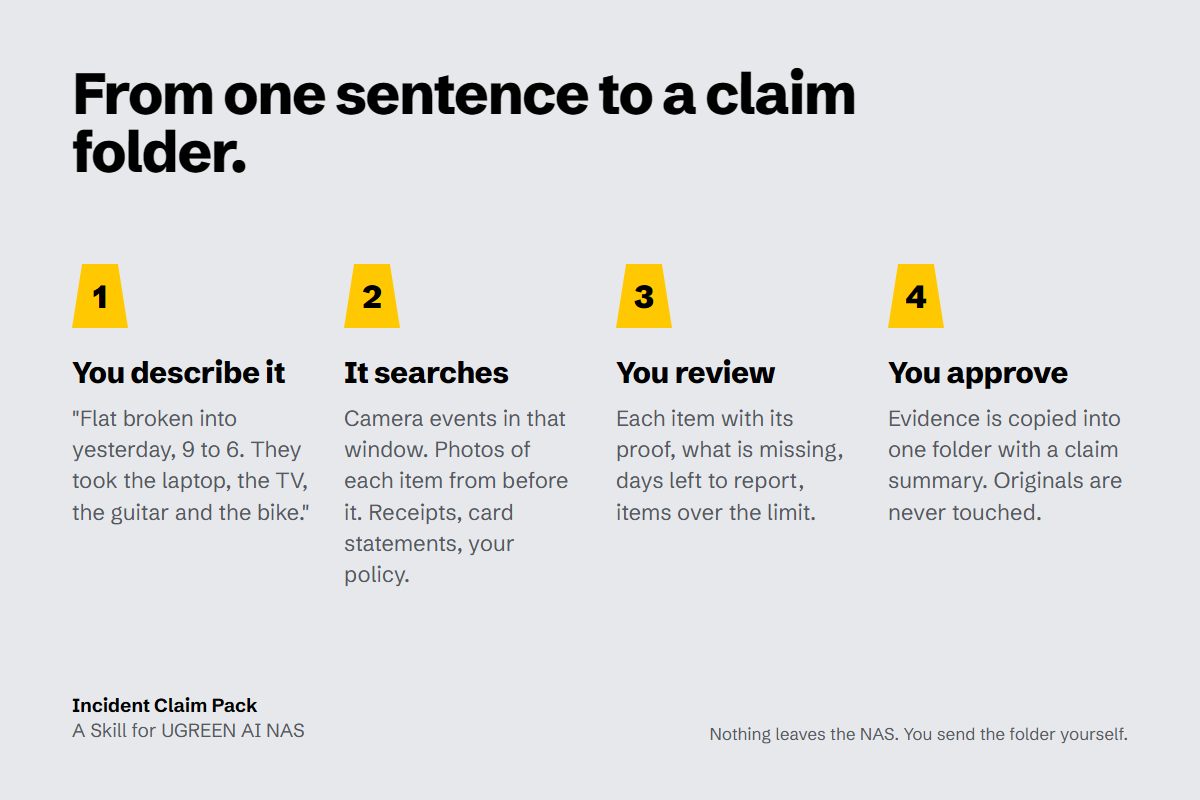
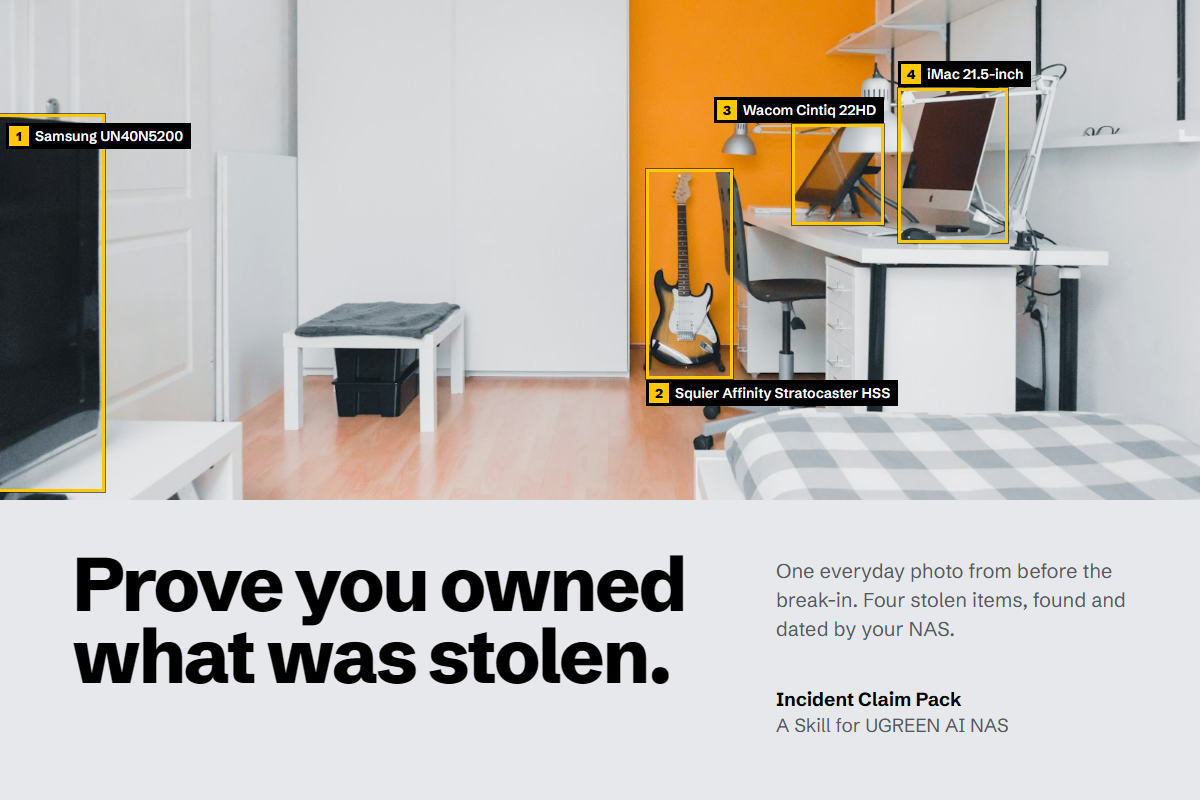
Incident Claim Pack takes one request ("our flat was broken into yesterday between 9 and 6, they took the laptop, the TV, the guitar and the bike") and:
- confirms the time window, items and time zone before touching anything
- finds camera events and snapshots in the incident window
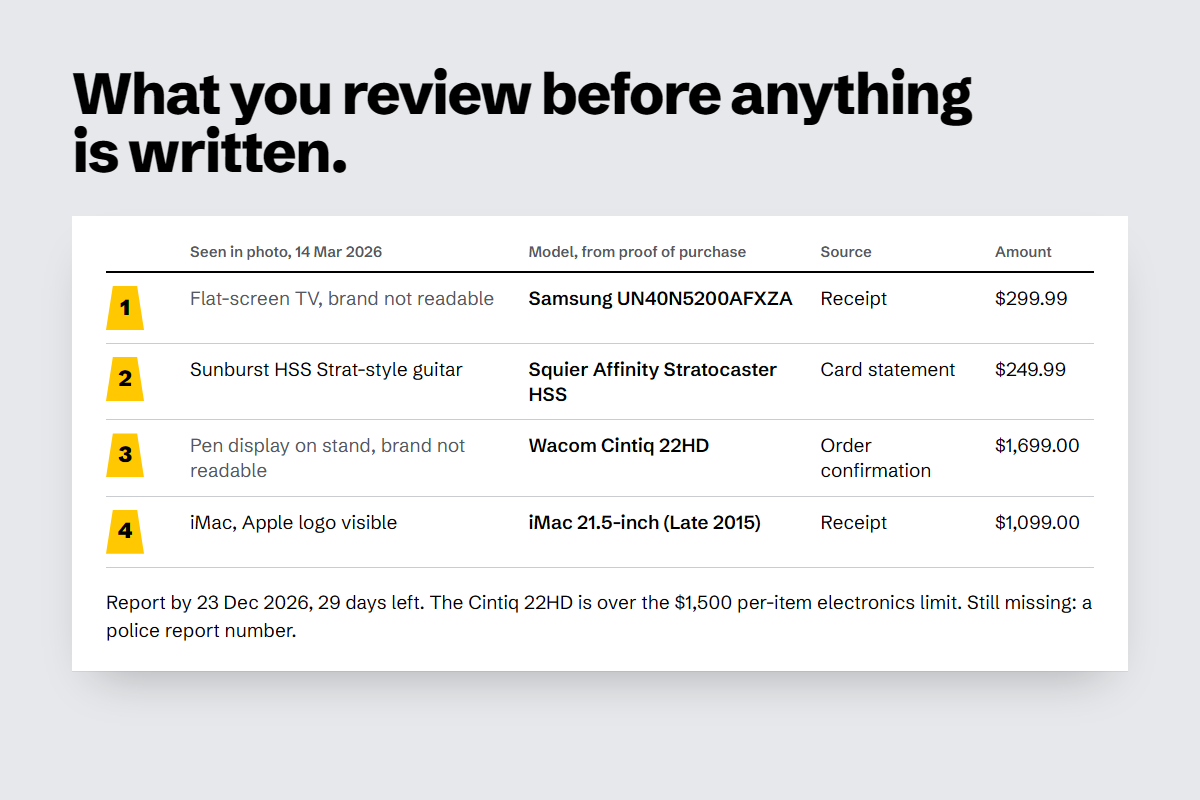
- finds photos taken before the incident that show each item, reads their capture date from the metadata, and marks each match confirmed or possible
- finds receipts and invoices and extracts price, date and serial number
- for items with no receipt, finds the purchase line on card statements
- reads the policy: reporting deadline, deductible, item limits, required documents
- shows an item table with checks (days left to report, items over the limit) and a gaps list
- only after approval, copies (never moves) the evidence into one folder and saves a claim summary
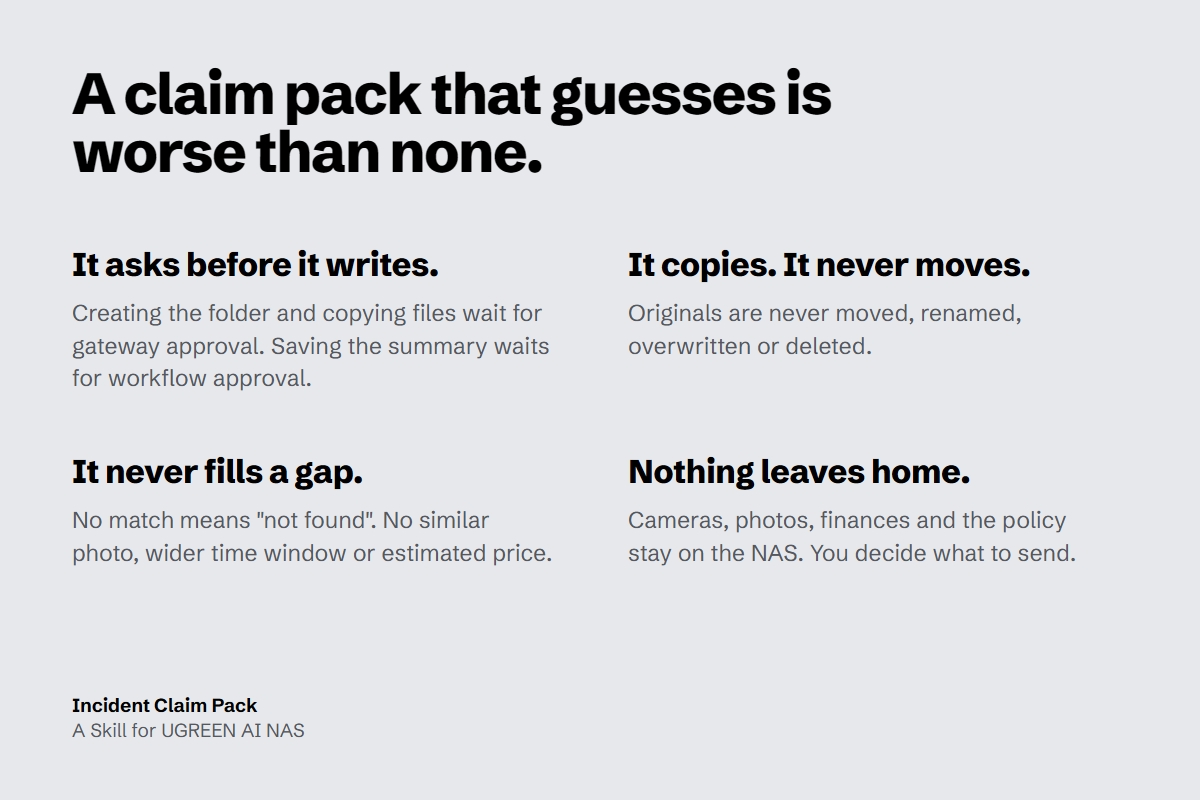
Nothing is sent anywhere. The user reviews the folder and sends it to the insurer.
How I built it
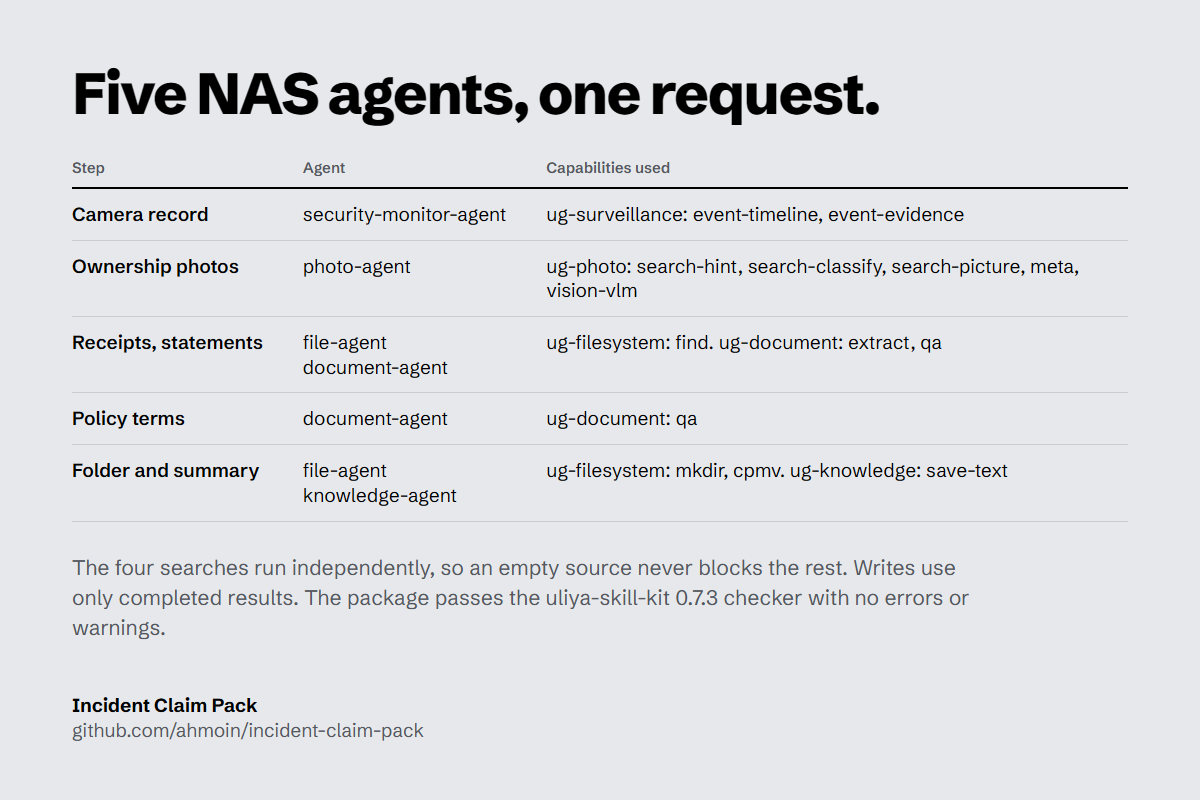
The Skill is a pure orchestration SKILL.md, built with the UGOS Skill Creation Tool (uliya-skill-kit 0.7.3). It delegates to five registered agents:
| Step | Agent | Capabilities |
|---|---|---|
| Camera record | security-monitor-agent |
ug-surveillance event-timeline, event-evidence |
| Ownership photos | photo-agent |
ug-photo search-hint, search-classify, search-picture, meta, vision-vlm |
| Receipts, statements | file-agent, document-agent |
ug-filesystem find, ug-document extract, qa |
| Policy terms | document-agent |
ug-document qa |
| Pack and summary | file-agent, knowledge-agent |
ug-filesystem mkdir, cpmv; ug-knowledge save-text |
Design rules I held to:
- Read steps are independent. A failed or empty source never blocks the others; it becomes a line in the gaps list.
- Write steps use only completed results. Folder creation and copies wait for gateway approval; the summary waits for workflow approval.
- No substitution. If nothing is found, the Skill says so. It never fills a gap with a similar photo, a different time window or an estimated value.
Every capability was checked against the kit's capability catalog, and the package passes the kit's static checker with 0 errors and 0 warnings.
Challenges
- Designing without the hardware. Round 1 has no NAS access, so every step had to be justified from the capability catalog alone. Where the catalog was unclear, the proposal says what is still pending validation instead of claiming it works.
- Brands versus categories. Object search appears to work on recognized categories ("laptop"), not brands ("MacBook Pro"). The Skill maps each item to a category first, then checks the brand with OCR and the vision model, and only counts a match as proof when the brand is readable.
- Camera clips. Evidence may come back as time-limited links rather than files, so the summary records event times and cameras for export.
- Honesty under pressure. A claim pack that guesses is worse than none. Every number in the output has to trace back to a real file.
What I learned
- The kit's checker is strict in useful ways: the package root may hold only
SKILL.mdandreferences/, every delegation must handlecompleted,failed,cancelled,waiting_userandwaiting_approval, and empty results must be handled explicitly. - Good orchestration is mostly about the negative cases: what to do when a source is empty, partial or wrong.
What's next: validation on the real NAS
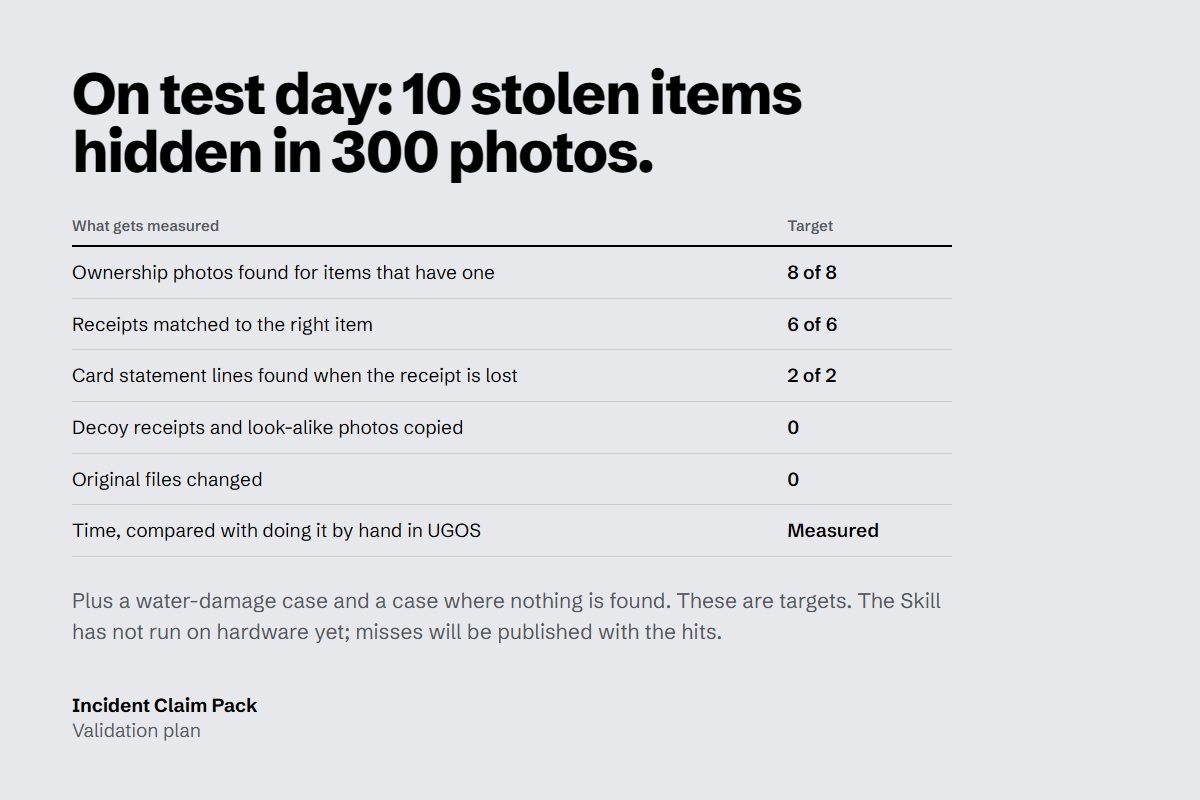
The test set hides 10 stolen items among 300 unrelated photos, with planted receipts, card statements, decoys and camera events. The headline metric:
$$\text{ownership recall} = \frac{\text{items with a confirmed pre-incident photo}}{\text{items with a planted photo}}$$
Targets: 8 of 8 ownership photos, 6 of 6 receipts, 2 of 2 statement lines, 0 decoys copied, 0 originals modified, and the time against doing it by hand in UGOS. Misses will be published along with the hits.
Built With
- document-agent
- file-agent
- knowledge-agent
- markdown
- photo-agent
- security-monitor-agent
- ug-document
- ug-filesystem
- ug-knowledge
- ug-photo
- ug-surveillance
- ugos
- ugreen-ai-nas
- uliya-skill-kit
