-
-
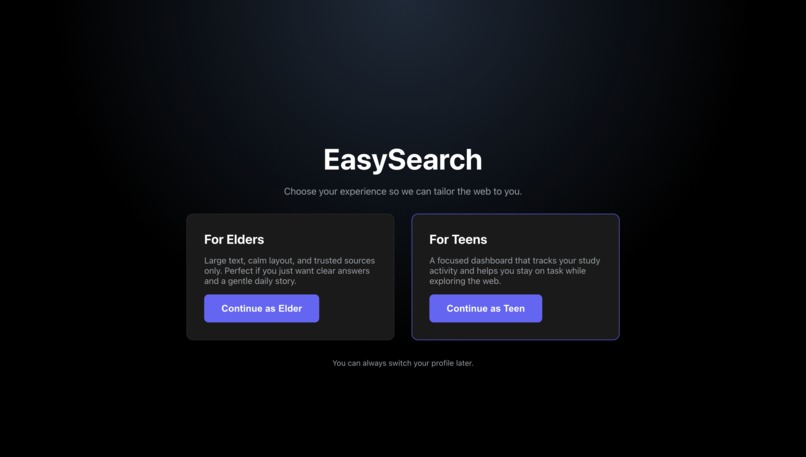
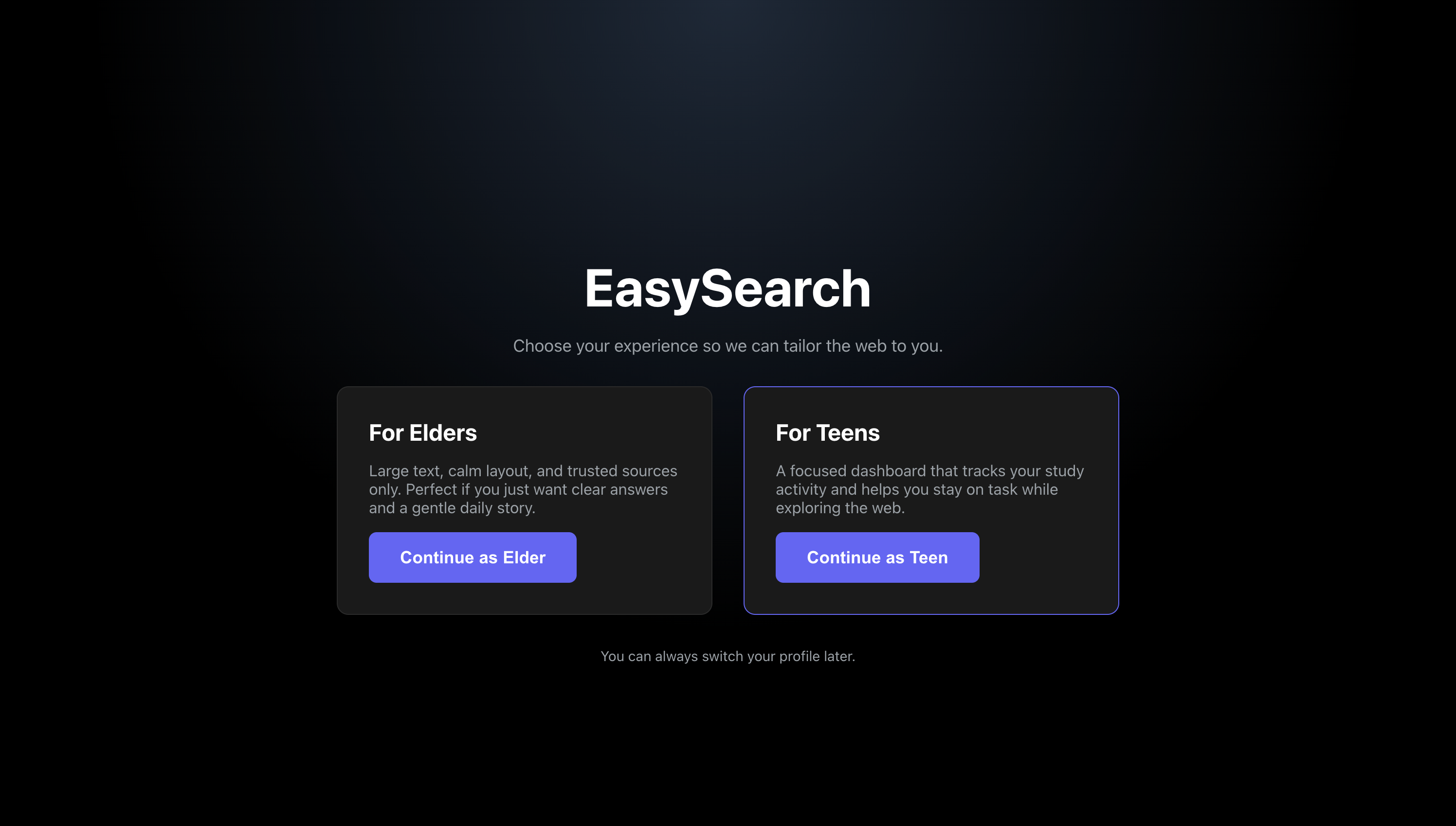
Start Screen
-
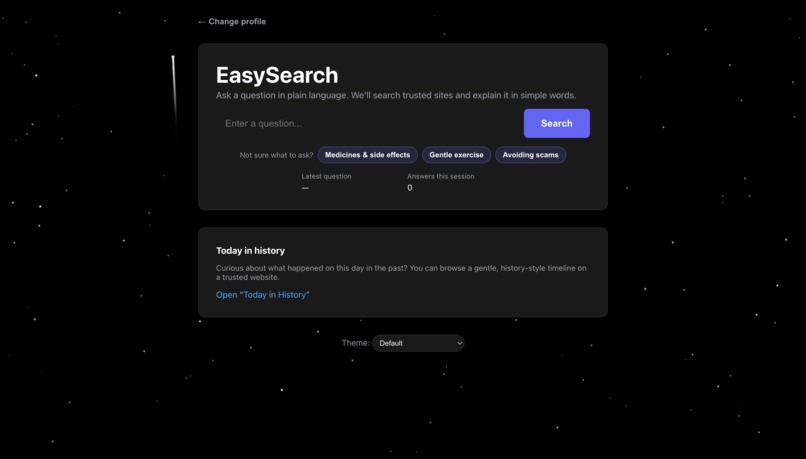
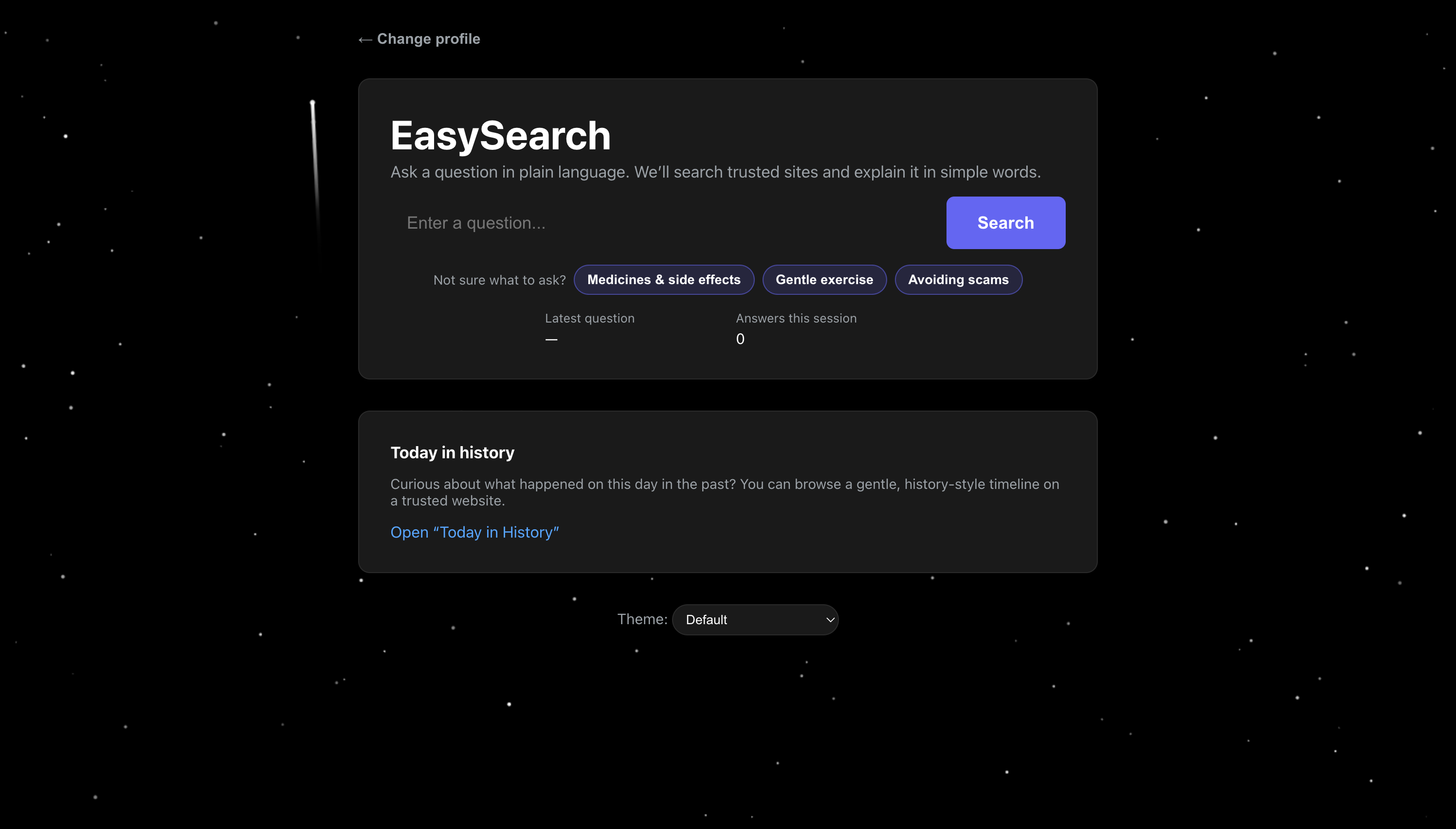
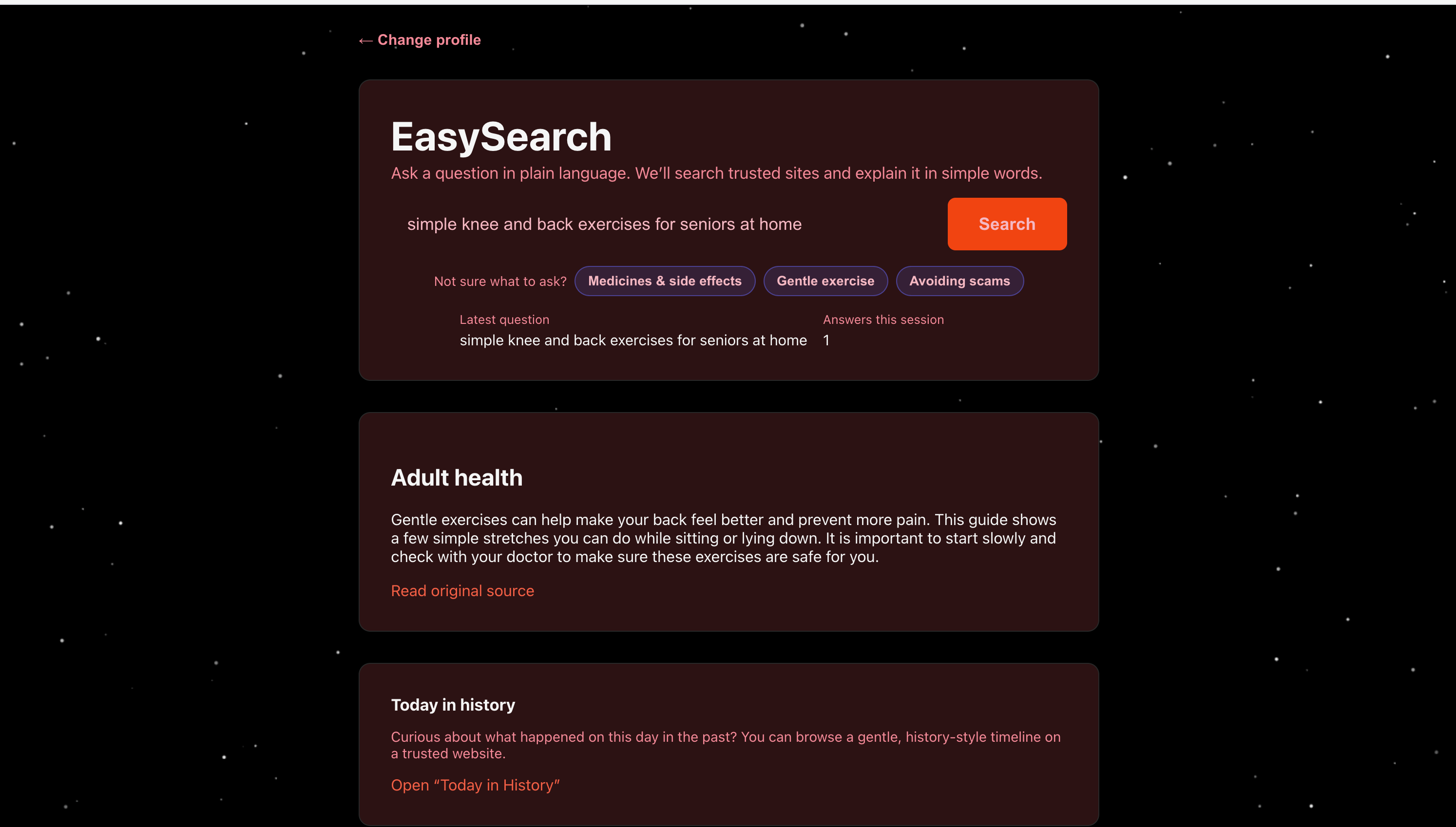
Screen for Elders
-
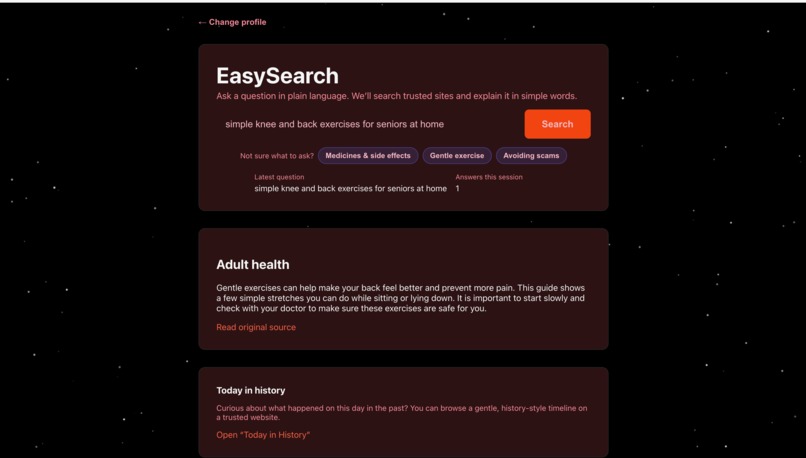
Screen for Elders with Search Results (another theme)
-
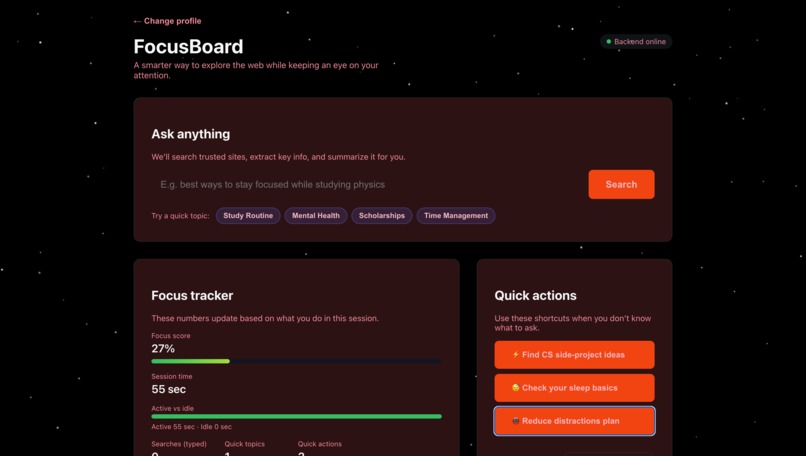
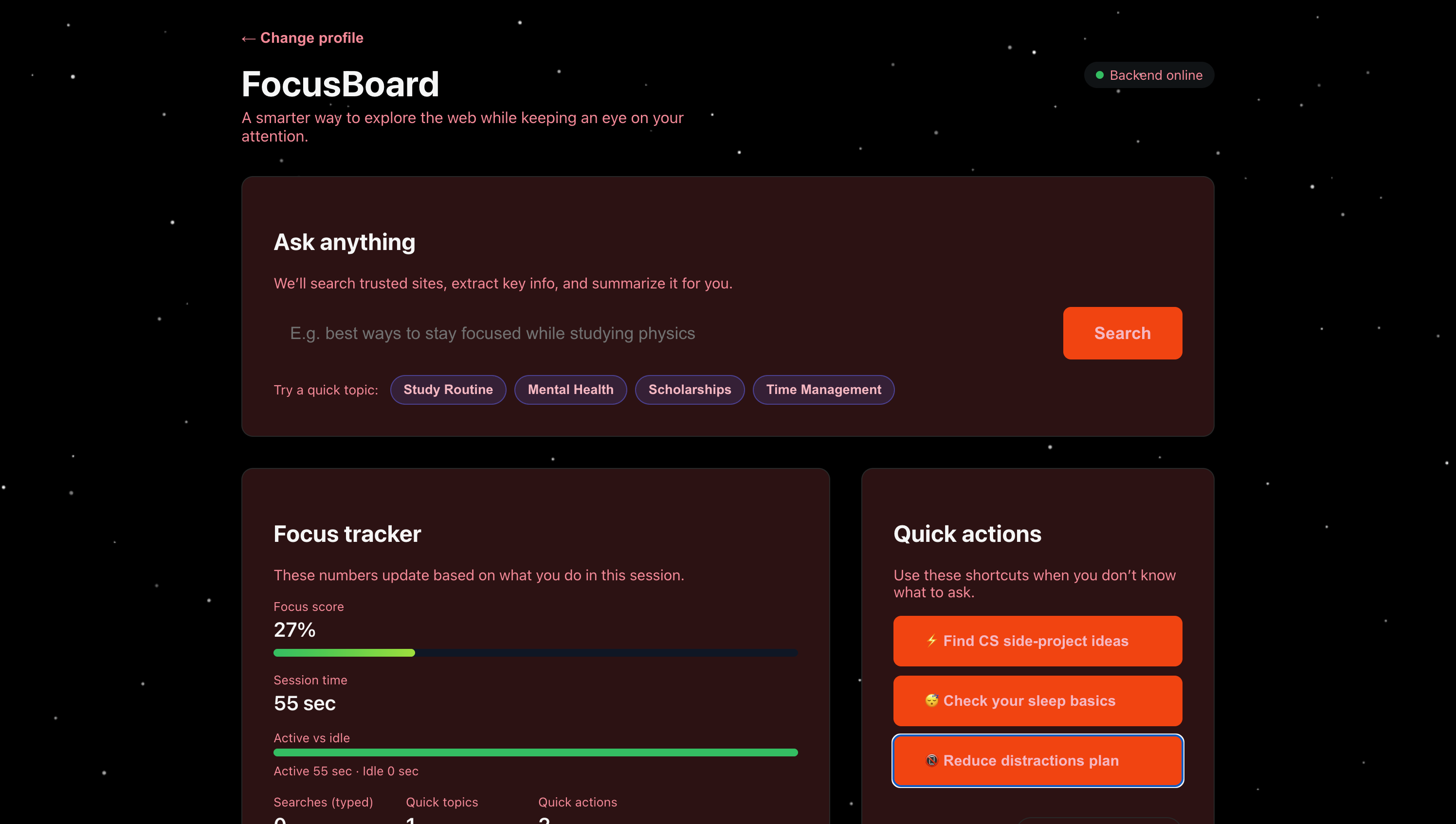
Screen for Teenagers
-
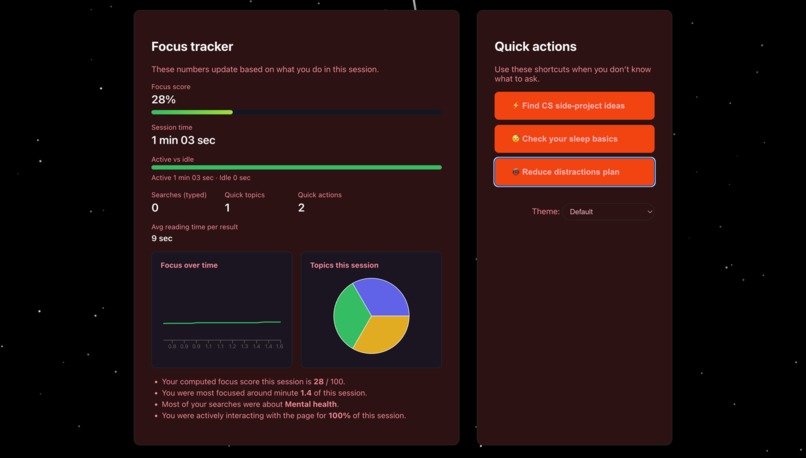
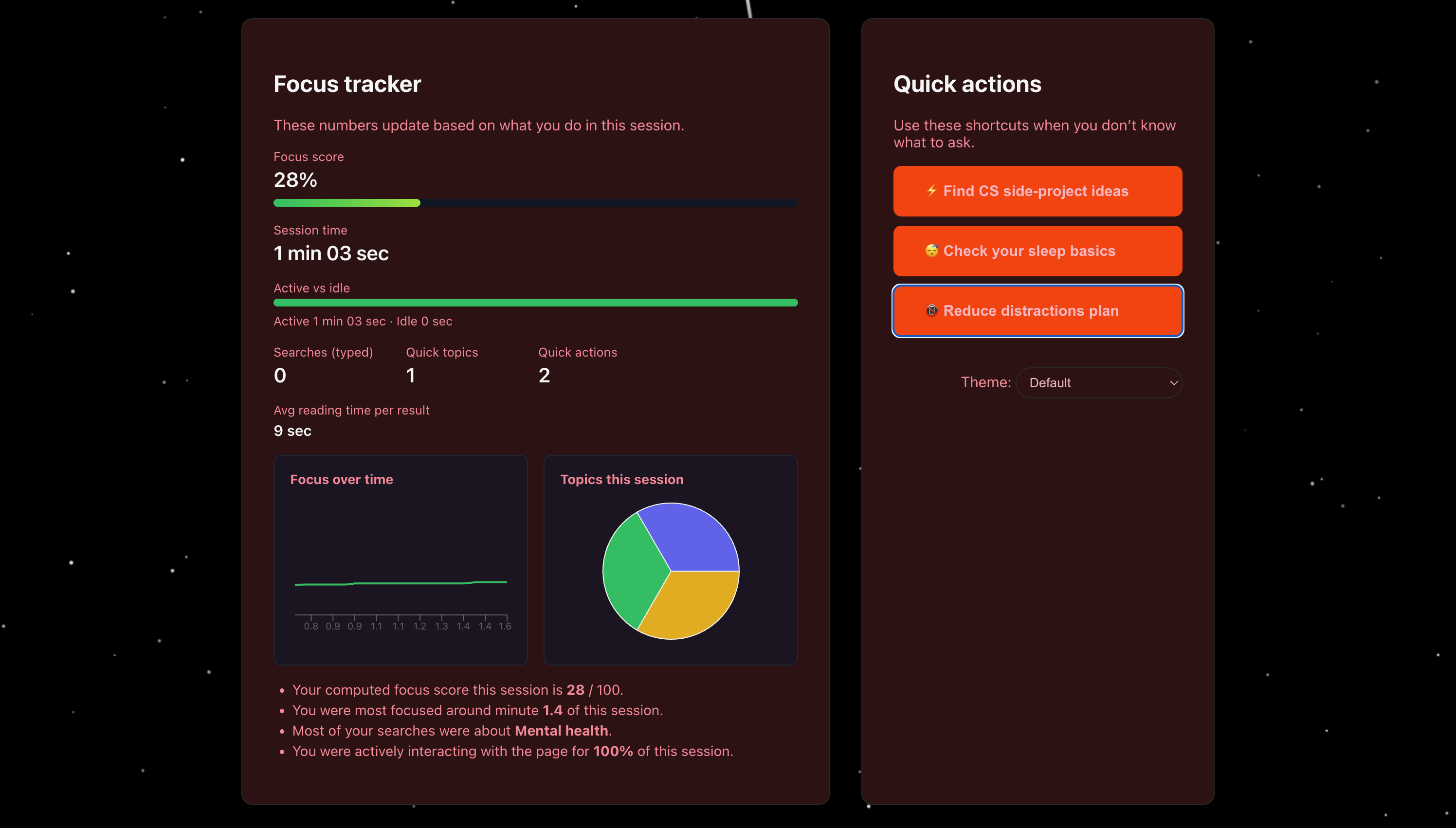
Screen for Teenagers (continued)
-
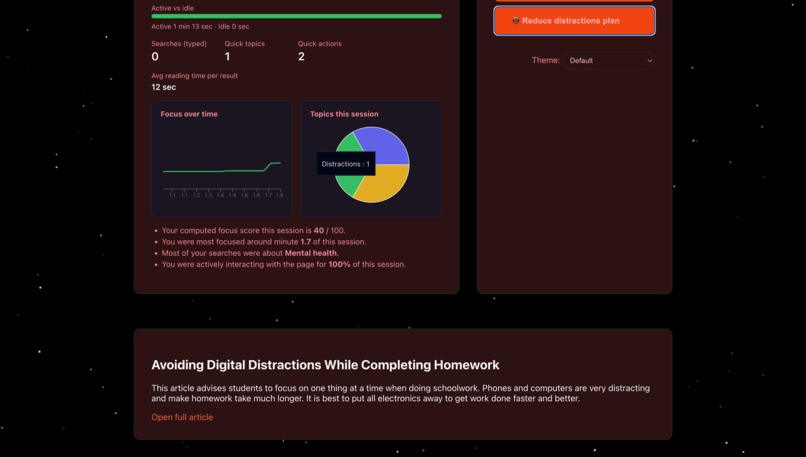
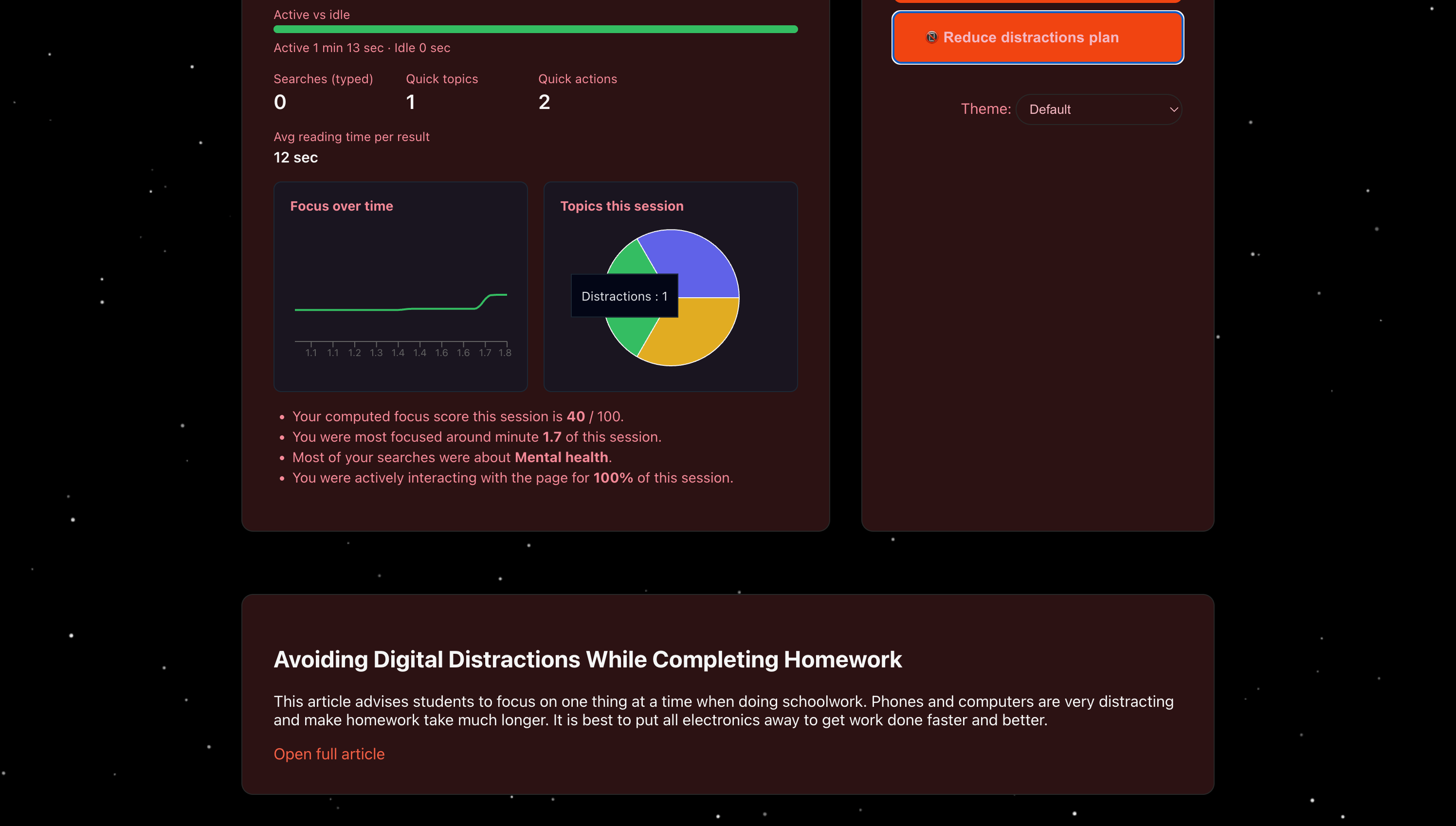
Screen for Teenagers Showing Results
Inspiration
The modern web is optimized for grabbing attention, not for helping people think clearly. Teenagers live inside platforms engineered for infinite scroll, notifications, and outrage - every screen is designed to keep them there a little longer, not to help them learn. Older adults face the same system from the opposite angle: cluttered pages, tiny text, dark patterns, and a constant sense of “Where do I even click?!” Two generations, two challenges, one shared reality - the internet is built to maximize engagement and profit, not human well-being. We wanted to build the opposite: a gentle space that treats attention as something precious, not exploitable. A tool where you ask a question and get a trusted, readable answer - without ads, cookie banners, or visual noise. For teens, it becomes a small act of resistance: a dashboard that helps them see and shape their own focus, instead of being shaped by algorithms. For elders, it restores clarity and confidence to something that should never have felt hostile in the first place. In a digital world optimized to steal your focus, we’re deliberately building one of the few places that gives it back - powered by AI, but aligned with people, not with ad revenue.
What it does
Our tool creates a calm, distraction-free layer on top of the web where teens and older adults can search, read, and reflect without being bombarded. Under the hood it uses AI - specifically Gemini’s Generative AI API - to transform messy, long-form pages into short, trustworthy explanations tailored to each audience. It provides: • A simplified search flow powered by a custom backend endpoint that filters results to .gov, .edu, and .org domains, reducing clickbait and low-quality sources. • Server-side HTML extraction (Axios + jsdom) that strips out scripts, sidebars, ads, footers, and other clutter, leaving only the core article content. • Gemini-based summarization that turns these long pages into short, accessible explanations - gently worded for elders, concise and information-dense for teens, with separate prompts for each mode. • A teen “FocusBoard” dashboard with: ◦ a built-in focus timer, ◦ live session stats (active vs idle time, reading duration, search count, topic variety), ◦ a computed attention score, ◦ and visualizations (line chart + pie chart) that show how their focus and topics evolved during the session. • Elder-friendly mode with larger defaults, high-contrast themes, simplified wording, and a calmer layout - one clean answer at a time, with no extra cognitive load. • Lightweight, privacy-first focus tracking using client-side event listeners (scroll, mouse, keyboard) to infer engagement without any accounts, cookies, or server-side storage. • A unified but adaptive UI: a shared visual language (themes, starfield background, layout) that shifts behavior based on who’s using it, instead of forcing everyone into the same “engagement funnel.” The result is a search experience that feels intentional instead of addictive, respectful instead of extractive - designed to help people think, not just click.
How we built it
We combined a lightweight Node.js backend with a fast React + Vite frontend and a focused scraping + summarization pipeline centered around the Gemini API. Under the hood: • Node.js + Express serve API routes for: ◦ search (/api/search), ◦ page fetch and content extraction (/api/fetch-and-extract), ◦ and summarization (/api/summarize). • Google Custom Search API retrieves results exclusively from trusted .gov, .edu, and .org domains to reduce misinformation and SEO-optimized noise. • Axios + jsdom download and parse the raw HTML, aggressively removing , <style>, <nav>, <footer>, <aside>, and similar “chrome” elements so we can isolate the main content region. • Gemini (Generative AI) API sits at the heart of the pipeline: ◦ We call Gemini on the cleaned text to generate summaries. ◦ We use different prompts and constraints for teen vs elder mode (e.g., 2-4 short sentences, no jargon for elders; tighter, structured summaries for teens). ◦ Gemini effectively becomes our “translator” from the chaotic web into human-friendly explanations. • React + Vite power a smooth single-page application with hot reload, mode switching, and a clean, card-based layout for both audiences. • Custom client-side focus tracking: ◦ We listen to scroll, mousemove, and keydown events. ◦ We infer active vs idle periods and track how long a user spends reading after each query. ◦ All of this is computed locally in memory for the current session only. • Local-only analytics: no database, no user accounts, no tracking pixels. Focus metrics and session stats live and die in the browser tab. • Recharts renders: ◦ a focus-over-time line chart, ◦ and a topic distribution pie chart, giving teens a visual reflection of how they used their time. • CSS variables and theme system allow us to switch between multiple high-contrast dark themes and keep elder mode readable while teen mode feels modern and “dashboard-like.” • Starfield background & motion provide a subtle, ambient layer that makes the experience feel alive without becoming another distraction. Every technical decision - from Gemini integration to DOM parsing to on-device analytics - was made to support a calmer, more humane search experience.</p> <h2 id="challenges-we-ran-into">Challenges we ran into</h2> <p>Building a dual-mode, AI-powered search layer that respects privacy and attention surfaced a lot of low-level challenges: • Inconsistent HTML in the wild Real webpages were full of nested ad containers, overlays, broken <div> hierarchies, and dynamic scripts. We had to iteratively tune our jsdom extraction logic, layering custom removal rules and fallback selectors to consistently pull out meaningful text blocks without losing context. • Making Gemini behave differently for teens and elders A single generic prompt to the Gemini API wasn’t enough. We had to experiment with instruction ordering, sentence limits, explicit “no jargon” constraints, and different tones to: ◦ keep elder summaries gentle and reassuring, ◦ keep teen summaries direct, specific, and information-dense, while still preserving factual accuracy from the source. • Maintaining two UXs in one codebase Teen mode needed continuous analytics updates, charts, and quick-action buttons. Elder mode needed as little visual complexity as possible. That forced us to carefully separate component logic, use CSS variables for typography and spacing, and isolate state so that one mode never “leaked” visual complexity into the other. • Client-side focus tracking without surveillance We wanted meaningful attention metrics without turning into yet another tracking tool. Designing a model based solely on browser events (scroll, mousemove, keydown) and timestamps - with no cookies, identifiers, or backend logs - meant carefully defining idle thresholds, event throttling, and how we translate raw events into an understandable “focus score.” • Pipeline latency with live charts on top Fetching HTML, parsing the DOM, calling Gemini, then updating React state and charts can easily feel sluggish. We had to debounce actions, batch state updates, and limit the frequency and resolution of chart updates so that the UI stayed responsive even while the AI and network were doing real work. Each challenge pushed us to refine both the architecture and the ethics of the system, making it not just more robust, but also more aligned with the kind of internet we actually want to live in.</p> <h2 id="accomplishments-that-we-re-proud-of">Accomplishments that we’re proud of</h2> <p>Even in a short hackathon window, we built something that feels closer to a product than a demo - and that takes a stand against the default “maximize engagement at all costs” model. Highlights: • A full end-to-end pipeline: search → trusted result selection → HTML extraction → Gemini summarization → focus analytics → visual feedback, all wired and working. • Real AI in the loop, not just mocked: our Gemini integration is central to the experience, transforming raw pages into mode-specific summaries that are actually readable and useful. • Dual modes that serve real needs: ◦ teen “FocusBoard” with genuine attention stats and topic breakdowns, ◦ elder mode that feels safe, readable, and unhurried. • Authentic focus metrics: attention scores are derived from actual behavior (active vs idle time, reading duration, scroll depth, query patterns), not hard-coded numbers. • Accessibility improvements baked in: larger text, high-contrast themes, simplified language, and a calmer flow for elders - not as an afterthought, but as a design constraint. • Polished UI and visuals: a clean layout, starfield background, smooth transitions, and live charts that make attention visible without feeling like surveillance. • Privacy-first by design: all analytics are computed locally in the browser, never stored, never sent to our server, and never tied to an identity. For a world that keeps shipping products to capture more attention, we’re proud we shipped one that helps people reclaim some of it.</p> <h2 id="what-we-learned">What we learned</h2> <p>This project forced us to get very practical about AI, parsing, performance, and humane UX: • DOM extraction is half art, half engineering A generic “readability” pass wasn’t enough. We had to write our own heuristics: stripping <script>, <style>, <nav>, <footer>, ad containers, and then prioritizing dense <p> groups inside <article>/<main> or similar anchors. • Prompt design for Gemini matters as much as the model We saw huge differences in output from small changes in prompts: reordering instructions, specifying audience (“explain to an elderly person”), limiting sentence counts, and explicitly disallowing jargon all improved consistency. • Client-side engagement tracking is surprisingly powerful By combining mousemove, scroll, keydown events with timestamps and scroll depth, we could approximate focus without needing cookies, sessions, or user accounts - proof that useful analytics don’t have to be invasive. • Latency is a pipeline problem, not just an AI problem Fetch time, HTML parsing, LLM inference, and React rendering all add up. We learned to optimize each step (debouncing, throttling, batching state updates, and limiting chart data) instead of blaming everything on the AI call. • React performance rests on state boundaries Keeping focus metrics, chart data, and search results in well-scoped state slices, and memoizing props where needed, made a big difference in how “live” the dashboard felt. • Accessibility is concrete, not abstract Bigger base font sizes, consistent high-contrast themes, simplified flows, and fewer simultaneous UI elements did more for elder usability than any number of abstract “accessibility” intentions. Most importantly, we learned that you can use advanced tools like Gemini and real-time analytics without automatically sliding into exploitative patterns - if you commit to different goals from the beginning.</p> <h2 id="what-s-next-for-this-project">What’s next for this project</h2> <p>There’s a clear path from hackathon prototype to a more capable, still-ethical tool: • Smarter, adaptive attention model Move beyond a single static formula and adapt scoring based on per-session patterns (scroll velocity, dwell-time clusters, break frequency) while still staying fully local on the device. • More robust multi-pass content extraction Add a secondary parser that uses density-based scoring and structural heuristics to better handle irregular or highly dynamic pages. • Cached Gemini summarization Introduce local/session caching so repeated queries can reuse summaries, reducing latency and cost while keeping everything private. • Goal-based focus sessions Let teens define sessions like “30 minutes of research, max 5 queries” with checkpoint prompts and friendly summaries at the end. • Session history on device Use IndexedDB or similar local storage to let users keep a personal archive of queries, summaries, and focus stats - still without any server-side profiles. • Deeper accessibility & mobile support Extend the CSS variable system for granular scaling (text, spacing, button sizes) and redesign layouts for mobile screens with touch-event tracking. • Optional voice layer Add TTS and speech input so elders (and teens with accessibility needs) can use the tool hands-free.</p>
Built With
- axios
- clientsideeventtracking
- cssvariables
- express.js
- geminiapi
- googlecustomsearchapi
- htmldomparsing
- jsdom
- keyboardevents
- mouseevents
- node.js
- react
- recharts
- scrollevents
- themesystem
- vite

Log in or sign up for Devpost to join the conversation.