-
-

Improved JIRA Diff Icon
-
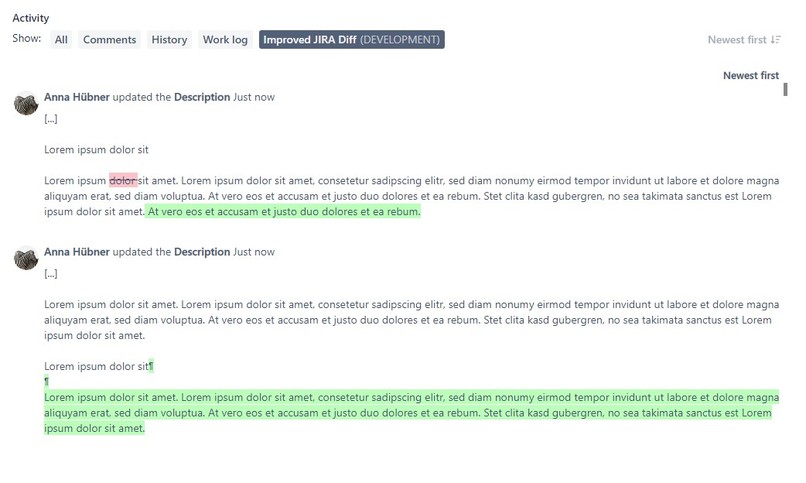
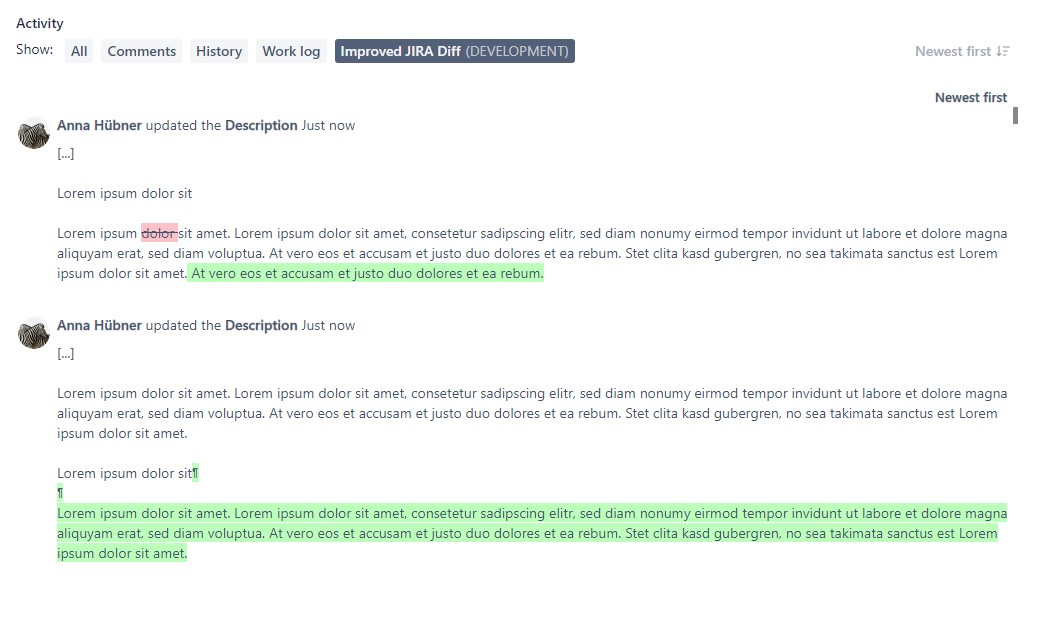
Display of changes in a text field.

Inspiration
We have already developed this plugin for JIRA Server. Since some users have requested this feature for JIRA Cloud as well, we set out to implement it.
What it does
Instead of using the opaque before → after display for text changes in tickets of standard Jira, you can now easily grasp differences with the help of color. All added words and sentences are marked green, while removed sections are crossed out and marked red. Also, if the change is part of a bigger block of text, it is truncated down to the immediate context.
How we built it
We build a Forge app with JavaScript and React. To determine the differences between the original and the new values of the text fields, we use https://github.com/google/diff-match-patch
Challenges we ran into
The first challenge was to get used to the new way of developing atlassian plugins. In the course of time, other difficulties arose, such as the translation of the plugin into German. Sometimes we stopped the development to wait for updates for Forge.
What we learned
Since our team is mainly programming with Java and Maven, we learned a lot about Node, JavaScript and React.


Log in or sign up for Devpost to join the conversation.