Inspiration
The genesis of ImgHunt came from my own experiences browsing the web. I often found myself wanting to save or collect interesting images I encountered while surfing across dozens of tabs. Sometimes I'd see a perfect reference image but lose track of which tab contained it. Other times, I needed to quickly extract all images from a research session but found the manual process tedious and time-consuming.
As a visual designer and web developer, I frequently need to collect reference materials and inspiration from various sources. Traditional bookmarking wasn't efficient enough - I wanted to focus on the visual content directly. After searching for a solution and finding existing tools either too complex or too limited, I decided to build ImgHunt to solve this specific problem.
What it does
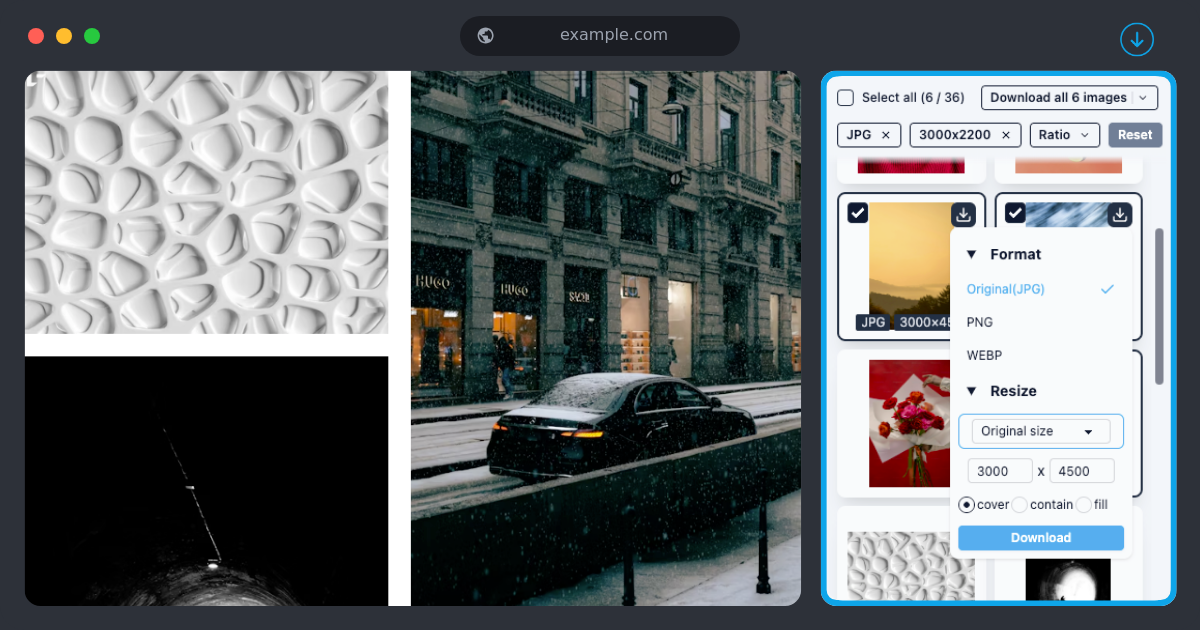
ImgHunt is a browser extension that helps users discover, organize, and extract images from their browsing sessions. The extension has two primary modes:
Current Tab Mode: Scans the active tab and displays all images found on the page in a clean gallery interface. Users can filter by image size, type, and even dominant colors. This mode is perfect for quickly extracting all visual content from a single website.
All Tabs Mode: The true power of ImgHunt lies in its ability to scan across all open tabs, creating a unified gallery of all images currently loaded in your browser. This solves the "which tab had that image?" problem and provides a comprehensive view of all visual content across your browsing session.
Additional features include:
- Quick image download options (original size or custom dimensions)
- Batch selection and download of multiple images
- Smart image filtering to exclude tiny icons and UI elements
- Image collections that persist between browsing sessions
- Quick search within discovered images by auto-generated tags
- Image information preview showing dimensions, file size, and source page
ImgHunt respects privacy by operating entirely within the browser - no data is sent to external servers unless the user explicitly chooses to use the optional cloud backup feature for their collections.
How I built it
Building ImgHunt required a strategic approach to browser extension development with a focus on simplicity and performance. Here's how I built it:
Technology Stack
- Extension Framework: I built ImgHunt using Plasmo, a framework specifically designed for browser extension development. Plasmo simplified the development process by handling much of the boilerplate code and providing a modern development experience with hot reloading.
- Frontend: For the user interface, I used React with Tailwind CSS for styling. Tailwind's utility-first approach allowed me to create a polished UI quickly without writing custom CSS, while maintaining a consistent design language throughout the extension.
- Storage: The extension utilizes Chrome's Storage API for preserving user preferences and image collections between browsing sessions.
Development Process
Research & Planning: I began by researching the limitations of existing image collection tools and identifying the key features that would make ImgHunt valuable for users.
Setting up with Plasmo: I initialized the project using Plasmo's CLI, which provided the necessary structure for a modern browser extension including popup, options page, and background script templates.
Core Functionality: The first implementation focused on scanning the DOM of the active tab to identify and extract image elements. I wrote custom selectors to find
<img>tags, CSS background images, and other image sources.Image Processing & Filtering: I developed algorithms to:
- Filter out tiny images and UI elements based on dimensions
- Extract basic metadata (dimensions, file type, alt text)
- Create thumbnails for the gallery view using canvas elements
- Determine image quality based on size and resolution
Multi-tab Functionality: For the all-tabs scanning feature, I implemented a message-passing system between the extension's background script and content scripts injected into each tab. This allowed for asynchronous collection of images across all open tabs without freezing the browser.
User Interface: The UI was designed to be minimalist yet functional, with a focus on the gallery view and intuitive filtering options. Tailwind CSS was instrumental in creating a responsive grid layout that adapts to the number and size of discovered images, with smooth transitions and a cohesive dark/light mode that respects user preferences.
Performance Optimization: To ensure the extension remained responsive even when scanning dozens of tabs, I implemented:
- Lazy loading of images in the gallery view
- Throttling and debouncing of scan operations
- Incremental processing of large image sets
- Efficient caching of already processed images
Testing & Iteration
Throughout development, I regularly tested ImgHunt across various websites with different structures and image implementations. Based on my own usage patterns and pain points, I continuously refined the detection algorithms and user interface.
The final product is a lightweight yet powerful browser extension that focuses on doing one thing extremely well: helping users discover, organize, and extract images from their browsing sessions without unnecessary complexity.
Challenges I ran into
Accomplishments that I'm proud of
Developing ImgHunt has been a rewarding journey with several accomplishments that I'm particularly proud of:
Technical Achievements
Cross-tab Image Discovery: Successfully implementing a system that can efficiently scan all open browser tabs without causing performance issues was technically challenging. The asynchronous messaging architecture I developed maintains browser responsiveness even when processing dozens of tabs simultaneously.
Intelligent Image Detection: The extension can identify images across various implementation methods - not just standard
<img>tags, but also CSS backgrounds, picture elements, and even some canvas renderings. This required deep understanding of how images are embedded in modern websites.Minimal Footprint: Despite its powerful functionality, ImgHunt maintains a remarkably small memory and CPU footprint. Through careful optimization and efficient DOM processing, the extension runs smoothly without draining system resources.
Clean Architecture: I'm proud of the clean separation of concerns in the codebase, with distinct modules for image discovery, processing, storage, and UI rendering. This makes the code maintainable and extensible for future features.
User Experience Wins
Intuitive Interface: Creating a UI that feels natural and intuitive was important to me. Users can immediately understand how to use ImgHunt without a tutorial, thanks to thoughtful design decisions and clear visual hierarchy built with Tailwind CSS.
Fast Response Times: The extension provides immediate feedback at each step, with smooth loading states and transitions that make the experience feel polished and responsive.
Thoughtful Details: Small touches like remembering user preferences, keyboard shortcuts for power users, and helpful empty states when no images are found contribute to a refined user experience.
Personal Growth
Solo Development: This was my first major browser extension project completed entirely on my own, from concept to deployment. Managing all aspects of development taught me valuable lessons about project scoping and execution.
Problem-Solving: Working through the challenges of browser extension development, particularly around permissions and cross-tab communication, significantly improved my debugging and problem-solving skills.
User-Centered Design: This project reinforced the importance of building for real user needs - because I was solving my own pain point, I was able to create something that genuinely improves my browsing workflow.
Shipping Mindset: Rather than endlessly polishing features, I focused on getting a functional version shipped and then iterating based on actual usage. This approach resulted in a more focused product that solves its core problem well.
Above all, I'm proud that ImgHunt has become an essential tool in my own daily browsing, genuinely saving me time and frustration when collecting images across the web. Seeing it solve the exact problem I set out to address is the most satisfying accomplishment of all.
What I learned
Developing ImgHunt has been an incredible learning journey that stretched my skills and understanding in several areas:
Technical Skills
Browser Extension Architecture: Before ImgHunt, I had limited experience with browser extension development. I learned how to properly structure an extension with background scripts, content scripts, and popup interfaces, and how these components communicate with each other through Chrome's messaging API.
Working with the DOM: I gained deep insights into DOM traversal and manipulation, particularly how to efficiently query and extract image elements from complex modern websites. I learned that many sites implement images in non-standard ways that require specialized detection techniques.
Plasmo Framework: Learning Plasmo was a game-changer for my development workflow. I now understand how to leverage this framework to streamline browser extension development, including its hot-reloading capabilities and simplified manifest generation.
Performance Optimization: I learned crucial techniques for ensuring smooth performance in browser extensions, particularly when dealing with potentially resource-intensive operations like scanning multiple tabs. This included implementing throttling, debouncing, and incremental processing patterns.
Browser Storage APIs: I became proficient with Chrome's storage APIs, understanding the differences between local and sync storage, and learning how to structure data efficiently for extension persistence.
Design & UX Principles
Tailwind CSS Mastery: ImgHunt was my first project using Tailwind CSS extensively, and I've grown to appreciate its utility-first approach. I learned how to create consistent, responsive designs much more quickly than with traditional CSS.
Progressive Enhancement: I implemented features in layers, ensuring the core functionality worked well before adding advanced features. This taught me the value of focusing on the essential user needs first.
Error States & Edge Cases: I learned to anticipate and design for various error states and edge cases, such as websites that block content scripts, images that fail to load, or extremely large quantities of images.
Project Management
Scope Management: I learned to identify feature creep early and maintain focus on the core value proposition. Several times during development, I caught myself adding "nice-to-have" features that would have delayed shipping.
Iterative Development: Rather than trying to build the perfect product in one go, I adopted an iterative approach where I continuously tested and refined features based on actual usage.
Dogfooding: Using my own product daily during development revealed issues and opportunities that weren't apparent from just looking at the code. This reinforced the importance of being your own user.
Personal Insights
Problem Definition Matters: I realized that clearly defining the specific problem I wanted to solve led to a more focused and useful product. The temptation to solve adjacent problems was strong, but resistance led to a better core product.
Simple Solutions Win: Often, my first approach to a technical challenge was overly complex. I learned that taking a step back and seeking simpler solutions usually resulted in more maintainable and performant code.
User Privacy Considerations: Developing a tool that interacts with user browsing made me much more conscious of privacy implications. I made deliberate choices to keep processing local and limit data collection, which I believe resulted in a more ethical product.
The Joy of Utility: There's a special satisfaction in building something that solves a real problem in my daily workflow. This project reminded me that the best software often comes from scratching your own itch.
Perhaps the most valuable lesson was the confidence gained from taking a project from concept to completion entirely on my own. This end-to-end ownership has prepared me for more ambitious projects in the future, with a deeper appreciation for all aspects of the software development lifecycle.


Log in or sign up for Devpost to join the conversation.