-
-
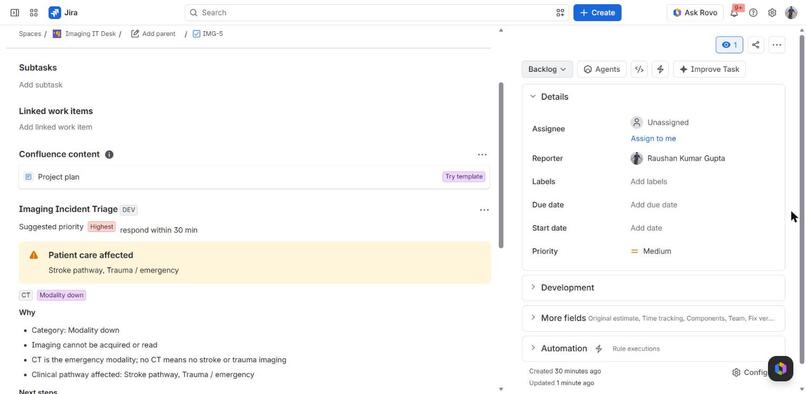
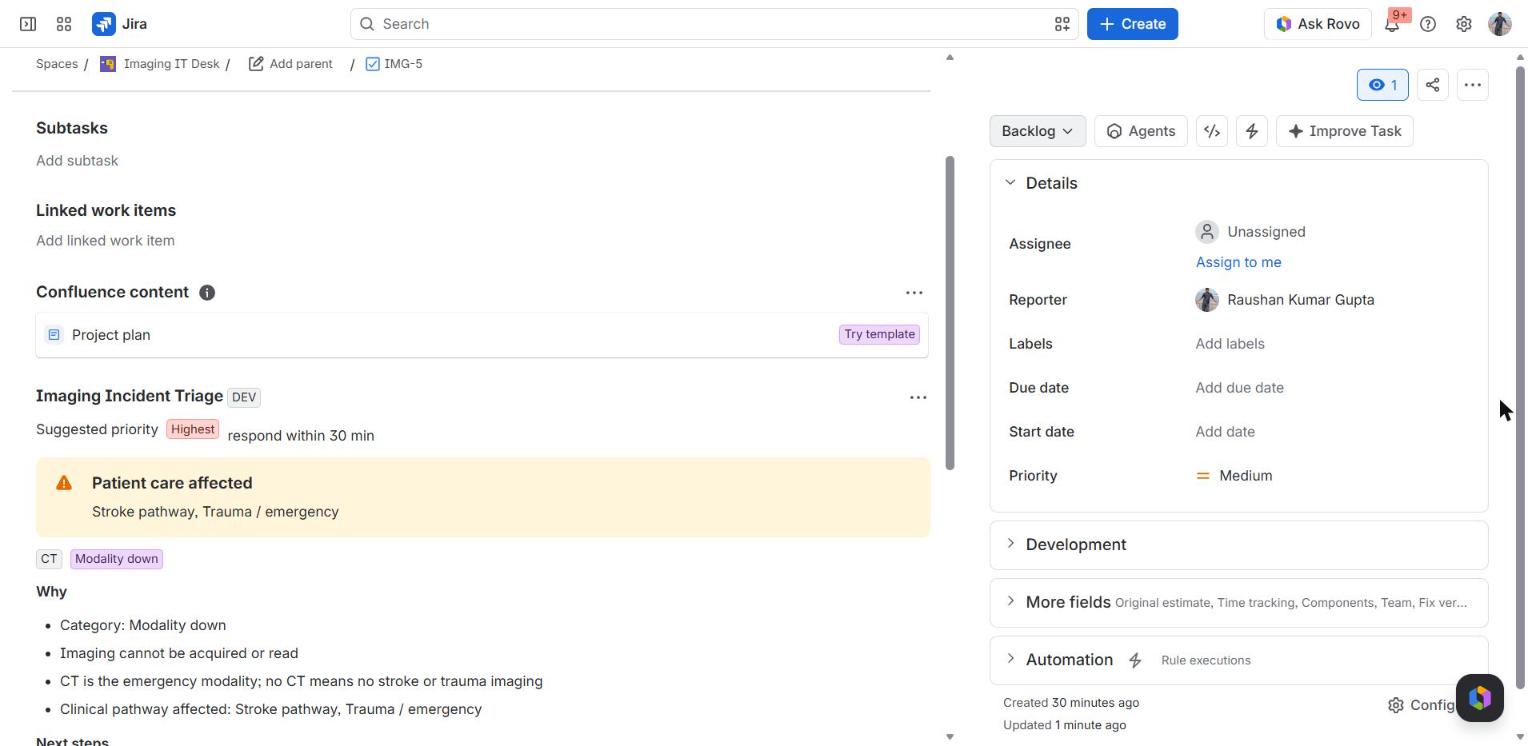
CT down + code stroke: Highest, respond within 30 min, stroke pathway warning
-
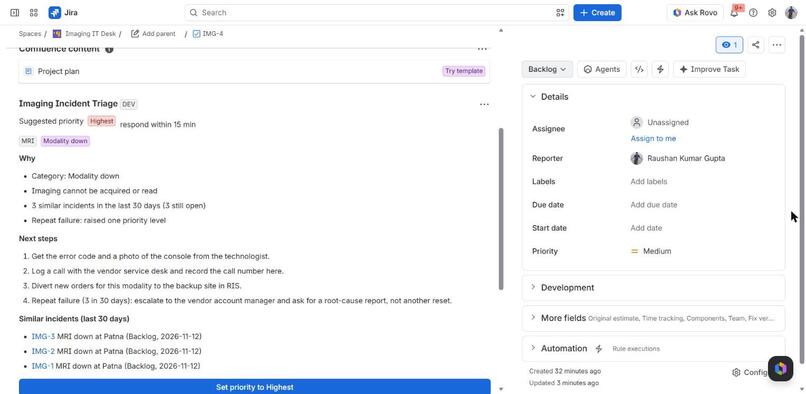
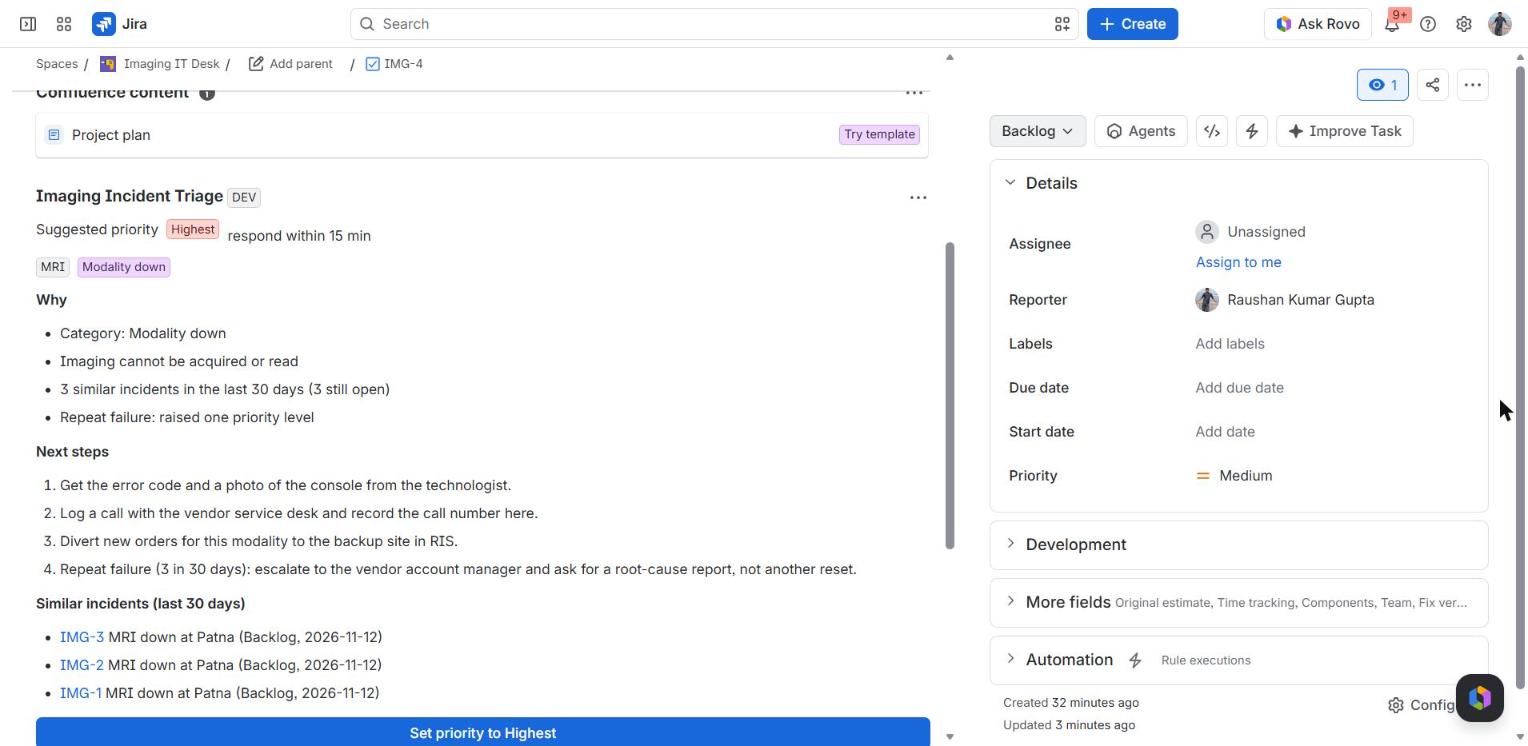
4th MRI failure in 30 days: lists IMG-1..3, raises priority, vendor escalation
-
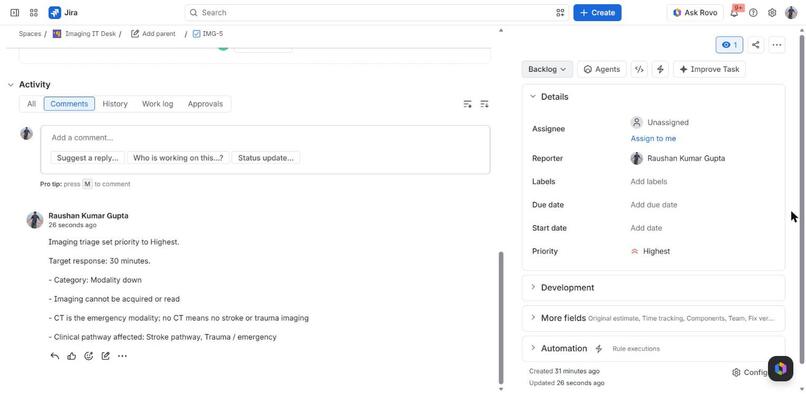
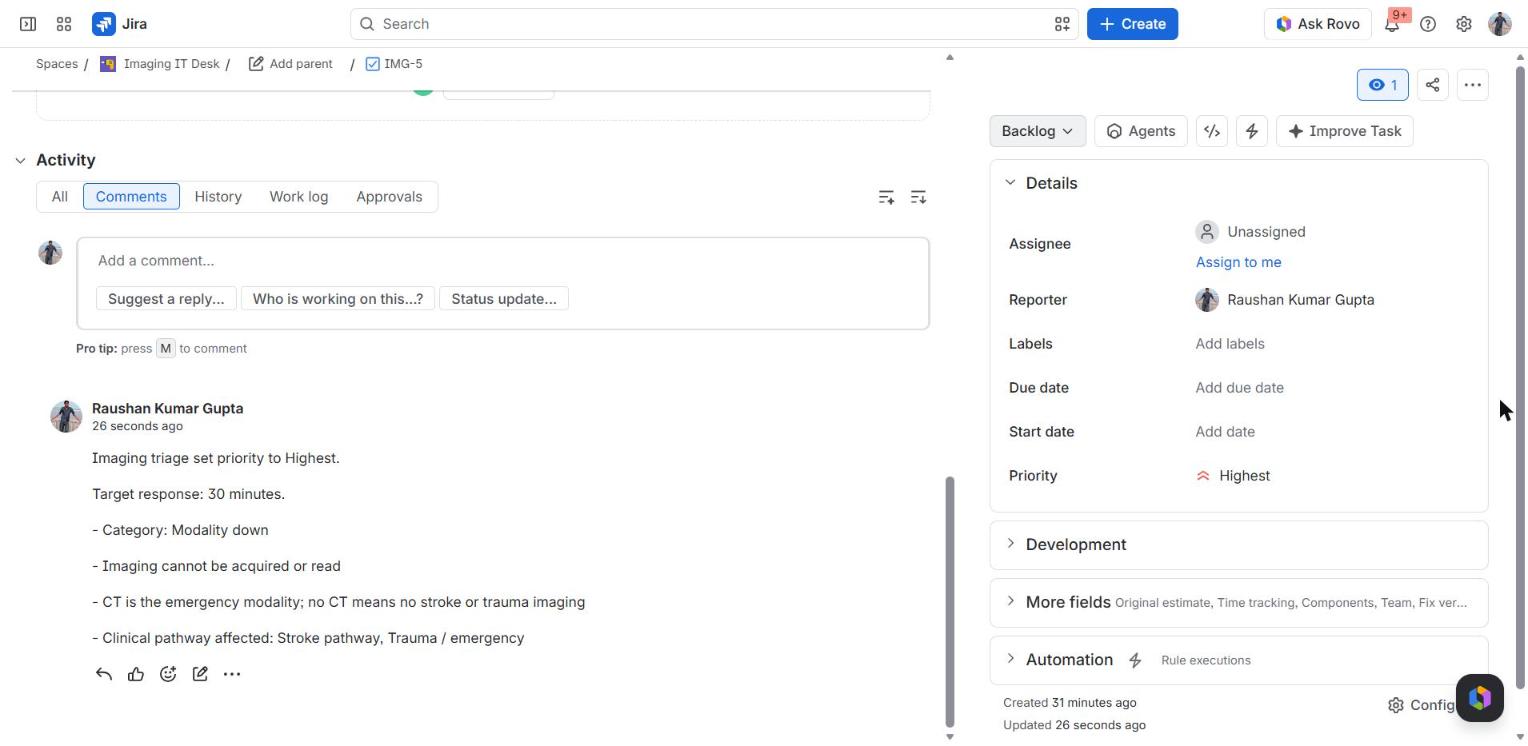
One click: priority set to Highest and the reasons posted as a comment
-
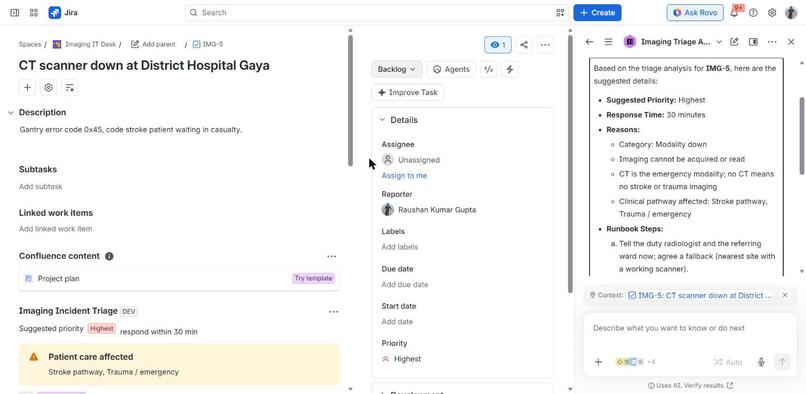
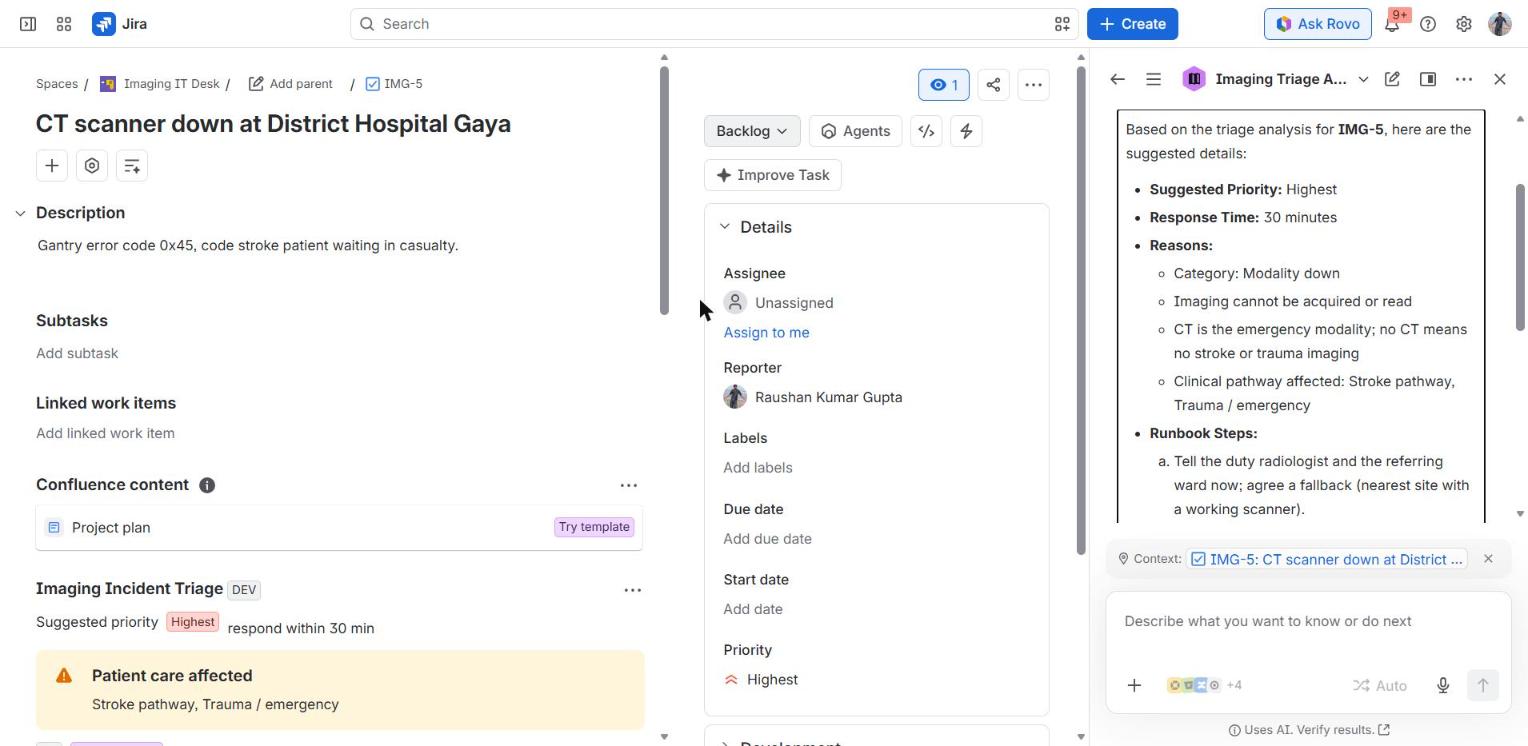
Rovo: Imaging Triage Agent answers "Triage IMG-5" via a read-only Forge action
Inspiration
I run the PACS and teleradiology infrastructure for a statewide government hospital network in Bihar, India. Our IT desk gets tickets like "CT not working" and "images not coming" from dozens of district hospitals. In a generic service desk they all look the same. They are not: a CT scanner down while a stroke patient waits in casualty has a 30-minute window, while a slow viewer at one site can wait. Agents who are new to imaging cannot tell the difference, and repeat failures of the same scanner get reset again and again instead of escalated.
What it does
Imaging Incident Triage brings clinical context into Jira (and Jira Service Management projects).
- Issue panel. Reads the ticket and shows a suggested priority, a target response time, the modality (CT, MRI, X-ray, ultrasound, mammography, PACS), the category (modality down, images not reaching PACS, worklist, viewer, network) and how many sites are affected.
- Clinical warning. Flags the stroke, trauma and STAT pathways and moves those tickets to Highest with a 30 / 60-minute target.
- Context from history. Searches the same project (JQL) for similar incidents in the last 30 days. Three or more repeats raise the priority one level and add "escalate to the vendor for a root-cause report, not another reset". An open duplicate is offered for linking.
- Runbook. Concrete next steps per category: tell the duty radiologist, vendor call, DICOM C-ECHO, MWL query, divert orders to a backup site.
- One click. "Set priority" updates the work item and posts the reasons as a comment, so the decision is visible to everyone.
- Rovo agent. "Imaging Triage Agent" calls the same logic through a read-only Forge action, so a coordinator can ask "Triage IMG-5" or "Is IMG-4 a repeat failure?" in Rovo chat.
How we built it
- Forge app on the Node.js 22 runtime. Modules:
jira:issuePanel(UI Kit,render: native),rovo:agent,action(the Rovo action) and twofunctionhandlers. - All triage rules live in one pure module (
src/triage.js, no Forge imports) covered by 11node --testcases, so the panel and the agent always agree. - Jira REST v3: read the issue,
POST /search/jqlfor 30-day history, and update priority + add a comment only when the user clicks. Everything runsasUser, so the app only sees what the user can already see. - No external services and no storage: the app reads ticket text that is already in Jira.
Testing on a real site
Deployed to development and production and installed on a Jira demo site. Created an IMG project with seven incidents (four "MRI down at Patna", a CT outage with a code-stroke patient in Gaya, a slow viewer at five hospitals, and a vague "Please help"). Verified on the live site: the CT ticket goes to Highest / 30 min with a stroke warning; the fourth MRI ticket lists IMG-1..3 and is raised to Highest / 15 min with a vendor escalation; "Set priority" changes the field and posts the comment; the Rovo agent answers "Triage IMG-5" with the same result.
Challenges we ran into
- The first live run failed with
out_namespaceObject is not a constructor: the Forge packages are CommonJS and my package is ESM, so the bundler handed back the module object as the default import. Fixed by unwrapping.default. - Keyword matching that does not misfire: an early version matched "er" (emergency room) inside "viewer". Whole-word matching is now pinned by tests.
- Response targets that follow the raised priority (a repeat-failure bump now changes the target from 60 to 15 minutes).
Accomplishments that we're proud of
- A triage panel that an engineer with no radiology background can act on in seconds.
- The same tested logic exposed to people (panel) and to agents (Rovo action).
What we learned
Context changes the answer: the same words "MRI down" mean "reset it" the first time and "call the vendor" the fourth time. Jira history plus a small amount of domain knowledge is enough to make that call.
What's next for Imaging Incident Triage
- Read site, modality and keyword lists from a Confluence page so each hospital network can tune the rules without a redeploy.
- Teamwork Graph: link incidents to the vendor and site entities.
- Marketplace listing.
Bonus: Best Agents (Rovo)
The Rovo agent is not a chat wrapper. Its triage-imaging-incident action returns structured triage (priority, response minutes, clinical flags, similar incidents, runbook) computed by the same tested code as the panel. The action is read-only; changes happen only through the panel button, which keeps a human in the loop for anything that alters a ticket.
Testing instructions for judges
- Open the installation link (see the "Additional info" section) and install the app on your Jira site.
- Create a project with key
IMG(any software template). - Create these work items (summary / description):
MRI down at Patna/Magnet error, not scanning.- create this one four times (IMG-1 to IMG-4).CT scanner down at District Hospital Gaya/Gantry error code 0x45, code stroke patient waiting in casualty.(IMG-5)PACS viewer slow/Reported by 5 hospitals today.(IMG-6)Please help/Something wrong.(IMG-7)
- Open a work item and choose Imaging Incident Triage from the app actions (puzzle icon under the title).
- IMG-5: Highest, 30 min, stroke warning.
- IMG-4: lists IMG-1..3, raised to Highest / 15 min, vendor escalation.
- IMG-6: High (5 sites). IMG-7: Low, asks for modality, site and accession number.
- Click "Set priority to ..." and check the comment it adds.
- In Rovo chat choose "Imaging Triage Agent" and ask
Triage IMG-5.
No configuration or external integrations are needed. The app requests only read:jira-work and write:jira-work.
Built With
- atlassian-forge
- javascript
- jira
- node.js
- react
- rovo