-
-
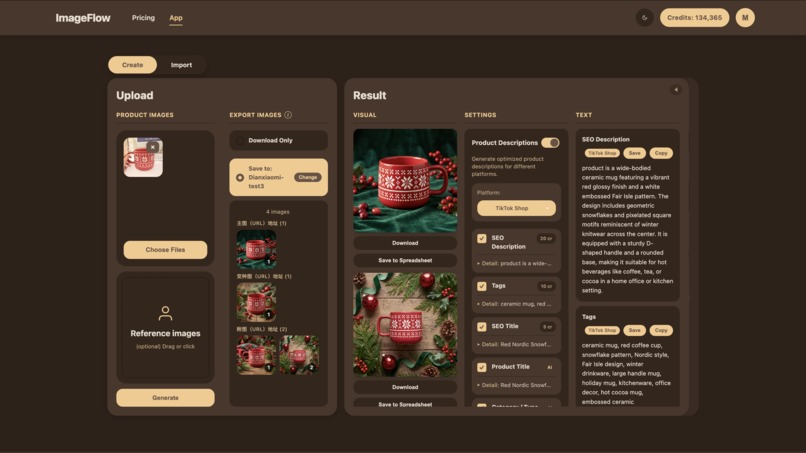
One phone photo in, a ready-to-sell product assets created — images and marketing copy for any shopping platform.
-
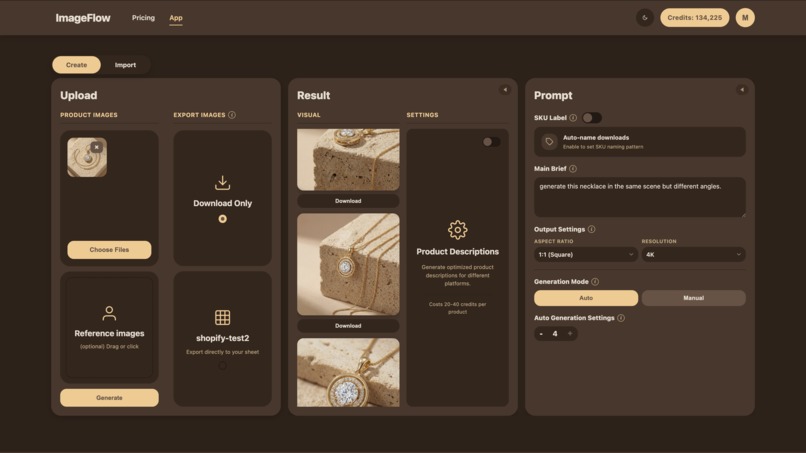
Gemini3 reasoning for understanding prompts, and planing different shot angles for each image rather than cramming angles in one image.
-
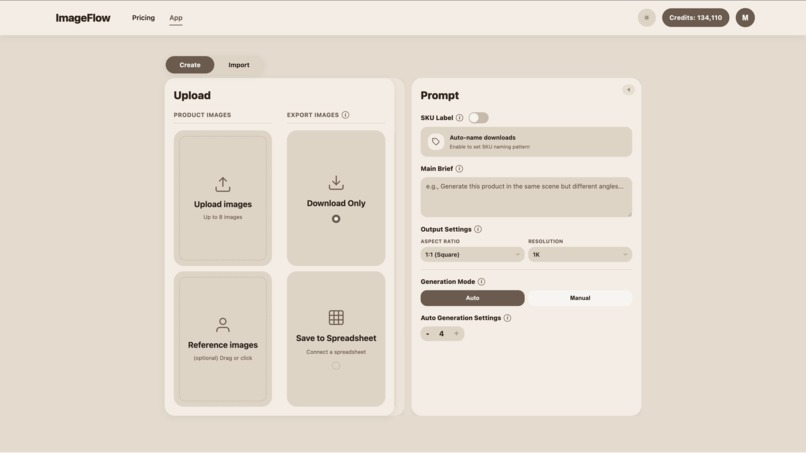
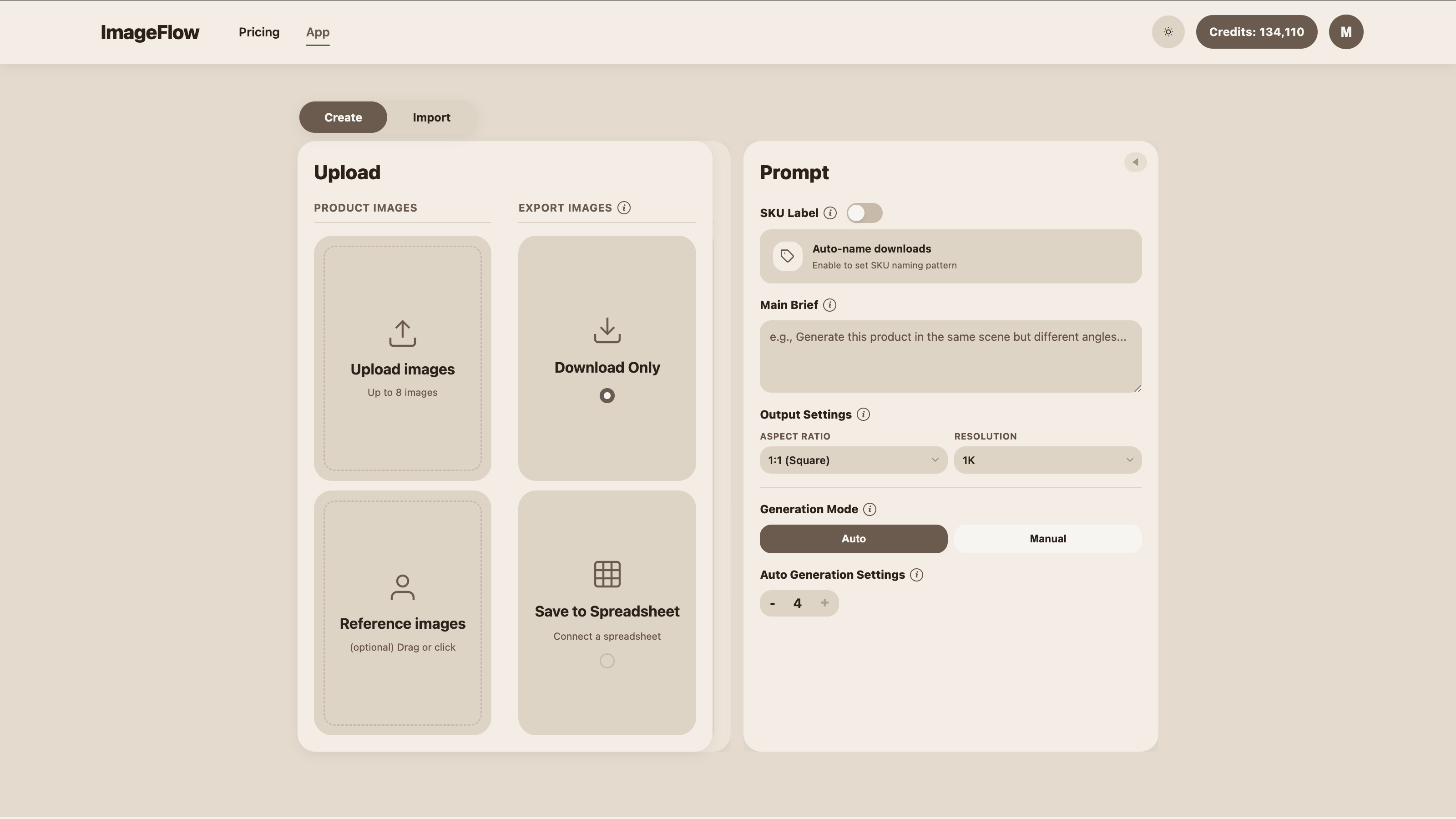
Light mode
-
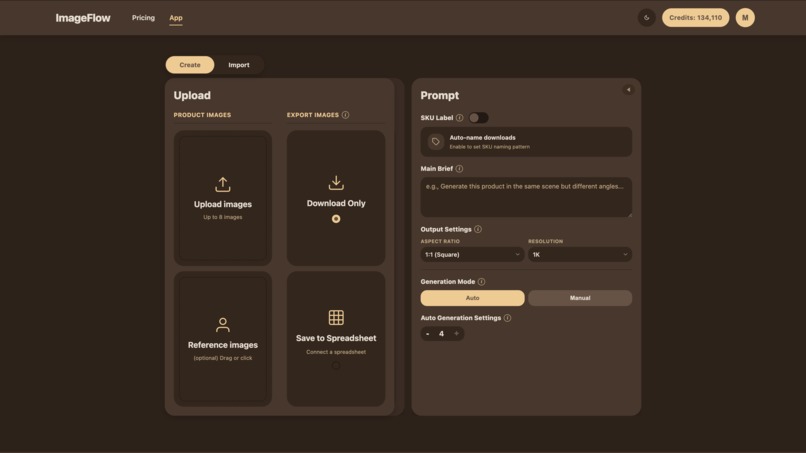
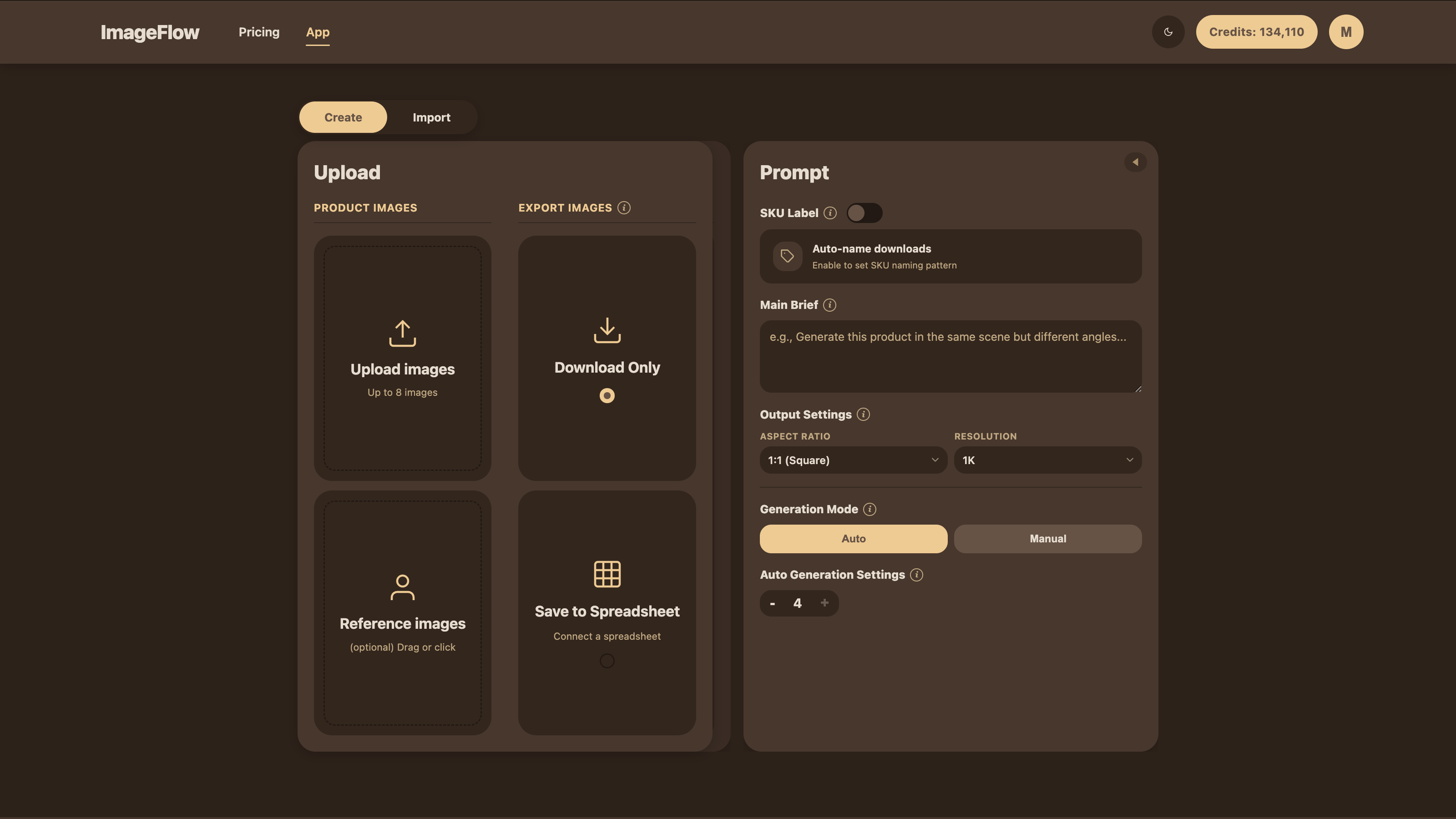
Dark mode
-
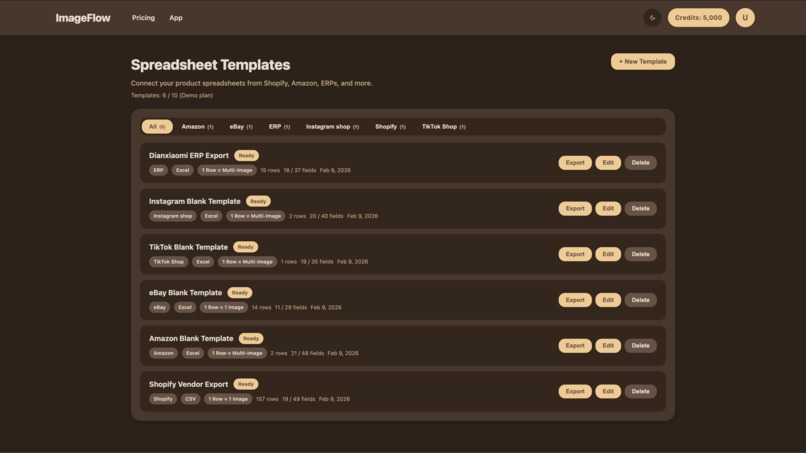
Support multiple e-commerce platforms
-
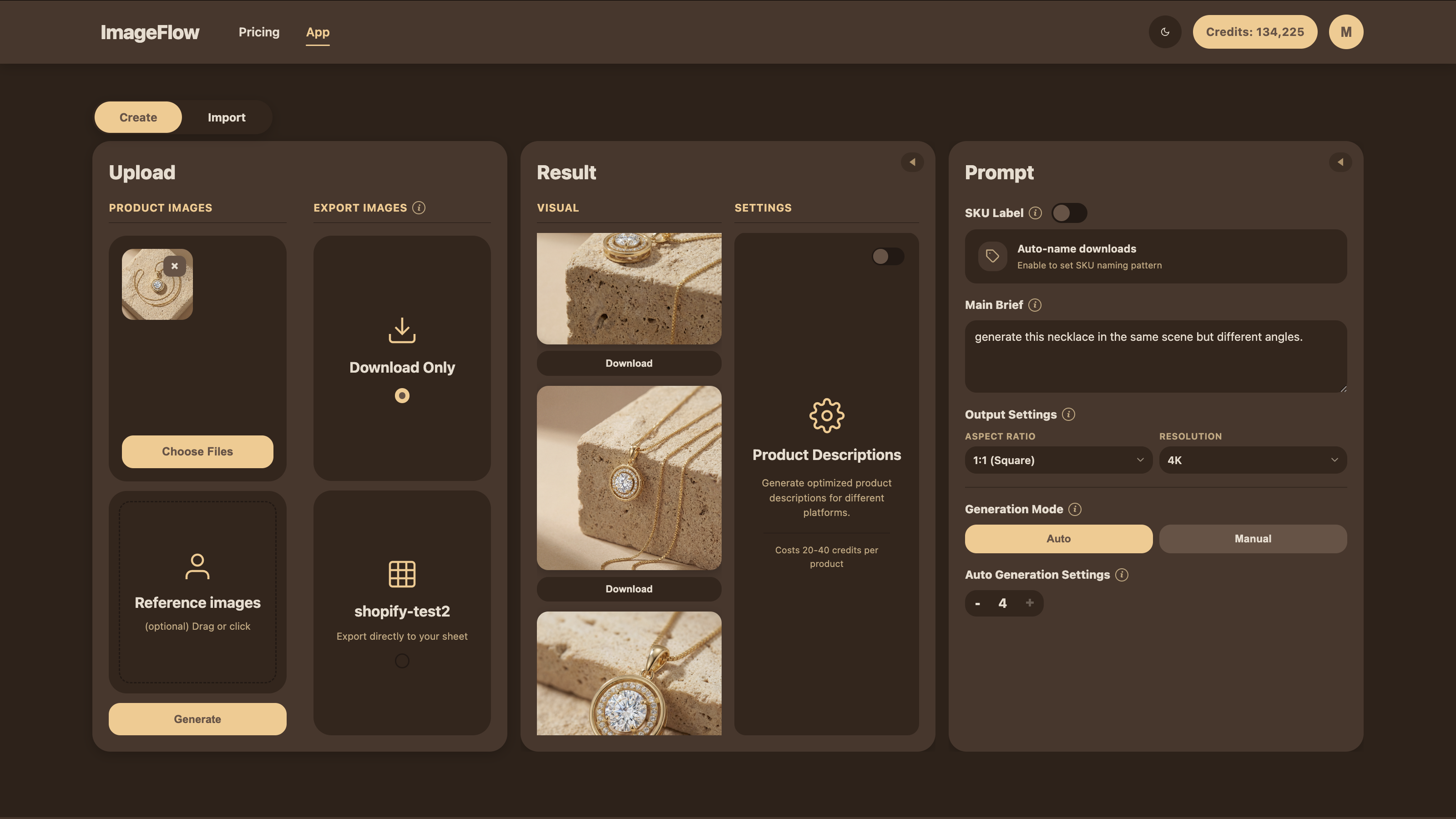
Support 1k, 2k, and 4k images with different ratios
-

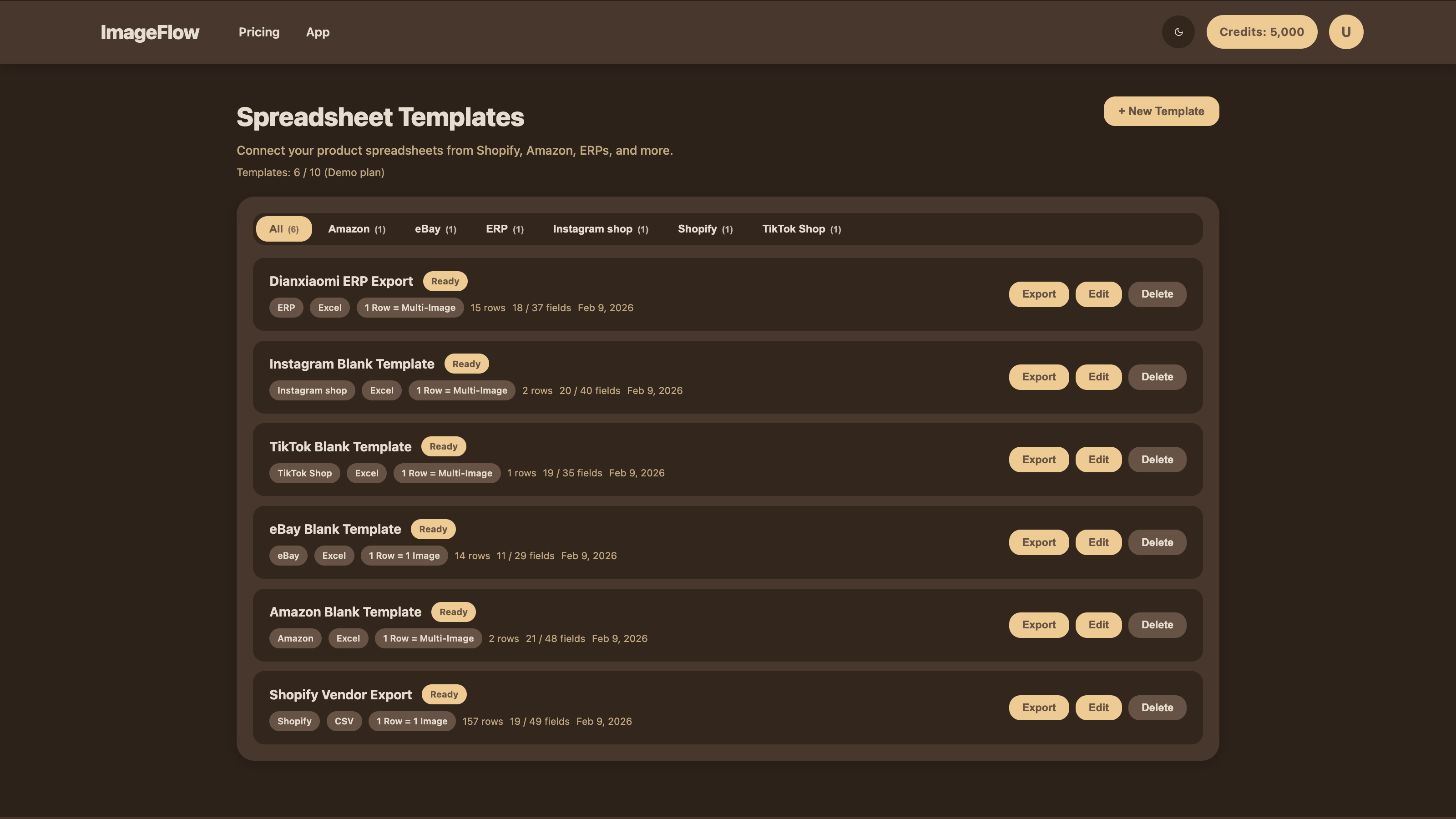
PIM (Product information management) system
-

Simple prompt to get a product detailed page
-

Auto-named image files for download
-

Gallery for image generation history




ImageFlow AI — Devpost Project Story
Inspiration
3.5 million small and medium e-commerce sellers share the same daily struggle: getting a product from a single photo to a live listing takes far too long, and requires constant switching between disconnected tools.
The workflow looks like this: a seller takes one product photo and opens an AI image generator, hoping to batch-create multiple shots from different angles. But most tools can't understand "multiple images, each from a different angle" — they generate all angles crammed into a single image, making the output completely unusable. One distinct angle per image, consistently and professionally? Almost no tool gets this right.
Even when images do come out correctly, each file needs to be renamed according to the product's SKU before uploading to any platform. Current tools just output image_001.png — sellers are left manually renaming hundreds of files, one by one.
Beyond images, every listing needs marketing descriptions. Sellers running stores on multiple platforms — Shopify, Amazon, eBay, AliExpress — must research each platform's SEO rules, character limits, and traffic-driving best practices separately, then write tailored copy for each. Even after writing it, they copy-paste each description into spreadsheet cells manually. These image and copy assets pile up on sellers' computers, and listing a single product still means manually copying and pasting everything into each platform. Updating a product's assets? The exact same painful process all over again.
Some sellers turn to PIM (Product Information Management) software to help with bulk listing. But PIM only handles the distribution of existing assets — it can't generate or update the images and copy themselves. When a seller is unhappy with a product photo or description, they're back to square one: switching between an image generator, a copywriting tool, and a PIM system.
The result: sellers are trapped switching between apps that each do only one thing — generate images, or write copy, or manage product data. No tool combines all three into a single, connected workflow.
I saw the opportunity to solve this end-to-end — as a solo developer. The release of Google Gemini 3 — with its native image generation capabilities, powerful language understanding, and support for up to 14 reference images — made it possible to build a system that truly understands a product from a single photo and generates professional, usable results. Not just images, but images + copy + catalog management, all in one place. I built ImageFlow AI entirely on my own, with Claude as my core development partner for architecture, debugging, and code review, and Gemini and GPT as planning advisors and product design consultants.
What it does
ImageFlow AI unifies image generation, marketing copywriting, and product information management into one integrated system. From a single product photo to a platform-ready listing — without leaving the app.
Two-Layer AI Image Generation
ImageFlow solves the "multiple angles in one image" problem with a unique two-layer pipeline:
Layer 1 — Semantic Decomposition (Gemini 3 Flash): The user writes one prompt (e.g., "generate 4 product shots from different angles on a marble table"). Gemini 3 Flash analyzes the prompt using its powerful understanding capabilities and decomposes it into N separate, specific scene descriptions — understanding that "different angles" means one angle per image, while preserving the shared context (same product, same marble table, same lighting mood).
Layer 2 — Parallel Professional Generation (Gemini 3 Pro Image): Each of the N decomposed prompts is sent simultaneously to Gemini 3 Pro Image for high-fidelity generation at the user's chosen resolution (1K / 2K / 4K) and aspect ratio (10 options including 1:1, 4:3, 9:16, 21:9). The result: N individual, professional product images — each with a distinct angle or scene, each as a separate, usable file.
Flexible AI Marketing Copy (Gemini 3 Flash)
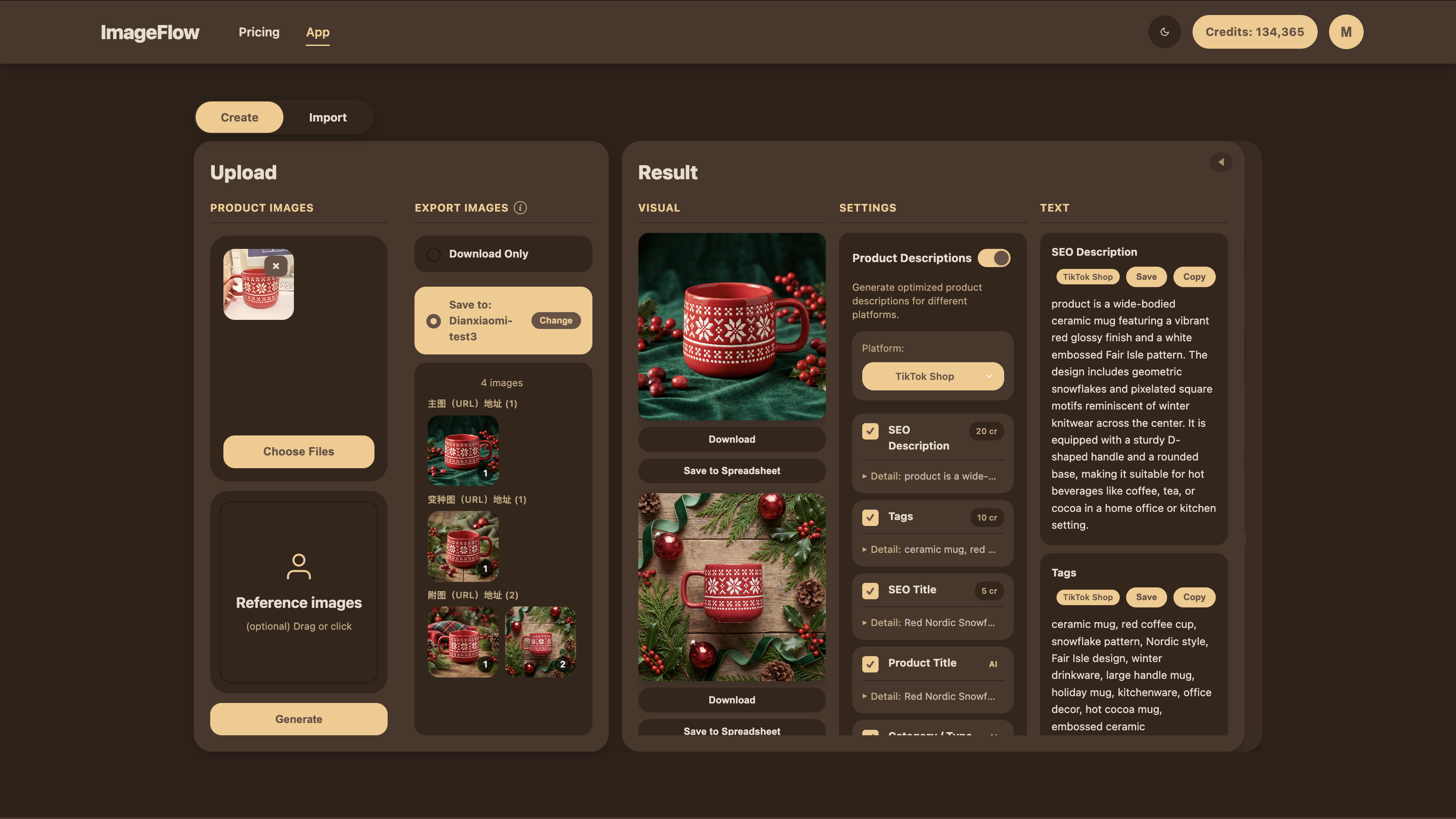
Powered by Gemini 3 Flash's understanding and research capabilities, ImageFlow generates marketing copy tailored to each platform's rules and high-traffic selling points. When saving to a spreadsheet, users can select which fields they want AI to generate copy for — not just preset descriptions, but any field in their catalog. ImageFlow also provides built-in generation for SEO, GEO (geo-targeted marketing), GSO (Google Shopping optimized), tags, meta titles, and more. Users click to switch between platforms — Shopify, Amazon, eBay, and 9 more — and the copy regenerates accordingly. The entire system is flexibly customizable to match each seller's actual spreadsheet structure. No manual research, no copy-paste between apps.
Built-In Product Information Management
After generation, all assets flow directly into the seller's product catalog:
- Download or Save to Spreadsheet: Users can download files directly (with automatic SKU-based naming), or save everything — images and copy — into a product spreadsheet imported from their merchant platform.
- CDN-Hosted Images: Every generated image automatically receives a universally accessible CDN URL during generation. When image URLs are saved into a product spreadsheet and imported into any merchant platform, the images load correctly — they won't be blocked or unreadable because of domain restrictions.
- In-App Catalog Editing: Users can organize, update, and manage all spreadsheet data within ImageFlow, then one-click export the updated catalog for direct import into any merchant platform.
- Cross-Spreadsheet Save: Generate content and images from one catalog and save or override assets directly into another — a daily workflow for multi-platform sellers who maintain separate source and listing spreadsheets.
Additional Features
- SKU Template Engine: Pattern-based naming with configurable variables (brand initials, category codes, color, size, custom fields, sequence numbers, and more). Sequence numbers are automatically assigned at download time based on download order — no manual file renaming needed. Configurable separators, prefix/suffix, digit padding, up to 20 templates per user.
- SKU-Level Grouping: Automatically groups rows by the finest-level SKU across PER_PRODUCT and PER_IMAGE modes, so users can batch-process images and copy per SKU. Handles spreadsheets where each SKU spans multiple rows by grouping them into a single navigable unit.
- Demo Mode: Anonymous login with pre-loaded sample catalogs — try the full workflow without signing up. Most merchant platforms require real business credentials to access their product spreadsheet templates, so the demo uses sample spreadsheets. The Dianxiaomi ERP spreadsheet is real and fully functional for testing product import (no merchant credentials required); note that Dianxiaomi's website and field names are in Chinese — testers can use Google Chrome's page translation. Subscription checkout and confirmation emails are fully developed but require authenticated accounts, so they do not function in anonymous demo mode. Stripe payments are in sandbox mode during the competition period and will be enabled for real transactions post-competition.
- Real-time Credits: Firestore-powered live credit balance with instant deduction and refund on failure
- Light/Dark/System Theme: Chocolate-mocha design palette with system preference detection
How we built it
Architecture Overview
ImageFlow is a full-stack application with a React/TypeScript frontend and Node.js/Express backend, connected through SSE (Server-Sent Events) for real-time generation progress.
Frontend (React + TypeScript + Vite)
The UI follows a three-column workflow layout:
- LeftPanel (~3,800 lines): Product upload, spreadsheet selection, target configuration, image management with triple storage architecture (2048px base64 for AI, 800px Object URL for display, original URL for caching)
- PromptCard (~1,600 lines): Prompt editing, Auto/Manual generation strategy, SKU configuration, aspect ratio and resolution selection
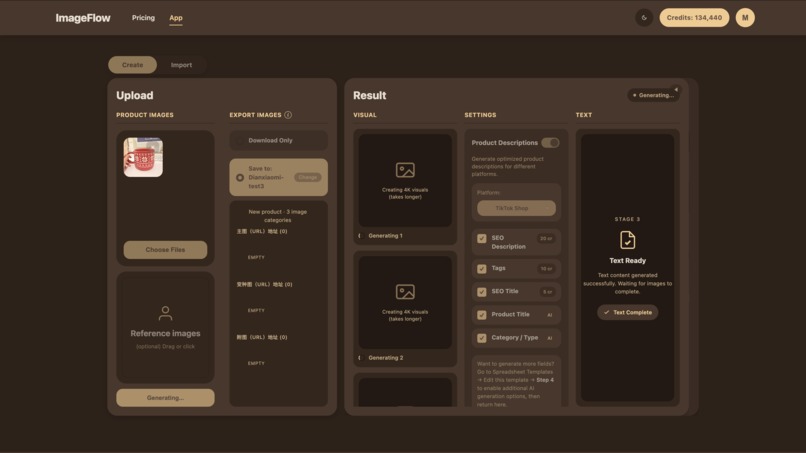
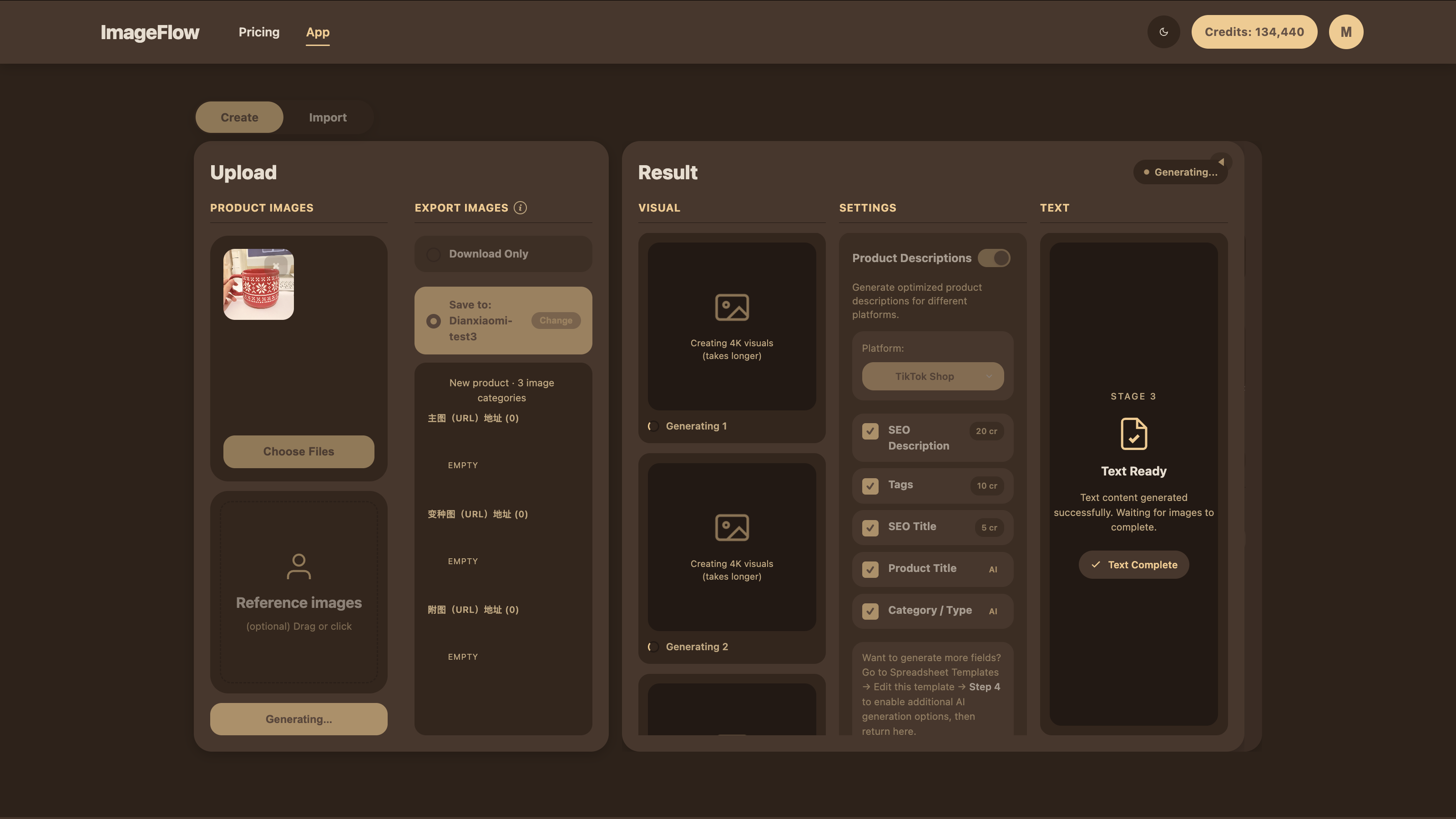
- ResultColumn (~3,100 lines): Generation results with 6-stage progress visualization (idle → understanding → planning → generating → uploading → complete), collapsible description fields, download/save operations
The modal system handles complex multi-step workflows: source spreadsheet selection → target spreadsheet selection → image mapping (Override Modal) → save confirmation with deduplication logic.
Three React Contexts manage global state: AuthContext (Firebase Auth with email, Google, and anonymous login), ThemeContext (light/dark/system with CSS variable synchronization), and ModeContext (Import/Create work modes).
Backend (Node.js + Express)
The two-layer generation pipeline is the core:
- Layer 1: Prompt Decomposition (Gemini 3 Flash): Analyzes user prompt + reference images, decomposes "multiple images with different angles" into N specific scene descriptions while preserving shared context
- Layer 2: Image Generation (Gemini 3 Pro Image → 2.5 Flash fallback): Each decomposed prompt sent in parallel with reference images as visual anchors. Automatic model fallback and resolution clamping per model capability
- Description Generation (Gemini 3 Flash): Platform-specific content with full product context from spreadsheet, running in parallel with image generation
- CDN Upload (Firebase Storage): Images uploaded with 1-year cache headers, public CDN URLs generated instantly
- History & Credits (Firestore): Generation metadata saved, credits deducted atomically with refund on failure
The spreadsheet system includes file upload/parsing (SheetJS for XLSX/CSV, xlwt via Python for BIFF8 .xls export), column role mapping (manual for first-time platform imports to avoid errors; automatic for subsequent imports from the same platform), SKU-level row grouping for PER_PRODUCT and PER_IMAGE modes, and a results storage system with scenario-based overlays for cross-spreadsheet content generation and asset overrides.
The billing system uses Stripe with complete lifecycle management: one-time credit packs, monthly subscriptions, upgrades/downgrades, cancel/resume, and bidirectional sync between Stripe and Firebase via webhooks. Stripe is currently in sandbox mode during the competition period; real payments will be enabled post-competition.
Key Technical Decisions
- Two-layer pipeline over single-prompt generation: Decomposing user intent before image generation is what makes "one angle per image" work reliably — a single prompt to an image model typically produces the "all angles in one image" problem sellers hate
- SSE over WebSocket: Simpler for unidirectional progress updates; the generation pipeline only needs to stream status to the client
- Triple image storage: Separating AI-optimized (2048px base64), preview (800px Object URL), and source URL prevents memory bloat while maintaining quality for generation
- HEIC conversion cascade: Sharp → heic-convert → macOS sips — three-tier fallback ensures iPhone photos work everywhere (local dev, Cloud Run, CI)
- Display dedupe / Storage no-dedupe: UI shows unique images only, but Firestore preserves the full array with originIndex tracking for accurate write-back
- Category-specific visual weights: 13 product categories × 3 visual modules each guide generation focus — jewelry emphasizes reflection and brilliance, fashion emphasizes fabric texture, food emphasizes freshness and moisture
Tech Stack
| Layer | Technology |
|---|---|
| AI | Google Gemini 3 Pro Image, Gemini 3 Flash, Gemini 2.5 Flash Image (fallback) |
| Frontend | React 18, TypeScript, Vite, styled-components, React Router v6 |
| Backend | Node.js, Express, Server-Sent Events |
| Database | Firebase Firestore |
| Storage | Firebase Storage (CDN) |
| Auth | Firebase Authentication (email, Google OAuth, anonymous) |
| Payments | Stripe (Checkout, Billing Portal, Webhooks) |
| Resend API | |
| Image Processing | Sharp, heic-convert, Canvas API |
| Spreadsheets | SheetJS (XLSX/CSV), xlwt/Python (.xls) |
| Deployment | Google Cloud Run + Firebase Hosting |
Challenges we ran into
1. The "Multiple Angles in One Image" Problem
The core UX challenge: when users ask AI to generate "4 product shots from different angles," image models typically render all 4 angles into a single composite image — completely unusable for e-commerce listings. My two-layer pipeline (semantic decomposition → per-image generation) solves this, but getting the decomposition prompt engineering right — so that shared context is preserved while angles are genuinely different — required extensive iteration.
2. Gemini 3 Image API Field Naming
The Gemini REST API uses generationConfig.imageConfig for image generation settings — not imageGenerationConfig (which gets silently rejected) or outputImageSize (wrong field name — the correct one is imageSize). This cost significant debugging time as the API returned no error, just ignored the config. I documented every valid field combination through trial and error.
3. Cross-Spreadsheet Save Complexity
Letting users generate from Spreadsheet A and save or override assets into Spreadsheet B sounds simple, but the implementation required: a target selection modal with product browsing, an Override Modal for mapping source images to target image categories, deduplication logic that shows unique images in the UI but preserves full arrays in storage, two write modes (Add and Override) each with different positioning logic, and handling PER_PRODUCT vs PER_IMAGE row modes with SKU-level grouping in both source and target. This feature alone spans ~5,000 lines across 4 modal components and the backend save logic.
4. iPhone HEIC Image Support
iOS cameras shoot HEIC by default, but browsers can't decode it. My solution cascades through three conversion methods: Sharp (fast, native libvips), heic-convert (pure JS, works on Cloud Run), and macOS sips (built-in fallback for local dev). I also had to add magic-byte detection because iOS frequently lies about file types — saving HEIC files with .jpg or .png extensions.
5. Credit System Atomicity
Credits need to be deducted before generation starts (to prevent abuse) but refunded if generation fails. With parallel image + description generation, partial failures are possible. I implemented atomic deduction with try/catch refund logic that correctly handles partial success scenarios.
6. Production Deployment (CORS + Firebase Storage)
Deploying to Cloud Run + Firebase Hosting introduced CORS issues between the frontend domain and backend API, plus Firebase Storage permission configuration for public CDN access. The allowed origins list and Storage rules required careful configuration to work in both development and production.
Accomplishments that we're proud of
Solo Developer, Full Product
ImageFlow AI — from frontend to backend, from Stripe billing to Gemini pipeline, from spreadsheet parsing to CDN upload — was designed, developed, and shipped entirely by a single developer. Claude served as an indispensable development partner throughout the process, helping with architecture decisions, debugging, and code review. Gemini and GPT also played key roles as planning advisors and product design consultants. This project demonstrates what a solo developer can accomplish with the right AI tools.
Three-in-One System That Actually Works
ImageFlow isn't just an image generator with extras bolted on. The image generation, copywriting, and product information management are deeply integrated: generate images → they automatically get CDN URLs → save them with copy directly into a product spreadsheet → export for platform import. This end-to-end flow eliminates the app-switching that defines sellers' daily frustration.
The Two-Layer Pipeline Solves a Real, Unaddressed Problem
The "multiple angles crammed into one image" problem is something every seller who's tried AI image generation has experienced. By decomposing user intent with Gemini 3 Flash before generating with Gemini 3 Pro, ImageFlow produces results that actually match what sellers need: one angle per image, consistent product appearance, individual files ready to use.
Production-Ready, Not a Prototype
ImageFlow isn't a hackathon demo — it's a deployable product with Stripe billing, real authentication, CDN-hosted outputs, rate limiting, security headers, and proper error handling throughout. Users can sign up, buy credits, generate images, and export catalogs today.
Gemini 3 Multi-Model Pipeline
I use three Gemini models in concert: Gemini 3 Flash for semantic prompt decomposition (understanding user intent and decomposing into per-image prompts), Gemini 3 Pro Image for high-fidelity image generation (with up to 14 reference images and 4K output), and Gemini 2.5 Flash Image as an automatic fallback. Resolution is automatically clamped per model capability.
6-Stage Generation Progress UX
The generation pipeline shows a rich visual progression: idle → understanding (analyzing product) → planning (creating shot directions) → generating (creating images) → uploading (CDN) → complete. Each stage has a custom icon, badge, hint text, and smooth transitions. This transforms a 30-60 second wait into an engaging experience.
Flexibly Customizable Copy Generation
Beyond the built-in SEO, GEO, GSO, Tags, Meta Title, Meta Description, and SEO Title types, users can select any field in their spreadsheet for AI copy generation. Each type uses platform-specific prompts for 12 e-commerce platforms, and the AI receives full product context from the spreadsheet. The system adapts to each seller's actual catalog structure — not the other way around.
What we learned
Semantic Decomposition is the Key to Usable AI Image Generation
The single most important technical insight: you can't just send "generate 4 images from different angles" to an image model and expect 4 separate images. The decomposition step — breaking user intent into individual, specific scene descriptions — is what makes the output actually usable. This is a prompt architecture pattern that could apply to many multi-output AI applications beyond e-commerce.
Spreadsheet Integration is a Competitive Moat
Most AI tools treat spreadsheets as an afterthought — "export to CSV" at the end. Building the entire workflow around spreadsheet import/export, with column auto-detection, role mapping, and bidirectional save, creates a workflow that's dramatically more efficient for real e-commerce operations. This integration is where ImageFlow's differentiated value lives.
Gemini 3's Image Generation is Production-Viable
With proper prompt engineering, reference image handling (up to 14 images as visual anchors), and the correct API configuration, Gemini 3 Pro produces consistently professional product photography. The key: providing system instructions for product appearance consistency plus multiple reference images dramatically improves output quality.
The Three-Tool Problem is Universal
Every seller I talked to described the same pattern: one tool for images, another for copy, a third for catalog management, and hours of copy-paste in between. The integration opportunity isn't just a nice-to-have — it's the primary pain point. Sellers don't need a better image generator; they need fewer tools.
Credit Systems Need Careful Design
The economics of AI credits are subtle: deduct too early and failed generations anger users; deduct too late and bad actors exploit the gap. My pattern — immediate deduction with guaranteed refund on any failure — balances security with user experience.
What's next for ImageFlow AI
Direct Platform API Integration
Currently, ImageFlow works through spreadsheet export/import. The next step is direct API integration with Shopify, Amazon, and other platforms — enabling one-click batch uploading or updating product assets without manual file handling. (Most platform APIs require real merchant credentials, which limited the hackathon demo to sample spreadsheets.)
Batch Generation with Holiday/Seasonal Themes
Currently, ImageFlow generates images for one product at a time. Batch generation would let users select multiple products and update all of them at once — for example, one-click batch updating product images and copy across an entire catalog to match a holiday or seasonal theme (Christmas, Valentine's Day, Black Friday). Essential for sellers who need to refresh hundreds of listings simultaneously.
Multi-Language Description Generation
Cross-border sellers need descriptions in multiple languages. Gemini's multilingual capabilities could generate descriptions in English, Chinese, Spanish, and more — all optimized for each platform's SEO rules in that language.
Video Generation
As Gemini's video generation capabilities mature, extend ImageFlow to generate short product videos (360° rotation, lifestyle context) from the same reference photos.
AI Model Comparison
Let users generate the same prompt with different Gemini models side-by-side and choose their preferred result — useful for understanding quality/speed/cost tradeoffs.
Built With
- express.js
- firebase-authentication
- firebase-firestore
- firebase-storage
- google-cloud
- google-gemini-2.5-flash
- google-gemini-3-flash
- google-gemini-3-pro
- node.js
- react
- resend
- sharp
- sheetjs
- stripe
- styled-components
- typescript
- vite


Log in or sign up for Devpost to join the conversation.