Inspiration
Small nonprofits usually don't have a designer or a marketing team. They know their mission really well, but turning that into a good-looking Instagram post takes time and skills most of them don't have. We wanted to fix that gap - let someone type in basic info about their organization and get a real, usable set of Instagram slides back, without needing to hire anyone or learn design tools.
What it does
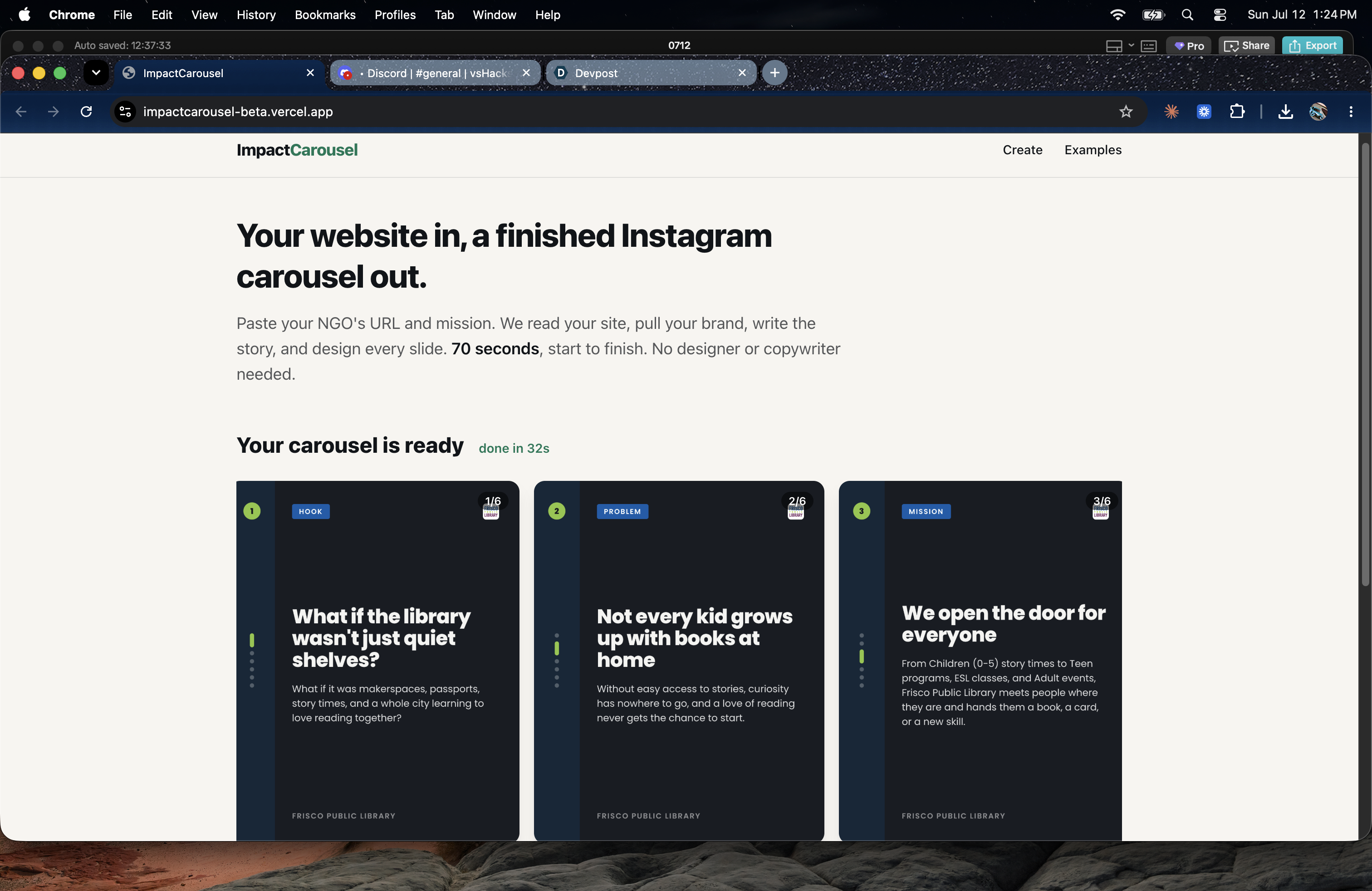
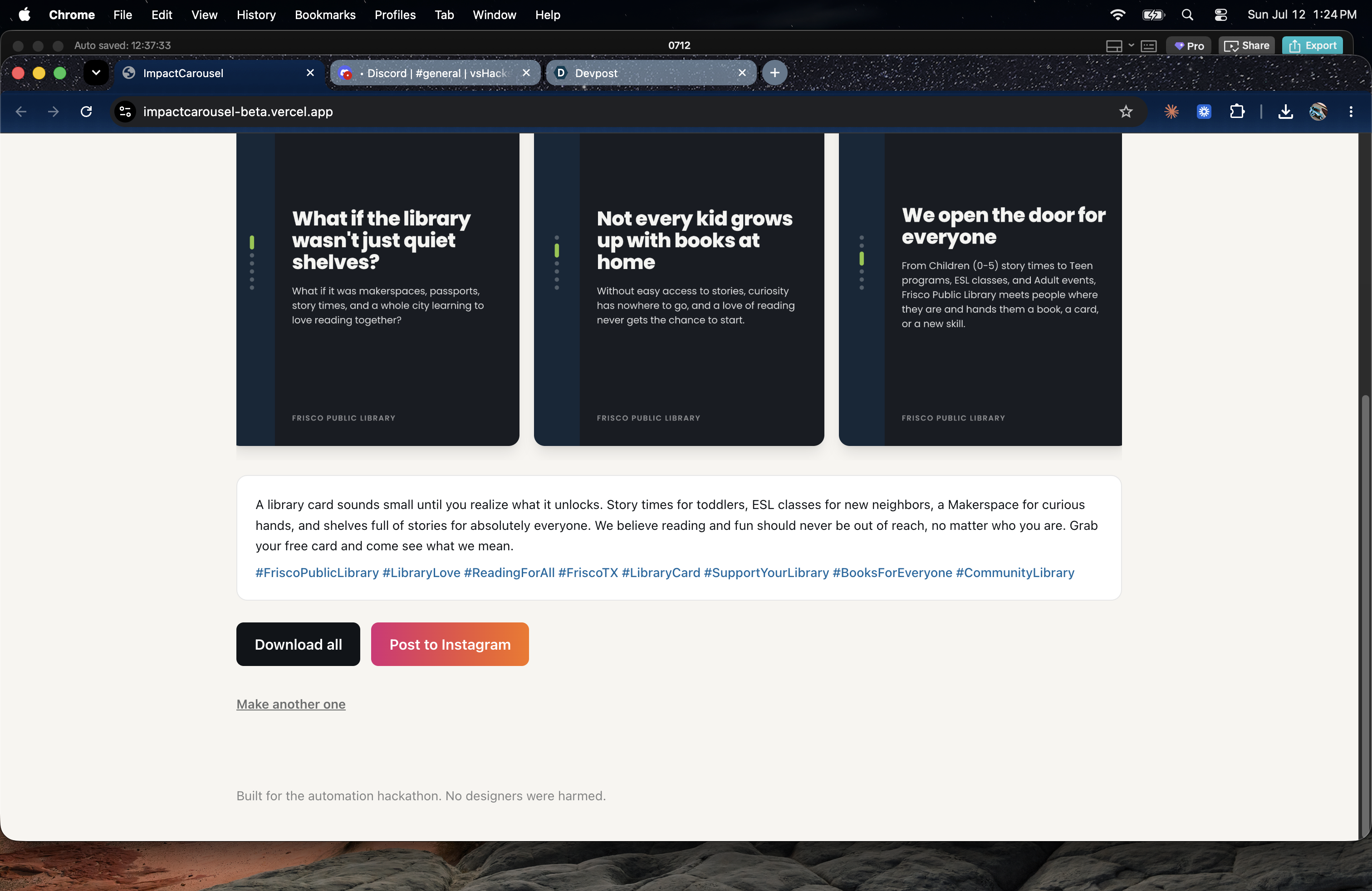
You fill in a short form: your organization's name, your mission, your vision, and your website link. Then the app does the rest on its own. It looks at your website to figure out your brand colors and the tone you usually use. It writes a story for your carousel, slide by slide, following a pattern that works well on social media (a hook to grab attention, the problem, what you're doing about it, proof that it works, and a call to action). It picks a layout design that matches your tone and content. Then it turns all of that into actual image files you can download, along with a caption and hashtags ready to post. There's also a button to send it straight to Instagram through an automation we already had set up. While it's working, you see a live list of steps updating in real time, so you're not just staring at a loading spinner.
How we built it
We used Next.js for both the website and the backend logic, so everything lives in one project. Supabase handles the database, file storage, and real-time updates. For the AI parts, we used Claude, and every single time we ask it to do something, we force it to answer in a strict, structured format instead of letting it write free text, so we never have to guess how to read its answer. We use a service called Firecrawl to read the content of the organization's website. To actually generate the slide images, we used two tools called satori and resvg, which turn the slide layout into an SVG image and then into a PNG file. We built four different slide designs, and each one has its own text length limits and its own description so the AI can pick the one that fits best.
Challenges we ran into
Nonprofit websites often don't have clean brand information. The colors in their website code are usually just grays and borders, not real brand colors. Logos are often missing, broken, or just a small icon. We had to let the AI look at the messy data and make a real decision instead of trying to clean everything up ourselves first.
At first, the AI kept picking the same slide design almost every time, no matter what the content was. We fixed this by asking it to explain its choice based on the actual content, which forced it to actually think about the decision instead of defaulting to the first option.
The AI also kept writing the same generic phrases over and over, like ending every slide with "join us on this journey." We had to specifically tell it not to do that.
Sometimes the AI would write text that was too long for the slide design we picked. We built a separate check that counts characters and only asks the AI to shorten the exact parts that are too long, and if it still doesn't fit after two tries, we just cut the text short ourselves so the app never breaks.
We also ran into a technical problem where the normal tool for generating images didn't work properly on Windows, so we switched to using the lower-level tools directly instead.
Trying to generate multiple slide images at the same time also caused the server to run out of memory, so we changed it to generate them one at a time instead.
Accomplishments that we're proud of
We're proud that every AI step in this app gives back a clean, predictable answer instead of us having to guess how to read its response. We're proud of the live progress screen that shows real steps happening, not just a spinner, using the same information we use for debugging behind the scenes. And we're proud that adding a new slide design to the app is simple and doesn't require rewriting other parts of the code.
What we learned
We learned that asking an AI to explain its reasoning, based on the specific details in front of it, leads to much better and more varied decisions than just asking it to pick an option. We learned that giving very specific instructions about what not to say works better than vague instructions about what to say. We learned that things a computer can check directly, like counting characters, should be checked by the computer, not by asking the AI to guess.
What's next for ImpactCarousel
We want to make the security setup stronger so the app doesn't rely on a more open access key than it needs. We want to save already-generated slide images so we're not redoing the same work if nothing has changed. We want to add more slide design options and let organizations choose their own design instead of always letting the AI decide. We want to connect directly to Instagram instead of going through an outside automation tool. We want to let people edit or regenerate just one slide instead of starting over completely. And we want to support other languages, since a lot of nonprofits work in communities where English isn't the main language.
Built With
- anthropicapi
- firecrawl
- next.js
- node.js
- react
- satori
- supabase
- tailwindcss
- typescript


Log in or sign up for Devpost to join the conversation.