-
-
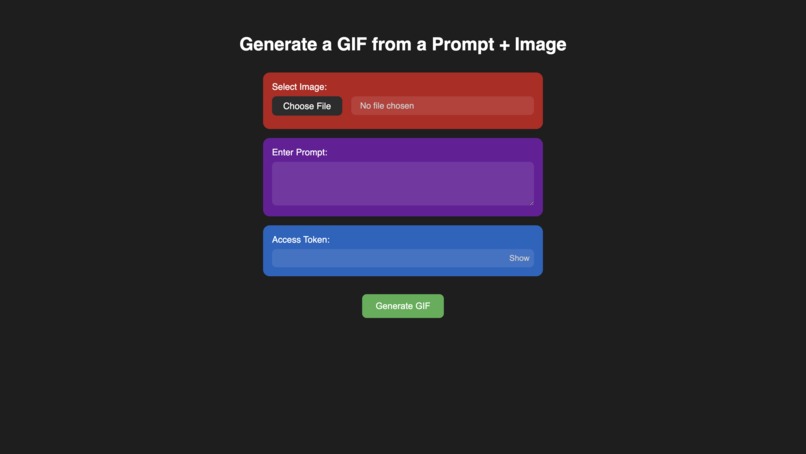
User Interface
-
 GIF
GIF
I generated this Gif using my LinkedIn display picture, prompted that I begin to sob.
-
 GIF
GIF
I generated this Gif of my friend, prompted that his face contorts with silent fury.
-
 GIF
GIF
My friend generated this Gif using the prompt that the woman begins to smile to appear more friendly.
-
 GIF
GIF
This is the gif generated in the demo, sourced from https://pixabay.com/photos/portrait-woman-beauty-girl-7582123/




About the project
Inspiration
Who doesn't love putting a Gif in the workplace Teams chat to convey their reaction. Having worked in an office, I appreciated the opportunities to banter with colleagues in the chat using Gifs. The inspiration behind the project came from a gap in the applications of AI-generated media in a simple, accessible tool that could transform static images with a prompt to illustrate a story in an animated GIF format that could be shared easily with colleagues, friends, and family. I wanted to leverage AI to create personalized and fun little animations that could easily be shared across platforms.
What it does
This application allows users to upload an image and provide a textual prompt to guide AI powered content creation. It leverages the image-to-image API offered by Stability AI to process an uploaded image and iteratively generate a series of frames. The frames are then compiled into a Gif that users can easily download and share. The entire workflow is handled serverlessly on AWS including the frontend page that is publicly accessible, removing the hassles of hosting a server.
How I built it
I built the application using a serverless architecture run on AWS. I used AWS Lambda for backend processing for each of the stages, which are the upload stage, the generation stage, and the gif creation stage. S3 was used to store inputs, generated frames, and the output Gifs. API Gateway was used to expose the application to HTTP endpoints. SQS was used to handle the queue of generation tasks, allowing the application to enqueue multiple tasks submitted around the same time. EventBridge was used to orchestrate asynchronous tasks, notifying each stage when it could begin processing the job. The backend of each stage uses a Lambda function each to call the Stability API at generation, process the images, and combine them into a Gif respectively.
Challenges I ran into
One major challenge I ran into was to do with how failed lambda functions retry automatically by default, which I only found out when I realized my generation API credits were being drained continuously at an alarming rate. After almost having a heart attack, I rushed to redeploy the application without my API key to halt the generation, and addressed the issue by having the generation handler first verify that the files don’t exist in the relevant job folder.
Accomplishments that I'm proud of
I’m proud to have created a fully functioning application from scratch that integrates AI image generation and delivers a user-friendly interface, hosted completely by AWS. As someone who was completely new to AWS, I’m proud to have been able to demonstrate the uses of various AWS services and how they can be linked together to create an entire end-to-end processing pipeline.
What I learned
Through the project, I was able to deepen my understanding of serverless architectures, AWS cloud services, and event-driven programming, in particular how it allows different components to communicate in a serverless pipeline. I gained practical experience working with APIs and learned how to handle image processing. I also improved my skills in developing an intuitive and aesthetic frontend, and how to coordinate frontend to backend communication securely and efficiently through AWS.
What's next for Image to Gif Generator
Customization Options
Next steps could include customization options for the animations such as generation strength (the portion of the original images that can be changed during image generation), frame rate, looping style, and AI model or API used.
Masked Gif Generation
Including support for a mask to define what part of the image is to be modified could allow for more control over gif generation, particularly if there are multiple subjects in the input frame. This could be implemented in the UI quite intuitively by allowing the user to highlight over their input to mask the area to be fixed or changed. However, since each frame is generated recursively off of the previous frame, meaning that the mask would have to be modified between frames, making this a challenging feature to implement.
Authentication
Currently, a static token stored in Lambda protects the Stability API. Future improvements could include IP-based rate limiting, funding via micro-payments (e.g., cryptocurrency), or possibly ad-supported access to cover API usage costs.
Built With
- amazon-web-services
- api-gateway
- eventbridge
- github
- javascript
- lambda
- python
- s3
- sam
- serverless
- sqs
- stability

Log in or sign up for Devpost to join the conversation.