-
-
Logo
-
Architecture
-
Workflow
-
Output
-
-
-
Inspiration
Digital tools change lives when they're built with accessibility in mind a meal ordering app that works without needing to read a menu, an audio-first way to navigate a video game, a screen reader that turns a webpage into speech. None of this is possible without deliberate design. But even when product teams try, gaps remain especially around images, where alt text is optional, easily forgotten, and rarely retrofitted after the fact.
For blind and low-vision people, closing that gap has usually meant relying on someone else a sighted coworker glancing over, a support desk, or a volunteer service like Be My Eyes. These are genuinely valuable, but they come with a cost: it takes a person's time, it can feel like a small interruption every single time you need it, and it means asking for help with something you'd rather just handle yourself, privately.
AI can close that gap directly not by replacing human connection, but by removing the need for it in the moments that don't require it. I wanted to build that specifically for Slack, because Slack isn't a side tool for most teams anymore it's the office. Every screenshot, chart, meme, and celebratory flyer that gets posted there is part of how a team actually works and bonds, and right now, a huge share of that is invisible to a screen reader the instant it isn't plain text.
That's what led me to Gemini Vision and Slack's MCP integration. Rather than asking someone to describe an image after the fact, or making a blind teammate leave Slack entirely to use a separate tool, I wanted the description to happen exactly where the image already is instantly, privately, and on demand. Over 7.5 million Americans are blind or have low vision, and only 44% of blind adults are employed, compared to 77% of people without disabilities every barrier removed from a modern workplace tool is one less reason that gap stays as wide as it is. Image Describer is my attempt at removing one of them.
What it does
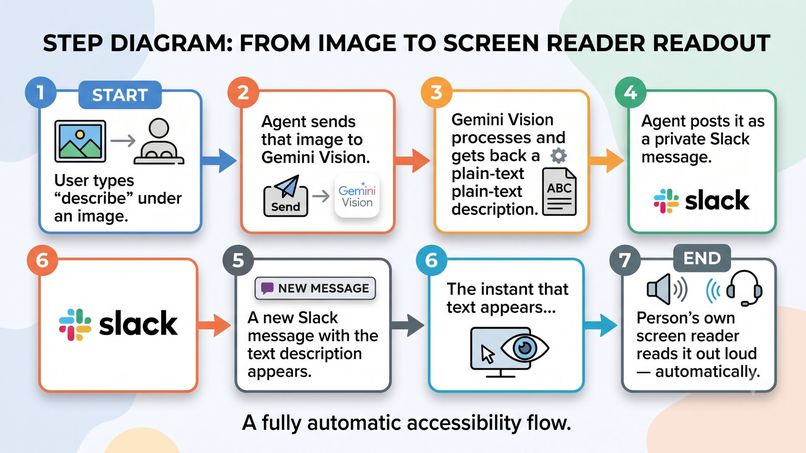
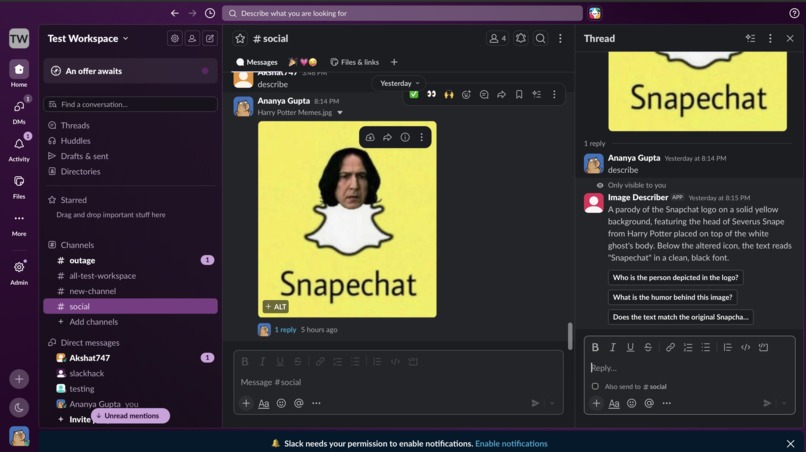
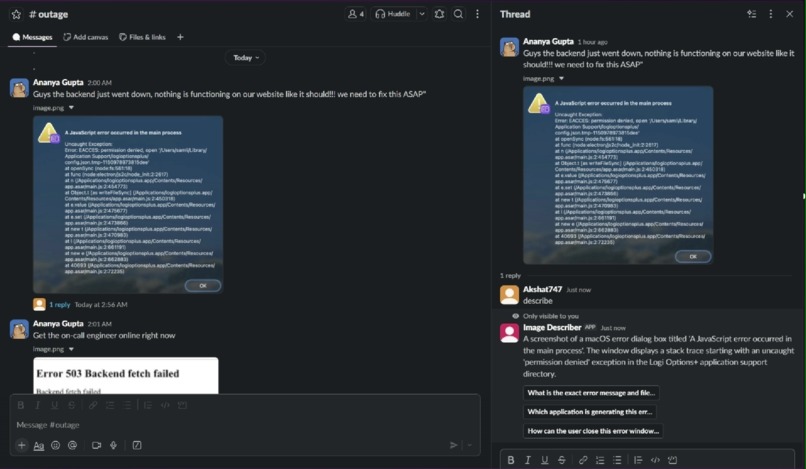
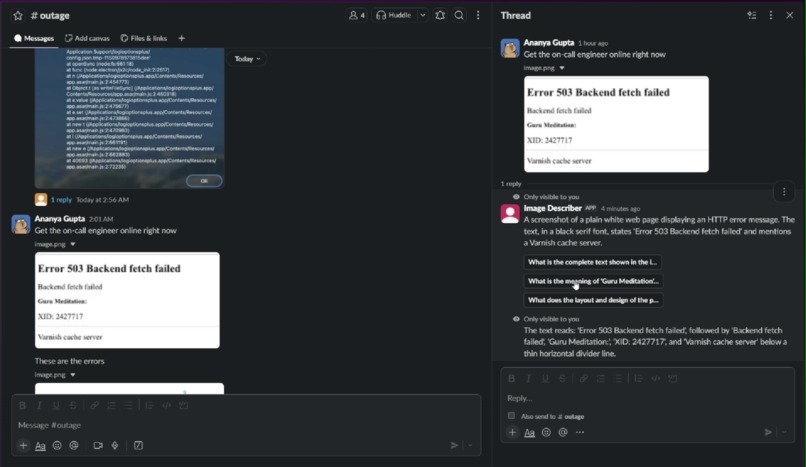
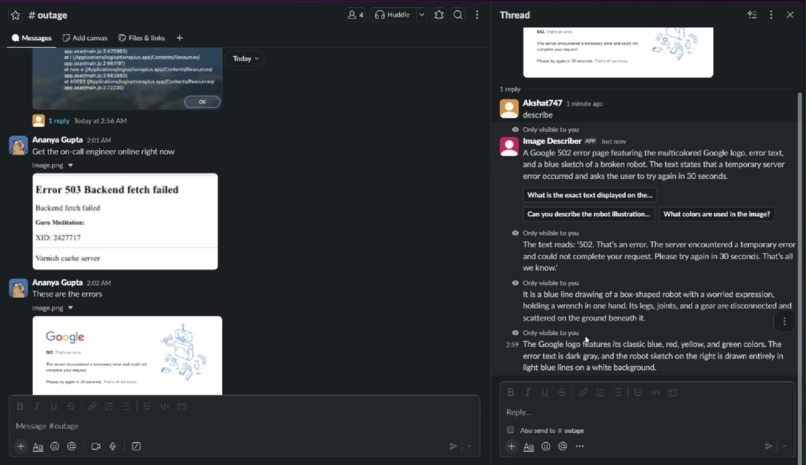
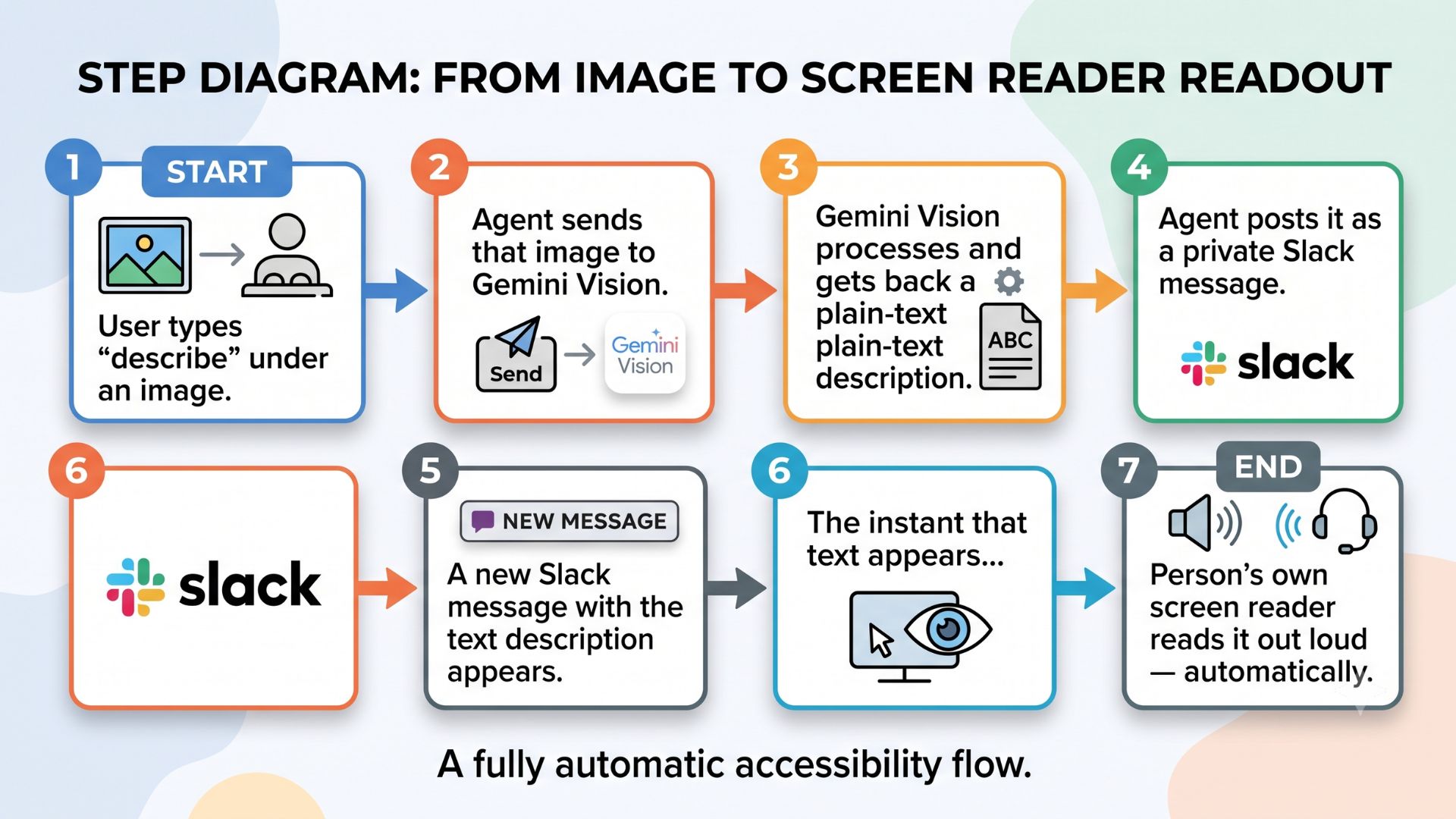
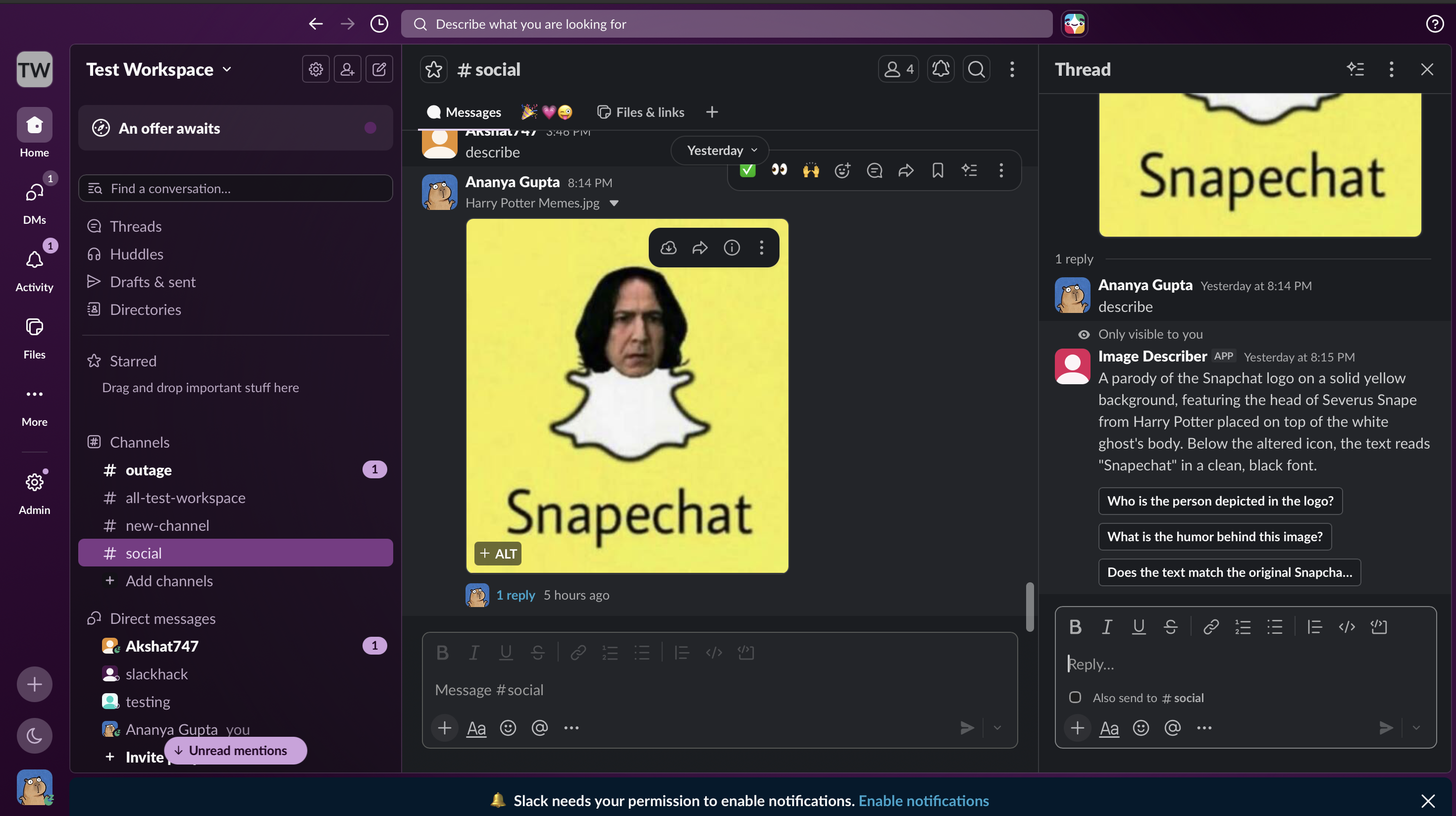
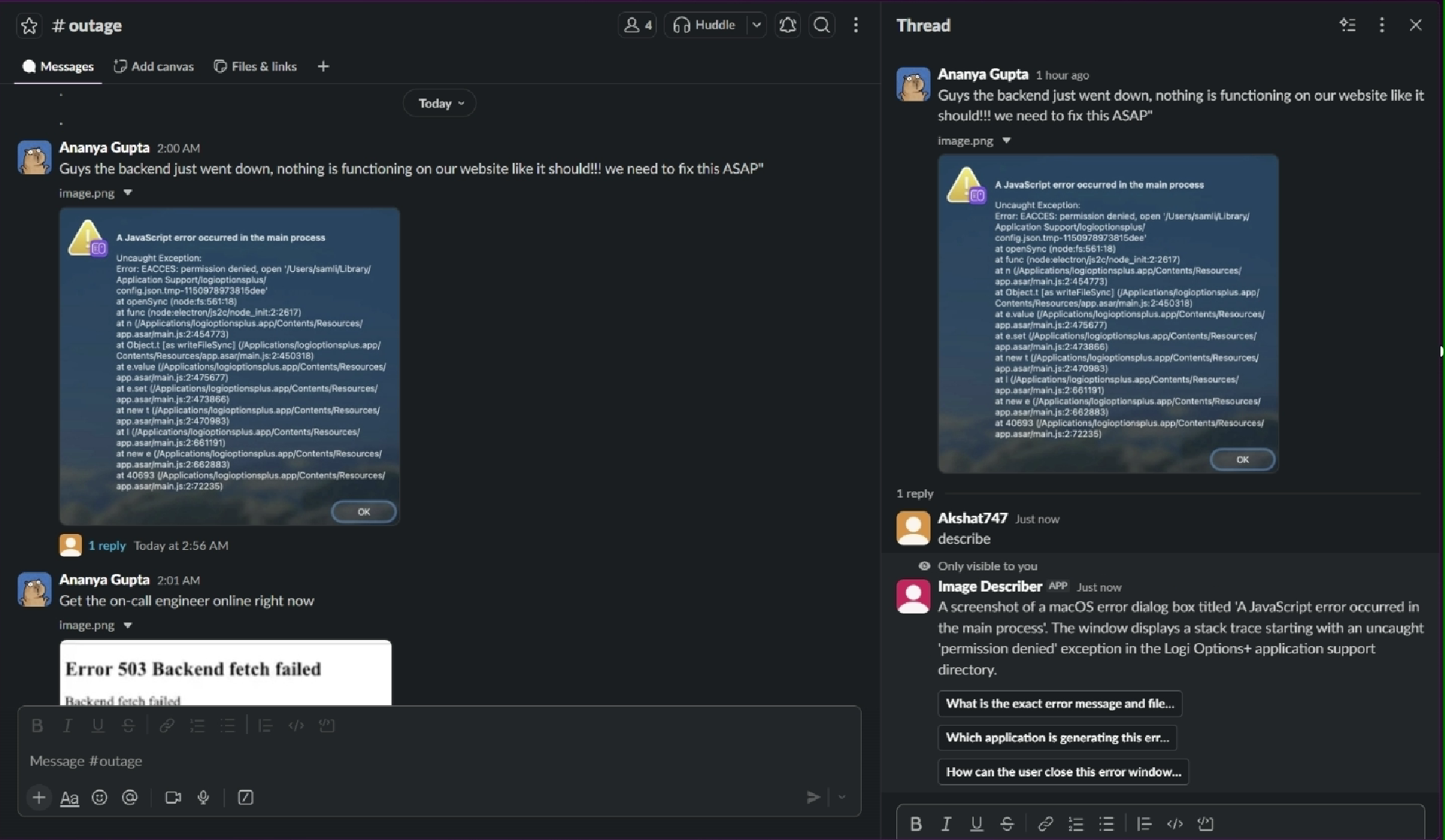
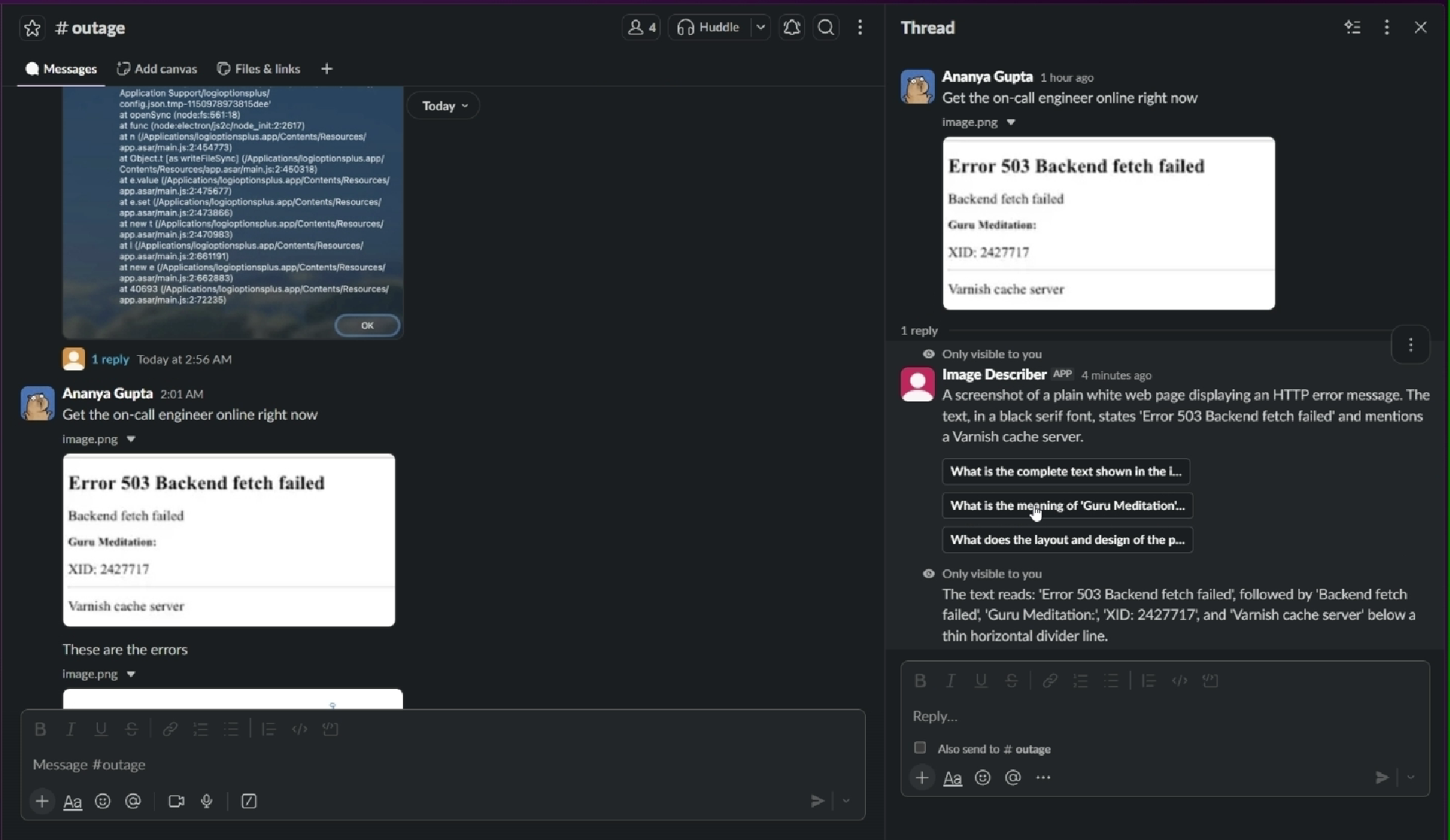
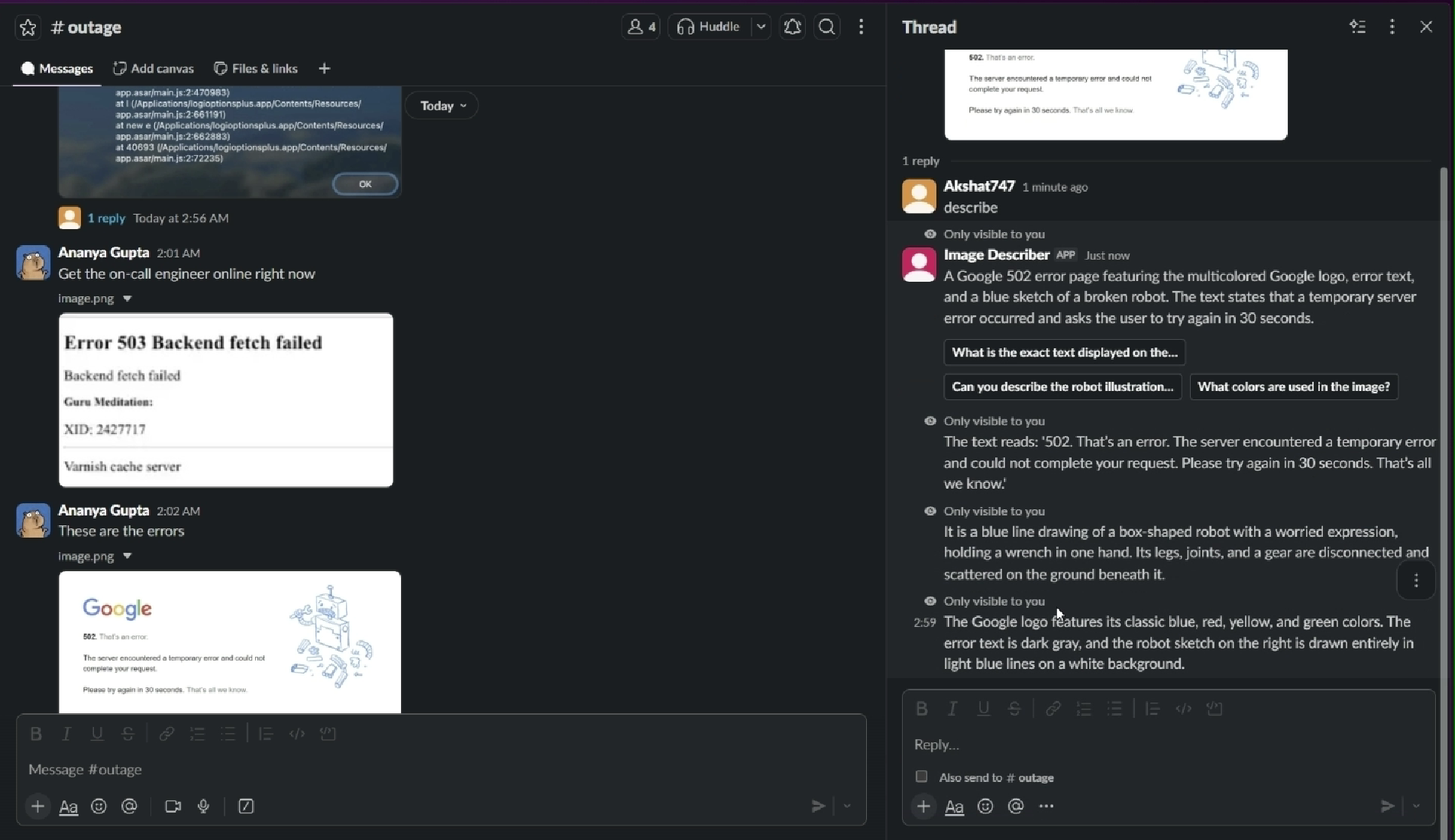
Image Describer is a Slack agent that gives blind and low-vision teammates instant, private access to any image shared in a conversation without ever leaving Slack. The core flow: -Someone posts an image in a channel a chart, a screenshot, a meme, a team photo. -A teammate replies "describe" in a thread under it. -Image Describer downloads the image, sends it through a custom MCP (Model Context Protocol) server to Gemini Vision, and gets back a clear, plain-language description. -That description is posted as a private (ephemeral) reply visible only to the person who asked written specifically to be the first thing a screen reader announces.
Follow-up, on demand: Alongside the description, the agent generates up to three tailored follow-up questions specific to that exact image things like "Is there any text in the image?" or "What is the person's expression?" Clicking one instantly returns another private answer, so a user can go from a one-line summary to real detail only if and when they want it, without a wall of text up front.
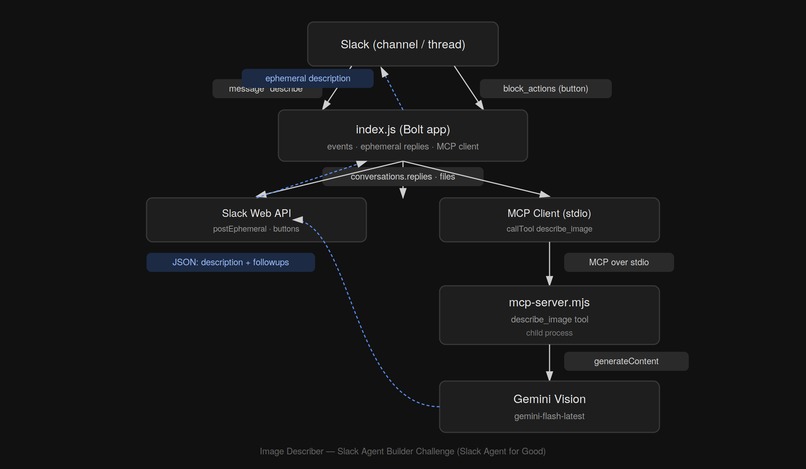
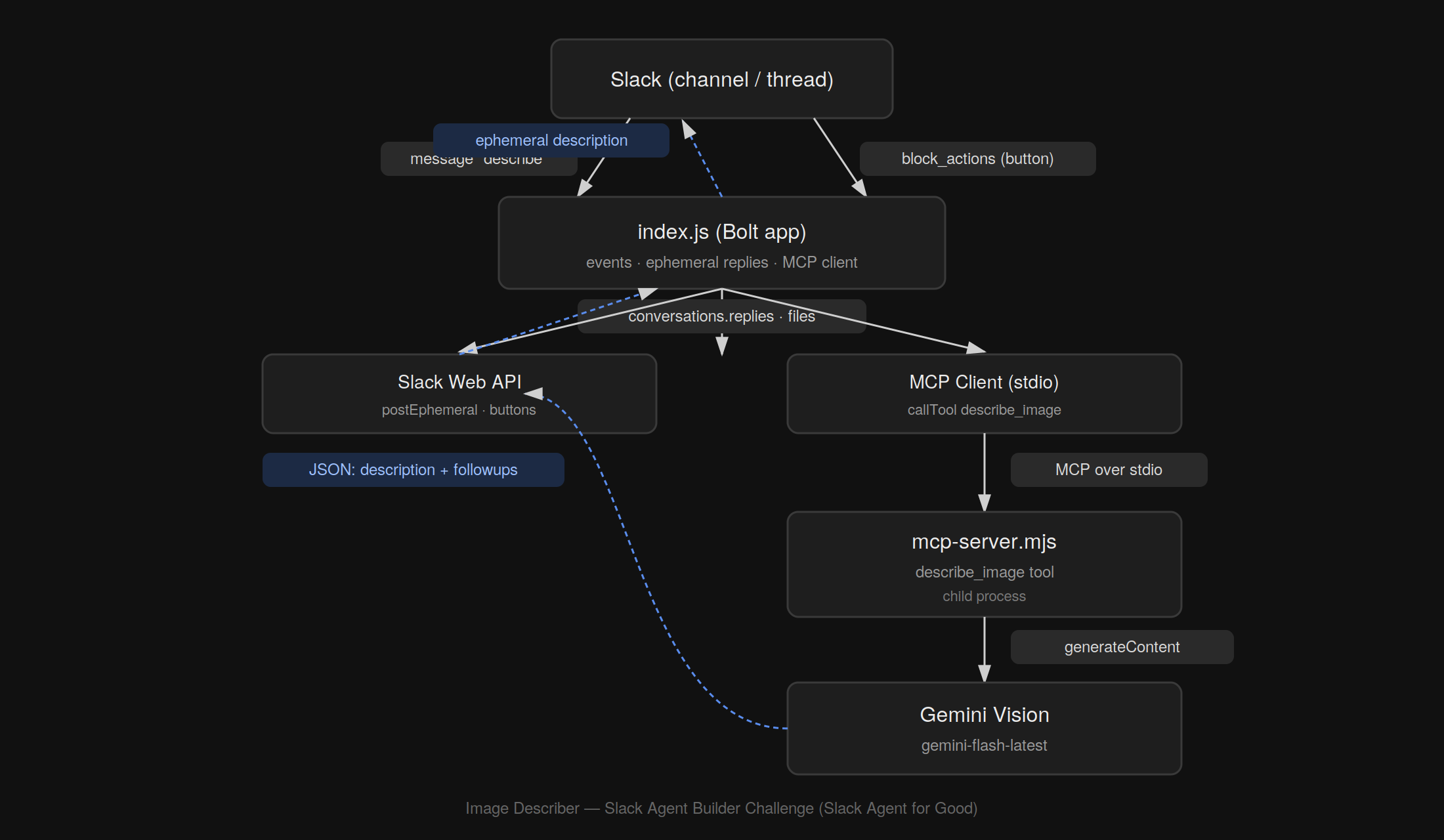
Why MCP matters here, not just as a checkbox: The Slack app (index.js) never talks to Gemini directly. It's a genuine MCP client that calls a separate MCP server I built (mcp-server.mjs) over the standard MCP stdio transport, which exposes one tool describe_image and is the only thing that talks to Gemini. That separation is deliberate: the Slack-facing logic and the vision/AI logic are fully decoupled, communicating through an open, standard protocol rather than a tangle of direct API calls. Where it runs: The whole thing is deployed on Railway, so it works continuously no laptop, no local server, no expiring tunnel URL exactly like any other always-on Slack app a team would actually rely on.
How we built it
Stack: -Slack Bolt (Node.js) : handles all Slack-side interaction: listening for thread replies, downloading image files, posting ephemeral messages, and handling button clicks. -A custom MCP server (mcp-server.mjs) : built with the official MCP SDK, exposing a single tool, describe_image, over the standard stdio transport. -Gemini Vision (gemini-flash-latest) : does the actual image understanding, prompted to return a structured JSON response: a short description plus three tailored follow-up Q&A pairs. -Railway : hosts the whole thing continuously, so it runs independently of any local machine.
The architecture, deliberately: index.js never calls Gemini directly. It's an MCP client it spawns mcp-server.mjs as a child process and communicates with it over MCP's stdio transport, calling the describe_image tool the same way any MCP-compatible client would. That server is the only piece that talks to Gemini. This separation means the Slack-facing logic and the AI/vision logic don't know about each other's internals they only agree on the MCP tool contract between them.
The build process: -Started with a minimal working version: Slack listens for "describe" in a thread, grabs the parent message's image, and calls Gemini directly to get a description. -Rebuilt that direct call into a genuine MCP client/server pair, so the project actually used the required MCP technology end-to-end rather than as a label. -Designed the Gemini prompt specifically for screen-reader consumption plain sentences, no markdown, description-first and had it generate three image-specific follow-up questions per request rather than a fixed generic set. -Wired up Slack's interactive Block Kit buttons so each follow-up question could be answered privately with a second ephemeral message, encoding the answer directly in the button's value to avoid needing a database for this scope. -Deployed to Railway, moved all credentials into environment variables, and pointed Slack's Event Subscriptions and Interactivity URLs at the permanent Railway domain so the agent runs without any local dependency.
Testing: Verified the flow end-to-end in a live Slack workspace with real images charts, illustrations, screenshots checking that descriptions were accurate, follow-ups were relevant to each specific image, and button clicks reliably triggered private replies.
Challenges we ran into
Getting a real MCP integration working, not just a direct API call. The straightforward path was calling Gemini directly from the Slack app. Actually building a separate MCP server and wiring index.js up as a proper MCP client spawning it as a child process, communicating over stdio, handling the tool-call/response cycle correctly took real trial and error, including a few full rewrites of the MCP server file after early versions got corrupted or cut off mid-save during editing.
Local environment setup ate more time than the actual logic. Getting ngrok and Homebrew installed, keeping two long-running terminal processes (npm start and ngrok) alive simultaneously without accidentally killing one while doing something else in the same tab, and untangling confusing multi-layered errors (a crashed MCP child process manifesting as a generic "Connection closed" error) took longer than writing the Slack logic itself.
Slack's multiple, separate configuration surfaces. Event Subscriptions and Interactivity & Shortcuts are two different settings, each with their own Request URL and toggle missing one meant button clicks silently went nowhere, with no obvious error message pointing at the actual cause.
Moving from "it works on my laptop" to something judges could actually rely on for a month. ngrok tunnels die the moment a laptop sleeps or a terminal closes, which isn't viable for a submission that needs to stay testable for weeks. Migrating to a real deployment (Railway) meant re-handling environment variables, redeploying, and re-pointing every Slack URL at a new permanent domain and confirming it worked with zero dependency on any local process.
Balancing scope against the clock. It was tempting to keep adding capability PDF support, free-form follow-up questions instead of fixed buttons but each addition introduced new failure modes late in the build. Deciding what to explicitly scope out, and documenting those choices as intentional rather than apologizing for them, was its own challenge.
Accomplishments that we're proud of
Building something that solves a problem I could clearly name, for people it actually affects. This isn't a generic chatbot wrapped in a Slack UI it targets one specific, real gap: images posted in Slack are invisible to screen readers the moment they aren't plain text. Every design decision, from ephemeral replies to screen-reader-first phrasing, came back to that one problem.
Getting real feedback from the community this is actually for. Beyond testing with a family friend who is low-vision and uses Slack daily at work, I looked into what the blind and low-vision community itself says on Reddit and Discord about existing accessibility tools hearing consistently that many feel slow, disconnected from where content actually lives, or dependent on switching to a separate app. That grounded this project in real, lived frustration rather than an assumption of what "accessible" should look like from the outside.
What's next for Image Describer
PDF and document support. The most requested next step extending describe_image (or a sibling MCP tool) to handle PDFs, starting with rendering and describing the first page using a pure-JavaScript renderer, so reports and slide decks get the same treatment images do now.
Free-form follow-up questions. Right now, follow-ups are limited to three fixed buttons generated per image. The natural next step is letting a user type their own question in the thread "what color is the background?" and have the agent answer it directly, turning this into a real back-and-forth rather than a single fixed round.
Wider trigger options. Currently the agent only responds to the word "describe" in a thread reply. Adding a Slack message shortcut or slash command would let users trigger a description without needing to remember the exact keyword, and would work even outside of threads.
A "share with channel" option. All responses are private today by design but some users may want the option to post a description publicly, so a whole channel benefits from one person's request instead of everyone needing to ask individually.
Direct feedback loop with the community. I want to keep testing with the blind and low-vision users who've already given input through Reddit, Discord, and direct contacts and let their real usage shape what gets prioritized next, rather than guessing at what "more accessible" should mean from the outside.
Broader workspace availability. Right now this lives in a single test workspace. A real next step is publishing it so any Slack workspace can install it directly, rather than requiring individual invitations to test it.
Built With
- dotenv
- google-gemini-vision
- javascript
- mcp
- node-fetch
- railway
- slack-bolt-sdk
- slack-event-api
- slack-web-api

Log in or sign up for Devpost to join the conversation.